gearbox VOLKSWAGEN T-ROC 2021 Owner´s Manual
[x] Cancel search | Manufacturer: VOLKSWAGEN, Model Year: 2021, Model line: T-ROC, Model: VOLKSWAGEN T-ROC 2021Pages: 502, PDF Size: 9.42 MB
Page 203 of 502
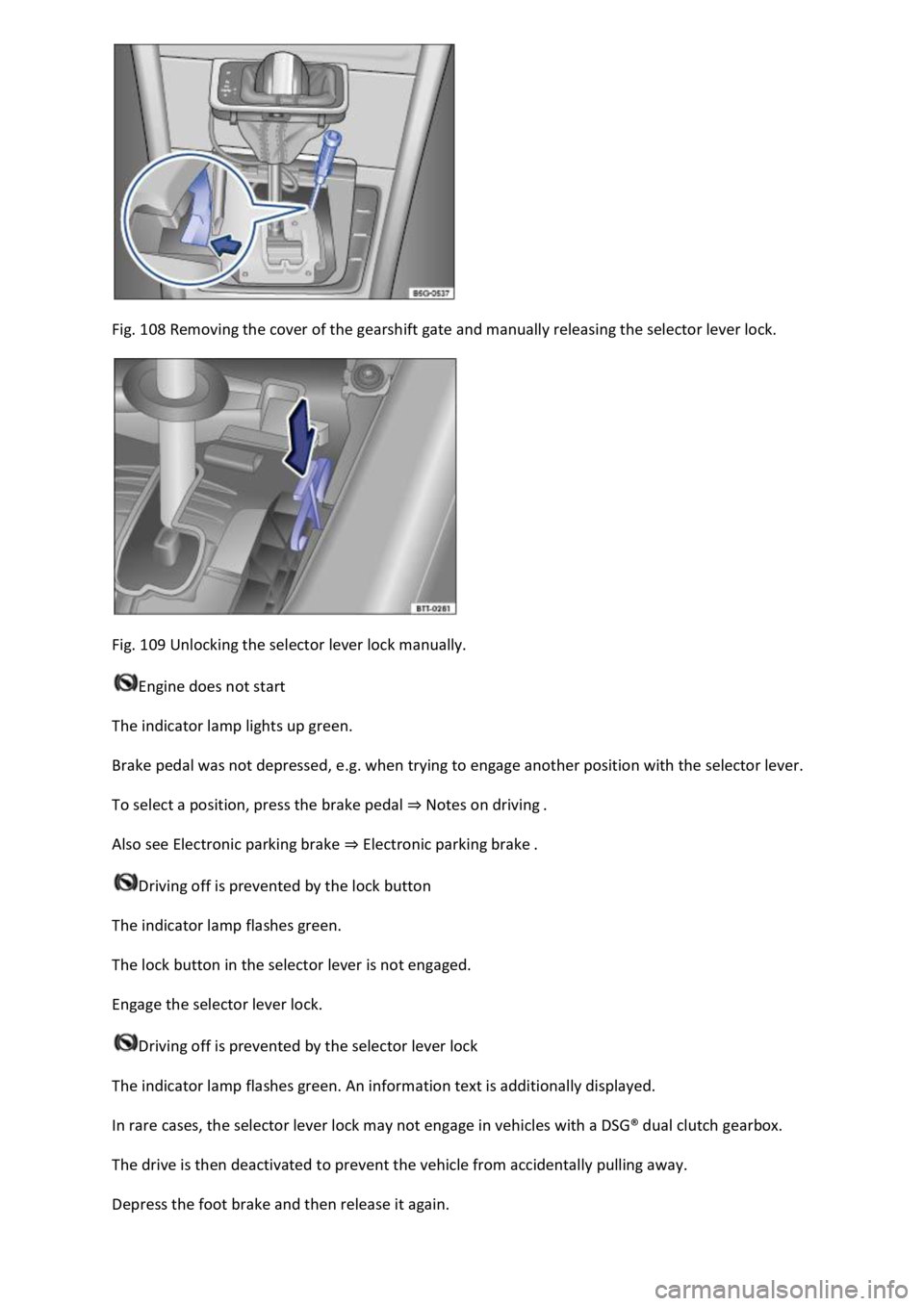
Fig. 108 Removing the cover of the gearshift gate and manually releasing the selector lever lock.
Fig. 109 Unlocking the selector lever lock manually.
Engine does not start
The indicator lamp lights up green.
Brake pedal was not depressed, e.g. when trying to engage another position with the selector lever.
To select a position, press the brake pedal ⇒ Notes on driving .
Also see Electronic parking brake ⇒ Electronic parking brake .
Driving off is prevented by the lock button
The indicator lamp flashes green.
The lock button in the selector lever is not engaged.
Engage the selector lever lock.
Driving off is prevented by the selector lever lock
The indicator lamp flashes green. An information text is additionally displayed.
In rare cases, the selector lever lock may not engage in vehicles with a DSG® dual clutch gearbox.
The drive is then deactivated to prevent the vehicle from accidentally pulling away.
Depress the foot brake and then release it again.
Page 204 of 502

Distance from vehicle ahead too close
The warning lamp lights up red.
Brake request by ACC ⇒ Adaptive Cruise Control (ACC) .
The brake pedal was not depressed or not fully depressed.
Brake immediately.
Gearbox overheated
The indicator lamp lights up yellow.
A signal tone may also be given. A text message may also be shown on the instrument cluster
display.
The DSG® dual clutch gearbox can become too hot, for example, if the vehicle pulls off regularly,
during long periods at crawling speed, or in stop-and-go traffic.
Do not drive on!
Allow the gearbox to cool down in selector lever position P⇒ .
Do not drive on if the indicator lamp does not go out.
Seek expert assistance. Failure to do so could result in considerable damage to the gearbox.
Releasing the selector lever lock manually
If the power fails in the vehicle (for example if the 12-volt vehicle battery is flat) and the vehicle has
to be towed, the selector lever lock must be released manually. Seek expert assistance for this.
The manual release mechanism is located under the cover of the gearshift gate.
Removing the cover of the gearshift gate:
Switch on the electronic parking brake. If the electronic parking brake cannot be switched on, the
vehicle will have to be prevented from rolling away using other means.
Switch off the ignition.
Carefully pull the cover upwards in the area around the selector lever gaiter with connected
electrical wiring ⇒ Fig. 108 .
Pull the cover up and over the selector lever ⇒ .
Depending on the vehicle equipment, there are two possible manual release mechanism variants.
Releasing the selector lever lock manually:
Using the flat blade of the screwdriver from the vehicle toolkit, carefully push the release lever in the
direction of the arrow and keep it in this position ⇒ Fig. 108 .
Press the lock button on the front of the selector lever and move the selector lever into position N.
Page 205 of 502

After manual unlocking, carefully press the cover into the centre console while ensuring that the
electrical wires are positioned correctly.
Using the flat blade of the screwdriver from the vehicle toolkit, carefully push the release lever in the
direction of the arrow and keep it in this position ⇒ Fig. 109 .
Press the lock button on the front of the selector lever and move the selector lever into position N.
After manual unlocking, carefully press the cover into the centre console while ensuring that the
electrical wires are positioned correctly.
Emergency programme
There is a fault in the system if all the displays on the instrument cluster for the selector lever
positions have a light background. The DSG® dual clutch gearbox is running in an emergency
programme. The vehicle can still be driven in the emergency programme, but only at reduced speed
and not in all gears.
In vehicles with a DSG® dual clutch gearbox, you may no longer be able to select reverse gear.
In all cases, you should have the DSG® dual clutch gearbox checked by a qualified workshop
immediately.
Vehicle does not move even though position is engaged
If the vehicle will not move in the required direction, the system may have selected the position
incorrectly.
Depress the brake pedal and reselect the position.
If the vehicle still does not move in the required direction, there is a system fault. Seek expert
assistance and have the system checked.
WARNING
Never move the selector lever out of the position P if the electronic parking brake is not switched on.
Otherwise the vehicle could move unexpectedly if it is stopped on an uphill or downhill gradient,
which could lead to accidents and serious injuries.
NOTICE
If the vehicle rolls for an extended period or at high speed with the engine switched off and the
selector lever in the position N, the DSG® dual clutch gearbox will be damaged, e.g. when being
towed.
NOTICE
If the display indicates that the gearbox is overheating for the first time, the vehicle must either be
parked safely or driven faster than 20 km/h (12 mph).
Page 206 of 502

If the text message and signal tone are repeated approximately every 10 seconds, park the vehicle
safely as soon as possible and switch the engine off. Allow the gearbox to cool down.
Do not drive on until the signal tone stops in order to avoid damage to the gearbox. You should not
pull away or drive the vehicle at very low speeds while the gearbox is overheated.
Downhill speed control
The downhill speed control system helps when braking and travelling downhill in vehicles with a
DSG® dual clutch gearbox ⇒ . The downhill speed control uses the braking power of the engine.
The DSG® dual clutch gearbox selects the best gear depending on the steepness of the gradient and
the current speed. The selector lever must be in position D/S. The downhill speed control is not
active in Tiptronic mode.
As the downhill speed control can shift down only as far as third gear, it may be necessary to activate
the Tiptronic mode when driving down particularly steep inclines. When in Tiptronic mode, select
second or first gear manually in order to make use of the braking effect of the engine and to relieve
the load on the brakes.
The start/stop system is automatically deactivated as long as downhill speed control is active.
Activating downhill speed control automatically:
If the downhill gradient is greater than approximately 6%.
AND: if the selector lever is in position D/S.
In addition, if the cruise control system or Adaptive Cruise Control (ACC) is switched off: if the
vehicle speed is less than approximately 80 km/h (50 mph) or the brake pedal is depressed.
In addition, if the cruise control system or Adaptive Cruise Control (ACC) is active: if the stored speed
is exceeded.
Deactivating downhill speed control automatically:
If the downhill gradient becomes less steep.
OR: if the gearbox shifts up a gear because the engine speed is higher than approximately 4,500 rpm.
Or additionally if the cruise control system or Adaptive Cruise Control (ACC) is active: if the stored
speed can be maintained.
WARNING
The intelligent downhill speed control technology cannot overcome the laws of physics, and
functions only within the limits of the system. Never let the extra convenience afforded by pull-away
assist systems tempt you into taking any safety risks when driving.
Unintentional vehicle movements can cause serious injury.
The downhill speed control cannot replace the full concentration of the driver.
Always adapt your speed and driving style to suit visibility, weather, road and traffic conditions.
Page 212 of 502

When the ignition is switched off, the set driving profile and the individual settings will remain
selected.
Vehicles with all-wheel drive: if the Snow, Offroad or Offroad Individual driving profile was
selected last, the onroad driving profile that was last active will be activated after the ignition has
been switched off for a long period.
Vehicles without starter button: as soon as the vehicle key is removed from the ignition lock.
Vehicles with starter button: as soon as the driver door is opened when the ignition is switched
off.
Sport functions: select Sport driving profile again.
OR: tap the selector lever of the DSG® dual clutch gearbox backwards to the position S⇒ DSG® dual
clutch gearbox .
Eco functions: select Eco driving profile again.
Characteristics of the driving profiles
Snow: the Snow driving profile makes it easier to control the throttle on icy or snowy roads. It is not
possible to select the S position in the Snow driving profile.
Onroad: under Onroad, you can choose between Eco, Comfort, Normal, Sport and Individual driving
profiles.
Offroad: the Offroad driving profile makes it easier to control the throttle when driving offroad. The
engine brake is always available and gearshifts can be prevented in critical situations. Hill Start Assist
and Hill Descent Control are active in the Offroad driving profile. It is not possible to select the S
position in the Offroad driving profile. When the driving profile is active, the instrument cluster
displays the symbol .
Offroad Individual: enhanced version of the offroad driving profile that can be adapted to the
driver's needs ⇒ Individually adapting a driving profile . When the driving profile is active, the
instrument cluster displays the symbol .
Eco: switches the vehicle into economical mode and helps the driver to drive the vehicle in a fuel-
efficient manner. Depending on the vehicle equipment level, coasting mode is available in the Eco
driving profile.
Comfort: the driving profile creates a comfort-oriented vehicle setup and is suited to poor roads or
long motorway journeys, for example.
Normal: the driving profile has a balanced setup, e.g. for everyday use.
Sport: this setting gives the driver a sporty driving feeling.
Page 213 of 502
Individual: individual vehicle systems can be adjusted to suit personal requirements ⇒ Individually
adapting a driving profile .
WARNING
The vehicle handling may change as a result of the different driving profiles. Never allow driving
profile selection to tempt you into taking any risks when driving.
Always adapt your speed and driving style to the current visibility, weather and road or traffic
conditions.
In vehicles with a DSG® dual clutch gearbox, the system automatically changes to gear position S
when the Sport driving profile is selected. The system automatically change to gear position D when
the Eco driving profile is selected. Since coasting is active in the Eco driving profile, the gearbox
programme E is additionally displayed on the instrument cluster display.
Individually adapting a driving profile
First read and observe the introductoryinformation and safety warnings⇒Introduction
Selecting the Individual driving profile
Switch on the ignition.
Switch on the Infotainment system.
Press the driving profile selection button or turn the control for 4MOTION Active Control until
the LED next to the Onroad driving profile ⇒ Fig. 111 ③ lights up.
Touch the Adjust function button to open the Individual menu.
Selecting the Offroad Individual driving profile
Switch on the ignition.
Switch on the Infotainment system.
Turn the control for the 4MOTION Active Control until the LED next to the Offroad Individual driving
profile ⇒ Fig. 111 ⑤ lights up.
If the Offroad Individual driving profile is already selected, press the MODE button on the
control ⇒ Fig. 111 .
Touch the Adjust function button to open the Individual menu.
Troubleshooting
First read and observe the introductoryinformation and safety warnings⇒Introduction
Fault in the adaptive chassis control (DCC)
Page 222 of 502

Do not slip the clutch or rest your foot on the clutch when driving offroad. When travelling over
uneven ground, you could press the clutch by mistake and lose control of the vehicle. This also
prevents power being transferred between the engine and the gearbox. In addition, driving with the
clutch partially engaged causes premature wear to the clutch lining.
Useful accessories for offroad driving
First read and observe the introductoryinformation and safety warnings⇒Introduction
The checklist contains just a few items of equipment that can be very useful for offroad driving. If
you have an instruction manual or fitting instructions for these accessories, you should always take
them with you and observe them as necessary when driving offroad.
Checklist
Useful items when driving offroad:
Water, compass, maps and torch with spare batteries.
Winch, tow bar or rope with sufficient strength.
Mobile telephone, shovel, blankets and rubber boots.
Electrical air compressor for connection to the 12-volt sockets in the vehicle to inflate the tyres.
A wooden board approx. 4 cm thick and approx. 1 metre long or an aluminium frame of similar size:
this can be used to free a vehicle stuck in the mud and provide a platform for a vehicle jack.
Snow chains, additional spare wheels, a breakdown set, jack and box spanner.
Changing gear correctly
First read and observe the introductoryinformation and safety warnings⇒Introduction
The correct choice of gear depends on the offroad terrain.
Before attempting to drive through difficult terrain it can be helpful to stop and consider which gear
you should select. After several trips offroad, you will learn which gear to select in conjunction with
the step-down ratio and differential locks for different types of terrain.
General rules
Page 223 of 502

With the correct gear selected, the vehicle will normally not have to be braked so much using the
foot brake when driving downhill as the engine braking effect will normally be sufficient.
You should only depress the accelerator as much as is required. If you accelerate too hard, the
wheels could lose traction and you could lose control of the vehicle.
DSG® dual clutch gearbox
Select position D when driving in normal, flat offroad terrain.
Adjust your speed when driving on soft or slippery ground, and select the highest suitable position
for the Tiptronic.
If driving through mud, sand, water or hilly terrain, drive with Tiptronic in the positions 3 or
2⇒ DSG® dual clutch gearbox .
Use the offroad display ⇒ Offroad display .
Driving on rough terrain
First read and observe the introductoryinformation and safety warnings⇒Introduction
Use the offroad driving profile ⇒ Setting a driving profile .
You should drive through rocky terrain at no faster than walking pace.
If you are not able to drive around a rock, drive carefully onto the rock with one front wheel and
drive over it slowly ⇒ .
NOTICE
You should never drive straight over large obstacles, e.g. boulders or tree stumps, or drive over such
obstacles with one side of the vehicle. Obstacles which require more ground clearance than is
available could damage vehicle components when you drive over them and thus cause the vehicle to
break down.
Even obstacles that are smaller than the available ground clearance could come into contact with
the vehicle underbody and thus cause damage which could lead to a vehicle breakdown. This applies
in particular if there is a hollow or soft ground either in front of or behind the obstacle. This also
applies in cases when you drive too quickly over the obstacle causing the vehicle to bounce.
Escaping engine oil and brake fluid can pollute the environment. Spilt service fluids must be
collected and then disposed of properly and in an environmentally responsible way.
Driving through water
First read and observe the introductoryinformation and safety warnings⇒Introduction
Driving through flooded terrain could damage the vehicle ⇒ Checklist before driving offroad .
Page 236 of 502

First read and observe the introductoryinformation and safety warnings⇒Introduction
Overtaking
If you indicate left (left-hand traffic: indicate right) to overtake, ACC will accelerate the vehicle and
reduce the distance from the vehicle in front. Your set speed will not be exceeded.
If ACC does not detect any vehicle in front after you have changed lane, ACC will accelerate the
vehicle up to the set speed.
Stop-and-go traffic
ACC can brake vehicles with DSG® dual clutch gearbox to a standstill and hold them stationary. ACC
remains active and the instrument cluster display shows ACC ready for a few seconds. During this
time the vehicle will move off again automatically as soon as the vehicle in front moves off
(depending on the vehicle equipment level and not available in all countries).
Press the button.
Press the button or briefly press the accelerator.
The vehicle is stationary for longer than approximately three minutes.
A vehicle door is opened.
The ignition is switched off.
Avoiding overtaking on the right (left-hand traffic: overtaking on the left)
If ACC detects a slower vehicle in the left-hand lane (left-hand traffic: in the right-hand lane), ACC
will brake the vehicle gently within the system limits and therefore prevent a prohibited overtaking
manoeuvre ⇒ Fig. 118 . The function is active from speeds of around 80 km/h (50 mph), but is not
available in all countries.
WARNING
If the message ACC ready is shown on the instrument cluster display and the vehicle in front moves
off, your vehicle will move off automatically. In some cases the radar sensor may be unable to detect
obstacles that are located in the vehicle's path. This can result in serious injury and accidents.
Always check the road ahead before moving off and brake the vehicle if necessary.
Limits of ACC
Page 240 of 502
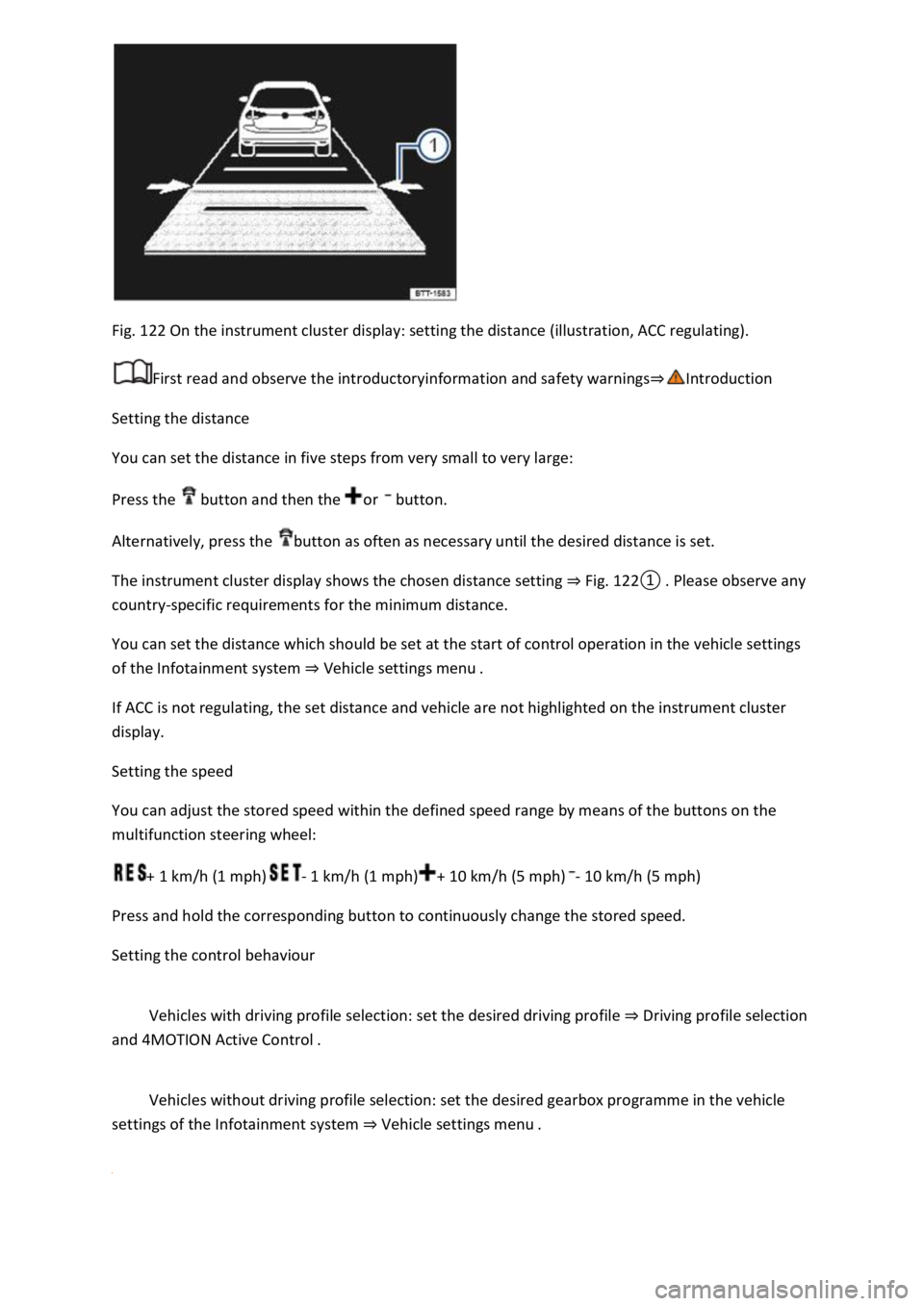
Fig. 122 On the instrument cluster display: setting the distance (illustration, ACC regulating).
First read and observe the introductoryinformation and safety warnings⇒Introduction
Setting the distance
You can set the distance in five steps from very small to very large:
Press the button and then the or button.
Alternatively, press the button as often as necessary until the desired distance is set.
The instrument cluster display shows the chosen distance setting ⇒ Fig. 122① . Please observe any
country-specific requirements for the minimum distance.
You can set the distance which should be set at the start of control operation in the vehicle settings
of the Infotainment system ⇒ Vehicle settings menu .
If ACC is not regulating, the set distance and vehicle are not highlighted on the instrument cluster
display.
Setting the speed
You can adjust the stored speed within the defined speed range by means of the buttons on the
multifunction steering wheel:
+ 1 km/h (1 mph)- 1 km/h (1 mph)+ 10 km/h (5 mph)- 10 km/h (5 mph)
Press and hold the corresponding button to continuously change the stored speed.
Setting the control behaviour
Vehicles with driving profile selection: set the desired driving profile ⇒ Driving profile selection
and 4MOTION Active Control .
Vehicles without driving profile selection: set the desired gearbox programme in the vehicle
settings of the Infotainment system ⇒ Vehicle settings menu .