lights VOLKSWAGEN T-ROC 2021 Owner´s Manual
[x] Cancel search | Manufacturer: VOLKSWAGEN, Model Year: 2021, Model line: T-ROC, Model: VOLKSWAGEN T-ROC 2021Pages: 502, PDF Size: 9.42 MB
Page 139 of 502
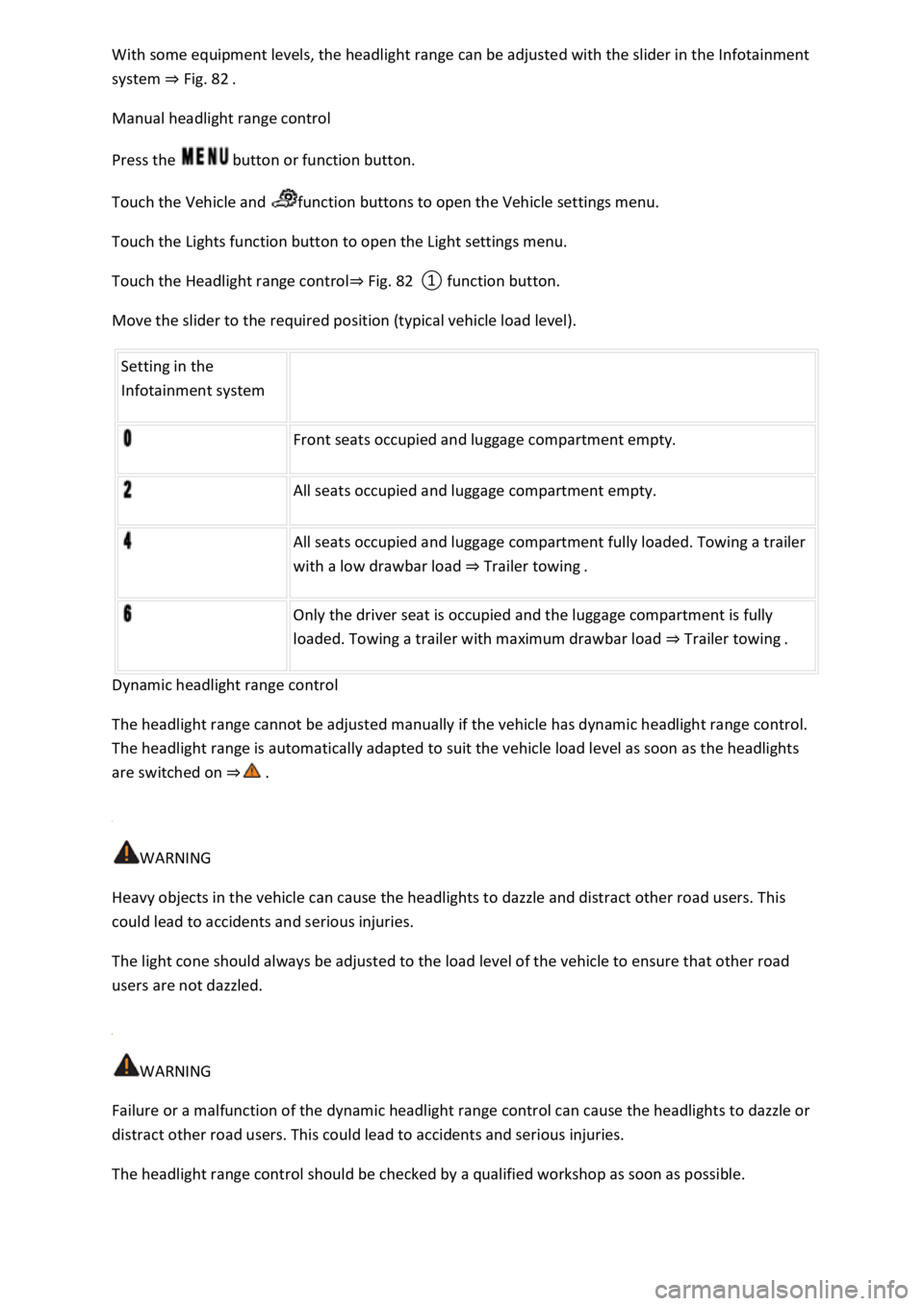
With some equipment levels, the headlight range can be adjusted with the slider in the Infotainment
system ⇒ Fig. 82 .
Manual headlight range control
Press the button or function button.
Touch the Vehicle and function buttons to open the Vehicle settings menu.
Touch the Lights function button to open the Light settings menu.
Touch the Headlight range control⇒ Fig. 82 ① function button.
Move the slider to the required position (typical vehicle load level).
Setting in the
Infotainment system
Front seats occupied and luggage compartment empty.
All seats occupied and luggage compartment empty.
All seats occupied and luggage compartment fully loaded. Towing a trailer
with a low drawbar load ⇒ Trailer towing .
Only the driver seat is occupied and the luggage compartment is fully
loaded. Towing a trailer with maximum drawbar load ⇒ Trailer towing .
Dynamic headlight range control
The headlight range cannot be adjusted manually if the vehicle has dynamic headlight range control.
The headlight range is automatically adapted to suit the vehicle load level as soon as the headlights
are switched on ⇒ .
WARNING
Heavy objects in the vehicle can cause the headlights to dazzle and distract other road users. This
could lead to accidents and serious injuries.
The light cone should always be adjusted to the load level of the vehicle to ensure that other road
users are not dazzled.
WARNING
Failure or a malfunction of the dynamic headlight range control can cause the headlights to dazzle or
distract other road users. This could lead to accidents and serious injuries.
The headlight range control should be checked by a qualified workshop as soon as possible.
Page 140 of 502
Switching over headlights for driving abroad (travel mode)
If you have to drive a right-hand drive vehicle in a left-hand drive country, or vice versa, the
asymmetric dipped beam headlights may dazzle oncoming traffic. The headlights must therefore be
switched over when you travel to these countries.
With some equipment levels, the headlight alignment can be adjusted in the Infotainment system in
the Vehicle settings menu ⇒ Infotainment system controls and displays .
In vehicles in which the headlights cannot be switched over in the menu, masking stickers should be
applied to certain parts of the headlight lenses, or the headlights should be adjusted by a qualified
workshop. A qualified workshop can provide you with further information. Volkswagen recommends
using a Volkswagen dealership for this purpose.
Travel mode may be used only for a short period. Please contact a qualified workshop for a
permanent conversion. Volkswagen recommends using a Volkswagen dealership for this purpose.
Interior lighting
Instrument and switch lighting
The brightness of the instrument and switch lighting can be adjusted in the Infotainment system in
the Vehicle settings menu ⇒ Infotainment system controls and displays .
The brightness setting is automatically adjusted to the changing light conditions in the vehicle.
When the light switch is in position , a sensor will switch the dipped beam and the lighting in
the instruments and switches on and off automatically depending on the ambient brightness level.
When the light is switched off and the ignition switched on, the instrument and switch lighting
(needles and scales) is switched on. As the ambient light becomes lower, the illumination of the
scales is automatically reduced and may be switched off entirely. This function is intended to remind
the driver to switch on the dipped beam in good time, i.e. when driving through tunnels.
Interior and reading lights
Press the appropriate button or move the switch to the appropriate position:
Switch off the interior light.Switch on the interior lights.The interior lights are switched on
automatically when the vehicle is unlocked, a door is opened or the vehicle key is removed from the
ignition.Switch the reading light on or off.
Stowage compartment and luggage compartment lights
A light will be switched on and off when the stowage compartment on the front passenger side or
the boot lid is opened or closed.
Background lighting
Page 141 of 502
Depending on the equipment level, the background lighting provides indirect light in various areas of
the vehicle interior.
The front footwell may also be illuminated.
The brightness of the background lighting can be adjusted in the Infotainment system in the Vehicle
settings menu ⇒ Infotainment system controls and displays .
The lights go out when the vehicle is locked or after a delay of a few minutes when the vehicle key is
removed from the ignition lock. This prevents the 12-volt vehicle battery from discharging.
Some settings can be stored in the user accounts of the personalisation function and therefore
change automatically when the user account changes ⇒ Personalisation .
Visibility
Wipers
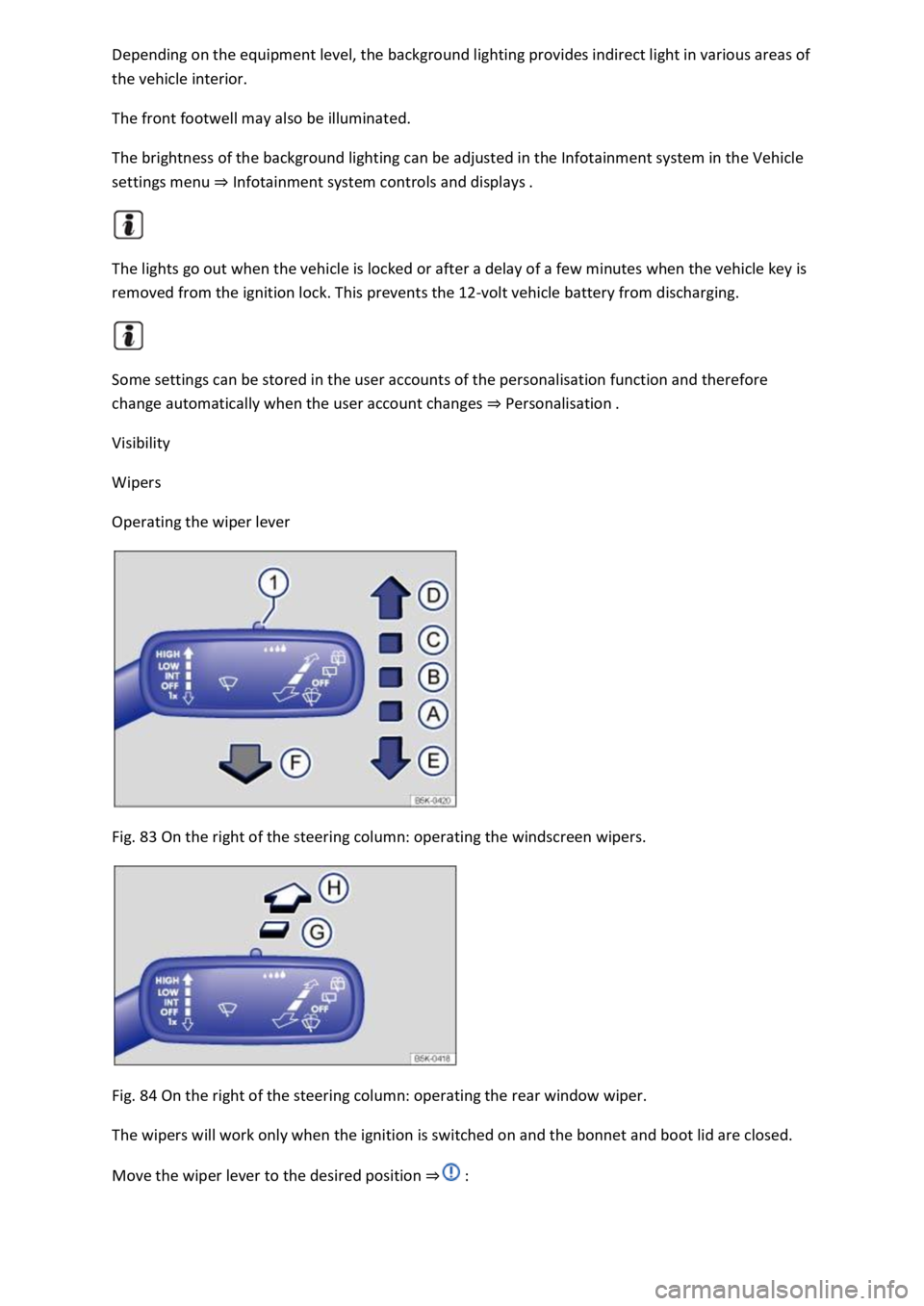
Operating the wiper lever
Fig. 83 On the right of the steering column: operating the windscreen wipers.
Fig. 84 On the right of the steering column: operating the rear window wiper.
The wipers will work only when the ignition is switched on and the bonnet and boot lid are closed.
Move the wiper lever to the desired position ⇒ :
Page 144 of 502
When the rain/light sensor is activated, it automatically controls the frequency of the wiper intervals
depending on the intensity of the rain.
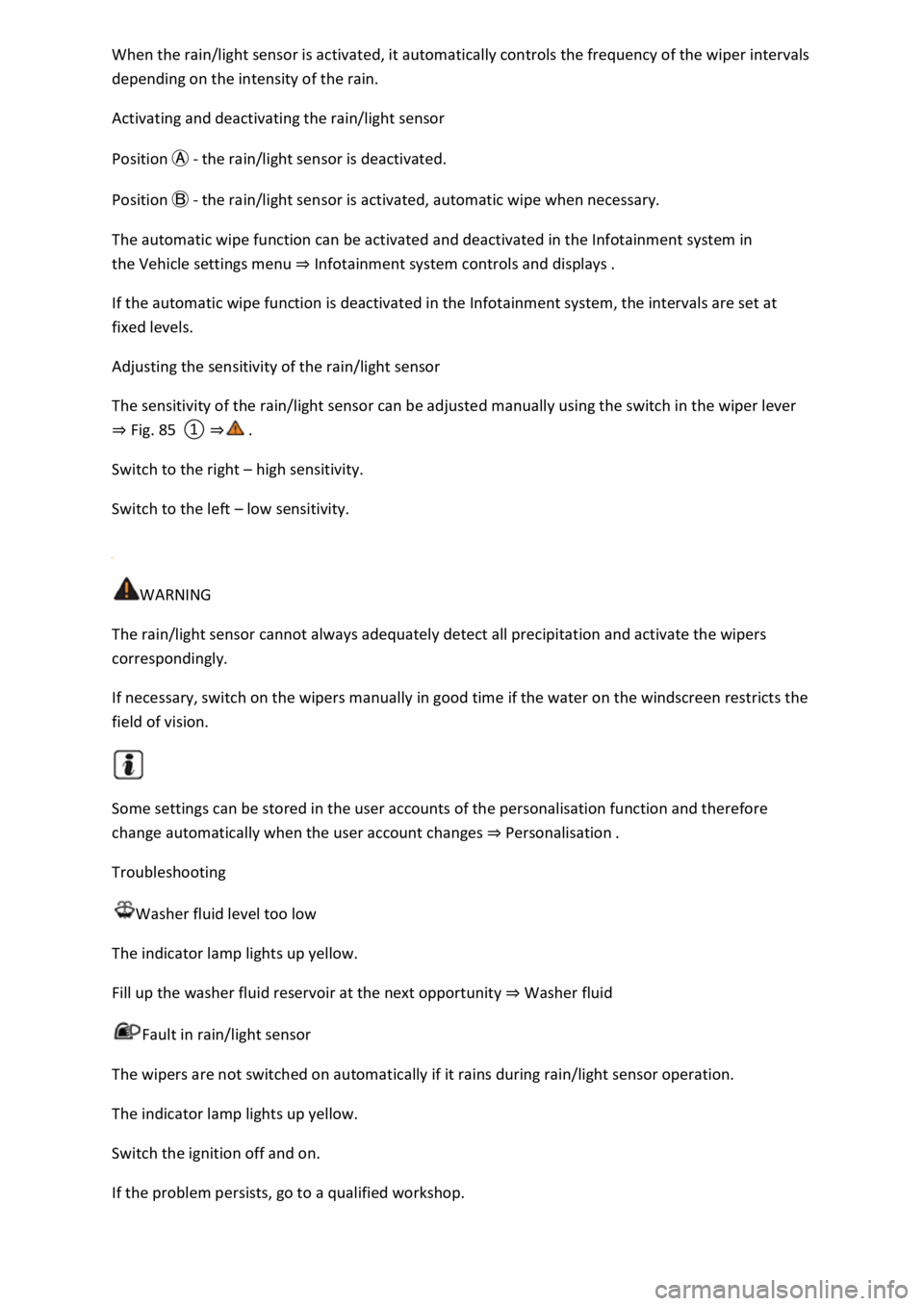
Activating and deactivating the rain/light sensor
Position Ⓐ - the rain/light sensor is deactivated.
Position Ⓑ - the rain/light sensor is activated, automatic wipe when necessary.
The automatic wipe function can be activated and deactivated in the Infotainment system in
the Vehicle settings menu ⇒ Infotainment system controls and displays .
If the automatic wipe function is deactivated in the Infotainment system, the intervals are set at
fixed levels.
Adjusting the sensitivity of the rain/light sensor
The sensitivity of the rain/light sensor can be adjusted manually using the switch in the wiper lever
⇒ Fig. 85 ① ⇒ .
Switch to the right – high sensitivity.
Switch to the left – low sensitivity.
WARNING
The rain/light sensor cannot always adequately detect all precipitation and activate the wipers
correspondingly.
If necessary, switch on the wipers manually in good time if the water on the windscreen restricts the
field of vision.
Some settings can be stored in the user accounts of the personalisation function and therefore
change automatically when the user account changes ⇒ Personalisation .
Troubleshooting
Washer fluid level too low
The indicator lamp lights up yellow.
Fill up the washer fluid reservoir at the next opportunity ⇒ Washer fluid
Fault in rain/light sensor
The wipers are not switched on automatically if it rains during rain/light sensor operation.
The indicator lamp lights up yellow.
Switch the ignition off and on.
If the problem persists, go to a qualified workshop.
Page 145 of 502
Fault in wipers
The wipers do not wipe.
The indicator lamp lights up yellow.
Switch the ignition off and on.
If the problem persists, go to a qualified workshop.
Changes in the activation behaviour of the rain/light sensor
Possible causes for faults and misinterpretations relating to the sensitive surface of the rain/light
sensor ⇒ Vehicle overviews include:
Damaged wiper blades: a film of water or smears caused by damaged wiper blades can increase the
time the wipers are switched on, can shorten the length of the intervals between wipes or cause the
wipers to run quickly and continuously.
Insects: insects hitting the windscreen can cause the wipers to be activated.
Salt deposits: in winter, salt deposits can cause the wipers to continue to wipe the windscreen when
it is almost dry.
Dirt: dry dust, wax, windscreen coatings (lotus effect), or detergent deposits (from an automatic car
wash) can cause the rain/light sensor to become less sensitive and react too slowly, or prevent it
from reacting at all. Clean the sensitive surface of the rain/light sensor ⇒ Caring for and cleaning the
vehicle exterior at regular intervals and inspect the wiper blades for damage.
Crack in the windscreen: a wipe cycle will be triggered if the rain/light sensor is on when the
windscreen is impacted by a stone. The rain/light sensor will then register the impairment of the
sensitive surfaces and adjust accordingly. Depending on the size of the stone impact, the activation
behaviour of the rain/light sensor may be changed.
We recommend that you use an alcohol-based glass cleaner to remove wax and polish.
The wipers will try to wipe away any obstacles that are on the window. The wiper will stop moving if
the obstacle continues to block its path. Remove the obstacle and switch the wiper back on again.
Mirrors
Introduction
This chapter contains information on the followingsubjects:
⇒ Interior mirror
⇒ Exterior mirrors
You can use the exterior mirrors and the interior mirror to observe traffic behind you and adjust
your driving style accordingly.
Page 151 of 502
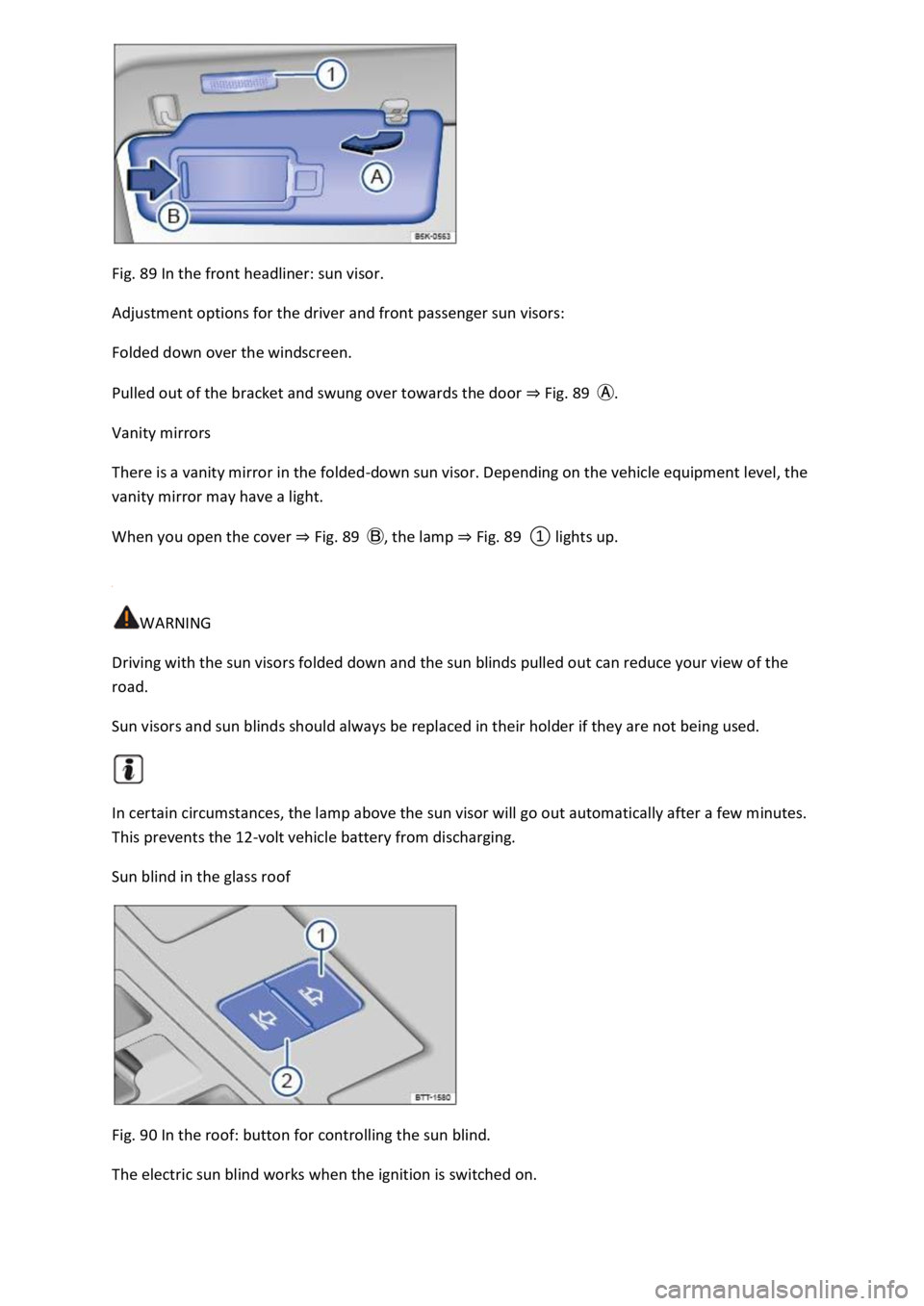
Fig. 89 In the front headliner: sun visor.
Adjustment options for the driver and front passenger sun visors:
Folded down over the windscreen.
Pulled out of the bracket and swung over towards the door ⇒ Fig. 89 Ⓐ.
Vanity mirrors
There is a vanity mirror in the folded-down sun visor. Depending on the vehicle equipment level, the
vanity mirror may have a light.
When you open the cover ⇒ Fig. 89 Ⓑ, the lamp ⇒ Fig. 89 ① lights up.
WARNING
Driving with the sun visors folded down and the sun blinds pulled out can reduce your view of the
road.
Sun visors and sun blinds should always be replaced in their holder if they are not being used.
In certain circumstances, the lamp above the sun visor will go out automatically after a few minutes.
This prevents the 12-volt vehicle battery from discharging.
Sun blind in the glass roof
Fig. 90 In the roof: button for controlling the sun blind.
The electric sun blind works when the ignition is switched on.
Page 164 of 502

NOTICE
Food, medicine and other items that are sensitive to heat or cold could be either damaged or
rendered useless by the air flowing out of the vents.
Never leave food, medicines or other temperature-sensitive objects in front of the vents.
Switching the auxiliary heater and ventilation on and off
First read and observe the introductoryinformation and safety warnings⇒Introduction
The auxiliary heater can be operated only when the ignition is switched off. If the ignition is switched
on while the auxiliary heater is working, the auxiliary heater continues to run to provide additional
heat.
Switching on the auxiliary heater
Press the immediate heat button in the air conditioning block ⇒ Front controls .
OR: press the button on the remote control ⇒ Remote control .
OR: program the departure time ⇒ Programming the auxiliary heater and ventilation .
The auxiliary heater heats the vehicle interior to at least 22 ℃.
The auxiliary heater will not switch on if the 12-volt vehicle battery is low or the fuel tank is empty.
Switching off the auxiliary heater manually
Press the immediate heat button in the air conditioning block ⇒ Front controls .
OR: press the button on the remote control ⇒ Remote control .
OR: touch the function button on the Infotainment system ⇒ Programming the auxiliary heater
and ventilation .
Auxiliary heater switches off automatically
When the programmed departure time is reached, or after the programmed operating period has
elapsed ⇒ Programming the auxiliary heater and ventilation .
When the indicator lamp lights up (fuel gauge) ⇒ Fuel gauge .
If the charge level of the 12-volt vehicle battery is too low ⇒ 12-volt vehicle battery .
The auxiliary heater runs on for a short time after it has been switched off manually or automatically
so that the remaining fuel in the system can be burnt off.
When the vehicle is at a standstill, the auxiliary heater can be activated up to three times in
succession for the maximum operating duration.
Page 171 of 502
The gear-change indicator display goes out when the clutch is depressed in vehicles with a manual
gearbox or when Tiptronic position is deselected in vehicles with a DSG® dual clutch gearbox.
Driving economically
Fuel consumption, environmental impact and wear of the engine, brakes and tyres can be reduced
by adopting the correct driving style. A few tips are provided below which will help you protect the
environment and also save money.
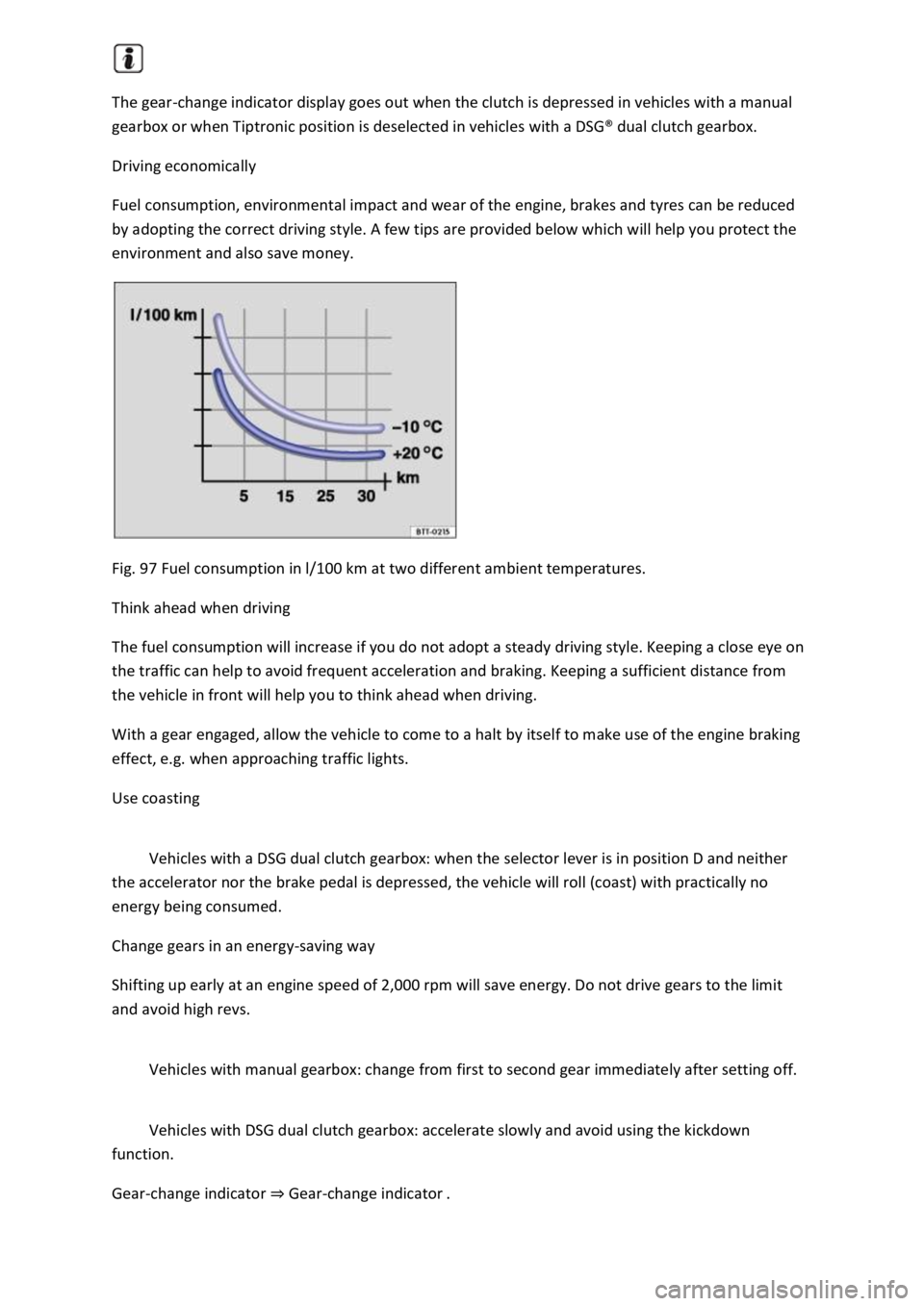
Fig. 97 Fuel consumption in l/100 km at two different ambient temperatures.
Think ahead when driving
The fuel consumption will increase if you do not adopt a steady driving style. Keeping a close eye on
the traffic can help to avoid frequent acceleration and braking. Keeping a sufficient distance from
the vehicle in front will help you to think ahead when driving.
With a gear engaged, allow the vehicle to come to a halt by itself to make use of the engine braking
effect, e.g. when approaching traffic lights.
Use coasting
Vehicles with a DSG dual clutch gearbox: when the selector lever is in position D and neither
the accelerator nor the brake pedal is depressed, the vehicle will roll (coast) with practically no
energy being consumed.
Change gears in an energy-saving way
Shifting up early at an engine speed of 2,000 rpm will save energy. Do not drive gears to the limit
and avoid high revs.
Vehicles with manual gearbox: change from first to second gear immediately after setting off.
Vehicles with DSG dual clutch gearbox: accelerate slowly and avoid using the kickdown
function.
Gear-change indicator ⇒ Gear-change indicator .
Page 175 of 502

Accidents and injuries can occur if the driver is distracted. Operating the Infotainment system can
distract you from the road.
Always drive carefully and responsibly.
Information on the brakes
New brake pads cannot generate the full braking effect during the first 200 to 300 km and must first
be run in ⇒ . The slightly reduced brake pressure can however be compensated for by increasing
pressure on the brake pedal. During the run-in period, the braking distance is longer for full or
emergency braking than when the brake pads have been run in. In the run-in period, full braking
should be avoided and also situations that create a heavy load on the brakes, e.g. when driving up
close to the vehicle ahead.
The wear of the brake pads depends to a great extent on the conditions under which the vehicle is
operated and the way the vehicle is driven. If the vehicle is used for regular urban trips, short
journeys, and is driven with a sporty driving style, the brake pads must be regularly checked by a
qualified workshop.
When driving with wet brakes, for example after driving through water, after heavy rainfall or after
washing the vehicle, the braking effect may be delayed as the brake discs will be wet, or possibly
iced up (in winter). The brakes must be dried as quickly as possible by careful braking at higher
speed. Please ensure that no following vehicle and no other road user is put at risk as a result of this
action ⇒ .
A layer of salt that accumulates on the discs and pads will reduce the braking effect and increase the
braking distance. If the vehicle has not been braked for a long time on roads which have been gritted
with salt, the layer of salt must be reduced through careful braking ⇒ .
Corrosion on the brake discs and dirt in the brake pads are facilitated through long standstill times,
low mileage and low load levels. If the brake pads have been hardly used or if they are corroded,
Volkswagen recommends that the brake discs and brake pads be cleaned by braking strongly several
times from high speed. Please ensure that no following vehicle and no other road user is put at risk
as a result of this action ⇒ .
Brake servo
The brake servo will function only when the engine is running and reinforces the pressure applied by
the driver on the brake pedal.
If the brake servo does not function or the vehicle is being towed, the brake pedal will have to be
depressed more forcefully as the braking distance will be increased due to the lack of assistance for
the brake system ⇒ .
WARNING
Driving with worn brake pads or with a faulty brake system can cause accidents and serious injuries.
If the warning lamp lights up either alone or together with a text message in the instrument
cluster display, go to a qualified workshop immediately to have the brake pads checked and the
worn brake pads replaced.
Page 180 of 502

If you want to use the vehicle abroad temporarily or for a short period, all relevant information and
instructions should be followed ⇒ Safety .
If the vehicle is going to be sold in another country or used in another country for an extended
period, the legal requirements applicable in that country must be observed.
In some cases, certain equipment will have to be fitted or removed and functions deactivated. The
scope of services and service types could also be affected. This is particularly important if the vehicle
is driven in another climate region for a long period of time.
Because different frequency bands are used in different countries, the factory-fitted Infotainment
system may not work in other countries.
NOTICE
Volkswagen is not responsible for any vehicle damage caused by low-quality fuel, inadequate
servicing work or non-availability of Genuine Parts.
Volkswagen cannot be held responsible if the vehicle does not comply with or only partly complies
with the relevant legal requirements in other countries and continents.
Troubleshooting
Unusual braking behaviour
The warning lamp lights up red.
A text message may also be displayed.
The vehicle does not brake in the usual way or the braking distance is longer than normal.
There is a malfunction in the brake system.
Go to the nearest qualified workshop without delay.
Drive at low speed and be prepared for longer braking distances and the need to apply increased
pedal pressure.
Brake pad wear indicator
The indicator lamp lights up yellow.
Front brake pads are worn.
Go to a qualified workshop immediately.
All brake pads should be checked and renewed as necessary.