warning light VOLKSWAGEN T-ROC 2021 Owner´s Manual
[x] Cancel search | Manufacturer: VOLKSWAGEN, Model Year: 2021, Model line: T-ROC, Model: VOLKSWAGEN T-ROC 2021Pages: 502, PDF Size: 9.42 MB
Page 204 of 502

Distance from vehicle ahead too close
The warning lamp lights up red.
Brake request by ACC ⇒ Adaptive Cruise Control (ACC) .
The brake pedal was not depressed or not fully depressed.
Brake immediately.
Gearbox overheated
The indicator lamp lights up yellow.
A signal tone may also be given. A text message may also be shown on the instrument cluster
display.
The DSG® dual clutch gearbox can become too hot, for example, if the vehicle pulls off regularly,
during long periods at crawling speed, or in stop-and-go traffic.
Do not drive on!
Allow the gearbox to cool down in selector lever position P⇒ .
Do not drive on if the indicator lamp does not go out.
Seek expert assistance. Failure to do so could result in considerable damage to the gearbox.
Releasing the selector lever lock manually
If the power fails in the vehicle (for example if the 12-volt vehicle battery is flat) and the vehicle has
to be towed, the selector lever lock must be released manually. Seek expert assistance for this.
The manual release mechanism is located under the cover of the gearshift gate.
Removing the cover of the gearshift gate:
Switch on the electronic parking brake. If the electronic parking brake cannot be switched on, the
vehicle will have to be prevented from rolling away using other means.
Switch off the ignition.
Carefully pull the cover upwards in the area around the selector lever gaiter with connected
electrical wiring ⇒ Fig. 108 .
Pull the cover up and over the selector lever ⇒ .
Depending on the vehicle equipment, there are two possible manual release mechanism variants.
Releasing the selector lever lock manually:
Using the flat blade of the screwdriver from the vehicle toolkit, carefully push the release lever in the
direction of the arrow and keep it in this position ⇒ Fig. 108 .
Press the lock button on the front of the selector lever and move the selector lever into position N.
Page 205 of 502

After manual unlocking, carefully press the cover into the centre console while ensuring that the
electrical wires are positioned correctly.
Using the flat blade of the screwdriver from the vehicle toolkit, carefully push the release lever in the
direction of the arrow and keep it in this position ⇒ Fig. 109 .
Press the lock button on the front of the selector lever and move the selector lever into position N.
After manual unlocking, carefully press the cover into the centre console while ensuring that the
electrical wires are positioned correctly.
Emergency programme
There is a fault in the system if all the displays on the instrument cluster for the selector lever
positions have a light background. The DSG® dual clutch gearbox is running in an emergency
programme. The vehicle can still be driven in the emergency programme, but only at reduced speed
and not in all gears.
In vehicles with a DSG® dual clutch gearbox, you may no longer be able to select reverse gear.
In all cases, you should have the DSG® dual clutch gearbox checked by a qualified workshop
immediately.
Vehicle does not move even though position is engaged
If the vehicle will not move in the required direction, the system may have selected the position
incorrectly.
Depress the brake pedal and reselect the position.
If the vehicle still does not move in the required direction, there is a system fault. Seek expert
assistance and have the system checked.
WARNING
Never move the selector lever out of the position P if the electronic parking brake is not switched on.
Otherwise the vehicle could move unexpectedly if it is stopped on an uphill or downhill gradient,
which could lead to accidents and serious injuries.
NOTICE
If the vehicle rolls for an extended period or at high speed with the engine switched off and the
selector lever in the position N, the DSG® dual clutch gearbox will be damaged, e.g. when being
towed.
NOTICE
If the display indicates that the gearbox is overheating for the first time, the vehicle must either be
parked safely or driven faster than 20 km/h (12 mph).
Page 207 of 502

The downhill speed control cannot hold the vehicle on the gradient in all situations or brake it
sufficiently on all slopes going downhill (e.g. if the ground is slippery or icy).
WARNING
Always be prepared to brake the vehicle. Accidents and injuries could occur if you are not prepared
to brake.
The downhill speed control is only a support function and may not be able to brake the vehicle
sufficiently in all situations when driving downhill.
The vehicle may become faster despite the downhill speed control being in operation.
Steering
Information on steering
The steering should be locked every time you leave the vehicle to make it more difficult for the
vehicle to be stolen.
The steering
The power steering is not hydraulic, but is an electromechanical system. The advantage of this
steering system is that no hydraulic hoses, hydraulic oil, pumps, filter or other parts are required.
The electromechanical system reduces fuel consumption. A hydraulic system requires constant oil
pressure in the system, whereas an electromechanical steering system only needs an energy supply
while steering.
In vehicles with driving profile selection, the selected driving profile can affect the behaviour of the
power steering ⇒ Driving profile selection and 4MOTION Active Control .
Electronic steering column lock in vehicles with a starter button
The steering column will be locked if the driver door is opened when the ignition is switched off. For
this, the vehicle should be stationary and, if necessary, the gear selector lever should be in position
P.
If the ignition is not switched off until after the driver door is opened, the electronic steering column
will only be locked when the vehicle is locked using the sensor in the door handle or the vehicle key.
Mechanical steering column lock (steering lock) in vehicles with an ignition lock
The steering column is locked if the vehicle key is removed from the ignition lock when the vehicle is
stationary. Turn the steering wheel slightly until the steering lock audibly engages.
Insert the vehicle key into the ignition lock to unlock the steering lock. Turn the steering wheel
slightly to relieve the load on the steering lock mechanism. Hold the steering wheel in this position
and turn the ignition on.
Electromechanical steering
Page 209 of 502

The indicator lamp lights up yellow.
The steering should be checked by a qualified workshop as soon as possible.
If the yellow warning lamp remains off after the engine has been restarted and you have driven a
short distance, you do not need to consult a qualified workshop.
Fault in steering
The indicator lamp lights up yellow.
The 12-volt vehicle battery was disconnected.
Drive a short distance at a speed of 15 – 20 km/h (9 – 12 mph).
If the yellow warning lamp is still lit after the engine has been restarted, have the steering checked
by a qualified workshop immediately.
Fault in steering
The indicator lamp flashes yellow.
Turn the steering wheel back and forth.
Switch the ignition off and then on again.
Observe the messages on the instrument cluster display.
Do not continue your journey if the indicator lamp still flashes when the ignition is switched on.
Seek expert assistance.
Steering column is not unlocked or locked
The indicator lamp flashes yellow.
Follow any messages that are on the instrument cluster display.
Switch the ignition off and then on again.
Do not continue your journey if the steering column remains locked when the ignition is switched
on.
Seek expert assistance.
Steering requires increased force
The warning lamp lights up red.
The electromechanical steering has failed.
Do not drive on!
Seek expert assistance.
Driving profile selection and 4MOTION Active Control
Page 211 of 502
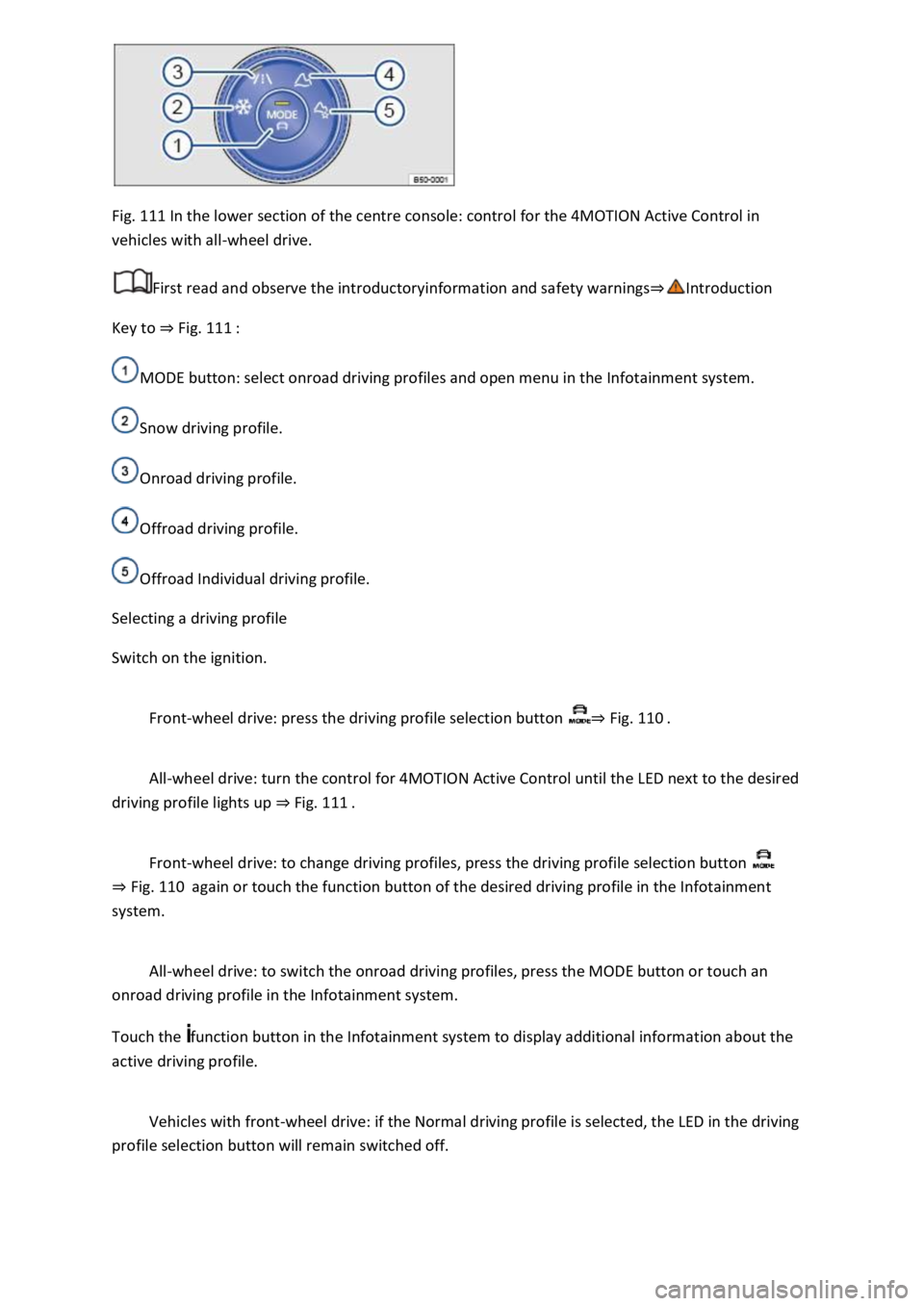
Fig. 111 In the lower section of the centre console: control for the 4MOTION Active Control in
vehicles with all-wheel drive.
First read and observe the introductoryinformation and safety warnings⇒Introduction
Key to ⇒ Fig. 111 :
MODE button: select onroad driving profiles and open menu in the Infotainment system.
Snow driving profile.
Onroad driving profile.
Offroad driving profile.
Offroad Individual driving profile.
Selecting a driving profile
Switch on the ignition.
Front-wheel drive: press the driving profile selection button ⇒ Fig. 110 .
All-wheel drive: turn the control for 4MOTION Active Control until the LED next to the desired
driving profile lights up ⇒ Fig. 111 .
Front-wheel drive: to change driving profiles, press the driving profile selection button
⇒ Fig. 110 again or touch the function button of the desired driving profile in the Infotainment
system.
All-wheel drive: to switch the onroad driving profiles, press the MODE button or touch an
onroad driving profile in the Infotainment system.
Touch the function button in the Infotainment system to display additional information about the
active driving profile.
Vehicles with front-wheel drive: if the Normal driving profile is selected, the LED in the driving
profile selection button will remain switched off.
Page 213 of 502
Individual: individual vehicle systems can be adjusted to suit personal requirements ⇒ Individually
adapting a driving profile .
WARNING
The vehicle handling may change as a result of the different driving profiles. Never allow driving
profile selection to tempt you into taking any risks when driving.
Always adapt your speed and driving style to the current visibility, weather and road or traffic
conditions.
In vehicles with a DSG® dual clutch gearbox, the system automatically changes to gear position S
when the Sport driving profile is selected. The system automatically change to gear position D when
the Eco driving profile is selected. Since coasting is active in the Eco driving profile, the gearbox
programme E is additionally displayed on the instrument cluster display.
Individually adapting a driving profile
First read and observe the introductoryinformation and safety warnings⇒Introduction
Selecting the Individual driving profile
Switch on the ignition.
Switch on the Infotainment system.
Press the driving profile selection button or turn the control for 4MOTION Active Control until
the LED next to the Onroad driving profile ⇒ Fig. 111 ③ lights up.
Touch the Adjust function button to open the Individual menu.
Selecting the Offroad Individual driving profile
Switch on the ignition.
Switch on the Infotainment system.
Turn the control for the 4MOTION Active Control until the LED next to the Offroad Individual driving
profile ⇒ Fig. 111 ⑤ lights up.
If the Offroad Individual driving profile is already selected, press the MODE button on the
control ⇒ Fig. 111 .
Touch the Adjust function button to open the Individual menu.
Troubleshooting
First read and observe the introductoryinformation and safety warnings⇒Introduction
Fault in the adaptive chassis control (DCC)
Page 225 of 502

Always adjust your speed and driving to match vehicle load levels and visibility, terrain and weather
conditions.
Driving on sand and mud
First read and observe the introductoryinformation and safety warnings⇒Introduction
Always drive at a steady speed through sand or mud and, do not carry out any manual gear changes
or stop the vehicle.
Check whether ESC is active. The indicator lamp or in the instrument cluster display must not
light up ⇒ Brake support systems .
Keep the vehicle moving constantly.
Use the Offroad driving profile ⇒ Setting a driving profile .
Select a suitable gear and remain in this gear until you have reached more solid ground ⇒ Changing
gear correctly .
If the tyres have lost their grip, turn the steering wheel to and fro quickly. This can briefly give the
tyres on the front wheels better grip for these ground conditions.
Driving through sand
Do not under any circumstances reduce the tyre pressure to drive through sand ⇒ . If the tyre
pressure has been reduced for driving through sand, the correct tyre pressure must always be
restored before driving on. Driving with reduced tyre pressure can lead to a loss of control over the
vehicle and increase the risk of serious and fatal injuries.
Driving through mud
Do not change speed or direction. The tyres can lose their traction when driving through mud. If the
vehicle slides, steer in the direction needed to get the vehicle under control.
WARNING
Driving through mud and sand can be dangerous. The vehicle can slide uncontrollably. This increases
the risk of injury. Always drive carefully through sand and mud.
Never choose an unsafe route or take a risk which could endanger you or your passengers. If you are
in any doubt about the safety of the route, turn round and choose another way.
WARNING
Incorrect tyre pressure can cause severe or even fatal accidents.
Incorrect tyre pressures will increase the levels of wear on the tyres and will negatively affect the
vehicle's handling.
Page 228 of 502
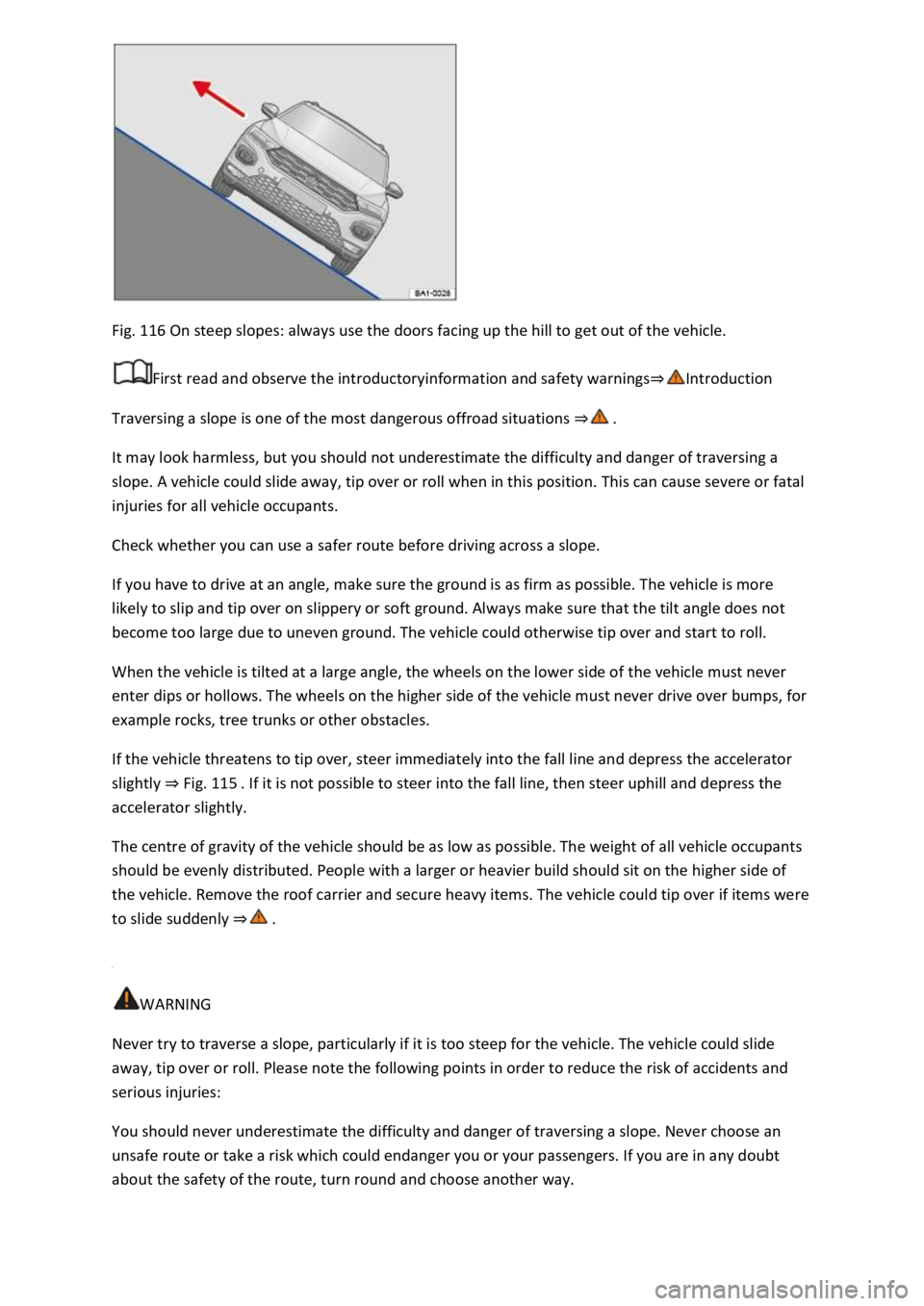
Fig. 116 On steep slopes: always use the doors facing up the hill to get out of the vehicle.
First read and observe the introductoryinformation and safety warnings⇒Introduction
Traversing a slope is one of the most dangerous offroad situations ⇒ .
It may look harmless, but you should not underestimate the difficulty and danger of traversing a
slope. A vehicle could slide away, tip over or roll when in this position. This can cause severe or fatal
injuries for all vehicle occupants.
Check whether you can use a safer route before driving across a slope.
If you have to drive at an angle, make sure the ground is as firm as possible. The vehicle is more
likely to slip and tip over on slippery or soft ground. Always make sure that the tilt angle does not
become too large due to uneven ground. The vehicle could otherwise tip over and start to roll.
When the vehicle is tilted at a large angle, the wheels on the lower side of the vehicle must never
enter dips or hollows. The wheels on the higher side of the vehicle must never drive over bumps, for
example rocks, tree trunks or other obstacles.
If the vehicle threatens to tip over, steer immediately into the fall line and depress the accelerator
slightly ⇒ Fig. 115 . If it is not possible to steer into the fall line, then steer uphill and depress the
accelerator slightly.
The centre of gravity of the vehicle should be as low as possible. The weight of all vehicle occupants
should be evenly distributed. People with a larger or heavier build should sit on the higher side of
the vehicle. Remove the roof carrier and secure heavy items. The vehicle could tip over if items were
to slide suddenly ⇒ .
WARNING
Never try to traverse a slope, particularly if it is too steep for the vehicle. The vehicle could slide
away, tip over or roll. Please note the following points in order to reduce the risk of accidents and
serious injuries:
You should never underestimate the difficulty and danger of traversing a slope. Never choose an
unsafe route or take a risk which could endanger you or your passengers. If you are in any doubt
about the safety of the route, turn round and choose another way.
Page 229 of 502

The vehicle can lose its grip when traversing a slope and slide away sideways, tip over or roll over
and roll down the hill.
The wheels on the lower side of the vehicle must never enter dips or hollows. The wheels on the
higher side of the vehicle must never drive over bumps, for example stones, tree trunks or other
obstacles.
Before traversing a slope, make sure that it is possible to steer into the fall line. Choose another
route if this is not guaranteed. If the vehicle threatens to tip over, steer immediately into the fall line
and depress the accelerator slightly ⇒ Fig. 115 .
If the vehicle is stopped at a large tilt angle when traversing a slope, avoid sudden and uncontrolled
movements in the vehicle. The vehicle can lose its grip and slide away sideways, tip over or roll over
and roll down the hill.
Vehicle occupants should never leave the vehicle via the doors facing down the hill when the vehicle
is stopped sideways on a slope with a large tilt angle to one side. This could cause the centre of
gravity to move to the side. The vehicle could then tip over or roll over and roll down the hill. To
avoid this, always leave the vehicle carefully on the side that is facing uphill ⇒ Fig. 116 .
When getting out the vehicle, make sure that the vehicle door which opens uphill does not close
with its own weight or through carelessness, thus potentially causing injury.
Driving through ditches
First read and observe the introductoryinformation and safety warnings⇒Introduction
Check whether the ramp and tilt angles are small enough to drive through the ditch with the vehicle
⇒ .
If possible, drive through the ditch at an acute angle ⇒ .
The tilt angle must not become too large when driving through the ditch.
WARNING
Never drive through a ditch if the ramp and tilt angles are too steep for the vehicle and the ditch is
too deep. The vehicle could slide away, tip over or roll.
NOTICE
If you drive into the ditch at a right angle, the front wheels will fall in. The underbody of your vehicle
could bottom, get stuck and be damaged. It is then almost impossible to get out of the ditch despite
having all-wheel drive.
Stuck vehicle
First read and observe the introductoryinformation and safety warnings⇒Introduction
Rocking free a vehicle requires training and feeling for the vehicle.
Page 230 of 502

If you make a mistake when rocking free the vehicle, it can sink deeper and you will need assistance
to free the vehicle.
When you cannot move forwards
Carefully dig out all the wheels and check that no other parts of the vehicle are stuck in the sand.
Select reverse gear.
Reverse in your own tracks with gentle use of the accelerator.
If this does not help, place brushwood, foot mats or sacking directly in front of the wheels to
increase grip ⇒ .
Rocking the vehicle free
Never allow the wheels to spin for long periods as this will cause the vehicle to sink deeper ⇒ .
Switch off TCS ⇒ Brake support systems .
Position the steering wheel so that it is facing straight ahead.
Reverse until the point where the wheels just start to spin.
Immediately select first gear and drive forwards until the wheels start to spin again.
Repeat driving back and forth until you have enough momentum to free yourself.
Switch the TCS on after the rocking free procedure is completed ⇒ Brake support systems .
Use the Offroad driving profile.
WARNING
No one must stand either in front or behind the vehicle, particularly if you are attempting to free a
stuck vehicle.
Spinning wheels can propel stones, brushwood, pieces of wood or other objects that are in front or
behind the wheels at enormous speed and cause potentially fatal injury.
People standing in front of or behind the vehicle could be run over if the stuck vehicle starts to move
suddenly.
After offroad driving
First read and observe the introductoryinformation and safety warnings⇒Introduction
Checklist
Clean the turn signals, lighting system, the number plate and all windows.