bonnet VOLKSWAGEN T-ROC 2021 Owner´s Manual
[x] Cancel search | Manufacturer: VOLKSWAGEN, Model Year: 2021, Model line: T-ROC, Model: VOLKSWAGEN T-ROC 2021Pages: 502, PDF Size: 9.42 MB
Page 1 of 502
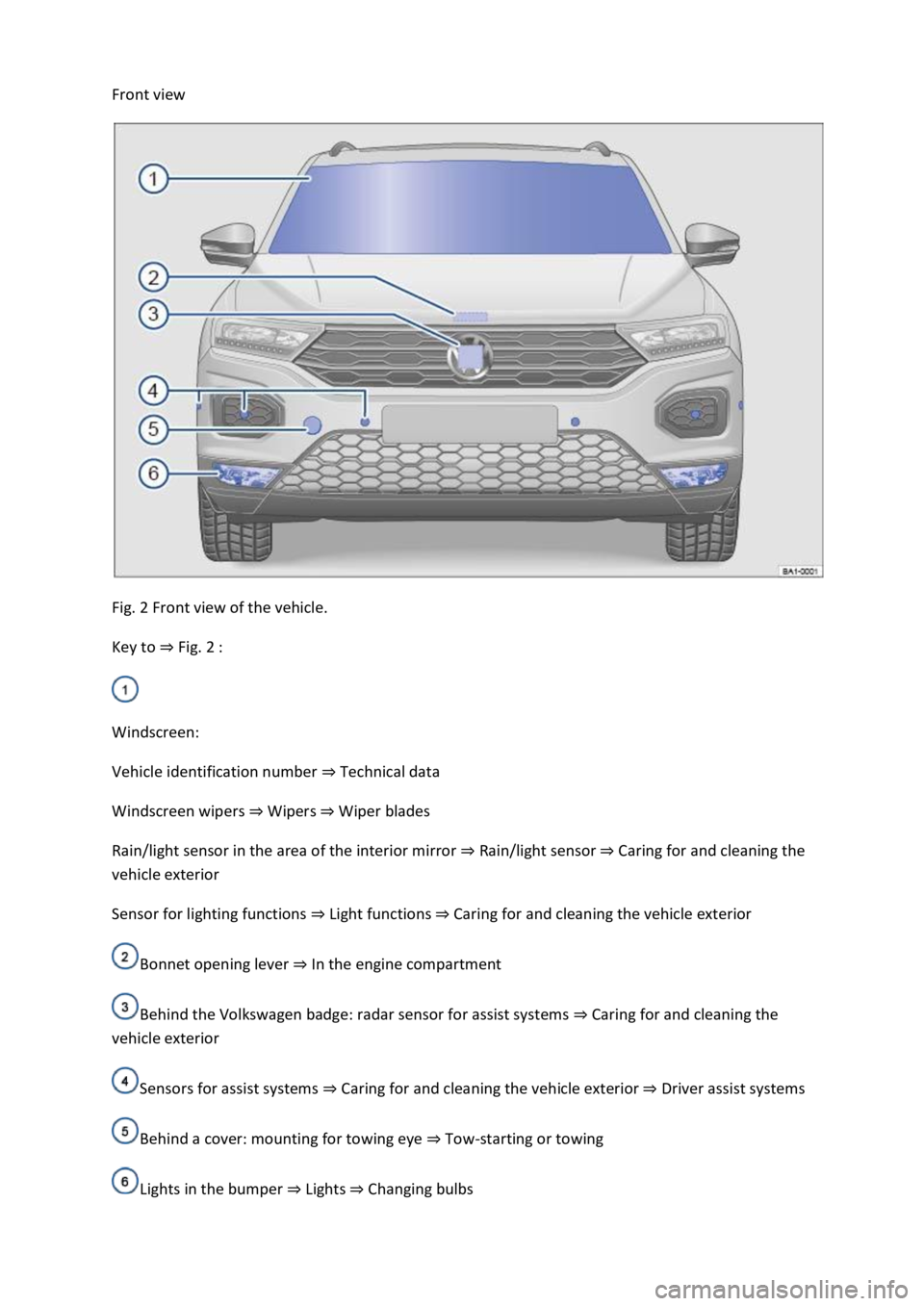
Front view
Fig. 2 Front view of the vehicle.
Key to ⇒ Fig. 2 :
Windscreen:
Vehicle identification number ⇒ Technical data
Windscreen wipers ⇒ Wipers ⇒ Wiper blades
Rain/light sensor in the area of the interior mirror ⇒ Rain/light sensor ⇒ Caring for and cleaning the
vehicle exterior
Sensor for lighting functions ⇒ Light functions ⇒ Caring for and cleaning the vehicle exterior
Bonnet opening lever ⇒ In the engine compartment
Behind the Volkswagen badge: radar sensor for assist systems ⇒ Caring for and cleaning the
vehicle exterior
Sensors for assist systems ⇒ Caring for and cleaning the vehicle exterior ⇒ Driver assist systems
Behind a cover: mounting for towing eye ⇒ Tow-starting or towing
Lights in the bumper ⇒ Lights ⇒ Changing bulbs
Page 6 of 502

Bonnet release lever ⇒ In the engine compartment
Fuse box cover ⇒ Changing fuses
Lever for adjusting the steering column position ⇒ Steering wheel
Light switch ⇒ Vehicle lighting
Turn signal and main beam lever ⇒ Vehicle lighting
With switches and buttons for the driver assist systems ⇒ Button for driver assist systems ⇒ Driver
assist systems
Vents ⇒ Heating and air conditioning system
Instrument cluster ⇒ Instrument cluster
With warning and indicator lamps ⇒ Symbols in instrument cluster
Lever for wipers and washers ⇒ Wipers
With buttons for operating the menus ⇒ Instrument cluster
Controls on the multifunction steering wheel:
Operating driver assist systems ⇒ Operating using the multifunction steering wheel ⇒ Driver assist
systems
Audio, navigation
Opening the telephone menu or accepting telephone calls
Volume adjustment
Activating voice control (no function in some models)
Horn
Location of the driver front airbag ⇒ Airbag system
Ignition lock ⇒ Starting and stopping the engine
Pedals ⇒ Pedals
Page 18 of 502

OR: press the or arrow button on the multifunction steering wheel to select the required
map size. A frame appears around the selected option.
Press the button on the multifunction steering wheel to confirm your selection.
With some equipment levels, navigation is shown on two screens or only one. The navigation map
can be displayed on the Active Info Display and Infotainment system or only on the Infotainment
system display. In the latter case, only navigation arrows are shown on the Active Info Display.
Displays
First read and observe the introductoryinformation and safety warnings⇒Introduction
Possible instrument cluster displays
Open doors, bonnet and boot lid.
Warning and information messages.
Mileage displays.
Time ⇒ Time .
Radio and navigation information ⇒BookletInfotainment system,.
Telephone information ⇒BookletInfotainment system,.
Outside temperature.
Compass display.
Selector lever positions.
Gear-change indicator ⇒ Gear-change indicator .
Driving data display (multifunction display) and menus for various settings ⇒ Instrument cluster
menus .
Service interval display ⇒ Service interval display .
Speed warning ⇒ Instrument cluster menus .
Speed warning for winter tyres.
Start/stop system status display ⇒ Start/stop system .
Road signs detected by the Dynamic Road Sign Display system ⇒ Dynamic Road Sign Display (Sign
Assist) .
Status display for Active Cylinder Management (ACT®) ⇒ Driving economically .
Economical mode .
Engine code.
Display of driver assist systems ⇒ Driver assist systems .
Page 19 of 502

Personalisation: welcome and user selection ⇒ Personalisation .
Open doors, bonnet and boot lid
The instrument cluster display indicates if any doors, the engine compartment or boot lid are open
once the vehicle has been unlocked, and while the vehicle is in motion. In some cases, a signal tone
is also given. Different instrument cluster designs may have different displays.
Selector lever positions (DSG® dual clutch gearbox)
The gear selected is displayed on the side of the selector lever and on the display in the instrument
cluster. The instrument cluster display may show which gear has been selected if the selector lever is
in D/S position or in Tiptronic mode ⇒ DSG® dual clutch gearbox .
Outside temperature display
If the outside temperature falls below approximately +4°C (+39°F), the temperature display also
shows a snowflake symbol . This symbol remains lit up until the outside temperature rises
above +6°C (+43°F) ⇒ .
Heat radiated from the engine may cause the temperature display to show a slightly higher value
than the actual outside temperature if the vehicle is stationary, the auxiliary heater ⇒ Auxiliary
heater and ventilation is switched on or the vehicle is travelling at a very low vehicle speed.
The measured range is -45°C (-49°F) to +76°C (+169°F).
Gear-change indicator
While the vehicle is in motion, the instrument cluster may show which gear should be selected to
reduce fuel consumption ⇒ Gear-change indicator .
Mileage displays
The odometer registers the total distance travelled by the vehicle.
The trip recorder (trip) shows the distance travelled since the trip recorder was last reset.
Vehicles with analogue instrument cluster: press the button in the instrument cluster
briefly to reset the trip recorder to 0 ⇒ Analogue instrument cluster .
Vehicles with digital instrument cluster: reset the trip recorder via the Infotainment system or
via the multifunction display ⇒ Infotainment system controls and displays or ⇒ Driving data display
(multifunction display) .
Speed warning for winter tyres
A display in the instrument cluster indicates when the set maximum speed has been exceeded
⇒ Instrument cluster menus .
Speed warning settings can be made in the vehicle settings in the Infotainment system ⇒ Vehicle
settings menu .
Compass display
Page 103 of 502

Please note that the sensors in the door handles can be activated by a powerful jet of water or
steam if a valid vehicle key is simultaneously within the operating range. If at least one window is
open and sensor surfaces on the door handles are continuously activated, all windows will close. All
windows could open if the jet of water or steam is moved away from the door handle sensors briefly
and then moved back again ⇒ .
It may not be possible to lock or unlock the vehicle using the Keyless Access if the 12-volt vehicle
battery or button cell in the vehicle key is weak or discharged. The vehicle can be locked or unlocked
manually ⇒ .
If there is no valid vehicle key in the vehicle or if it is not detected, a corresponding message will be
shown on the instrument cluster display. This may occur if the vehicle key is exposed to interference
from another radio signal or is covered by another item, e.g. an aluminium case ⇒ Starting and
stopping the engine .
Anti-theft alarm
Depending on the vehicle equipment level, the vehicle may have an anti-theft alarm.
The anti-theft alarm is activated automatically when the vehicle is locked using the vehicle key.
The anti-theft alarm outputs acoustic and visual warning signals for up to five minutes.
When does the system trigger an alarm?
If a door is opened.
If the bonnet is opened.
If the boot lid is opened.
If the ignition is switched on with a valid vehicle key. (The alarm may sound briefly.)
If the 12-volt vehicle battery is disconnected.
If there is movement inside the vehicle (in vehicles with interior monitoring) ⇒ Interior monitoring
system and anti-tow alarm .
If the vehicle is lifted or towed (vehicles with anti-tow alarm) ⇒ Interior monitoring system and anti-
tow alarm .
If the vehicle is transported on a car ferry or by rail (vehicles with anti-tow alarm or interior
monitoring) ⇒ Interior monitoring system and anti-tow alarm .
If a trailer that is connected to the anti-theft alarm system is removed ⇒ Trailer towing .
Switching off the alarm
Unlock the vehicle using the unlocking button on the vehicle key.
Page 141 of 502
Depending on the equipment level, the background lighting provides indirect light in various areas of
the vehicle interior.
The front footwell may also be illuminated.
The brightness of the background lighting can be adjusted in the Infotainment system in the Vehicle
settings menu ⇒ Infotainment system controls and displays .
The lights go out when the vehicle is locked or after a delay of a few minutes when the vehicle key is
removed from the ignition lock. This prevents the 12-volt vehicle battery from discharging.
Some settings can be stored in the user accounts of the personalisation function and therefore
change automatically when the user account changes ⇒ Personalisation .
Visibility
Wipers
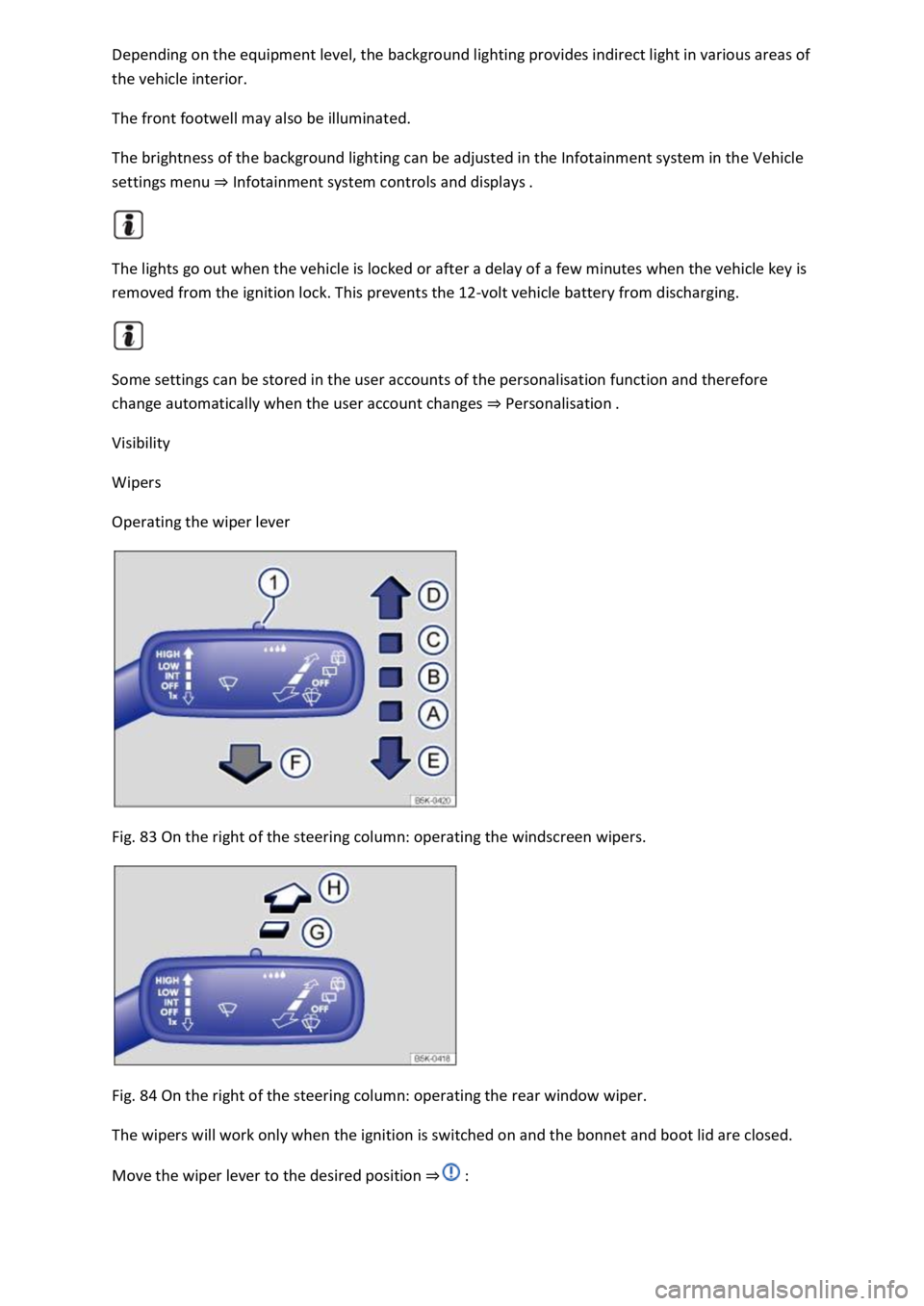
Operating the wiper lever
Fig. 83 On the right of the steering column: operating the windscreen wipers.
Fig. 84 On the right of the steering column: operating the rear window wiper.
The wipers will work only when the ignition is switched on and the bonnet and boot lid are closed.
Move the wiper lever to the desired position ⇒ :
Page 191 of 502

The bonnet is closed.
A minimum engine temperature has been reached.
Vehicles with Climatronic: the temperature of the vehicle interior is within the preset
temperature range, and the humidity level is not too high.
The defrost function of the air conditioning system is not switched on.
The charge level of the 12-volt vehicle battery is sufficient.
The temperature of the 12-volt vehicle battery is not too low or too high.
The vehicle is not on a steep uphill or downhill gradient.
Vehicles with DSG dual clutch gearbox: the steering wheel is not turned too sharply.
The windscreen heating is not switched on.
Reverse gear is not engaged.
Park Assist is not active.
When the conditions for automatic engine switch-off are fulfilled only during a stationary phase, the
engine can also switch off subsequently, e.g. after switching off the defrost function.
Conditions for an automatic restart
The engine can start automatically under the following conditions:
If the temperature inside the vehicle substantially increases or decreases.
If the vehicle starts rolling.
If the electrical voltage of the 12-volt vehicle battery drops.
If the steering wheel is moved.
As a general rule, the engine always starts again automatically when required by the detected
situation and for the vehicle.
Conditions that require a manual engine start
The engine must be started manually in the following conditions:
If the driver door is opened.
If the bonnet is opened.
Manually deactivating and activating the start/stop system
Press the button in the centre console ⇒ Fig. 102 to deactivate the system manually. If the
start/stop system has been deactivated, the indicator lamp in the button lights up.
Press the button in the centre console again ⇒ Fig. 102 to activate the system manually once
more.
Page 336 of 502
Switch the ignition on and then off again.
Lifting the windscreen wiper arms
⇒ .
lade mounting.
Place the windscreen wiper arms back onto the windscreen before driving away. With the ignition
switched on, briefly press the windscreen wiper lever down to bring the windscreen wiper arms back
to the original position.
NOTICE
r to prevent damage to the bonnet and the windscreen wiper arms, the windscreen wiper
arms should be lifted only when in the service position.
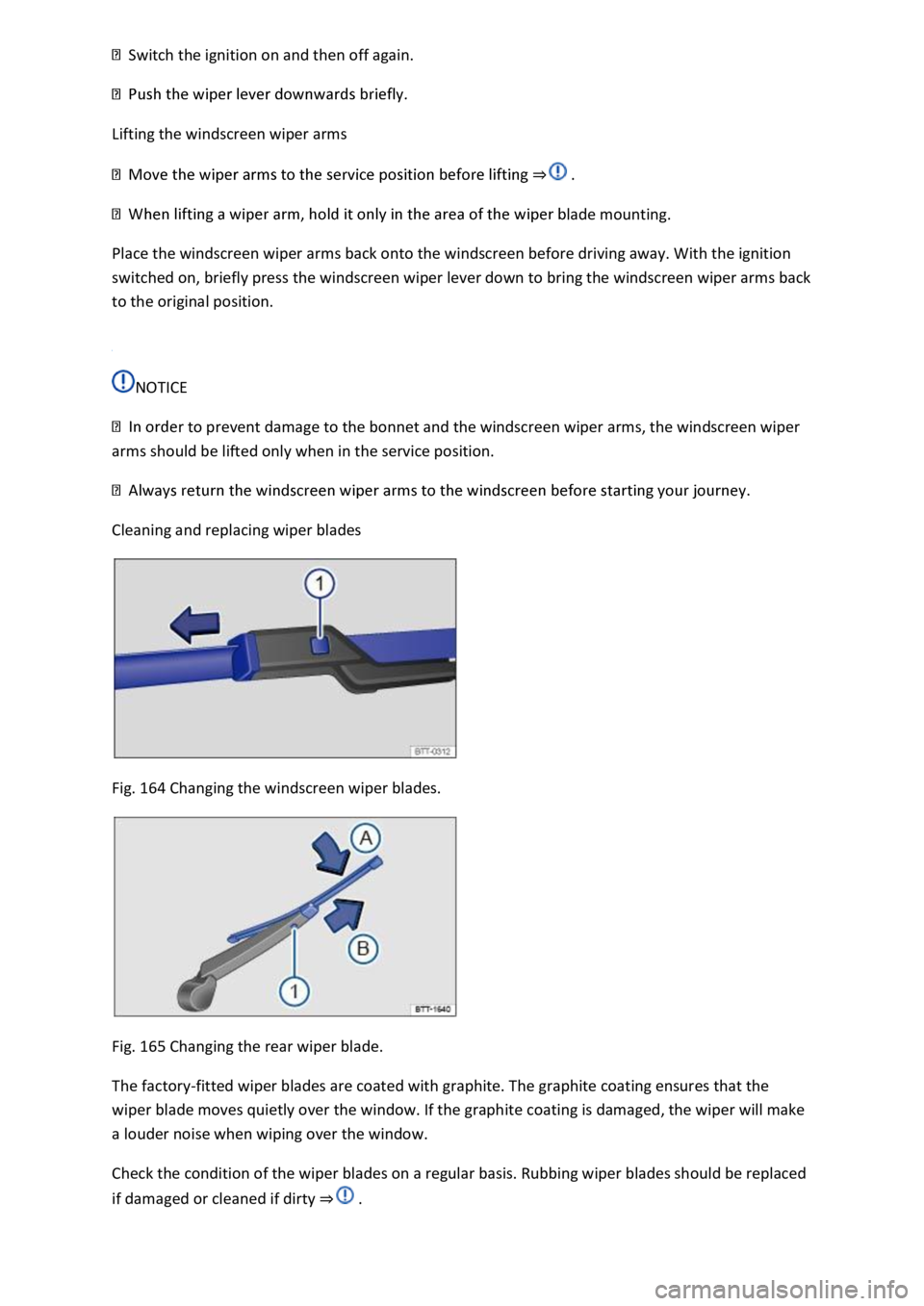
Cleaning and replacing wiper blades
Fig. 164 Changing the windscreen wiper blades.
Fig. 165 Changing the rear wiper blade.
The factory-fitted wiper blades are coated with graphite. The graphite coating ensures that the
wiper blade moves quietly over the window. If the graphite coating is damaged, the wiper will make
a louder noise when wiping over the window.
Check the condition of the wiper blades on a regular basis. Rubbing wiper blades should be replaced
if damaged or cleaned if dirty ⇒ .
Page 342 of 502
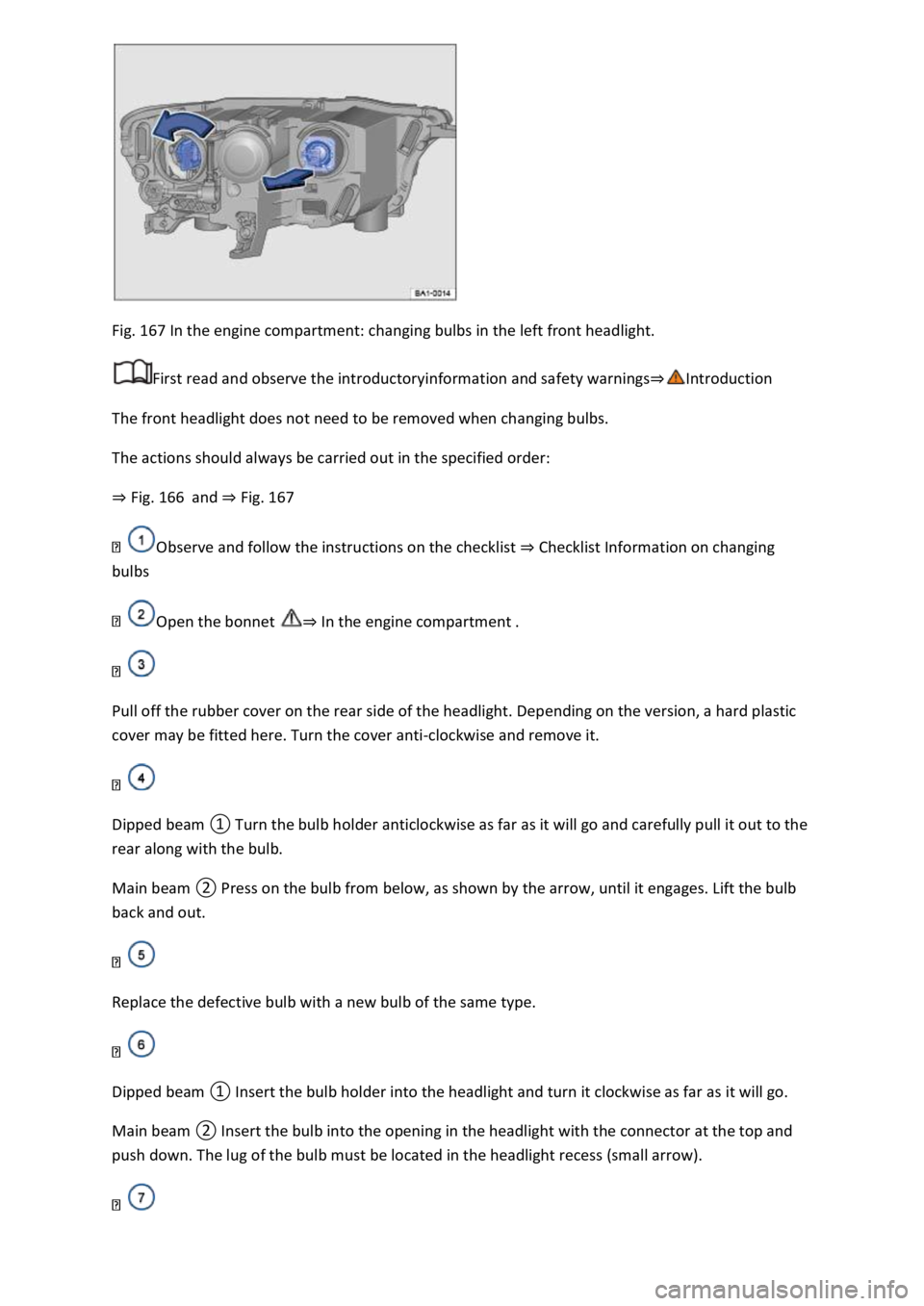
Fig. 167 In the engine compartment: changing bulbs in the left front headlight.
First read and observe the introductoryinformation and safety warnings⇒Introduction
The front headlight does not need to be removed when changing bulbs.
The actions should always be carried out in the specified order:
⇒ Fig. 166 and ⇒ Fig. 167
Observe and follow the instructions on the checklist ⇒ Checklist Information on changing
bulbs
Open the bonnet ⇒ In the engine compartment .
Pull off the rubber cover on the rear side of the headlight. Depending on the version, a hard plastic
cover may be fitted here. Turn the cover anti-clockwise and remove it.
Dipped beam ① Turn the bulb holder anticlockwise as far as it will go and carefully pull it out to the
rear along with the bulb.
Main beam ② Press on the bulb from below, as shown by the arrow, until it engages. Lift the bulb
back and out.
Replace the defective bulb with a new bulb of the same type.
Dipped beam ① Insert the bulb holder into the headlight and turn it clockwise as far as it will go.
Main beam ② Insert the bulb into the opening in the headlight with the connector at the top and
push down. The lug of the bulb must be located in the headlight recess (small arrow).
Page 343 of 502
Attach the rubber cover or hard plastic cover and turn it clockwise as far as it will go.
Close the bonnet ⇒ In the engine compartment .
Changing the bulbs in the headlights (lights with LED technology)
First read and observe the introductoryinformation and safety warnings⇒Introduction
These lamps use LED technology. The LEDs cannot be replaced by customers. If some LEDs fail, this
may be an indication that more elements are on the point of failure. In this case, have the lights
checked and renewed if necessary at a qualified workshop.
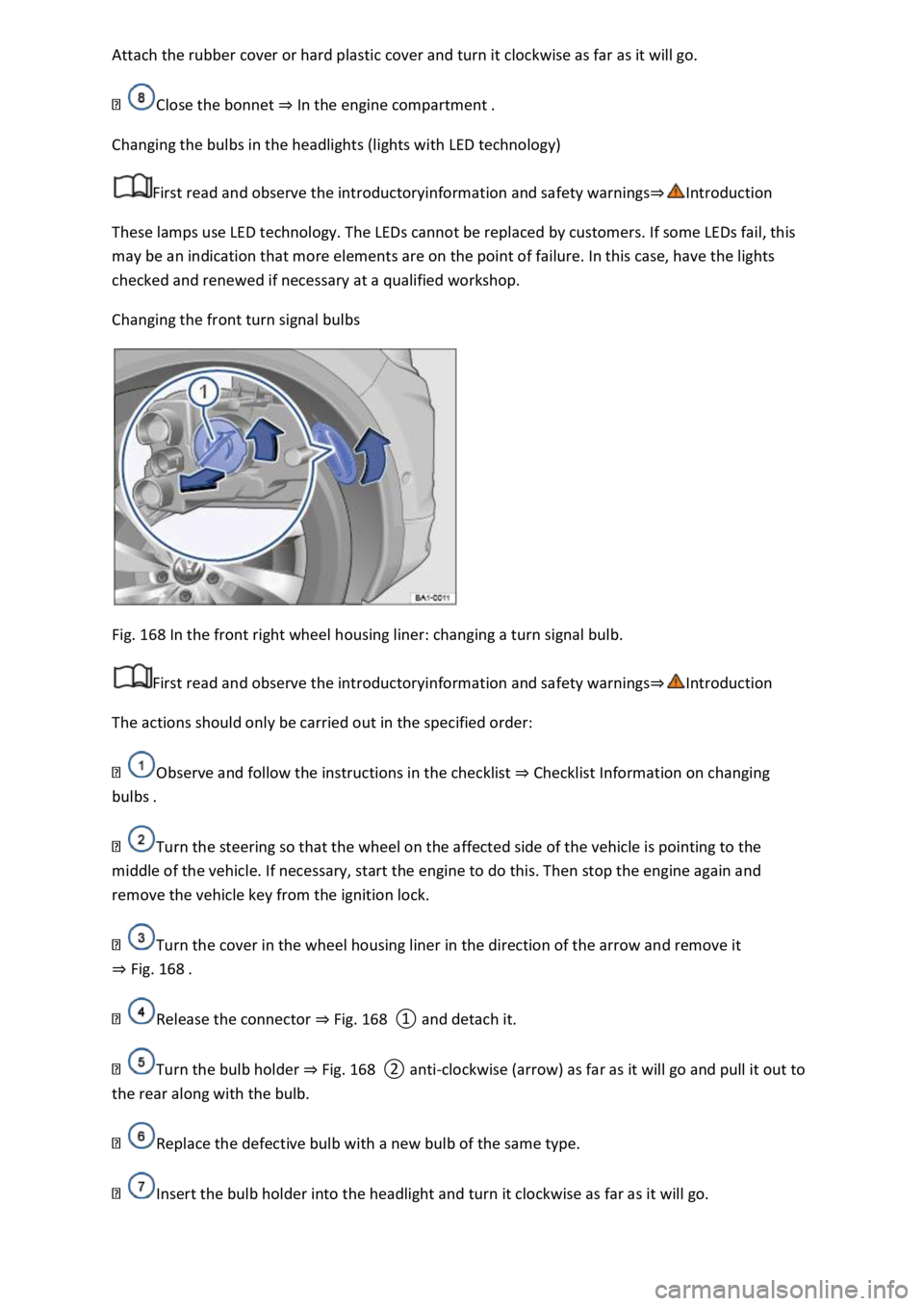
Changing the front turn signal bulbs
Fig. 168 In the front right wheel housing liner: changing a turn signal bulb.
First read and observe the introductoryinformation and safety warnings⇒Introduction
The actions should only be carried out in the specified order:
Observe and follow the instructions in the checklist ⇒ Checklist Information on changing
bulbs .
Turn the steering so that the wheel on the affected side of the vehicle is pointing to the
middle of the vehicle. If necessary, start the engine to do this. Then stop the engine again and
remove the vehicle key from the ignition lock.
Turn the cover in the wheel housing liner in the direction of the arrow and remove it
⇒ Fig. 168 .
Release the connector ⇒ Fig. 168 ① and detach it.
Turn the bulb holder ⇒ Fig. 168 ② anti-clockwise (arrow) as far as it will go and pull it out to
the rear along with the bulb.
Replace the defective bulb with a new bulb of the same type.
Insert the bulb holder into the headlight and turn it clockwise as far as it will go.