door lock VOLKSWAGEN T-ROC 2022 Owner's Manual
[x] Cancel search | Manufacturer: VOLKSWAGEN, Model Year: 2022, Model line: T-ROC, Model: VOLKSWAGEN T-ROC 2022Pages: 502, PDF Size: 8.58 MB
Page 107 of 502
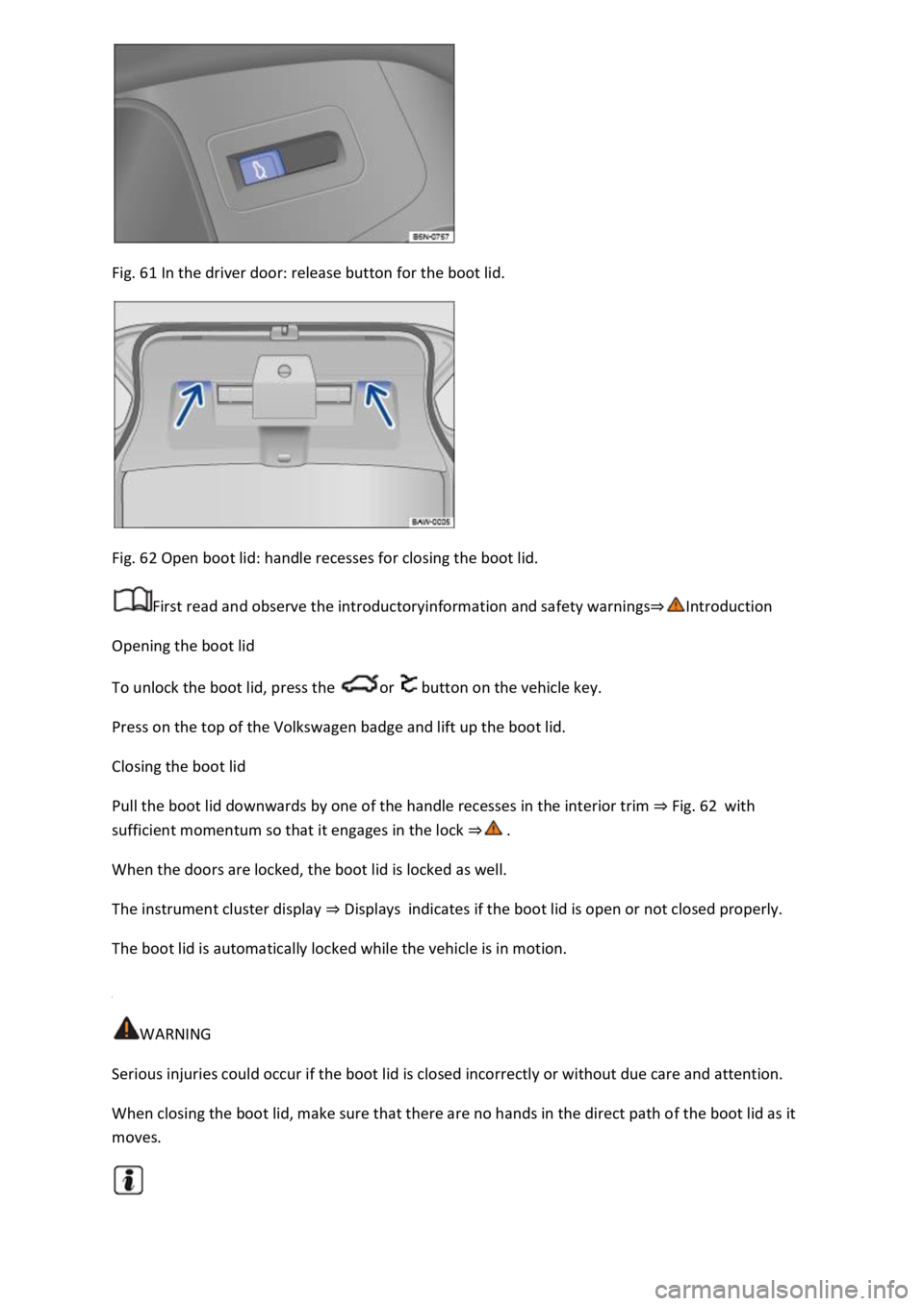
Fig. 61 In the driver door: release button for the boot lid.
Fig. 62 Open boot lid: handle recesses for closing the boot lid.
First read and observe the introductoryinformation and safety warnings
Opening the boot lid
To unlock the boot lid, press the or button on the vehicle key.
Press on the top of the Volkswagen badge and lift up the boot lid.
Closing the boot lid
Pull the boot lid downwards by one of the handle recesses in the interior trim Fig. 62with
sufficient momentum so that it engages in the lock
When the doors are locked, the boot lid is locked as well.
The instrument cluster display Displaysindicates if the boot lid is open or not closed properly.
The boot lid is automatically locked while the vehicle is in motion.
WARNING
Serious injuries could occur if the boot lid is closed incorrectly or without due care and attention.
When closing the boot lid, make sure that there are no hands in the direct path of the boot lid as it
moves.
Page 108 of 502
Opening and closing the boot lid electrically
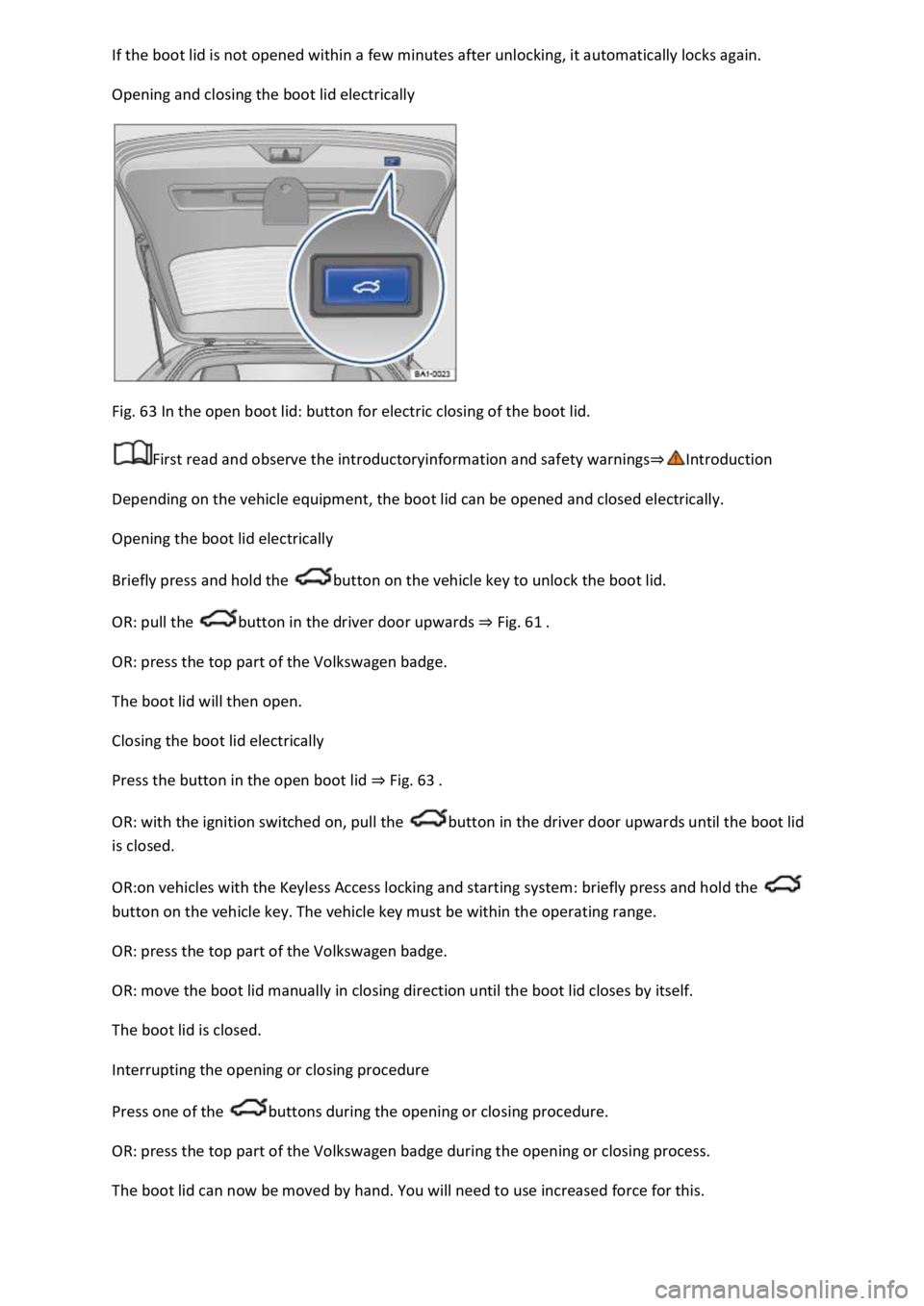
Fig. 63 In the open boot lid: button for electric closing of the boot lid.
First read and observe the introductoryinformation and safety warnings
Depending on the vehicle equipment, the boot lid can be opened and closed electrically.
Opening the boot lid electrically
Briefly press and hold the button on the vehicle key to unlock the boot lid.
OR: pull the button in the driver door upwards Fig. 61
OR: press the top part of the Volkswagen badge.
The boot lid will then open.
Closing the boot lid electrically
Press the button in the open boot lid Fig. 63
OR: with the ignition switched on, pull the button in the driver door upwards until the boot lid
is closed.
OR:on vehicles with the Keyless Access locking and starting system: briefly press and hold the
button on the vehicle key. The vehicle key must be within the operating range.
OR: press the top part of the Volkswagen badge.
OR: move the boot lid manually in closing direction until the boot lid closes by itself.
The boot lid is closed.
Interrupting the opening or closing procedure
Press one of the buttons during the opening or closing procedure.
OR: press the top part of the Volkswagen badge during the opening or closing process.
The boot lid can now be moved by hand. You will need to use increased force for this.
Page 111 of 502

The buttons are located in the doors Vehicle overviews
Opening the windows: press the button. Closing the windows: pull the button.Press to disable
the electric window buttons in the rear doors.
The windows can still be opened or closed using the buttons for a short time after the ignition has
been switched off, provided the driver door and the front passenger door are not opened.
One-touch opening and closing
The one-touch opening and closing function can be used to fully open and close the windows. The
individual buttons do not have to be held to do this.
One-touch closing: pull the button for the appropriate window up briefly into the second position.
One-touch opening: press the button for the appropriate window down briefly into the second
position.
Stopping the one-touch function: press or pull the button for the appropriate window again.
Convenience opening and closing
The windows can be opened and closed from outside the vehicle using the vehicle key when the
ignition is switched off:
Press and hold the locking or unlocking button on the vehicle key.
In vehicles with keyless locking and starting system Keyless Access: place your finger on the locking
sensor in the door handle for a few seconds until the windows are closed Unlocking or locking the
vehicle with Keyless Access operating range.
To interrupt this function, release the locking or unlocking button OR remove your finger from the
sensor.
A valid vehicle key must be located within the operating range. All turn signals will flash once as
confirmation that all the windows and the glass roof have been closed.
Set the convenience opening settings in the Vehicle settings menu in the Infotainment system
Infotainment system controls and displays
WARNING
Careless or unsupervised use of the electric windows can cause serious injuries.
The electric windows should only be opened or closed when you are sure that nobody is in their
operating area.
Never leave children or people requiring assistance alone in the vehicle when the vehicle is locked.
The windows can no longer be opened in an emergency.
Page 114 of 502

66 In the roof: button for the glass roof.
The term glass roof is used as a standard term for the panorama sliding/tilting roof.
The glass roof is a roof opening system featuring two glass elements. The rear glass element is fixed
and cannot be opened.
The button has two positions. First stage: fully or partially tilt, open or close the roof. Second
stage: automatically move the roof to the respective limit position. Press the button again to stop
the one-touch function.
Tilting the glass roof: push the button Fig. 66to the first position. One-touch function: push
button to the second position.
Closing the tilted glass roof: push the button to the first position. One-touch function: push
button to the second position.
Opening the glass roof: push the button to the first position. One-touch function up to
convenience position: push button to the second position.
Closing the glass roof: push the button to the first position. One-touch function: push button
to the second position.
Stopping one-stop function of the opening or closing procedure: push button or again.
WARNING
Careless or unsupervised use of the glass roof can cause serious injuries.
Open and close the glass roof only when you are sure that nobody is obstructing the path of the
roof.
Always take all vehicle keys with you every time you leave the vehicle.
Never leave children or people requiring assistance alone in the car, particularly if they have access
to the vehicle key. Unsupervised use of the vehicle key can lock the vehicle, start the engine, switch
on the ignition and operate the glass roof.
The glass roof can still be opened or closed for a short time after the ignition has been switched off,
provided that the driver door or front passenger door are not opened.
NOTICE
To avoid damage during cold weather, clear any ice and snow off the vehicle roof before opening or
tilting the glass roof.
Always close the glass roof when you leave the vehicle or if it starts to rain. Any rain entering the
vehicle when the glass roof is open or tilted could cause significant damage to the electrical system.
This can result in further damage to the vehicle.
Page 115 of 502

Remove leaves and other loose items from the glass roof guide rails at regular intervals using a
vacuum cleaner, or by hand.
The roll-back function will not work properly if there is a malfunction in the glass roof. Go to a
qualified workshop.
Convenience opening or closing of the glass roof
Convenience opening and closing
The glass roof can be opened and closed from outside the vehicle using the vehicle key:
Press and hold the locking or unlocking button on the vehicle key. The glass roof is tilted or closed.
In vehicles with the Keyless Access locking and starting system: place your finger on the locking
sensor in the door handle for a few seconds until the glass roof is closed Unlocking or locking the
vehicle with Keyless Access
Release the locking or unlocking button to interrupt this function.
The convenience closing function closes all the windows in the doors and the glass roof. All turn
signals will flash once as confirmation that all the windows and the glass roof have been closed.
Make settings for operation of the glass roof in the Vehicle settings menu in the Infotainment
system Infotainment system controls and displays
Some settings can be saved in the user accounts for personalisation and therefore change
automatically when the user account is changed Personalisation
Glass roof roll-back function
The roll-back function reduces the risk of crush injuries f the glass roof is obstructed during
the closing process, it will open again immediately.
Check to see why the glass roof has not closed.
Try to close the glass roof again.
If the glass roof still cannot be closed, close it without the roll-back function.
Closing the glass roof without the roll-back function
Press the button to the second position until the glass roof has fully closed.
The glass roof will now close without the roll-back function.
Please go to a qualified workshop if the glass roof still cannot be closed.
If you release the switch during the closing procedure, the glass roof will open automatically.
Page 131 of 502

tion:
The lights are switched off.Leaving Home function (orientation lighting) can be switched on
Coming Home and Leaving Home function (orientation lighting)Side lights or continuous
parking light on both sides of the vehicle switched on Switching the parking lights on and off
symbol in the light switch lights up green.Dipped beam is switched off the side lights will stay
on as long as the vehicle key is in the ignition lock or, in vehicles with Keyless Access, the driver door
is closed.
Daytime running lights
The daytime running lights (dependent on equipment level) can increase the visibility of your vehicle
in traffic during the day.
The daytime running lights are switched on every time the ignition is switched on when the light
switch is in position , or (when brightness is detected).
The daytime running lights cannot be switched on or off manually.
WARNING
Accidents and serious injuries can occur if the road is not sufficiently illuminated and other road
users have difficulty seeing the vehicle, or cannot see it at all.
The light assist systems are designed only to provide support; the driver is responsible for the
correct vehicle lights being switched on.
Always switch on the dipped beam headlights if it is dark, raining or visibility is poor.
WARNING
The side lights or daytime running lights are not bright enough to illuminate the road ahead and to
ensure that other road users are able to see you.
Always switch on the dipped beam headlights if it is dark, raining or visibility is poor.
The tail light clusters are not switched on with the daytime running lights. If the tail light clusters are
not switched on, the vehicle may not be visible to other road users if it is dark, raining, or if visibility
is poor.
WARNING
The automatic headlights ( ) switch dipped beam on and off only when there is a change in
the level of brightness.
Switch on dipped beam manually if required by the weather conditions, e.g. in fog.
Page 137 of 502

Lock the vehicle from the outside.
Automatic switch-off of side lights and parking lights
If the battery capacity is not sufficient for the side lights or parking light to remain switched on for
two hours, the 12-volt vehicle battery can be discharged to such an extent that it is no longer
possible to start the engine
In the case of standing times of more than two hours, the vehicle will detect a weak 12-volt vehicle
battery and switch off the side lights or parking light so that the engine can still be started.
WARNING
Accidents and serious injuries can occur if the vehicle is parked without sufficient illumination, as
other road users might have difficulty seeing the vehicle, or may not see it at all.
Always park the vehicle safely and with sufficient lighting. Observe any applicable local regulations.
If the vehicle lighting is required for several hours, switch on the right or left parking light if possible.
The illumination time of the parking light on one side is generally twice as long as for continuous
parking light on both sides of the vehicle.
Coming Home and Leaving Home function (orientation lighting)
The Coming Home and Leaving Home function lights up the area immediately surrounding the
vehicle when you get in or out of the vehicle in darkness.
Not in China: the Coming Home function is switched on manually. In contrast, the Leaving
Home function is controlled automatically by a rain/light sensor.
Only in China: the Coming Home and Leaving Home function is controlled automatically by a
rain/light sensor.
The switch-off delay can be adjusted and the function activated or deactivated in the Vehicle
settings menu in the Infotainment system Infotainment system controls and displays
Activating the Coming Home function
Not in China
Switch off the ignition.
Operate the headlight flasher for approximately one second.
The Coming Home lighting is switched on when the driver door is opened. The switch-off delay starts
when the last vehicle door or the boot lid has been closed.
Activating the Coming Home function
Page 138 of 502

Switch off the ignition.
The Coming Home lighting is switched on when the light switch is in position and the
rain/light sensor detects that it is dark.
The switch-off delay starts when the last vehicle door or the boot lid has been closed.
Deactivating the Coming Home function
Automatically after the selected switch-off delay has elapsed.
OR: automatically if a door or the boot lid is still open approximately 30 seconds after switching on.
OR: turn light switch to position .
OR: switch on the ignition.
Activating the Leaving Home function
Unlock the vehicle when the light switch is in position and the rain/light sensor detects that it
is dark.
Deactivating the Leaving Home function
Automatically after the switch-off delay.
OR: lock the vehicle.
OR: turn light switch to position .
OR: switch on the ignition.
Some settings can be stored in the user accounts of the personalisation function and therefore
change automatically when the user account changes Personalisation
Headlights
Headlight range control
Fig. 82 In the Infotainment system: slider for headlight range control.
Headlight range control can be used to adjust the light cone of the dipped beam headlights to the
vehicle load level. This gives the driver the best visibility possible and means that oncoming traffic
will not be dazzled
Page 140 of 502

If you have to drive a right-hand drive vehicle in a left-hand drive country, or vice versa, the
asymmetric dipped beam headlights may dazzle oncoming traffic. The headlights must therefore be
switched over when you travel to these countries.
With some equipment levels, the headlight alignment can be adjusted in the Infotainment system in
the Vehicle settings menu Infotainment system controls and displays
In vehicles in which the headlights cannot be switched over in the menu, masking stickers should be
applied to certain parts of the headlight lenses, or the headlights should be adjusted by a qualified
workshop. A qualified workshop can provide you with further information. Volkswagen recommends
using a Volkswagen dealership for this purpose.
Travel mode may be used only for a short period. Please contact a qualified workshop for a
permanent conversion. Volkswagen recommends using a Volkswagen dealership for this purpose.
Interior lighting
Instrument and switch lighting
The brightness of the instrument and switch lighting can be adjusted in the Infotainment system in
the Vehicle settings menu Infotainment system controls and displays
The brightness setting is automatically adjusted to the changing light conditions in the vehicle.
When the light switch is in position , a sensor will switch the dipped beam and the lighting in
the instruments and switches on and off automatically depending on the ambient brightness level.
When the light is switched off and the ignition switched on, the instrument and switch lighting
(needles and scales) is switched on. As the ambient light becomes lower, the illumination of the
scales is automatically reduced and may be switched off entirely. This function is intended to remind
the driver to switch on the dipped beam in good time, i.e. when driving through tunnels.
Interior and reading lights
Press the appropriate button or move the switch to the appropriate position:
Switch off the interior light.Switch on the interior lights.The interior lights are switched on
automatically when the vehicle is unlocked, a door is opened or the vehicle key is removed from the
ignition.Switch the reading light on or off.
Stowage compartment and luggage compartment lights
A light will be switched on and off when the stowage compartment on the front passenger side or
the boot lid is opened or closed.
Background lighting
Page 181 of 502
pping the engine
Ignition lock
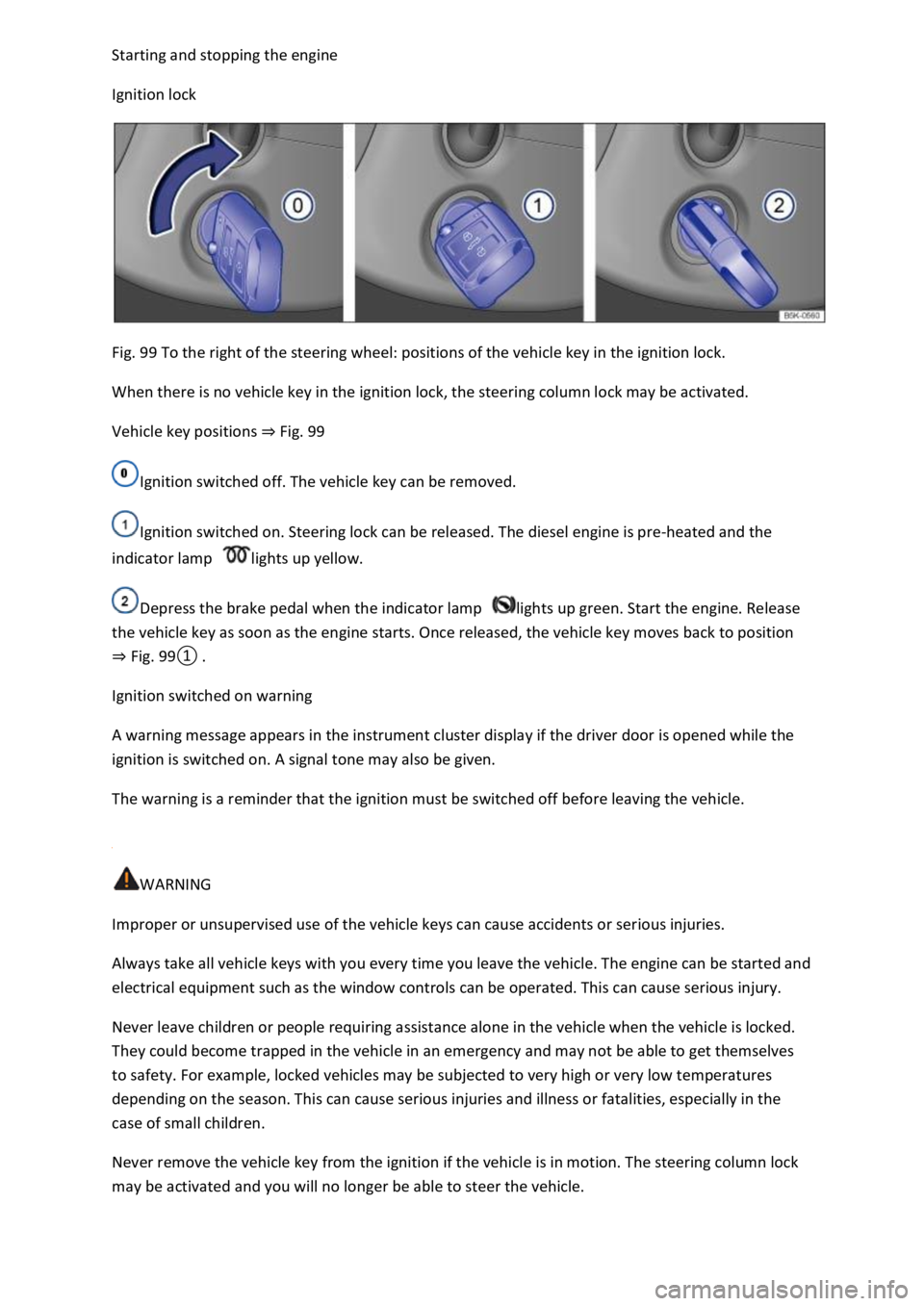
Fig. 99 To the right of the steering wheel: positions of the vehicle key in the ignition lock.
When there is no vehicle key in the ignition lock, the steering column lock may be activated.
Vehicle key positions Fig. 99
Ignition switched off. The vehicle key can be removed.
Ignition switched on. Steering lock can be released. The diesel engine is pre-heated and the
indicator lamp lights up yellow.
Depress the brake pedal when the indicator lamp lights up green. Start the engine. Release
the vehicle key as soon as the engine starts. Once released, the vehicle key moves back to position
Fig.
0
Ignition switched on warning
A warning message appears in the instrument cluster display if the driver door is opened while the
ignition is switched on. A signal tone may also be given.
The warning is a reminder that the ignition must be switched off before leaving the vehicle.
WARNING
Improper or unsupervised use of the vehicle keys can cause accidents or serious injuries.
Always take all vehicle keys with you every time you leave the vehicle. The engine can be started and
electrical equipment such as the window controls can be operated. This can cause serious injury.
Never leave children or people requiring assistance alone in the vehicle when the vehicle is locked.
They could become trapped in the vehicle in an emergency and may not be able to get themselves
to safety. For example, locked vehicles may be subjected to very high or very low temperatures
depending on the season. This can cause serious injuries and illness or fatalities, especially in the
case of small children.
Never remove the vehicle key from the ignition if the vehicle is in motion. The steering column lock
may be activated and you will no longer be able to steer the vehicle.