bulb VOLKSWAGEN TIGUAN 2009 User Guide
[x] Cancel search | Manufacturer: VOLKSWAGEN, Model Year: 2009, Model line: TIGUAN, Model: VOLKSWAGEN TIGUAN 2009Pages: 435, PDF Size: 4.23 MB
Page 415 of 435

Only perform these steps in the specified order:
fig. 204 Low beam headlight Parking light Turn signal High beam headlight or daytime running light
4. Turn the bulb holder (3) B counterclockwise until it stops and remove it toward the rear with the bulb.
Unclip the bulb holder (4) B upward out of the guide and remove it toward the rear with the bulb.
Unclip the parking light bulb holder (4) B upward out of the guide and remove it toward the rear with the bulb. Turn the turn signal bulb holder (5) B counterclockwise until it stops and remove it toward the rear with the bulb.
Turn the bulb (6) B counterclockwise until it stops and remove it toward the rear.
5. If necessary, press the locking mechanism on the bulb holder and pull the bulb straight out of the bulb holder.
6. Replace the burned out light bulb with a new bulb of the same type.
7. Reinsert the bulb holder (3) B into the headlight and turn it clockwise until it stops.
Reinsert the bulb holder (4) B into the headlight and clip it into the guide.
Reinsert the turn signal bulb holder (5) B into the headlight and turn it clockwise until it stop. Insert the parking light bulb holder (4) B into the headlight and clip it into the guide.
Reinsert the bulb (6) B into the headlight and turn it clockwise until it stops.
8.
Install the cover (1) A on the back of the headlight (retainer vertical) and turn it clockwise until it stops.
Install the rubber cover (2) A.
The illustrations show the left headlight assembly from the rear. The right headlight assembly is the mirror image of the left headlight assembly.
Different models may have different lights, and the location and design of covers, bulb holders, and bulbs may be in a different location than shown in the illustrations.
You cannot replace the LEDs in LED daytime running lights. Contact your authorized Volkswagen dealer or an authorized Volkswagen Service Facility for assistance.
Page 416 of 435
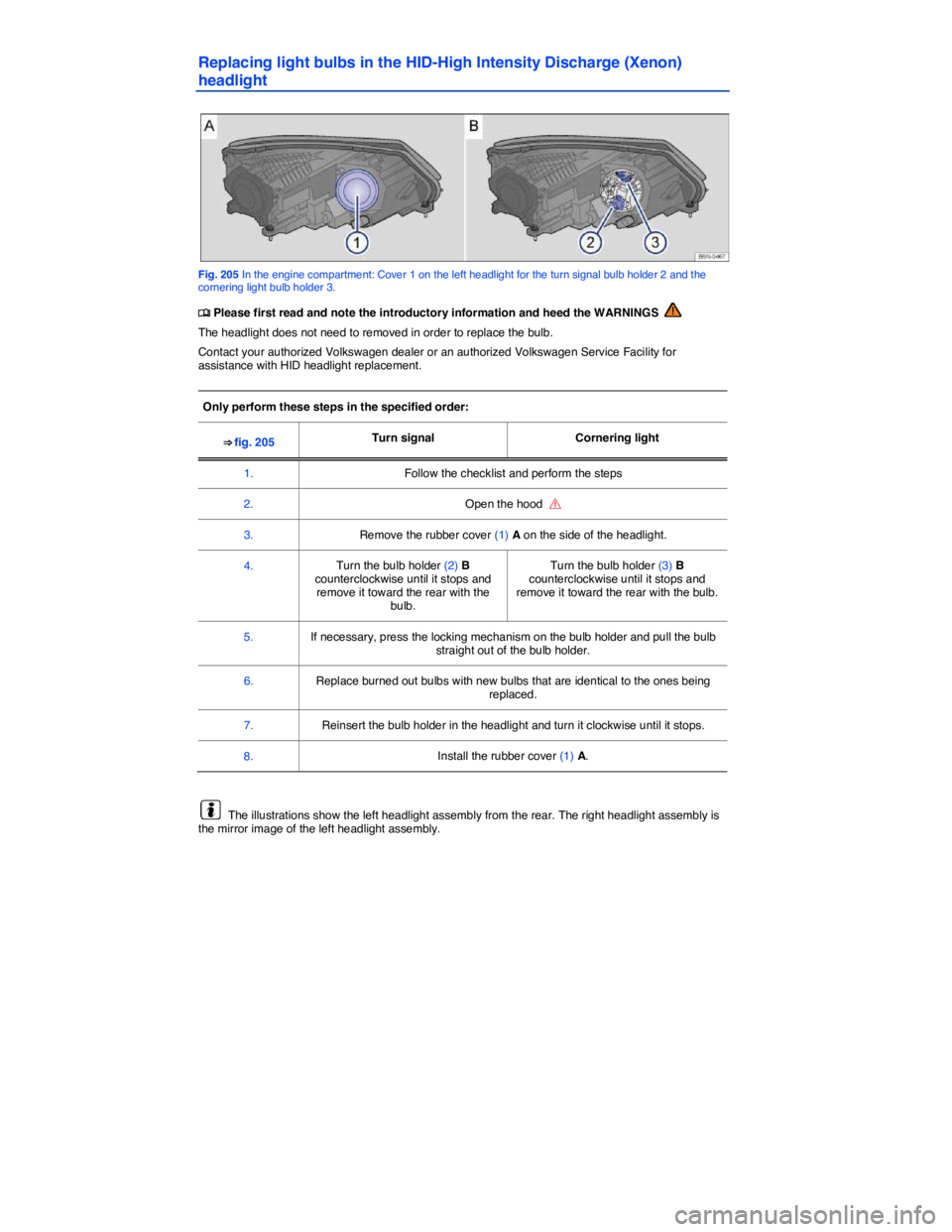
Replacing light bulbs in the HID-High Intensity Discharge (Xenon)
headlight
Fig. 205 In the engine compartment: Cover 1 on the left headlight for the turn signal bulb holder 2 and the cornering light bulb holder 3.
Page 417 of 435
Different models may have different lights, and the location and design of covers, bulb holders, and bulbs may be in a different location than shown in the illustrations.
You cannot replace the LEDs in LED daytime running lights. Contact your authorized Volkswagen dealer or an authorized Volkswagen Service Facility for assistance.
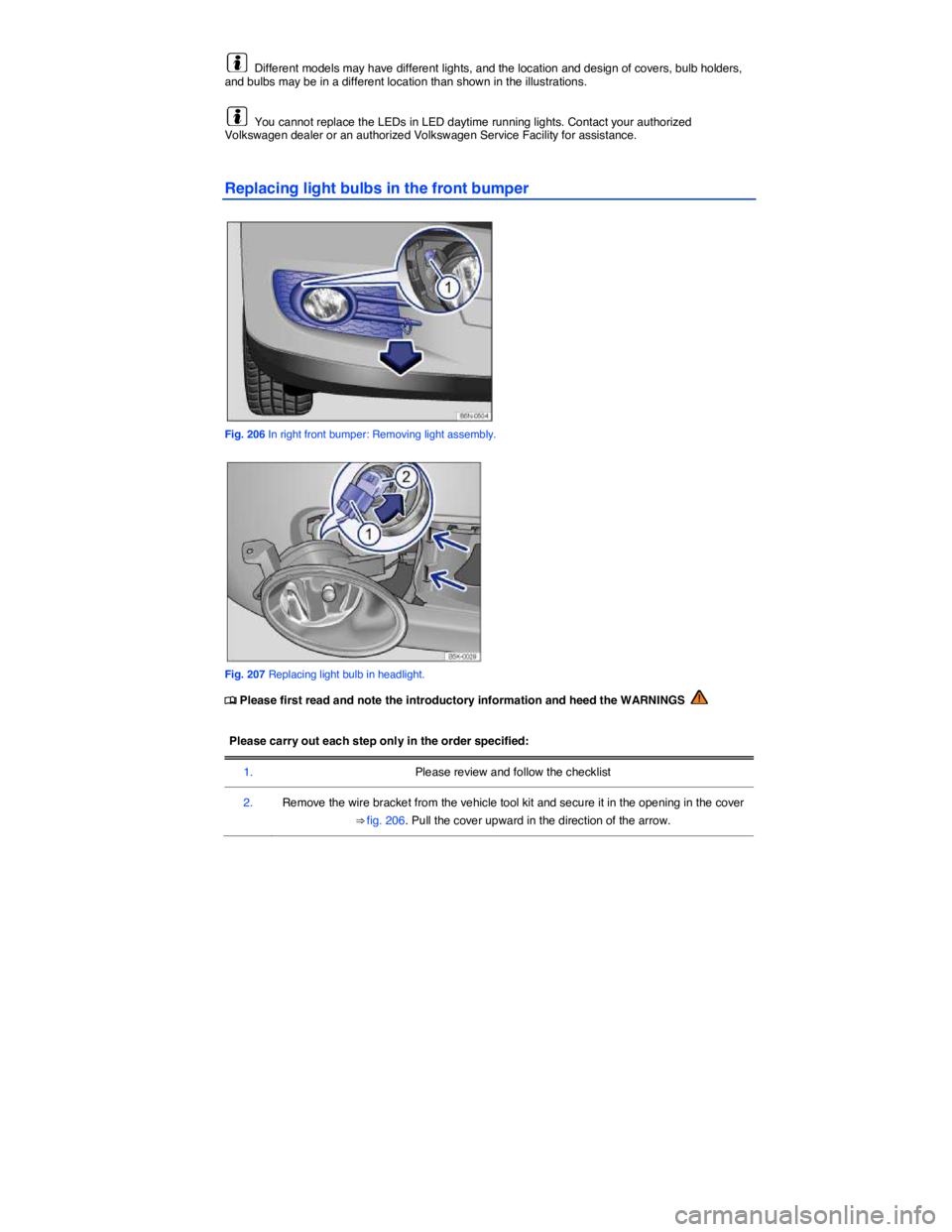
Replacing light bulbs in the front bumper
Fig. 206 In right front bumper: Removing light assembly.
Fig. 207 Replacing light bulb in headlight.
Page 418 of 435
Please carry out each step only in the order specified:
3. Remove the screw (1) using the flat blade of the screwdriver in the vehicle tool kit
4. Remove the headlight.
5. Release the connector ⇒ fig. 207 (1) and disconnect it.
6. Turn the bulb holder (2) counterclockwise in the direction of the arrow until it stops and remove it toward the rear with the bulb.
7. Replace the burned out light bulb with a new bulb of the same type.
8. Insert the bulb holder into the headlight assembly and turn it clockwise until it stops.
9. Connect the connector (1) on the bulb holder (2). You must hear the connector click into place.
10. Insert the headlight.
11. Tighten the screw ⇒ fig. 206 (1) with the screwdriver.
12. Install cover in the bumper ⇒ fig. 206.
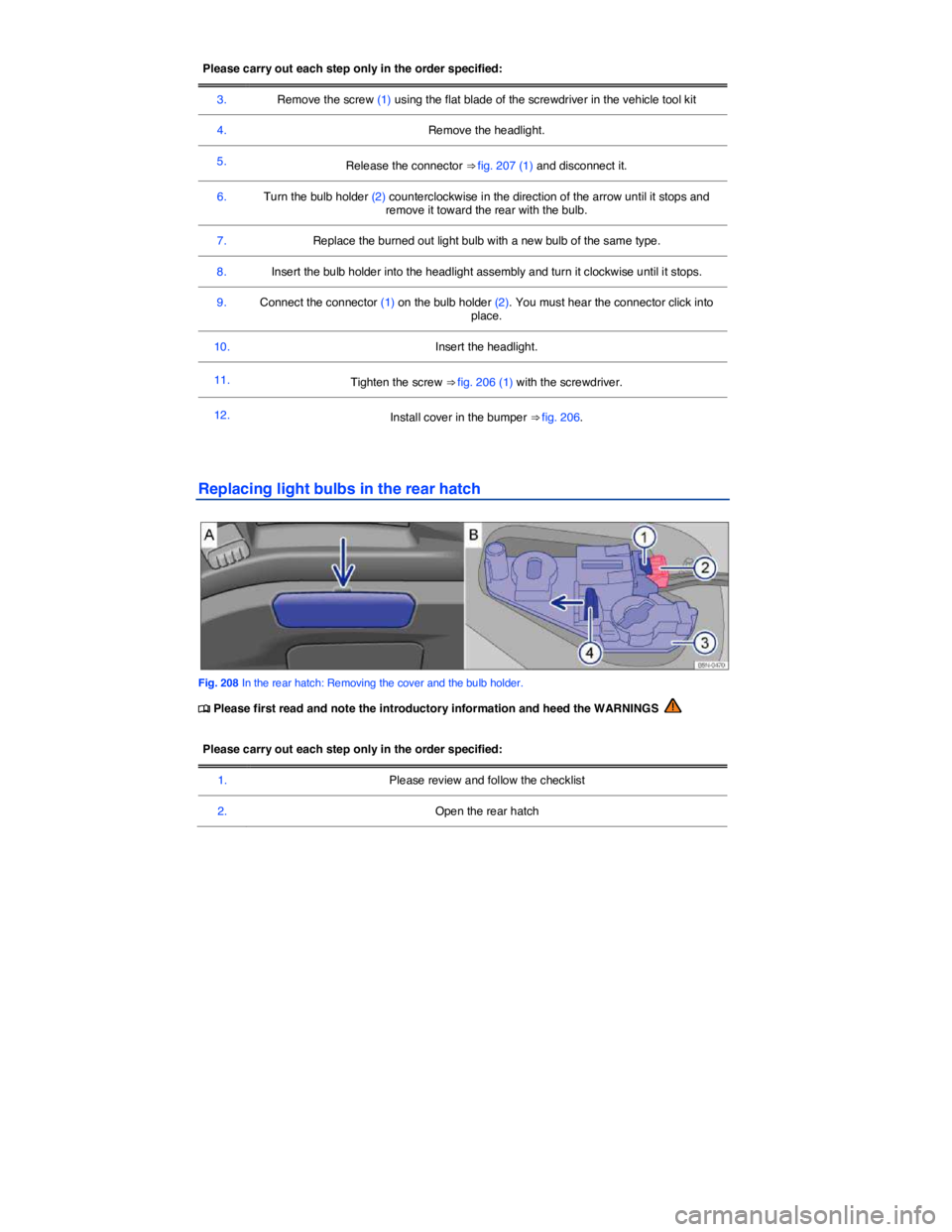
Replacing light bulbs in the rear hatch
Fig. 208 In the rear hatch: Removing the cover and the bulb holder.
Page 419 of 435
Please carry out each step only in the order specified:
3. Using the screwdriver from the vehicle tool kit carefully pry the cover off with the flat blade
of the screw driver inserted in the opening ⇒ fig. 208 A (arrow).
4. Remove the red locking mechanism (2) B as illustrated and disconnect the electrical connector with the lever pressed down (1) B.
5. Press the locking tab (4) B in the direction of the arrow and remove the bulb holder (3) B.
6. Replace burned out rear light bulb with a bulb that is identical to the one being replaced.
7. Insert the bulb holder. You must hear the locking tab click into place.
8. Insert the electrical connector into the bulb holder until it clicks into place. Press the red locking mechanism (2) B back in.
9. Insert the cover. The cover must lock into place and be secure.
LEDs in the rear lights
Changing LEDs is not possible without dismantling vehicle components. Contact an authorized Volkswagen dealer or an authorized Volkswagen Service Facility.
Taillights with LEDs may also have some “standard” light bulbs. These bulbs can be replaced.
Different models may have different lights, and the location and design of covers, bulb holders, and bulbs may be in a different location than shown in the illustrations.
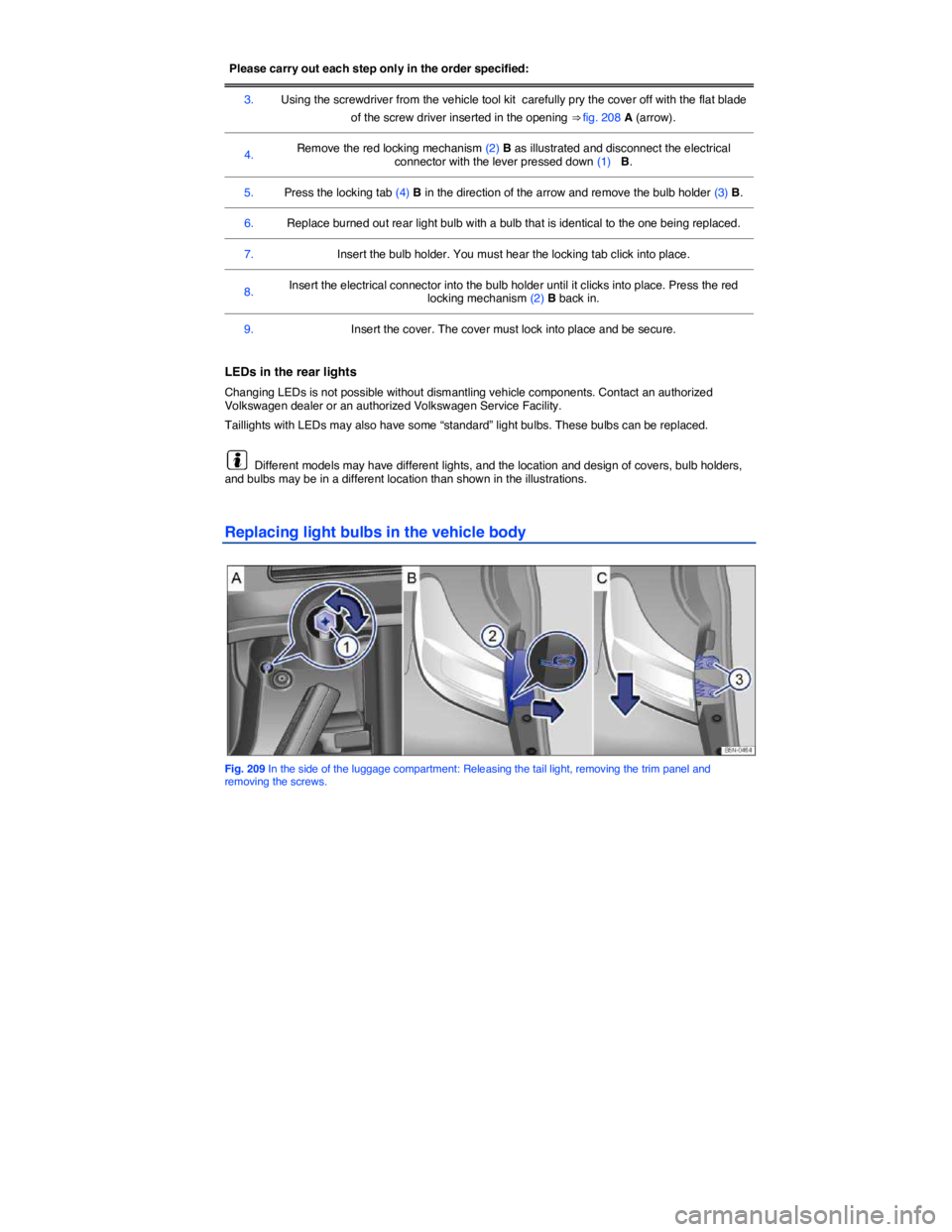
Replacing light bulbs in the vehicle body
Fig. 209 In the side of the luggage compartment: Releasing the tail light, removing the trim panel and removing the screws.
Page 420 of 435
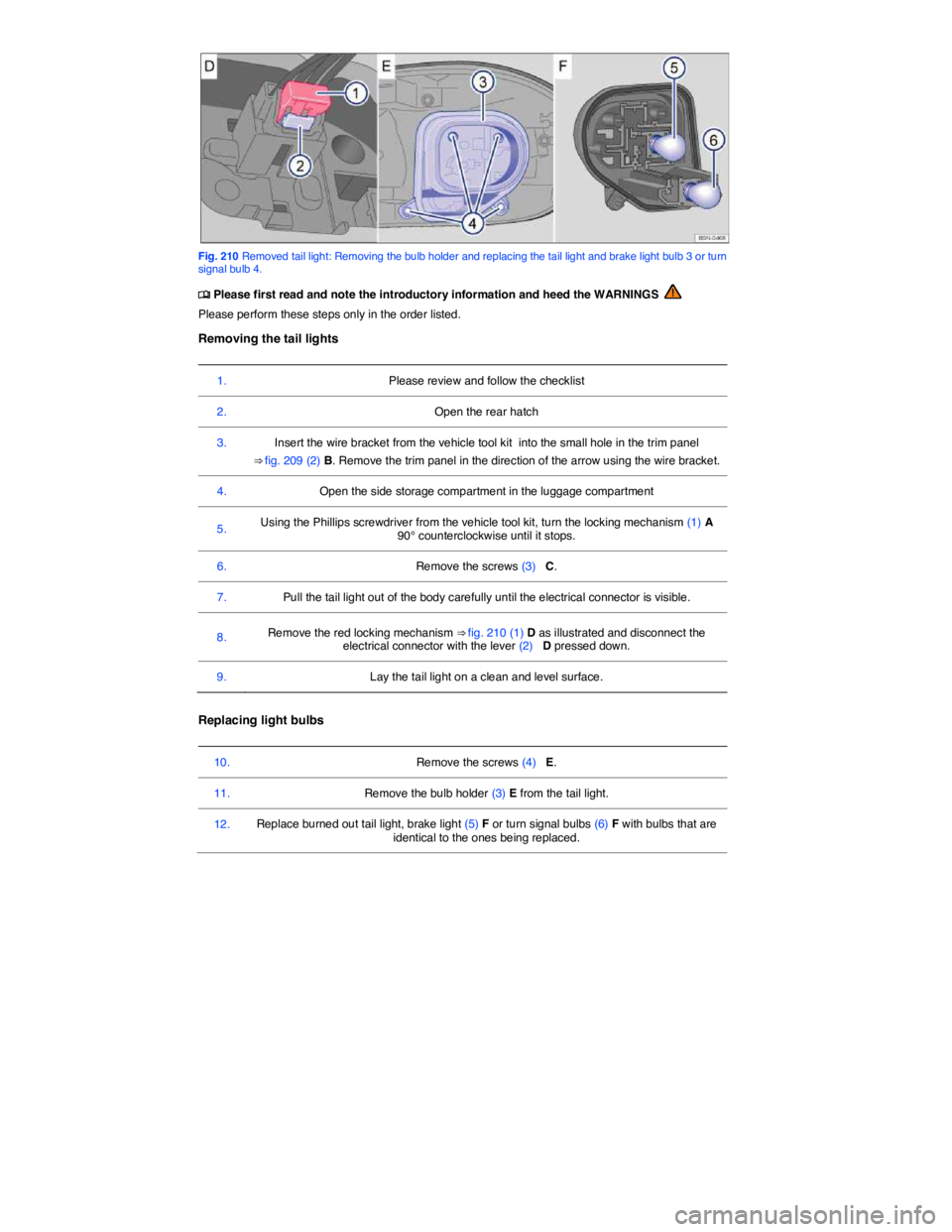
Fig. 210 Removed tail light: Removing the bulb holder and replacing the tail light and brake light bulb 3 or turn signal bulb 4.
Page 421 of 435
13. Insert the bulb holder in the tail light and screw it in ⇒ fig. 210 E.
Installing the tail lights
14. Turn the locking mechanism ⇒ fig. 209 (1) A 90° clockwise until it stops.
15. Insert the electrical connector into the bulb holder until it clicks into place. Press the red
locking mechanism ⇒ fig. 210 (1) D back in.
16. Insert the tail light into the opening on the body carefully.
17. Hold the tail light in the correct position with one hand and tighten the screws with the other hand (3) C.
18. Insert the trim panel ⇒ fig. 209 (2) B into its original position, first at the bottom and then at the top.
19. Close the side storage compartment in the luggage compartment.
20. Close the rear hatch
LEDs in the rear taillights
Changing LEDs is not possible without dismantling vehicle components. Contact an authorized Volkswagen dealer or an authorized Volkswagen Service Facility.
Taillights with LEDs may also have some “standard” light bulbs. These bulbs can be replaced.
Different models may have different lights, and the location and design of covers, bulb holders, and bulbs may be in a different location than shown in the illustrations.
Replacing license plate lights