buttons VOLKSWAGEN TIGUAN 2011 User Guide
[x] Cancel search | Manufacturer: VOLKSWAGEN, Model Year: 2011, Model line: TIGUAN, Model: VOLKSWAGEN TIGUAN 2011Pages: 435, PDF Size: 4.23 MB
Page 97 of 435

x Briefly press the desired memory button 1 , 2 or 3 on the outer side of the driver seat.
x Shift the transmission into Reverse (R).
x Adjust the passenger outside mirror to provide good visibility of the curb, for example.
x The adjusted mirror position is automatically stored and assigned to the vehicle key used to unlock the vehicle. The preselected position will be recalled when the key assigned to that mirror adjustment position is used again.
The passenger-side outside mirror automatically adjusts back from the position stored for backing up
when the vehicle moves forward at about 10 mph (15 km/h) or more or when the rotary knob ⇒ fig. 98 is rotated from R into a different position.
Recalling settings for driver seat and outside mirrors
x Briefly press the appropriate memory button when the vehicle is not moving, the ignition is switched off, and the driver door is open.
x OR: If the ignition is switched on and the driver door is closed, press and hold the appropriate memory button until the stored position is reached.
Assigning driver seat and outside mirror settings to a vehicle key
The memory function of all vehicle keys is disabled when the vehicle is first delivered from the factory.
To enable vehicle key memory feature:
x Unlock the driver door.
x Press and hold a memory button ⇒ fig. 56 until memory position is reached.
x Press and hold the unlock button 0 on the vehicle key and then press the desired memory button at the same time within about 3 seconds. A chime sounds to confirm activation.
To disable remote control vehicle key memory function:
x Press and hold the SET button.
x Press and hold the unlock button 0 on the remote control vehicle key within about 10 seconds. A chime sounds to confirm deactivation.
Assigning settings to an additional vehicle key
x Follow the instructions ⇒ Assigning driver seat and outside mirror settings to a vehicle key to assign the driver seat and outside mirror settings to the vehicle key.
x Unlock the vehicle with the same vehicle key.
x Adjust driver seat and outside mirrors.
x Lock the vehicle with locking button 1 in the vehicle key to store the settings.
Once the settings are stored, the driver seat and the outside mirrors move to the stored positions whenever the vehicle is unlocked with the vehicle key open button 0 and the driver door is opened. If 2 people use the vehicle, each of them should always use the key in which his or her personal settings have been stored.
Initializing the memory seat
The memory system must be initialized by an authorized Volkswagen dealer, an authorized Volkswagen Service Facility, or another qualified workshop in certain situations, for instance, if a new driver seat is installed.
Initializing clears all memories and assignments of the memory seat. After that, memory buttons can be reprogrammed and assigned to a remote control vehicle key.
x Open the driver door but do not enter the vehicle.
x Adjust the driver seat from the outside.
x Move the angle of the backrest forward as far as it will go.
x Release the backrest adjustment switch and press it again until you hear a chime sound.
Page 98 of 435
Cancellation conditions when storing settings for the memory buttons
When one of the following conditions is met, the storing process will be cancelled:
x Charging condition of the vehicle battery is weak.
x The SET button is pressed again within about 10 seconds.
x The seat position is readjusted within about 10 seconds after pressing the SET button.
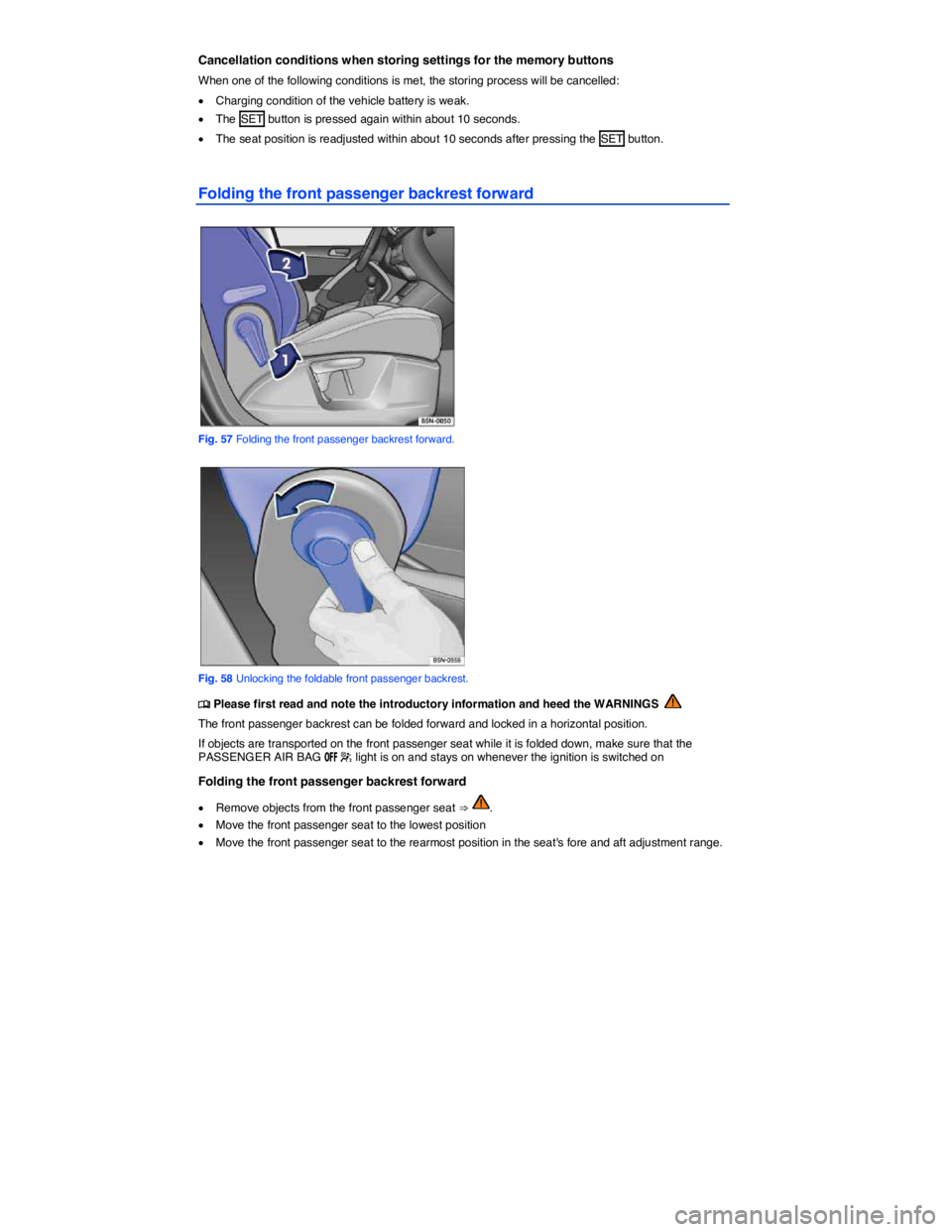
Folding the front passenger backrest forward
Fig. 57 Folding the front passenger backrest forward.
Fig. 58 Unlocking the foldable front passenger backrest.
Page 267 of 435
Display
Different cruise control versions are available. The stored speed is shown in the instrument cluster display on some equipment versions.
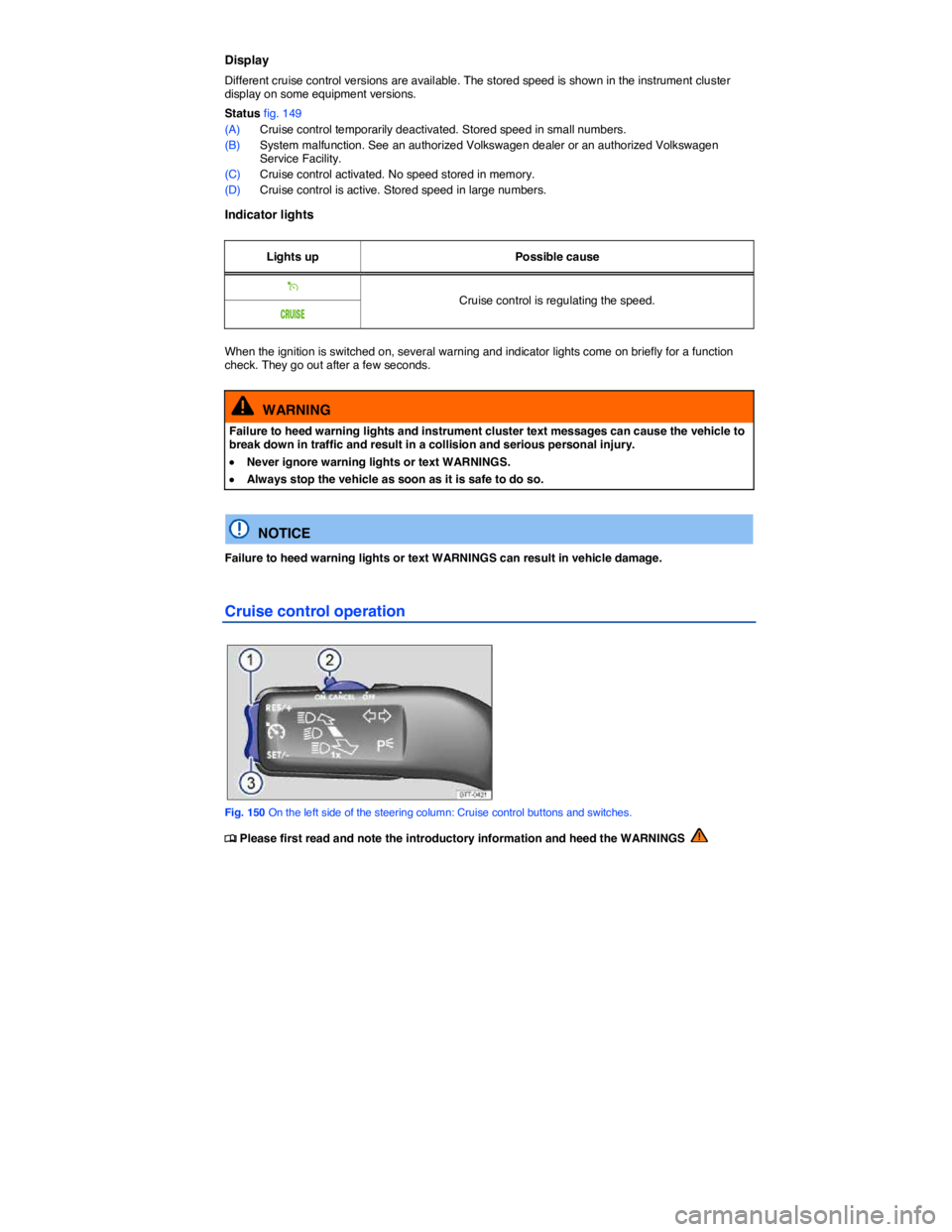
Status fig. 149
(A) Cruise control temporarily deactivated. Stored speed in small numbers.
(B) System malfunction. See an authorized Volkswagen dealer or an authorized Volkswagen Service Facility.
(C) Cruise control activated. No speed stored in memory.
(D) Cruise control is active. Stored speed in large numbers.
Indicator lights
Lights up Possible cause
% Cruise control is regulating the speed. #25)3%
When the ignition is switched on, several warning and indicator lights come on briefly for a function check. They go out after a few seconds.
WARNING
Failure to heed warning lights and instrument cluster text messages can cause the vehicle to break down in traffic and result in a collision and serious personal injury.
x Never ignore warning lights or text WARNINGS.
x Always stop the vehicle as soon as it is safe to do so.
NOTICE
Failure to heed warning lights or text WARNINGS can result in vehicle damage.
Cruise control operation
Fig. 150 On the left side of the steering column: Cruise control buttons and switches.
Page 282 of 435
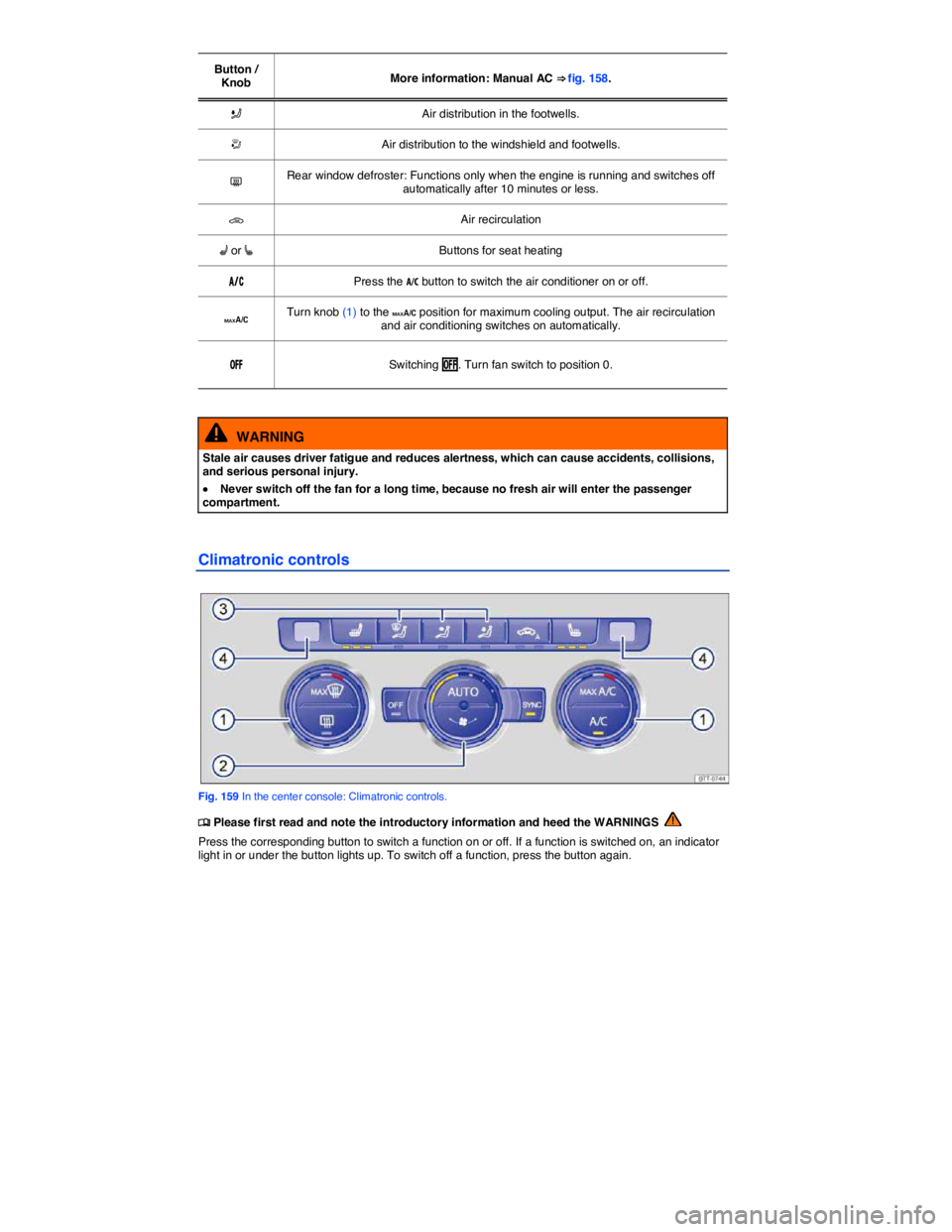
Button / Knob More information: Manual AC ⇒ fig. 158.
L Air distribution in the footwells.
u Air distribution to the windshield and footwells.
= Rear window defroster: Functions only when the engine is running and switches off automatically after 10 minutes or less.
3 Air recirculation
A or [ Buttons for seat heating
!
Page 379 of 435

Frequently asked questions (FAQ)
If you suspect a malfunction or vehicle damage, read and follow the following advice before contacting an authorized Volkswagen dealer or an authorized Volkswagen Service Facility. You may also find helpful information under “Characteristics” and “Checklist” in the index.
Description Possible causes among others Possible remedy
Engine does not start.
Vehicle battery dead. – Perform jump-start – Charge vehicle battery
The wrong remote control vehicle key is used. Use a valid remote control vehicle key
Fuel level too low. Refuel
Vehicle cannot be locked or unlocked using remote control vehicle key.
– Battery in remote control vehicle key dead. – Too far away from vehicle.(out of range). – Buttons have been pressed too many times.
– Replace battery in the remote control key – Move closer to vehicle. – Synchronize remote control vehicle key – Lock or unlock vehicle manually
Unusual noises. Cold engine, braking support systems, electronic parking brake.
Check the “Noises” entry in the keyword index.
Odd driving behavior. Assistance systems activated. Check the “Assistance systems” entry in the index.
Driver seat and outside mirrors move when vehicle is unlocked.
Convenience settings are stored. Correct convenience settings
Memory-seat settings are stored. – Reassign seat setting – Clear memory-seat memory
Front seats cannot be adjusted with power controls.
Vehicle battery dead. Charge vehicle battery
Fuse blown. Check fuse and replace if necessary
Features do not work as described in this manual.
Settings were adjusted in the Volkswagen Information System.
Check and reset to factory settings if necessary
Headlights do not light up the road as they should.
– Headlights incorrectly adjusted. – Light bulbs burned out. – Low beams not switched on.
Have the headlight range adjusted by an authorized Volkswagen dealer or an authorized Volkswagen Service Facility. Adjust headlight range – Change light bulbs – Switch on low beams