engine compartment VOLKSWAGEN TIGUAN 2017 Owner´s Manual
[x] Cancel search | Manufacturer: VOLKSWAGEN, Model Year: 2017, Model line: TIGUAN, Model: VOLKSWAGEN TIGUAN 2017Pages: 341, PDF Size: 9.14 MB
Page 140 of 341
•m/k/a995MKVehicles with a starter button: Press the starter button briefly ⇒ Fig. 119. If
the engine cannot be switched off, carry out the emergency switch-off procedure ⇒ Emergency
deactivation.
•Observe the instructions in the instrument cluster ⇒ Instrument cluster.
Warning before leaving the vehicle
In order to indicate an active ignition when leaving the vehicle, an acoustic warning signal sounds
when opening the driver door and corresponding warning messages appear on the display of the
instrument cluster. The ignition also switches off automatically after a certain period in order to
prevent unintentional discharge of the 12-volt vehicle battery.
m/k/a995MK Vehicles with DSG dual clutch gearbox: if the selector lever is not in position P,
an acoustic warning signal will sound when the driver door is opened and the warning
message Please move selector lever to position P. will be shown on the instrument cluster
display. In this way, a warning is given that the vehicle could potentially roll away. The electronic
parking brake is also activated.
After the engine is switched off, the radiator fan in the engine compartment may run on for
some minutes, even if the ignition is switched off or the vehicle key has been removed. The radiator
fan will switch itself off automatically.
Electronic immobiliser
First read and observe the introductoryinformation and safety warnings⇒
Introduction
The immobiliser helps to prevent the engine from being started and driven with an unauthorised
vehicle key.
There is a chip in the key. This is used to automatically deactivate the immobiliser when a valid
vehicle key is inserted into the ignition lock.
The electronic immobiliser is automatically activated when the vehicle key is removed from the
ignition lock. In vehicles with keyless locking and starting system Keyless Access, the vehicle key
must be outside the vehicle ⇒ Central and manual locking.
The engine can only be started using a genuine Volkswagen vehicle key with the correct code.
Coded vehicle keys are available from a Volkswagen dealership ⇒ Vehicle key set.
The vehicle cannot be operated properly if you do not have a genuine Volkswagen key.
Troubleshooting
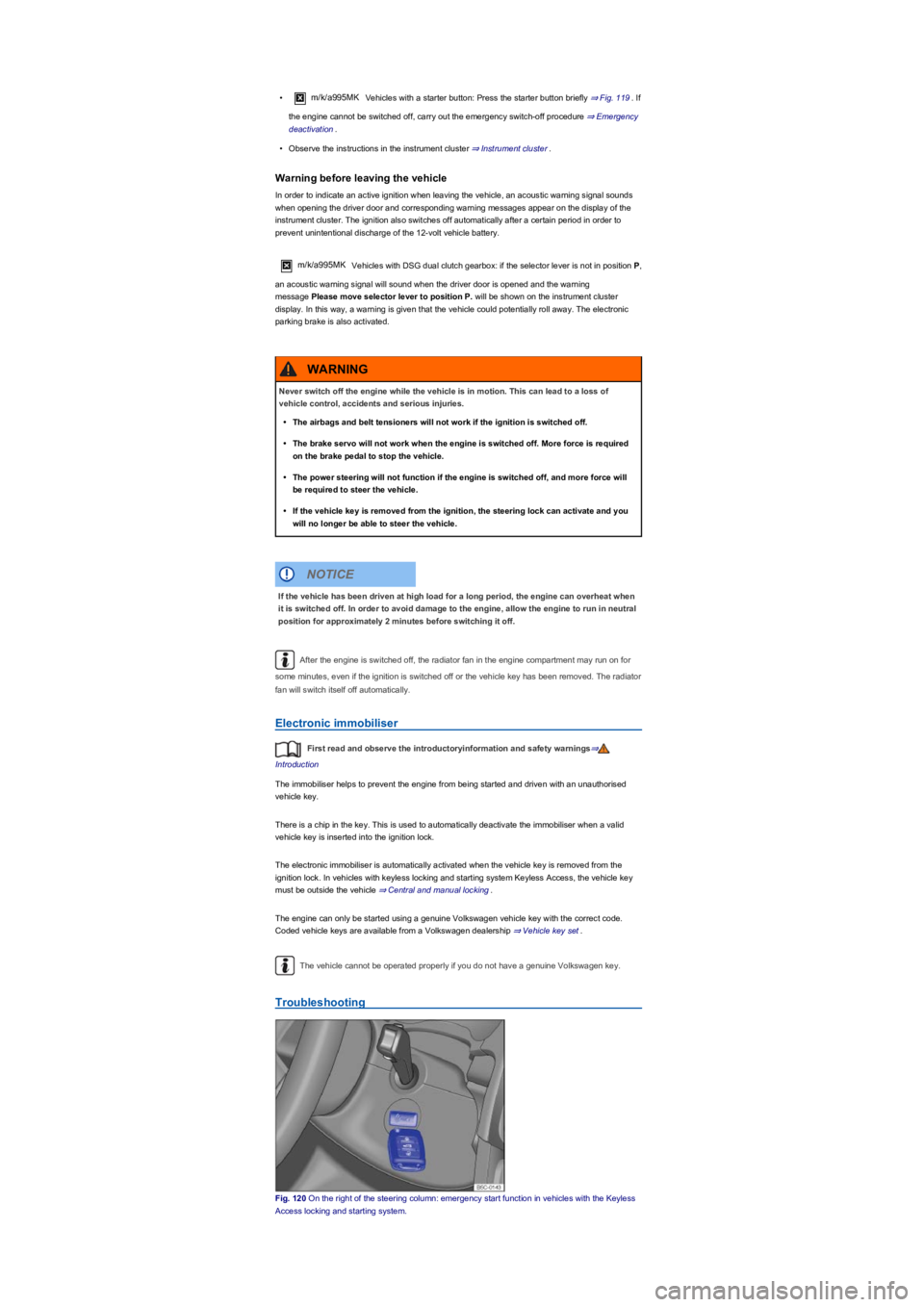
Fig. 120 On the right of the steering column: emergency start function in vehicles with the Keyless
Access locking and starting system.
Never switch off the engine while the vehicle is in motion. This can lead to a loss of
vehicle control, accidents and serious injuries.
•The airbags and belt tensioners will not work if the ignition is switched off.
•The brake servo will not work when the engine is switched off. More force is required
on the brake pedal to stop the vehicle.
•The power steering will not function if the engine is switched off, and more force will
be required to steer the vehicle.
•If the vehicle key is removed from the ignition, the steering lock can activate and you
will no longer be able to steer the vehicle.
WARNING
If the vehicle has been driven at high load for a long period, the engine can overheat when
it is switched off. In order to avoid damage to the engine, allow the engine to run in neutral
position for approximately 2 minutes before switching it off.
NOTICE
Page 143 of 341
Conditions that require a manual engine start
The engine must be started manually under the following conditions:
•If the driver door is opened.
•If the bonnet is opened.
Activating and deactivating the start/stop system manually
•Press the button in the centre console ⇒ Fig. 121 to deactivate the system. If the
start/stop system has been deactivated, the indicator lamp in the button lights up.
•Press the button in the centre console again ⇒ Fig. 121 to reactivate the system.
The instrument cluster shows the status of the start/stop system every time the button is
pressed.
If the start/stop system has switched the engine off, it will start again as soon as the system has
been deactivated manually with the button.
Always deactivate the start/stop system manually when driving through water.
Start/stop mode when Adaptive Cruise Control (ACC) is active
The engine will be switched off after the Adaptive Cruise Control (ACC) has brought the vehicle to a
standstill via an active braking intervention ⇒ Adaptive Cruise Control (ACC).
m/k/a995MKVehicles with DSG dual clutch gearbox: when the Adaptive Cruise Control
(ACC) is active, the DSG dual clutch gearbox can shift into coasting mode and the engine can be
switched off with the engine-off coasting function.
In the following instances, the engine will restart when the Adaptive Cruise Control (ACC) is active:
•If the accelerator is depressed.
•When the Adaptive Cruise Control (ACC) has resumed speed and automatic distance control.
•If the vehicle ahead has moved on.
•If the Adaptive Cruise Control (ACC) is deactivated and the vehicle driving in front moved away.
Troubleshooting
The engine stop function may be deactivated if the temperature is above around 38°C (100°F).
In some cases, it may be necessary to restart the engine manually. Follow any
corresponding messages on the instrument cluster display.
The start/stop function is activated automatically if the Eco driving profile is selected on
vehicles with driving profile selection ⇒ Driving profile selection and 4MOTION Active Control.
Always deactivate the start/stop system manually when driving through water.
Manual gearbox: selecting a gear
®
Never switch off the engine or the ignition while the vehicle is in motion. This can lead to a
loss of vehicle control, accidents and serious injuries.
•The airbags and belt tensioners will not work if the ignition is switched off.
•The brake servo will not work when the engine is switched off. That is why more
pressure on the brake pedal is needed to brake the vehicle when the engine is
switched off.
•The power steering will not work when the engine is not running. More power is
needed to steer the vehicle when the engine is switched off.
•When the ignition is switched off, the steering lock may activate and you will no longer
be able to steer the vehicle.
•The start/stop system must be deactivated if work is to be carried out in the engine
compartment.
WARNING
If the start/stop system is used in very high outside temperatures over a long period, the
12-volt vehicle battery can be damaged.
NOTICE
Page 163 of 341
•Use the Off-road display ⇒ Off-road display.
Up hill and down dale
First read and observe the introductoryinformation and safety warnings⇒
Introduction
Use off-road mode ⇒ Selecting a driving profile (4MOTION Action Control).
You should drive through rocky terrain at walking pace.
If you are not able to drive around a stone, drive carefully onto the stone with one front wheel and
drive over it slowly ⇒.
Escaping engine oil and brake fluid can pollute the environment. Spilt service fluids must be
collected and then disposed of properly and in an environmentally responsible way.
Driving through water
First read and observe the introductoryinformation and safety warnings⇒
Introduction
Driving through flooded terrain could damage the vehicle ⇒ Checklist: Before driving off-road.
You can drive the vehicle carefully through water with a depth reaching to the bottom edge of the
body, for example puddles or shallow water. Never stop in the water, do not drive in reverse, and
never switch off the engine.
Off-road driving in snow
First read and observe the introductoryinformation and safety warnings⇒
Introduction
Fit snow chains to the front wheels only before driving on snow-covered terrain.
Terrain might look harmless, but there could be hidden dangers. This is particularly true of sections
where there are no tyre tracks.
•You should never drive straight over large obstacles, e.g. boulders or tree stumps, or
drive over such obstacles with one side of the vehicle. Obstacles which require more
ground clearance than is available could damage vehicle components when you drive
over them and thus cause the vehicle to break down.
•Even obstacles that are smaller than the ground clearance selected could come into
contact with the vehicle underbody and thus cause damage which could lead to a
vehicle breakdown. This applies in particular if there is a ditch or soft ground either in
front of or behind the obstacle. This also applies in cases when you drive too quickly
over the obstacle causing the vehicle to bounce.
NOTICE
Strong flowing water can develop enormous power and sweep the vehicle away. This can
lead to very dangerous situations which can cause accidents and serious or even fatal
accidents.
•Never allow the vehicle to stand still in water.
•Water in the engine compartment can cause the vehicle to breakdown in the water.
•Soft ground surface, underwater obstacles and shallows can cause accidents and can
cause the vehicle to breakdown in the water. This could lead to critical situations.
WARNING
If you drive through water, parts of the vehicle, such as the engine, drive train, running
gear and vehicle electrics, could sustain severe damage.
•When driving through water, always select a section where the ground is solid and
where the depth of the water does not exceed the maximum permitted wading depth of
the vehicle.
•Never drive through salt, salty surfaces or salt water as salt can cause corrosion. Rinse
all components that have been exposed to salt or salt water thoroughly with fresh
water.
NOTICE
Page 167 of 341
Clean the turn signals, headlight system, the number plate and all windows.
If necessary, remove the towing eye and the snow chains.
Check the tyres, struts and axles for damage and remove dirt, stones and other foreign
bodies from the tyre tread.
Inspect the vehicle underbody and remove all items that are jammed in the brake system,
on the wheels, in the running gear, in the exhaust system and in the engine, such as
branches, leaves or pieces of wood . If you see any damage or leaks, take your vehicle to a
qualified workshop.
Clean heavy soiling from the radiator grille and the vehicle underbody Vehicle care.
Check the engine compartment to see if any dirt is affecting the engine operation In the
engine compartment.
Switch off OFF-ROAD mode Selecting a driving profile (4MOTION Action Control).
Switch on TCS again Brake support systems.
If your vehicle gets stuck
First read and observe the introductoryinformation and safety warnings⇒
Introduction
Rocking out a vehicle requires a great deal of training and feeling for the vehicle.
If you make a mistake when rocking the vehicle, it can sink deeper and you will need assistance to
get out of the mud.
When you cannot proceed ...
•Carefully dig out all the wheels and check that no other parts of the vehicle are stuck in the
sand.
•Engage reverse gear.
•Reverse over your own tracks, accelerating gently.
If this does not help, place brushwood, floor mats or sacking directly in front of the wheels to
increase grip ⇒.
Rocking the vehicle
Never allow the wheels to spin for long periods as this will cause the vehicle to sink deeper ⇒.
•Switch off TCS ⇒ Brake support systems.
•Position the steering wheel so that it is facing straight ahead.
•Reverse until the point where the wheels just start to spin.
•Quickly select first gear and drive forwards until the wheels start to spin again.
•Repeat driving back and forth until you have enough momentum to free yourself.
•Switch the TCS on after the rocking procedure is completed ⇒ Brake support systems.
•Use the Off-road driving profile.
After off-road driving
First read and observe the introductoryinformation and safety warnings⇒
Introduction
Checklist
Never drive through a ditch if the entry/exit angle is too steep for the vehicle and the ditch
is too deep. The vehicle could slide away, tip over or roll.
WARNING
If you drive into the ditch at a right angle, the front wheels will fall in. The underbody of
your vehicle could get stuck and damaged which means that the vehicle could break
down. It is then almost impossible to get out of the ditch despite having all-wheel drive.
NOTICE
Nobody may stand either in front or behind the vehicle, particularly if you are attempting
to free a stuck vehicle.
•Spinning wheels can propel stones, brushwood, pieces of wood or other objects that
are in front or behind the wheels at enormous speed and cause potentially fatal injury.
•People standing in front of or behind the vehicle could be run over if the stuck vehicle
starts to move suddenly.
WARNING
Page 192 of 341
Troubleshooting
Warning and indicator lamps on the instrument cluster display
Fault in electronic parking brake. Go to a qualified workshop.
Electronic parking brake does not switch off
The electronic parking brake will not switch itself off if the prerequisites for switching off are not met
or the 12-volt vehicle battery is discharged. Use jump leads ⇒ Jump starting.
Noises of the electronic parking brake
•Noises may be heard when the electronic parking brake is switched on or off.
•If the electronic parking brake has not been used for a long period, the system will carry out
occasional automatic and acoustic checks when the vehicle is parked.
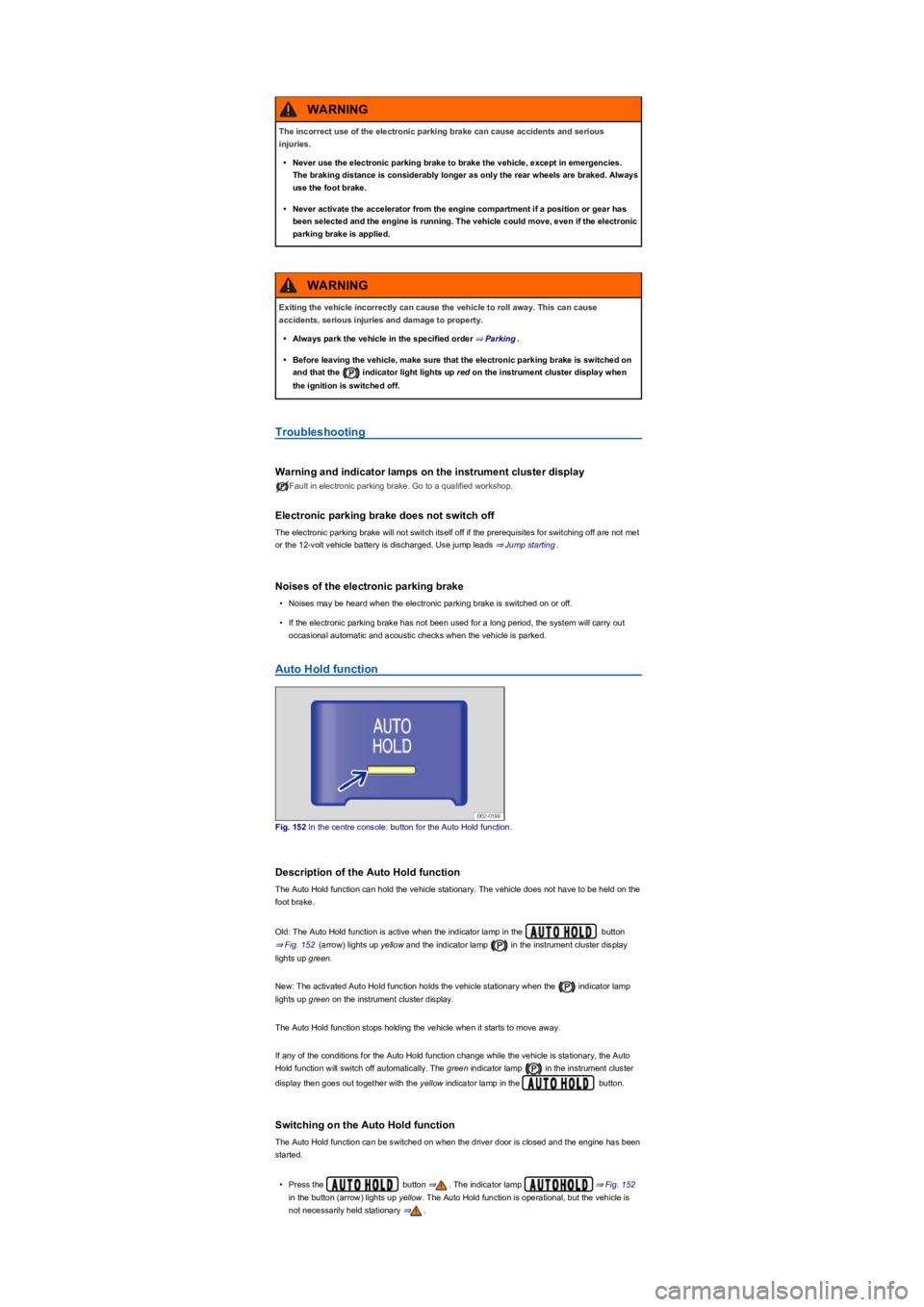
Auto Hold function
Fig. 152 In the centre console: button for the Auto Hold function.
Description of the Auto Hold function
The Auto Hold function can hold the vehicle stationary. The vehicle does not have to be held on the
foot brake.
Old: The Auto Hold function is active when the indicator lamp in the button
⇒ Fig. 152 (arrow) lights up yellow and the indicator lamp in the instrument cluster display
lights up green.
New: The activated Auto Hold function holds the vehicle stationary when the indicator lamp
lights up green on the instrument cluster display.
The Auto Hold function stops holding the vehicle when it starts to move away.
If any of the conditions for the Auto Hold function change while the vehicle is stationary, the Auto
Hold function will switch off automatically. The green indicator lamp in the instrument cluster
display then goes out together with the yellow indicator lamp in the button.
Switching on the Auto Hold function
The Auto Hold function can be switched on when the driver door is closed and the engine has been
started.
•Press the button ⇒. The indicator lamp ⇒ Fig. 152
in the button (arrow) lights up yellow. The Auto Hold function is operational, but the vehicle is
not necessarily held stationary ⇒.
The incorrect use of the electronic parking brake can cause accidents and serious
injuries.
•Never use the electronic parking brake to brake the vehicle, except in emergencies.
The braking distance is considerably longer as only the rear wheels are braked. Always
use the foot brake.
•Never activate the accelerator from the engine compartment if a position or gear has
been selected and the engine is running. The vehicle could move, even if the electronic
parking brake is applied.
WARNING
Exiting the vehicle incorrectly can cause the vehicle to roll away. This can cause
accidents, serious injuries and damage to property.
•Always park the vehicle in the specified order ⇒ Parking.
•Before leaving the vehicle, make sure that the electronic parking brake is switched on
and that the indicator light lights up red on the instrument cluster display when
the ignition is switched off.
WARNING
Page 211 of 341
•Switch off TCS: press the button for around one second.
•Switch on ESC Sport: press the button for longer than three seconds.
•Switch on TCS: press the button again. ESC Sport is switched off.
Troubleshooting
Warning and indicator lamps in the event of faults
Do not drive on! Brake system fault. Seek expert assistance immediately ⇒.Lit
up: ABS failure or defect. Go to a qualified workshop. The vehicle can be braked without ABS.
Lit up: ESC switched off by the system. Switch the ignition on and off. Drive a short distance at a
speed of 15 – 20 km/h (9 – 12 mph) if necessary. If still lights up, seek expert assistance.
Notes on the brake support systems
If you suspect that there is a malfunction in the systems, read and observe the following notes:
•The ESC and TCS can function properly only if all four wheels are fitted with the same tyres.
Any differences in the rolling radius of the tyres can cause the system to reduce engine power
unexpectedly.
•If there is a fault in the anti-lock brake system, the ESC, TCS and EDL will also stop working.
•Operating noises may be heard during the self-regulation processes of the systems explained
above.
Practical equipment
Stowage areas
Introduction
This chapter contains information on the followingsubjects:
⇒ Stowage compartment on the driver side
⇒ Stowage compartment on the front passenger side
⇒ Stowage compartment in the dash panel
⇒ Stowage compartment in the front centre armrest
⇒ Stowage compartment in the roof console (glasses compartment)
⇒ Folding table
⇒ Drawers
⇒ Coat and bag hooks
Use stowage compartments only to stow light or relatively small objects.
A factory-fitted CD changer, Apple iPod adapter, USB connection or multimedia socket
(MEDIA-IN) may be located in the stowage compartment in the centre armrest.
•If the brake warning lamp lights up together with the ABS indicator lamp , the
control function of the anti-lock brake system may have failed. This can cause the rear
wheels to lock quickly when you brake. Locked rear wheels can lead to a loss of
control of the vehicle. If possible, reduce your speed and drive carefully at low speed
to the nearest qualified workshop in order to have the brake system tested. Avoid
sudden braking and driving manoeuvres on the way.
•The anti-lock brake system is not functioning correctly if the ABS indicator lamp
does not go out or comes on while the vehicle is in motion. The vehicle can be stopped
using the normal brakes only (without the anti-lock brake system). The protection
provided by the anti-lock brake system is no longer available. Go to a qualified
workshop as soon as possible.
WARNING
®
Page 219 of 341
The cigarette lighter socket can also be used as a 12-volt socket ⇒ Electrical sockets.
Electrical sockets
Introduction
This chapter contains information on the followingsubjects:
⇒ Sockets in the vehicle
Electrical equipment can be connected to the sockets in the vehicle.
The electrical devices must be in good condition. Do not use faulty devices.
The 12-volt socket will work only when the ignition is switched on.
Using electrical consumers with the engine switched off and the ignition switched on will
drain the 12-volt battery.
Unshielded devices can cause interference in the Infotainment system and vehicle
electronics.
Sockets in the vehicle
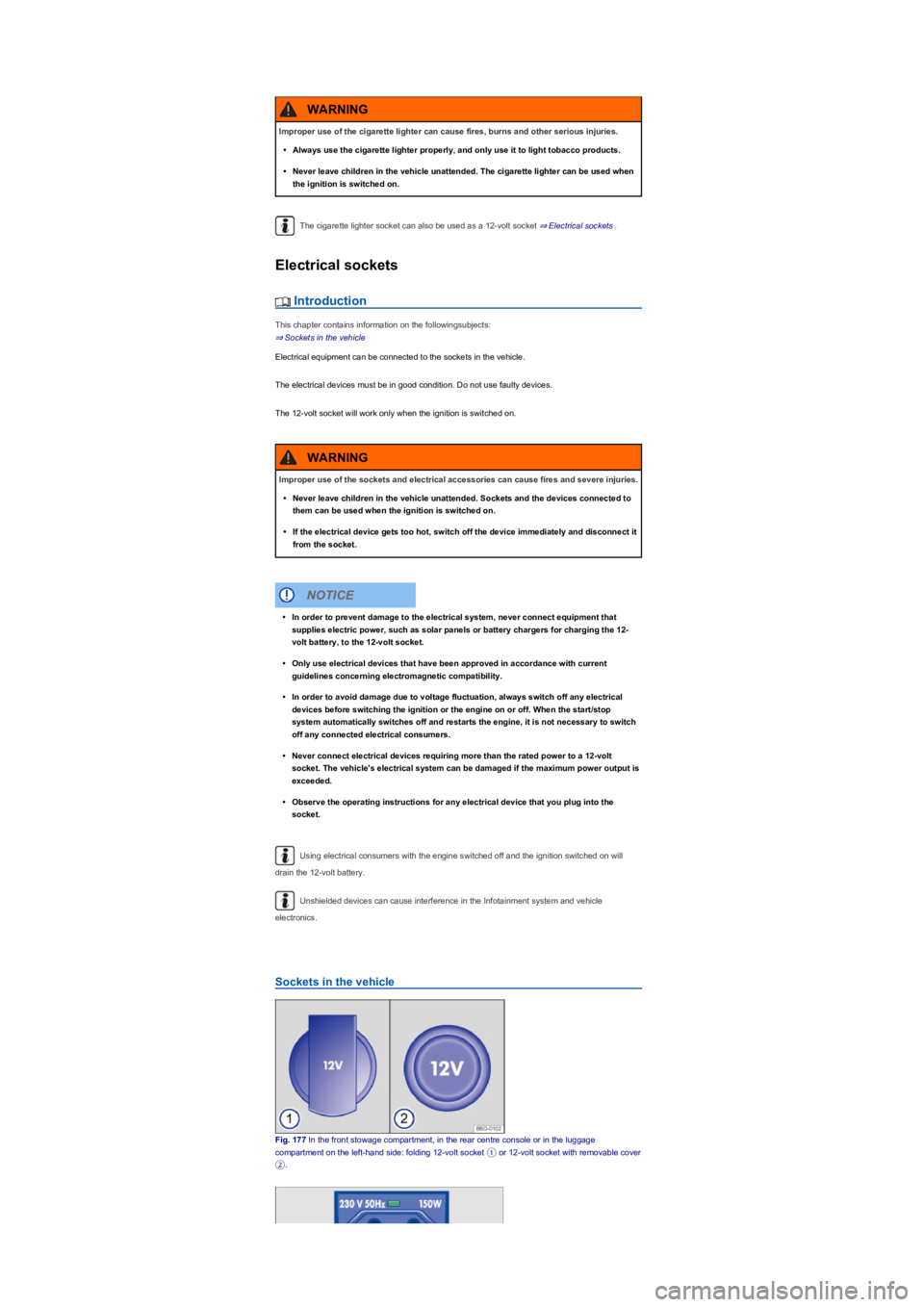
Fig. 177 In the front stowage compartment, in the rear centre console or in the luggage
compartment on the left-hand side: folding 12-volt socket ① or 12-volt socket with removable cover
②.
Improper use of the cigarette lighter can cause fires, burns and other serious injuries.
•Always use the cigarette lighter properly, and only use it to light tobacco products.
•Never leave children in the vehicle unattended. The cigarette lighter can be used when
the ignition is switched on.
WARNING
Improper use of the sockets and electrical accessories can cause fires and severe injuries.
•Never leave children in the vehicle unattended. Sockets and the devices connected to
them can be used when the ignition is switched on.
•If the electrical device gets too hot, switch off the device immediately and disconnect it
from the socket.
WARNING
•In order to prevent damage to the electrical system, never connect equipment that
supplies electric power, such as solar panels or battery chargers for charging the 12-
volt battery, to the 12-volt socket.
•Only use electrical devices that have been approved in accordance with current
guidelines concerning electromagnetic compatibility.
•In order to avoid damage due to voltage fluctuation, always switch off any electrical
devices before switching the ignition or the engine on or off. When the start/stop
system automatically switches off and restarts the engine, it is not necessary to switch
off any connected electrical consumers.
•Never connect electrical devices requiring more than the rated power to a 12-volt
socket. The vehicle's electrical system can be damaged if the maximum power output is
exceeded.
•Observe the operating instructions for any electrical device that you plug into the
socket.
NOTICE
Page 220 of 341
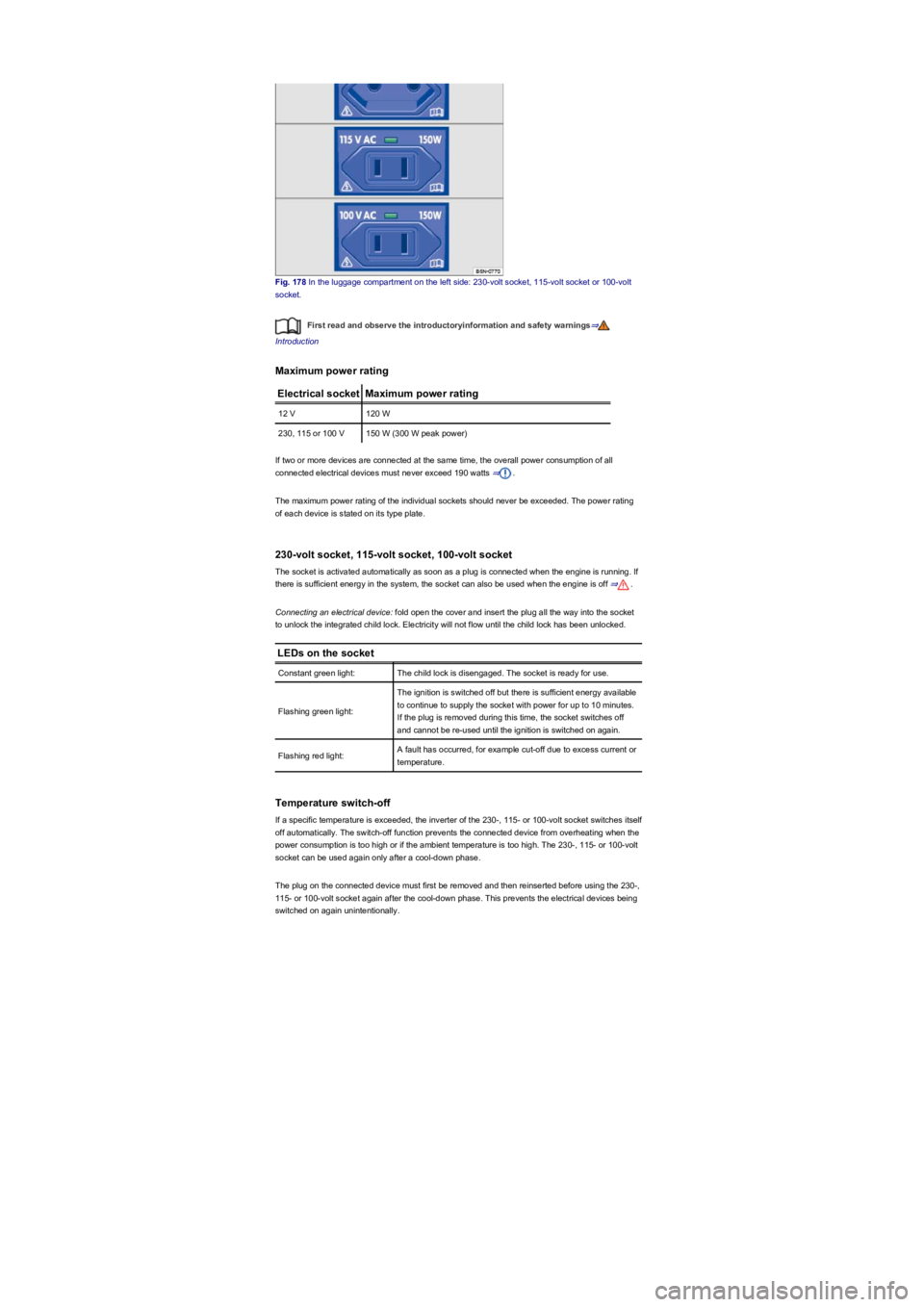
Fig. 178 In the luggage compartment on the left side: 230-volt socket, 115-volt socket or 100-volt
socket.
First read and observe the introductoryinformation and safety warnings⇒
Introduction
Maximum power rating
Electrical socketMaximum power rating
12 V120 W
230, 115 or 100 V150 W (300 W peak power)
If two or more devices are connected at the same time, the overall power consumption of all
connected electrical devices must never exceed 190 watts ⇒.
The maximum power rating of the individual sockets should never be exceeded. The power rating
of each device is stated on its type plate.
230-volt socket, 115-volt socket, 100-volt socket
The socket is activated automatically as soon as a plug is connected when the engine is running. If
there is sufficient energy in the system, the socket can also be used when the engine is off ⇒.
Connecting an electrical device: fold open the cover and insert the plug all the way into the socket
to unlock the integrated child lock. Electricity will not flow until the child lock has been unlocked.
LEDs on the socket
Constant green light:The child lock is disengaged. The socket is ready for use.
Flashing green light:
The ignition is switched off but there is sufficient energy available
to continue to supply the socket with power for up to 10 minutes.
If the plug is removed during this time, the socket switches off
and cannot be re-used until the ignition is switched on again.
Flashing red light:A fault has occurred, for example cut-off due to excess current or
temperature.
Temperature switch-off
If a specific temperature is exceeded, the inverter of the 230-, 115- or 100-volt socket switches itself
off automatically. The switch-off function prevents the connected device from overheating when the
power consumption is too high or if the ambient temperature is too high. The 230-, 115- or 100-volt
socket can be used again only after a cool-down phase.
The plug on the connected device must first be removed and then reinserted before using the 230-,
115- or 100-volt socket again after the cool-down phase. This prevents the electrical devices being
switched on again unintentionally.
Page 231 of 341
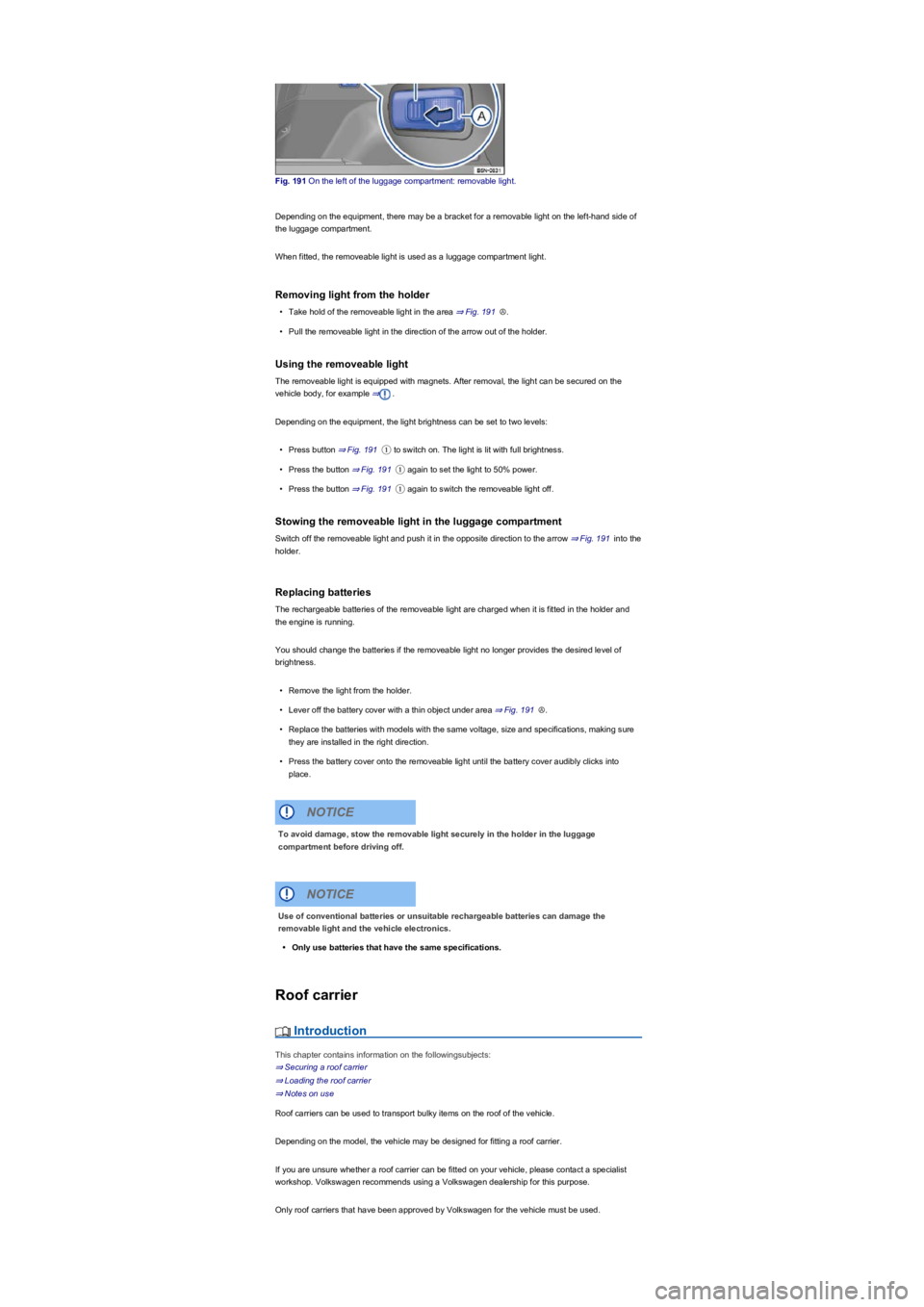
Fig. 191 On the left of the luggage compartment: removable light.
Depending on the equipment, there may be a bracket for a removable light on the left-hand side of
the luggage compartment.
When fitted, the removeable light is used as a luggage compartment light.
Removing light from the holder
•Take hold of the removeable light in the area ⇒ Fig. 191Ⓐ.
•Pull the removeable light in the direction of the arrow out of the holder.
Using the removeable light
The removeable light is equipped with magnets. After removal, the light can be secured on the
vehicle body, for example ⇒.
Depending on the equipment, the light brightness can be set to two levels:
•Press button ⇒ Fig. 191① to switch on. The light is lit with full brightness.
•Press the button ⇒ Fig. 191① again to set the light to 50% power.
•Press the button ⇒ Fig. 191① again to switch the removeable light off.
Stowing the removeable light in the luggage compartment
Switch off the removeable light and push it in the opposite direction to the arrow ⇒ Fig. 191 into the
holder.
Replacing batteries
The rechargeable batteries of the removeable light are charged when it is fitted in the holder and
the engine is running.
You should change the batteries if the removeable light no longer provides the desired level of
brightness.
•Remove the light from the holder.
•Lever off the battery cover with a thin object under area ⇒ Fig. 191Ⓐ.
•Replace the batteries with models with the same voltage, size and specifications, making sure
they are installed in the right direction.
•Press the battery cover onto the removeable light until the battery cover audibly clicks into
place.
Roof carrier
Introduction
This chapter contains information on the followingsubjects:
⇒ Securing a roof carrier
⇒ Loading the roof carrier
⇒ Notes on use
Roof carriers can be used to transport bulky items on the roof of the vehicle.
Depending on the model, the vehicle may be designed for fitting a roof carrier.
If you are unsure whether a roof carrier can be fitted on your vehicle, please contact a specialist
workshop. Volkswagen recommends using a Volkswagen dealership for this purpose.
Only roof carriers that have been approved by Volkswagen for the vehicle must be used.
To avoid damage, stow the removable light securely in the holder in the luggage
compartment before driving off.
NOTICE
Use of conventional batteries or unsuitable rechargeable batteries can damage the
removable light and the vehicle electronics.
•Only use batteries that have the same specifications.
NOTICE
Page 236 of 341
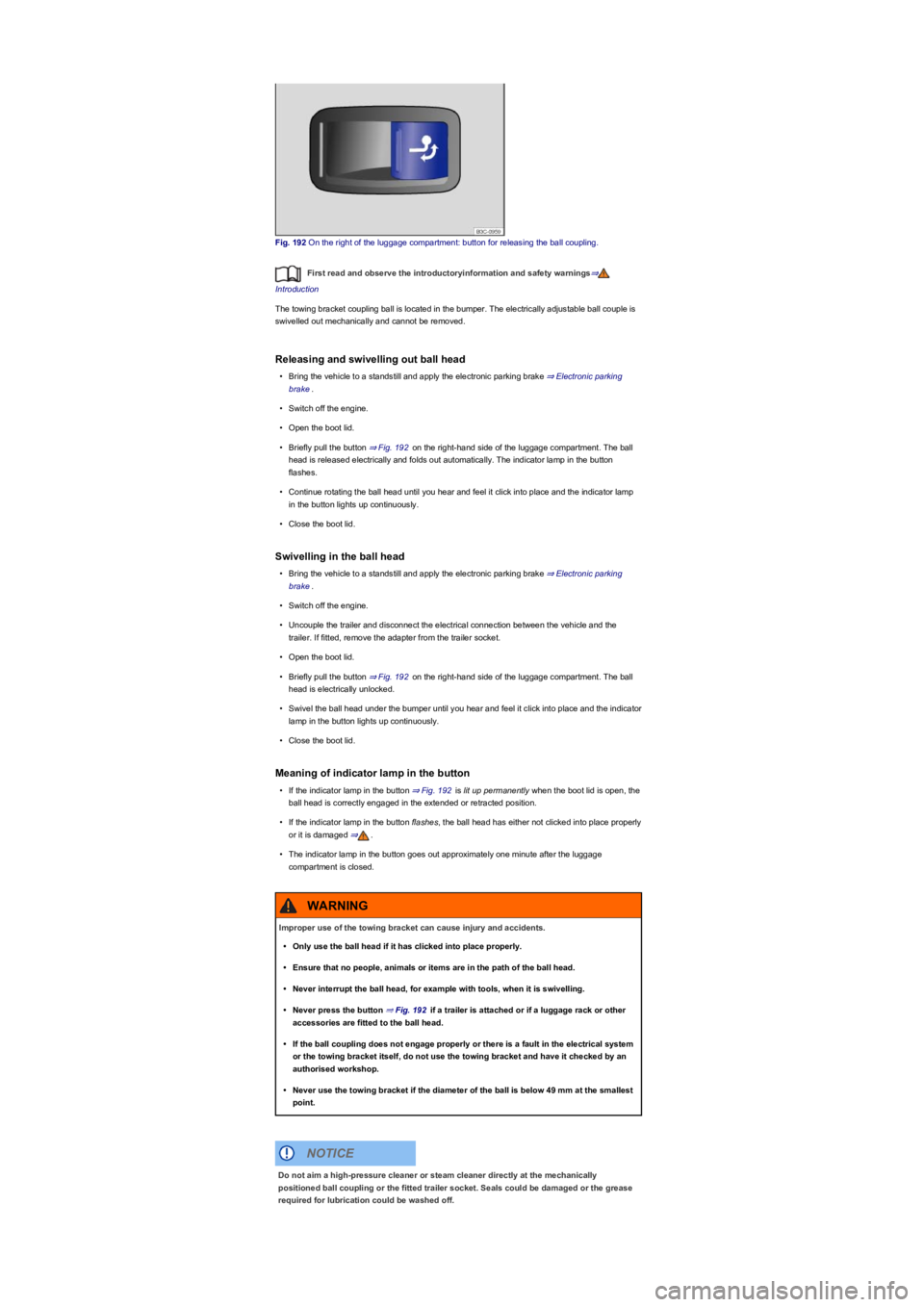
Fig. 192 On the right of the luggage compartment: button for releasing the ball coupling.
First read and observe the introductoryinformation and safety warnings⇒
Introduction
The towing bracket coupling ball is located in the bumper. The electrically adjustable ball couple is
swivelled out mechanically and cannot be removed.
Releasing and swivelling out ball head
•Bring the vehicle to a standstill and apply the electronic parking brake ⇒ Electronic parking
brake.
•Switch off the engine.
•Open the boot lid.
•Briefly pull the button ⇒ Fig. 192 on the right-hand side of the luggage compartment. The ball
head is released electrically and folds out automatically. The indicator lamp in the button
flashes.
•Continue rotating the ball head until you hear and feel it click into place and the indicator lamp
in the button lights up continuously.
•Close the boot lid.
Swivelling in the ball head
•Bring the vehicle to a standstill and apply the electronic parking brake ⇒ Electronic parking
brake.
•Switch off the engine.
•Uncouple the trailer and disconnect the electrical connection between the vehicle and the
trailer. If fitted, remove the adapter from the trailer socket.
•Open the boot lid.
•Briefly pull the button ⇒ Fig. 192 on the right-hand side of the luggage compartment. The ball
head is electrically unlocked.
•Swivel the ball head under the bumper until you hear and feel it click into place and the indicator
lamp in the button lights up continuously.
•Close the boot lid.
Meaning of indicator lamp in the button
•If the indicator lamp in the button ⇒ Fig. 192 is lit up permanently when the boot lid is open, the
ball head is correctly engaged in the extended or retracted position.
•If the indicator lamp in the button flashes, the ball head has either not clicked into place properly
or it is damaged ⇒.
•The indicator lamp in the button goes out approximately one minute after the luggage
compartment is closed.
Improper use of the towing bracket can cause injury and accidents.
•Only use the ball head if it has clicked into place properly.
•Ensure that no people, animals or items are in the path of the ball head.
•Never interrupt the ball head, for example with tools, when it is swivelling.
•Never press the button ⇒ Fig. 192 if a trailer is attached or if a luggage rack or other
accessories are fitted to the ball head.
•If the ball coupling does not engage properly or there is a fault in the electrical system
or the towing bracket itself, do not use the towing bracket and have it checked by an
authorised workshop.
•Never use the towing bracket if the diameter of the ball is below 49 mm at the smallest
point.
WARNING
Do not aim a high-pressure cleaner or steam cleaner directly at the mechanically
positioned ball coupling or the fitted trailer socket. Seals could be damaged or the grease
required for lubrication could be washed off.
NOTICE