boot lid VOLKSWAGEN TIGUAN 2017 Owner´s Manual
[x] Cancel search | Manufacturer: VOLKSWAGEN, Model Year: 2017, Model line: TIGUAN, Model: VOLKSWAGEN TIGUAN 2017Pages: 341, PDF Size: 9.14 MB
Page 106 of 341
Switching on the Coming Home function
m/k/a999MKNot in China
•Switch off the ignition.
•Operate the headlight flasher for approximately one second.
The Coming Home lighting is switched on when the driver door is opened. The switch-off delay
starts when the last vehicle door or the boot lid has been closed.
Switching on the Coming Home function
m/k/a999MKOnly in China
•Switch off the ignition.
The Coming Home lighting is switched on when the light switch is in position and the
rain/light sensor detects that it is dark.
The switch-off delay starts when the last vehicle door or the boot lid has been closed.
Switching off the Coming home function
•Automatically after the set switch-off delay has elapsed.
•OR: automatically if a vehicle door or the boot lid is still open approximately 30 seconds after
switching on.
•OR: turn light switch to position .
•OR: switch on the ignition.
Switching on the Leaving home function
•Unlock the vehicle when the light switch is in position and the rain/light sensor detects
that it is dark.
Switching off the Leaving home function
•Automatically after the switch-off delay.
•OR: lock the vehicle.
•OR: turn light switch to position .
•OR: switch on the ignition.
Some settings can be stored in the user accounts of the personalisation function and
therefore change automatically when the user account changes ⇒ Personalisation.
Headlights
Headlight range control
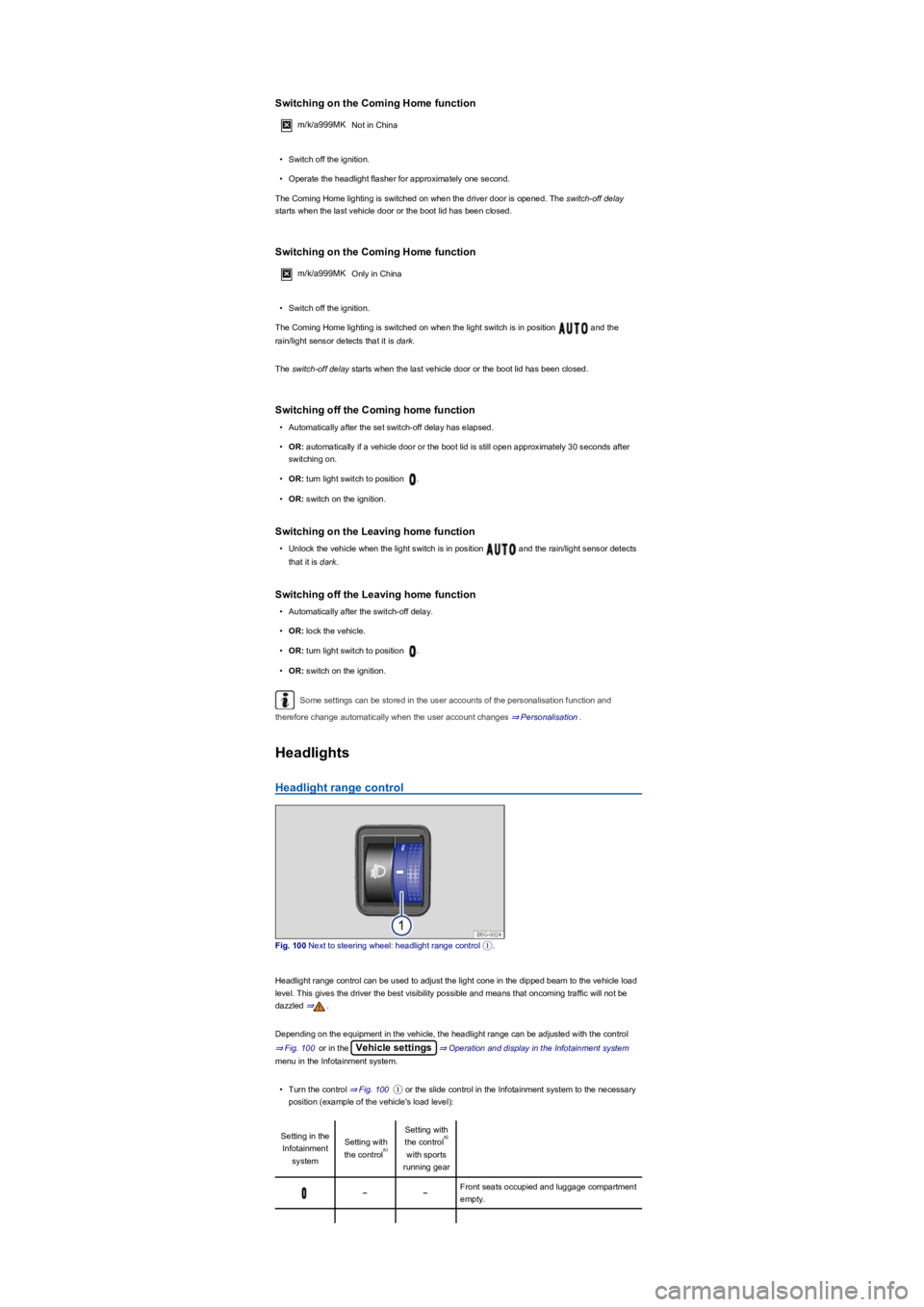
Fig. 100 Next to steering wheel: headlight range control ①.
Headlight range control can be used to adjust the light cone in the dipped beam to the vehicle load
level. This gives the driver the best visibility possible and means that oncoming traffic will not be
dazzled ⇒.
Depending on the equipment in the vehicle, the headlight range can be adjusted with the control
⇒ Fig. 100 or in the Vehicle settings⇒ Operation and display in the Infotainment system
menu in the Infotainment system.
•Turn the control ⇒ Fig. 100① or the slide control in the Infotainment system to the necessary
position (example of the vehicle's load level):
Setting in the
Infotainment
system
Setting with
the control
Setting with
the control
with sports
running gear
Front seats occupied and luggage compartment
empty.
a)
a)
Page 108 of 341
•If the dynamic cornering light has been deactivated.
•If travel mode is activated ⇒ Switching over headlights for driving abroad (travel mode).
•When the Eco driving profile is selected in vehicles with driving profile selection ⇒ Driving
profile selection and 4MOTION Active Control.
Interior lighting
Instrument and switch lighting
The brightness of the instrument and switch lighting and the basic brightness level of the Head-up
Display ⇒ Instrument cluster can be adjusted in the Infotainment system in
the Vehicle settings menu ⇒ Operation and display in the Infotainment system.
The brightness setting is automatically adjusted to the changing light conditions in the vehicle.
When the light switch is in position , a sensor will switch the dipped beam and the lighting
in the instruments and switches on and off automatically depending on the ambient brightness
level.
When the light is switched off and the ignition switched on, the dash panel lighting (indicators
and scales) is switched on. As the ambient light becomes lower, the lighting of these scales is
automatically reduced and may be switched off entirely. This function is intended to remind the
driver to switch on the dipped beam in good time, i.e. when driving through tunnels.
Interior lights, reading lights, background lighting
Press the corresponding button:
Switches the front interior lights on or off.Switches the rear interior lights on or off.
The interior lights are switched on automatically when the vehicle is unlocked, a door is
opened or the vehicle key is removed from the ignition lock.Switches the reading lights on or
off.
Stowage compartment and luggage compartment lights
A light will be switched on and off automatically when the stowage compartment on the front
passenger side, or the boot lid, is opened or closed.
Background lighting
Depending on the equipment level, the background lighting provides indirect light in the various
areas of the vehicle interior.
The footwell and, where applicable, the closed blind of the glass roof may also be illuminated.
The brightness of the background lighting can be adjusted in the Infotainment system in
the Vehicle settings menu ⇒ Operation and display in the Infotainment system.
The lights go out when the vehicle is locked or after a delay of a few minutes when the
vehicle key is removed from the ignition lock. This prevents the 12-volt battery from discharging.
Some settings can be stored in the user accounts of the personalisation function and
therefore change automatically when the user account changes ⇒ Personalisation.
Visibility
Wipers
Operating the wiper lever
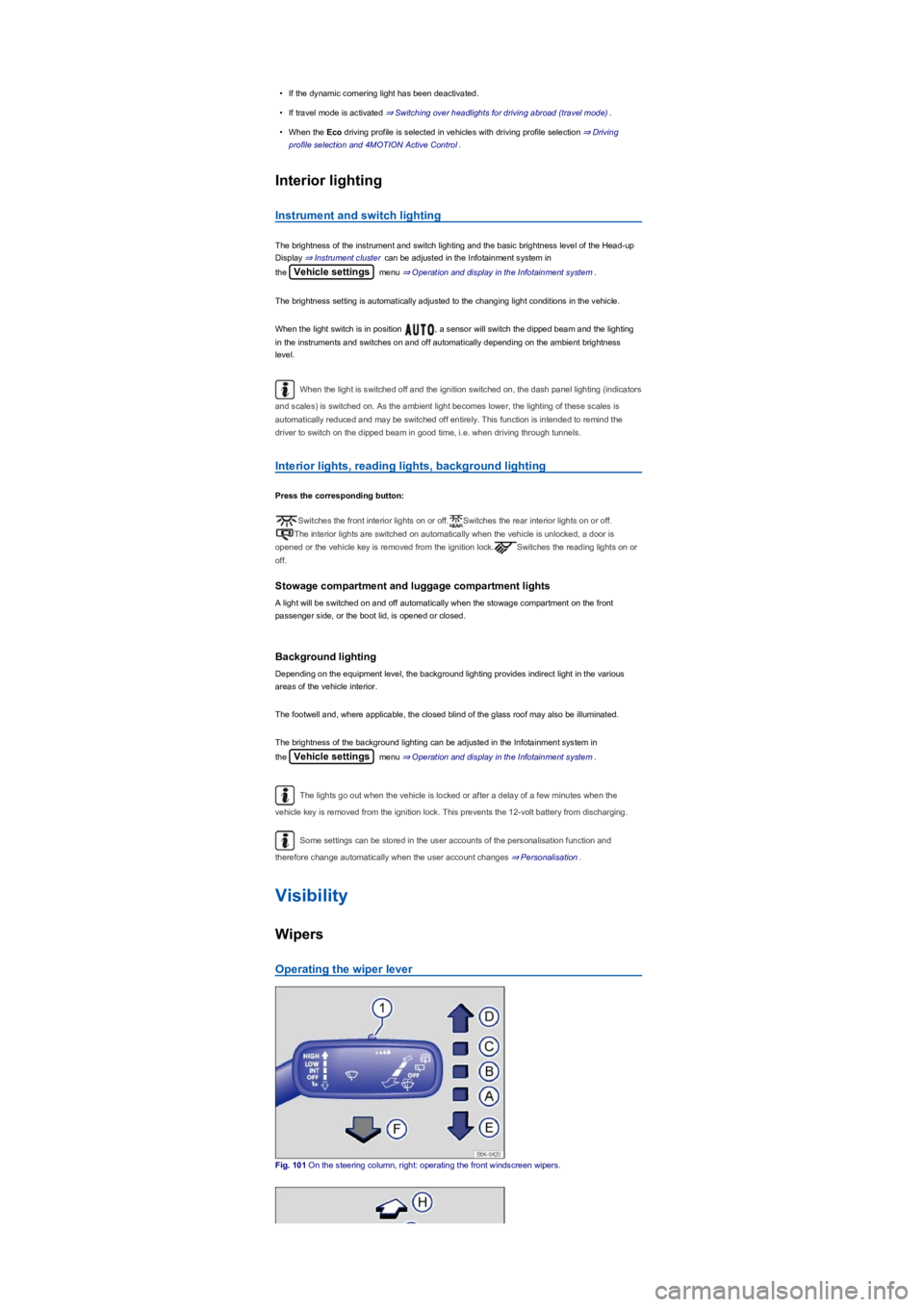
Fig. 101 On the steering column, right: operating the front windscreen wipers.
Page 109 of 341
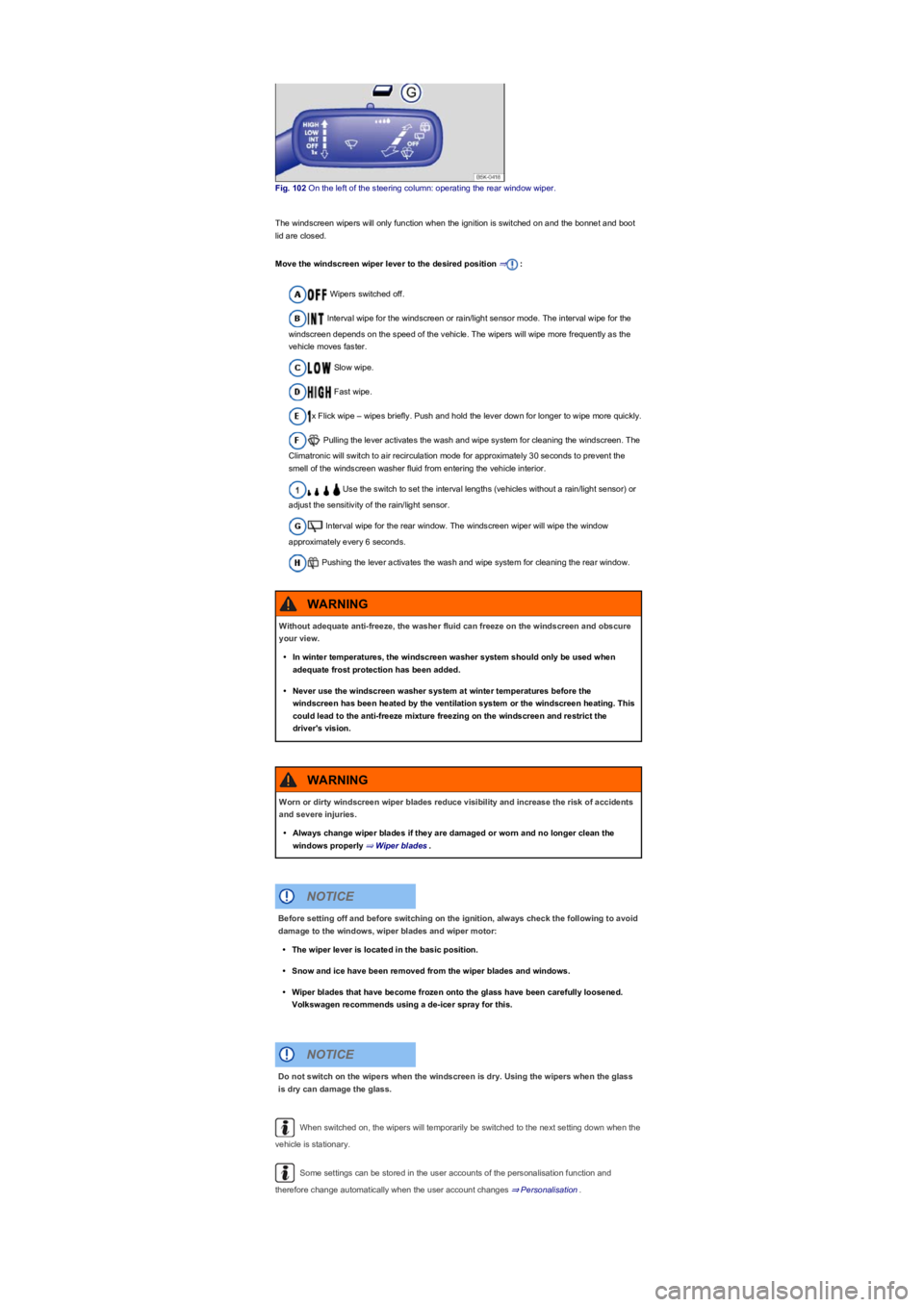
Fig. 102 On the left of the steering column: operating the rear window wiper.
The windscreen wipers will only function when the ignition is switched on and the bonnet and boot
lid are closed.
Move the windscreen wiper lever to the desired position ⇒:
Wipers switched off.
Interval wipe for the windscreen or rain/light sensor mode. The interval wipe for the
windscreen depends on the speed of the vehicle. The wipers will wipe more frequently as the
vehicle moves faster.
Slow wipe.
Fast wipe.
x Flick wipe – wipes briefly. Push and hold the lever down for longer to wipe more quickly.
Pulling the lever activates the wash and wipe system for cleaning the windscreen. The
Climatronic will switch to air recirculation mode for approximately 30 seconds to prevent the
smell of the windscreen washer fluid from entering the vehicle interior.
Use the switch to set the interval lengths (vehicles without a rain/light sensor) or
adjust the sensitivity of the rain/light sensor.
Interval wipe for the rear window. The windscreen wiper will wipe the window
approximately every 6 seconds.
Pushing the lever activates the wash and wipe system for cleaning the rear window.
When switched on, the wipers will temporarily be switched to the next setting down when the
vehicle is stationary.
Some settings can be stored in the user accounts of the personalisation function and
therefore change automatically when the user account changes ⇒ Personalisation.
Without adequate anti-freeze, the washer fluid can freeze on the windscreen and obscure
your view.
•In winter temperatures, the windscreen washer system should only be used when
adequate frost protection has been added.
•Never use the windscreen washer system at winter temperatures before the
windscreen has been heated by the ventilation system or the windscreen heating. This
could lead to the anti-freeze mixture freezing on the windscreen and restrict the
driver's vision.
WARNING
Worn or dirty windscreen wiper blades reduce visibility and increase the risk of accidents
and severe injuries.
•Always change wiper blades if they are damaged or worn and no longer clean the
windows properly ⇒ Wiper blades.
WARNING
Before setting off and before switching on the ignition, always check the following to avoid
damage to the windows, wiper blades and wiper motor:
•The wiper lever is located in the basic position.
•Snow and ice have been removed from the wiper blades and windows.
•Wiper blades that have become frozen onto the glass have been carefully loosened.
Volkswagen recommends using a de-icer spray for this.
NOTICE
Do not switch on the wipers when the windscreen is dry. Using the wipers when the glass
is dry can damage the glass.
NOTICE
Page 127 of 341
•Lever open the battery cover in upward direction using the object.
•Push the battery cover slightly in the direction of the arrow.
•Remove the battery cover.
•Remove the button cell.
•Insert a new button cell of the same type, paying attention to the correct polarity.
•Insert the battery in the housing of the remote control.
•Push the battery cover in the opposite direction to the arrow ⇒ Fig. 112 until it engages.
Dispose of discharged batteries in accordance with regulations governing the protection of
the environment.
The battery in the remote control may contain perchlorate. Please comply with legislation
regarding disposal.
Driving
Notes on driving
Introduction
This chapter contains information on the followingsubjects:
⇒ Pedals
⇒ Gear-change indicator
⇒ Driving economically
⇒ Think Blue. Trainer.
⇒ Information on the brakes
⇒ Driving with a loaded vehicle
⇒ Driving with an open boot lid
⇒ Driving through water on roads
⇒ Running in the engine
⇒ Using the vehicle in other countries and continents
⇒ Troubleshooting
Pedals
Swallowing batteries with a diameter of 20 mm, or other button cells, can result in severe
or even fatal injuries within a very short period of time.
•Always keep the remote control key, key ring with batteries, spare batteries, round
cells and other batteries that are larger than 20 mm out of the reach of children.
•Call for medical help immediately you suspect that someone has swallowed a battery.
DANGER
•The remote control contains electronic components. Protect the remote control from
moisture, excessive vibration and direct sunlight.
•Unsuitable batteries can damage the remote control. Replace discharged batteries only
with new batteries of the same voltage rating, size and specification.
•Ensure that the battery is fitted the right way round.
NOTICE
Driving under the influence of alcohol, drugs, medication or narcotics can cause serious
accidents and fatal injuries.
•Alcohol, drugs, medication and narcotics can severely impair perception, reaction
times and driving safety. This could cause you to lose control of the vehicle.
WARNING
Rapid acceleration can cause loss of traction and skidding, particularly on slippery roads.
This can cause you to lose control of the vehicle, which can lead to accidents and serious
injuries.
•Always adjust your driving style in accordance with the flow of traffic.
•The kickdown function or fast acceleration should only be used if the visibility,
weather, road and traffic conditions permit.
WARNING
Page 133 of 341
If the front brake pads are tested, the rear brake pads should be tested at the same time.
Regularly check the thickness of the brake pads through the openings in the rims or from the
underside of the vehicle. If necessary, remove the wheels to carry out a comprehensive check.
Volkswagen recommends using a Volkswagen dealership for this purpose.
Driving with a loaded vehicle
First read and observe the introductoryinformation and safety warnings⇒
Introduction
For good vehicle handling when driving a loaded vehicle, please observe the following:
•Stow all items of luggage securely ⇒ Stowing luggage and loads.
•Accelerate particularly cautiously and carefully.
•Avoid sudden braking and driving manoeuvres.
•Brake earlier than in normal driving.
•If applicable, observe the information concerning the roof carrier ⇒ Roof carrier.
•If applicable, observe the information about driving with a trailer ⇒ Trailer towing.
Driving with an open boot lid
First read and observe the introductoryinformation and safety warnings⇒
Introduction
Driving with an open boot lid is particularly dangerous. All objects and the open boot lid must be
secured properly. Take the appropriate measures to reduce the amount of poisonous exhaust
fumes that could enter into the vehicle.
Wet brakes or brakes coated with ice or road salt react more slowly and require longer
braking distances.
•Carefully apply the brakes to test them.
•Always dry brakes and clean off any coating of ice and salt with a few cautious
applications of the brake when visibility, weather, road and traffic conditions permit.
WARNING
Driving without the brake servo can considerably increase the braking distance and thus
cause accidents and serious injuries.
•Never switch the engine or ignition off while the vehicle is in motion.
•If the brake servo does not function or the vehicle is being towed, the brake pedal will
have to be depressed more forcefully as the braking distance will be increased due to
the lack of assistance for the brake system.
WARNING
Moving loads can severely impair the vehicle's stability and driving safety which could
cause accidents and severe injuries.
•Secure objects properly to prevent them from sliding.
•Use suitable straps when securing heavy objects.
•Engage the rear seat backrests and the adjustable rear bench seat securely.
WARNING
Page 134 of 341
Driving through water on roads
First read and observe the introductoryinformation and safety warnings⇒
Introduction
Please follow these rules to help prevent damage to your vehicle when driving through water, for
example if the road is flooded:
•Check the depth of the water before driving through it. The water level must be no higher than
the lower edge of the vehicle body ⇒.
•Do not drive faster than walking speed.
•Never stop the vehicle, reverse or switch off the engine while in water.
•Oncoming vehicles will create waves that could increase the water level for your vehicle to such
an extent that it is not safe to drive through the water.
•Always deactivate the start/stop system manually when driving through water ⇒ Start/stop
system .
Driving with an unlocked or open boot lid can cause serious injuries.
•Always drive with the boot lid closed.
•Always stow all items in the luggage compartment securely. Loose objects can fall out
of the luggage compartment and injure other road users.
•Always drive carefully and ensure that you think ahead.
•Avoid any abrupt or sudden driving and braking manoeuvres as this could cause the
open boot lid to move unpredictably.
•Any objects protruding from the luggage compartment must be marked to ensure that
they are visible to other road users. Comply with legal regulations.
•If items protrude out of the luggage compartment, never use the boot lid to wedge
them into place or hold them in position.
•If you drive with the boot lid open, you must remove any racks and luggage from the
boot lid.
WARNING
Poisonous exhaust fumes could enter the vehicle interior if the boot lid is open. This could
result in loss of consciousness, carbon monoxide poisoning, serious injury and
accidents.
•You should always drive with the boot lid closed in order to prevent poisonous gases
from entering the vehicle.
•If exceptional circumstances require you to drive with an open boot lid, you must do
the following to reduce the amount of poisonous exhaust fumes that could enter into
the vehicle:
- Close all windows and the glass roof.
- Switch off the air recirculation mode of the heating and fresh air system or
switch off the air conditioning system.
- Open all vents in the dash panel.
- Switch the blowers for the heating and fresh air system, or for the air
conditioning system, to the highest setting.
WARNING
The vehicle height, and possibly the length, are different when the boot lid is open.
NOTICE
Page 194 of 341
Volkswagen recommends that drivers practise using the parking systems in a traffic-calmed
area or car park to allow them to familiarise themselves with the systems and their functions.
Park Distance Control
Introduction
This chapter contains information on the followingsubjects:
⇒ Switching on and off
⇒ Display representation
⇒ Settings
⇒ Troubleshooting
The Park Distance Control system
assists the driver when manoeuvring
and parking.
Park Distance Control detects the distance from an obstacle by means of sensors in the front and
rear bumpers ⇒ Vehicle overviews. If there is an obstacle in the detection range of the sensors, the
system indicates this on the Infotainment system and by means of signal tones.
System limits
The sensors may not always be able to detect objects such as trailer drawbars, thin rails, fences,
posts, trees, very low or high obstacles and open or opening boot lids.
In some cases, dirt and ice on the sensors could be registered as an obstacle.
Switching on and off
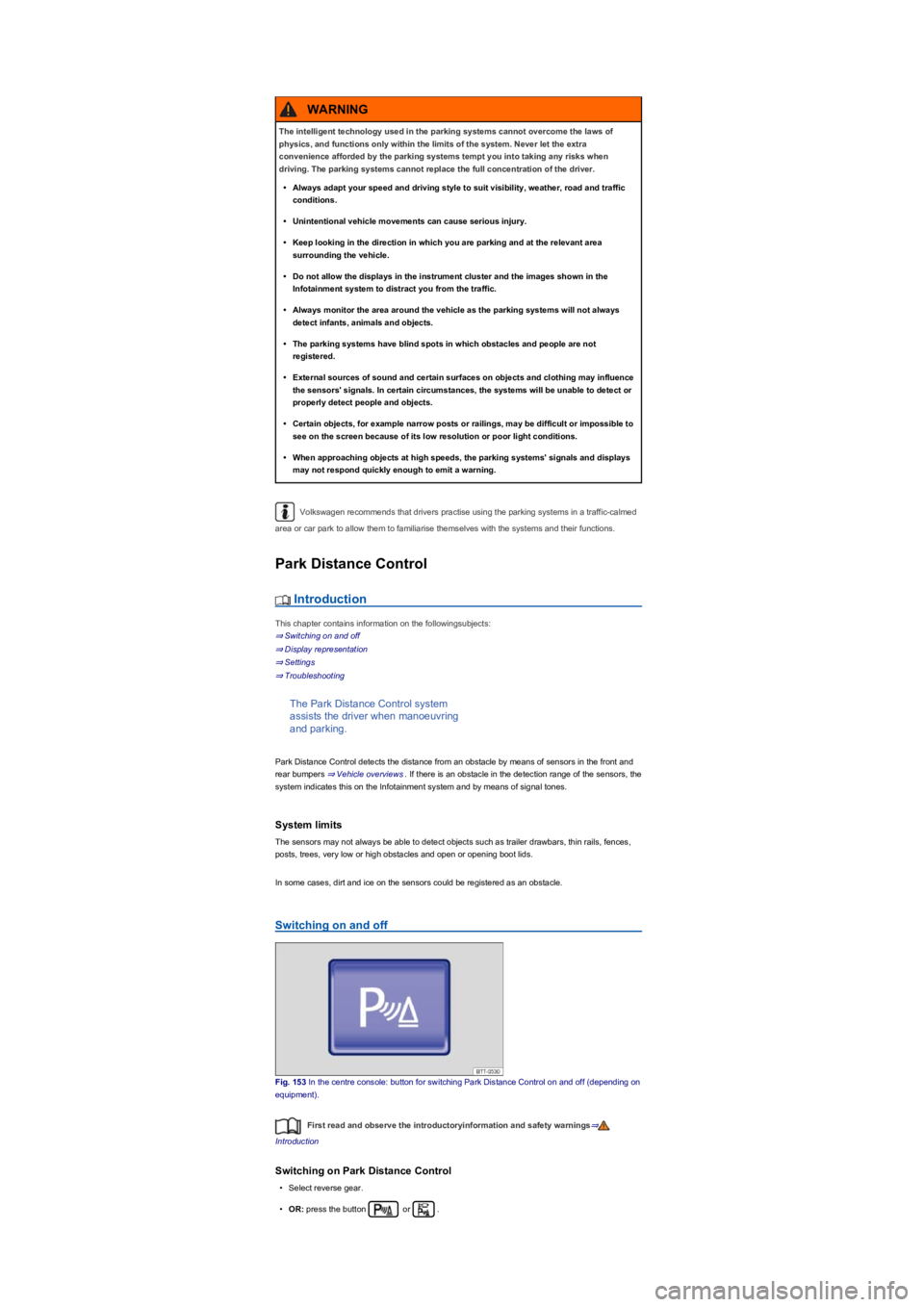
Fig. 153 In the centre console: button for switching Park Distance Control on and off (depending on
equipment).
First read and observe the introductoryinformation and safety warnings⇒
Introduction
Switching on Park Distance Control
•Select reverse gear.
•OR: press the button or .
The intelligent technology used in the parking systems cannot overcome the laws of
physics, and functions only within the limits of the system. Never let the extra
convenience afforded by the parking systems tempt you into taking any risks when
driving. The parking systems cannot replace the full concentration of the driver.
•Always adapt your speed and driving style to suit visibility, weather, road and traffic
conditions.
•Unintentional vehicle movements can cause serious injury.
•Keep looking in the direction in which you are parking and at the relevant area
surrounding the vehicle.
•Do not allow the displays in the instrument cluster and the images shown in the
Infotainment system to distract you from the traffic.
•Always monitor the area around the vehicle as the parking systems will not always
detect infants, animals and objects.
•The parking systems have blind spots in which obstacles and people are not
registered.
•External sources of sound and certain surfaces on objects and clothing may influence
the sensors' signals. In certain circumstances, the systems will be unable to detect or
properly detect people and objects.
•Certain objects, for example narrow posts or railings, may be difficult or impossible to
see on the screen because of its low resolution or poor light conditions.
•When approaching objects at high speeds, the parking systems' signals and displays
may not respond quickly enough to emit a warning.
WARNING
Page 198 of 341
Red and green frames: vehicle outline (mode 2).
Trailer support (mode 3)
In vehicles with a factory-fitted towing bracket, the trailer support function can be used when
approaching a trailer drawbar. The powerful zoom level used in this mode means that obstacles
behind the vehicle appear very late.
Auxiliary lines are shown on the Infotainment system.
Red line: position of the towing bracket.
Green lines: distance to towing bracket. The distance intervals are around 0.1 m in each case.
Orange line: predicted path of the towing bracket, depending on the steering angle.
Crossing traffic (mode 4)
This display representation helps the driver to monitor traffic behind the vehicle and can be used in
situations such as driving out of a garage or narrow exits, for example.
Prerequisites
First read and observe the introductoryinformation and safety warnings⇒
Introduction
The following prerequisites must be met for detection of a parking space:
•Do not exceed a speed of approximately 15 km/h (9 mph).
•Width of the parking space: vehicle width + 0.2 m.
•Distance: position the vehicle approximately one metre from the parking space (mode 2 only).
•Length of the parking space: approx. 8 m (mode 2 only).
The following conditions must be met in order to display a correct image:
•The boot lid is closed.
•The surrounding area has a flat surface.
•Vehicle does not have a heavy load at the rear.
Parking perpendicular to the road (mode 1)
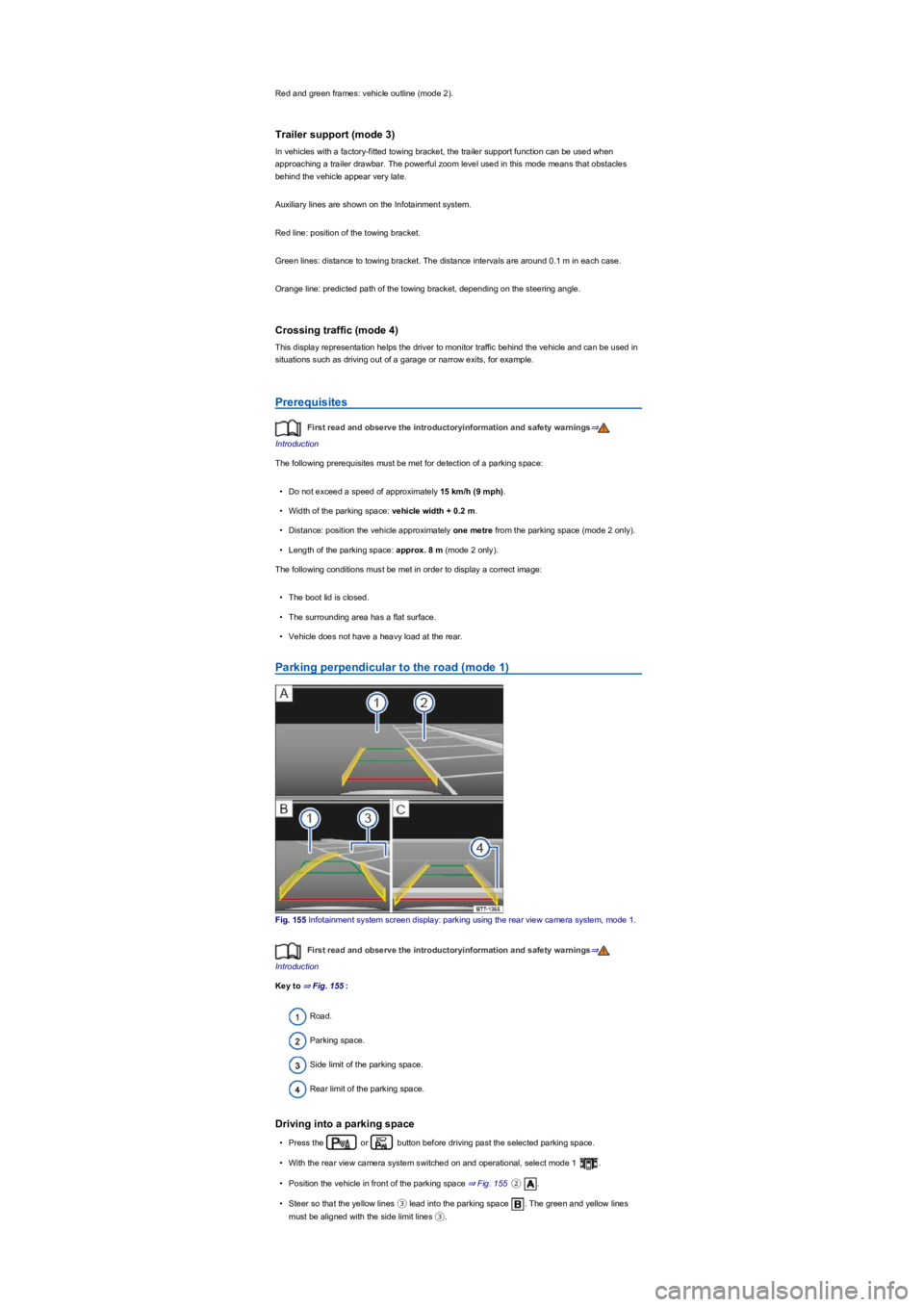
Fig. 155 Infotainment system screen display: parking using the rear view camera system, mode 1.
First read and observe the introductoryinformation and safety warnings⇒
Introduction
Key to ⇒ Fig. 155:
Road.
Parking space.
Side limit of the parking space.
Rear limit of the parking space.
Driving into a parking space
•Press the or button before driving past the selected parking space.
•With the rear view camera system switched on and operational, select mode 1 .
•Position the vehicle in front of the parking space ⇒ Fig. 155②.
•Steer so that the yellow lines ③ lead into the parking space . The green and yellow lines
must be aligned with the side limit lines ③.
Page 200 of 341
•Changes have been made to the paintwork around the camera or the construction has been
modified, e.g. vehicle front end or the running gear.
Response to all circumstances
•Switch off the system temporarily.
•Check whether any of the causes described below apply.
•You can switch the system back on again once you have rectified the cause of the problem.
•If the system still fails to respond as expected, have the system checked by a qualified
workshop.
Park Assist
Introduction
This chapter contains information on the followingsubjects:
⇒ Prerequisites
⇒ Looking for a parking space
⇒ Driving into a parking space
⇒ Driving out of a parking space
⇒ Troubleshooting
Park Assist shows parking spaces
which are suitable for parking and
assists the driver when driving into and
out of parking spaces.
Park Assist is an extension of Park Distance Control ⇒ Park Distance Control.
Park Assist automatically steers the vehicle. The driver must control the accelerator, gear changes
and brake!
Driving into a parking space using Park Assist takes place in the following steps:
•Look for a parking space.
•Drive into a parking space.
System limits
The sensors may not always be able to detect objects such as trailer drawbars, thin rails, fences,
posts, trees and open or opening boot lids. This can result in damage to your vehicle.
In some cases, dirt and ice on the sensors could be registered as an obstacle.
Prerequisites
First read and observe the introductoryinformation and safety warnings⇒
Introduction
The following prerequisites must be met for driving into and out of parking spaces:
•The traction control system (TCS) must be switched on ⇒ Brake support systems.
•Distance: maintain a distance of 0.5 – -2.0 metres when driving past the parking space.
•The parking space must have at least the dimensions required by Park Assist.
•Speed when driving past the parking space (for parking spaces parallel to the road): not above
40 km/h (25 mph).
•Speed when driving past the parking space (for parking spaces perpendicular to the road): not
above 20 km/h (12 mph).
•Maximum speed: 7 km/h (4 mph). An automatic braking intervention can take place when
driving into a parking space.
The parking manoeuvre can be continued after the automatic brake intervention.
Fast steering wheel movements can cause serious injury.
•During the manoeuvring operation, do not reach for the steering wheel until prompted
to do so by the system.
•Exception: if a dangerous situation occurs, intervene and take over the steering.
WARNING
Park Assist uses parked vehicles, the kerb and other objects as guidance. Please ensure
that the wheels and tyres are not damaged when parking the vehicle. If necessary, stop the
parking procedure in good time to prevent damage to the vehicle.
NOTICE
Page 204 of 341
in real time and allows you to detect
obstacles at an early stage.
The system uses several cameras to create an image which is displayed on the Infotainment
system display.
The functions and displays may differ in vehicles with or without Park Distance Control.
Things to note
The Area View system camera supplies two-dimensional images only. Due to the lack of depth of
field on the screen, potholes and dips in the ground, protruding parts on another vehicle or
protruding objects on the ground may be difficult or impossible to see on the image.
•When driving into or out of an uphill gradient.
•Protruding objects can disappear from the field of view of the cameras.
System limits
The camera may not always be able to detect objects such as trailer drawbars, thin rails, fences,
posts, trees and open or opening boot lids. This can result in damage to your vehicle.
In some cases, dirt and ice on the sensors could be registered as an obstacle.
Prerequisites
First read and observe the introductoryinformation and safety warnings⇒
Introduction
The following conditions must be met in order to display a correct image:
•The doors and boot lid must be closed.
•The area around the vehicle must be clear and fully visible.
•The surrounding area has a flat surface.
•Vehicle does not have a heavy load at the rear.
Switching on and off
Fig. 160 In the centre console: button for manually switching on Area View.
First read and observe the introductoryinformation and safety warnings⇒
Introduction
Switching on
•Select reverse gear.
•OR: press the button.
Switching off
•Drive forwards faster than approximately 15 km/h (9 mph).
•OR: press the button.
Display representation
First read and observe the introductoryinformation and safety warnings⇒
Introduction
The functions and displays depend on the vehicle equipment and may differ from each other.
Area View is shown in two screen areas in the Infotainment system:
Using images from the camera to estimate the distance from obstacles (people, vehicles
etc.) is inaccurate and could cause accidents and severe injuries.
•Camera lenses enlarge and distort the field of vision and make objects appear different
and inaccurate on the screen.
WARNING