display VOLKSWAGEN TIGUAN 2017 Owner´s Manual
[x] Cancel search | Manufacturer: VOLKSWAGEN, Model Year: 2017, Model line: TIGUAN, Model: VOLKSWAGEN TIGUAN 2017Pages: 341, PDF Size: 9.14 MB
Page 26 of 341
Check the system settings after charging or replacing the 12-volt vehicle battery. System
settings may be adjusted or deleted if the power supply is interrupted.
Operating using the wiper lever
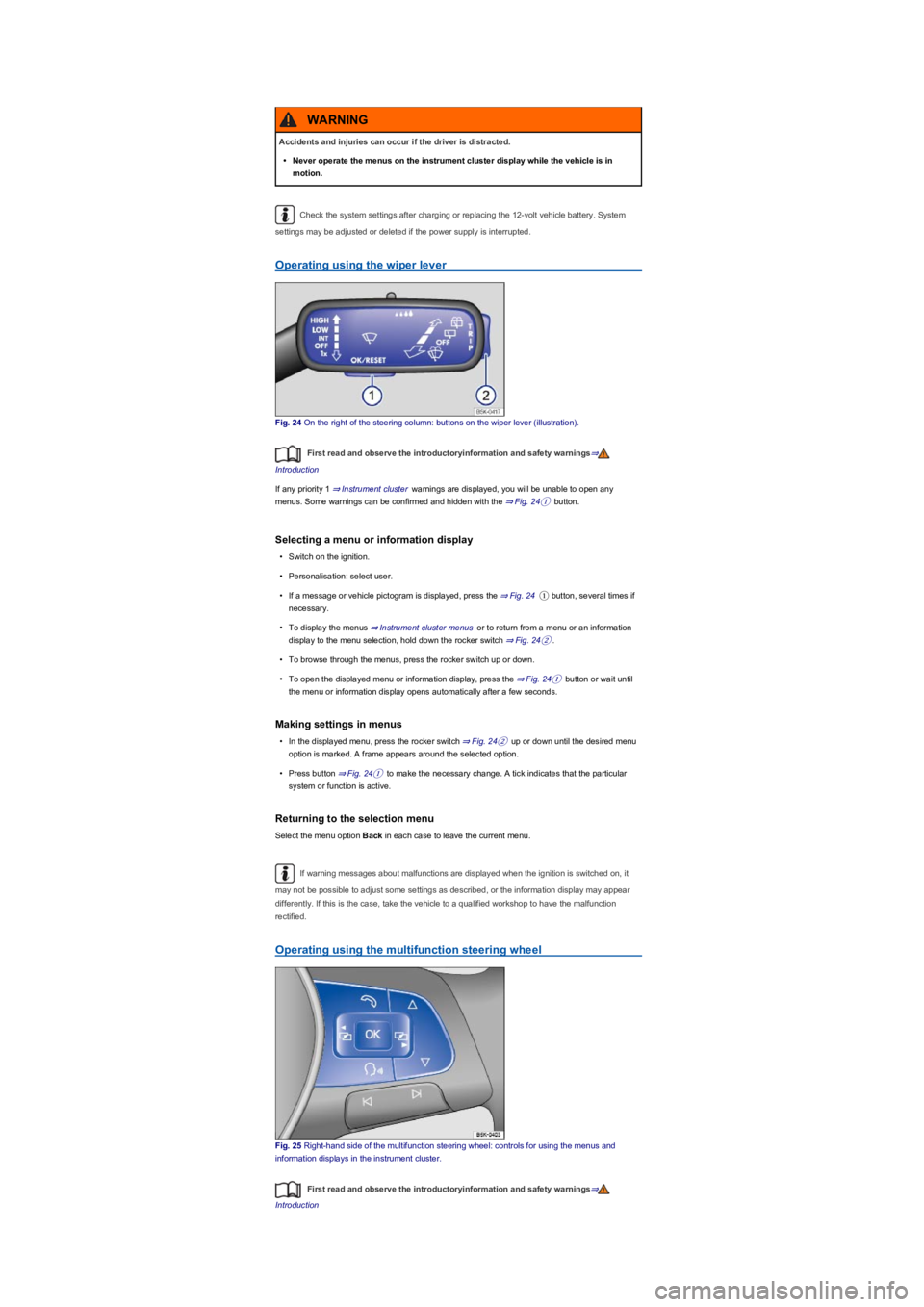
Fig. 24 On the right of the steering column: buttons on the wiper lever (illustration).
First read and observe the introductoryinformation and safety warnings⇒
Introduction
If any priority 1 ⇒ Instrument cluster warnings are displayed, you will be unable to open any
menus. Some warnings can be confirmed and hidden with the ⇒ Fig. 24① button.
Selecting a menu or information display
•Switch on the ignition.
•Personalisation: select user.
•If a message or vehicle pictogram is displayed, press the ⇒ Fig. 24① button, several times if
necessary.
•To display the menus ⇒ Instrument cluster menus or to return from a menu or an information
display to the menu selection, hold down the rocker switch ⇒ Fig. 24②.
•To browse through the menus, press the rocker switch up or down.
•To open the displayed menu or information display, press the ⇒ Fig. 24① button or wait until
the menu or information display opens automatically after a few seconds.
Making settings in menus
•In the displayed menu, press the rocker switch ⇒ Fig. 24② up or down until the desired menu
option is marked. A frame appears around the selected option.
•Press button ⇒ Fig. 24① to make the necessary change. A tick indicates that the particular
system or function is active.
Returning to the selection menu
Select the menu option Back in each case to leave the current menu.
If warning messages about malfunctions are displayed when the ignition is switched on, it
may not be possible to adjust some settings as described, or the information display may appear
differently. If this is the case, take the vehicle to a qualified workshop to have the malfunction
rectified.
Operating using the multifunction steering wheel
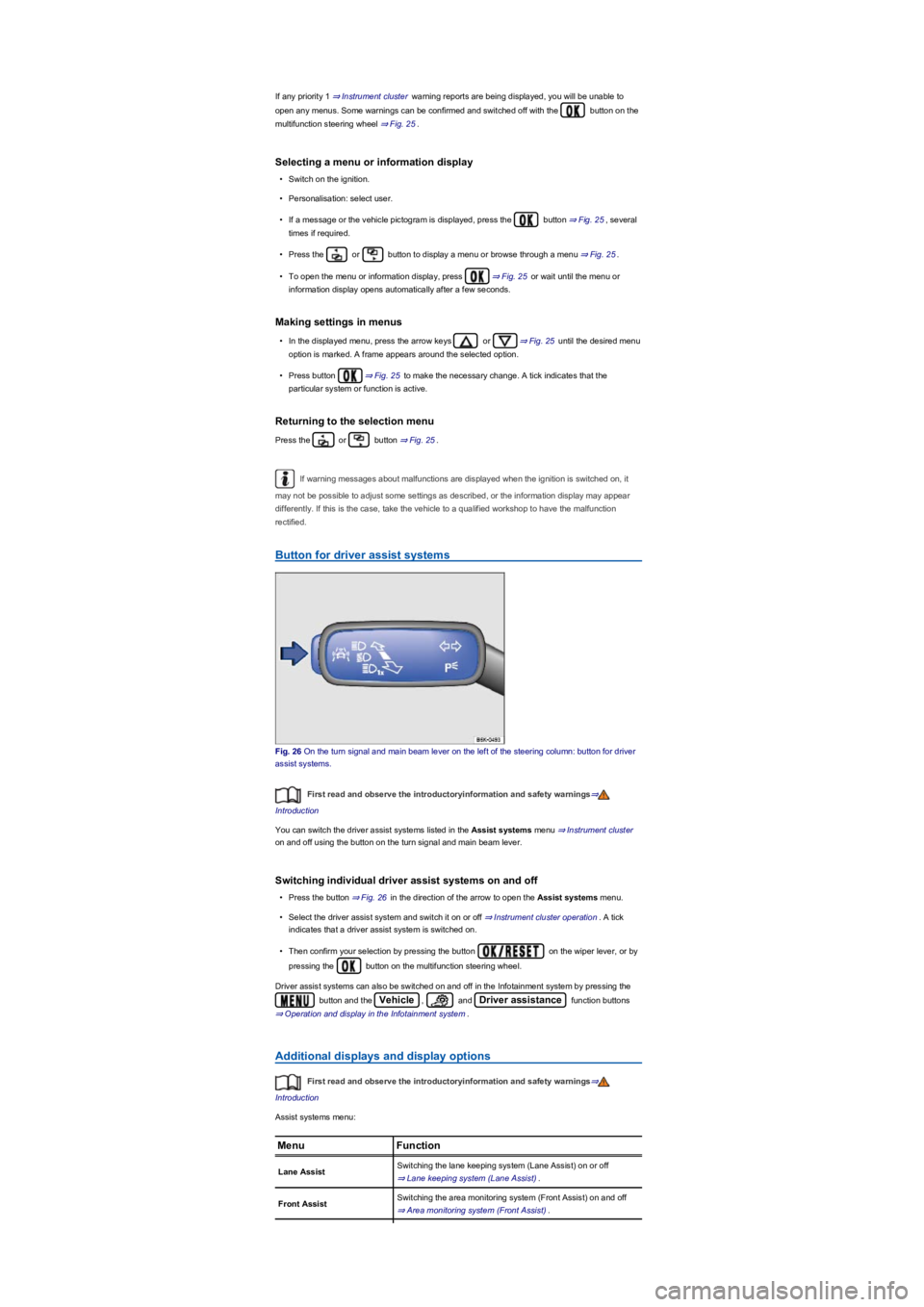
Fig. 25 Right-hand side of the multifunction steering wheel: controls for using the menus and
information displays in the instrument cluster.
First read and observe the introductoryinformation and safety warnings⇒
Introduction
Accidents and injuries can occur if the driver is distracted.
•Never operate the menus on the instrument cluster display while the vehicle is in
motion.
WARNING
Page 27 of 341
If any priority 1 ⇒ Instrument cluster warning reports are being displayed, you will be unable to
open any menus. Some warnings can be confirmed and switched off with the button on the
multifunction steering wheel ⇒ Fig. 25.
Selecting a menu or information display
•Switch on the ignition.
•Personalisation: select user.
•If a message or the vehicle pictogram is displayed, press the button ⇒ Fig. 25, several
times if required.
•Press the or button to display a menu or browse through a menu ⇒ Fig. 25.
•To open the menu or information display, press ⇒ Fig. 25 or wait until the menu or
information display opens automatically after a few seconds.
Making settings in menus
•In the displayed menu, press the arrow keys or ⇒ Fig. 25 until the desired menu
option is marked. A frame appears around the selected option.
•Press button ⇒ Fig. 25 to make the necessary change. A tick indicates that the
particular system or function is active.
Returning to the selection menu
Press the or button ⇒ Fig. 25.
If warning messages about malfunctions are displayed when the ignition is switched on, it
may not be possible to adjust some settings as described, or the information display may appear
differently. If this is the case, take the vehicle to a qualified workshop to have the malfunction
rectified.
Button for driver assist systems
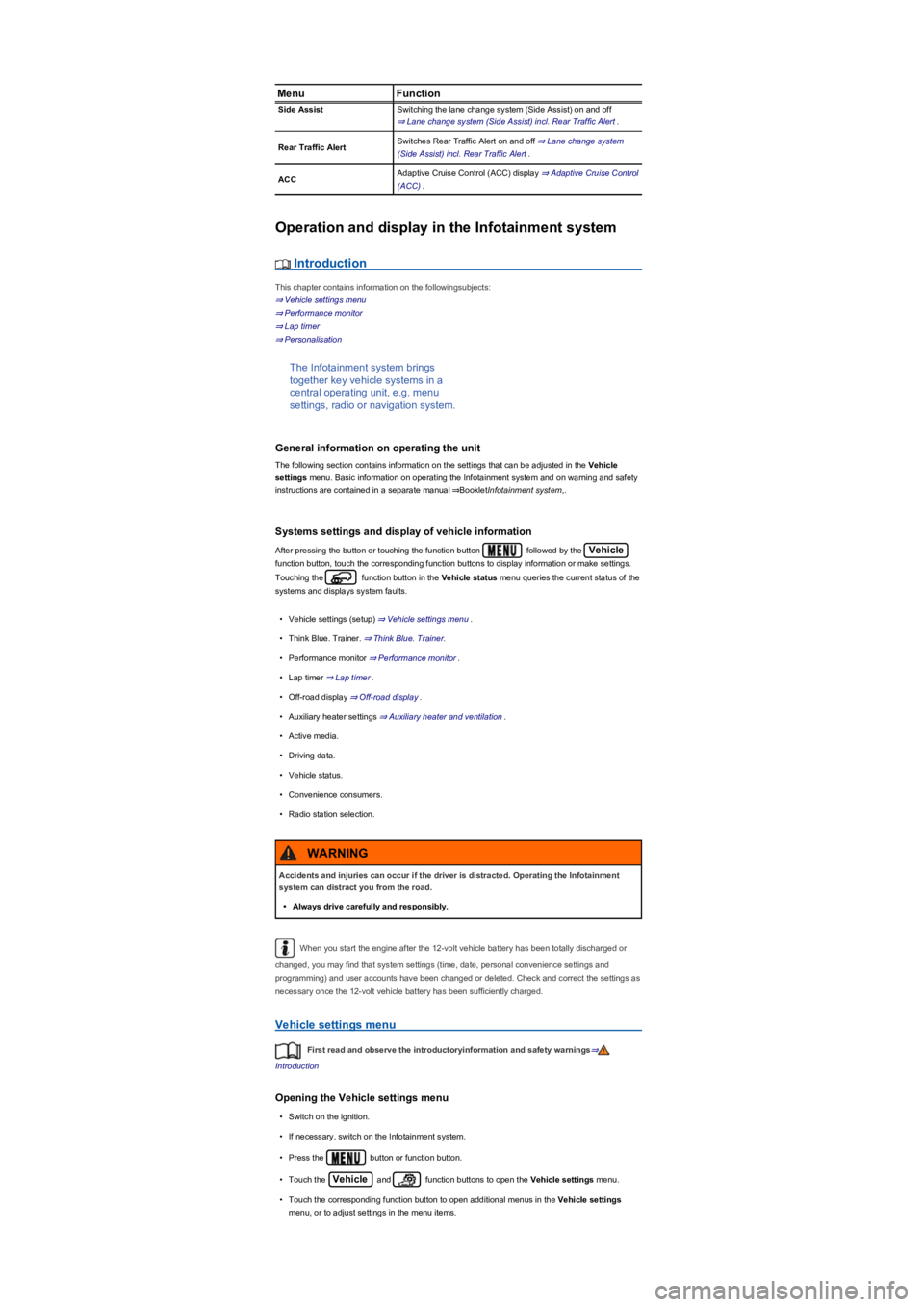
Fig. 26 On the turn signal and main beam lever on the left of the steering column: button for driver
assist systems.
First read and observe the introductoryinformation and safety warnings⇒
Introduction
You can switch the driver assist systems listed in the Assist systems menu ⇒ Instrument cluster
on and off using the button on the turn signal and main beam lever.
Switching individual driver assist systems on and off
•Press the button ⇒ Fig. 26 in the direction of the arrow to open the Assist systems menu.
•Select the driver assist system and switch it on or off ⇒ Instrument cluster operation. A tick
indicates that a driver assist system is switched on.
•Then confirm your selection by pressing the button on the wiper lever, or by
pressing the button on the multifunction steering wheel.
Driver assist systems can also be switched on and off in the Infotainment system by pressing the
button and the Vehicle, and Driver assistance function buttons
⇒ Operation and display in the Infotainment system.
Additional displays and display options
First read and observe the introductoryinformation and safety warnings⇒
Introduction
Assist systems menu:
MenuFunction
Lane AssistSwitching the lane keeping system (Lane Assist) on or off
⇒ Lane keeping system (Lane Assist).
Front AssistSwitching the area monitoring system (Front Assist) on and off
⇒ Area monitoring system (Front Assist).
Page 28 of 341
MenuFunction
Side AssistSwitching the lane change system (Side Assist) on and off
⇒ Lane change system (Side Assist) incl. Rear Traffic Alert.
Rear Traffic AlertSwitches Rear Traffic Alert on and off ⇒ Lane change system
(Side Assist) incl. Rear Traffic Alert.
ACCAdaptive Cruise Control (ACC) display ⇒ Adaptive Cruise Control
(ACC).
Operation and display in the Infotainment system
Introduction
This chapter contains information on the followingsubjects:
⇒ Vehicle settings menu
⇒ Performance monitor
⇒ Lap timer
⇒ Personalisation
The Infotainment system brings
together key vehicle systems in a
central operating unit, e.g. menu
settings, radio or navigation system.
General information on operating the unit
The following section contains information on the settings that can be adjusted in the Vehicle
settings menu. Basic information on operating the Infotainment system and on warning and safety
instructions are contained in a separate manual ⇒BookletInfotainment system,.
Systems settings and display of vehicle information
After pressing the button or touching the function button followed by the Vehicle
function button, touch the corresponding function buttons to display information or make settings.
Touching the function button in the Vehicle status menu queries the current status of the
systems and displays system faults.
•Vehicle settings (setup) ⇒ Vehicle settings menu.
•Think Blue. Trainer. ⇒ Think Blue. Trainer.
•Performance monitor ⇒ Performance monitor.
•Lap timer ⇒ Lap timer.
•Off-road display ⇒ Off-road display.
•Auxiliary heater settings ⇒ Auxiliary heater and ventilation.
•Active media.
•Driving data.
•Vehicle status.
•Convenience consumers.
•Radio station selection.
When you start the engine after the 12-volt vehicle battery has been totally discharged or
changed, you may find that system settings (time, date, personal convenience settings and
programming) and user accounts have been changed or deleted. Check and correct the settings as
necessary once the 12-volt vehicle battery has been sufficiently charged.
Vehicle settings menu
First read and observe the introductoryinformation and safety warnings⇒
Introduction
Opening the Vehicle settings menu
•Switch on the ignition.
•If necessary, switch on the Infotainment system.
•Press the button or function button.
•Touch the Vehicle and function buttons to open the Vehicle settings menu.
•Touch the corresponding function button to open additional menus in the Vehicle settings
menu, or to adjust settings in the menu items.
Accidents and injuries can occur if the driver is distracted. Operating the Infotainment
system can distract you from the road.
•Always drive carefully and responsibly.
WARNING
Page 29 of 341
If the checkbox in the function button is ticked , the respective function is switched on.
Press the function button to return to the previous menu.
Menu overview
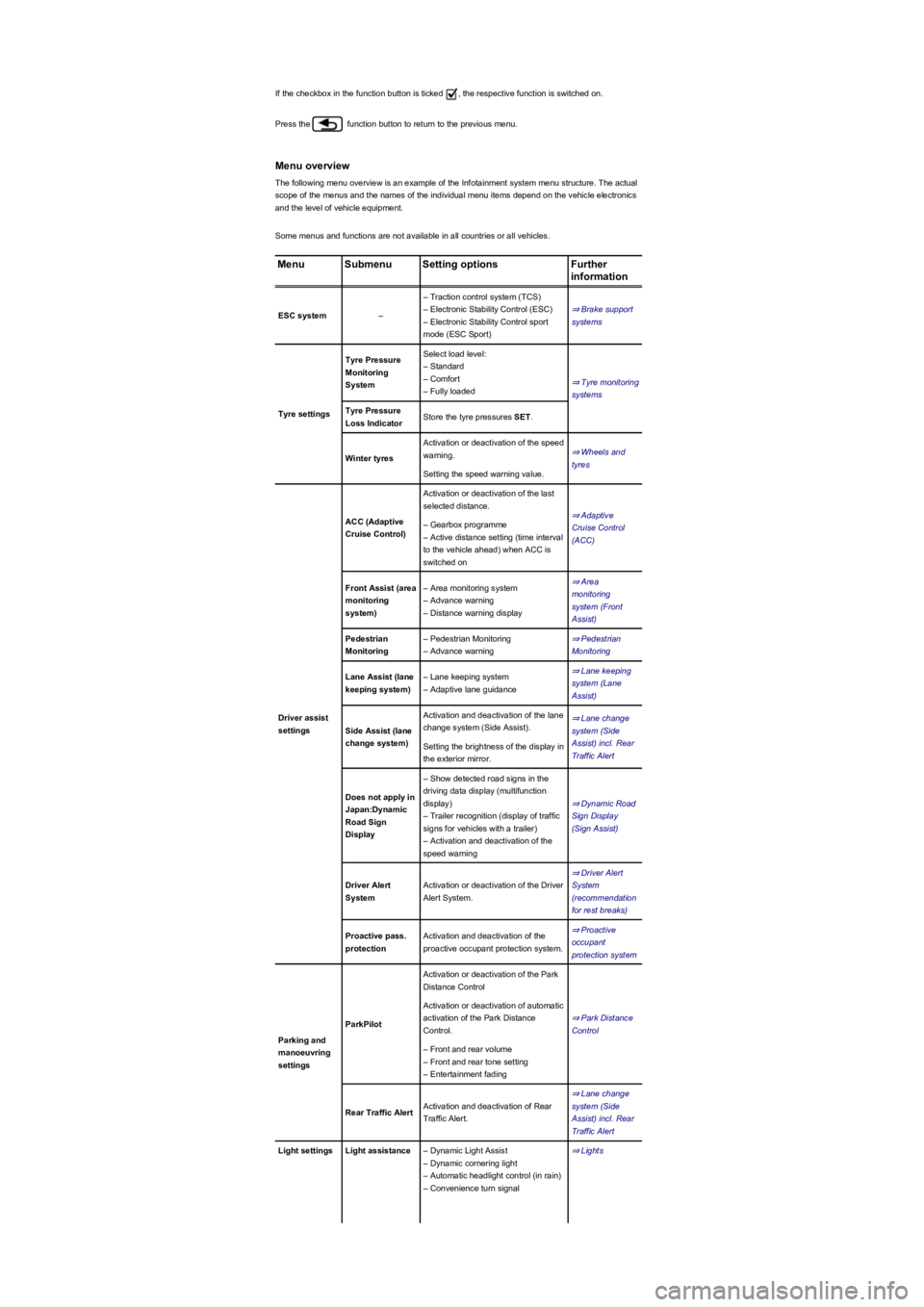
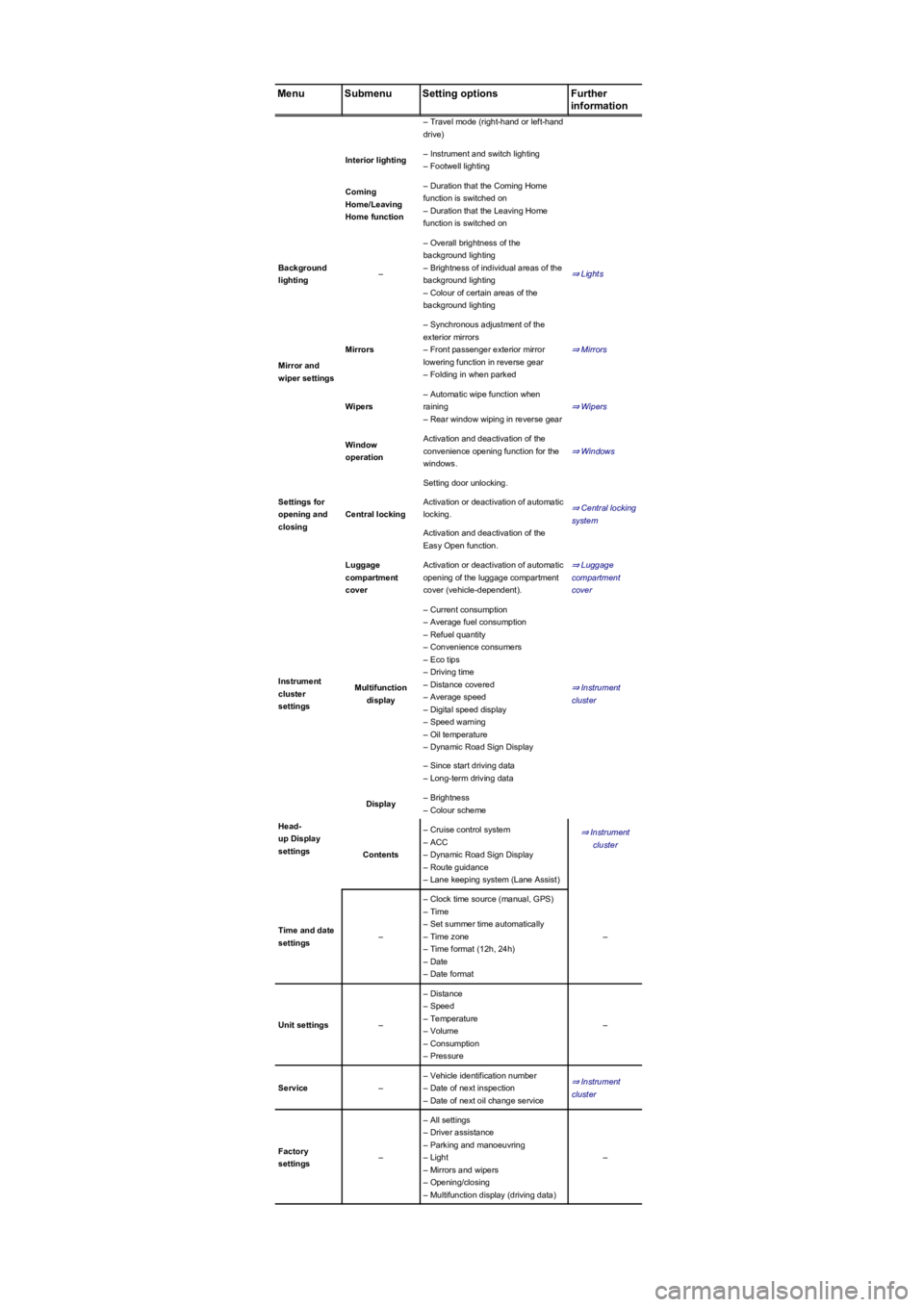
The following menu overview is an example of the Infotainment system menu structure. The actual
scope of the menus and the names of the individual menu items depend on the vehicle electronics
and the level of vehicle equipment.
Some menus and functions are not available in all countries or all vehicles.
MenuSubmenuSetting optionsFurther
information
ESC system–
– Traction control system (TCS)
– Electronic Stability Control (ESC)
– Electronic Stability Control sport
mode (ESC Sport)
⇒ Brake support
systems
Tyre settings
Tyre Pressure
Monitoring
System
Select load level:
– Standard
– Comfort
– Fully loaded
⇒ Tyre monitoring
systems
Tyre Pressure
Loss IndicatorStore the tyre pressures SET.
Winter tyres
Activation or deactivation of the speed
warning.⇒ Wheels and
tyres
Setting the speed warning value.
Driver assist
settings
ACC (Adaptive
Cruise Control)
Activation or deactivation of the last
selected distance.
⇒ Adaptive
Cruise Control
(ACC)
– Gearbox programme
– Active distance setting (time interval
to the vehicle ahead) when ACC is
switched on
Front Assist (area
monitoring
system)
– Area monitoring system
– Advance warning
– Distance warning display
⇒ Area
monitoring
system (Front
Assist)
Pedestrian
Monitoring
– Pedestrian Monitoring
– Advance warning
⇒ Pedestrian
Monitoring
Lane Assist (lane
keeping system)
– Lane keeping system
– Adaptive lane guidance
⇒ Lane keeping
system (Lane
Assist)
Side Assist (lane
change system)
Activation and deactivation of the lane
change system (Side Assist).
⇒ Lane change
system (Side
Assist) incl. Rear
Traffic Alert
Setting the brightness of the display in
the exterior mirror.
Does not apply in
Japan:Dynamic
Road Sign
Display
– Show detected road signs in the
driving data display (multifunction
display)
– Trailer recognition (display of traffic
signs for vehicles with a trailer)
– Activation and deactivation of the
speed warning
⇒ Dynamic Road
Sign Display
(Sign Assist)
Driver Alert
System
Activation or deactivation of the Driver
Alert System.
⇒ Driver Alert
System
(recommendation
for rest breaks)
Proactive pass.
protection
Activation and deactivation of the
proactive occupant protection system.
⇒ Proactive
occupant
protection system
Parking and
manoeuvring
settings
ParkPilot
Activation or deactivation of the Park
Distance Control
⇒ Park Distance
Control
Activation or deactivation of automatic
activation of the Park Distance
Control.
– Front and rear volume
– Front and rear tone setting
– Entertainment fading
Rear Traffic AlertActivation and deactivation of Rear
Traffic Alert.
⇒ Lane change
system (Side
Assist) incl. Rear
Traffic Alert
Light settingsLight assistance– Dynamic Light Assist
– Dynamic cornering light
– Automatic headlight control (in rain)
– Convenience turn signal
⇒ Lights
Page 30 of 341
MenuSubmenuSetting optionsFurther
information
– Travel mode (right-hand or left-hand
drive)
Interior lighting– Instrument and switch lighting
– Footwell lighting
Coming
Home/Leaving
Home function
– Duration that the Coming Home
function is switched on
– Duration that the Leaving Home
function is switched on
Background
lighting–
– Overall brightness of the
background lighting
– Brightness of individual areas of the
background lighting
– Colour of certain areas of the
background lighting
⇒ Lights
Mirror and
wiper settings
Mirrors
– Synchronous adjustment of the
exterior mirrors
– Front passenger exterior mirror
lowering function in reverse gear
– Folding in when parked
⇒ Mirrors
Wipers
– Automatic wipe function when
raining
– Rear window wiping in reverse gear
⇒ Wipers
Settings for
opening and
closing
Window
operation
Activation and deactivation of the
convenience opening function for the
windows.
⇒ Windows
Central locking
Setting door unlocking.
⇒ Central locking
system
Activation or deactivation of automatic
locking.
Activation and deactivation of the
Easy Open function.
Luggage
compartment
cover
Activation or deactivation of automatic
opening of the luggage compartment
cover (vehicle-dependent).
⇒ Luggage
compartment
cover
Instrument
cluster
settings
Multifunction
display
– Current consumption
– Average fuel consumption
– Refuel quantity
– Convenience consumers
– Eco tips
– Driving time
– Distance covered
– Average speed
– Digital speed display
– Speed warning
– Oil temperature
– Dynamic Road Sign Display
⇒ Instrument
cluster
– Since start driving data
– Long-term driving data
Head-
up Display
settings
Display– Brightness
– Colour scheme
⇒ Instrument
cluster
Contents
– Cruise control system
– ACC
– Dynamic Road Sign Display
– Route guidance
– Lane keeping system (Lane Assist)
Time and date
settings–
– Clock time source (manual, GPS)
– Time
– Set summer time automatically
– Time zone
– Time format (12h, 24h)
– Date
– Date format
–
Unit settings–
– Distance
– Speed
– Temperature
– Volume
– Consumption
– Pressure
–
Service–
– Vehicle identification number
– Date of next inspection
– Date of next oil change service
⇒ Instrument
cluster
Factory
settings–
– All settings
– Driver assistance
– Parking and manoeuvring
– Light
– Mirrors and wipers
– Opening/closing
– Multifunction display (driving data)
–
Page 31 of 341
Performance monitor
First read and observe the introductoryinformation and safety warnings⇒
Introduction
The performance monitor is a display
for sporty driving. The digital
instruments display real-time values for
engine power, temperature and
acceleration that are determined by
sensors on the vehicle. This provides
the driver with an overview of driving
dynamics.
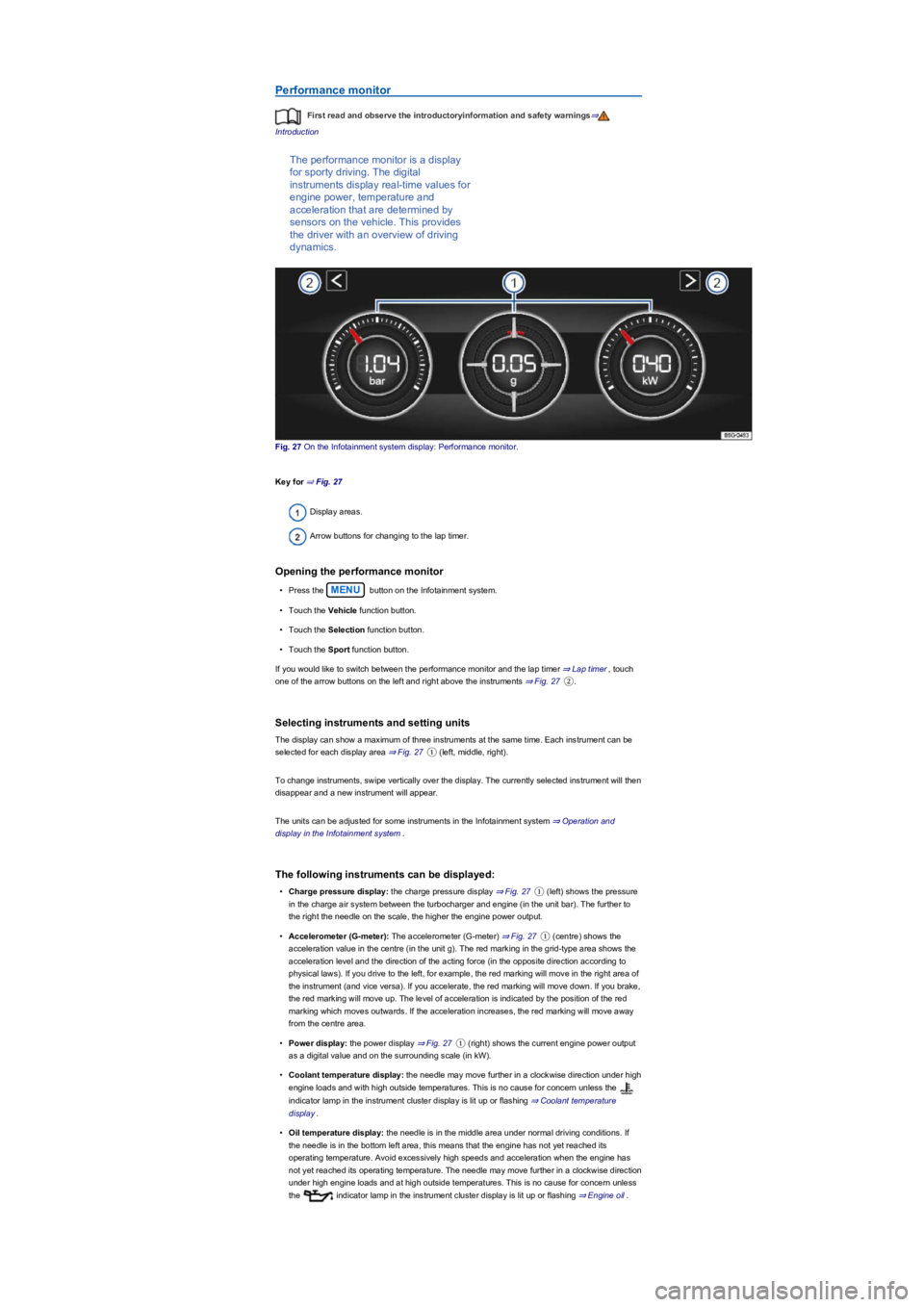
Fig. 27 On the Infotainment system display: Performance monitor.
Key for ⇒ Fig. 27
Display areas.
Arrow buttons for changing to the lap timer.
Opening the performance monitor
•Press the MENU button on the Infotainment system.
•Touch the Vehicle function button.
•Touch the Selection function button.
•Touch the Sport function button.
If you would like to switch between the performance monitor and the lap timer ⇒ Lap timer, touch
one of the arrow buttons on the left and right above the instruments ⇒ Fig. 27②.
Selecting instruments and setting units
The display can show a maximum of three instruments at the same time. Each instrument can be
selected for each display area ⇒ Fig. 27① (left, middle, right).
To change instruments, swipe vertically over the display. The currently selected instrument will then
disappear and a new instrument will appear.
The units can be adjusted for some instruments in the Infotainment system ⇒ Operation and
display in the Infotainment system.
The following instruments can be displayed:
•Charge pressure display: the charge pressure display ⇒ Fig. 27① (left) shows the pressure
in the charge air system between the turbocharger and engine (in the unit bar). The further to
the right the needle on the scale, the higher the engine power output.
•Accelerometer (G-meter): The accelerometer (G-meter) ⇒ Fig. 27① (centre) shows the
acceleration value in the centre (in the unit g). The red marking in the grid-type area shows the
acceleration level and the direction of the acting force (in the opposite direction according to
physical laws). If you drive to the left, for example, the red marking will move in the right area of
the instrument (and vice versa). If you accelerate, the red marking will move down. If you brake,
the red marking will move up. The level of acceleration is indicated by the position of the red
marking which moves outwards. If the acceleration increases, the red marking will move away
from the centre area.
•Power display: the power display ⇒ Fig. 27① (right) shows the current engine power output
as a digital value and on the surrounding scale (in kW).
•Coolant temperature display: the needle may move further in a clockwise direction under high
engine loads and with high outside temperatures. This is no cause for concern unless the
indicator lamp in the instrument cluster display is lit up or flashing ⇒ Coolant temperature
display.
•Oil temperature display: the needle is in the middle area under normal driving conditions. If
the needle is in the bottom left area, this means that the engine has not yet reached its
operating temperature. Avoid excessively high speeds and acceleration when the engine has
not yet reached its operating temperature. The needle may move further in a clockwise direction
under high engine loads and at high outside temperatures. This is no cause for concern unless
the indicator lamp in the instrument cluster display is lit up or flashing ⇒ Engine oil.
Page 32 of 341
Adapting the display areas to the driving situation
Choose the three possible instruments corresponding to your individual driving style and the driving
situation.
Due to the principle of performance determination available in the vehicle, the physical
accuracy of the displayed values is not guaranteed.
Lap timer
First read and observe the introductoryinformation and safety warnings⇒
Introduction
The lap timer provides you with the
option of timing your own laps manually
in the vehicle on a race track, storing
the times and comparing them with
previously measured best times.
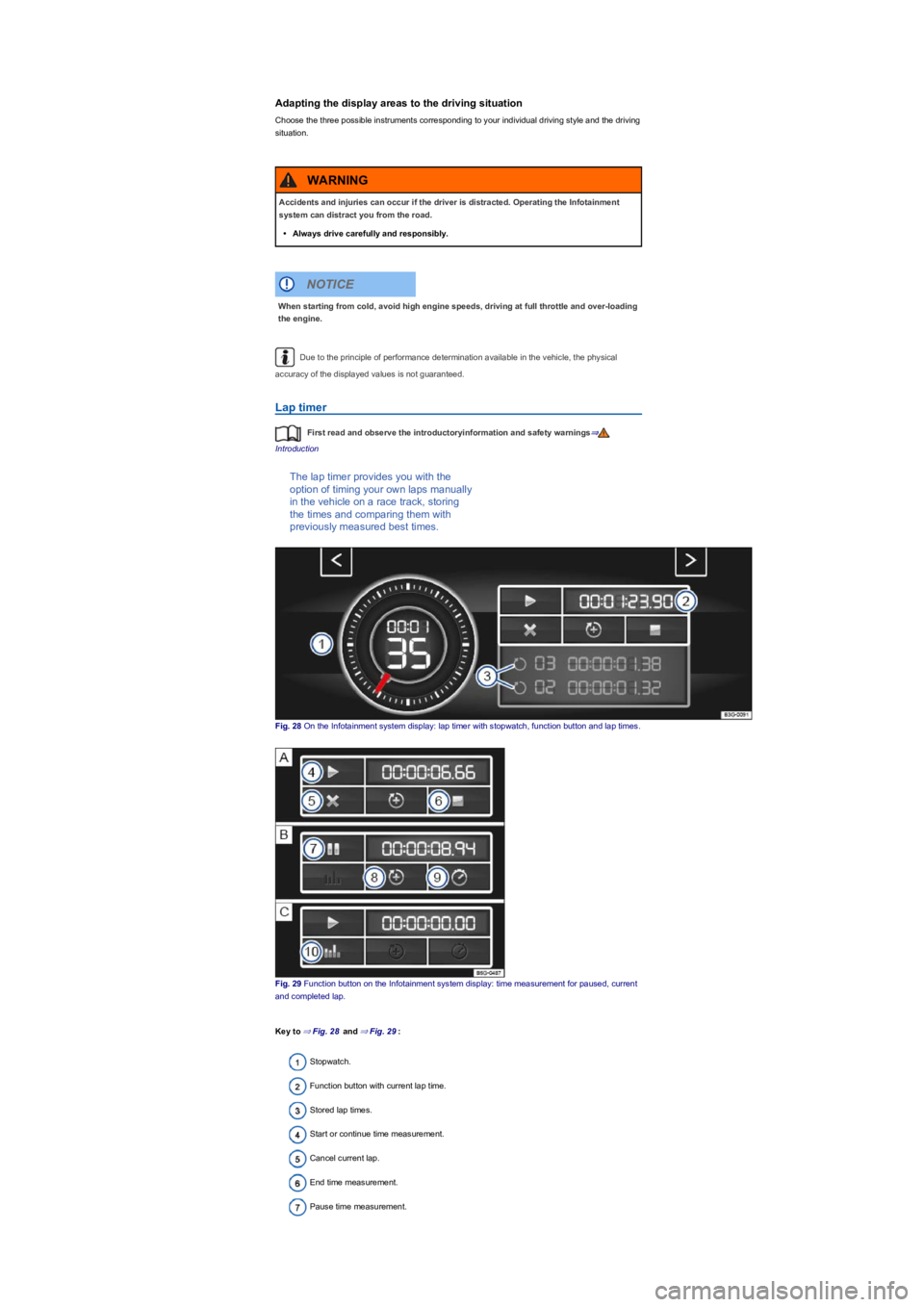
Fig. 28 On the Infotainment system display: lap timer with stopwatch, function button and lap times.
Fig. 29 Function button on the Infotainment system display: time measurement for paused, current
and completed lap.
Key to ⇒ Fig. 28 and ⇒ Fig. 29:
Stopwatch.
Function button with current lap time.
Stored lap times.
Start or continue time measurement.
Cancel current lap.
End time measurement.
Pause time measurement.
Accidents and injuries can occur if the driver is distracted. Operating the Infotainment
system can distract you from the road.
•Always drive carefully and responsibly.
WARNING
When starting from cold, avoid high engine speeds, driving at full throttle and over-loading
the engine.
NOTICE
Page 33 of 341
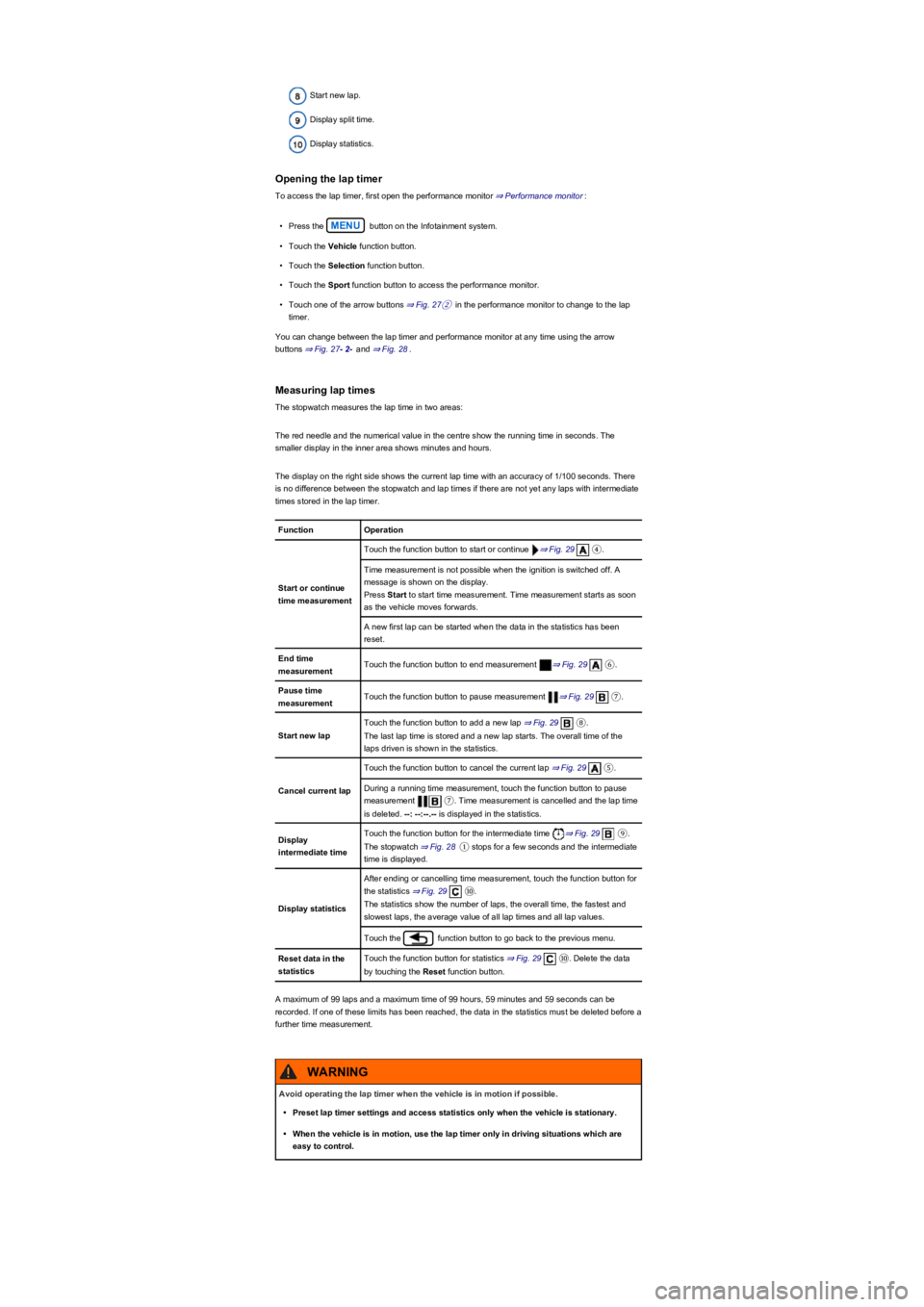
Start new lap.
Display split time.
Display statistics.
Opening the lap timer
To access the lap timer, first open the performance monitor ⇒ Performance monitor:
•Press the MENU button on the Infotainment system.
•Touch the Vehicle function button.
•Touch the Selection function button.
•Touch the Sport function button to access the performance monitor.
•Touch one of the arrow buttons ⇒ Fig. 27② in the performance monitor to change to the lap
timer.
You can change between the lap timer and performance monitor at any time using the arrow
buttons ⇒ Fig. 27- 2- and ⇒ Fig. 28.
Measuring lap times
The stopwatch measures the lap time in two areas:
The red needle and the numerical value in the centre show the running time in seconds. The
smaller display in the inner area shows minutes and hours.
The display on the right side shows the current lap time with an accuracy of 1/100 seconds. There
is no difference between the stopwatch and lap times if there are not yet any laps with intermediate
times stored in the lap timer.
FunctionOperation
Start or continue
time measurement
Touch the function button to start or continue ⇒ Fig. 29④.
Time measurement is not possible when the ignition is switched off. A
message is shown on the display.
Press Start to start time measurement. Time measurement starts as soon
as the vehicle moves forwards.
A new first lap can be started when the data in the statistics has been
reset.
End time
measurementTouch the function button to end measurement ⇒ Fig. 29⑥.
Pause time
measurementTouch the function button to pause measurement ⇒ Fig. 29⑦.
Start new lap
Touch the function button to add a new lap ⇒ Fig. 29⑧.
The last lap time is stored and a new lap starts. The overall time of the
laps driven is shown in the statistics.
Cancel current lap
Touch the function button to cancel the current lap ⇒ Fig. 29⑤.
During a running time measurement, touch the function button to pause
measurement ⑦. Time measurement is cancelled and the lap time
is deleted. --: --:--.-- is displayed in the statistics.
Display
intermediate time
Touch the function button for the intermediate time ⇒ Fig. 29⑨.
The stopwatch ⇒ Fig. 28① stops for a few seconds and the intermediate
time is displayed.
Display statistics
After ending or cancelling time measurement, touch the function button for
the statistics ⇒ Fig. 29⑩.
The statistics show the number of laps, the overall time, the fastest and
slowest laps, the average value of all lap times and all lap values.
Touch the function button to go back to the previous menu.
Reset data in the
statistics
Touch the function button for statistics ⇒ Fig. 29⑩. Delete the data
by touching the Reset function button.
A maximum of 99 laps and a maximum time of 99 hours, 59 minutes and 59 seconds can be
recorded. If one of these limits has been reached, the data in the statistics must be deleted before a
further time measurement.
Avoid operating the lap timer when the vehicle is in motion if possible.
•Preset lap timer settings and access statistics only when the vehicle is stationary.
•When the vehicle is in motion, use the lap timer only in driving situations which are
easy to control.
WARNING
Page 34 of 341
Personalisation
First read and observe the introductoryinformation and safety warnings⇒
Introduction
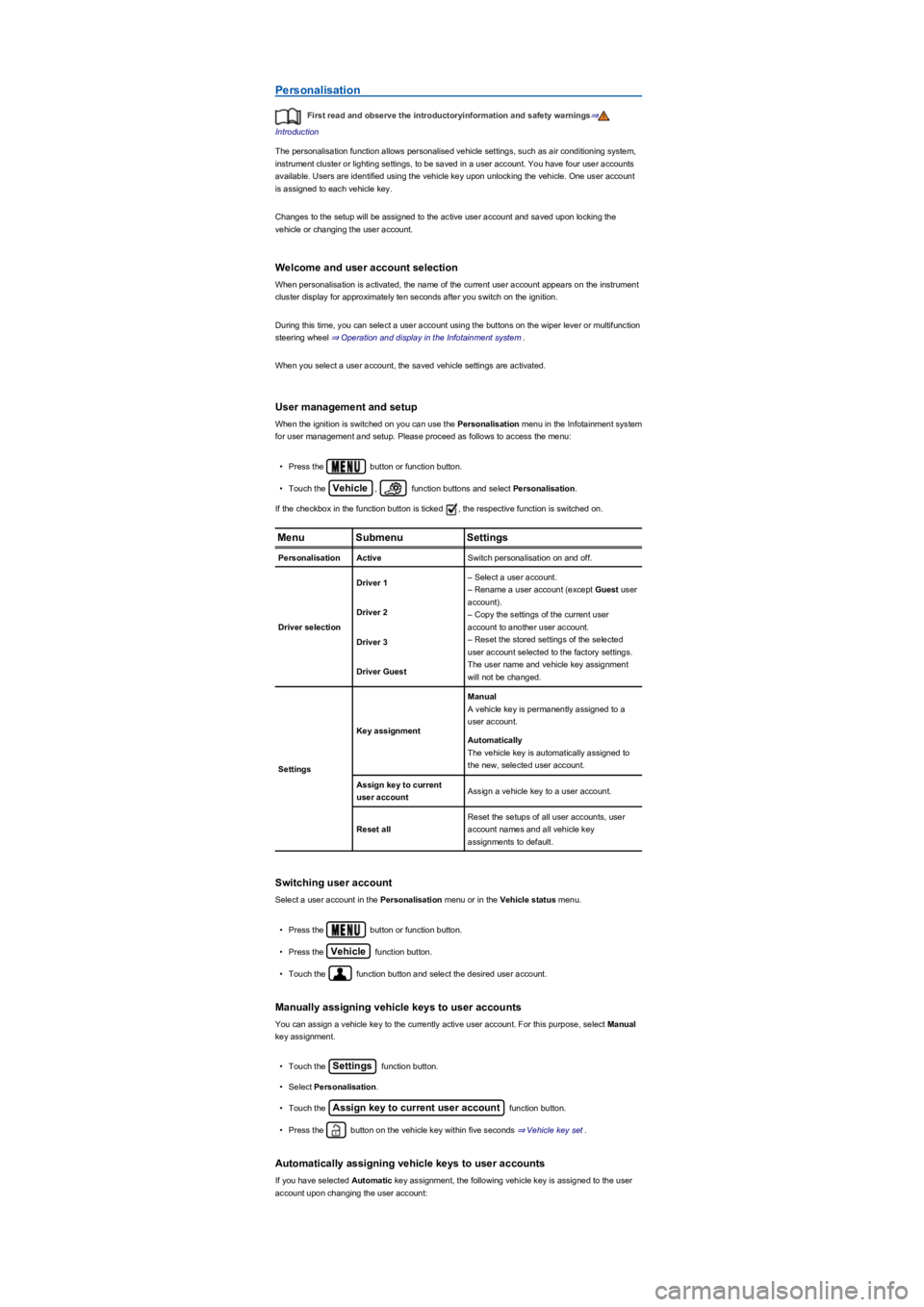
The personalisation function allows personalised vehicle settings, such as air conditioning system,
instrument cluster or lighting settings, to be saved in a user account. You have four user accounts
available. Users are identified using the vehicle key upon unlocking the vehicle. One user account
is assigned to each vehicle key.
Changes to the setup will be assigned to the active user account and saved upon locking the
vehicle or changing the user account.
Welcome and user account selection
When personalisation is activated, the name of the current user account appears on the instrument
cluster display for approximately ten seconds after you switch on the ignition.
During this time, you can select a user account using the buttons on the wiper lever or multifunction
steering wheel ⇒ Operation and display in the Infotainment system.
When you select a user account, the saved vehicle settings are activated.
User management and setup
When the ignition is switched on you can use the Personalisation menu in the Infotainment system
for user management and setup. Please proceed as follows to access the menu:
•Press the button or function button.
•Touch the Vehicle, function buttons and select Personalisation.
If the checkbox in the function button is ticked , the respective function is switched on.
MenuSubmenuSettings
PersonalisationActiveSwitch personalisation on and off.
Driver selection
Driver 1– Select a user account.
– Rename a user account (except Guest user
account).
– Copy the settings of the current user
account to another user account.
– Reset the stored settings of the selected
user account selected to the factory settings.
The user name and vehicle key assignment
will not be changed.
Driver 2
Driver 3
Driver Guest
Settings
Key assignment
Manual
A vehicle key is permanently assigned to a
user account.
Automatically
The vehicle key is automatically assigned to
the new, selected user account.
Assign key to current
user accountAssign a vehicle key to a user account.
Reset all
Reset the setups of all user accounts, user
account names and all vehicle key
assignments to default.
Switching user account
Select a user account in the Personalisation menu or in the Vehicle status menu.
•Press the button or function button.
•Press the Vehicle function button.
•Touch the function button and select the desired user account.
Manually assigning vehicle keys to user accounts
You can assign a vehicle key to the currently active user account. For this purpose, select Manual
key assignment.
•Touch the Settings function button.
•Select Personalisation.
•Touch the Assign key to current user account function button.
•Press the button on the vehicle key within five seconds ⇒ Vehicle key set.
Automatically assigning vehicle keys to user accounts
If you have selected Automatic key assignment, the following vehicle key is assigned to the user
account upon changing the user account:
Page 35 of 341
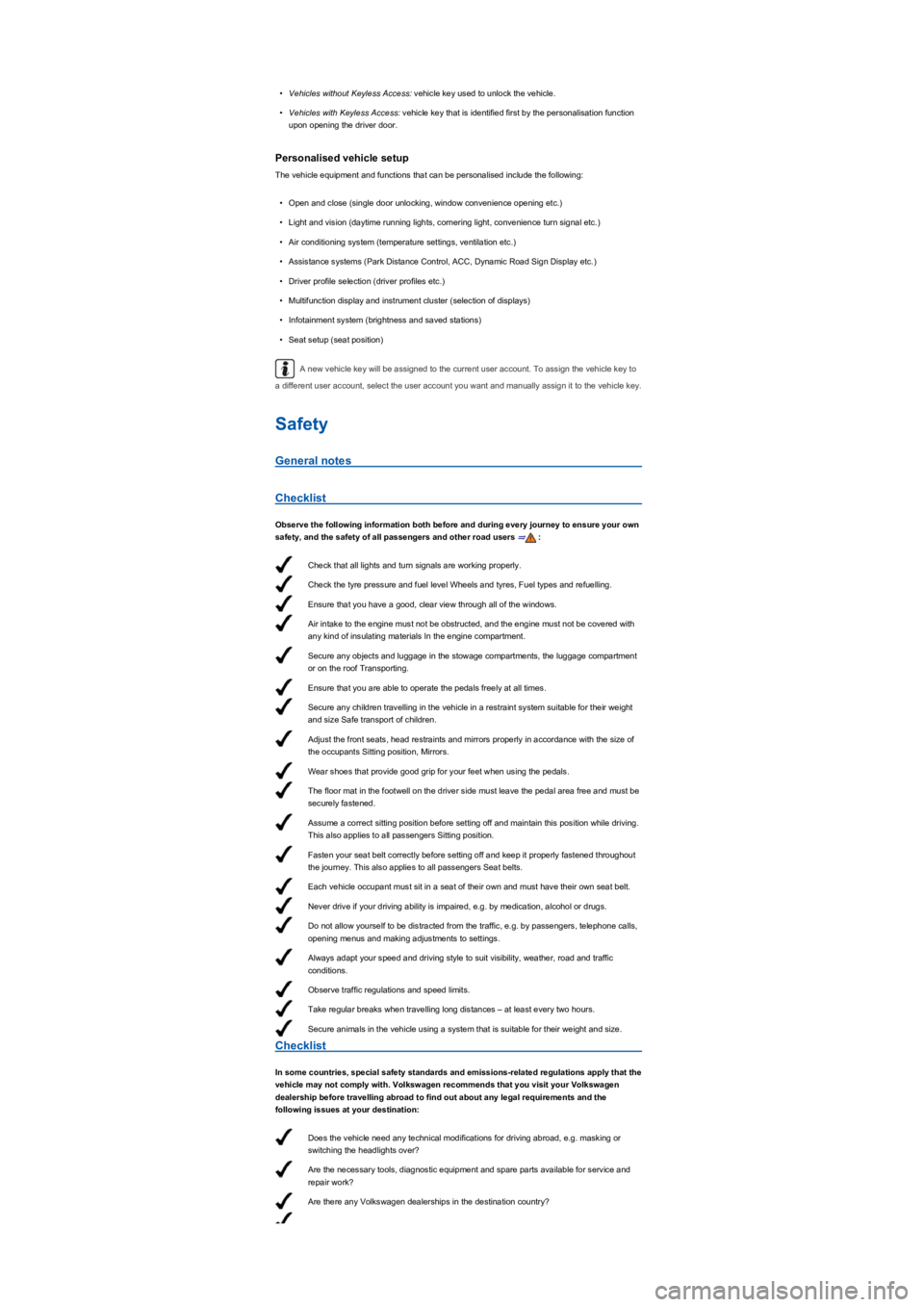
Check that all lights and turn signals are working properly.
Check the tyre pressure and fuel level Wheels and tyres, Fuel types and refuelling.
Ensure that you have a good, clear view through all of the windows.
Air intake to the engine must not be obstructed, and the engine must not be covered with
any kind of insulating materials In the engine compartment.
Secure any objects and luggage in the stowage compartments, the luggage compartment
or on the roof Transporting.
Ensure that you are able to operate the pedals freely at all times.
Secure any children travelling in the vehicle in a restraint system suitable for their weight
and size Safe transport of children.
Adjust the front seats, head restraints and mirrors properly in accordance with the size of
the occupants Sitting position, Mirrors.
Wear shoes that provide good grip for your feet when using the pedals.
The floor mat in the footwell on the driver side must leave the pedal area free and must be
securely fastened.
Assume a correct sitting position before setting off and maintain this position while driving.
This also applies to all passengers Sitting position.
Fasten your seat belt correctly before setting off and keep it properly fastened throughout
the journey. This also applies to all passengers Seat belts.
Each vehicle occupant must sit in a seat of their own and must have their own seat belt.
Never drive if your driving ability is impaired, e.g. by medication, alcohol or drugs.
Do not allow yourself to be distracted from the traffic, e.g. by passengers, telephone calls,
opening menus and making adjustments to settings.
Always adapt your speed and driving style to suit visibility, weather, road and traffic
conditions.
Observe traffic regulations and speed limits.
Take regular breaks when travelling long distances – at least every two hours.
Secure animals in the vehicle using a system that is suitable for their weight and size.
Does the vehicle need any technical modifications for driving abroad, e.g. masking or
switching the headlights over?
Are the necessary tools, diagnostic equipment and spare parts available for service and
repair work?
Are there any Volkswagen dealerships in the destination country?
•Vehicles without Keyless Access: vehicle key used to unlock the vehicle.
•Vehicles with Keyless Access: vehicle key that is identified first by the personalisation function
upon opening the driver door.
Personalised vehicle setup
The vehicle equipment and functions that can be personalised include the following:
•Open and close (single door unlocking, window convenience opening etc.)
•Light and vision (daytime running lights, cornering light, convenience turn signal etc.)
•Air conditioning system (temperature settings, ventilation etc.)
•Assistance systems (Park Distance Control, ACC, Dynamic Road Sign Display etc.)
•Driver profile selection (driver profiles etc.)
•Multifunction display and instrument cluster (selection of displays)
•Infotainment system (brightness and saved stations)
•Seat setup (seat position)
A new vehicle key will be assigned to the current user account. To assign the vehicle key to
a different user account, select the user account you want and manually assign it to the vehicle key.
Safety
General notes
Checklist
Observe the following information both before and during every journey to ensure your own
safety, and the safety of all passengers and other road users ⇒:
Checklist
In some countries, special safety standards and emissions-related regulations apply that the
vehicle may not comply with. Volkswagen recommends that you visit your Volkswagen
dealership before travelling abroad to find out about any legal requirements and the
following issues at your destination: