instrument cluster VOLKSWAGEN TIGUAN 2017 Owner´s Manual
[x] Cancel search | Manufacturer: VOLKSWAGEN, Model Year: 2017, Model line: TIGUAN, Model: VOLKSWAGEN TIGUAN 2017Pages: 341, PDF Size: 9.14 MB
Page 2 of 341
Before using your vehicle for the first time, please read and observe the information in this
owner's manual. It will quickly help you to become familiar with your vehicle and all of its
functions as well as making you aware of dangers to yourself and others and of how these
dangers can be avoided.
If you have any further questions about your vehicle, or if you think that the vehicle wallet has not
covered everything, please get in touch with your Volkswagen dealership. They will always be
happy to deal with your questions, suggestions or problems.
We hope you enjoy driving your new vehicle. Happy motoring.
Volkswagen AG
•This owner's manual is valid for all models and versions of the Tiguan.
•An alphabetical index is included at the end of this manual.
•A list of abbreviations at the end of the manual explains the abbreviations used.
•Directions and positions such as left, right, front and rear are normally relative to the vehicle's
direction of travel, unless otherwise indicated.
•Illustrations help with orientation and should be regarded as a general guide.
•This owner's manual was written for left-hand drive vehicles. In right-hand drive vehicles the
controls may sometimes be different to those displayed in illustrations or described in the text
⇒ Overview of driver side.
•Values given in miles instead of kilometres or mph instead of km/h refer to the country-specific
instrument clusters or Infotainment systems.
•Short definitions appear in a different colour before some sections of this manual. They provide
a summary of the function and use of a system or feature. More detailed information about the
features, conditions and limitations of systems and equipment can be found in the relevant
sections.
•Any technical changes that may be made to the vehicle after publication of this booklet are
contained in a supplement that is included with the vehicle wallet.
All equipment and models are described without indicating whether the equipment is optional or
specific to the model type. This means that your vehicle may not have some of the equipment
described, or it may only be available in certain markets. The scope of equipment fitted in your
vehicle can be found in the sales documentation and you can contact your Volkswagen dealership
for further information.
All data in this owner's manual correspond to the information available at the time of going to print.
Because the vehicle is constantly being developed and further improved, there may be differences
between your vehicle and the data in this owner's manual. No discrepancy in data, illustrations or
descriptions shall form the basis for any legal claim.
Please ensure that the complete vehicle wallet is always in the vehicle if you lend or sell the vehicle
to someone else.
Standard booklets in the vehicle wallet:
•Owner's manual
Additional booklets in the vehicle wallet (optional):
•Supplements
•Infotainment system
•Other supplements
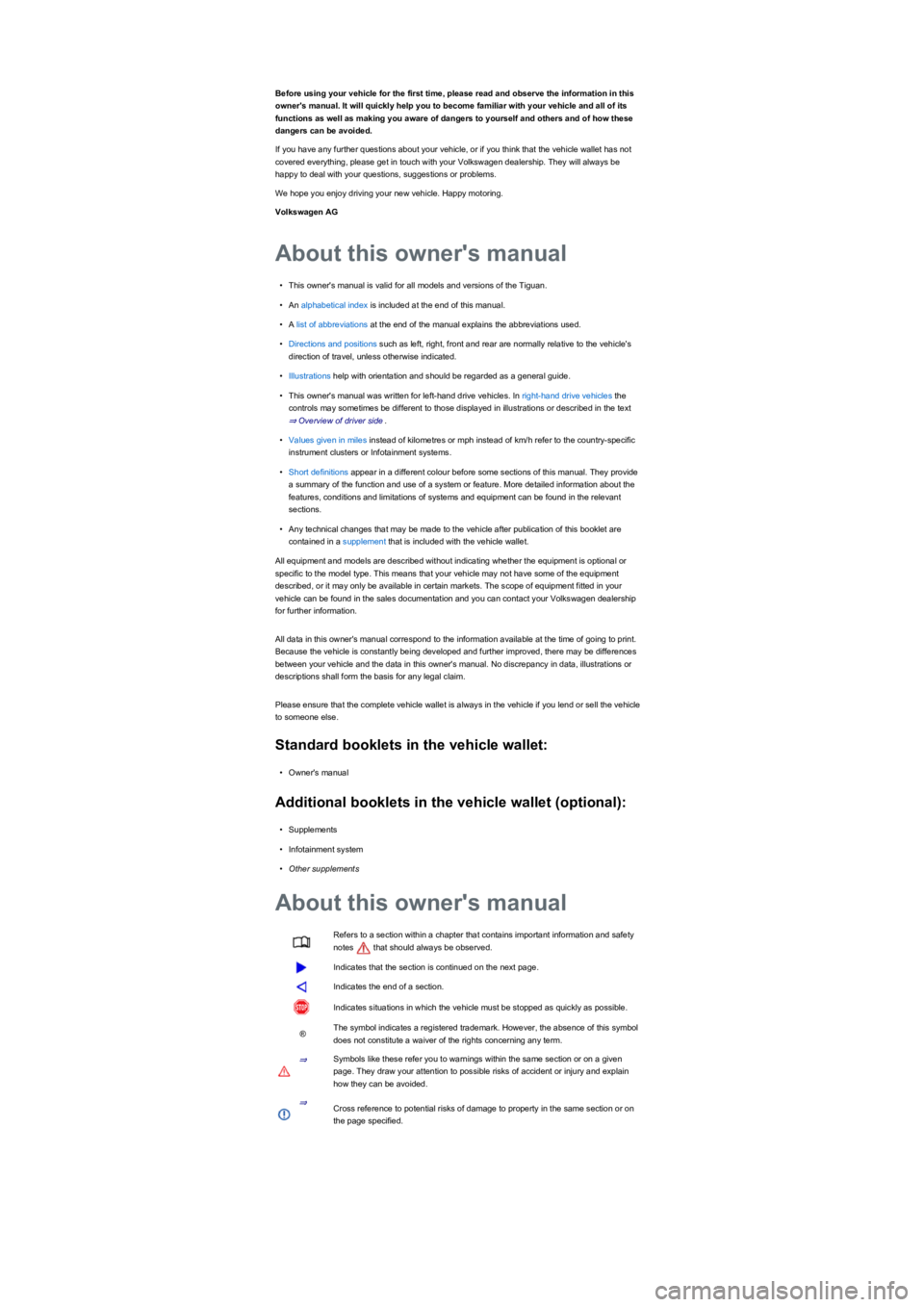
Refers to a section within a chapter that contains important information and safety
notes that should always be observed.
Indicates that the section is continued on the next page.
Indicates the end of a section.
Indicates situations in which the vehicle must be stopped as quickly as possible.
®The symbol indicates a registered trademark. However, the absence of this symbol
does not constitute a waiver of the rights concerning any term.
⇒Symbols like these refer you to warnings within the same section or on a given
page. They draw your attention to possible risks of accident or injury and explain
how they can be avoided.
⇒Cross reference to potential risks of damage to property in the same section or on
the page specified.
About this owner's manual
About this owner's manual
Page 7 of 341
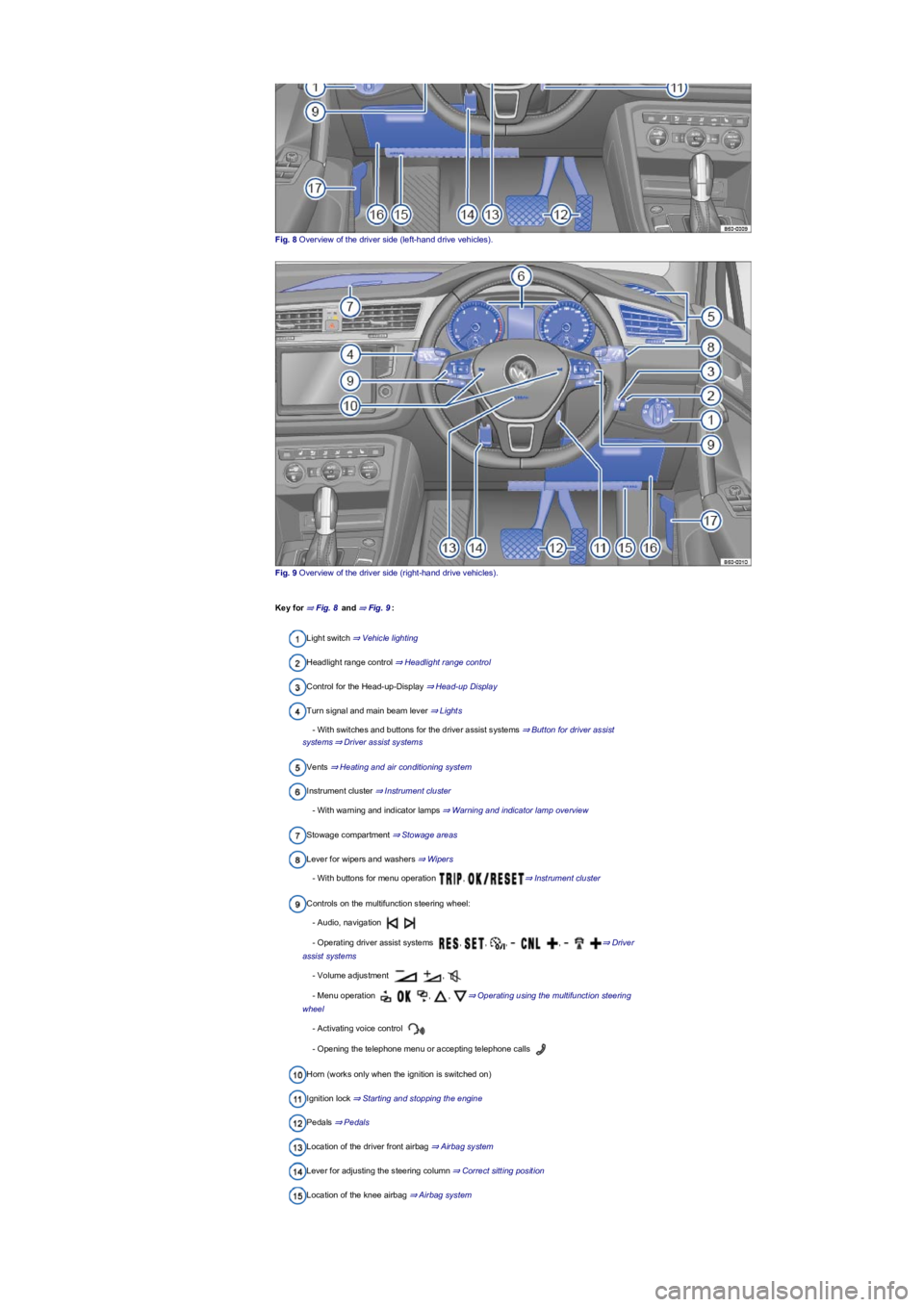
Fig. 8 Overview of the driver side (left-hand drive vehicles).
Fig. 9 Overview of the driver side (right-hand drive vehicles).
Key for ⇒ Fig. 8 and ⇒ Fig. 9:
Light switch ⇒ Vehicle lighting
Headlight range control ⇒ Headlight range control
Control for the Head-up-Display ⇒ Head-up Display
Turn signal and main beam lever ⇒ Lights
- With switches and buttons for the driver assist systems ⇒ Button for driver assist
systems⇒ Driver assist systems
Vents ⇒ Heating and air conditioning system
Instrument cluster ⇒ Instrument cluster
- With warning and indicator lamps ⇒ Warning and indicator lamp overview
Stowage compartment ⇒ Stowage areas
Lever for wipers and washers ⇒ Wipers
- With buttons for menu operation , ⇒ Instrument cluster
Controls on the multifunction steering wheel:
- Audio, navigation
- Operating driver assist systems , , , , ⇒ Driver
assist systems
- Volume adjustment ,
- Menu operation , , ⇒ Operating using the multifunction steering
wheel
- Activating voice control
- Opening the telephone menu or accepting telephone calls
Horn (works only when the ignition is switched on)
Ignition lock ⇒ Starting and stopping the engine
Pedals ⇒ Pedals
Location of the driver front airbag ⇒ Airbag system
Lever for adjusting the steering column ⇒ Correct sitting position
Location of the knee airbag ⇒ Airbag system
Page 10 of 341
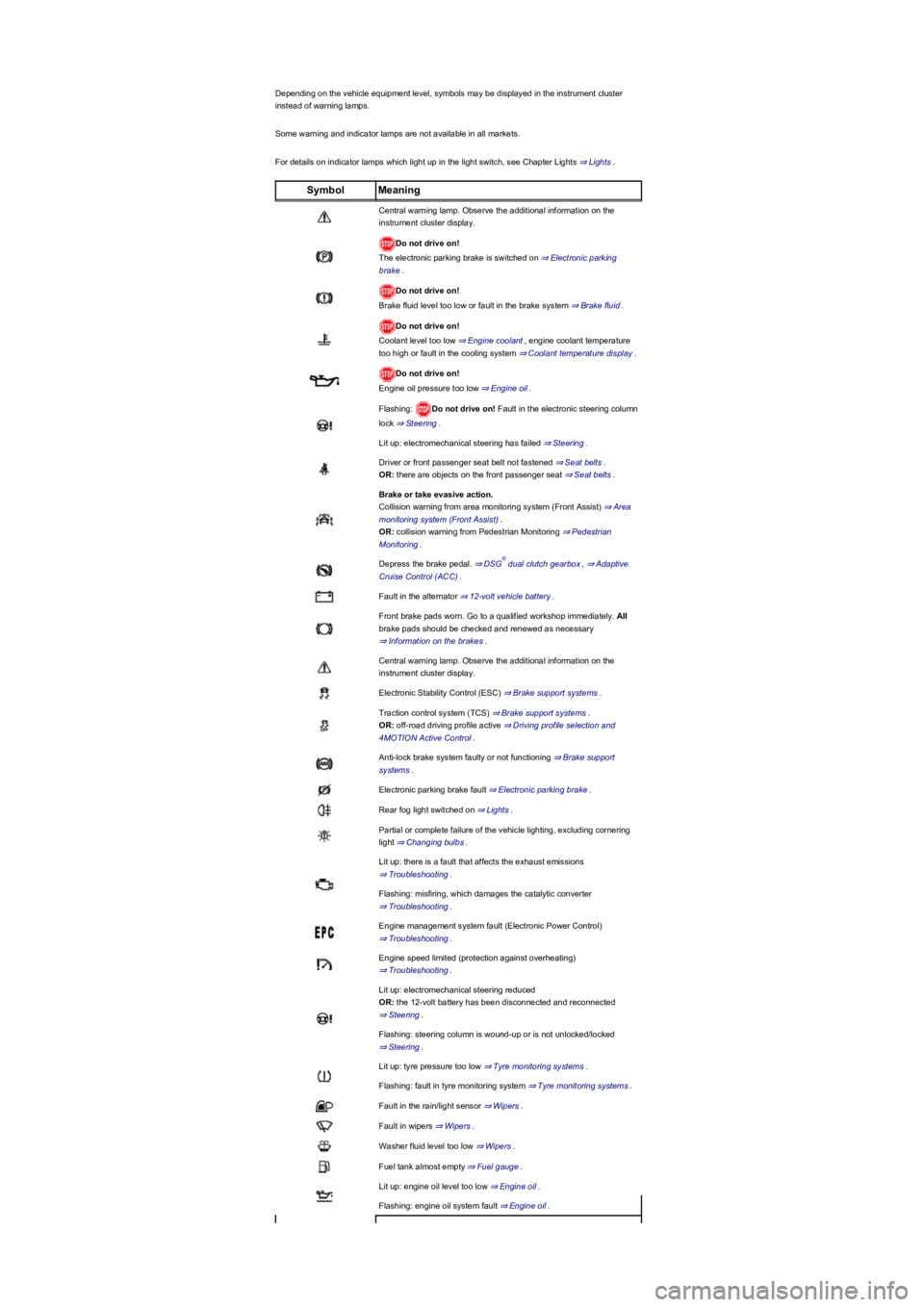
Depending on the vehicle equipment level, symbols may be displayed in the instrument cluster
instead of warning lamps.
Some warning and indicator lamps are not available in all markets.
For details on indicator lamps which light up in the light switch, see Chapter Lights ⇒ Lights.
SymbolMeaning
Central warning lamp. Observe the additional information on the
instrument cluster display.
Do not drive on!
The electronic parking brake is switched on ⇒ Electronic parking
brake.
Do not drive on!
Brake fluid level too low or fault in the brake system ⇒ Brake fluid.
Do not drive on!
Coolant level too low ⇒ Engine coolant, engine coolant temperature
too high or fault in the cooling system ⇒ Coolant temperature display.
Do not drive on!
Engine oil pressure too low ⇒ Engine oil.
Flashing: Do not drive on! Fault in the electronic steering column
lock ⇒ Steering.
Lit up: electromechanical steering has failed ⇒ Steering.
Driver or front passenger seat belt not fastened ⇒ Seat belts.
OR: there are objects on the front passenger seat ⇒ Seat belts.
Brake or take evasive action.
Collision warning from area monitoring system (Front Assist) ⇒ Area
monitoring system (Front Assist).
OR: collision warning from Pedestrian Monitoring ⇒ Pedestrian
Monitoring.
Depress the brake pedal. ⇒ DSG dual clutch gearbox, ⇒ Adaptive
Cruise Control (ACC).
Fault in the alternator ⇒ 12-volt vehicle battery.
Front brake pads worn. Go to a qualified workshop immediately. All
brake pads should be checked and renewed as necessary
⇒ Information on the brakes.
Central warning lamp. Observe the additional information on the
instrument cluster display.
Electronic Stability Control (ESC) ⇒ Brake support systems.
Traction control system (TCS) ⇒ Brake support systems.
OR: off-road driving profile active ⇒ Driving profile selection and
4MOTION Active Control.
Anti-lock brake system faulty or not functioning ⇒ Brake support
systems.
Electronic parking brake fault ⇒ Electronic parking brake.
Rear fog light switched on ⇒ Lights.
Partial or complete failure of the vehicle lighting, excluding cornering
light ⇒ Changing bulbs.
Lit up: there is a fault that affects the exhaust emissions
⇒ Troubleshooting.
Flashing: misfiring, which damages the catalytic converter
⇒ Troubleshooting.
Engine management system fault (Electronic Power Control)
⇒ Troubleshooting.
Engine speed limited (protection against overheating)
⇒ Troubleshooting.
Lit up: electromechanical steering reduced
OR: the 12-volt battery has been disconnected and reconnected
⇒ Steering.
Flashing: steering column is wound-up or is not unlocked/locked
⇒ Steering.
Lit up: tyre pressure too low ⇒ Tyre monitoring systems.
Flashing: fault in tyre monitoring system ⇒ Tyre monitoring systems.
Fault in the rain/light sensor ⇒ Wipers.
Fault in wipers ⇒ Wipers.
Washer fluid level too low ⇒ Wipers.
Fuel tank almost empty ⇒ Fuel gauge.
Lit up: engine oil level too low ⇒ Engine oil.
Flashing: engine oil system fault ⇒ Engine oil.
®
Page 11 of 341
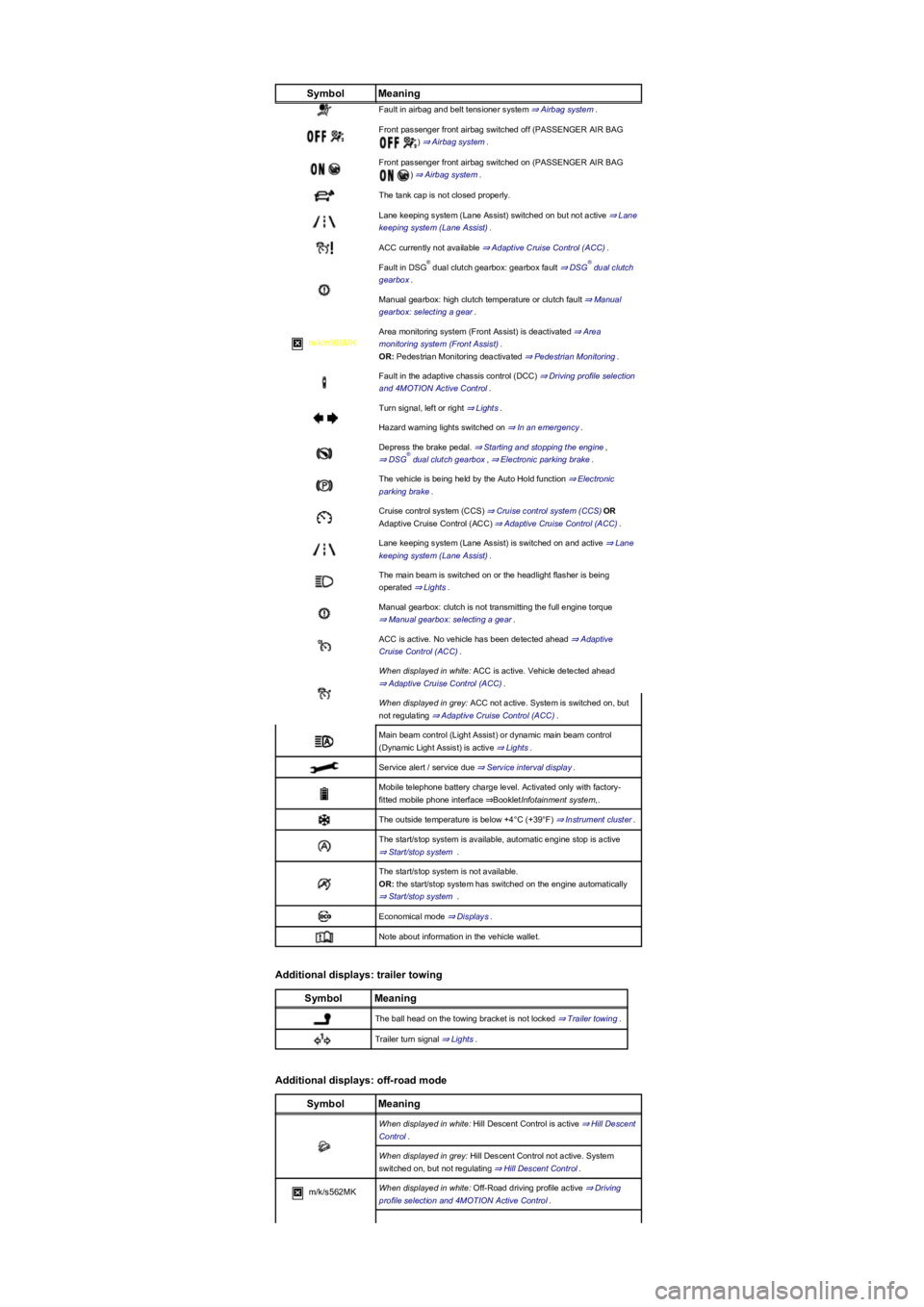
SymbolMeaning
Fault in airbag and belt tensioner system ⇒ Airbag system.
Front passenger front airbag switched off (PASSENGER AIR BAG
) ⇒ Airbag system.
Front passenger front airbag switched on (PASSENGER AIR BAG
) ⇒ Airbag system.
The tank cap is not closed properly.
Lane keeping system (Lane Assist) switched on but not active ⇒ Lane
keeping system (Lane Assist).
ACC currently not available ⇒ Adaptive Cruise Control (ACC).
Fault in DSG dual clutch gearbox: gearbox fault ⇒ DSG dual clutch
gearbox.
Manual gearbox: high clutch temperature or clutch fault ⇒ Manual
gearbox: selecting a gear.
m/k/n998MK
Area monitoring system (Front Assist) is deactivated ⇒ Area
monitoring system (Front Assist).
OR: Pedestrian Monitoring deactivated ⇒ Pedestrian Monitoring.
Fault in the adaptive chassis control (DCC) ⇒ Driving profile selection
and 4MOTION Active Control.
Turn signal, left or right ⇒ Lights.
Hazard warning lights switched on ⇒ In an emergency.
Depress the brake pedal. ⇒ Starting and stopping the engine,
⇒ DSG dual clutch gearbox, ⇒ Electronic parking brake.
The vehicle is being held by the Auto Hold function ⇒ Electronic
parking brake.
Cruise control system (CCS) ⇒ Cruise control system (CCS)OR
Adaptive Cruise Control (ACC) ⇒ Adaptive Cruise Control (ACC).
Lane keeping system (Lane Assist) is switched on and active ⇒ Lane
keeping system (Lane Assist).
The main beam is switched on or the headlight flasher is being
operated ⇒ Lights.
Manual gearbox: clutch is not transmitting the full engine torque
⇒ Manual gearbox: selecting a gear.
ACC is active. No vehicle has been detected ahead ⇒ Adaptive
Cruise Control (ACC).
When displayed in white: ACC is active. Vehicle detected ahead
⇒ Adaptive Cruise Control (ACC).
When displayed in grey: ACC not active. System is switched on, but
not regulating ⇒ Adaptive Cruise Control (ACC).
Main beam control (Light Assist) or dynamic main beam control
(Dynamic Light Assist) is active ⇒ Lights.
Service alert / service due ⇒ Service interval display.
Mobile telephone battery charge level. Activated only with factory-
fitted mobile phone interface ⇒BookletInfotainment system,.
The outside temperature is below +4°C (+39°F) ⇒ Instrument cluster.
The start/stop system is available, automatic engine stop is active
⇒ Start/stop system .
The start/stop system is not available.
OR: the start/stop system has switched on the engine automatically
⇒ Start/stop system .
Economical mode ⇒ Displays.
Note about information in the vehicle wallet.
Additional displays: trailer towing
SymbolMeaning
The ball head on the towing bracket is not locked ⇒ Trailer towing.
Trailer turn signal ⇒ Lights.
Additional displays: off-road mode
SymbolMeaning
When displayed in white: Hill Descent Control is active ⇒ Hill Descent
Control.
When displayed in grey: Hill Descent Control not active. System
switched on, but not regulating ⇒ Hill Descent Control.
m/k/s562MKWhen displayed in white: Off-Road driving profile active ⇒ Driving
profile selection and 4MOTION Active Control.
®®
®
Page 12 of 341
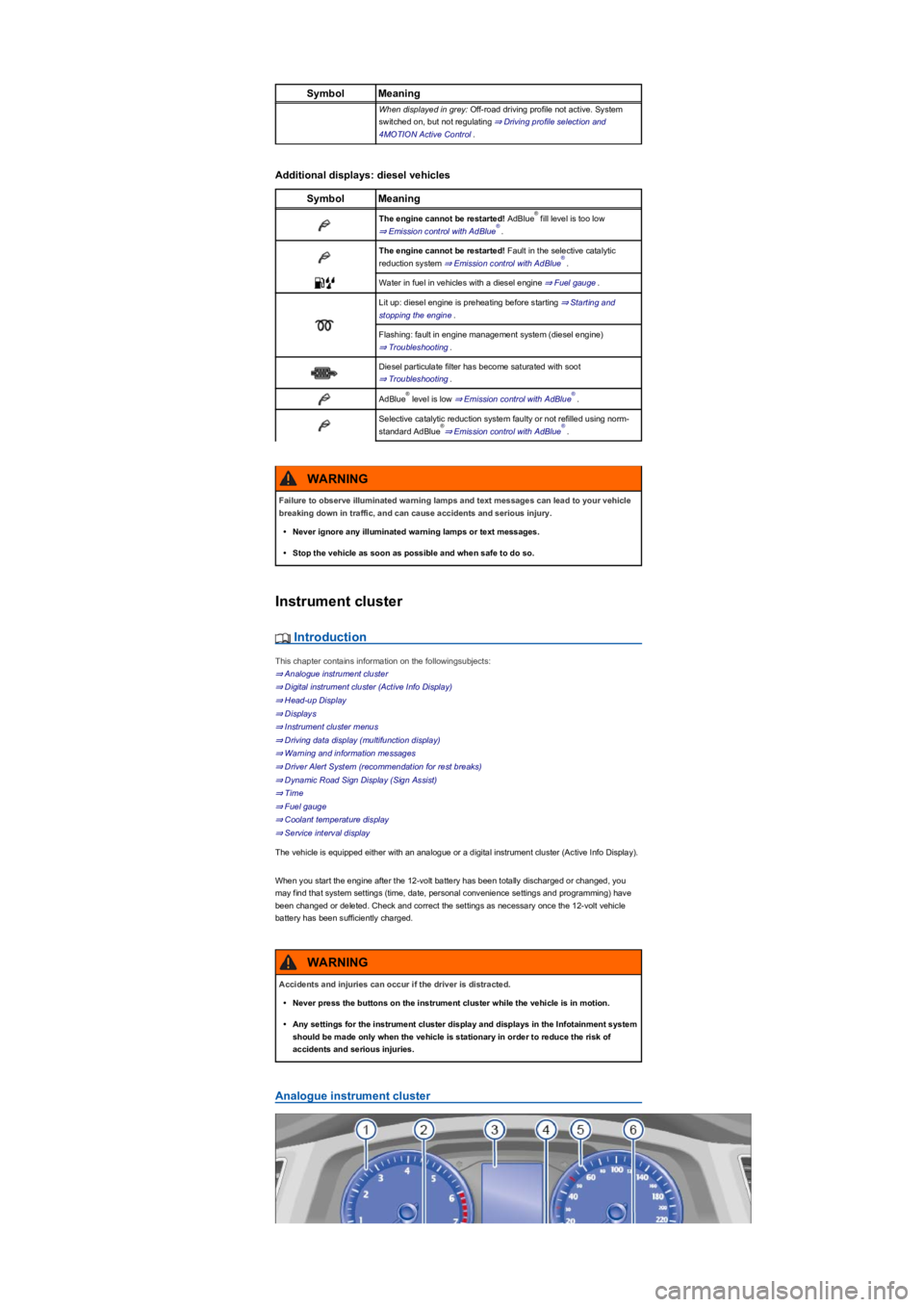
SymbolMeaning
When displayed in grey: Off-road driving profile not active. System
switched on, but not regulating ⇒ Driving profile selection and
4MOTION Active Control.
Additional displays: diesel vehicles
SymbolMeaning
The engine cannot be restarted! AdBlue fill level is too low
⇒ Emission control with AdBlue.
The engine cannot be restarted! Fault in the selective catalytic
reduction system ⇒ Emission control with AdBlue.
Water in fuel in vehicles with a diesel engine ⇒ Fuel gauge.
Lit up: diesel engine is preheating before starting ⇒ Starting and
stopping the engine.
Flashing: fault in engine management system (diesel engine)
⇒ Troubleshooting.
Diesel particulate filter has become saturated with soot
⇒ Troubleshooting.
AdBlue level is low ⇒ Emission control with AdBlue.
Selective catalytic reduction system faulty or not refilled using norm-
standard AdBlue⇒ Emission control with AdBlue.
Instrument cluster
Introduction
This chapter contains information on the followingsubjects:
⇒ Analogue instrument cluster
⇒ Digital instrument cluster (Active Info Display)
⇒ Head-up Display
⇒ Displays
⇒ Instrument cluster menus
⇒ Driving data display (multifunction display)
⇒ Warning and information messages
⇒ Driver Alert System (recommendation for rest breaks)
⇒ Dynamic Road Sign Display (Sign Assist)
⇒ Time
⇒ Fuel gauge
⇒ Coolant temperature display
⇒ Service interval display
The vehicle is equipped either with an analogue or a digital instrument cluster (Active Info Display).
When you start the engine after the 12-volt battery has been totally discharged or changed, you
may find that system settings (time, date, personal convenience settings and programming) have
been changed or deleted. Check and correct the settings as necessary once the 12-volt vehicle
battery has been sufficiently charged.
Analogue instrument cluster
®
®
®
®®
®®
Failure to observe illuminated warning lamps and text messages can lead to your vehicle
breaking down in traffic, and can cause accidents and serious injury.
•Never ignore any illuminated warning lamps or text messages.
•Stop the vehicle as soon as possible and when safe to do so.
WARNING
Accidents and injuries can occur if the driver is distracted.
•Never press the buttons on the instrument cluster while the vehicle is in motion.
•Any settings for the instrument cluster display and displays in the Infotainment system
should be made only when the vehicle is stationary in order to reduce the risk of
accidents and serious injuries.
WARNING
Page 13 of 341
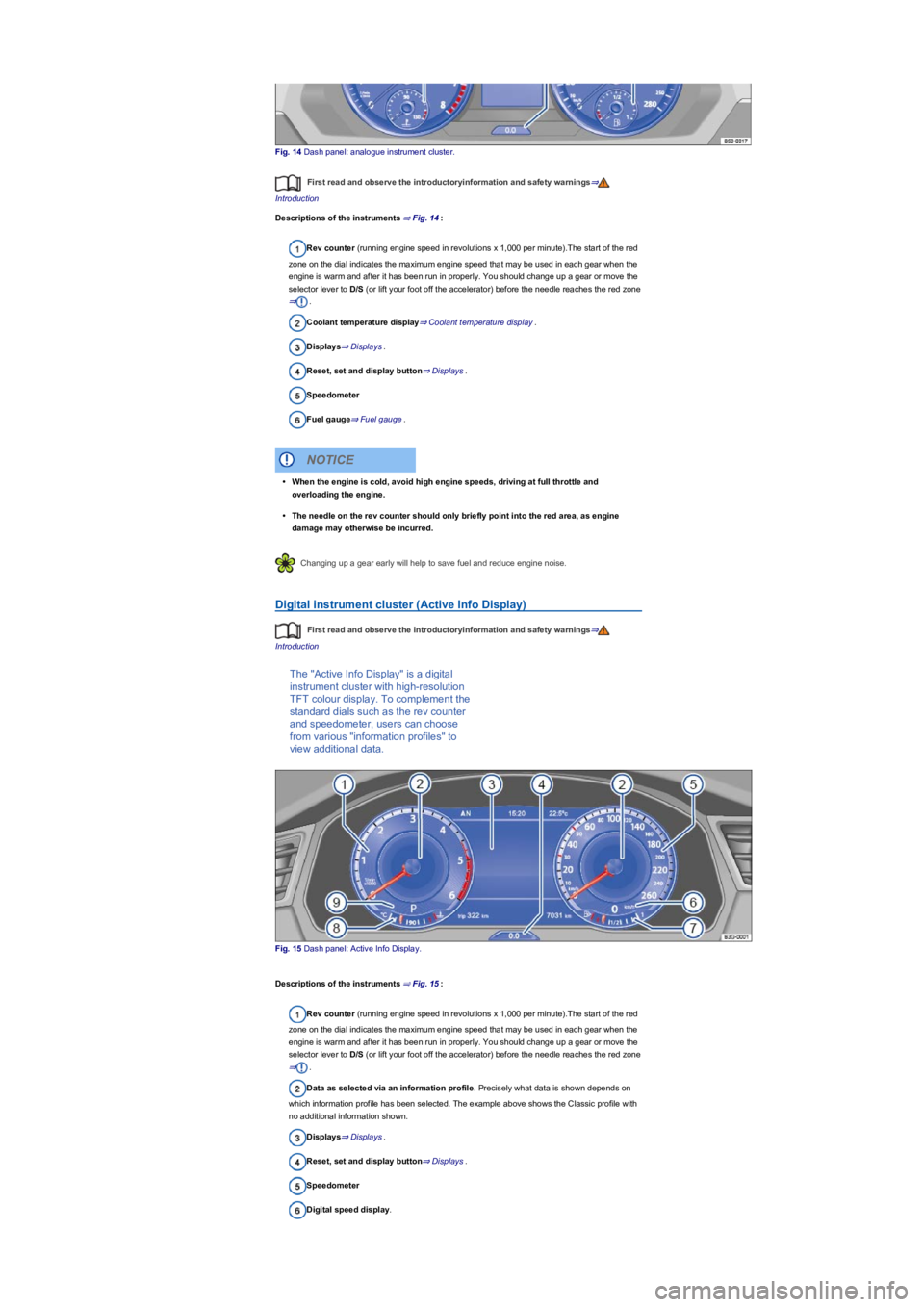
Fig. 14 Dash panel: analogue instrument cluster.
First read and observe the introductoryinformation and safety warnings⇒
Introduction
Descriptions of the instruments ⇒ Fig. 14:
Rev counter (running engine speed in revolutions x 1,000 per minute).The start of the red
zone on the dial indicates the maximum engine speed that may be used in each gear when the
engine is warm and after it has been run in properly. You should change up a gear or move the
selector lever to D/S (or lift your foot off the accelerator) before the needle reaches the red zone
⇒.
Coolant temperature display⇒ Coolant temperature display.
Displays⇒ Displays.
Reset, set and display button⇒ Displays.
Speedometer
Fuel gauge⇒ Fuel gauge.
Changing up a gear early will help to save fuel and reduce engine noise.
Digital instrument cluster (Active Info Display)
First read and observe the introductoryinformation and safety warnings⇒
Introduction
The "Active Info Display" is a digital
instrument cluster with high-resolution
TFT colour display. To complement the
standard dials such as the rev counter
and speedometer, users can choose
from various "information profiles" to
view additional data.
Fig. 15 Dash panel: Active Info Display.
Descriptions of the instruments ⇒ Fig. 15:
Rev counter (running engine speed in revolutions x 1,000 per minute).The start of the red
zone on the dial indicates the maximum engine speed that may be used in each gear when the
engine is warm and after it has been run in properly. You should change up a gear or move the
selector lever to D/S (or lift your foot off the accelerator) before the needle reaches the red zone
⇒.
Data as selected via an information profile. Precisely what data is shown depends on
which information profile has been selected. The example above shows the Classic profile with
no additional information shown.
Displays⇒ Displays.
Reset, set and display button⇒ Displays.
Speedometer
Digital speed display.
•When the engine is cold, avoid high engine speeds, driving at full throttle and
overloading the engine.
•The needle on the rev counter should only briefly point into the red area, as engine
damage may otherwise be incurred.
NOTICE
Page 14 of 341
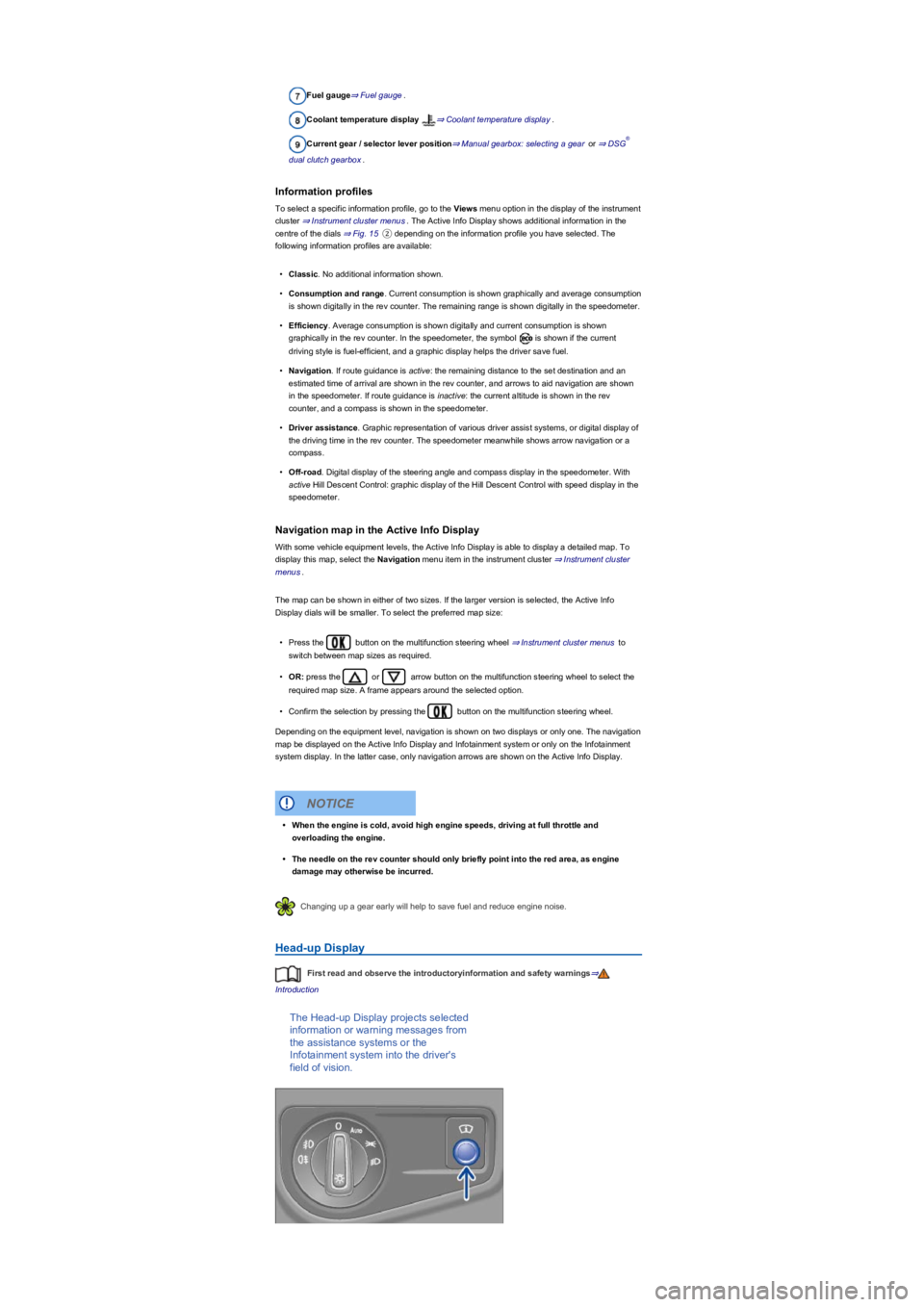
Fuel gauge⇒ Fuel gauge.
Coolant temperature display ⇒ Coolant temperature display.
Current gear / selector lever position⇒ Manual gearbox: selecting a gear or ⇒ DSG
dual clutch gearbox.
Information profiles
To select a specific information profile, go to the Views menu option in the display of the instrument
cluster ⇒ Instrument cluster menus. The Active Info Display shows additional information in the
centre of the dials ⇒ Fig. 15② depending on the information profile you have selected. The
following information profiles are available:
•Classic. No additional information shown.
•Consumption and range. Current consumption is shown graphically and average consumption
is shown digitally in the rev counter. The remaining range is shown digitally in the speedometer.
•Efficiency. Average consumption is shown digitally and current consumption is shown
graphically in the rev counter. In the speedometer, the symbol is shown if the current
driving style is fuel-efficient, and a graphic display helps the driver save fuel.
•Navigation. If route guidance is active: the remaining distance to the set destination and an
estimated time of arrival are shown in the rev counter, and arrows to aid navigation are shown
in the speedometer. If route guidance is inactive: the current altitude is shown in the rev
counter, and a compass is shown in the speedometer.
•Driver assistance. Graphic representation of various driver assist systems, or digital display of
the driving time in the rev counter. The speedometer meanwhile shows arrow navigation or a
compass.
•Off-road. Digital display of the steering angle and compass display in the speedometer. With
active Hill Descent Control: graphic display of the Hill Descent Control with speed display in the
speedometer.
Navigation map in the Active Info Display
With some vehicle equipment levels, the Active Info Display is able to display a detailed map. To
display this map, select the Navigation menu item in the instrument cluster ⇒ Instrument cluster
menus.
The map can be shown in either of two sizes. If the larger version is selected, the Active Info
Display dials will be smaller. To select the preferred map size:
•Press the button on the multifunction steering wheel ⇒ Instrument cluster menus to
switch between map sizes as required.
•OR: press the or arrow button on the multifunction steering wheel to select the
required map size. A frame appears around the selected option.
•Confirm the selection by pressing the button on the multifunction steering wheel.
Depending on the equipment level, navigation is shown on two displays or only one. The navigation
map be displayed on the Active Info Display and Infotainment system or only on the Infotainment
system display. In the latter case, only navigation arrows are shown on the Active Info Display.
Changing up a gear early will help to save fuel and reduce engine noise.
Head-up Display
First read and observe the introductoryinformation and safety warnings⇒
Introduction
The Head-up Display projects selected
information or warning messages from
the assistance systems or the
Infotainment system into the driver's
field of vision.
®
•When the engine is cold, avoid high engine speeds, driving at full throttle and
overloading the engine.
•The needle on the rev counter should only briefly point into the red area, as engine
damage may otherwise be incurred.
NOTICE
Page 15 of 341
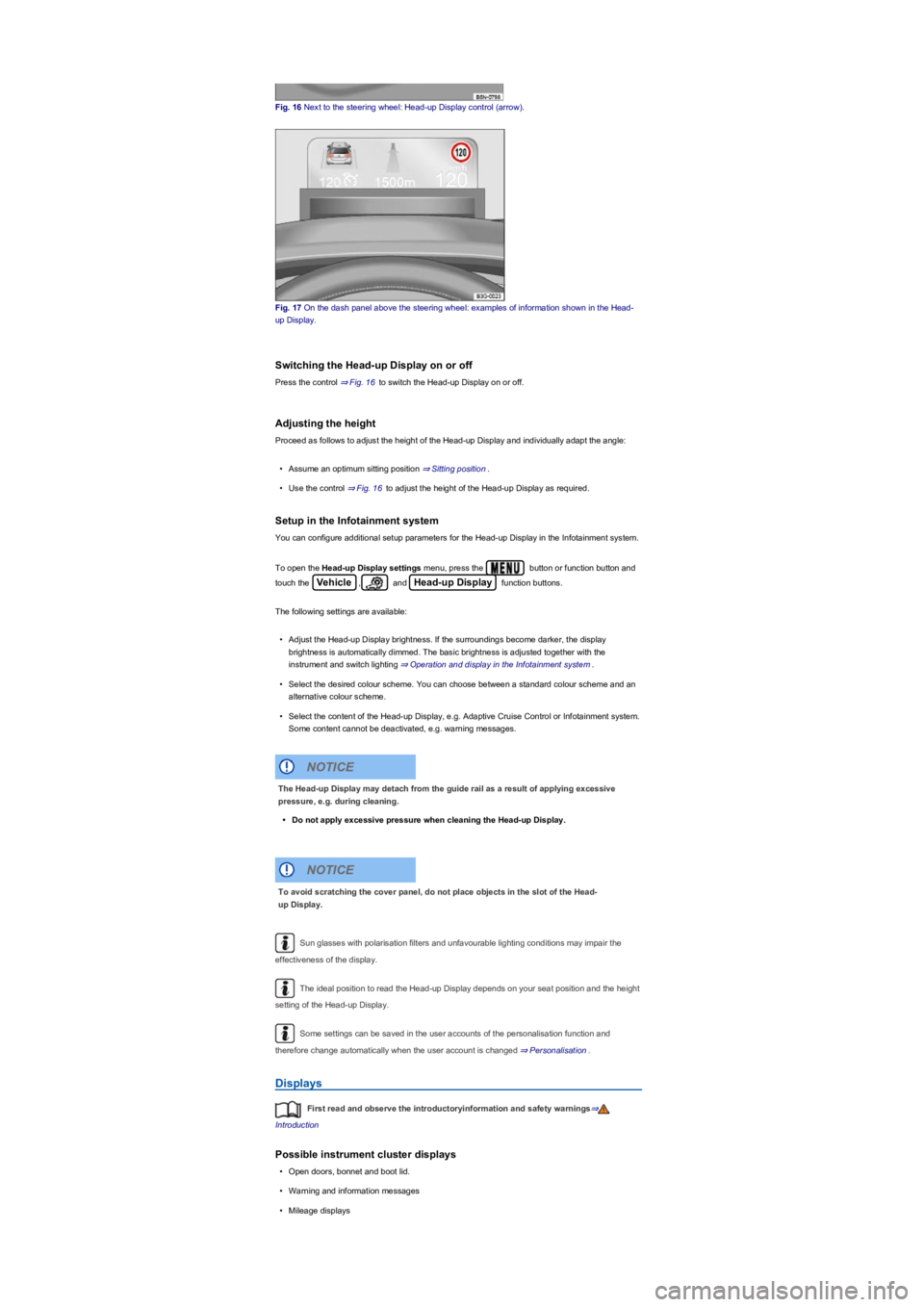
Fig. 16 Next to the steering wheel: Head-up Display control (arrow).
Fig. 17 On the dash panel above the steering wheel: examples of information shown in the Head-
up Display.
Switching the Head-up Display on or off
Press the control ⇒ Fig. 16 to switch the Head-up Display on or off.
Adjusting the height
Proceed as follows to adjust the height of the Head-up Display and individually adapt the angle:
•Assume an optimum sitting position ⇒ Sitting position.
•Use the control ⇒ Fig. 16 to adjust the height of the Head-up Display as required.
Setup in the Infotainment system
You can configure additional setup parameters for the Head-up Display in the Infotainment system.
To open the Head-up Display settings menu, press the button or function button and
touch the Vehicle, and Head-up Display function buttons.
The following settings are available:
•Adjust the Head-up Display brightness. If the surroundings become darker, the display
brightness is automatically dimmed. The basic brightness is adjusted together with the
instrument and switch lighting ⇒ Operation and display in the Infotainment system.
•Select the desired colour scheme. You can choose between a standard colour scheme and an
alternative colour scheme.
•Select the content of the Head-up Display, e.g. Adaptive Cruise Control or Infotainment system.
Some content cannot be deactivated, e.g. warning messages.
Sun glasses with polarisation filters and unfavourable lighting conditions may impair the
effectiveness of the display.
The ideal position to read the Head-up Display depends on your seat position and the height
setting of the Head-up Display.
Some settings can be saved in the user accounts of the personalisation function and
therefore change automatically when the user account is changed ⇒ Personalisation.
Displays
First read and observe the introductoryinformation and safety warnings⇒
Introduction
Possible instrument cluster displays
•Open doors, bonnet and boot lid.
•Warning and information messages
•Mileage displays
The Head-up Display may detach from the guide rail as a result of applying excessive
pressure, e.g. during cleaning.
•Do not apply excessive pressure when cleaning the Head-up Display.
NOTICE
To avoid scratching the cover panel, do not place objects in the slot of the Head-
up Display.
NOTICE
Page 16 of 341
•Time ⇒ Time.
•Radio and navigation information ⇒BookletInfotainment system,.
•Telephone information ⇒BookletInfotainment system,.
•Outside temperature
•Compass display
•Selector lever positions
•Gear-change indicator ⇒ Gear-change indicator.
•Driving data display (multifunction display) and menus for various settings ⇒ Instrument cluster
menus.
•Service interval display ⇒ Service interval display.
•Speed warning function ⇒ Instrument cluster menus.
•Speed warning for winter tyres.
•Start/stop system status display ⇒ Start/stop system .
•Status display for Active Cylinder Management (ACT) ⇒ Driving economically.
•Economical mode .
•Engine code (EC)
•Personalisation: welcome and user selection.
•Road signs detected by the Dynamic Road Sign Display system ⇒ Dynamic Road Sign Display
(Sign Assist).
Open doors, bonnet and boot lid
The instrument cluster display indicates if any doors, the bonnet or boot lid are open once the
vehicle has been unlocked, and while the vehicle is in motion. In some cases, a signal tone is also
given. Different instrument cluster designs will have different displays.
Selector lever positions (DSG dual clutch gearbox)
The gear selected is displayed on the side of the selector lever and on the display in the instrument
cluster. The instrument cluster display may show which gear has been selected if the selector lever
is in D/S position or in Tiptronic mode ⇒ DSG dual clutch gearbox.
Outside temperature display
If the outside temperature falls below approximately +4°C (+39°F), the temperature display also
shows a snowflake symbol . This symbol remains lit up until the outside temperature rises
above +6°C (+43°F) ⇒.
Heat radiated from the engine may cause the temperature display to show a slightly higher value
than the actual outside temperature if the vehicle is stationary, the auxiliary heater ⇒ Auxiliary
heater and ventilation is switched on or the vehicle is travelling at a very low vehicle speed.
The measuring range lies between -45°C (-49°F) and +76°C (+169°F).
Gear-change indicator
When driving in Tiptronic mode, the instrument cluster display may recommend a gear to save fuel
⇒ Gear-change indicator.
Mileage displays
The odometer registers the total distance travelled by the car.
The trip recorder (trip) shows the distance travelled since the trip recorder was last reset.
•To reset the trip recorder to 0, briefly press the button in the instrument cluster
⇒ Analogue instrument cluster or ⇒ Digital instrument cluster (Active Info Display).
Speed warning for winter tyres
A display in the instrument cluster indicates when the set maximum speed has been exceeded
⇒ Instrument cluster menus.
You can adjust the settings for the speed warning in the Infotainment system ⇒ Vehicle settings
menu.
Compass display
If the ignition is switched on, depending on the equipment level, the instrument cluster display
shows the current direction of travel in the form of an abbreviation, e.g. NW for north west.
The graphic compass display is also shown when the Infotainment system is switched on and route
guidance is not active.
®
®
®
Page 17 of 341
Economical mode
While driving, the instrument cluster will show whether the vehicle is in a fuel-efficient mode ,
e.g. due to active cylinder management (ACT) ⇒ Driving economically or coasting of the
automatic gearbox ⇒ DSG dual clutch gearbox.
Engine code
Press and hold the button in the instrument cluster (for approximately 15 seconds) to show
the vehicle's engine code (EC) in the display. The ignition must be switched on but the engine must
not be running ⇒ Analogue instrument cluster or ⇒ Digital instrument cluster (Active Info Display).
Trailer drawbar load display
If the vehicle drives with a trailer attached (depends on equipment and not available in all markets),
the drawbar load and the trailer weight can be shown in the instrument cluster display.
Different instrument clusters are available, which means that the versions and displays may
vary. In displays without warning or information texts, faults are indicated exclusively by indicator
lamps.
Some displays in the instrument cluster may be overridden by sudden alerts, e.g. incoming
telephone calls.
Depending on the vehicle equipment level, some settings and displays may also appear in
the Infotainment system.
If several warning reports are detected, the symbols will appear for several seconds, one
after another. The symbols will continue to appear until the faults are rectified.
If warning messages about malfunctions are displayed when the ignition is switched on, it
may not be possible to adjust some settings as described, or the information display may appear
differently. If this is the case, take the vehicle to a qualified workshop to have the malfunction
rectified.
Instrument cluster menus
First read and observe the introductoryinformation and safety warnings⇒
Introduction
The range of content and layout of the menus and displays depend on the vehicle electronics and
the level of vehicle equipment.
Qualified workshops can programme and modify other functions depending on the vehicle
equipment level. Volkswagen recommends using a Volkswagen dealership for this purpose.
Some menu options can only be opened when the vehicle is stationary.
◾Driving data⇒ Driving data display (multifunction display)
◾Assist systems
◾Lane Assist on/off ⇒ Lane keeping system (Lane Assist)
◾Front Assist on/off ⇒ Area monitoring system (Front Assist)
◾Pedestrian Monitoring on/off ⇒ Pedestrian Monitoring
◾Lane change system on/off ⇒ Lane change system (Side Assist) incl. Rear Traffic Alert
◾Rear Traffic Alert on/off ⇒ Lane change system (Side Assist) incl. Rear Traffic Alert
◾ACC (display only) ⇒ Adaptive Cruise Control (ACC)
◾Views⇒ Instrument cluster
◾Navigation⇒BookletInfotainment system,
◾Audio⇒BookletInfotainment system,
◾Telephone⇒BookletInfotainment system,
◾Vehicle status⇒ Warning and information messages
◾Lap timer⇒ Lap timer
◾Personalisation (user selection)⇒ Personalisation
®
®
Streets and bridges can be iced over at outside temperatures above freezing point.
•The snowflake symbol indicates that there is a risk of black ice.
•There may be black ice on the roads even when outside temperatures are above +4 °C
(+39 °F), even when no snowflake symbol is displayed.
•You should never rely solely on the outside temperature display!
WARNING
1)