navigation VOLKSWAGEN TOUAREG 2013 2.G User Guide
[x] Cancel search | Manufacturer: VOLKSWAGEN, Model Year: 2013, Model line: TOUAREG, Model: VOLKSWAGEN TOUAREG 2013 2.GPages: 440, PDF Size: 7.68 MB
Page 233 of 440
Introduction to navigation
Page 234 of 440
Navigation data
All navigation data required for navigation is stored in the unit navigation data memory.
Street routing is subject to ongoing changes like, for example, new streets, street names or street
numbers. The route guidance may be inaccurate or incorrect if the navigation data is no longer up to
date. You should therefore have the unit navigation data memory updated by a Volkswagen
dealership on a regular basis. The updates are subject to a fee.
Possible errors in navigation
When the navigation system cannot receive any data from GPS satellites (dense canopy of trees,
tunnel, underground CAR park), navigation can still continue using the vehicle sensors.
In areas that are not or only incompletely digitized on the data medium (such as one-way streets and
street type not sufficiently captured), the navigation system also tries to enable route guidance.
Please remember that the navigation may sometimes not be so accurate as usual if the precise
vehicle position cannot be determined.
Navigation main menu
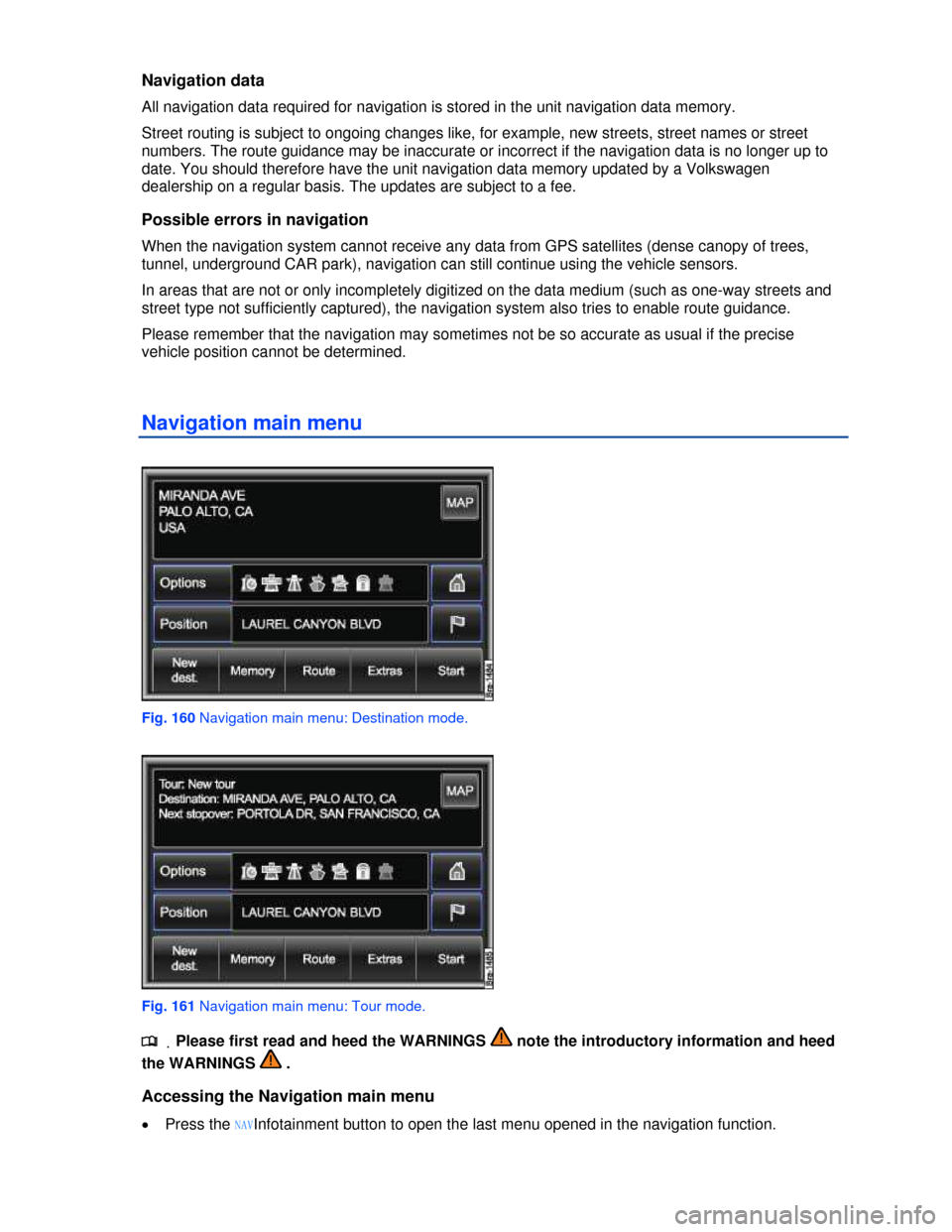
Fig. 160 Navigation main menu: Destination mode.
Fig. 161 Navigation main menu: Tour mode.
.
Page 235 of 440

x Press the NAVInfotainment button twice in quick succession. After changing to the map display, the
main menu Navigation is displayed.
x Press the e function key to switch menu by menu from a navigation submenu to the Navigation
main menu.
x You can switch back and forth between the map view and the Navigation main menu by pressing
the NAVInfotainment button.
The Navigation main menu is displayed either in “normal” Destination mode or in Tour mode or as the
Waypoint navigation menu ⇒ fig. 201.
If Tour mode ⇒ fig. 161 is displayed .
If the Waypoint navigation menu is displayed .
Display of the last destination
In the upper third of the screen, the destination last used as route guidance is displayed.
x Briefly touch the display box to show the displayed destination in the detailed view.
x Press the New destinationfunction key followed by the + Addressfunction key to show the displayed
destination in the Address entry menu and edit it .
If no destination is displayed, this means no route guidance has been started or that the
destination memory has been deleted manually .
Function keys in the Navigation main menu
Function key: Effect
Options : Defines route options for calculating a route .
Position : opens the current position in the detailed view and displays the coordinates.
Store : stores the displayed position in the destination memory .
D: Stores the current position as a “Flagged destination” in the destination memory .
': Enter home address or show home address in the Navigation main menu .
New destination : opens the selection menu for entry of destination .
Memory: Opens a pop-up window for storing the current destination, loading stored destinations or
managing destinations .
Route: Opens options for route guidance .
Route list: Shows street names or street designations of the route section to be driven.
Remove area to avoid: Removes an entered route exclusion.
Avoid area: To enter a route exclusion.
Extras: opens a pop-up window.
Accept new stopover: for entering a stopover .
Tour mode: for switching to tour mode in order to drive to several destinations during route
guidance .
Offroad: for navigation in off-road areas (waypoint navigation) .
Start: Starts route guidance to the displayed destination .
Page 239 of 440
area you have selected in a previous window, you will not be able to find the street at the street
selection stage.
Finishing destination input
x Press the Start route guidance function key to start route guidance to the entered destination .
x OR: Press the Store in directoryfunction key to store the destination in the destination memory .
Address entry menu
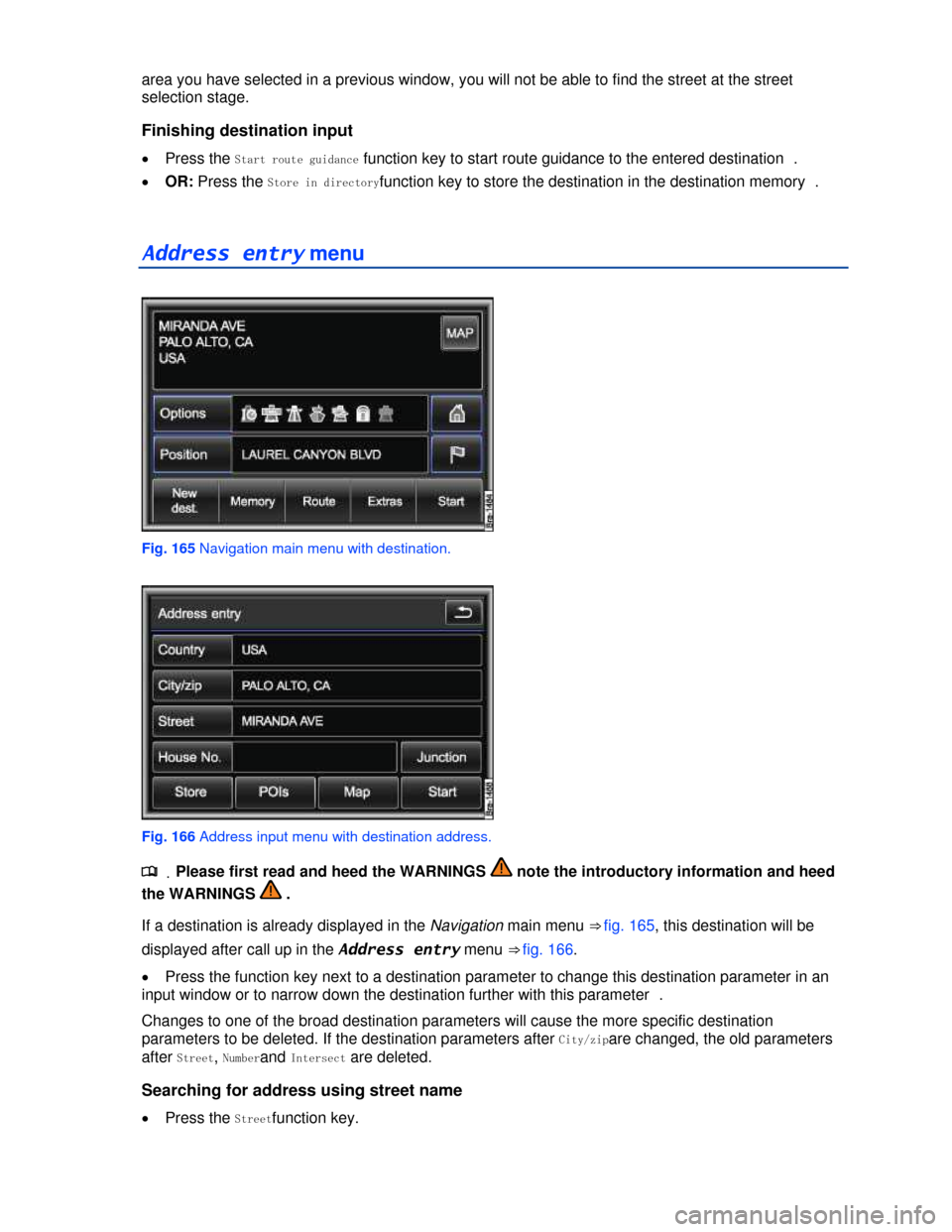
Fig. 165 Navigation main menu with destination.
Fig. 166 Address input menu with destination address.
.
Page 243 of 440
Correct spelling of entries is important. In the same way as when selecting a destination address, it is
only possible to make entries that correspond with a point of interest stored in the navigation data.
In some lists, the Options interface can be used to put special objects into alphabetical order, according
to trade names or categories.
Selecting special and favorite destinations from the map
.
Page 247 of 440

Show details: Shows the destination in the detail view.
Show destination on map: Shows the destination on the map .
Loading a destination from the directory
The Load from directory menu only displays directory entries for which route guidance can be
started (display: symbol 3)
The directory needs to be opened for editing in order to display or edit all directory entries .
x Press the * Directoryfunction key ⇒ fig. 162.
x Press the desired directory entry in the Load from directory menu.
x If more than one navigation destination is stored for a directory entry, you then need to select the
desired navigation destination by touching the screen.
x Press one of the following options in the Destination details menu.
Start route guidance: Starts route guidance .
Add as stopover: Allows you to add the destination to the tour plan .
Enter/show destination on map: Shows the destination on the map .
You can also search for directory entries using a search function.
x Press the Searchfunction key and search for the directory entry by entering the entry name in an
input window .
Page 248 of 440
Directory (navigation destinations, addresses and
telephone numbers)
Page 255 of 440
Editing directory entries
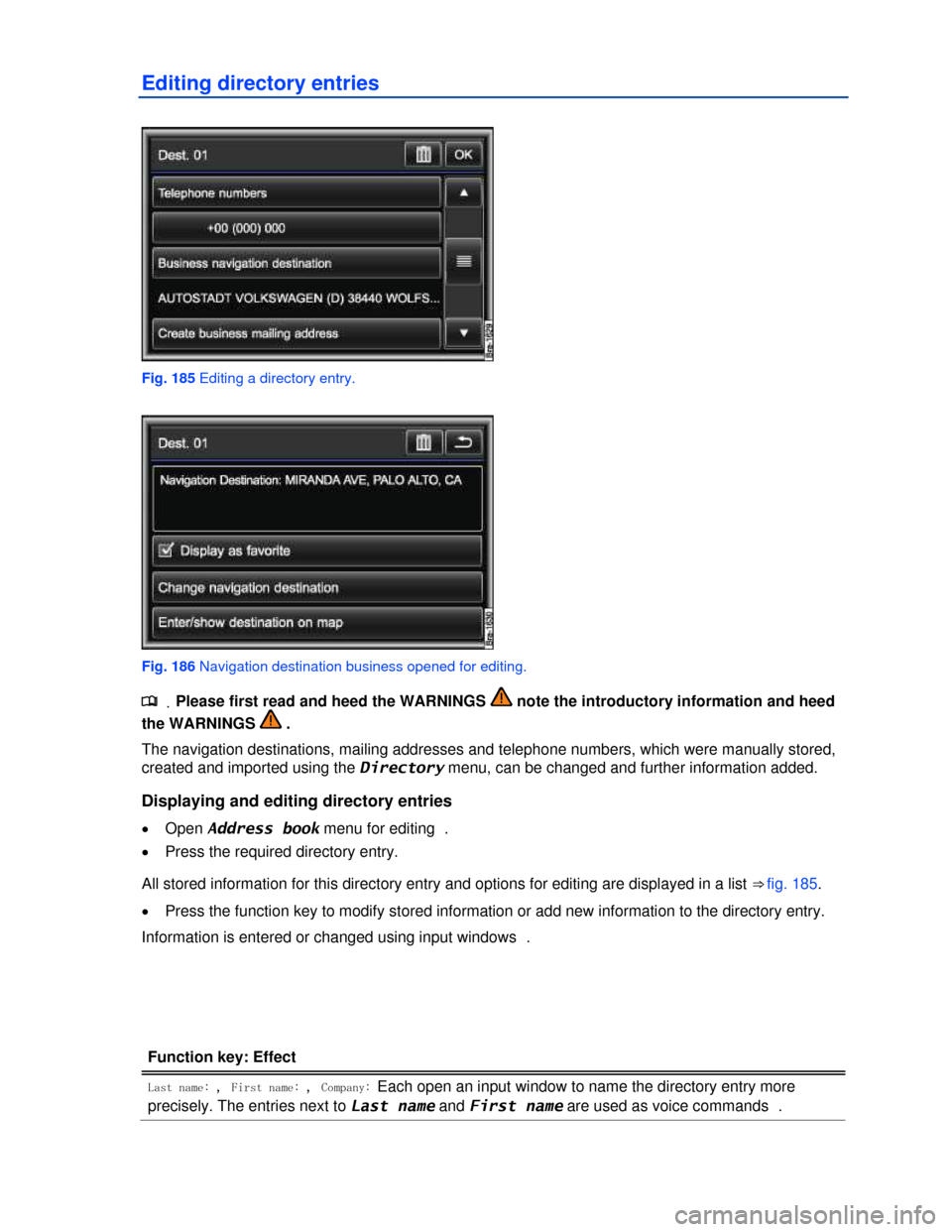
Fig. 185 Editing a directory entry.
Fig. 186 Navigation destination business opened for editing.
.
Page 256 of 440

Function key: Effect
Create new telephone numbers: Opens an input window where you can enter a telephone number
manually.
Create business navigation destination: Opens a menu where you can select a navigation destination for
the “Business P”favorites category or convert a stored mailing address into a navigation
destination .
Create business mailing address: Opens a menu to enter a mailing address manually in input windows.
Create business mailing address: Opens a menu where you can select a navigation destination for the
“Private T” favorites category or convert a stored mailing address into a navigation destination .
Create private mailing address: Opens a menu to enter a mailing address manually in input windows.
Read contact: The voice command stored under Last name and First name is read out .
= Private contact: The directory entry is only displayed when the corresponding user profile is loaded.
If the check box = is cleared, the directory entry is transferred to the general user profile and is
always displayed .
If the prefix Create ... is not displayed in a function key, corresponding information is already stored.
This information is displayed below the function key (such as in .: Business navigation destination).
Press the function key to display or modify the stored information ⇒ fig. 186.
Converting mailing addresses into navigation destinations
Information that is stored as Business mailing address or Private mailing address can be converted into
navigation destinations, such as the telephone directory entries of a connected cell phone.
x Press the Create private navigation destination or Create business navigation destination
.button.
x Press the Create navigation destination function key.
The mailing address is converted into a navigation destination in the Infotainment System and
displayed in the Address entry menu where it can be edited further .
x Touch the OKfunction key.
The mailing address is now stored as a navigation destination. The navigation destination is displayed
and can be edited again.
x Press the Efunction key to close the menu.
Page 257 of 440
Favorite ) and flagged destinations $
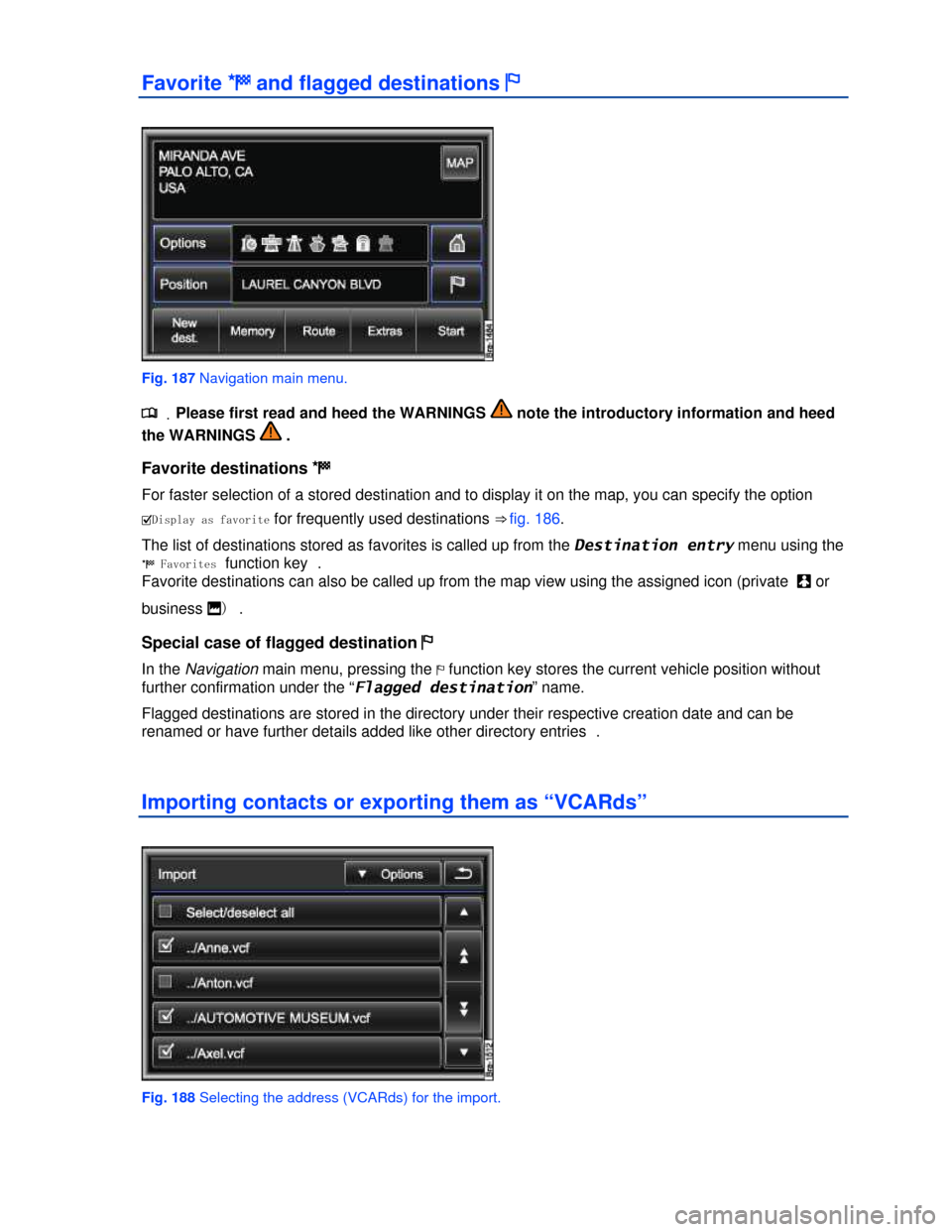
Fig. 187 Navigation main menu.
.