ad blue VOLKSWAGEN TOUAREG 2017 Owner´s Manual
[x] Cancel search | Manufacturer: VOLKSWAGEN, Model Year: 2017, Model line: TOUAREG, Model: VOLKSWAGEN TOUAREG 2017Pages: 684, PDF Size: 9.34 MB
Page 389 of 684

Function key: Effect
Car phone40: Device paired via Bluetooth rSAP ⇒ Bluetooth pro-
files. Press the function key to make a connection; for instance, to
switch from HFP to rSAP
Hands-free function : Device paired via Bluetooth HFP Press the
function key to set up a connection.
Audio player : Device paired via Bluetooth A2DP. Press the function
key to also pair a paired mobile phone with the telephone control as
an audio player.
Delete all external devices : Deletes all paired devices after confirmation.
Display recently found devices : Displays the devices most recently found
by the telephone control.
40 country specific
Page 445 of 684
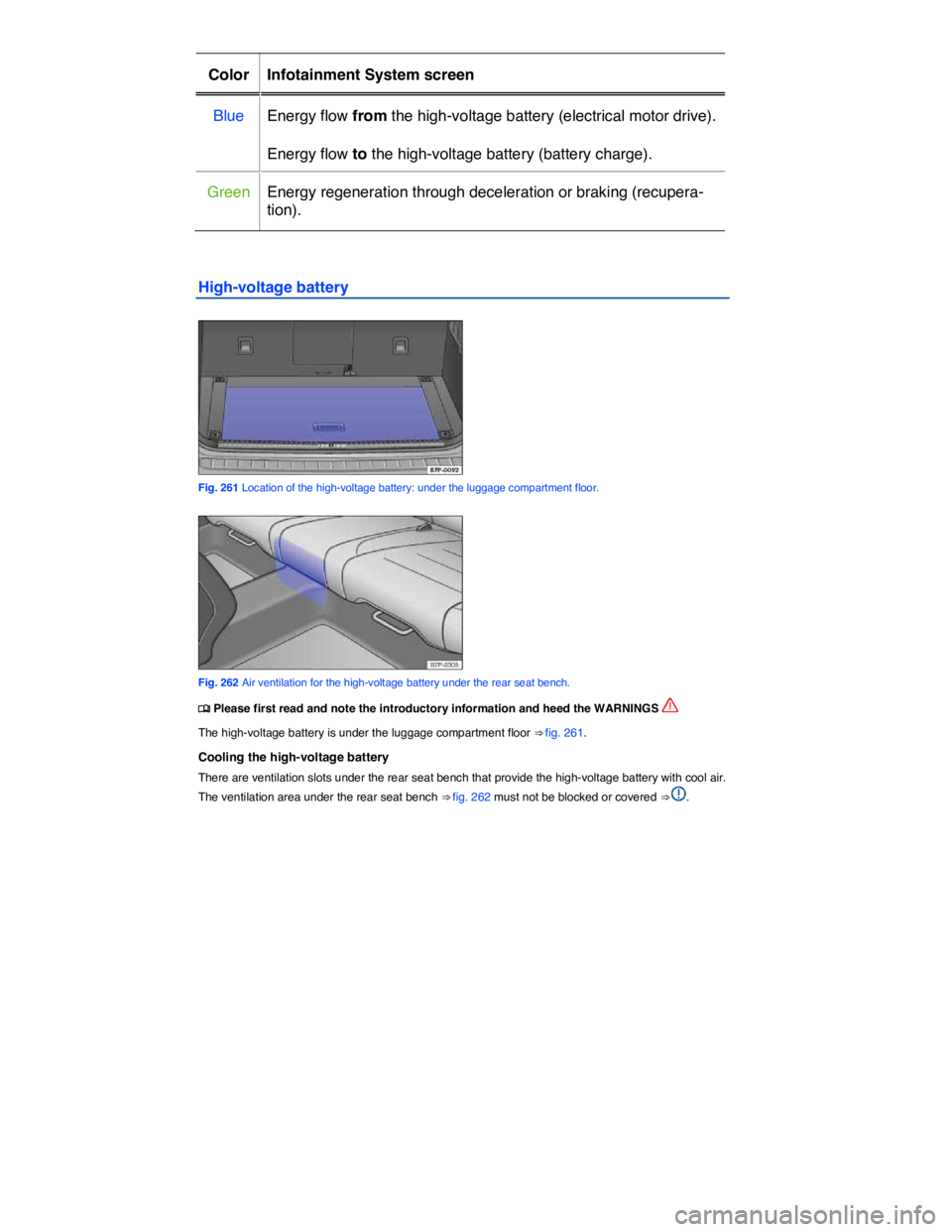
Color Infotainment System screen
Blue Energy flow from the high-voltage battery (electrical motor drive).
Energy flow to the high-voltage battery (battery charge).
Green Energy regeneration through deceleration or braking (recupera-
tion).
High-voltage battery
Fig. 261 Location of the high-voltage battery: under the luggage compartment floor.
Fig. 262 Air ventilation for the high-voltage battery under the rear seat bench.
Page 537 of 684
Selective catalytic reduction (AdBlue®)
Page 539 of 684
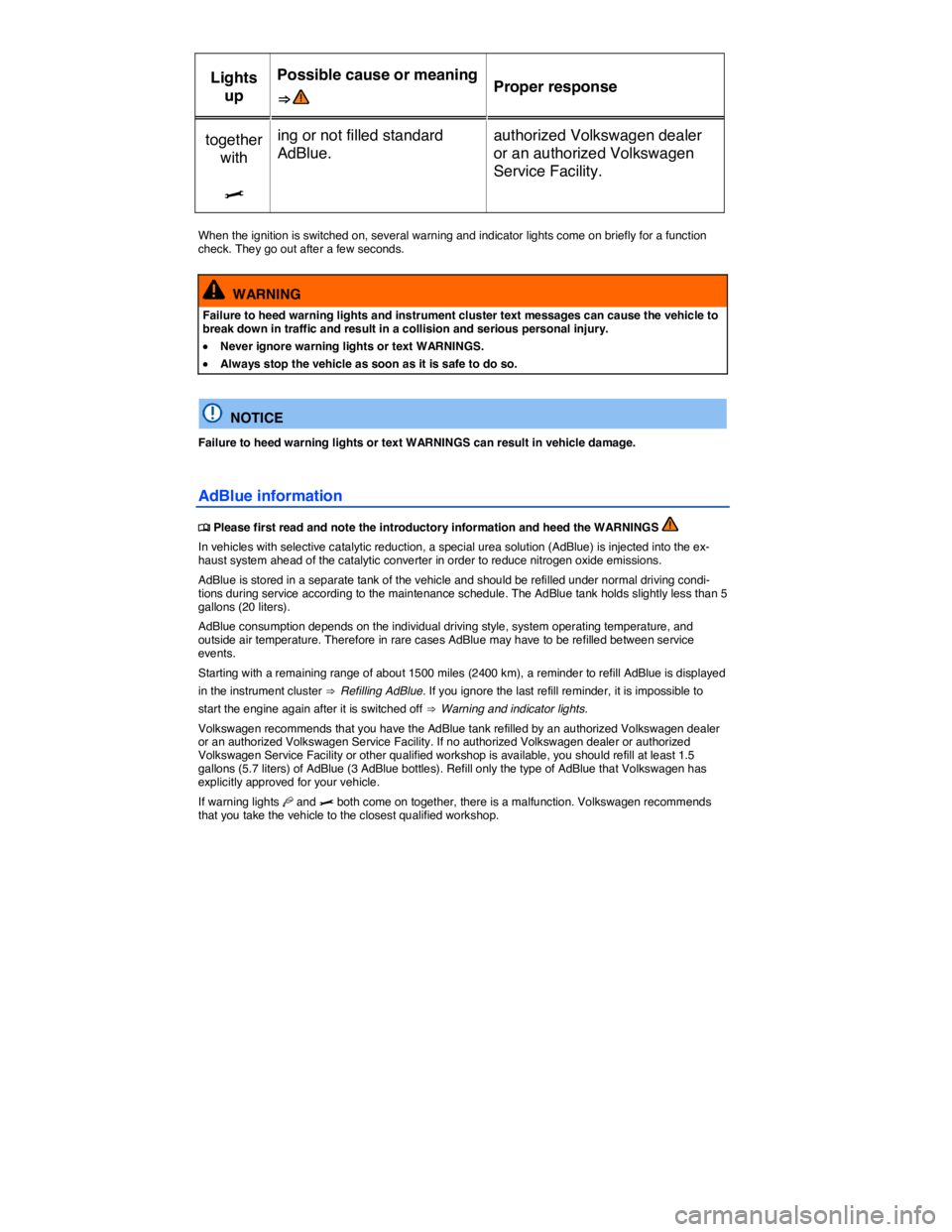
Lights
up
Possible cause or meaning
⇒ Proper response
together
with
ing or not filled standard
AdBlue.
authorized Volkswagen dealer
or an authorized Volkswagen
Service Facility.
>
When the ignition is switched on, several warning and indicator lights come on briefly for a function check. They go out after a few seconds.
WARNING
Failure to heed warning lights and instrument cluster text messages can cause the vehicle to break down in traffic and result in a collision and serious personal injury.
x Never ignore warning lights or text WARNINGS.
x Always stop the vehicle as soon as it is safe to do so.
NOTICE
Failure to heed warning lights or text WARNINGS can result in vehicle damage.
AdBlue information
Page 540 of 684
AdBlue® is a registered trademark of the German Association of the Automotive Industry (VDA) in the United States, Germany, the European Union and in other countries. AdBlue meets International Organization for Standardization specification ISO 22241-1.
Refilling AdBlue
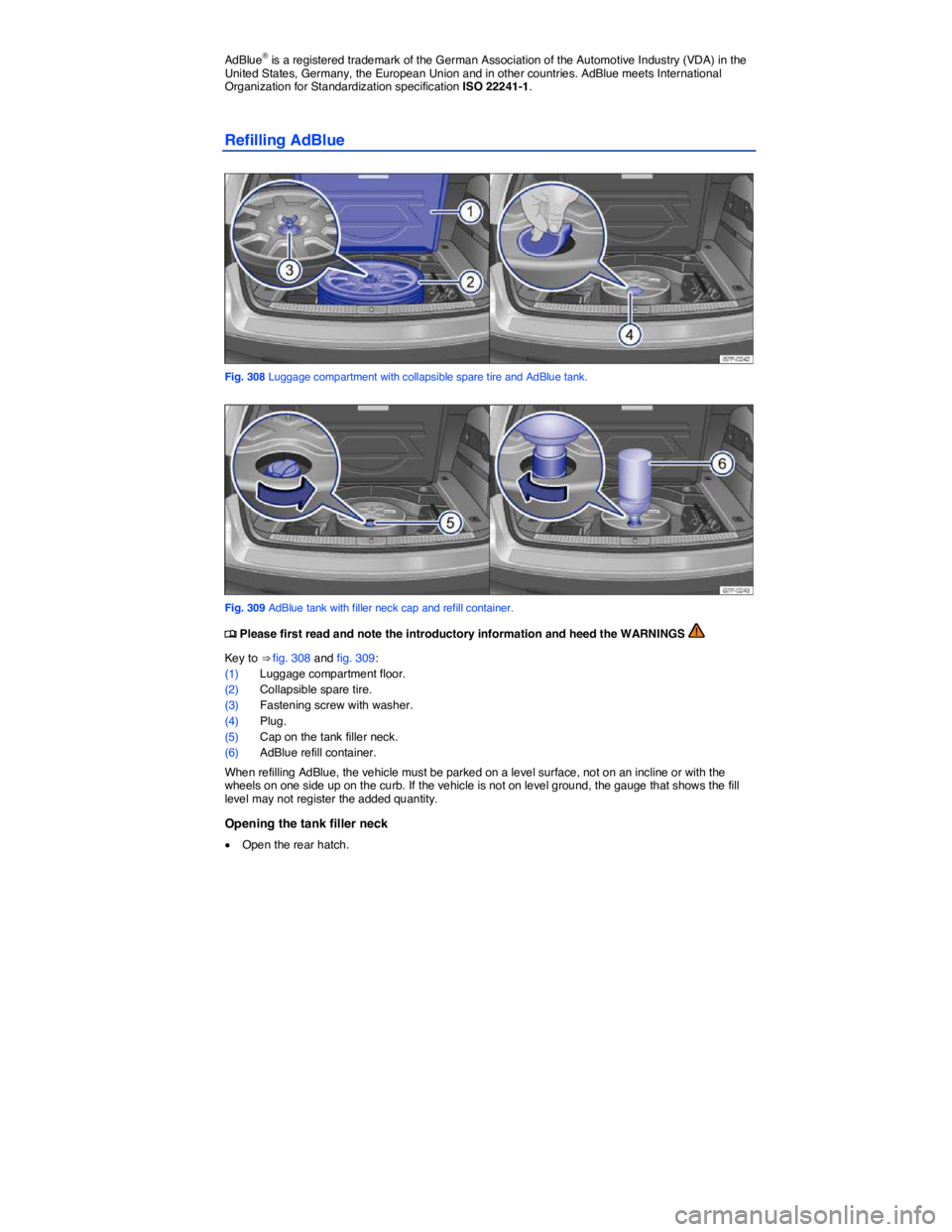
Fig. 308 Luggage compartment with collapsible spare tire and AdBlue tank.
Fig. 309 AdBlue tank with filler neck cap and refill container.
Page 541 of 684
x Fold up the luggage compartment floor panel ⇒ fig. 308 (1) and hook it open or, if you have a reversible luggage compartment floor panel, take this out
x Take out the collapsible spare tire (2)- Unscrew the fastening screw (3) with washer counterclock-wise and take out the collapsible spare tire.
x Pull off the plug (4) in the spare tire well.
x Unscrew the tank filler neck cap ⇒ fig. 309 (5) counterclockwise and remove.
Refilling AdBlue
Only use Volkswagen-approved AdBlue or any Diesel Exhaust Fluid that expressly conforms to International Organization for Standardization specification ISO 22241-1. Using a DEF that does not meet the requirements of ISO 22241-1 can seriously damage your vehicle’s engine. Only use fluid in original, unopened packaging.
x Read and heed the information provided by the AdBlue refill manufacturer ⇒ .
x Note the expiration date.
x Unscrew the cap of the refill container.
x Vertically insert the neck of the refill container (6) into the tank filler neck and turn clockwise to hand-tighten.
x Press the refill container down into the tank filler neck and hold it there.
x Add at least 1.5 gallons (5.7 liters) of AdBlue which is 3 refill bottles. Adding a smaller amount is not sufficient.
x Wait until the contents of the refill container has flowed into the AdBlue tank. Do not squeeze or damage the refill container!
x Unscrew the refill container counterclockwise and lift it out carefully ⇒ .
x AdBlue stops flowing from the refill bottle when the AdBlue tank is completely full.
Closing the fuel filler neck
x Screw in the fuel filler neck cap (5) clockwise until the cap locks into place.
x Put the plug ⇒ fig. 308 (4) back in the spare wheel recess and make certain it is properly placed and secure.
x Put the collapsible spare tire (2) back in the spare wheel recess and secure it with the fastening screw (3) and washer.
x Unhook the luggage compartment floor panel (1) and fold down or, if you have a reversible lug-
gage compartment floor panel, put this back in ⇒ Luggage compartment.
Things to do before driving again
x After refilling, switch on only the ignition.
x Leave the ignition switched on for at least 30 seconds so that system can detect the refill.
x Do not start the engine for 30 seconds!
WARNING
Store AdBlue only in its closed original container and in a safe place.
x To reduce the risk of poisoning, never keep AdBlue in empty food or beverage containers that might mislead someone into drinking from them.
x Always store AdBlue outside the reach of children.
Page 542 of 684

NOTICE
x Use only AdBlue® or any Diesel Exhaust Fluid that expressly conforms to International Organization for Standardization specification ISO 22241-1. Using a DEF that does not meet the requirements of ISO 22241-1 can seriously damage your vehicle’s engine.
x Never mix water or any other substances or additives with AdBlue. Damage caused by such additives will not be covered by any Volkswagen Limited Warranty.
x Never put AdBlue into the diesel fuel tank! Otherwise the engine may be damaged!
x Do not carry a refill container in the vehicle all the time or routinely. Due to temperature fluctuations and damage, the container could start leaking and the AdBlue could damage the vehicle interior.
Dispose of the refill container in an environmentally-responsible manner.
Appropriate AdBlue refill containers can be obtained from an authorized Volkswagen dealer or an authorized Volkswagen Service Facility.
Page 628 of 684

Frequently asked questions
If you suspect a malfunction or vehicle damage, read and follow the following advice before contacting an authorized Volkswagen dealer or an authorized Volkswagen Service Facility. You may also find helpful information under “Characteristics” and “Checklist” in the index.
Description Possible causes
among others Possible remedy
Engine does not
start.
Vehicle battery dead. – Perform jump-start
– Charge vehicle battery
The wrong remote
control vehicle key is
used.
Use a valid remote control
vehicle key
Fuel level too low. Refuel
AdBlue fill level too
low. Refill AdBlue
Vehicle cannot be
locked or unlocked
using remote con-
trol vehicle key.
– Battery in remote
control vehicle key
dead.
– Too far away from
vehicle.
(out of range).
– Buttons have been
pressed too many
times.
– Replace battery
–. Move closer to vehicle.
– Synchronize remote con-
trol vehicle key
– Lock or unlock vehicle
manually
Unusual noises.
Cold engine, brake-
assistance systems,
electronic parking
brake.
Check the “Noises” entry in
the keyword index.
Odd driving behav-
ior.
Assistance systems
activated.
Check the “Assistance sys-
tems” entry in the keyword
index.
Driver seat and
outer mirrors move
Convenience settings
are stored.
Correct convenience set-
tings
Page 664 of 684
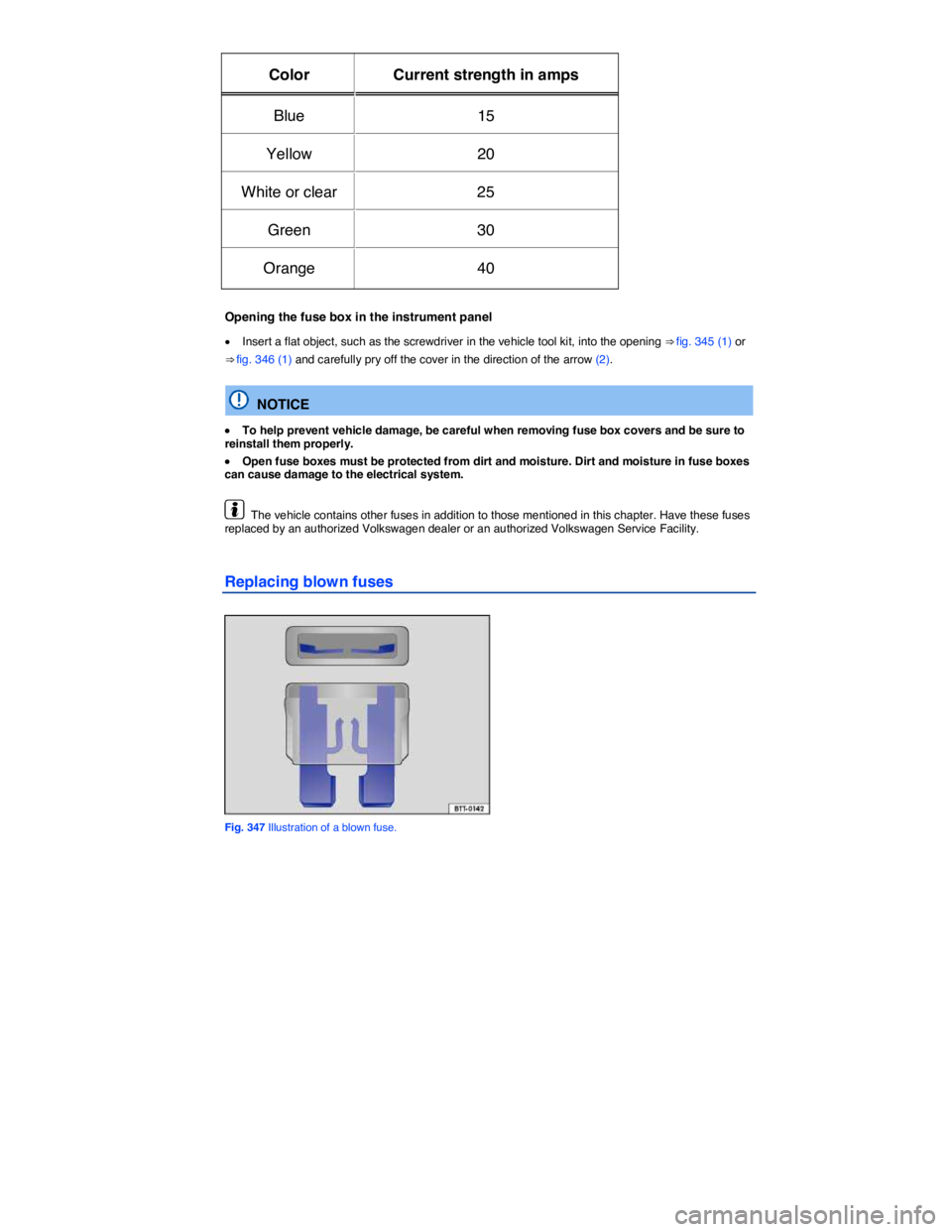
Color Current strength in amps
Blue 15
Yellow 20
White or clear 25
Green 30
Orange 40
Opening the fuse box in the instrument panel
x Insert a flat object, such as the screwdriver in the vehicle tool kit, into the opening ⇒ fig. 345 (1) or
⇒ fig. 346 (1) and carefully pry off the cover in the direction of the arrow (2).
NOTICE
x To help prevent vehicle damage, be careful when removing fuse box covers and be sure to reinstall them properly.
x Open fuse boxes must be protected from dirt and moisture. Dirt and moisture in fuse boxes can cause damage to the electrical system.
The vehicle contains other fuses in addition to those mentioned in this chapter. Have these fuses replaced by an authorized Volkswagen dealer or an authorized Volkswagen Service Facility.
Replacing blown fuses
Fig. 347 Illustration of a blown fuse.
Page 682 of 684

Abbreviations
Abbreviation Meaning
A2DP Advanced Audio Distribution Profile for cross-manufacturer Bluetooth audio signal transmission compatibility.
ABS Anti-lock Brake System.
AFS Adaptive Front Lighting System.
AKI Anti-Knock Index.
AM AM (amplitude modulation).
ANSI American National Standards Institute.
ASL Automatic Shift Lock.
ASR Anti-Slip Regulation.
ATA Anti-Theft Alarm system.
BAS Brake Assist System.
cc Cubic centimeter unit of volume for specifying engine displacement.
ccm Cubic centimeters. Unit of measure for engine displacement.
CCS Cruise Control System.
CCS Cruise Control System.
CID Cubic inch displacement, unit of volume for specifying engine displacement.
cm Centimeter – metric unit of measure for length.
CO2 Carbon dioxide.
DIN Deutsches Institut für Normung (German Institute for Standardization).
DPF Diesel Particulate Filter.
DRL Daytime Running Lights.
DTMF Dual Tone Multiple Frequency.
EDL Electronic Differential Lock.
EN European Norm.
EON Enhanced Other Network (support for other radio networks).
EPC Engine control (Electronic Power Control).
ESC Electronic Stability Control.
ETC Electronic Toll Collection system.
FLA Headlight assistant.
FSI Fuel Stratified Injection.
g/mi Generated carbon monoxide amount in grams per mile driven.