ECU VOLKSWAGEN TRANSPORTER 2011 Repair Manual
[x] Cancel search | Manufacturer: VOLKSWAGEN, Model Year: 2011, Model line: TRANSPORTER, Model: VOLKSWAGEN TRANSPORTER 2011Pages: 486, PDF Size: 69.28 MB
Page 161 of 486
Switching the cool box on and off
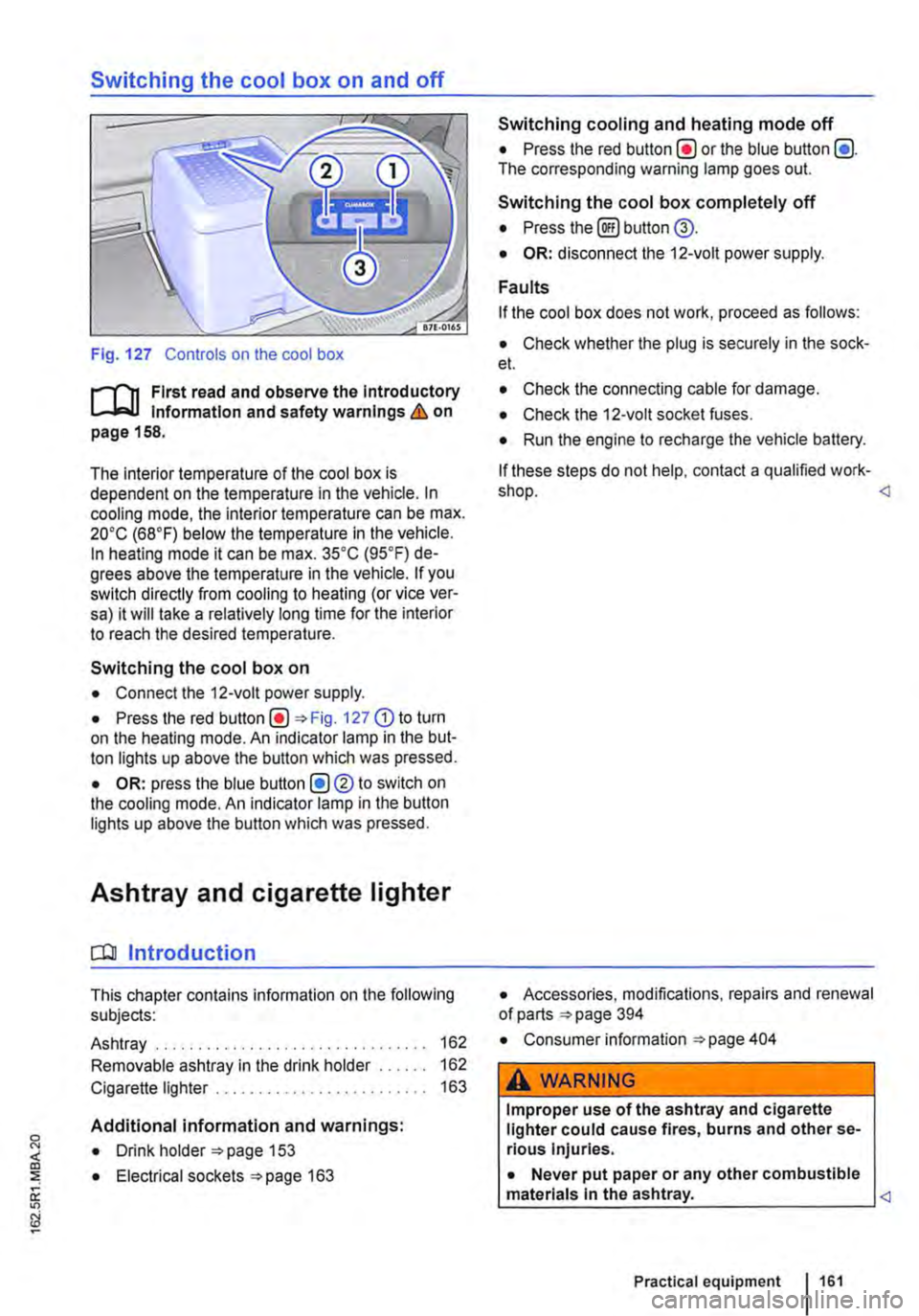
Fig. 127 Controls on the cool box
r-f'n First read and observe the Introductory Information and safety warnings & on page 158.
The interior temperature of the cool box is dependent on the temperature in the vehicle. In cooling mode, the interior temperature can be max. 20•c (68°F) below the temperature in the vehicle. In heating mode it can be max. 35•c (95.F) de-grees above the temperature in the vehicle. If you switch directly from cooling to heating (or vice ver-sa) it will take a relatively long time for the interior to reach the desired temperature.
Switching the cool box on
• Connect the 12-volt power supply.
• Press the red Fig. 127 G) to turn on the heating mode. An indicator lamp in the but-ton lights up above the button which was pressed.
• OR: press the blue button (!)®to switch on the cooling mode. An indicator lamp in the button lights up above the button which was pressed.
Ashtray and cigarette lighter
o:n Introduction
This chapter contains information on the following subjects:
Ashtray . . . . . . . . . . . . . . . . . . . 162
Removable ashtray in the drink holder 162
Cigarette lighter . . . . . . . . . . . . . . . . . . . 163
Additional information and warnings:
• Drink holder 153
• Electrical sockets 163
Switching cooling and heating mode off
• Press the red button(!) or the blue button (!). The corresponding warning lamp goes out.
Switching the cool box completely off
• Press the@) button @.
• OR: disconnect the 12-volt power supply.
Faults
If the cool box does not work, proceed as follows:
• Check whether the plug is securely in the sock-et.
• Check the connecting cable for damage.
• Check the 12-volt socket fuses.
• Run the engine to recharge the vehicle battery.
If these steps do not help, contact a qualified work-shop.
• Consumer information 404
A WARNING
Improper use of the ashtray and cigarette lighter could cause fires, burns and other se-rious Injuries.
• Never put paper or any other combustible materials In the ashtray.
Page 165 of 486
A DANGER (Continued)
• 230-volt socket with inverter switch:
CD
-Do not plug adapters or extension ca-bles into the 230-volt socket. Otherwise the built-in child lock will disengage and power will be supplied to the socket.
• Observe the operating instructions for any device that you plug into the socket.
• Never exceed the maximum power rating as this could damage the whole vehicle electrical system.
• Only use accessories that have been ap-proved in accordance with valid guidelines concerning electromagnetic compatibility.
CD
• Never feed electricity Into the socket.
• Do not plug any heavy devices or connec-tions, such as mains adapters, directly Into the socket.
• Only connect devices to the socket with a voltage that matches the voltage of the socket.
• 230-volt socket with inverter switch:
-Do not connect any lights which use neon tubes.
-With electrical devices that require a high level of current In the start phase, the built-In excess current switch will prevent the de-vice from being switched on. If this hap-pens, disconnect the device from the power supply and reconnect after waiting approxi-mately 10 seconds.
m Unshielded devices can cause interference W with radio reception and vehicle electronics.
[Q) Introduction
This chapter contains information on the following subjects:
Components ......... .
Folding the LCD screen out and in
DVD player ..
Controls on the LCD screen ...
Remote control ..
Settings on the LCD screen Settings on the DVD player
Care and protection
166
167 167
168
169
170 171
Use a suitable screen cleaner for cleaning the screen Be careful not to scratch the screen when cleaning it.
A WARNING
Improper use of the rear seat entertainment system could cause short-circuits, fire and serious Injuries.
• Protect the rear seat entertainment system against moisture and damp.
A WARNING
Objects that are loosely placed in the vehicle or not properly secured could be flung through the interior and cause injuries during a sudden driving or braking manoeuvre, or in the event of an accident.
• Always stow the remote control units and headsets securely In the stowage compart-ments.
A WARNING
Accidents and Injuries can occur If the driver Is distracted.
• Never allow use of the rear seat entertain-ment system to distract you from what Is happening on the road.
• Comply with legal regulations .
• Select volume settings that allow signals from outside the vehicle (such as emergency services sirens) to be easily heard at all times.
Practical equipment 165
Page 167 of 486
Folding the LCD screen out and in
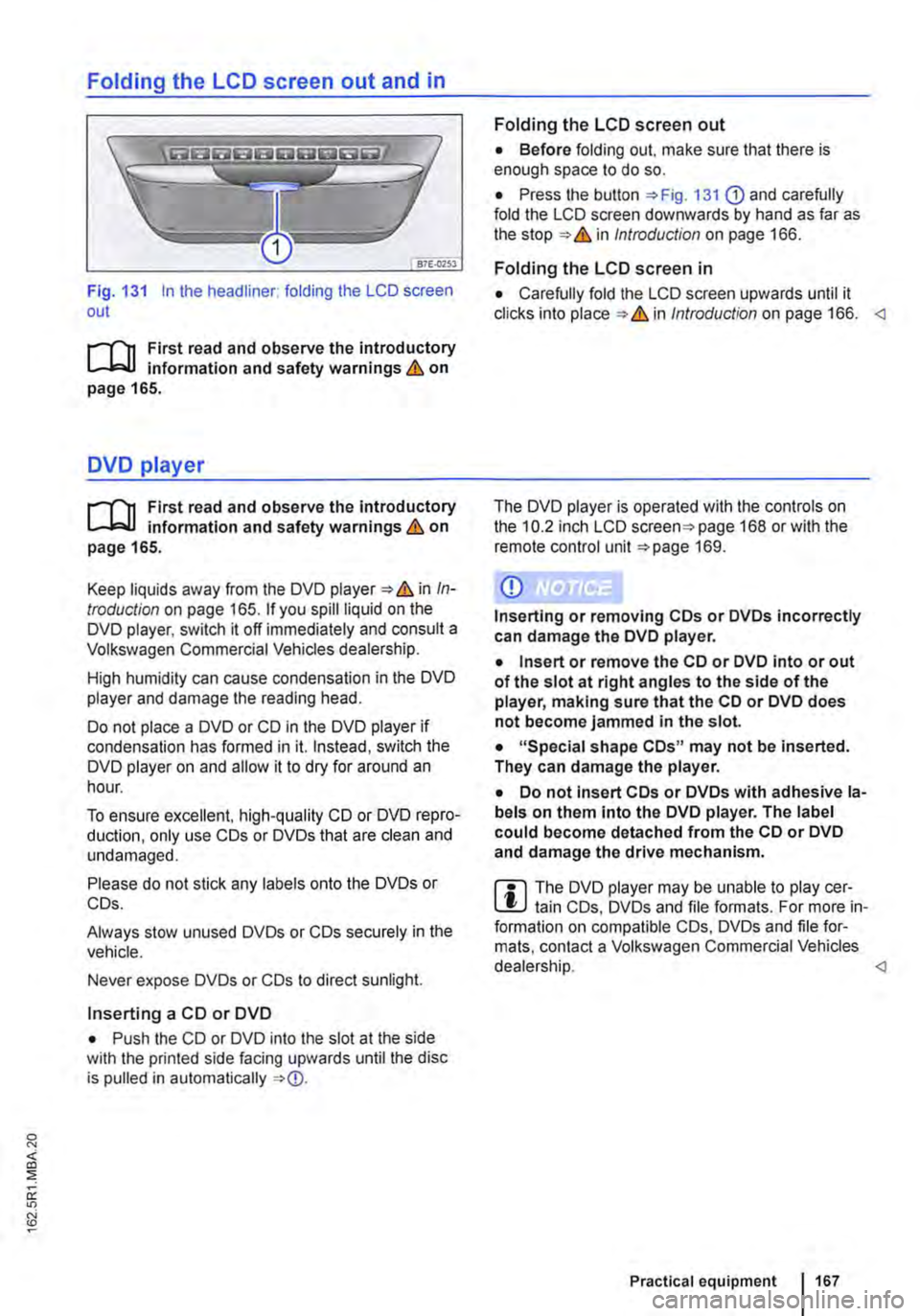
Fig. 131 In the headliner: folding the LCD screen out
r-111 First read and observe the introductory L-b.U information and safety warnings & on page 165.
DVD player
r-111 First read and observe the introductory L-b.U information and safety warnings & on page 165.
Keep liquids away from the DVD player & in In-troduction on page 165. If you spill liquid on the DVD player, switch it off immediately and consult a Volkswagen Commercial Vehicles dealership.
High humidity can cause condensation in the DVD player and damage the reading head.
Do not place a DVD or CD in the DVD player if condensation has formed in it. Instead, switch the DVD player on and allow it to dry for around an hour.
To ensure excellent, high-quality CD or DVD repro-duction, only use COs or DVDs that are clean and undamaged.
Please do not stick any labels onto the DVDs or COs.
Always stow unused DVDs or COs securely in the vehicle.
Never expose DVDs or COs to direct sunlight.
Inserting a CD or DVD
• Push the CD or DVD into the slot at the side with the printed side facing upwards until the disc is pulled in automatically
Folding the LCD screen out
• Before folding out. make sure that there is enough space to do so.
• Press the button 131 G) and carefully fold the LCD screen downwards by hand as far as the in Introduction on page 166.
Folding the LCD screen in
• Carefully fold the LCD screen upwards until it clicks into in Introduction on page 166.
CD
Inserting or removing COs or DVDs incorrectly can damage the DVD player.
• Insert or remove the CD or DVD into or out of the slot at right angles to the side of the player, making sure that the CD or DVD does not become jammed in the slot.
• "Special shape COs" may not be inserted. They can damage the player.
• Do not insert COs or DVDs with adhesive la-bels on them Into the DVD player. The label could become detached from the CD or DVD and damage the drive mechanism.
m The DVD player may be unable to play cer-L!J tain COs, DVDs and file formats. For more in-formation on compatible COs, DVDs and file for-mats, contact a Volkswagen Commercial Vehicles dealership.
Page 172 of 486
• Press the [ENTER! button to confirm your selec-tion.
• Press the [SETUP! button again to leave the main menu.
The following settings can be made in the subme-nus:
• Picture format.
• Camera perspective.
• Language.
• Subtitles.
• Screen saver.
• Saving the last item played.
Tachograph
o::D Introduction
This chapter contains information on the following subjects:
Notes on the tachograph . . . . . . . . . . . . . . . . . 172
The function and operation of the factory-fitted ta-chograph can be found in an additional operating manual delivered with the vehicle.
If you retro-fit a tachograph to the vehicle, ensure it complies with relevant legislation.
Additional information and warnings:
• Towing a trailer 139
• Accessories. modifications, repairs and renewal of parts 394
Notes on the tachograph
I""'""'J'n First read and observe the Introductory L-lo:.l.l Information given on page 172.
Location
Depending on the model, the factory-fitted tacho-graph could be located in the middle of the dash panel or in a console on the dash panel.
Time
For the time settings, refer to the additional operat-ing instructions for the tachograph.
Please note that in digital tachographs, the time must be displayed in local time. The time on the printouts is always given in UTC (Coordinated Uni-versal Time).
1721 Before the journey
• Various audio settings.
• Colour system.
• Playback control for video COs
• Parental lock 172.
• Reset to default settings.
• Password protection.
Childproof locks
This function is only available in the case of DVDs with restricted access for young people and chil-dren. This menu is used to specify whether a DVD with access restrictions is to be played or whether a password has to be entered first.
m Manipulation of the tachograph and its signal, l.!J and misuse of the tachograph discs can re-sult in prosecution.
The digital tachograph has a buffer battery to pre-vent data loss. The buffer battery can supply power for approx. one year without an external power supply. This function is used if, for example, the digital tachograph is removed from the vehicle and stored or if left in a vehicle with a battery fault or a flat battery.
Legal requirements
By law. the tachograph must be used in:
Page 175 of 486
Equipment, Multivan
Darkening the interior of the vehicle, Multivan
n:n Introduction
This chapter contains information on the following subjects:
Components of the opaque shades kit . . . 175
Assembling opaque shades for the windscreen and the rear window . . . . . . . 176
Fitting opaque shades for the windscreen and the rear window . . . . . . . . . . . . . . . . . . . . . . . . . 177
Fitting the opaque shades to the side windows . . . . . . . . . . . . . . . . . . . . . . . . . . . . . 178
Removing and stowing the opaque shades . . 179
Darkening the interior of the vehicle
The opaque shades kit is supplied in a zippered storage bag, which can be securely stowed in a drawer underneath the 3-seat bench.
Additional information and warnings:
• Windows 36
• Seat functions, front 61
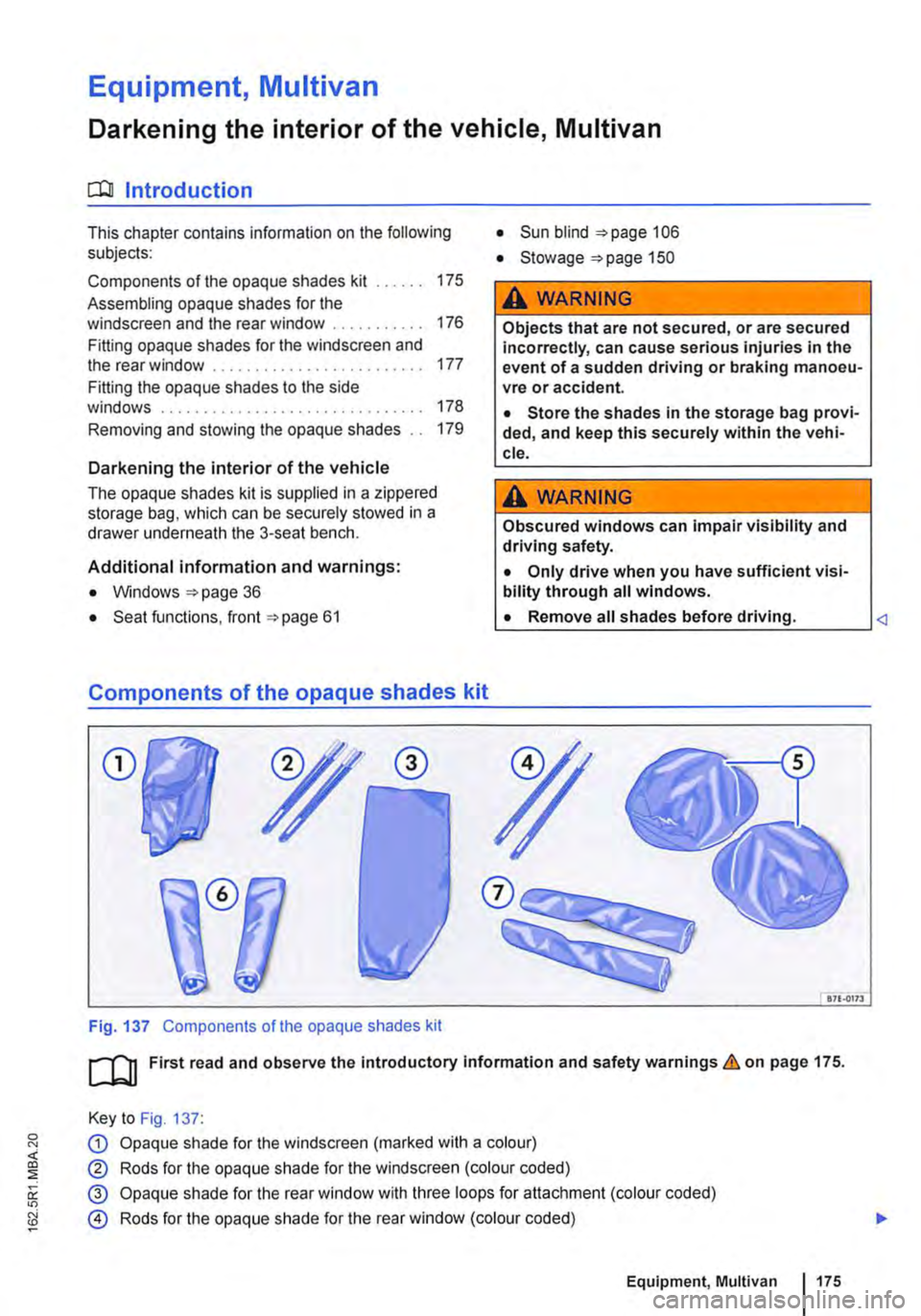
Components of the opaque shades kit
CD
Fig. 137 Components of the opaque shades kit
• Sun blind 106
• Stowage "'page 150
A WARNING
Objects that are not secured, or are secured incorrectly, can cause serious injuries in the event of a sudden driving or braking manoeu-vre or accident.
• Store the shades in the storage bag provi-ded, and keep this securely within the vehi-cle.
A WARNING
Obscured windows can impair visibility and driving safety.
• Only drive when you have sufficient visi-bility through all windows.
L• ___
&71.0173
[QJ First read and observe the introductory information and safety warnings.&. on page 175.
Key to Fig. 137:
G) Opaque shade for the windscreen (marked with a colour)
® Rods for the opaque shade for the windscreen (colour coded)
@ Opaque shade for the rear window with three loops for attachment (colour coded)
@ Rods for the opaque shade for the rear window (colour coded)
Equipment, Multivan 1175
Page 177 of 486
Fitting opaque shades for the windscreen and the rear window
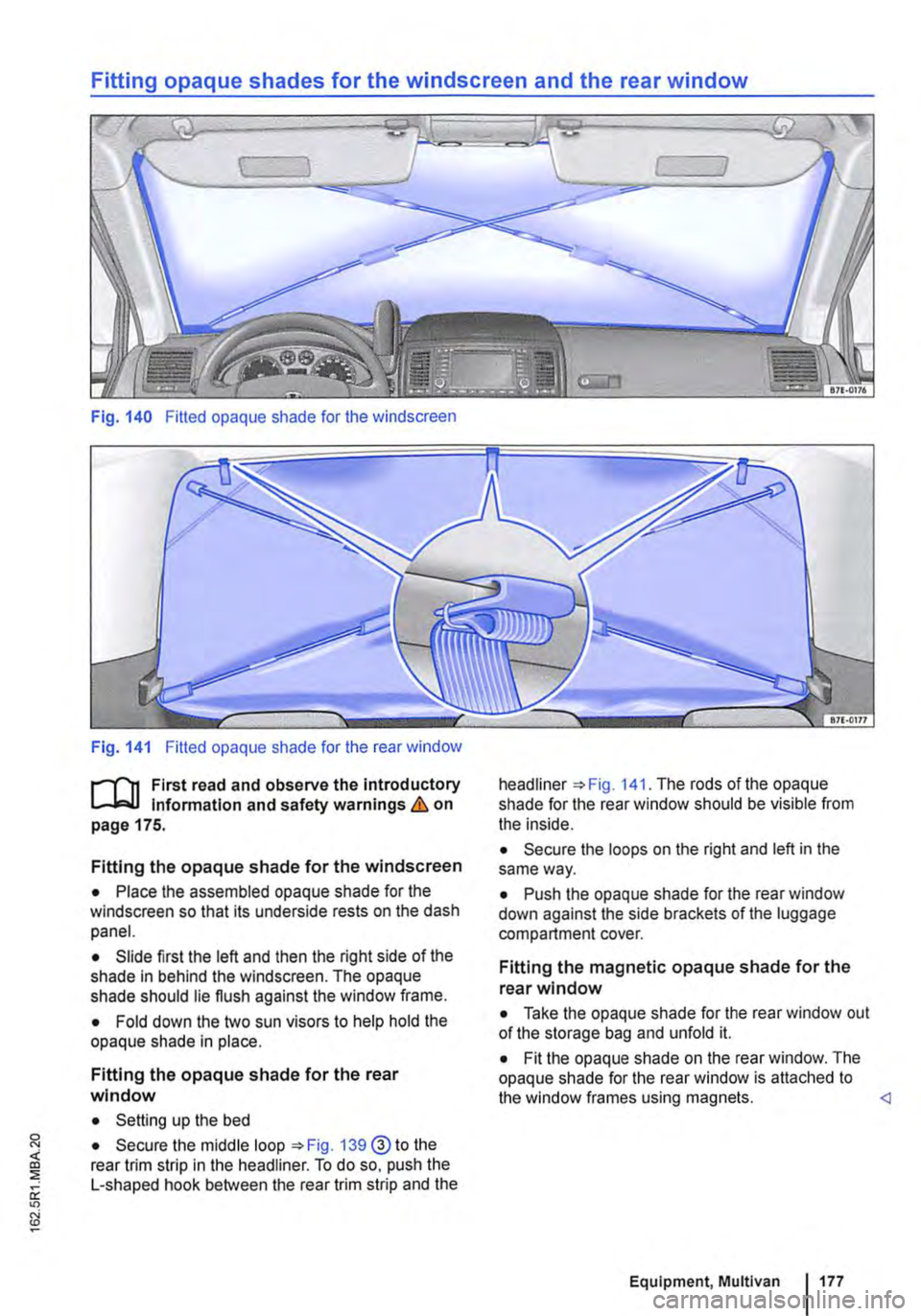
Fig. 140 Fitted opaque shade for the windscreen
Fig. 141 Fitted opaque shade for the rear window
f"""l'"'n First read and observe the introductory Information and safety warnings&. on page 175.
Fitting the opaque shade for the windscreen
• Place the assembled opaque shade for the windscreen so that its underside rests on the dash panel.
• Slide first the left and then the right side of the shade in behind the windscreen. The opaque shade should lie flush against the window frame.
• Fold down the two sun visors to help hold the opaque shade in place.
Fitting the opaque shade for the rear window
• Setting up the bed
• Secure the middle loop 139@ to the rear trim strip in the headliner. To do so, push the L-shaped hook between the rear trim strip and the
headliner The rods of the opaque shade for the rear window should be visible from the inside.
• Secure the loops on the right and left in the same way.
• Push the opaque shade for the rear window down against the side brackets of the luggage compartment cover.
Fitting the magnetic opaque shade for the rear window
• Take the opaque shade for the rear window out of the storage bag and unfold it.
• Fit the opaque shade on the rear window. The opaque shade for the rear window is attached to the window frames using magnets.
Page 178 of 486
Fitting the opaque shades to the side windows
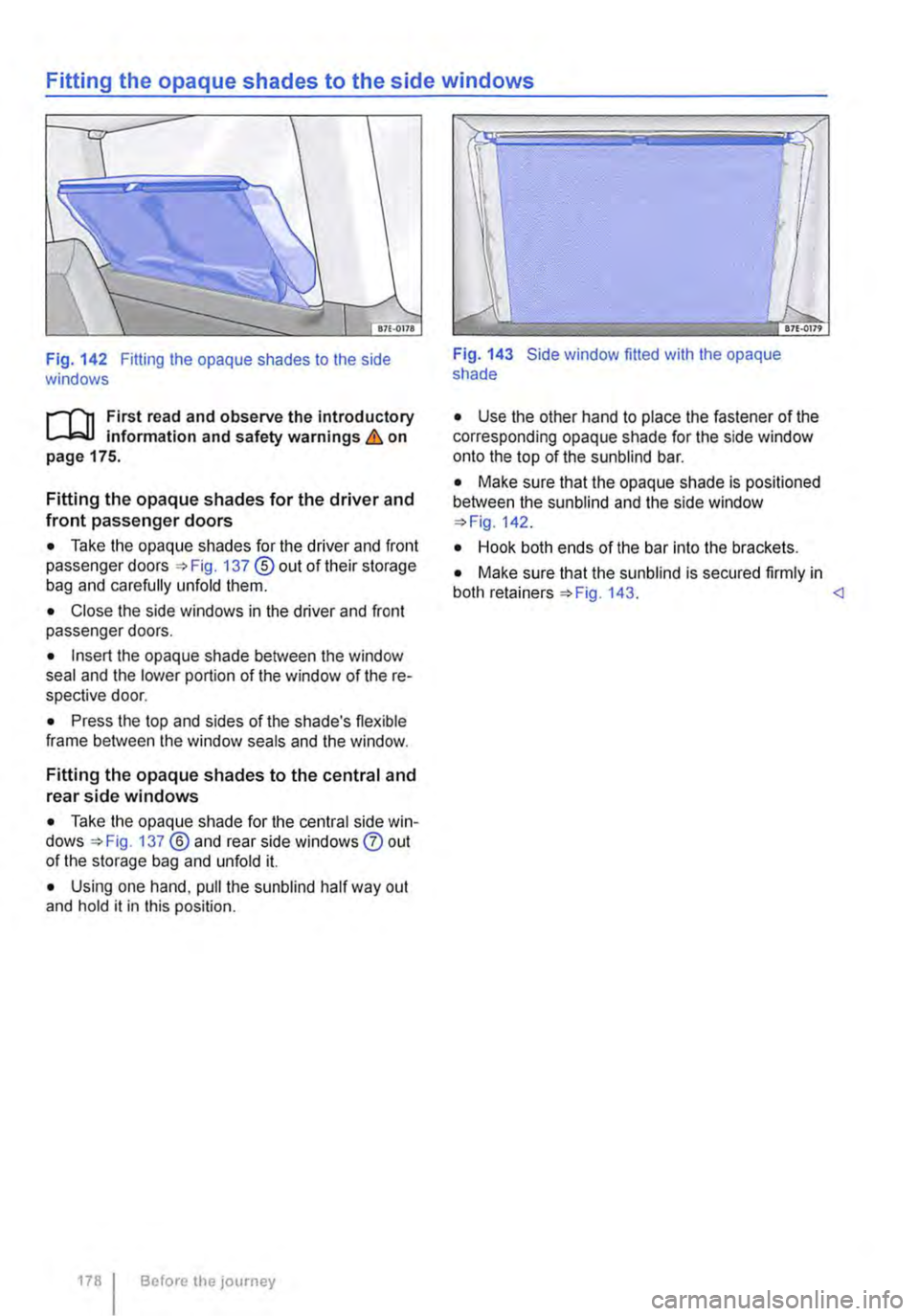
Fig. 142 Fitting the opaque shades to the side windows
rl'"'n First read and observe the introductory L-lc.l.l information and safety warnings & on page 175.
Fitting the opaque shades for the driver and front passenger doors
• Take the opaque shades for the driver and front passenger doors =>Fig. 137 ®out of their storage bag and carefully unfold them.
• Close the side windows in the driver and front passenger doors.
• Insert the opaque shade between the window seal and the lower portion of the window of the re-spective door.
• Press the top and sides of the shade's flexible frame between the window seals and the window.
Fitting the opaque shades to the central and rear side windows
• Take the opaque shade for the central side win-dows =>Fig. 137 ®and rear side windows 0 out of the storage bag and unfold it.
• Using one hand, pull the sunblind half way out and hold it in this position.
178 Before the journey
Fig. 143 Side window fitted with the opaque shade
• Use the other hand to place the fastener of the corresponding opaque shade for the side window onto the top of the sunblind bar.
• Make sure that the opaque shade is positioned between the sun blind and the side window =>Fig. 142.
• Hook both ends of the bar into the brackets.
• Make sure that the sunblind is secured firmly in both retainers=> Fig. 143. <1
Page 179 of 486
Removing and stowing the opaque shades
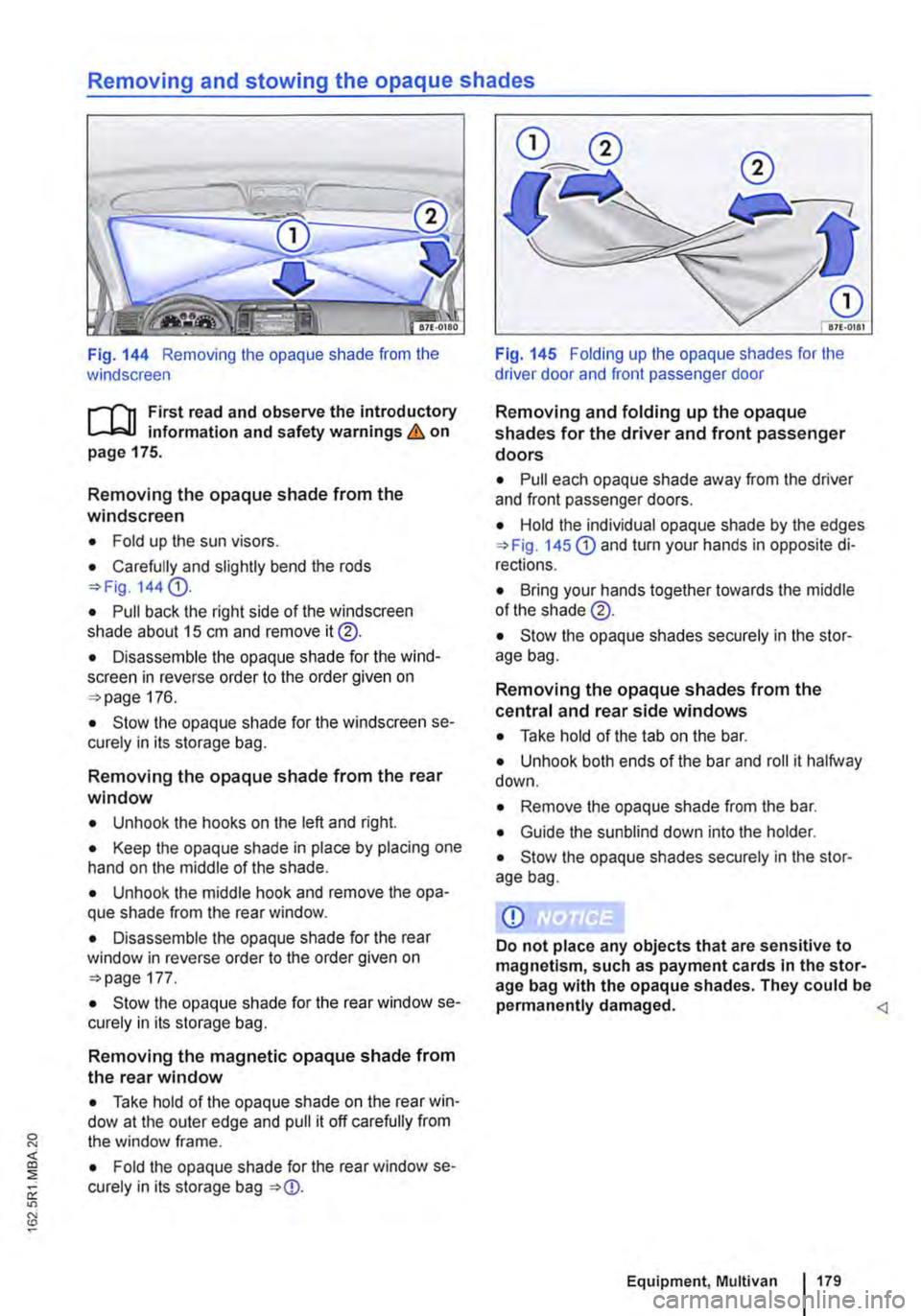
Fig. 144 Removing the opaque shade from the windscreen
,....-("n First read and observe the introductory L-.lc.l.l information and safety warnings & on page 175.
Removing the opaque shade from the windscreen
• Fold up the sun visors.
• Carefully and slightly bend the rods =>Fig. 144 G).
• Pull back the right side of the windscreen shade about 15 cm and remove it@.
• Disassemble the opaque shade for the wind-screen in reverse order to the order given on =>page 176.
• Stow the opaque shade for the windscreen se-curely in its storage bag.
Removing the opaque shade from the rear window
• Unhook the hooks on the left and right.
• Keep the opaque shade in place by placing one hand on the middle of the shade.
• Unhook the middle hook and remove the opa-que shade from the rear window.
• Disassemble the opaque shade for the rear window in reverse order to the order given on =>page 177.
• Stow the opaque shade for the rear window se-curely in its storage bag.
Removing the magnetic opaque shade from the rear window
• Take hold of the opaque shade on the rear win-dow at the outer edge and pull it off carefully from the window frame.
• Fold the opaque shade for the rear window se-curely in its storage bag =>CD.
Fig. 145 Folding up the opaque shades for the driver door and front passenger door
Removing and folding up the opaque shades for the driver and front passenger doors
• Pull each opaque shade away from the driver and front passenger doors.
• Hold the individual opaque shade by the edges =>Fig. 145 CD and turn your hands in opposite di-rections.
• Bring your hands together towards the middle of the shade @.
• Stow the opaque shades securely in the stor-age bag.
Removing the opaque shades from the central and rear side windows
• Take hold of the tab on the bar.
• Unhook both ends of the bar and roll it halfway down.
• Remove the opaque shade from the bar.
• Guide the sun blind down into the holder.
• Stow the opaque shades securely in the stor-age bag.
Equipment, Multivan 179
Page 181 of 486
anchor points should be fitted to the vehicle floor by a specialist workshop in accordance with Volks-
wagen AG guidelines.
These additional seats must also have seat belt anchor points and suitable seat belts.
The Volkswagen Commercial Vehicles dealership can provide you with more Information on retrofit-ting seats.
Additional Information and warnings:
• Sitting correctly and safely =>page 61
• Child seats (accessories) =>page 96
A WARNING
Assuming an Incorrect sitting position In the vehicle can Increase the risk of severe or fa-tal injuries during a sudden driving or brak-Ing manoeuvre, In the event of a collision or accident, or If the alrbags are triggered.
• The number of vehicle occupants must never exceed the number of seats with seat belts In the vehicle.
• All vehicle occupants must assume a cor-rect sitting position before setting off and maintain this position throughout the trip. This also applies to the fastening of seat belts.
• Always secure children In the vehicle in an authorised restraint system which is suita-ble for their height and weight=> page 61.
• Always keep your feet In the footwell while the vehicle is In motion. Never place your feet on the seat or dash panel, for example, and never ride with your feet out the window. When you are sat like this, the alrbag and seat belt cannot provide optimal protection and could actually Increase the risk of injury during an accident.
A WARNING
The seats of the 2-seat arrangement are not suitable for the attachment of child seats of any kind.
• Never use a child seat on the 2-seat ar-rangement.
A WARNING
Children who are not strapped In or who are not strapped In properly could sustain severe or fatal injuries while the vehicle Is In motion.
• Never use a rear-facing child seat on the front passenger seat.
• Children up to the age of 12 should always be transported on the single seats In the pas-senger compartment but not on the 2-seat ar-rangement.
• Always secure children In the vehicle In an authorised restraint system suitable for their height and weight.
• Always fasten children's seat belts cor-rectly and ensure that they assume a correct sitting position.
• Adjust the seat backrest to an upright po-sition If a child seat Is to be used on this seat.
• Do not allow children to sit with their heads or any other body parts In the side air-bag's deployment zone.
• Make sure that the seat belt Is correctly routed.
• Never allow children or babies to be trans-ported on someone's lap, or held In some-one's arms.
• Only ever fasten one child Into each child seat.
• Read and follow the Instructions by the manufacturer of the child seat.
Page 182 of 486
Seat functions, rear, Business
ct:lJ Introduction
This chapter contains information on the following subjects:
Controls of the 2-seat arrangement. . . . . . . . . 183
Seat heater in the 2-seat arrangement . . . . . . 183
Armrests . . . . . . . . . . . . .. . . . .. .. .. . .. .. .. 184
Moving the 2-seat arrangement . . . . . . . . . . . 185
Centre console of the 2-seat arrangement . . 185
Refrigerator box . . . . . . . . . . . . . . . . . . . . . . . 186
The seats of the 2-seat arrangement are not suita-ble for the attachment of child seats => &.
Features of the 2-seat arrangement
• Optimised seat belts for both seats.
• Head restraints and seat belts can be electrical-ly adjusted for height.
• The height, forwards/backwards position and angle of the seat cushion can be adjusted electri-cally.
• The backrest angle can be adjusted electrically.
• Electrically adjustable lumbar support.
• seat heating.
• Armrests with stowage compartment.
Additional information and warnings:
• Sitting correctly and safely =>page 61
• Seat functions. rear =>page 72
• Seat belts => page 79
• Airbag system =>page 87
• Child seats (accessories) =>page 96
• Luggage compartment =>page 130
• Stowage =>page 150
• Central table =>page 155
A WARNING
Incorrect use of the seat functions can cause serious Injuries.
• Always assume a correct sitting position before you drive and maintain this position throughout the trip. This also applies to all passengers.
• Keep hands, fingers, feet and other body parts away from the moving parts of the seats.
1821 Before the journey
A WARNING
The seats of the 2-seat arrangement are not suitable for the attachment of child seats of any kind.
• Never use a child seat on the 2-seat ar-rangement.
A WARNING
Incorrect adjustment or removal and Installa-tion of single seats and/or the 2-seat arrange-ment can cause accidents and severe Inju-ries.
• All adjustments as well as removing/In-stalling should be carried out only when the vehicle Is stationary; otherwise the single seats and/or the 2-seat arrangement could move unexpectedly when the vehicle Is in motion. Furthermore, an Incorrect seating po-sition Is adopted while adjusting the seat.
• All single seats and the 2-seat arrange-ment must always be fitted In the seat rails and must be securely engaged.
• Never use the table while the vehicle is in motion. All backrests must be In the upright position and securely engaged In this posi-tion while the vehicle Is In motion.
• While the vehicle Is In motion the feet of a fitted single seat must not be positioned close to the removable covers In the seat rails.
• Never move single seats and/or the 2-seat arrangement when the vehicle is on a steep slope. The single seats and/or the 2-seat ar-rangement could move unexpectedly and cause Injuries.
• The area for adjustment of the single seats and/or the 2-seat arrangement should not be restricted by any Items.
• While fitting and removing the single seats and/or the 2-seat arrangement, make sure that the seat feet are not soiled or dam-aged.
• The rotating single seats In the passenger compartment can be engaged securely only when facing either the front or rear of the ve-hicle. .,.