buttons VOLKSWAGEN TRANSPORTER 2013 Owner's Manual
[x] Cancel search | Manufacturer: VOLKSWAGEN, Model Year: 2013, Model line: TRANSPORTER, Model: VOLKSWAGEN TRANSPORTER 2013Pages: 486, PDF Size: 69.28 MB
Page 304 of 486
When the highest level is reached, the distance re-turns to the lowest level when the button is press-ed again.
The distance level can also be set using the Q or Q buttons on the multifunction steering wheel im-mediately after the(!) button on the multifunction steering Fig. 241 has been pressed.
Select the Settings menu, Assist systems submenu, ACC to set the distance to be used when the ACC is switched on 24.
Setting the gearbox programme
The acceleration response can be influenced by the gearbox programme selected. The programme can be set Using the ACC option in the Assistant submenu in the Settings menu. The following gearbox programmes can be selected:
• Normal
• Sport
• Eco
The following conditions can prevent the adaptive cruise control (ACC) from reacting:
• If the accelerator is depressed.
• If no gear is selected.
• If the ESC is taking corrective action.
• If there is a fault in several brake lights on the vehicle or on a trailer with an electrical connection to the vehicle.
• If the vehicle is reversing.
• System version 1: if the vehicle is travelling faster than approximately 160 km/h (1 00 m ph).
• System version 2: if the vehicle is travelling faster than approximately 210 km/h (130 mph).
A WARNING
If you do not maintain the minimum distance to a vehicle In front and the difference In speed between the two vehicles is so great that the braking action of the adaptive cruise control (ACC) is insufficient, you are In dan-ger of colliding with the vehicle in front. You should reduce the vehicle speed immediately with the foot brake.
• The adaptive cruise control (ACC) may not be able to detect all driving situations cor-rectly.
• Leaving your foot on the accelerator means that the adaptive cruise control (ACC) will not brake automatically. This is because manual acceleration overrides the system.
• You should always be prepared to brake the vehicle yourself.
• Observe country-specific regulations re-garding the minimum distance.
m The set speed will be deleted if the ignition or L!.J the adaptive cruise control (ACC) is switched off.
m The adaptive cruise control (ACC) is auto-L!.J matically deactivated when the traction con-trol system (TCS) is deactivated.
m In vehicles with a start/stop system, the en-L!.J gine is switched off automatically during the stationary phase of adaptive cruise control (ACC) and is then restarted for moving off.
situations
1""111 First read and observe the introductory L-J,:.IJ Information and safety warnings & on page 298.
The adaptive cruise control (ACC) should be switched off in the following situations due to sys-tem limitations &:
304 I While driving
• When turning off roads, driving around round-abouts, narrow curves, joining motorways, exiting from motorways or driving through road works, to prevent the vehicle from unnecessarily accelerat-ing to the set speed in these situations
• When driving through a tunnel as this situation could impair the system function.
• On roads with more than one lane, if other vehi-cles are driving more slowly in the fast lane. The slower vehicles In the other lane would be overtak-en from the right side in this case.
• In heavy rain, snow or spray as vehicles travel-ling ahead cannot be monitored sufficiently or maybe cannot be monitored at all. .,.
Page 324 of 486
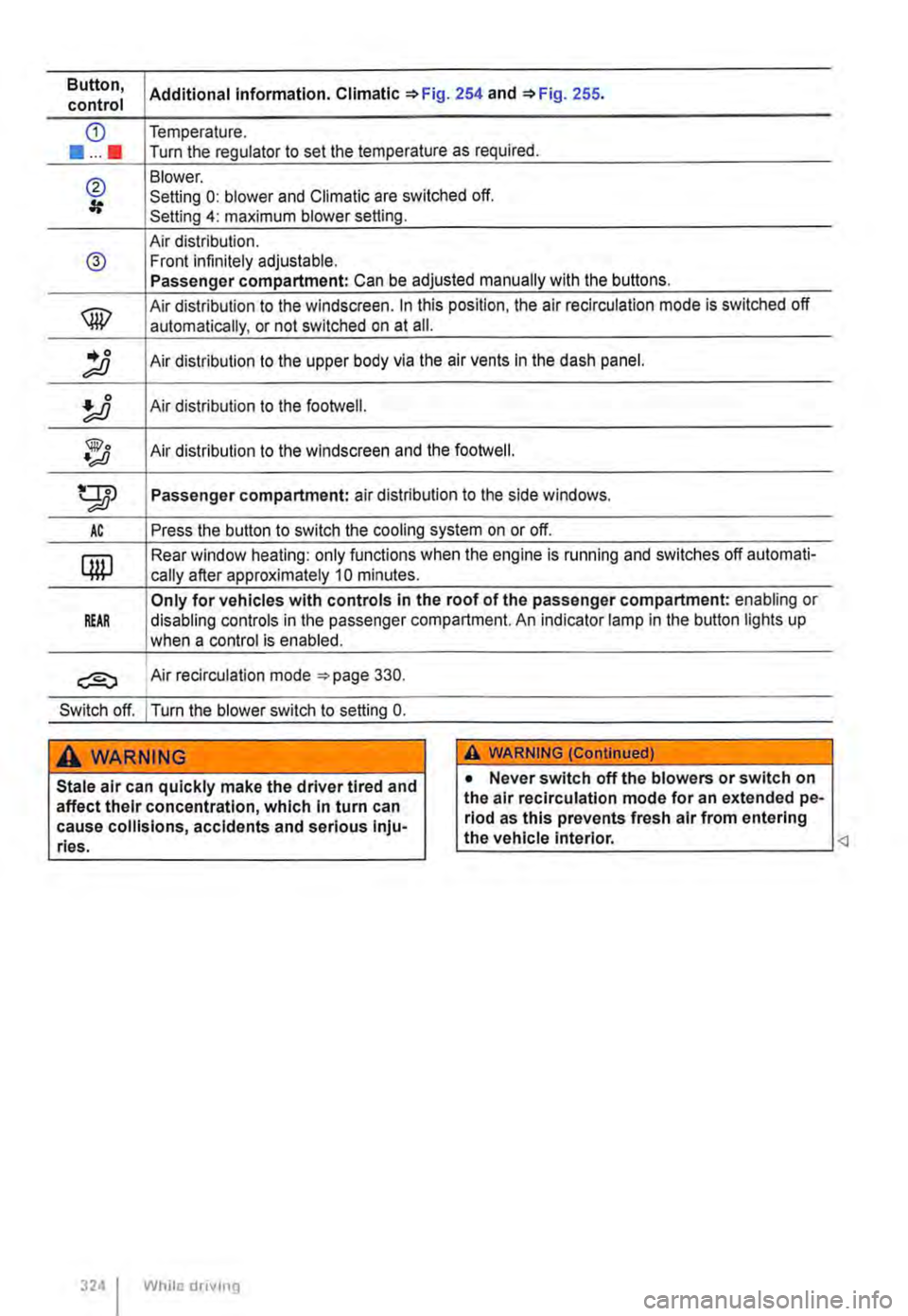
Button, Additional information. Climatic '*Fig. 254 and '*Fig. 255. control
CD Temperature .
••••• Turn the regulator to set the temperature as required.
@ Blower. Setting 0: blower and Climatic are switched off. Setting 4: maximum blower setting.
Air distribution. @ Front infinitely adjustable. Passenger compartment: Can be adjusted manually with the buttons.
® Air distribution to the windscreen. In this position, the air re circulation mode is switched off
automatically, or not switched on at ail .
.. 0 ;;;o Air distribution to the upper body via the air vents In the dash panel.
Air distribution to the footwell.
@o •;;JJ Air distribution to the windscreen and the footweii.
gp Passenger compartment: air distribution to the side windows.
AC Press the button to switch the cooling system on or off.
QW Rear window heating: only functions when the engine is running and switches off automati-
cally after approximately 10 minutes.
Only for vehicles with controls in the roof of the passenger compartment: enabling or REAR disabling controls in the passenger compartment. An indicator lamp in the button lights up
when a control is enabled.
Air recirculation mode =-page 330.
Switch off. I Turn the blower switch to setting 0.
A WARNING
Stale air can quickly make the driver tired and affect their concentration, which in turn can cause collisions, accidents and serious Inju-ries.
324 I While drivmg
A WARNING (ConUnued)
• Never switch off the blowers or switch on the air recirculation mode for an extended pe-riod as this prevents fresh air from entering the vehicle interior.
Page 325 of 486
:
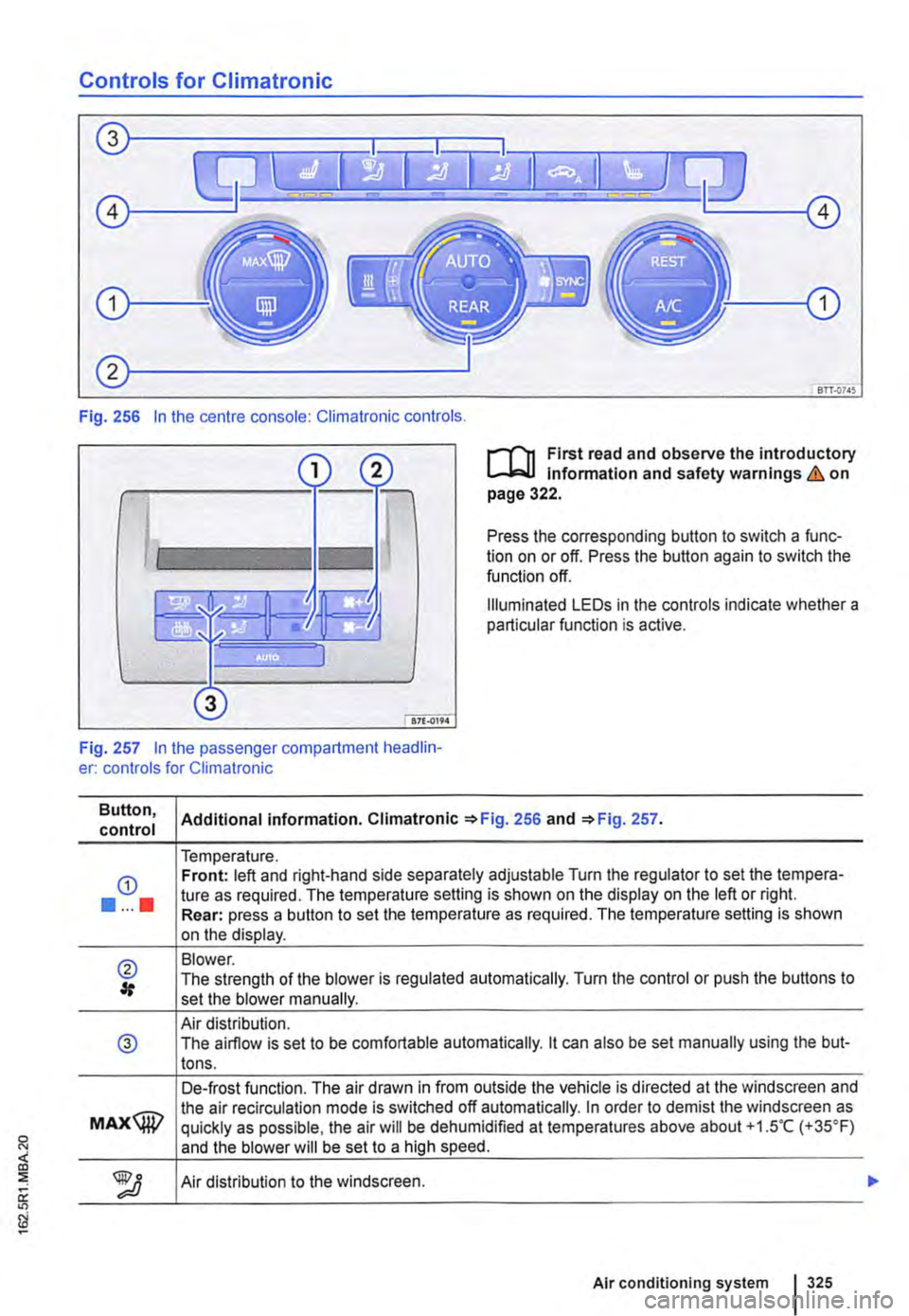
Controls for Climatronic
Fig. 256 In the centre console: Climatronic controls.
l"'"l'"'n First read and observe the introductory l.-Jo:.l.l Information and safety warnings & on page 322.
Press the corresponding button to switch a func-tion on or off. Press the button again to switch the function off.
Illuminated LEDs in the controls indicate whether a particular function is active.
Fig. 257 In the passenger compartment headlin-er: controls for Climatronic
Button, control
G)
•••••
® #
@
MAX@
Additional information. Climatronic =>Fig. 256 and =>Fig. 257.
Temperature. Front: left and right-hand side separately adjustable Turn the regulator to set the tempera-ture as required. The temperature setting is shown on the display on the left or right. Rear: press a button to set the temperature as required. The temperature setting is shown on the display.
Blower. The strength of the blower is regulated automatically. Turn the control or push the buttons to set the blower manually.
Air distribution. The airflow is set to be comfortable automatically. lt can also be set manually using the but-tons.
De-frost function. The air drawn in from outside the vehicle is directed at the windscreen and the air recirculation mode is switched off automatically. In order to demist the windscreen as quickly as possible, the air will be dehumidified at temperatures above about +1.5"C (+35°F) and the blower will be set to a high speed.
Air distribution to the windscreen.
Air conditioning system 325
Page 331 of 486
Windscreen heating
1111 First read and observe the introductory L.-J,::.U information and safety warnings & on page 322.
Windscreen heating helps to de-ice the
windscreen and only works when the en-
gine is running.
Switching on and off
Press the button ®in the centre console or the Climatronic to switch the windscreen heating on and off.
Roof ventilator
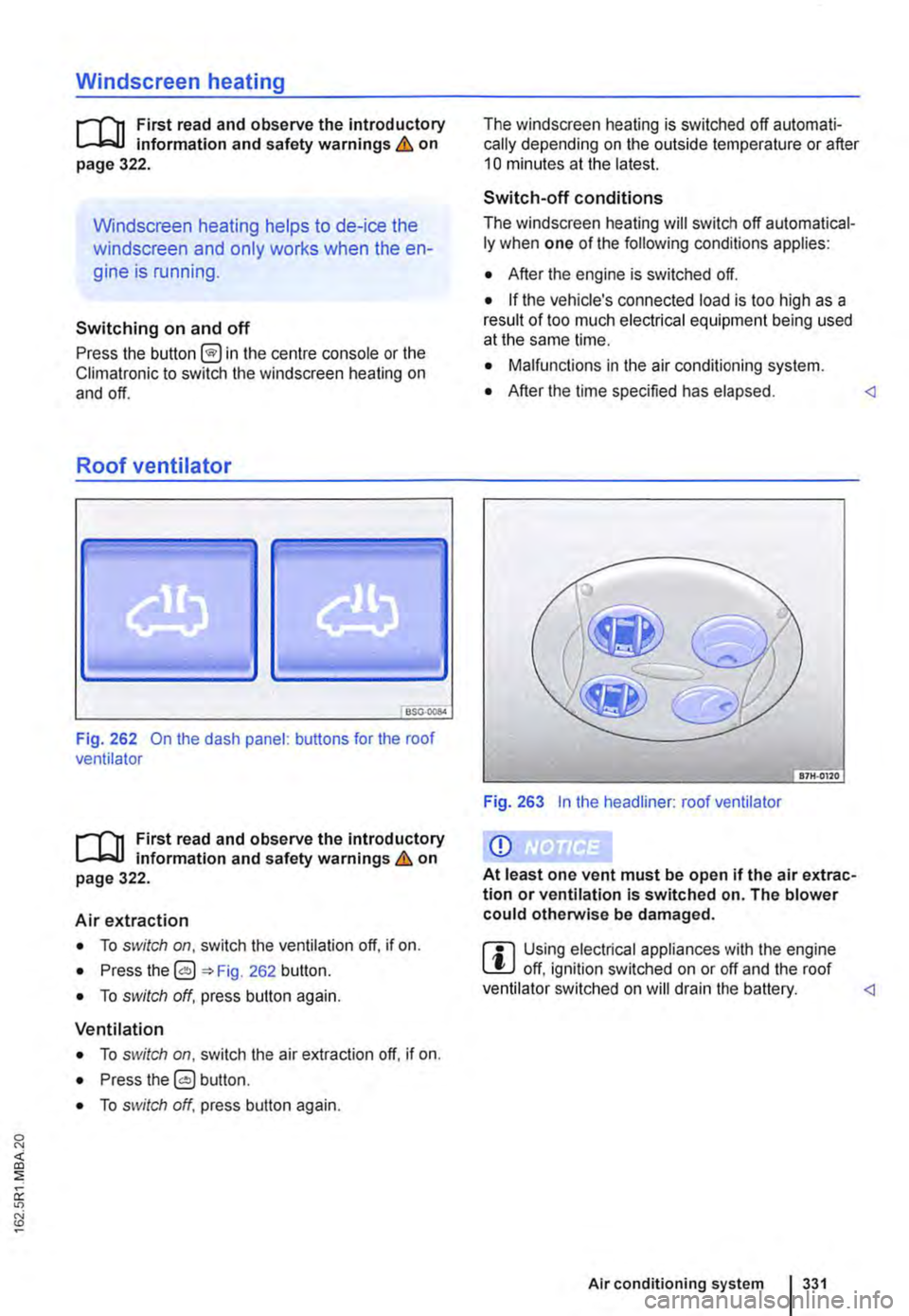
BS0-000<
Fig. 262 On the dash panel: buttons for the roof ventilator
1111 First read and observe the introductory L.-J,::.U Information and safety warnings & on page 322.
Air extraction
• To switch on, switch the ventilation off, if on.
• Press the 0 262 button.
• To switch off, press button again.
Ventilation
• To switch on, switch the air extraction off. if on.
• Press the 0 button.
• To switch off, press button again.
The windscreen heating is switched off automati-cally depending on the outside temperature or after 10 minutes at the latest.
Switch-off conditions
The windscreen heating will switch off automatical-ly when one of the following conditions applies:
• After the engine is switched off.
• If the vehicle's connected load is too high as a result of too much electrical equipment being used at the same lime.
• Malfunctions in the air conditioning system.
• After the time specified has elapsed.
Q)
At least one vent must be open if the air extrac-tion or ventilation Is switched on. The blower could otherwise be damaged.
ffi Using electrical appliances with the engine L!J off, ignition switched on or off and the roof ventilator switched on will drain the battery.
Page 338 of 486
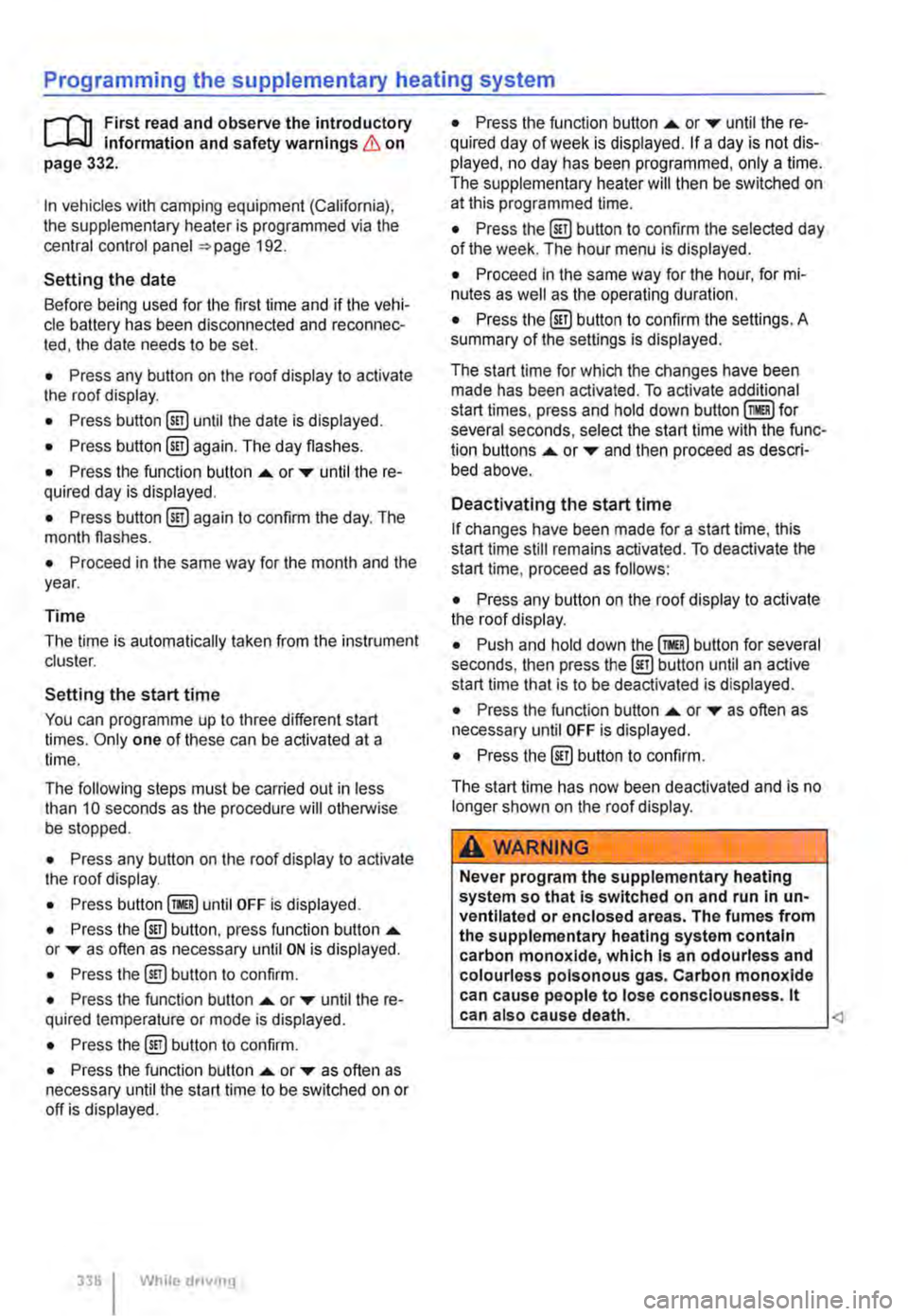
Programming the supplementary heating system
r('n First read and observe the introductory L-Wl Information and safety warnings & on page 332.
In vehicles with camping equipment (California), the supplementary heater is programmed via the central control panel =>page 192.
Setting the date
Before being used for the first time and if the vehi-cle battery has been disconnected and reconnec-ted, the date needs to be set.
• Press any button on the roof display to activate the roof display.
• Press button @!) until the date is displayed.
• Press button @!) again. The day flashes.
• Press the function button .... or T until the re-quired day is displayed.
• Press button @!) again to confirm the day. The month flashes.
• Proceed in the same way for the month and the year.
Time
The time is automatically taken from the instrument cluster.
Setting the start time
You can programme up to three different start times. Only one of these can be activated at a time.
The following steps must be carried out in less than 10 seconds as the procedure will otherwise be stopped.
• Press any button on the roof display to activate the roof display.
• Press until OFF is displayed.
• Press the @) button, press function button .... or T as often as necessary until ON is displayed.
• Press the@) button to confirm.
• Press the function button .... or T until the re-quired temperature or mode is displayed.
• Press the @!) button to confirm.
• Press the function button .... or T as often as necessary until the start time to be switched on or off is displayed.
338 I While dnvmg
• Press the function button .... or T until the re-quired day of week is displayed. If a day is not dis-played, no day has been programmed, only a time. The supplementary heater will then be switched on at this programmed time.
• Press the @) button to confirm the selected day of the week. The hour menu is displayed.
• Proceed in the same way for the hour, for mi-nutes as well as the operating duration.
• Press the @) button to confirm the settings. A summary of the settings is displayed.
The start time for which the changes have been made has been activated. To activate additional start times, press and hold down for several seconds, select the start time with the func-tion buttons .... or T and then proceed as descri-bed above.
Deactivating the start time
If changes have been made for a start time, this start time still remains activated. To deactivate the start time, proceed as follows:
• Press any button on the roof display to activate the roof display.
• Push and hold down button for several seconds, then press the@) button until an active start time that is to be deactivated is displayed.
• Press the function button .... or T as often as necessary until OFF is displayed.
• Press the @) button to confirm.
The start time has now been deactivated and is no longer shown on the roof display.
A WARNING
Never program the supplementary heating system so that Is switched on and run In un-ventllated or enclosed areas. The fumes from the supplementary heating system contain carbon monoxide, which Is an odourless and colourless poisonous gas. Carbon monoxide can cause people to lose consciousness. lt can also cause death.
Page 410 of 486
If and when
Practical tips
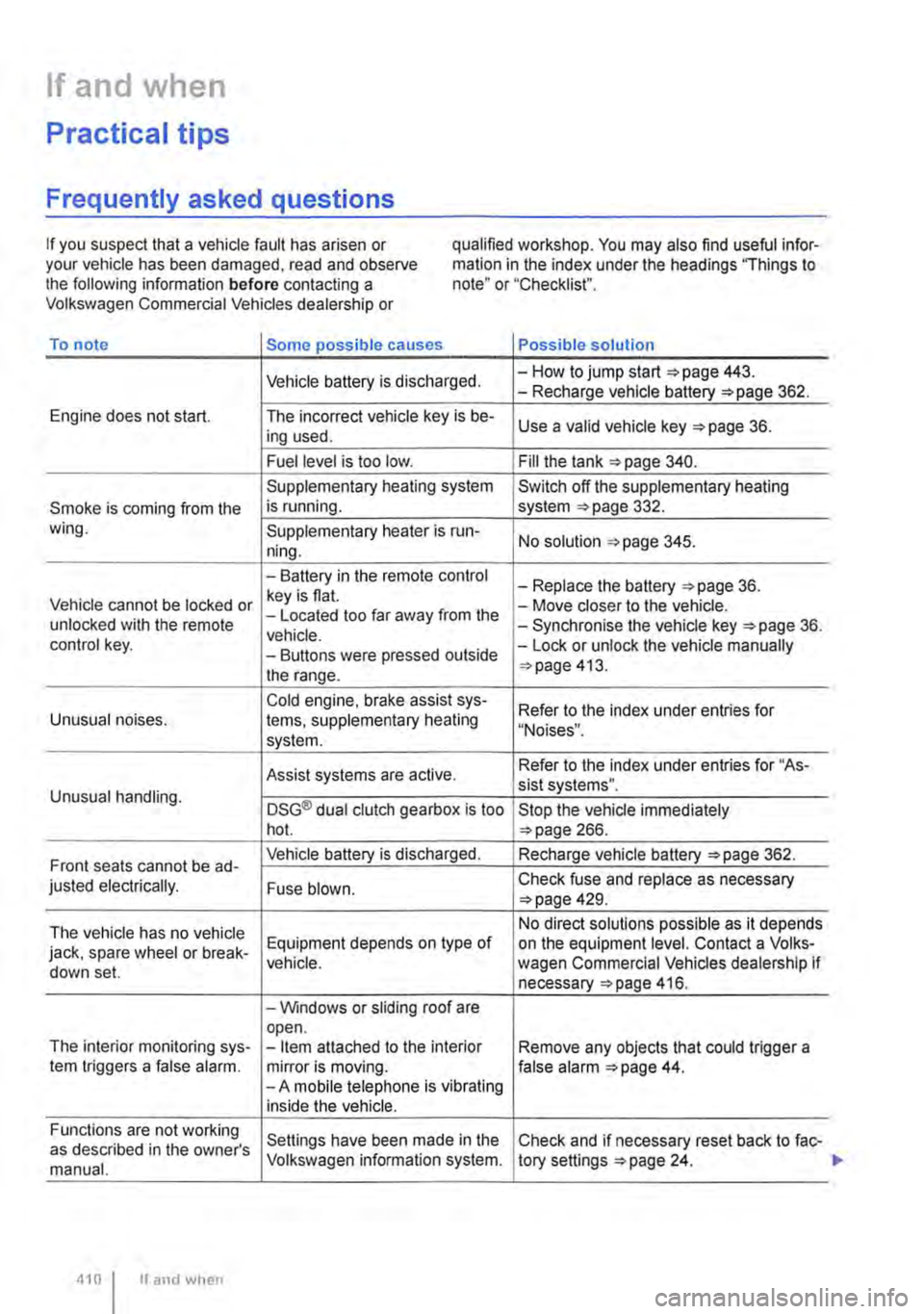
Frequently asked questions
If you suspect that a vehicle fault has arisen or your vehicle has been damaged, read and observe the following information before contacting a Volkswagen Commercial Vehicles dealership or
qualified workshop. You may also find useful infor-mation in the index under the headings "Things to note" or "Checklist".
To note Some possible causes Possible solution
Vehicle battery is discharged. -How to jump start =>page 443. -Recharge vehicle battery 362.
Engine does not start. The incorrect vehicle key is be-Use a valid vehicle key 36. ing used.
Fuel level is too low. Fill the tank 340.
Supplementary heating system Switch off the supplementary heating
Smoke is coming from the is running. system 332. wing. Supplementary heater is run-No solution 345. ning.
-Battery in the remote control -Replace the battery 36. Vehicle cannot be locked or key is flat. -Move closer to the vehicle. unlocked with the remote -Located too far away from the -Synchronise the vehicle key =>page 36. vehicle. control key. -Buttons were pressed outside -Lock or unlock the vehicle manually
the range. 413.
Cold engine. brake assist sys-Refer to the index under entries for Unusual noises. tems, supplementary heating "Noises". system.
Assist systems are active. Refer to the index under entries for "As-sist systems". Unusual handling. DSG® dual clutch gearbox is too Stop the vehicle immediately hot. 266.
Front seats cannot be ad-Vehicle battery is discharged. Recharge vehicle battery 362.
justed electrically. Fuse blown. Check fuse and replace as necessary 429.
The vehicle has no vehicle No direct solutions possible as it depends
jack, spare wheel or break-Equipment depends on type of on the equipment level. Contact a Volks-vehicle. wagen Commercial Vehicles dealership if down set. necessary 416.
-Windows or sliding roof are open. The interior monitoring sys--Item attached to the interior Remove any objects that could trigger a tem triggers a false alarm. mirror is moving. false alarm 44. -A mobile telephone is vibrating inside the vehicle.
Functions are not working Settings have been made in the Check and if necessary reset back to fac-as described in the owner's manual. Volkswagen information system. tory settings 24.
410 I If and when
Page 471 of 486
Electrical consumer . . . . . . . . . . . . . . . . . . 244
Electrical consum-ers ....... 145,164,242,244,331,339,412 Business . . . . . . . . . . . . . . . . . . . . 186
Electrical equipment . . . . . . . . . . . . . . . . . . 164
Electrical sockets . . . . . . . . . . . . . . . . . . . . 163
Electric lumbar support adjustment . . . . . . 66
Electric pop-up roof, California . . . . . . . . . 221 Closing . . . . . . . . . . . . . . . . . . . . . . . . . . . 223 Opening . . . . . . . . . . . . . . . . . . . . . . . . . . 222
Electric sliding doors Disabling . . . . . . . . . . . . . . . . . . . . . . . . . . 47 Opening and closing . . . . . . . . . . . . . . . . . 47 Roll-back function . . . . . . . . . . . . . . . . . . . 48 Electric windows . . . . . . . . . . . . . . . . . . . . . . 55 Buttons . . . . . . . . . . . . . . . . . . . . . . . . . . . . 56 Closing . . . . . . . . . . . . . . . . . . . . . . . . . . . . 56 Convenience closing . . . . . . . . . . . . . . . . . 57 Convenience opening . . . . . . . . . . . . . . . . 57 Fault .........................•.... 57 One-touch function . . . . . . . . . . . . . . . . . . . 56 Opening ........................... 56 Roll-back function . . . . . . . . . . . . . . • . . . . 57
Electrolyte . . . . . . . . . . . . . . . . . . . . . . . . . . 365
Electronic differential lock (EDL) . . . . . . . . 275
Electronic Immobilizer . . . . . . . . . . . . . . . . 260
Electronic stability control (ESC) . . . . . . . . 274
Emergency ........................... 411 Breakdown . . . . . . . . . . . . . . . . . . . . • . . . 412 Checklist . . . . . . . . . . . . . . . . . . . . . . . . . 412 Fire extinguisher . . . . . . . . . . . . . . . . . . . 413 First aid kit . . . . . . . . . . . . . . . . . . . . . . . . 413 Hazard warning lights . . . . . . . . . . . . . . . 412 Making you and your vehicle safe 412 Warning triangle . . . . . . . . . . . . . . 413
Emergency brake . . . . . . . . . . . . . . . . . . . . 412
Emergency brake lights . . . . . . . . . . . 412 Emergency breakaway cable . . . . . . . 141, 145
Emission control system for diesel vehi-cles . . . . . . . . . . . . . . . . . . . . . . . . . . . . . . . 346
Engine Noises . . . . . . . . . . . . . . . . . . . . . . . • . . . 259 Not running smoothly . . . . . . . . . . . . • . . . 343 Running in . . . . . . . . . . . . . . . . . . . . 394
Engine and ignition . . . . . . . . . . . . . . . . . . . 257 12-volt sockets . . . . . . • . . . . . . . . . . 164, 243 Ignition lock . . . . . . . . . . . . . . . . . . . . . . . 258 Immobilizer . . . . . . . . . . . . . . . . . . . . . . . . 260 Non-authorised vehicle key . . . . . . . . . . . 258 Preheating . . . . . . . . . . . . . . . . . . . 258 Starting the engine . . . . . . . . . . . . . . . . . . 258 Stopping the engine . . . . . . . . . . . . . . . . 259 Engine and transmission guard . . . . . . . . . . 33
Engine code Finding . . . . . . . . . . . . . . . . . . . . . . . . . . . 451
Engine compartment ................. . Cleaning ........................ . Coolant .......................... . Engine oil ........................ . Plenum chamber .................. . Preparation ...................... . Vehicle battery .................... . Engine coolant see Coolant ................. .
Engine fault ................... .
Engine idling speed increased ........................ . Engine management system .....•..... Indicator lamp .................... .
Engine oil .....................•..... Changing ........................ . Checking the engine oil level ......... . Consumption ................•..... Dipstick ......................... . Filler opening ..................... . Indicator lamp .................... . Refilling ......................... . Specification ...................... . Warning lamp ..................... .
Engine specifications ................ . Entering password Rear-seat telephony ......... .
Entering PIN code Rear-seat telephony ................ . Equipment Business ........................ . California ........................ . Multivan ... .
ESC ....... . ESP
350 387 358 353 387 352 362
358
407
366 407 407
353 357 356 357 356 356 354 356 354 354
450
190
190
180 192 175
274
see Electronic stability control (ESC) . . . . 274 Event data recorder . . . . . . . . . . . . . . . . . . . 399
Event memory Connector . . . . . . . . . . . . . . . . . . . . . . . 399 Reading . . . . . . . . . . . . . . . . . . . . . . . . . . 399 Exhaust purification system . . . . . . . . . . . 407 Indicator lamp . . . . . . . . . . . . . . . . . . . . . 407 Exterior mirrors . . . . . . . . . . . . . . . . . . . . 123 Aerial . . . . . . . . . . . . . . . . . . . . . . . . 124,406 Automatic anti-dazzle . . . . . . . . . . . . . . 123 Driving with a trailer . . . . . . . . . . . . . . . . 142 .............. ·····•········ Folding in . . . . . . . . . . . . . . . . . . . . . . . . . 123 Vehicle care . . . . . . . . . . . . . . . . . . . . . . . 382
Exterior views . . . . . . . . . . . . . . . . . • . . . . . . . 5
External aerial . . . . . . . . . . . . . . . . . . . . . . . 398 External socket 230-volt power supply 245
Index 471