brake light VOLKSWAGEN TRANSPORTER 2014 User Guide
[x] Cancel search | Manufacturer: VOLKSWAGEN, Model Year: 2014, Model line: TRANSPORTER, Model: VOLKSWAGEN TRANSPORTER 2014Pages: 486, PDF Size: 69.28 MB
Page 144 of 486
A WARNING (Continued)
• If the ball coupling will not fit properly, the towing bracket should be checked by a quali-fied workshop.
• Do not use the towing bracket If the ball coupling does not engage properly or if you are unable to set it to the "ready" position.
• Do not use the towing bracket if you are unable to remove the key from the handwheel once the ball coupling has been mounted. This means that ball coupling Is not locked properly.
Removing the ball coupling
r--T'n First read and observe the Introductory L-J.:.IJ information and safety warnings & on page 139.
• Unhitch the trailer => &.
• Remove the cover =>Fig. 113 ®from the lock on the handwheel.
• Insert the key® into the lock and turn it clock-wise.
• Hold the ball coupling tightly in your left hand =>&.
• Use your right hand to pull out the handwheel 0 in the direction of arrow 1 and keep it in this po-sition.
• Turn the handwheel 0 in the direction of arrow 2 until it engages.
Hitching and connecting the trailer
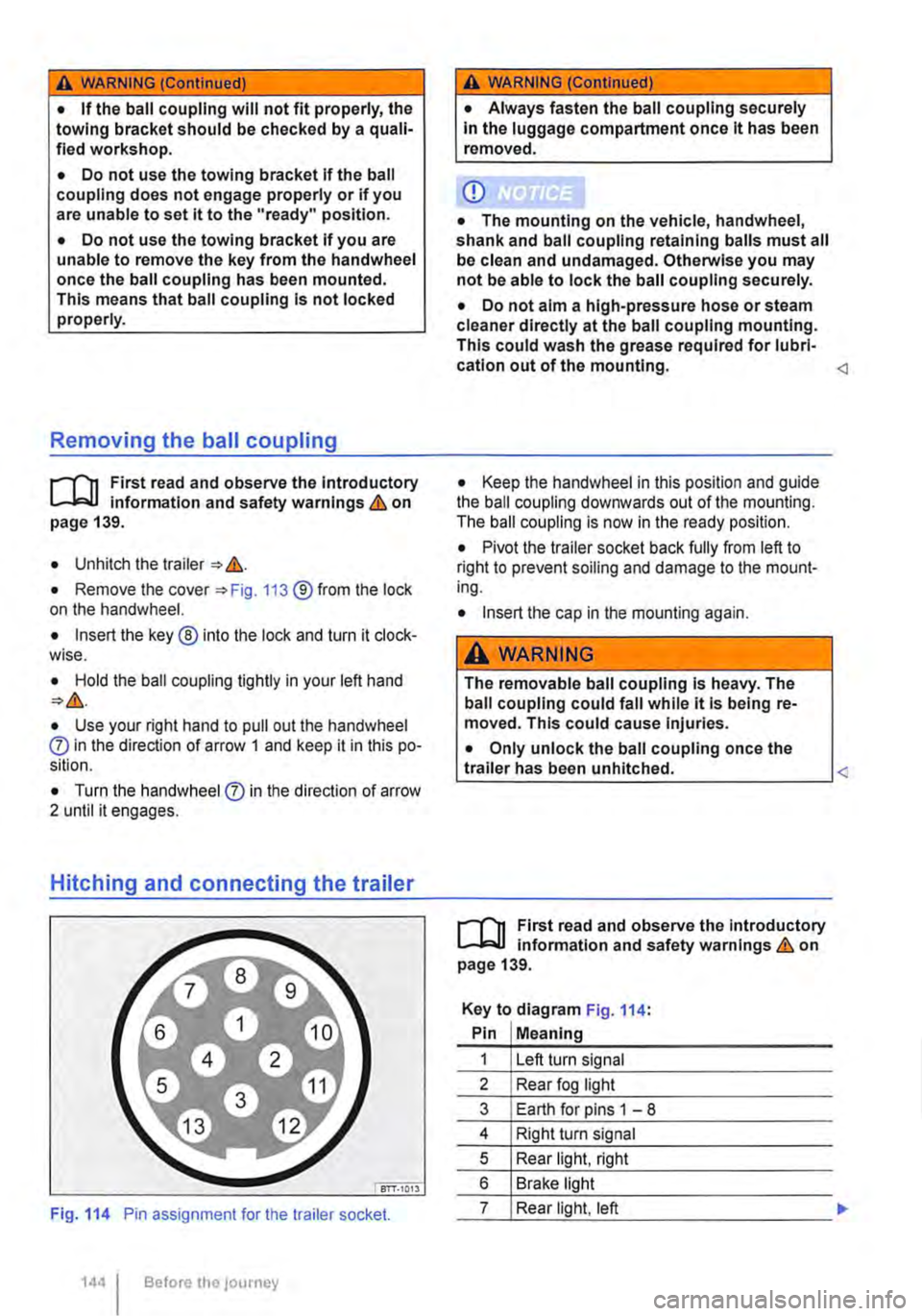
Fig. 114 Pin assignment for the trailer socket.
1441 Before the journey
A WARNING (Continued)
• Always fasten the ball coupling securely In the luggage compartment once it has been removed.
CD
• The mounting on the vehicle, handwheel, shank and ball coupling retaining balls must all be clean and undamaged. Otherwise you may not be able to lock the ball coupling securely.
• Do not aim a high-pressure hose or steam cleaner directly at the ball coupling mounting. This could wash the grease required for lubri-cation out of the mounting.
• Pivot the trailer socket back fully from left to right to prevent soiling and damage to the mount-ing.
• Insert the cap in the mounting again.
A WARNING
The removable ball coupling Is heavy. The ball coupling could fall while it Is being re-moved. This could cause Injuries.
• Only unlock the ball coupling once the L-tr_a_ile_r_h_a_s __ be_e_n __ u_n_hi_tc_h_e_d_. ____________
r--T'n First read and observe the Introductory L-J.:.IJ information and safety warnings & on page 139.
Key to diagram Fig. 114:
Pin Meaning
1 Left turn signal
2 Rear fog light
3 Earth for pins 1 -8
4 Right turn signal
5 Rear light, right
6 Brake light
7 Rear light, left
Page 147 of 486
Things to note when driving with a trailer
• If the trailer has an overrun brake, apply the brakes gently at first and then firmly. This will pre-vent the jerking that can be caused by the trailer wheels locking.
• The combination weight causes the braking dis-tance to increase.
• Select a low gear before driving down a slope. This enables you to use the engine braking effect to slow down the vehicle. The brake system could otherwise overheat and fail.
• The vehicle's centre of gravity and, in turn, the vehicle's handling, will change because of the trail-er load and the increased combined towing weight of the vehicle and trailer.
• The weight distribution of a loaded trailer with an unladen towing vehicle is very unfavourable. When driving in this situation, drive particularly carefully and slowly.
Tachograph
In most European countries, a tachograph has to be installed in the vehicle and used if the gross combination weight rating of the vehicle and trailer is over 3,500 kg.
• Observe the legal requirements governing the use of tachographs.
Pulling off on slopes when towing a trailer
A vehicle towing a trailer is liable to roll back a short distance when moving off on a slope, de-pending on the angle of the slope and the total weight of the trailer and vehicle.
When towing a trailer, pull off on slopes as follows:
• Depress and hold the brake pedal.
• Manual gearbox: depress the clutch fully.
• Select first gear or D =:o page 260, Changing gears.
Trailer stabilisation
r-('n First read and observe the introductory L-J,:.U information and safety warnings & on page 139.
The trailer stabilisation function can de-
tect if an attached trailer is starting to
lurch from side to side and can provide
countersteer.
• Unlock hand brake and carefully release while holding down lock button. At the same time, gently depress the accelerator and, in a manual vehicle, release the clutch pedal, until you feel the vehicle moving forwards. If necessary, read the notes on the Hill Hold Assist function =:o page 282, Pull-away assist systems.
• Only let go of the handbrake lever when the en-gine has sufficient power to move off.
• Pull away slowly.
A WARNING
Incorrect trailer towing can cause loss of ve-hicle control and serious personal injury.
• Towing a trailer and transporting heavy or bulky items can change the way the vehicle handles and increase the braking distance.
• Always drive carefully and think ahead. Brake earlier than in normal driving.
• Always adapt your speed and driving style to suit visibility, weather, road and traffic con-ditions. Reduce your speed, particularly when going downhill.
• Accelerate carefully and gently. Avoid abrupt and sudden driving and braking ma-noeuvres.
• Take special care when overtaking. Re-duce your speed immediately if the trailer shows even the slightest sign of snaking.
• Never try to stop a trailer from snaking by increasing your speed.
• Always obey speed limits. In some areas speed limits for vehicles towing trailers are lower than for vehicles without trailers.
If, however, the effects of this snaking on the vehi-cle are detected via the ESC control unit, the vehi-cle is braked automatically by the ESC in order to stabilise the trailer. In this case the ABS indicator lamp flashes .,.
Transporting items 1147
Page 148 of 486
Requirements for trailer stabilisation
• The vehicle is a factory-fitted towing bracket or a compatible towing bracket is fitted.
• ESC is active. The indicator lamp in the in-strument cluster is not lit up.
• The trailer is electrically connected to the tow-ing vehicle via the trailer socket.
• The vehicle speed is higher than approximately 60 km/h (37 mph).
• The maximum drawbar load is being carried.
• The trailer must have a rigid drawbar.
• Trailers with brakes must have a mechanical overrun system.
A WARNING
De not let the extra safety afforded by the trailer stabilisation function tempt you into taking any risks when driving-this can cause accidents.
• Always adapt your speed and driving style to suit visibility, weather, road and traffic con-ditions.
1481 Before the JOUrney
A WARNING (Continued)
• Accelerate carefully on slippery surfaces.
• Take your foot off the accelerator if one of the systems is active.
A wARNING
The trailer stabillsation function may not be able to detect all driving situations correctly.
• Light trailers that are snaking will not be recognised by the trailer stabilisation func-tion and stabilised accordingly in all cases.
• A trailer can still jack-knife on slippery roads with little grip, even if the towing vehi-cle is equipped with the trailer stabilisation system.
• Trailers with a high centre of gravity might tip over before snaking starts.
• Sudden braking procedures could occur automatically In extreme driving situations If the trailer socket Is being used without a trail-er (e.g. for a bicycle carrier with lighting).
Page 259 of 486
0 "' <(
"' ::;
oc "' N
The steps should only be carried out In the specified order.
Step Vehicles with a manual gearbox I Vehicles with dual clutch gearbox DSG ®
2a. Shift the gear stick to a neutral position. I Shift the selector lever to position P or N.
3. Only vehicles with diesel engines: to preheat the engine, turn the vehicle key to position 217 G). The indicator lamp mr lights up in the instrument cluster.
4. Turn vehicle key to position 217 ®-do not depress accelerator.
5. Release the vehicle key once the engine has started.
6. If the engine does not start, stop the procedure and repeat it after approximately one minute.
7. Release the handbrake if you wish to pull away =>page 269.
A WARNING
Never leave the engine running if you leave the vehicle unattended, particularly not if a gear or driving mode has been selected. The vehicle could move suddenly or something unexpected may happen that may cause damage, fire or serious injuries.
A WARNING
Start boosters may explode or suddenly cause the engine to run at high revs.
• Never use a start booster.
CD
• The starter and the engine could be dam-aged if you attempt to start the engine while the vehicle Is In motion or if the engine is started again immediately after it has been switched off.
Stopping the engine
CD
• When the engine is cold, avoid high engine speeds, driving at full throttle and overloading the engine.
• Do not push-start or tow-start the vehicle. Unburnt fuel can damage the catalytic convert-er.
&-, Do not warm up the engine by running it W while the vehicle is stationary. Instead, pull off as soon as there is good visibility through the win· dows. This helps the engine to reach operating temperature more quickly and reduces emissions.
m Components with a high power consumption L!:J are switched off temporarily when the engine is started.
m When starting from cold, the engine may be a L!:J little noisy for the first few seconds. This is quite normal, and no cause for concern.
m At outside temperatures of less than L!:J +5oC (+41°F), fumes may be detected under a vehicle with a diesel engine if the fuel-powered supplementary heater is switched on.
The steps should only be carried out In the specified order.
1. The vehicle must be completely stationary => &.
2. Press the brake pedal. Keep it held down until step 4 has been completed.
3. In vehicles with a dual clutch gearbox DSG®, shift selector lever to position P.
4. Apply the handbrake =>page 269.
5. Turn the vehicle key to position =>Fig. 217 @.
6. In vehicles with a manual gearbox, select the first gear or the reverse gear =>page 263. .,.
Starting the engine, changing gear and parking I 259
Page 261 of 486
The following will occur if reverse gear is selected and the ignition is switched on:
• The reverse light comes on.
• The Climatronic switches automatically to air recirculation mode when the vehicle is reversing.
• If fitted, the ParkPilot and the rear view camera system are switched on.
• The static cornering light may be switched on on both sides.
Additional information and warnings:
• Instruments 19
• Volkswagen information system 24
• Braking, stopping and parking 269
• Pull-away assist systems 282
• ParkPilot 287
• Reversing camera (Rear Assist) 291
• Air conditioning 322
• Engine management system and exhaust puri-fication system 407
• Manual opening and closing 413
A WARNING
Rapid acceleration can cause loss of traction and skidding, particularly on slippery roads. This can cause you to lose control of the ve-hicle, which can lead to accidents and seri-ous Injuries.
Warning and indicator lamps
A WARNING (Continued)
• The kickdown function or fast acceleration should only be used If the visibility, weather, road and traffic conditions permit.
A WARNING
Never "ride" the brake pedal. Do not overuse the brake pedal. Constant braking will cause the brakes to overheat. This can considerably reduce the brake effect, Increase the braking distance and, in certain circumstances, cause the brake system to fall completely.
CD
• Never let the brakes "rub" by applying light pressure to the brake when it Is not necessary to brake. This will Increase levels of wear.
• Before driving down a long, steep gradient, reduce speed and change to a lower gear or move the selector lever to a lower position. This will make use of the engine braking effect and relieve the load on the brakes. The brakes could otherwise overheat and possibly fall. The brakes should only be used to slow or stop the vehicle.
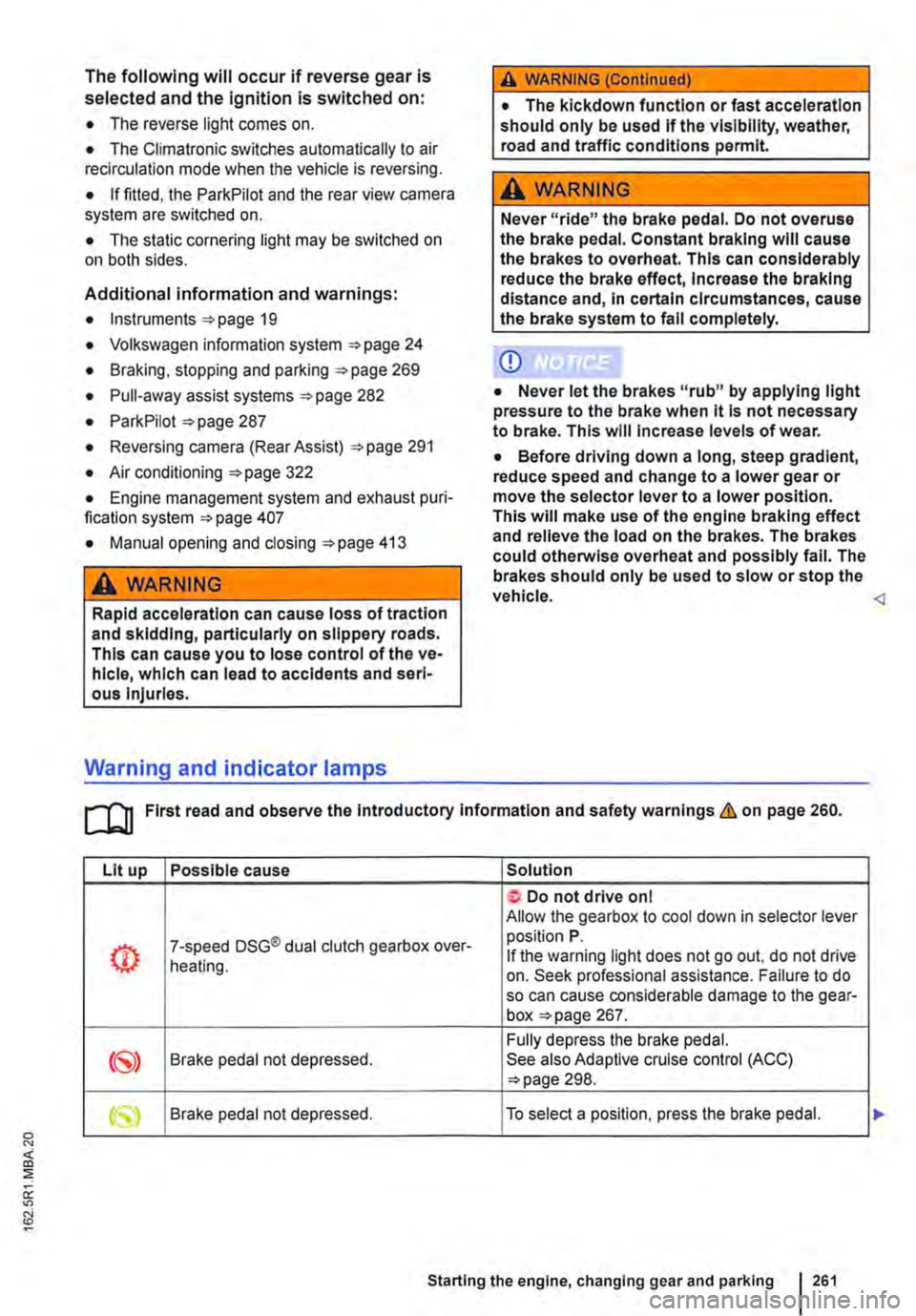
Lit up Possible cause Solution
Do not drive on I Allow the gearbox to cool down in selector lever
(!) 7-speed DSG® dual clutch gearbox over-position P. If the warning light does not go out, do not drive heating. on. Seek professional assistance. Failure to do so can cause considerable damage to the gear-box page 267.
Fully depress the brake pedal. Brake pedal not depressed. See also Adaptive cruise control (ACC) 298.
Starting the engine, changing gear and parking 261
Page 262 of 486
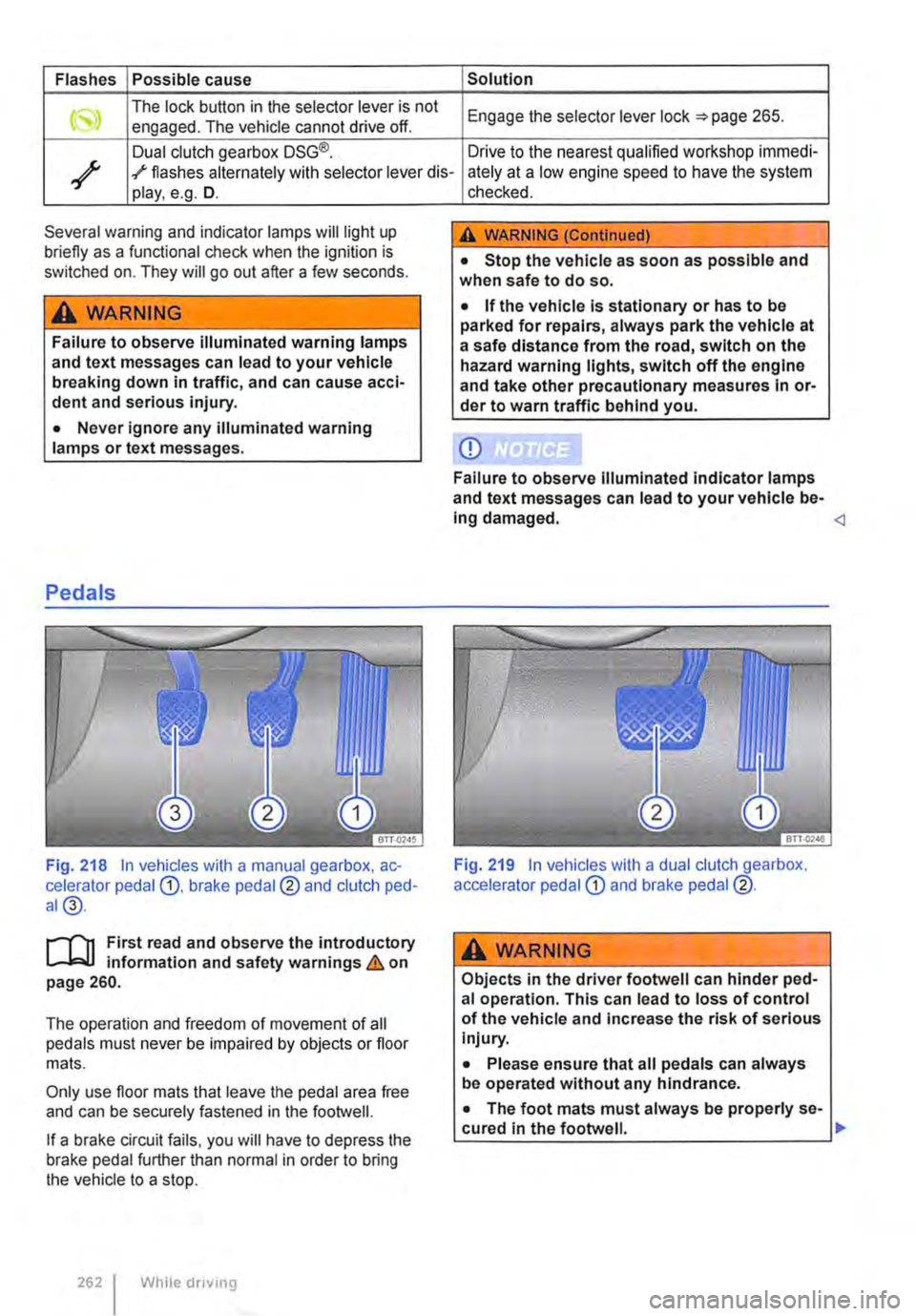
Flashes Possible cause Solution
The lock button in the selector lever is not Engage the selector lever lock 265. engaged. The vehicle cannot drive off.
Dual clutch gearbox DSG®. Drive to the nearest qualified workshop immedi-
/ ./ flashes alternately with selector lever dis-ately at a low engine speed to have the system play, e.g. D.
Several warning and indicator lamps will light up briefly as a functional check when the ignition is switched on. They will go out after a few seconds.
A WARNING
Failure to observe illuminated warning lamps and text messages can lead to your vehicle breaking down in traffic, and can cause acci-dent and serious injury.
• Never ignore any illuminated warning lamps or text messages.
Pedals
Fig. 218 In vehicles with a manual gearbox, ac-celerator pedal G), brake pedal@ and clutch ped-al@.
r-T'n First read and observe the introductory L-Wl information and safety warnings & on page 260.
The operation and freedom of movement of all pedals must never be impaired by objects or floor mats.
Only use floor mats that leave the pedal area free and can be securely fastened in the footwell.
If a brake circuit fails, you will have to depress the brake pedal further than normal in order to bring the vehicle to a stop.
262 I While driving
checked.
A WARNING (Continued)
• Stop the vehicle as soon as possible and when safe to do so.
• If the vehicle is stationary or has to be parked for repairs, always park the vehicle at a safe distance from the road, switch on the hazard warning lights, switch off the engine and take other precautionary measures In or-der to warn traffic behind you.
CD
Failure to observe Illuminated indicator lamps and text messages can lead to your vehicle be-Ing damaged.
A wARNING
Objects in the driver footwell can hinder ped-al operation. This can lead to loss of control of the vehicle and increase the risk of serious Injury.
• Please ensure that all pedals can always be operated without any hindrance.
• The foot mats must always be properly se-cured in the footwell. .,.
Page 267 of 486
• Reduce your speed.
• Push the selector lever from position D to the right into the Tiptronic gate 266.
• Gently push the selector lever to the rear to change down gear.
Stopping the vehicle and pulling away when driving uphill
The steeper the incline, the lower the gear that is required.
If you wish to stop the vehicle or pull away when driving uphill, you should use the Hill Hold Assist function 282.
Vehicles without Hill Hold Assist: when the vehi-cle is stopped on an incline and remains in gear, the vehicle must always be prevented from rolling by depressing the brake pedal or by applying the handbrake. The brake pedal or the handbrake should not be released until you start to pull away
Kickdown
The kickdown mechanism enables maximum ac-celeration in the selector lever positions D and S, or in the Tiptronic position.
If the accelerator pedal is depressed fully, the gear-box will automatically shift to a lower gear, depend-ing on the speed and engine revs. This will make use of the full vehicle acceleration &.
The gearbox does not shift up to the next gear until the engine reaches the maximum engine speed for the gear.
Freewheel driving with 7-speed dual clutch gearbox DSG®
In coasting mode, the momentum of the vehicle can be used to save fuel in conjunction with a fore-sighted driving style. The engine is declutched and no longer brakes the vehicle -the vehicle can roll out over a longer distance.
Switch-on condition: the selector lever must be in position D.
Fault in the DSG® dual clutch gearbox
r-f"'n First read and observe the introductory l-J::,JJ information and safety warnings & on page 260.
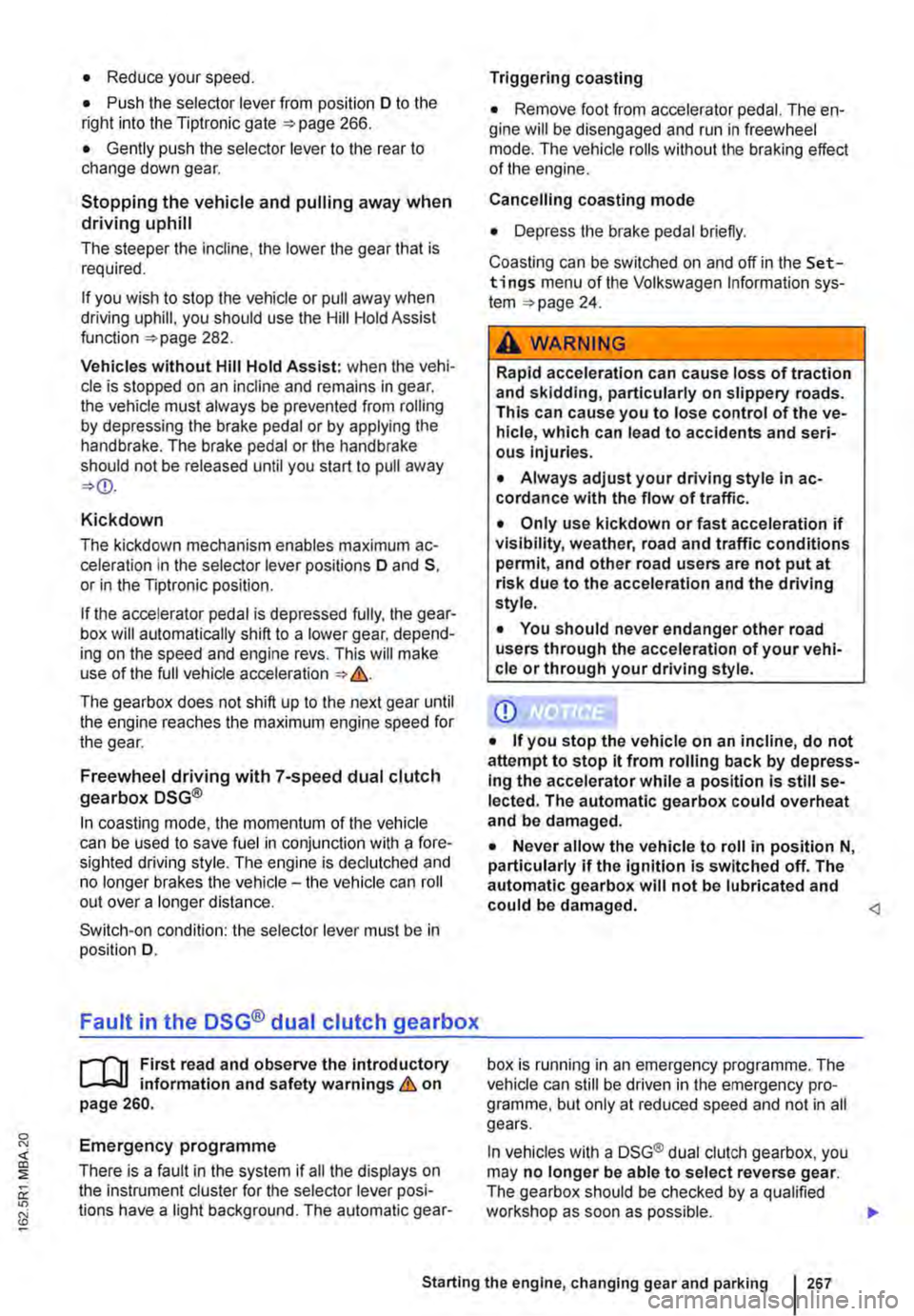
Emergency programme
There is a fault in the system if all the displays on the instrument cluster for the selector lever posi-tions have a light background. The automatic gear-
Triggering coasting
• Remove foot from accelerator pedal. The en-gine will be disengaged and run in freewheel mode. The vehicle rolls without the braking effect of the engine.
Cancelling coasting mode
• Depress the brake pedal briefly.
Coasting can be switched on and off in the Set-tings menu of the Volkswagen Information sys-tem 24.
A WARNING
Rapid acceleration can cause loss of traction and skidding, particularly on slippery roads. This can cause you to lose control of the ve-hicle, which can lead to accidents and seri-ous injuries.
• Always adjust your driving style in ac-cordance with the flow of traffic.
• Only use kickdown or fast acceleration if visibility, weather, road and traffic conditions permit, and other road users are not put at risk due to the acceleration and the driving style.
• You should never endanger other road users through the acceleration of your vehi-cle or through your driving style.
CD
• If you stop the vehicle on an incline, do not attempt to stop it from rolling back by depress-Ing the accelerator while a position is still se-lected. The automatic gearbox could overheat and be damaged.
• Never allow the vehicle to roll in position N, particularly if the ignition is switched off. The automatic gearbox will not be lubricated and could be damaged. <1
box is running in an emergency programme. The vehicle can still be driven in the emergency pro-gramme, but only at reduced speed and not in all gears.
In vehicles with a DSG® dual clutch gearbox, you may no longer be able to select reverse gear. The gearbox should be checked by a qualified workshop as soon as possible. .,..
Starting the engine, changing gear and parking 267
Page 269 of 486
Braking, stopping and parking
COl Introduction
This chapter contains information on the following subjects:
Warning and indicator lamps Handbrake ............................ .
Parking . . . . . . . ............. .
Information on the brakes ................ . Brake support systems .................. .
Switching the TCS on and off ............. .
Brake fluid ............................ .
270 271
272 272
274
276
277
The brake support systems are the anti-lock brake system (ASS), the Brake Assist system (SAS), the electronic differential lock (EDS), the traction control system (TCS) and the Electronic Stability Control (ESC).
Additional information and warnings:
• Towing a trailer 139
• Pull-away assist systems 282
• Wheels and tyres 367
• Accessories, modifications, repairs and renewal of parts 394
A WARNING
Driving with worn brake pads or with a faulty brake system can cause accidents and seri-ous Injuries.
• If the warning lamp 0 lights up either on its own or with a text message In the display of the Instrument cluster, go to a qualified workshop Immediately, have the brake pads checked and any worn brake pads replaced.
A WARNING
Incorrect parking can cause serious Injuries.
• Never remove the vehicle key from the lg-nltlon lock when the vehicle Is In motion. The steering lock may be activated and you will no longer be able to steer or control the vehl-cl e.
A WARNING (Continued)
• Never park the vehicle where parts of the exhaust system can come into contact with inflammable material underneath the vehicle, e.g. undergrowth, leaves, dry grass, spilt fuel.
• Always apply the handbrake when the ve-hicle Is parked.
• Never leave children or people requiring assistance alone In the vehicle. They could release the handbrake, move the selector lev-er or gearshift lever and thus set the vehicle In motion. This can lead to accidents and se-rious injuries.
• Always take all vehicle keys with you ev-ery time you leave the vehicle. The engine can be started and electrical equipment such as the window controls can be used which could cause serious injury.
• Never leave children or people requiring assistance alone in the vehicle. They could become trapped in the vehicle in an emergen-cy and may not be able to get themselves to safety. For example, locked vehicles may be subjected to very high or very low tempera-tures, according to season. This can cause serious Injuries and illness or fatalities, espe-cially for small children.
CD
• To avoid unintentional movement when parking the vehicle, first apply the handbrake and then remove your foot from the brake ped-al.
• Always take care when driving in car parks with protruding kerbstones or bollards. Objects that protrude from the ground can damage the bumper and other components when parking the vehicle. In order to avoid any damage, stop the vehicle before the wheels can touch the bollards or kerbs.
• Drive carefully through dips in the road, over driveways, ramps, kerbstones and other objects. Low-lying vehicle components such as the bumper, spoiler and parts of the running gear, engine or exhaust system could be dam-aged.
Starting the engine, changing gear and parking I 269
Page 270 of 486
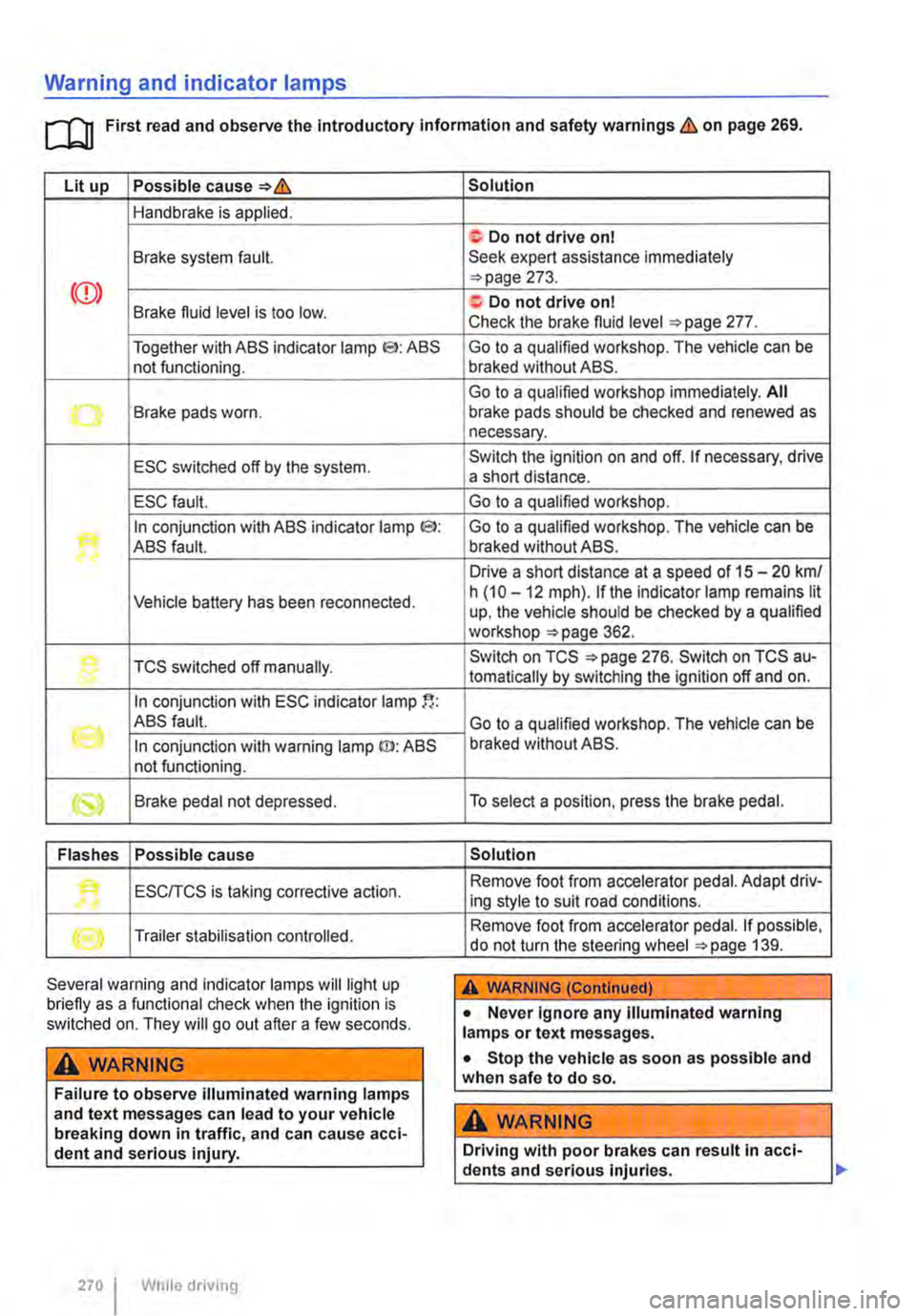
Warning and indicator lamps
[Q First read and observe the Introductory information and safety warnings & on page 269.
Lit up Possible cause=>&
Handbrake is applied.
Brake system fault.
Together with ABS indicator lamp El: ABS not functioning.
-...-Brake pads worn .
ESC switched off by the system.
ESC fault.
In conjunction with ABS indicator lamp CS>: ABS fault.
Vehicle battery has been reconnected.
TCS switched off manually.
In conjunction with ESC indicator lamp
((oil ABS fault.
In conjunction with warning lamp ID: ABS not functioning.
Brake pedal not depressed.
Flashes Possible cause
'• ESCITCS is taking corrective action.
Trailer stabilisation controlled.
Several warning and indicator lamps will light up briefly as a functional check when the ignition is switched on. They will go out after a few seconds.
A WARNING
Failure to observe illuminated warning lamps and text messages can lead to your vehicle breaking down in traffic, and can cause acci-dent and serious injury.
270 I While driving
Solution
f; Do not drive on I Seek expert assistance immediately =>page 273.
a:. Do not drive on I Check the brake fluid level =>page 277.
Go to a qualified workshop. The vehicle can be braked without ABS.
Go to a qualified workshop immediately. All brake pads should be checked and renewed as necessary.
Switch the ignition on and off. If necessary, drive a short distance.
Go to a qualified workshop.
Go to a qualified workshop. The vehicle can be braked without ABS.
Drive a short distance at a speed of 15 -20 km/ h (10 -12 mph). if the indicator lamp remains lit up, the vehicle should be checked by a qualified workshop =>page 362.
Switch on TCS =>page 276. Switch on TCS au-tomatically by switching the ignition off and on.
Go to a qualified workshop. The vehicle can be braked without ABS.
To select a position, press the brake pedal.
Solution
Remove foot from accelerator pedal. Adapt driv-ing style to suit road conditions.
Remove foot from accelerator pedal. If possible, do not turn the steering wheel =>page 139.
A WARNING (Continued)
• Never ignore any illuminated warning lamps or text messages.
• Stop the vehicle as soon as possible and when safe to do so.
A WARNING
Driving with poor brakes can result in acci-dents and serious injuries.
Page 271 of 486
A WARNING (Continued)
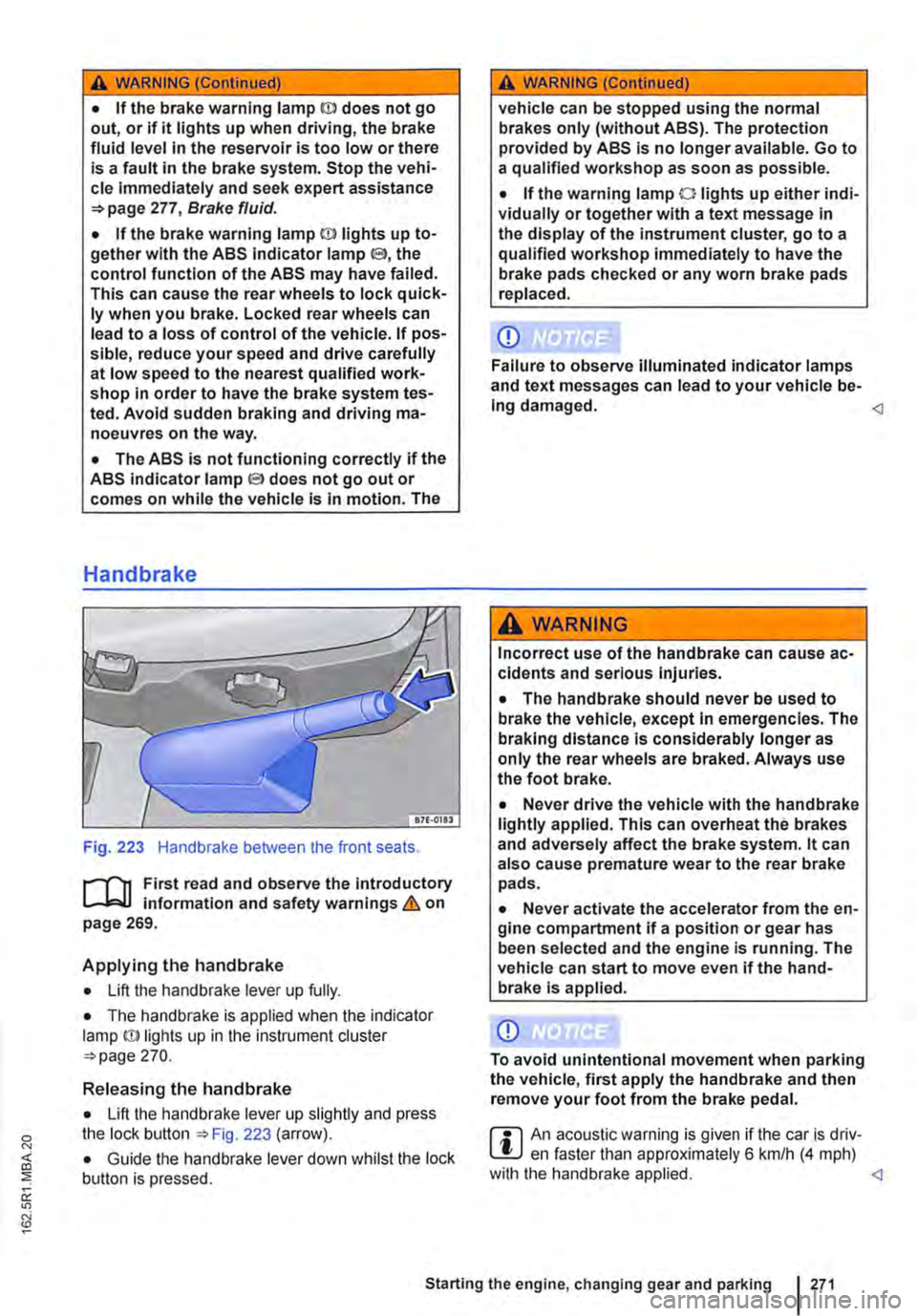
• If the brake warning lamp ID does not go out, or if it lights up when driving, the brake fluid level in the reservoir is too low or there is a fault in the brake system. Stop the vehi-cle Immediately and seek expert assistance 277, Brake fluid.
• If the brake warning lamp@ lights up to-gether with the ABS indicator lamp S, the control function of the ABS may have failed. This can cause the rear wheels to lock quick-ly when you brake. Locked rear wheels can lead to a loss of control of the vehicle. If pos-sible, reduce your speed and drive carefully at low speed to the nearest qualified work-shop in order to have the brake system tes-ted. Avoid sudden braking and driving ma-noeuvres on the way.
• The ABS Is not functioning correctly if the ABS indicator lampS does not go out or comes on while the vehicle is in motion. The
Handbrake
Fig. 223 Handbrake between the front seats.
r--fl1 First read and observe the introductory L-J,::.IJ information and safety warnings & on page 269.
Applying the handbrake
• Lift the handbrake lever up fully.
• The handbrake is applied when the indicator lamp ID lights up in the instrument cluster =-page 270.
Releasing the handbrake
• Lift the handbrake lever up slightly and press the lock button ::.Fig. 223 (arrow).
• Guide the handbrake lever down whilst the lock button is pressed.
A WARNING (Continued)
vehicle can be stopped using the normal brakes only (without ABS). The protection provided by ABS is no longer available. Go to a qualified workshop as soon as possible.
• If the warning lamp 0 lights up either indi-vidually or together with a text message in the display of the instrument cluster, go to a qualified workshop immediately to have the brake pads checked or any worn brake pads replaced.
CD
Failure to observe illuminated indicator lamps and text messages can lead to your vehicle be-Ing damaged.
Incorrect use of the handbrake can cause ac-cidents and serious Injuries.
• The handbrake should never be used to brake the vehicle, except in emergencies. The braking distance is considerably longer as only the rear wheels are braked. Always use the foot brake.
• Never drive the vehicle with the handbrake lightly applied. This can overheat the brakes and adversely affect the brake system. lt can also cause premature wear to the rear brake pads.
• Never activate the accelerator from the en-gine compartment if a position or gear has been selected and the engine is running. The vehicle can start to move even if the hand-brake Is applied.
CD
To avoid unintentional movement when parking the vehicle, first apply the handbrake and then remove your foot from the brake pedal.
r::l An acoustic warning is given if the car is driv-L.!:.J en faster than approximately 6 km/h (4 mph) with the handbrake applied.