lights VOLKSWAGEN TRANSPORTER 2014 User Guide
[x] Cancel search | Manufacturer: VOLKSWAGEN, Model Year: 2014, Model line: TRANSPORTER, Model: VOLKSWAGEN TRANSPORTER 2014Pages: 486, PDF Size: 69.28 MB
Page 21 of 486
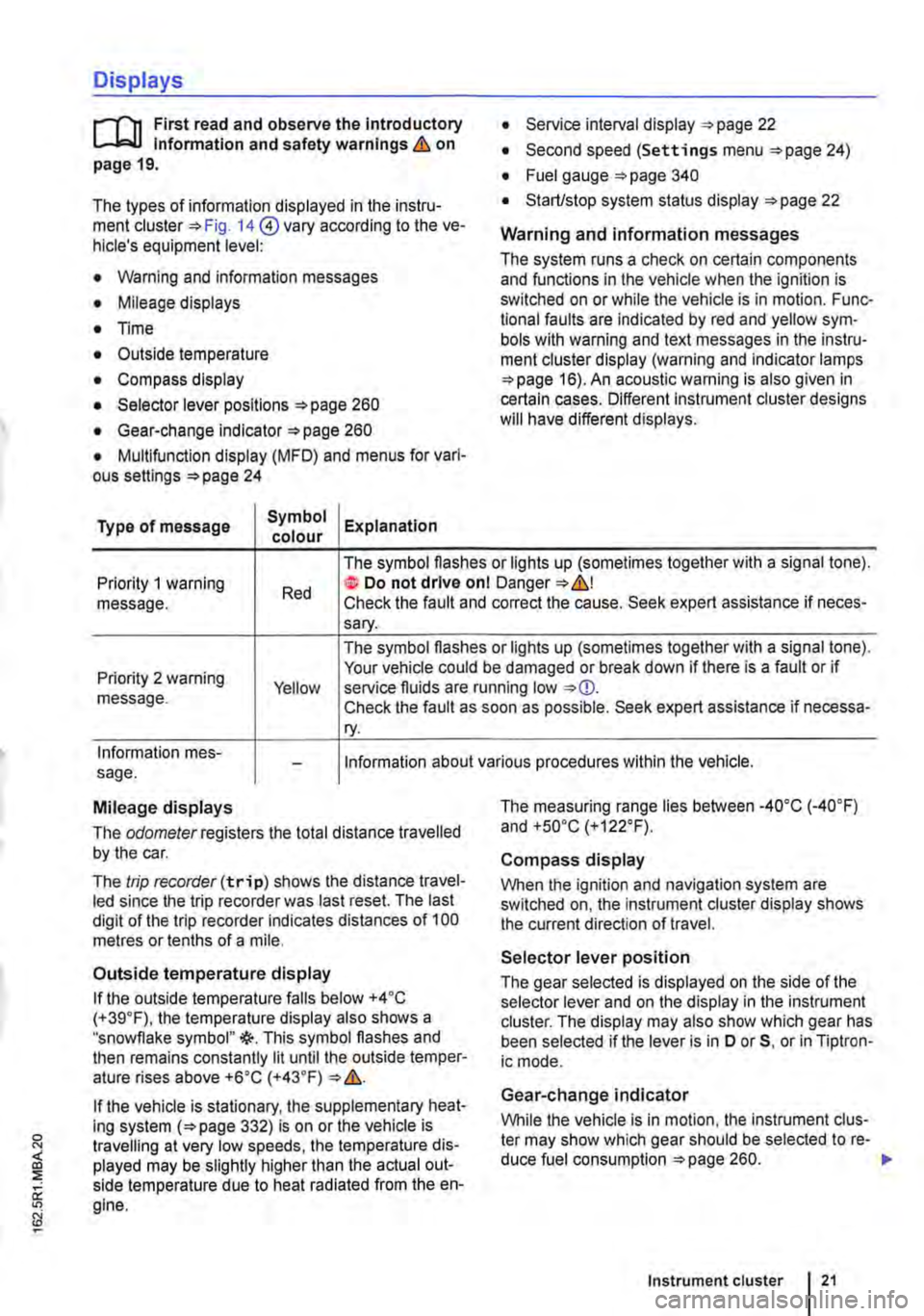
Displays
r-T'n First read and observe the introductory L-J,:.,U information and safety warnings & on page 19.
The types of information displayed in the instru-ment cluster=:. Fig. 14@ vary according to the ve-hicle's equipment level:
• Warning and information messages
• Mileage displays
• Time
• Outside temperature
• Compass display
• Selector lever positions =:.page 260
• Gear-change indicator =>page 260
• Multifunction display (MFD) and menus for vari-ous settings =>page 24
Type of message Symbol Explanation colour
• Service interval display =:.page 22
• Second speed (Settings menu =>page 24)
• Fuel gauge =:.page 340
• Start/stop system status display =:.page 22
Warning and information messages
The system runs a check on certain components and functions in the vehicle when the ignition is switched on or while the vehicle is in motion. Func-tional faults are indicated by red and yellow sym· bols with warning and text messages in the instru-ment cluster display (warning and indicator lamps =>page 16). An acoustic warning is also given in certain cases. Different instrument cluster designs will have different displays.
Priority 1 warning message. Red
The symbol flashes or lights up (sometimes together with a signal tone). te Do not drive onl Danger=:.&,! Check the fault and correct the cause. Seek expert assistance if neces-sary.
Priority 2 warning message. Yellow
The symbol flashes or lights up (sometimes together with a signal tone). Your vehicle could be damaged or break down if there is a fault or if service fluids are running low Check the fault as soon as possible. Seek expert assistance if necessa-ry.
Information mes-sage. Information about various procedures within the vehicle.
Mileage displays
The odomelerregisters the total distance travelled by the car.
The trip recorder(trip) shows the distance travel-led since the trip recorder was last reset. The last digit of the trip recorder indicates distances of 100 metres or tenths of a mile.
Outside temperature display
If the outside temperature falls below +4 ·c (+39.F), the temperature display also shows a "snowflake symbol"{(-. This symbol flashes and then remains constantly lit until the outside temper-ature rises above +6•c (+43.F)
If the vehicle is stationary, the supplementary heat-ing system (=>page 332) is on or the vehicle is travelling at very low speeds, the temperature dis-played may be slightly higher than the actual out-side temperature due to heat radiated from the en-gine.
The measuring range lies between -4o•c (·40.F) and +so•c (+122°F).
Compass display
When the ignition and navigation system are switched on, the instrument cluster display shows the current direction of travel.
Selector lever position
The gear selected is displayed on the side of the selector lever and on the display in the instrument cluster. The display may also show which gear has been selected if the lever is in D or 5, or in Tiptron-ic mode.
Gear-change indicator
While the vehicle is in motion, the instrument clus-ter may show which gear should be selected to re-duce fuel consumption =>page 260. .-
Instrument cluster 21
Page 22 of 486
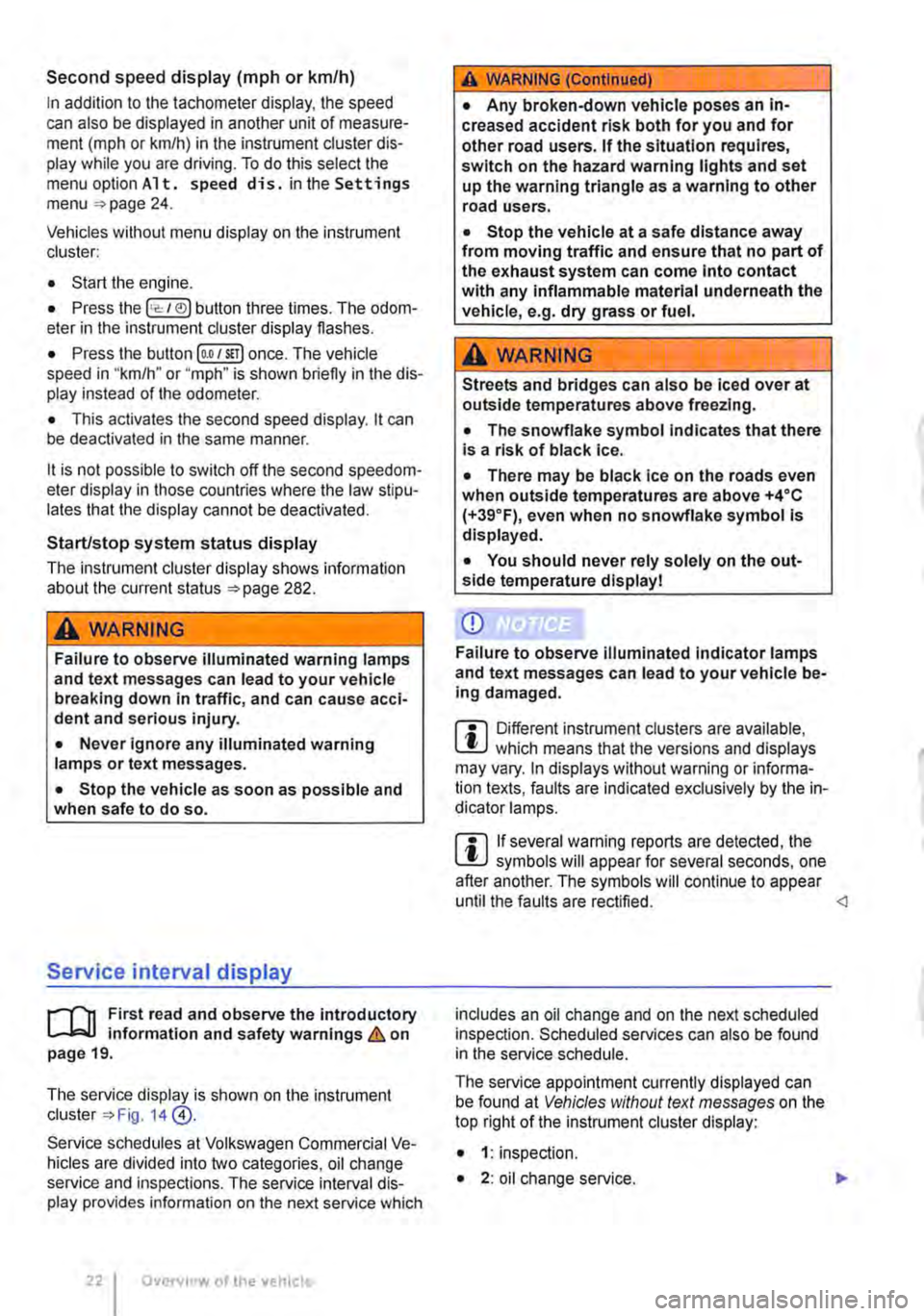
Second speed display (m ph or km/h)
In addition to the tachometer display, the speed can also be displayed in another unit of measure-ment (m ph or km/h) in the instrument cluster dis-play while you are driving. To do this select the menu option A 1 t. speed di s. in the Settings menu =>page 24.
Vehicles without menu display on the instrument cluster:
• Start the engine.
• Press the Ice: 1 e)j button three times. The odom-eter in the instrument cluster display flashes.
• Press the button !o.o 1 SErl once. The vehicle speed in "km/h" or "mph" is shown briefly in the dis-play instead of the odometer.
• This activates the second speed display. lt can be deactivated in the same manner.
lt is not possible to switch off the second speedom-eter display in those countries where the law stipu-lates that the display cannot be deactivated.
StarUstop system status display
The instrument cluster display shows information about the current status =>page 282.
A wARNING
Failure to observe illuminated warning lamps and text messages can lead to your vehicle breaking down In traffic, and can cause acci-dent and serious injury.
• Never Ignore any illuminated warning lamps or text messages.
• Stop the vehicle as soon as possible and when safe to do so.
Service interval display
)'"""'"('n First read and observe the introductory L-W.I information and safety warnings & on page 19.
The service display is shown on the instrument cluster=> Fig. 14 @.
Service schedules at Volkswagen Commercial Ve-hicles are divided into two categories, oil change service and inspections. The service interval dis-play provides information on the next service which
Overview of the vehicle
A WARNING (Continued)
• Any broken-down vehicle poses an In-creased accident risk both for you and for other road users. If the situation requires, switch on the hazard warning lights and set up the warning triangle as a warning to other road users.
• Stop the vehicle at a safe distance away from moving traffic and ensure that no part of the exhaust system can come Into contact with any inflammable material underneath the vehicle, e.g. dry grass or fuel.
A WARNING
Streets and bridges can also be iced over at outside temperatures above freezing.
• The snowflake symbol indicates that there is a risk of black Ice.
• There may be black Ice on the roads even when outside temperatures are above +4•c (+39°F), even when no snowflake symbol is displayed.
• You should never rely solely on the out-side temperature display I
CD
Failure to observe illuminated indicator lamps and text messages can lead to your vehicle be-ing damaged.
m Differenl instrument clusters are available, L!J which means that the versions and displays may vary. In displays without warning or informa-tion texts, faults are indicated exclusively by the in-dicator lamps.
m If several warning reports are detected, the L!J symbols will appear for several seconds, one after another. The symbols will continue to appear until the faults are rectified.
The service appointment currently displayed can be found at Vehicles without text messages on the top right of the instrument cluster display:
• 1: inspection.
• 2: oil change service. ..
Page 24 of 486
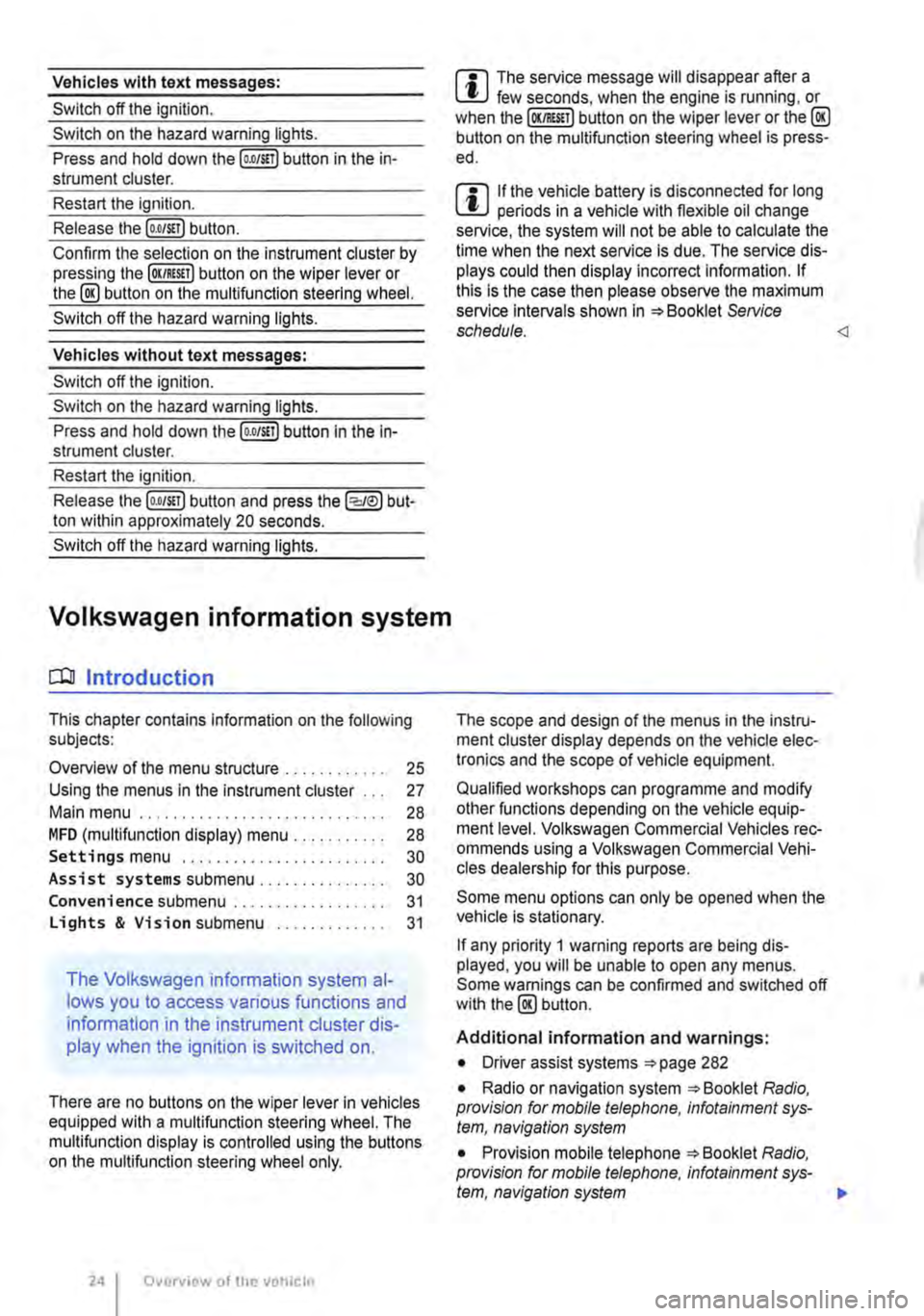
Vehicles with text messages:
Switch off the ignition.
Switch on the hazard warning lights.
Press and hold down the [o.o/S!T) button in the in-strument cluster.
Restart the ignition.
Release the (o.o/S!Tl button.
Confirm the selection on the instrument cluster by pressing lhe (OK/RES!!) button on lhe wiper lever or the @ button on the multifunclion steering wheel.
Switch off the hazard warning lights.
Vehicles without text messages:
Switch off the ignition.
Switch on the hazard warning lights.
Press and hold down the (o.oJS!l) button in the In-strument cluster.
Restart the ignition.
Release lhe [o.O/S!T) button and press the (:cJeJ) but-ton within approximately 20 seconds.
Switch off the hazard warning lights.
Volkswagen information system
COl Introduction
This chapter contains information on the following subjects:
Overview of the menu structure . . . . 25
Using the menus in the instrument cluster . . . 27
Main menu . . . . . . . . . . . . . . . . . . . . . . . 28
MFD (mullifunction display) menu . . . . . . . . . . . 28 Settings menu . . . . . . . . . . . . . . . . 30
Assist systems submenu.. . . . . . . . . . . . 30
Convenience submenu ... Lights & Vision submenu ..
The Volkswagen information system al-
lows you to access various functions and
information in the instrument cluster dis-
play when the ignition is switched on.
31
31
There are no buttons on the wiper lever in vehicles equipped with a multifunction steering wheel. The mullifunction display is controlled using the buttons on the multifunction steering wheel only.
Overview of the V!!hiclc
m The service message will disappear after a W few seconds, when the engine is running, or when the (OKIRES!T) button on the wiper lever or the@ button on the mullifunction steering wheel is press-ed.
m If the vehicle battery is disconnected for long W periods in a vehicle with flexible oil change service, the system will not be able to calculate the lime when the next service is due. The service dis-plays could then display incorrect information. If this is the case then please observe the maximum service Intervals shown in =:o Booklet Service schedule.
Qualified workshops can programme and modify other functions depending on the vehicle equip-ment level. Volkswagen Commercial Vehicles rec-ommends using a Volkswagen Commercial Vehi-cles dealership for this purpose.
Some menu options can only be opened when the vehicle is stationary.
If any priority 1 warning reports are being dis-played, you will be unable to open any menus. Some warnings can be confirmed and switched off with the@ button.
Additional information and warnings:
• Driver assist systems =:o page 282
• Radio or navigation system =:o Booklet Radio, provision for mobile telephone, infotainment sys-tem, navigation system
• Provision mobile telephone =:o Booklet Radio, provision for mobile telephone, infotainment sys-tem, navigation system 111>
Page 26 of 486
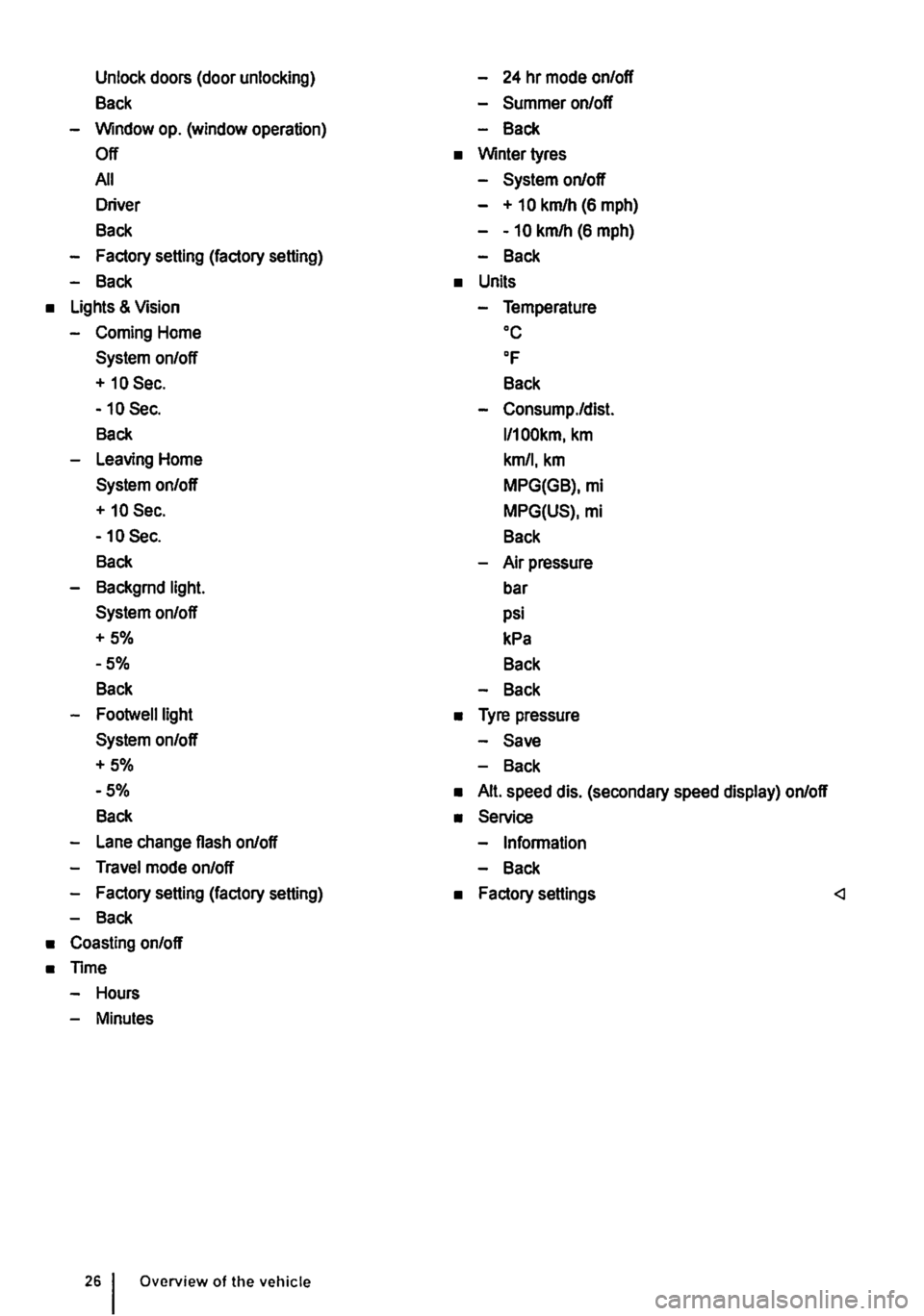
Unlock doors (door unlocking)
Back
-Window op. (window operation)
Off
All
Driver
Back
-Factory setting (factory setting)
-Back
• Lights & Vision
-Coming Home
System on/off
+ 10 Sec.
-10 Sec.
Back
-Leaving Home
System on/off
+ 10 Sec.
-10 Sec.
Back
-Backgrnd light.
System on/off
+5%
-5%
Back
-Footwelllight
System on/off
+5%
-5%
Back
-Lane change flash on/off
-Travel mode on/off
-Factory setting (factory setting)
-Back
• Coasting on/off
• Time
-Hours
-Minutes
Overview of the vehicle
-24 hr mode on/off
-Summer on/off
-Back
• Winter tyres
-System on/off
- + 10 km/h (6 mph)
--10 km/h (6 mph)
-Back
• Units
-Temperature oc
OF
Back
-Consump./dist.
l/100km, km
km/1, km
MPG(GB), mi
MPG(US), mi
Back
-Air pressure
bar
psi
kPa
Back
-Back
• Tyre pressure
-Save
-Back
• Alt. speed dis. (secondary speed display) on/off
• Service
-Information
-Back
• Factory settings
Page 30 of 486
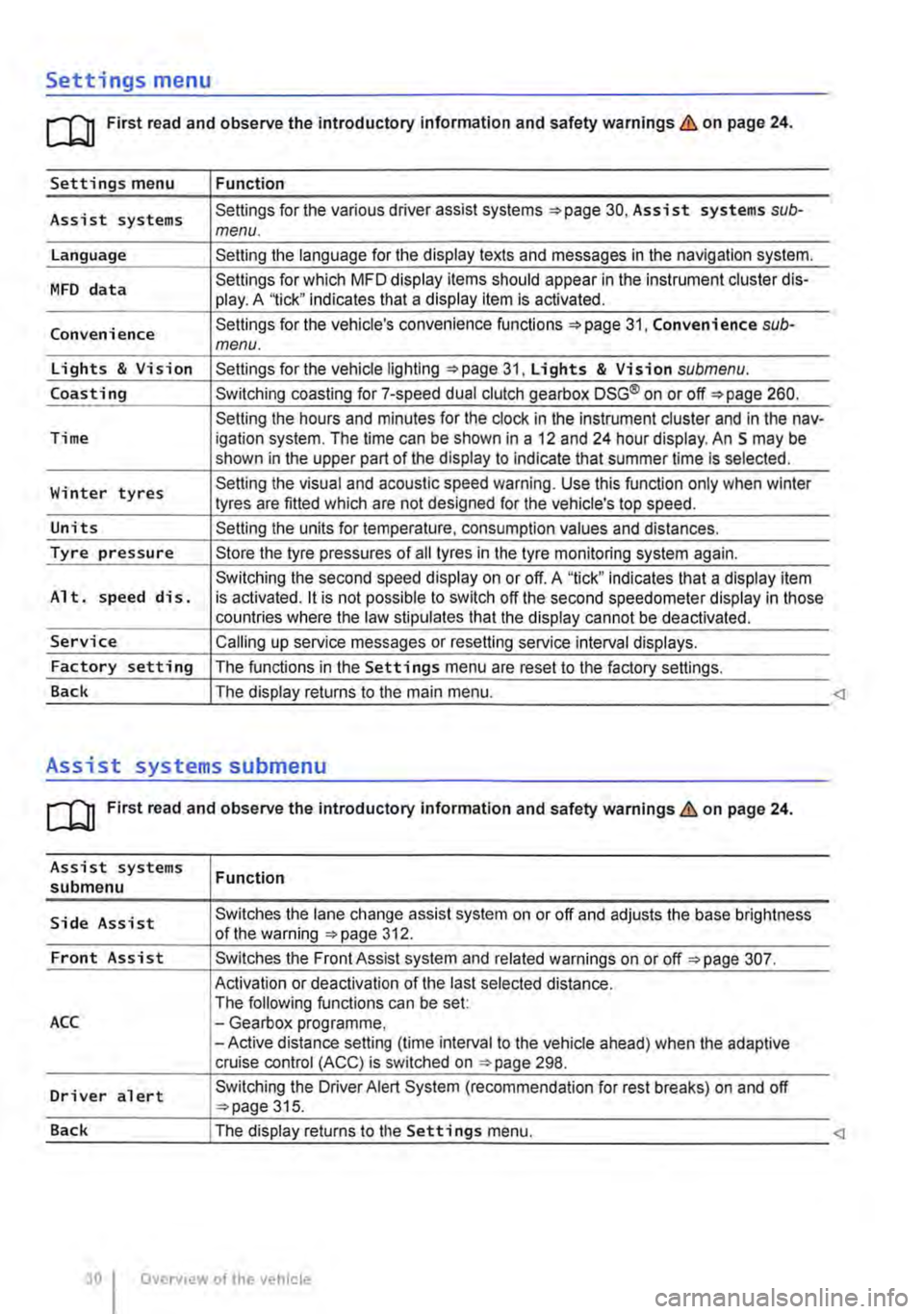
Settings menu
rn First read and observe the introductory information and safety warnings & on page 24.
Settings menu Function
Assist systems Settings for the various driver assist systems =:.page 30, Assist systems sub-menu.
Language Setting the language for the display texts and messages in the navigation system.
MFD data Settings for which MFD display items should appear in the instrument cluster dis-play. A '1ick" indicates that a display item is activated.
Convenience Settings for the vehicle's convenience functions 31, Convenience sub-menu.
Lights & Vision Settings for the vehicle lighting =:.page 31, Lights & Vision submenu.
Coasting Switching coasting for 7-speed dual clutch gearbox DSG® on or off=:. page 260.
Setting the hours and minutes for the clock in the instrument cluster and in the nav-Time igation system. The time can be shown in a 12 and 24 hour display. An S may be shown in the upper part of the display to indicate that summer time Is selected.
Winter tyres Setting the visual and acoustic speed warning. Use this function only when winter tyres are fitted which are not designed for the vehicle's top speed.
Units Setting the units for temperature, consumption values and distances.
Tyre pressure Store the tyre pressures of all tyres in the tyre monitoring system again.
Switching the second speed display on or off. A "tick" indicates that a display item Alt. speed dis. is activated. it is not possible to switch off the second speedometer display in those countries where the law stipulates that the display cannot be deactivated.
Service Calling up service messages or resetting service interval displays.
Factory setting The functions in the Settings menu are reset to the factory settings.
Back The display returns to the main menu.
Assist systems submenu
rn First read and observe the introductory information and safety warnings & on page 24.
Assist systems submenu
Side Assist
Front Assist
ACC
Driver alert
Function
Switches the lane change assist system on or off and adjusts the base brightness of the warning =:.page 312.
Switches the Front Assist system and related warnings on or off =:.page 307.
Activation or deactivation of the last selected distance. The following functions can be set: -Gearbox programme, -Active distance setting (time interval to the vehicle ahead) when the adaptive cruise control (ACC) is switched on ::.page 298.
Switching the Driver Alert System (recommendation for rest breaks) on and off ::.page 315.
Page 31 of 486
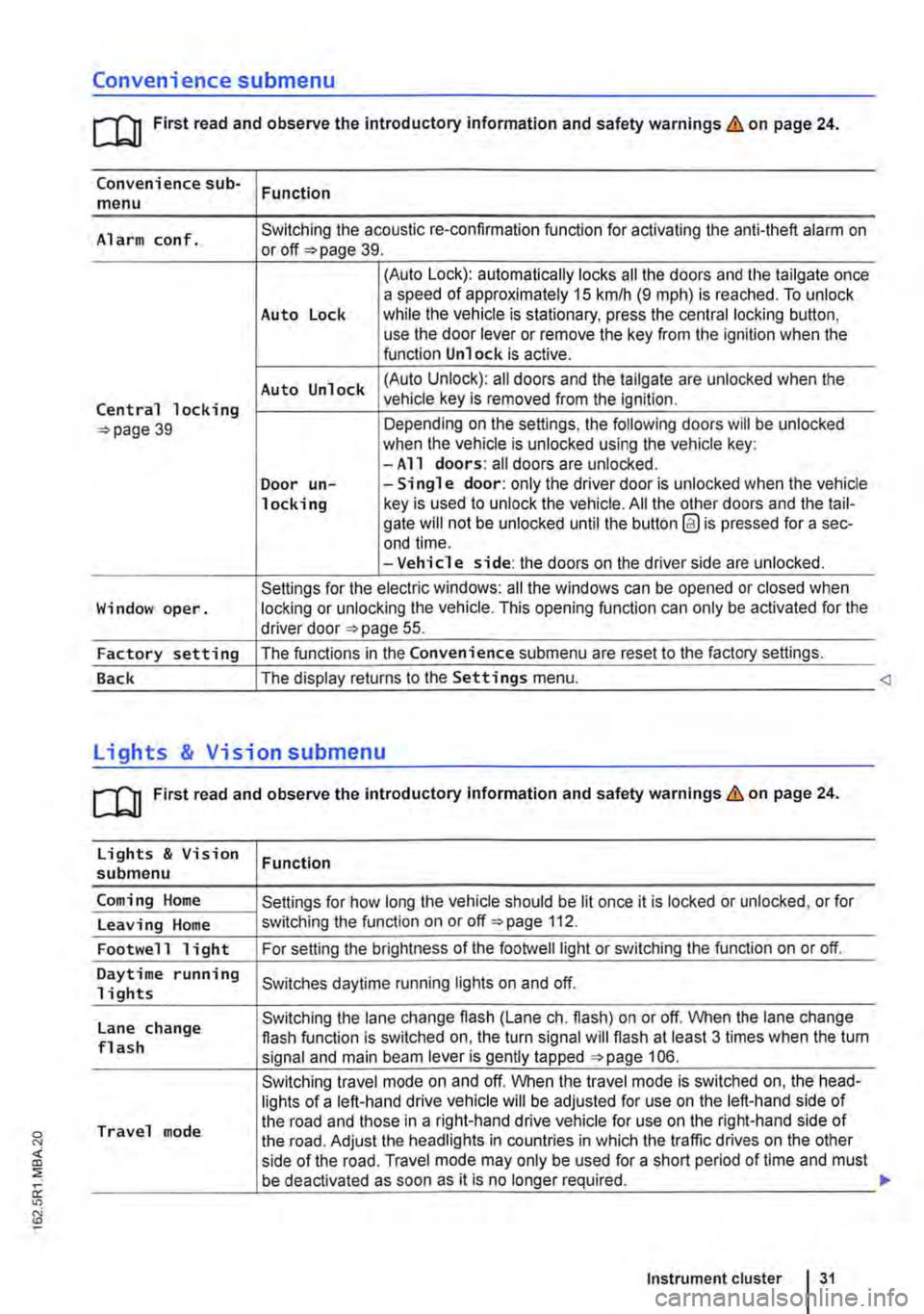
Convenience submenu
m First read and observe the introductory information and safety warnings & on page 24.
Convenience sub-menu Function
Alarm conf. Switching the acoustic re-confirmation function for activating the anti-theft alarm on or page 39.
(Auto Lock): automatically locks all the doors and the tailgate once a speed of approximately 15 km/h (9 m ph) is reached. To unlock Auto Lock while the vehicle is stationary, press the central locking button, use the door lever or remove the key from the ignition when the function Unlock is active.
Auto Unlock (Auto Unlock): all doors and the tailgate are unlocked when the
Central locking vehicle key is removed from the ignition.
39 Depending on the settings, the following doors will be unlocked when the vehicle is unlocked using the vehicle key: -All doors: all doors are unlocked. Door un--Single door: only the driver door is unlocked when the vehicle locking key is used to unlock the vehicle. All the other doors and the tail-gate will not be unlocked until the button @ is pressed for a sec-end time. -Vehicle side: the doors on the driver side are unlocked.
Settings for the electric windows: all the windows can be opened or closed when Window oper. locking or unlocking the vehicle. This opening function can only be activated for the driver door 55.
Factory setting The functions in the Convenience submenu are reset to the factory settings.
Back The display returns to the Settings menu.
[QJ First read and observe the introductory information and safety warnings & on page 24.
Lights & Vision Function submenu
Coming Home Settings for how long the vehicle should be lit once it is locked or unlocked, or for
Leaving Home switching the function on or off 112.
Footwell light For setting the brightness of the footwelllight or switching the function on or off.
Daytime running Switches daytime running lights on and off. 1 i ghts
Lane change Switching the lane change flash (Lane eh. flash) on or off. When the lane change flash function is switched on, the turn signal will flash at least 3 times when the tum flash signal and main beam lever is gently tapped 106.
Switching travel mode on and off. When the travel mode is switched on, the head-lights of a left-hand drive vehicle will be adjusted for use on the left-hand side of
Travel mode the road and those in a right-hand drive vehicle for use on the right-hand side of the road. Adjust the headlights in countries in which the traffic drives on the other side of the road. Travel mode may only be used for a short period of time and must be deactivated as soon as it is no longer required.
Instrument cluster 31
Page 32 of 486
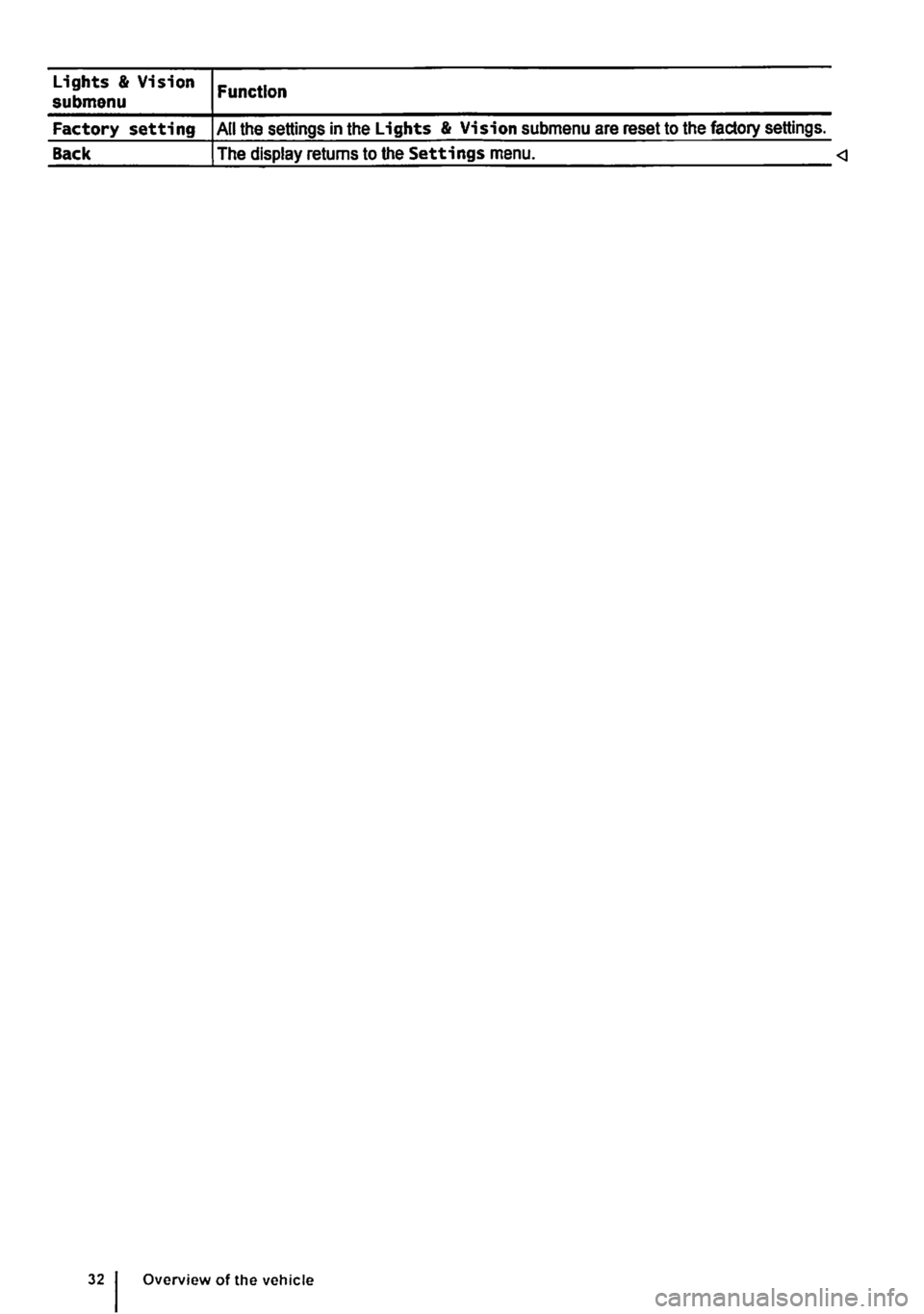
Lights & Vision submenu
Factory setting
Back
Function
All the settings in the Lights & Vision submenu are reset to the factory settings.
The display returns to the Settings menu.
Page 33 of 486
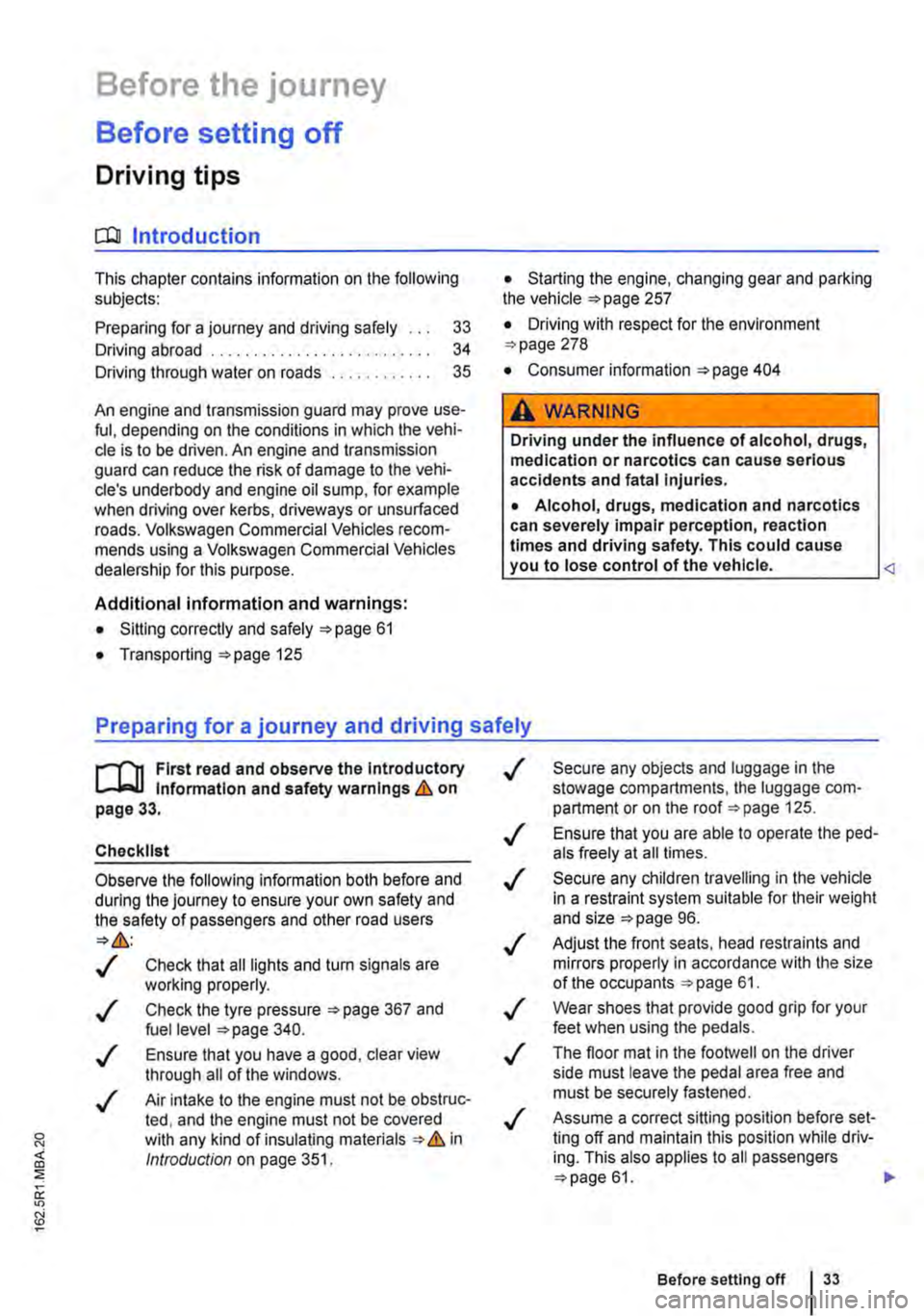
Before the journey
Before setting off
Driving tips
CO Introduction
This chapter contains information on the following subjects:
Preparing for a journey and driving safely
Driving abroad ...................... .
Driving through water on roads ........ .
33 34
35
An engine and transmission guard may prove use-ful, depending on the conditions in which the vehi-cle is to be driven. An engine and transmission guard can reduce the risk of damage to the vehi-cle's underbody and engine oil sump, for example when driving over kerbs, driveways or unsurfaced roads. Volkswagen Commercial Vehicles recom-mends using a Volkswagen Commercial Vehicles dealership for this purpose.
Additional Information and warnings:
• Sitting correctly and safely 61
• Transporting 125
• Starting the engine, changing gear and parking the vehicle 257
• Driving with respect for the environment =>page 278
• Consumer information 404
A WARNING
Driving under the Influence of alcohol, drugs, medication or narcotics can cause serious accidents and fatal Injuries.
• Alcohol, drugs, medication and narcotics can severely impair perception, reaction times and driving safety. This could cause you to lose control of the vehicle.
l""""('n First read and observe the Introductory L-Wl Information and safety warnings th on page 33.
Checklist
Observe the following Information both before and during the journey to ensure your own safety and the safety of passengers and other road users
..( Check that all lights and turn signals are working properly.
Check the tyre pressure 367 and fuel level 340.
..( Ensure that you have a good, clear view through all of the windows.
..( Air intake to the engine must not be obstruc-ted, and the engine must not be covered with any kind of insulating materials th in ell Introduction on page 351.
0::
g!
..(
..(
..(
..(
..(
..(
..(
Secure any objects and luggage in the stowage compartments, the luggage corn-partment or on the roof 125 .
Ensure that you are able to operate the ped-als freely at all times .
Secure any children travelling in the vehicle in a restraint system suitable for their weight and size =>page 96.
Adjust the front seats, head restraints and mirrors properly in accordance with the size of the occupants 61.
Wear shoes that provide good grip for your feet when using the pedals.
The floor mat in the footwell on the driver side must leave the pedal area free and must be securely fastened .
Assume a correct sitting position before set-ling off and maintain this position while driv-ing. This also applies to all passengers =>page 61. ..
Before setting off 33
Page 34 of 486
Checklist (Continued)
..( Fasten your seat belt correctly before set-ting off and keep it properly fastened throughout the journey. This also applies to all passengers 79 .
..!
..!
..!
..!
..!
Each vehicle occupant must sit in a seat of their own and must have their own seat belt.
Never drive if your driving ability is impaired, e.g. by medication, alcohol or drugs.
Do not allow yourself to be distracted from the traffic, e.g. by passengers, telephone calls, opening menus and making adjust-ments to settings .
Always adapt your speed and driving style to suit visibility, weather, road and traffic conditions.
Observe traffic regulations and speed limits.
Driving abroad
r-f'n First read and observe the introductory l.-J=.U information and safety warnings.& on page 33.
Checklist
In some countries, special safety standards and emissions-related regulations apply that the vehi-cle may not comply with. Volkswagen Commercial Vehicles recommends that you visit your Volkswa-gen Commercial Vehicles dealer before travelling abroad to find out about any legal requirements and the following points concerning your destina-tion:
..( Does the vehicle need any technical modifi-cations for driving abroad, e.g. masking or switching the headlights over?
..( Are the necessary tools, diagnostic equip-ment and spare parts available for service and repair work?
..( Are there any Volkswagen Commercial Ve-hicles dealerships in the country of destina-tion?
..( For petrol engines: is unleaded petrol with the correct octane number available?
34 Before the journey
..( When travelling long distances, stop and take a break regularly-at least every 2 hours.
..( Secure animals in the vehicle using a sys-tem that is suitable for their weight and size.
A WARNING
Always observe current traffic regulations and speed limits, and think ahead when driv-Ing. Correct interpretation of a driving situa-tion can make the difference between reach-Ing your destination safely and having an ac-cident with serious Injuries.
W Regular servicing of your vehicle not only W maintains its value, it also ensures that your vehicle remains roadworthy and in perfect working order. Servicing work should therefore be carried out in accordance with the service schedule. Some work may have to be carried out before the due date of the next service if the vehicle is subjected to severe operating conditions. Severe operating conditions are, for example, regular stop and go driving, regular driving with a trailer and driving in areas with high levels of dust. Additional informa-tion is available from your Volkswagen Commercial Vehicles dealership or qualified workshop.
..( Are the correct engine oil 353 and other service fluids in accordance with the specifications of Volkswagen Commercial Vehicles available in the destination coun-try?
..( Will the factory-fitted navigation system work with the navigation data available in the destination country?
..( Are special tyres necessary for travelling in the destination country?
CD
Volkswagen Commercial Vehicles is not re-sponsible for any vehicle damage which Is caused by low-quality fuel, inadequate servic-ing work or lack of availability of Genuine Parts.
Page 42 of 486
Locking and unlocking the vehicle from inside
c
1 PSG-0030
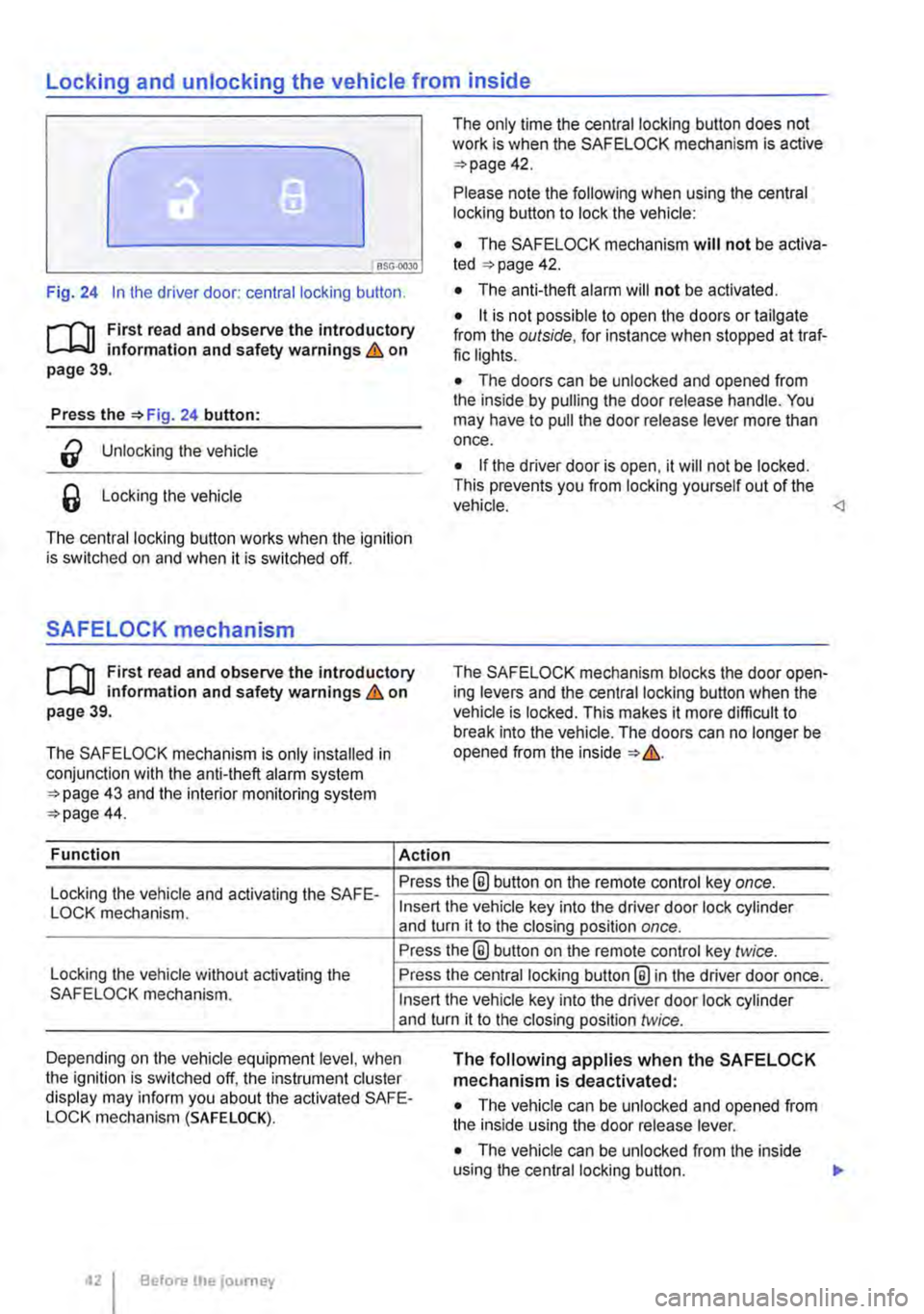
Fig. 24 In the driver door: central locking button.
rf'n First read and observe the introductory L.-J=.I.I information and safety warnings & on page 39.
Press the =>Fig. 24 button:
a Unlocking the vehicle
6 Locking the vehicle
The central locking button works when the ignition is switched on and when it is switched off.
SAFELOCK mechanism
rf'n First read and observe the introductory L.-J=.I.I information and safety warnings & on page 39.
The SAFELOCK mechanism is only installed in conjunction with the anti-theft alarm system =>page 43 and the interior monitoring system =>page 44.
Function Action
The only time the central locking button does not work is when the SAFE LOCK mechanism is active =>page 42.
Please note the following when using the central locking button to lock the vehicle:
• The SAFELOCK mechanism will not be activa-ted =:>page 42.
• The anti-theft alarm will not be activated.
• it is not possible to open the doors or tailgate from the outside, for instance when stopped at traf-fic lights.
• The doors can be unlocked and opened from the inside by pulling the door release handle. You may have to pull the door release lever more than once.
• If the driver door is open, it will not be locked. This prevents you from locking yourself out of the vehicle.
Locking the vehicle and activating the SAFE-Press the® button on the remote control key once.
LOCK mechanism.
Locking the vehicle without activating the SAFELOCK mechanism.
Insert the vehicle key into the driver door lock cylinder and turn it to the closing position once.
Press the@ button on the remote control key twice.
Press the central locking button@ in the driver door once.
Insert the vehicle key into the driver door lock cylinder and turn it to the closing position twice.
Depending on the vehicle equipment level, when the ignition is switched off, the instrument cluster display may inform you about the activated SAFE-LOCK mechanism (SAFE LOCK).
The following applies when the SAFELOCK mechanism is deactivated:
• The vehicle can be unlocked and opened from the inside using the door release lever.
• The vehicle can be unlocked from the inside using the central locking button. .,.
Before the journey