buttons VOLKSWAGEN TRANSPORTER 2015 Owner´s Manual
[x] Cancel search | Manufacturer: VOLKSWAGEN, Model Year: 2015, Model line: TRANSPORTER, Model: VOLKSWAGEN TRANSPORTER 2015Pages: 486, PDF Size: 72.17 MB
Page 69 of 486
A WARNING (Continued)
• The steering wheel must always point to-wards the chest and not towards the face. This ensures that the driver front airbag pro-vides maximum protection in the event of an accident.
• While driving, always keep both hands on the outside of the steering wheel (at the 9 o'clock and 3 o'clock positions =>Fig. 47). This reduces the risk of injury if the driver front alrbag Is triggered.
Seat functions, front
a:n Introduction
This chapter contains information on the following subjects:
Seat heating . . . . . . . . . . . . . . . . . . . • • • . . . . . . 69
Memory seats . . . . . . . . . . . . . . . . . . . 70
Rotating front seats . . . . . . . . . . . . . . . . . . . . . . 71
Additional information and warnings:
• Adjusting the seat position =>page 61
• Seat bells =>page 79
• Airbag system =>page 87
• Child seats (accessories) 96
• Heating, ventilating, cooling 322
Seat heating
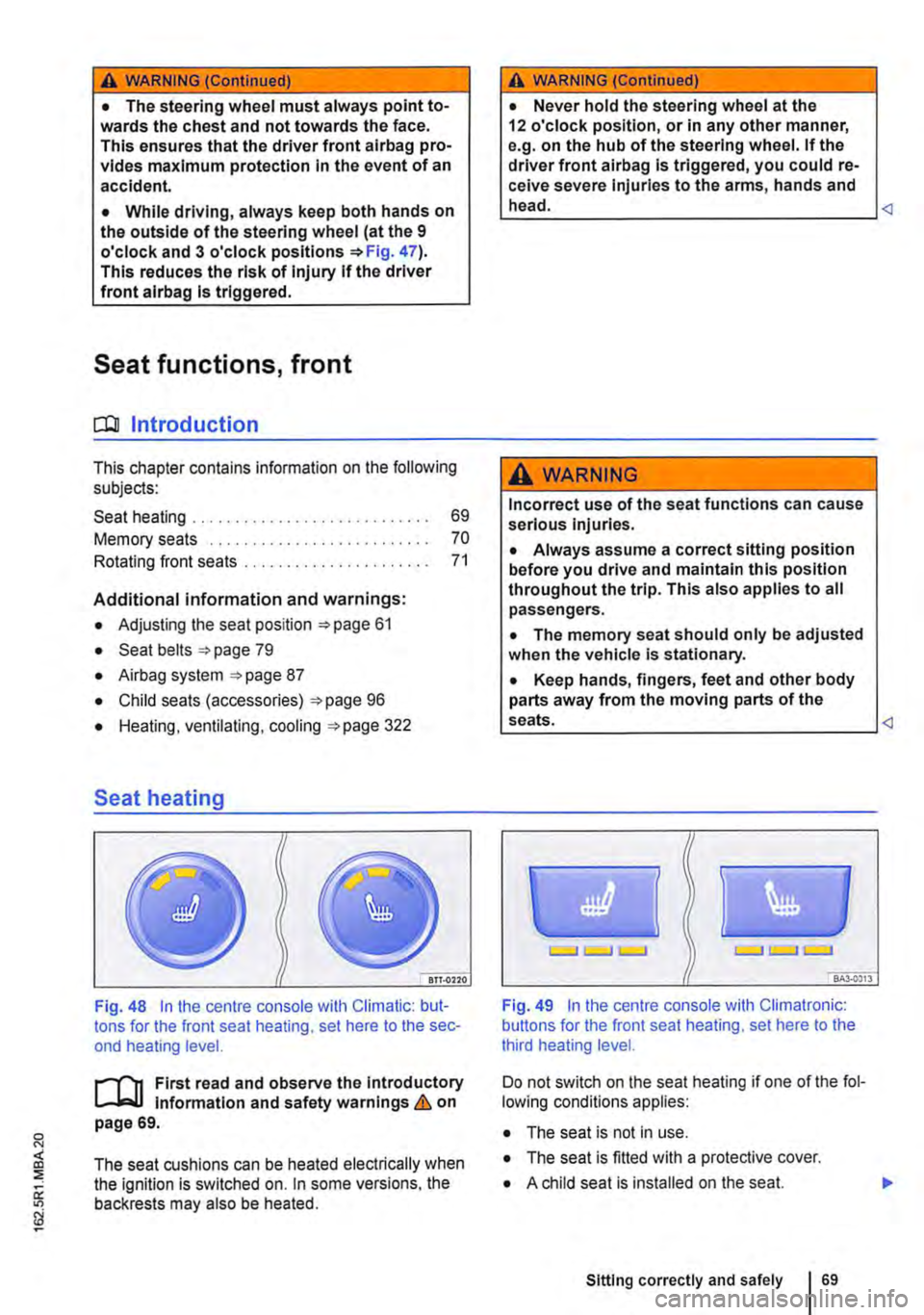
Fig. 48 In the centre console with Climatic: but-tons for the front seat heating, set here to the sec-ond heating level.
First read and observe the Introductory l-J,:.,U Information and safety warnings & on page 69.
The seat cushions can be heated electrically when the ignition is switched on. In some versions, the backrests may also be heated.
A WARNING (Continued)
• Never hold the steering wheel at the 12 o'clock position, or in any other manner, e.g. on the hub of the steering wheel. If the driver front airbag is triggered, you could re-ceive severe Injuries to the arms, hands and head.
A WARNING
Incorrect use of the seat functions can cause serious injuries.
• Always assume a correct sitting position before you drive and maintain this position throughout the trip. This also applies to all passengers.
• The memory seat should only be adjusted when the vehicle Is stationary.
• Keep hands, fingers, feet and other body parts away from the moving parts of the seats.
Fig. 49 In the centre console with Climatronic: buttons for the front seat heating, set here to the third heating level.
Do not switch on the seat heating if one of the fol-lowing conditions applies:
• The seat is not in use.
• The seat is fitted with a protective cover.
• A child seat is installed on the seat.
Sitting correctly and safely 69
Page 70 of 486

• The seat cushion is damp or wet.
• The interior or exterior temperature is above 2s•c (7rF).
Function
Switching on
Adjusting the heating output
Switching off
Action 49
Press the 0 or (9 button. The seat heating is switched on at the highest setting. All indicator lamps light up.
Press the 0 or (9 button repeat-edly until the required heat level is set.
Press the button 0 or (9 until the indicator lamps in the button go out 49.
A WARNING
Anyone experiencing reduced sensitivity to pain or temperature due to medication, para-lysis or chronic illness (e.g. diabetes) could sustain burns on the back, buttocks and legs when using the seat heating. These burns may take a long time to heal or may never heal fully. Please consult a doctor to deter-mine your own level of health.
Memory seats
Fig. 50 Memory buttons on the outside of the driv-er seat.
r"''l1 First read and observe the introductory L-JcJ.I information and safety warnings & on page 69.
The memory buttons can be used to store and re-call settings for the driver seat.
Before the JOurney
A WARNING (Continued)
• Anyone experiencing reduced sensitivity to pain or temperature should never use the seat heating.
A wARNING
Wet upholstery can cause a fault In the seat heating and Increase the risk of burns.
• Ensure that the seat cushion is dry before the seat heating is used.
• Do not sit on the seat when wearing damp or wet clothing.
• Do not set any damp or wet objects or items of clothing on the seat.
• Do not spill any liquids on the seat.
Q)
• To avoid damaging the heating elements, do not kneel on the seat or apply sharp pressure at a single point on the seat cushion and back-rest.
• Liquids, sharp objects and Insulating mate-rials (such as a protective cover or child seat) on the seat could damage the seat heating.
• If the system starts to emit a smell, switch the seat heating off Immediately and have lt checked by a qualified workshop.
r:O:-, The seat heating should be switched off as C!JtJ soon as it is no longer needed. Fuel is other-wise wasted.
Individual settings for the driver seat can be as-signed to each of the three memory buttons.
Storing the driver seat settings
• Apply the handbrake firmly.
• Put the gearbox into neutral.
• Adjust the driver seat.
• Press the @] button for longer than one second 50.
• Within approximately 10 seconds press the memory button you wish to use. A gong signal will sound to confirm that the settings have been saved. .,..
Page 109 of 486
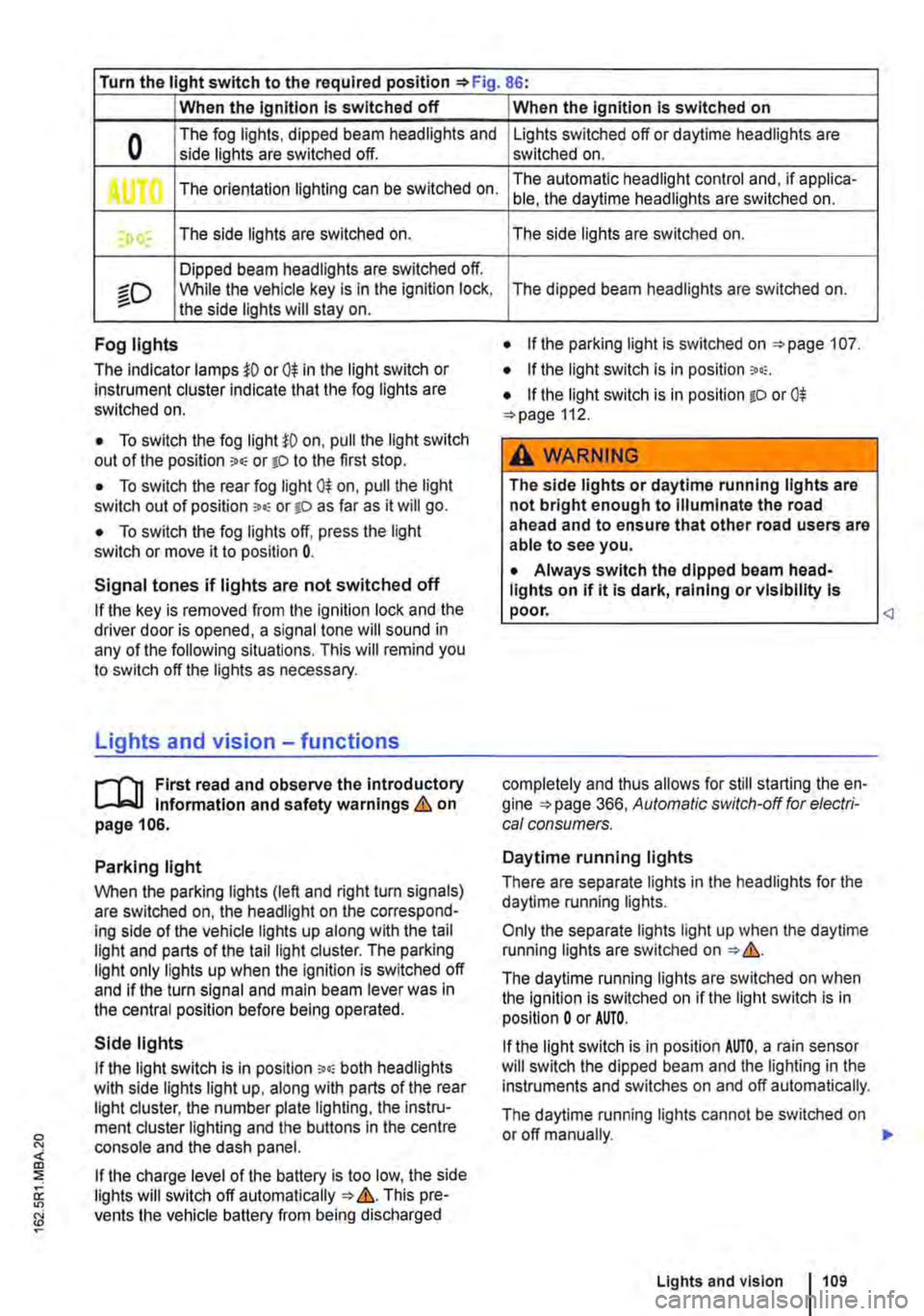
Turn the light switch to the required position 86:
When the Ignition Is switched off
0 The fog lights, dipped beam headlights and side lights are switched off.
,. The orientation lighting can be switched on.
) , The side lights are switched on.
Dipped beam headlights are switched off.
"'D While the vehicle key is in lhe ignition lock, the side lights will stay on.
Fog lights
The indicator lamps or 0$ in the light switch or Instrument cluster indicate that the fog lights are switched on.
• To switch the fog light on, pull the light switch out of the position "" or tD to the first stop.
• To switch the rear fog light 0$ on, pull the light switch out of position ,.,, or gD as far as it will go.
• To switch the fog lights off, press the light switch or move it to position 0.
Signal tones if lights are not switched off
If the key is removed from the ignition lock and the driver door is opened, a signal tone will sound in any of the following situations. This will remind you to switch off the lights as necessary.
Lights and vision -functions
1""1'11 First read and observe the introductory L-lo:.U Information and safety warnings & on page 106.
Parking light
When the parking lights (left and right turn signals) are switched on, the headlight on the correspond-ing side of the vehicle lights up along with the tail light and parts of the tail light cluster. The parking light only lights up when the Ignition is switched off and if the turn signal and main beam lever was in the central position before being operated.
Side lights
If the light switch is in position ;.o; both headlights with side lights light up, along with parts of the rear light cluster, the number plate lighting, the instru-ment cluster lighting and the buttons in the centre console and the dash panel.
If the charge level of the battery is too low, the side lights will switch off automatically &. This pre-vents the vehicle battery from being discharged
When the Ignition Is switched on
Lights switched off or daytime headlights are switched on.
The automatic headlight control and, if applica-ble, the daytime headlights are switched on.
The side lights are switched on.
The dipped beam headlights are switched on.
• If the parking light is switched on 107.
• If the light switch is in position '"'·
• If the light switch is in position iD or 0$ 112.
A WARNING
The side lights or daytime running lights are not bright enough to Illuminate the road ahead and to ensure that other road users are able to see you.
• Always switch the dipped beam head-lights on if it is dark, raining or visibility Is
completely and thus allows for still starting the en-gine 366, Automatic switch-off for electri-cal consumers.
Daytime running lights
There are separate lights in the headlights for the daytime running lights.
Only the separate lights light up when the daytime running lights are switched on &.
The daytime running lights are switched on when the ignition is switched on if the light switch is in position 0 or AUTO.
If the light switch is in position AUTO, a rain sensor will switch the dipped beam and the lighting in the instruments and switches on and off automatically.
The daytime running lights cannot be switched on or off manually. ,._
Lights and vision 1109
Page 169 of 486
Remote control
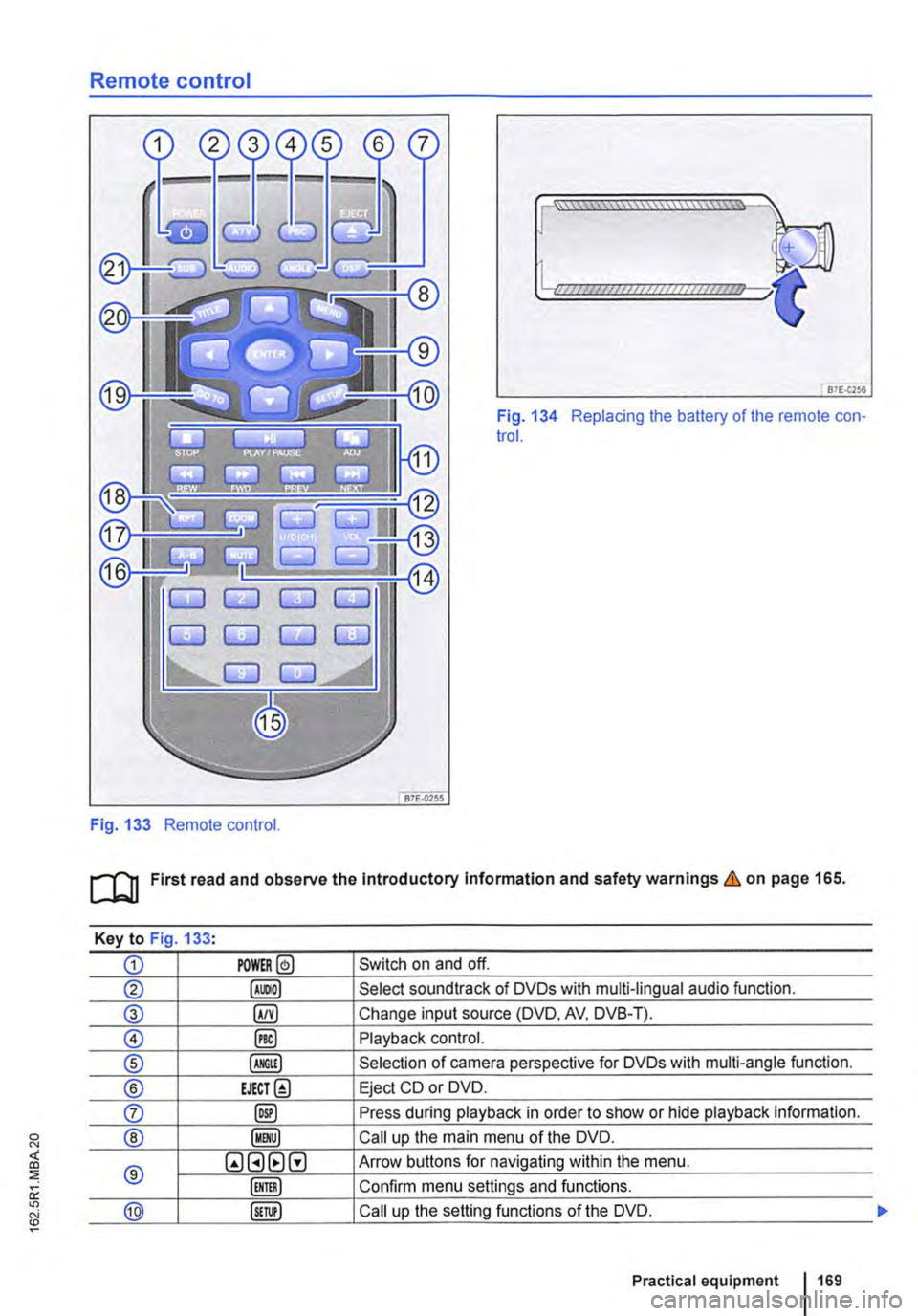
Fig. 133 Remote control.
[::::::::::::::::::::::vm
81£.(256
Fig. 134 Replacing the battery of the remote con-trol.
[QJ First read and observe the Introductory Information and safety warnings & on page 165.
Key to Fig 133·
CD POWER@ Switch on and off.
@ Select soundtrack of DVDs with multi-lingual audio function.
® §) Change input source (DVD, AV, DVB-T).
0 @) Playback control.
® Selection of camera perspective for DVDs with multi-angle function.
® EJECT@ Eject CD or DVD.
0 @) Press during playback in order to show or hide playback information.
® Call up the main menu of the DVD.
® QGHtlG Arrow buttons for navigating within the menu.
Confirm menu settings and functions.
@ Call up the setting functions of the DVD.
Practical equipment 169
Page 170 of 486
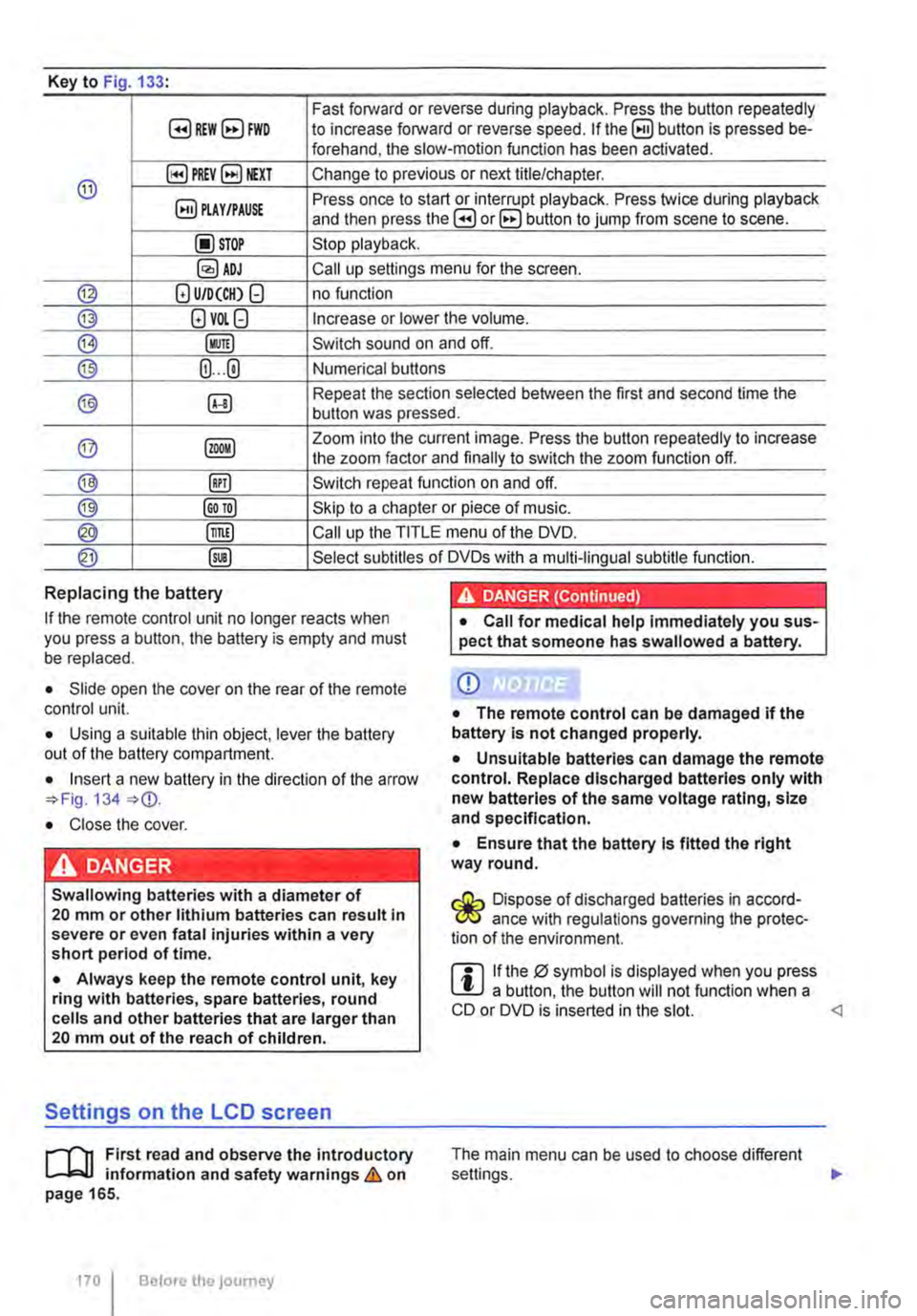
Key to Fig 133·
8REW8FWD Fast forward or reverse during playback. Press the button repeatedly to increase forward or reverse speed. If the§) button is pressed be-forehand, the slow-motion function has been activated.
@ §)PREY 81£XT Change to previous or next title/chapter.
§) PLAY /PAUSE Press once to start or interrupt playback. Press twice during playback and then press the B or 8 button to jump from scene to scene.
@STOP Stop playback.
Call up settings menu for the screen.
© (!) U/D(CH) Q no function
@ (!)VO!.Q Increase or lower the volume.
®l Switch sound on and off.
@ (ij ... (i) Numerical buttons
® @ Repeat the section selected between the first and second time the button was pressed.
@ Zoom into the current image. Press the button repeatedly to increase the zoom factor and finally to switch the zoom function off.
@ @) Switch repeat function on and off.
@ Skip to a chapter or piece of music.
@ §D Call up the TITLE menu of the DVD.
@ @ Select subtitles of DVDs with a multi-lingual subtitle function.
Replacing the battery
If the remote control unit no longer reacts when you press a button. the battery is empty and must be replaced.
• Slide open the cover on the rear of the remote control unit.
• Using a suitable thin object, lever the battery out of the battery compartment.
• Insert a new battery in the direction of the arrow 134
• Close the cover.
Swallowing batteries with a diameter of 20 mm or other lithium batteries can result in severe or even fatal injuries within a very short period of time.
• Always keep the remote control unit, key ring with batteries, spare batteries, round cells and other batteries that are larger than 20 mm out of the reach of children.
Settings on the LCD screen
rl'11 First read and observe the introductory L-W.f information and safety warnings & on page 165.
170 I Before the journey
• Call for medical help immediately you sus-pect that someone has swallowed a battery.
CD
• The remote control can be damaged if the battery is not changed properly.
• Unsuitable batteries can damage the remote control. Replace discharged batteries only with new batteries of the same voltage rating, size and specification.
• Ensure that the battery Is fitted the right way round.
Dispose of discharged batteries in accord-W ance with regulations governing the protec-tion of the environment.
r::l If the 0 symbol is displayed when you press l!J a button, the button will not function when a CD or DVD is inserted in the slot.
Page 171 of 486
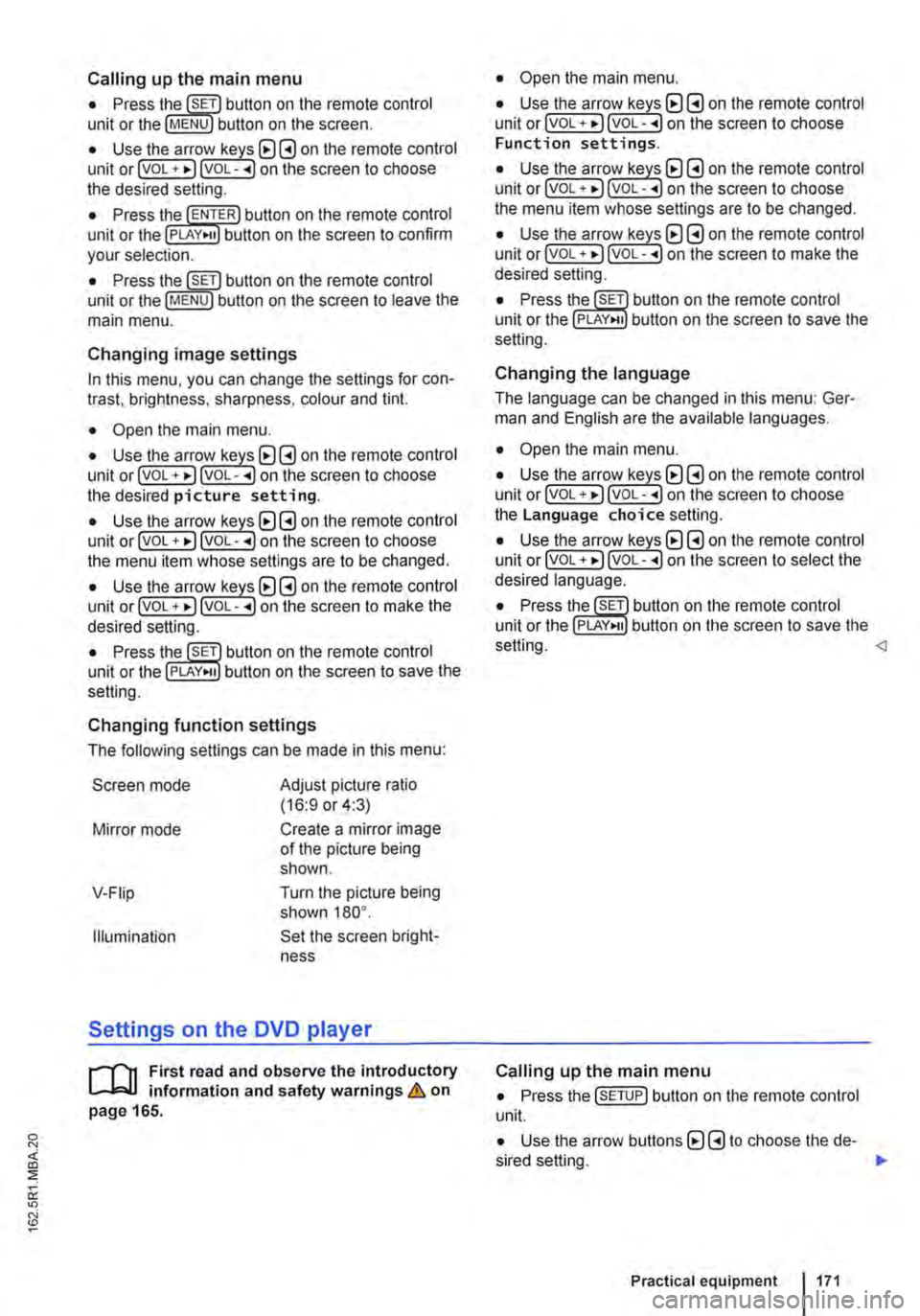
Calling up the main menu
• Press button on the remote control unit or the MENU button on the screen.
• Use the arr(w keyJ (8 G on the remote control unit or lvoL + ... ) VOL-.. on the screen to choose the desired setting.
unit or the PLAY>tl button on the screen to confirm your selection.
• Press the @m button on the remote control unit or the jMENUJ button on the screen to leave the main menu.
Changing image settings
In this menu, you can change the settings for con-trast, brightness, sharpness, colour and tint.
• Open the main menu.
• Use the arr(w keys) (8 G on the remote control unit or jvoL + ... ) VOL-.. on the screen to choose the desired picture setting.
• Use the arr(w keys) (8 G on the remote control unit or lvoL + ... ) voL-.. on the screen to choose the menu item whose settings are to be changed.
• Use the arr(w keys) (8 G on the remote control unit or lvOL + ... ) VOL-.. on the screen to make the desired setting.
unit or the PLAY•u button on the screen to save the setting.
Changing function settings
The following settings can be made in this menu:
Screen mode
Mirror mode
V-Fiip
Illumination
Adjust picture ratio (16:9 or 4:3)
Create a mirror image of the picture being shown.
Turn the picture being shown 180°.
Set the screen bright-ness
Settings on the DVD player
r--("'n First read and observe the introductory L.-J.:.I.I information and safety warnings & on page 165.
• Open the main menu.
• Use the arr(w keys) (8 G on the remote control unit or lvoL + ... ) VOL-.. on the screen to choose Function settings.
• Use the arr(w keyJ (8 G on the remote control unit or lvoL + ... ) VOL-.. on the screen to choose the menu item whose settings are to be changed.
• Use the arr(w keys) (8 G on the remote control unit or lvoL + ... ] VOL-.. on the screen to make the desired setting.
unit or the PLAY>tl button on the screen to save the setting.
Changing the language
The language can be changed in this menu: Ger-man and English are the available languages.
• Open the main menu.
• Use the arr(w keys) (8 G on the remote control unit or lvoL + ... ) voL-.. on the screen to choose the Language choice setting.
• Use the arr(w keys) (8 G on the remote control unit or lvoL + ... ) VOL-.. on the screen to select the desired language.
• Press the SET button on the remote control unit or the setting.
Calling up the main menu
• Press the !SETUP) button on the remote control unit.
• Use the arrow buttons (8 G to choose the de-sired setting. .,.
Practical equipment 1171
Page 292 of 486
A WARNING (Continued)
• The camera lens enlarges and distorts the field of vision and the objects on the screen will not be depicted as precisely and accu-rately as they are In reality.
• Certain objects, for example narrow posts or railings, may be difficult or Impossible to see on the screen because of its low resolu-tion or poor light conditions.
• The rear view camera system has blind spots within which obstacles and people can-not be detected.
• Keep the camera lens clean, free of snow and Ice and do not cover it.
A WARNING
The Intelligent rear view camera system tech-nology cannot overcome the laws of physics, and functions only within the limits of the system. Careless or unintentional use of the rear view camera system can cause accl· dents and lead to serious Injury. The system is not a substitute for the full concentration of the driver.
• Always adapt your speed and driving style to suit visibility, weather, road and traffic con· ditions.
General information
r'""'('n First read and observe the Introductory L-J,::.U information and safety warnings & on page 291.
Requirements for parking and manoeuvring while using the rear view camera system
Checklist
./ The tailgate must be closed.
./ The camera must give a clear and accurate image, i.e. there must be good visibility and the camera lens must be clean =:o Fig. 233.
./ There must be a clear and unobstructed view of the area behind the vehicle.
./ The rear of the vehicle must not be heavily loaded.
2921 While driving
A WARNING (ConUnued)
• Keep looking In the direction In which you are parking and at the relevant area sur-rounding the vehicle. The front of the vehicle swings out more than the rear of the vehicle.
• Do not allow the Images shown on the screen to distract you from the traffic around you.
• Always monitor the area around the vehi· cle as small children, animals and objects will not always be detected by the rear view cam-era system.
• The rear view camera system may not be able to display all areas clearly.
• The rear view camera system should only be used when the tallgate is fully closed.
CD
• The rear view camera system shows only two-dimensional images on the screen. The lack of depth of field means that potholes and protruding objects on the ground may only be detected with difficulty, or may not be detected at all.
• The rear view camera system may notal· ways be able to detect objects such as thin rails, fences, posts, trees etc. This could result In damage to your vehicle.
./ The vehicle must be undamaged. The rear view camera system must be checked by a qualified workshop if the position or angle of the camera has changed, e.g. following a rear impact.
Volkswagen Commercial Vehicles recommends that you practise parking with the reversing camera in a traffic-calmed area or car park with good visi-bility and weather conditions, so that you can famil· iarise yourself with the system, orientation lines and guiding functions in a safer environment.
Rear view camera system settings
Various settings, including brightness, contrast and colour, can be by touching the relevant function buttons 1j or G. or by moving the corre-sponding slider.
• Stop the vehicle in a safe place.
• Apply the handbrake firmly.
• Switch on the ignition.
Page 294 of 486
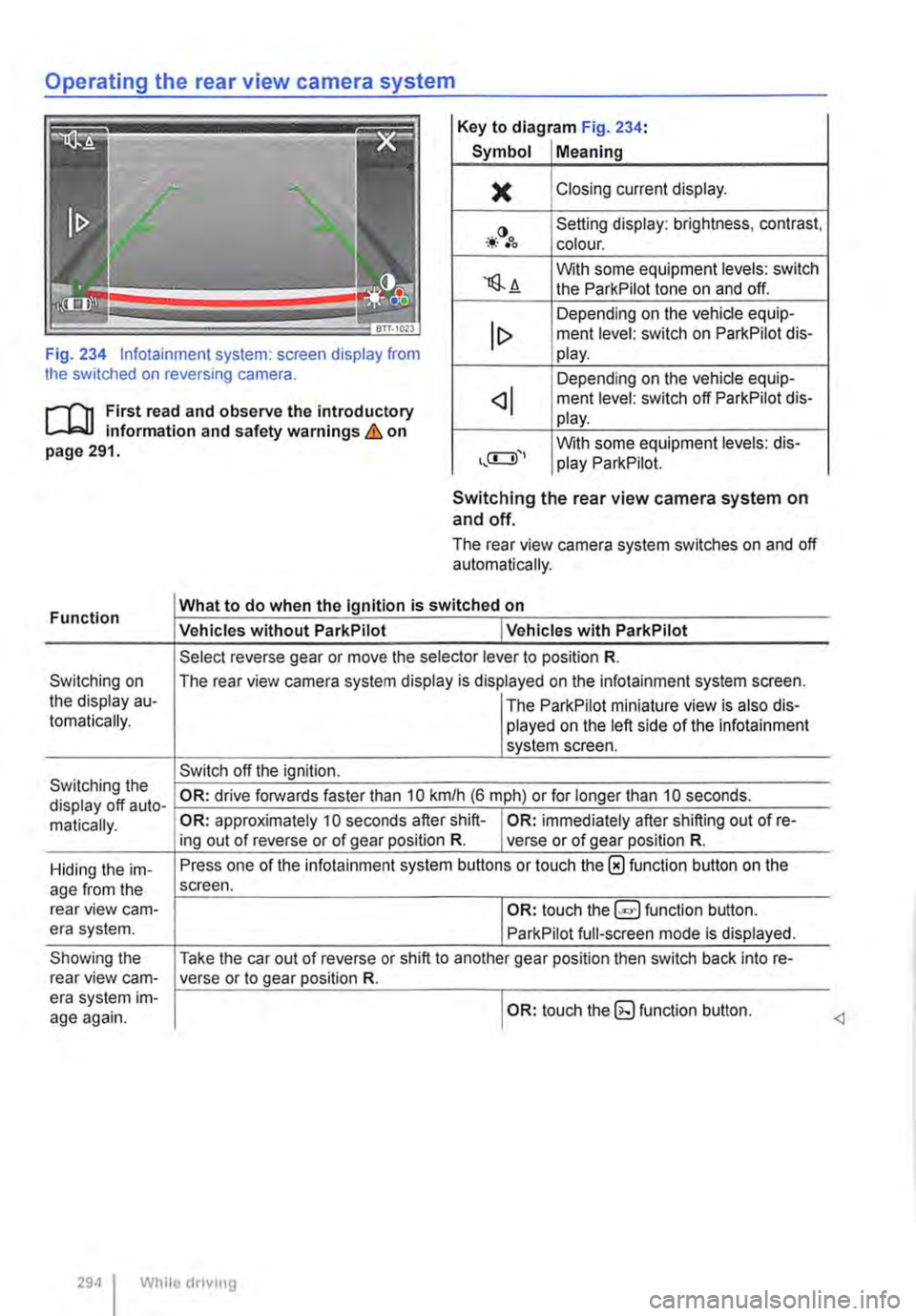
Operating the rear view camera system
Key to diagram Fig. 234:
Symbol Meaning
)( Closing current display.
-*·()•oo Setting display: brightness, contrast, colour.
'lS.A With some equipment levels: switch the ParkPilot tone on and off.
Depending on the vehicle equip-ment level: switch on ParkPilot dis-Fig. 234 lnfotainment system: screen display from the switched on reversing camera.
lt> play.
Depending on the vehicle equip-
r--f'n First read and observe the introductory L-J,:.U information and safety warnings & on page 291.
ment level: switch off ParkPilot dis-play.
With some equipment levels: dis-play ParkPilot.
Function
Switching on the display au-tomatically.
Switching the display off auto-matically.
Hiding the im-age from the rear view cam-era system.
Showing the rear view cam-era system im-age again.
Switching the rear view camera system on and off.
The rear view camera system switches on and off automatically.
What to do when the Ignition is switched on
Vehicles without ParkPilot I Vehicles with ParkPilot
Select reverse gear or move the selector lever to position R.
The rear view camera system display is displayed on the infotainment system screen.
I The ParkPilot miniature view is also dis-played on the left side of the infotainment system screen.
Switch off the ignition.
OR: drive forwards faster than 10 km/h (6 m ph) or for longer than 10 seconds.
OR: approximately 10 seconds after shift-I OR: immediately after shifting out of re-ing out of reverse or of gear position R. verse or of gear position R.
Press one of the infotainment system buttons or touch the 0 function button on the screen.
I OR: touch function button.
ParkPilot full-screen mode is displayed.
Take the car out of reverse or shift to another gear position then switch back into re-verse or to gear position R.
I OR: touch the (g function button.
294 I While driving
Page 297 of 486
Using the cruise control system (CCS)
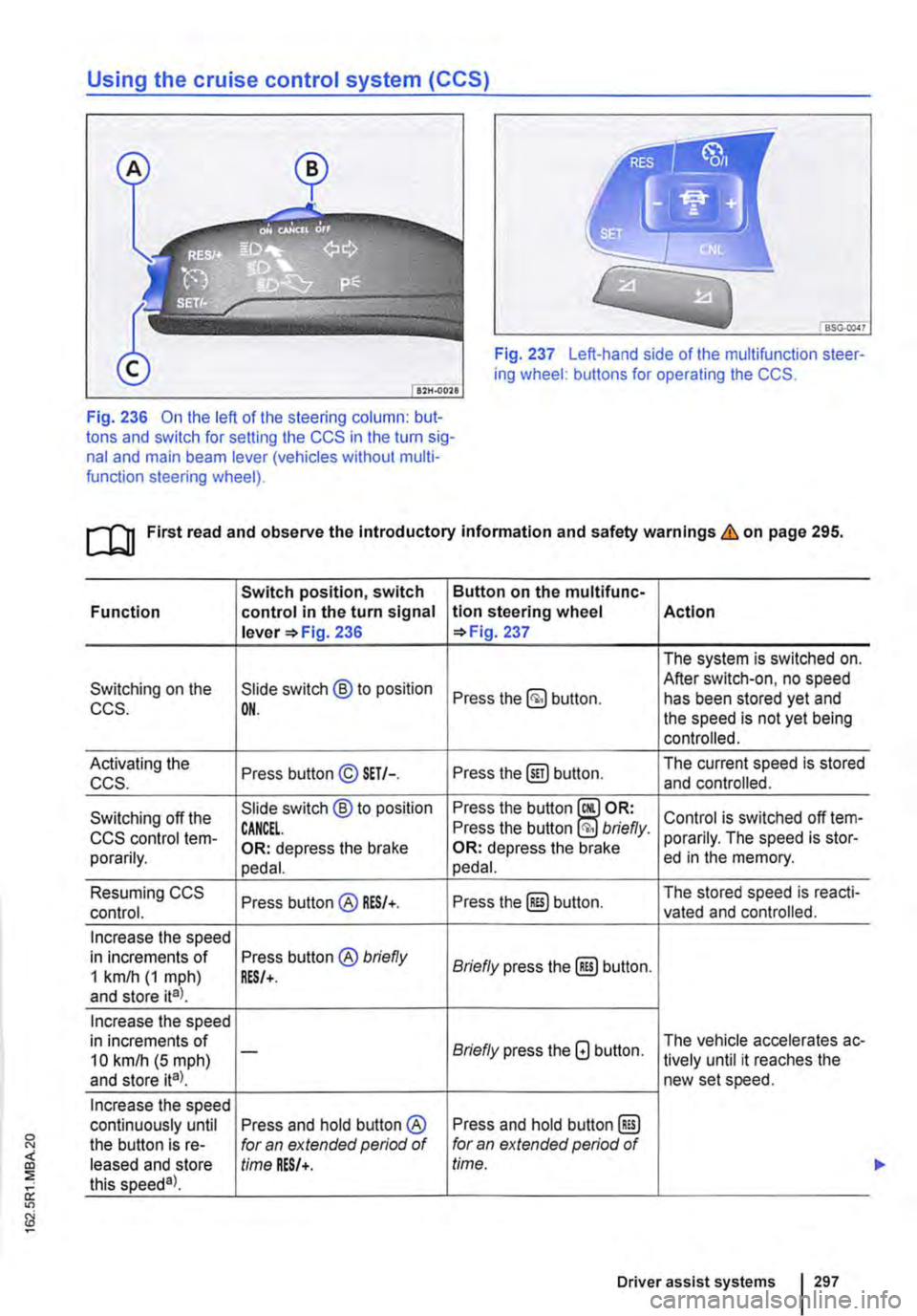
Fig. 237 Left-hand side of the multifunction steer-ing wheel: buttons for operating the CCS.
Fig. 236 On the left of the steering column: but-tons and switch for setting the CCS in the turn sig-nal and main beam lever (vehicles without multi-function steering wheel).
ro First read and observe the introductory information and safety warnings & on page 295.
Switch position, switch Button on the multifunc-Function control in the turn signal tlon steering wheel Action lever =>Fig. 236 =>Fig. 237
The system is switched on.
Switching on the Slide switch @ to position After switch-on, no speed Press the button. has been stored yet and CCS. OH. the speed is not yet being controlled.
Activating the Press button© SET/-. Press the@) button. The current speed is stored ccs. and controlled.
Switching off the Slide switch @ to position Press the button Control is switched off !em-CCS control !em-CANCEL. Press the button briefly. porarily. The speed is stor-porarily. OR: depress the brake OR: depress the brake ed in the memory. pedal. pedal.
Resuming CCS Press button@ RES/+. Press the@) button. The stored speed is reacti-control. vated and controlled.
Increase the speed in increments of Press button® briefly Briefly press the@) button. 1 km/h (1 mph) RES/+. and store ita).
Increase the speed in increments of Briefly press the G button. The vehicle accelerates ac-10 kmlh (5 mph) -lively until it reaches the and store ita). new set speed.
Increase the speed continuously until Press and hold button ® Press and hold button @) the button is re-for an extended period of for an extended period of leased and store time RES/+. time. this speeda).
Driver assist systems 297
...
Page 302 of 486
CD CD
• Remove snow with a brush, and remove Ice • Repair work on the radar sensor will require special knowledge and tools. Volkswagen rec-ommends using a Volkswagen dealership for this purpose.
preferably with a solvent-free de-leer spray.
SSG-0047
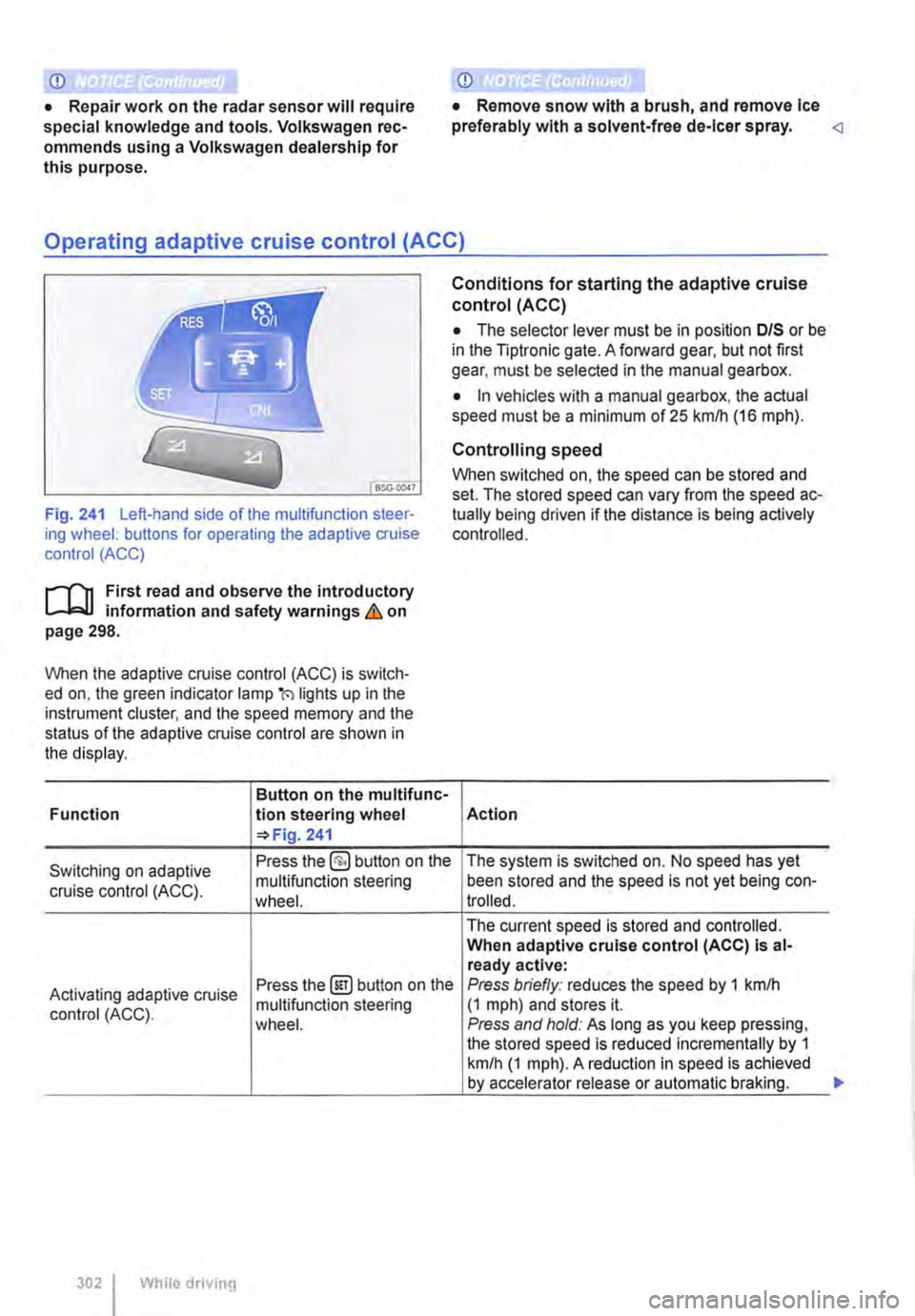
Fig. 241 Left-hand side of the multifunction steer-ing wheel: buttons for operating the adaptive cruise control (ACC)
1"1'11 First read and observe the introductory L-I=J.I information and safety warnings Lb. on page 298.
When the adaptive cruise control (ACC) is switch-ed on, the green indicator lamp(') lights up in the instrument cluster, and the speed memory and the status of the adaptive cruise control are shown in the display.
Button on the multifunc-Function lion steering wheel 241
Conditions for starting the adaptive cruise control (ACC)
• The selector lever must be in position D/S or be in the Tiptronic gate. A forward gear, but not first gear, must be selected in the manual gearbox.
• In vehicles with a manual gearbox, the actual speed must be a minimum of 25 kmlh (16 m ph).
Controlling speed
When switched on, the speed can be stored and set. The stored speed can vary from the speed ac-tually being driven if the distance is being actively controlled.
Action
Switching on adaptive Press the §) button on the The system is switched on. No speed has yet
cruise control (ACC). multifunction steering been stored and the speed is not yet being con-wheel. trolled.
The current speed is stored and controlled. When adaptive cruise control (ACC) Is al-ready active:
Activating adaptive cruise Press the@!) button on the Press briefly: reduces the speed by 1 kmlh
control (ACC). multifunction steering (1 mph) and stores it. wheel. Press and hold: As long as you keep pressing, the stored speed is reduced incrementally by 1 km/h (1 mph). A reduction in speed is achieved by accelerator release or automatic braking.
302 While driving
...