headlights VOLKSWAGEN TRANSPORTER 2015 Owner´s Manual
[x] Cancel search | Manufacturer: VOLKSWAGEN, Model Year: 2015, Model line: TRANSPORTER, Model: VOLKSWAGEN TRANSPORTER 2015Pages: 486, PDF Size: 72.17 MB
Page 112 of 486
If you have to drive a right-hand drive vehicle in a left-hand drive country, or vice versa, the asymmet-ric dipped beam halogen headlights may dazzle oncoming traffic. Therefore, the headlights must be masked over if you are driving abroad.
Therefore you must apply stickers to certain parts of the headlighllenses if you are driving abroad. A qualified workshop can provide you with further in-formation. Volkswagen Commercial Vehicles rec-ommends using a Volkswagen Commercial Vehi-cles dealership for this purpose.
m The use of the stickers on the headlights is L!J only permissible if the period of use is limited. Please contact a qualified workshop for a perma-nent alteration. Volkswagen Commercial Vehicles recommends using a Volkswagen Commercial Ve-hicles dealership for this purpose.
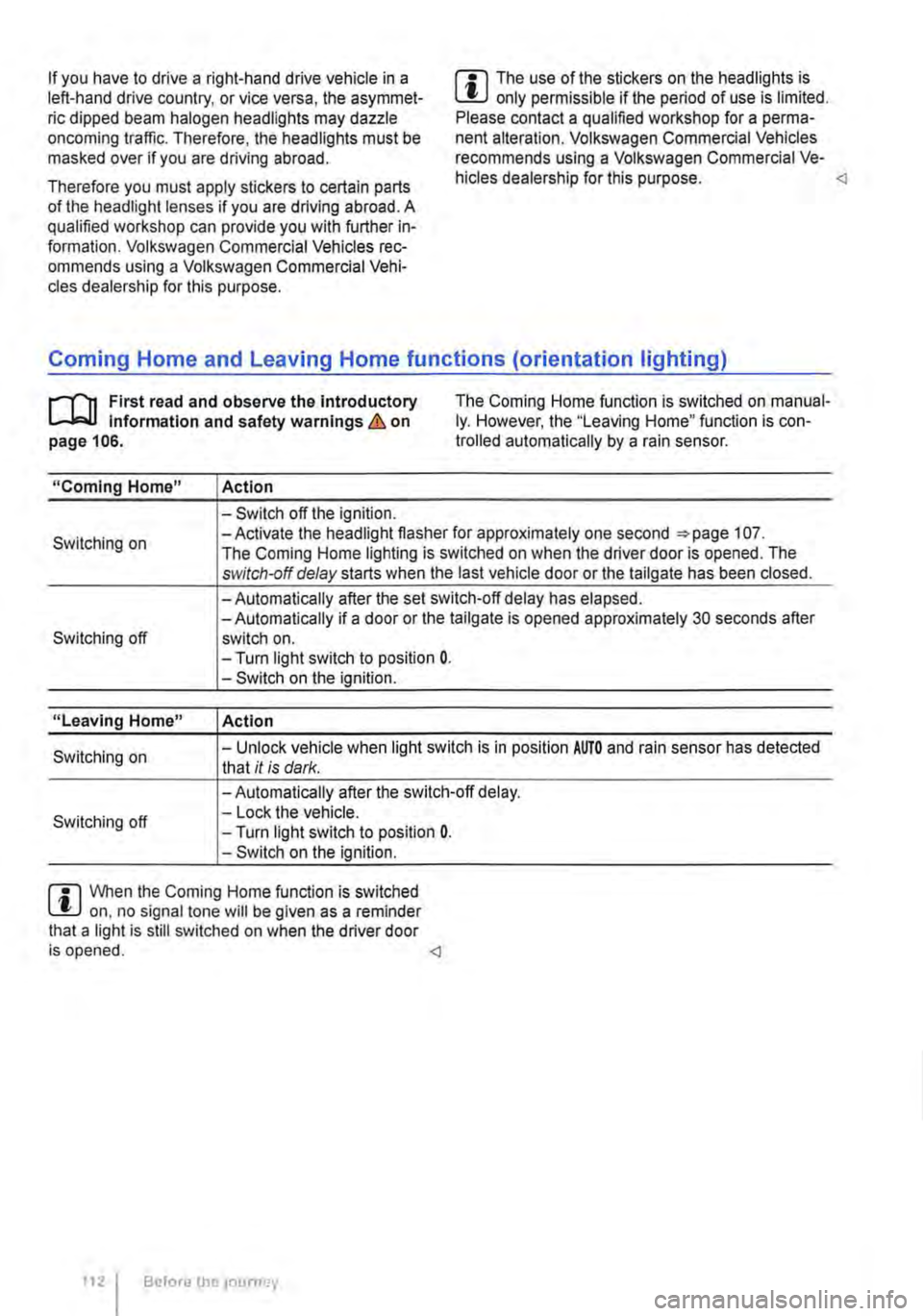
,.....-.(')1 First read and observe the introductory l....-.lo:.l.l Information and safety warnings & on page 106.
The Coming Home function is switched on manual-ly. However, the "Leaving Home" function is con-trolled automatically by a rain sensor.
"Coming Home"
Switching on
Switching off
"Leaving Home"
Switching on
Switching off
!Action
-Switch off the ignition. -Activate the headlight flasher for approximately one second 107. The Coming Home lighting is switched on when the driver door is opened. The switch-off delay starts when the last vehicle door or the tailgate has been closed.
-Automatically after the set switch-off delay has elapsed. -Automatically if a door or the tailgate is opened approximately 30 seconds after switch on. -Turn light switch to position 0. -Switch on the ignition.
Action
-Unlock vehicle when light switch is in position AUTO and rain sensor has detected that it is dark.
-Automatically after the switch-off delay. -Lock the vehicle. -Turn light switch to position 0. -Switch on the ignition.
m When the Coming Home function is switched L!J on, no signal tone will be given as a reminder that a light is still switched on when the driver door is opened.
Page 113 of 486
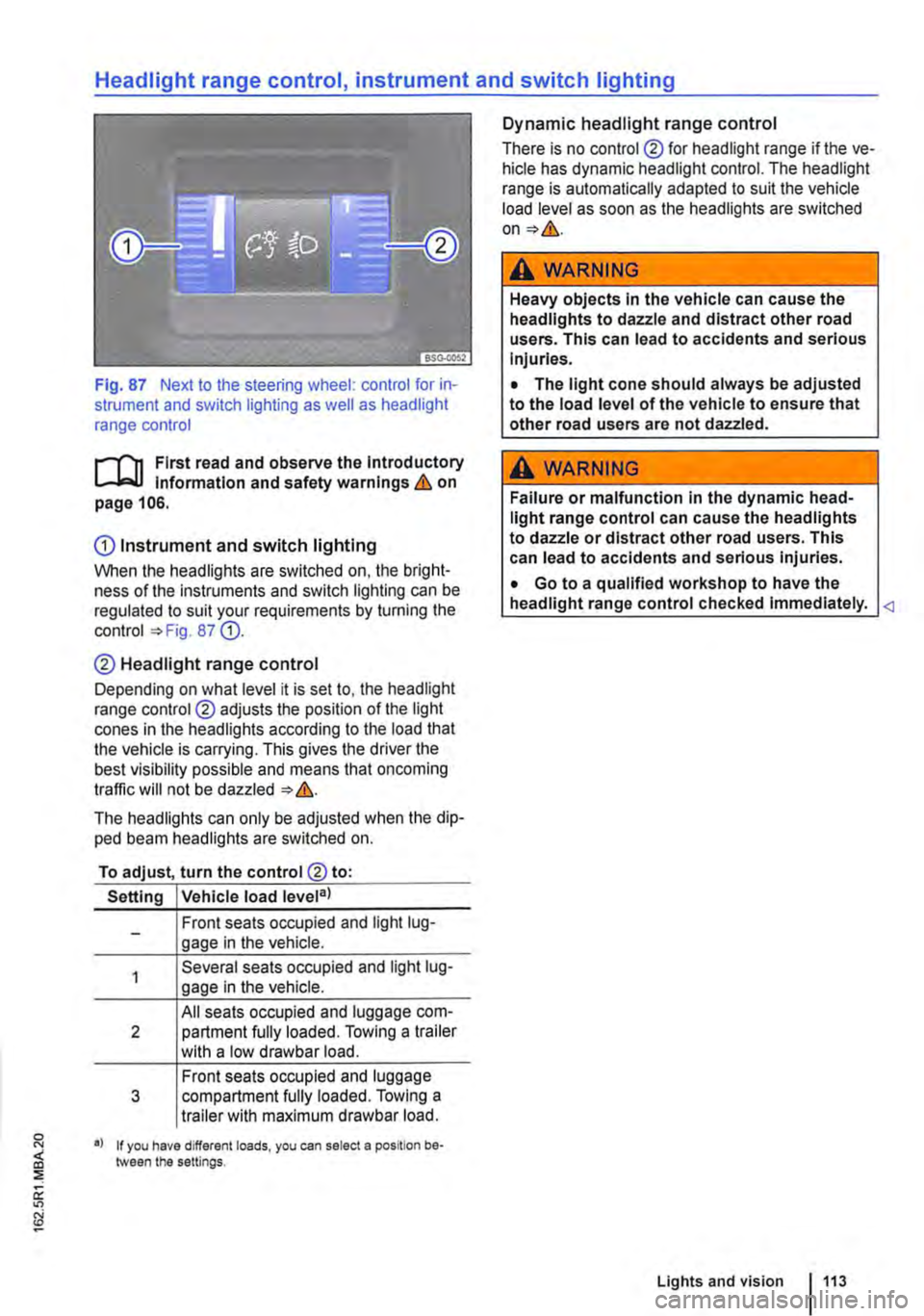
Fig. 87 Next to the steering wheel: control for in-strument and switch lighting as well as headlight range control
,....-('n First read and observe the Introductory l-Jo:-1.1 information and safety warnings & on page 106.
CD Instrument and switch lighting
When the headlights are switched on. the bright-ness of the instruments and switch lighting can be regulated to suit your requirements by turning the control =>Fig. 87 Q).
0 Headlight range control
Depending on what level it is set to. the headlight range control ® adjusts the position of the light cones in the headlights according to the load that the vehicle is carrying. This gives the driver the best visibility possible and means that oncoming traffic will not be dazzled => &.
The headlights can only be adjusted when the dip-ped beam headlights are switched on.
To adjust, turn the control® to:
Setting Vehicle load level3l
Front seats occupied and light lug-gage in the vehicle.
Several seats occupied and light lug-gage in the vehicle.
All seats occupied and luggage com-2 partment fully loaded. Towing a trailer with a low drawbar load.
Front seats occupied and luggage 3 compartment fully loaded. Towing a trailer with maximum drawbar load.
•l If you have different loads, you can select a position be-;:j tween the settings. :::;; a: "'
Dynamic headlight range control
There is no control ® for headlight range if the ve-hicle has dynamic headlight control. The headlight range is automatically ad a pled to suit the vehicle load level as soon as the headlights are switched on=>&.
,A WARNING
Heavy objects in the vehicle can cause the headlights to dazzle and distract other road users. This can lead to accidents and serious Injuries.
• The light cone should always be adjusted to the load level of the vehicle to ensure that other road users are not dazzled.
,A WARNING
Failure or malfunction in the dynamic head-light range control can cause the headlights to dazzle or distract other road users. This can lead to accidents and serious injuries.
• Go to a qualified workshop to have the headlight range control checked immediately.
Lights and vision 113
Page 118 of 486
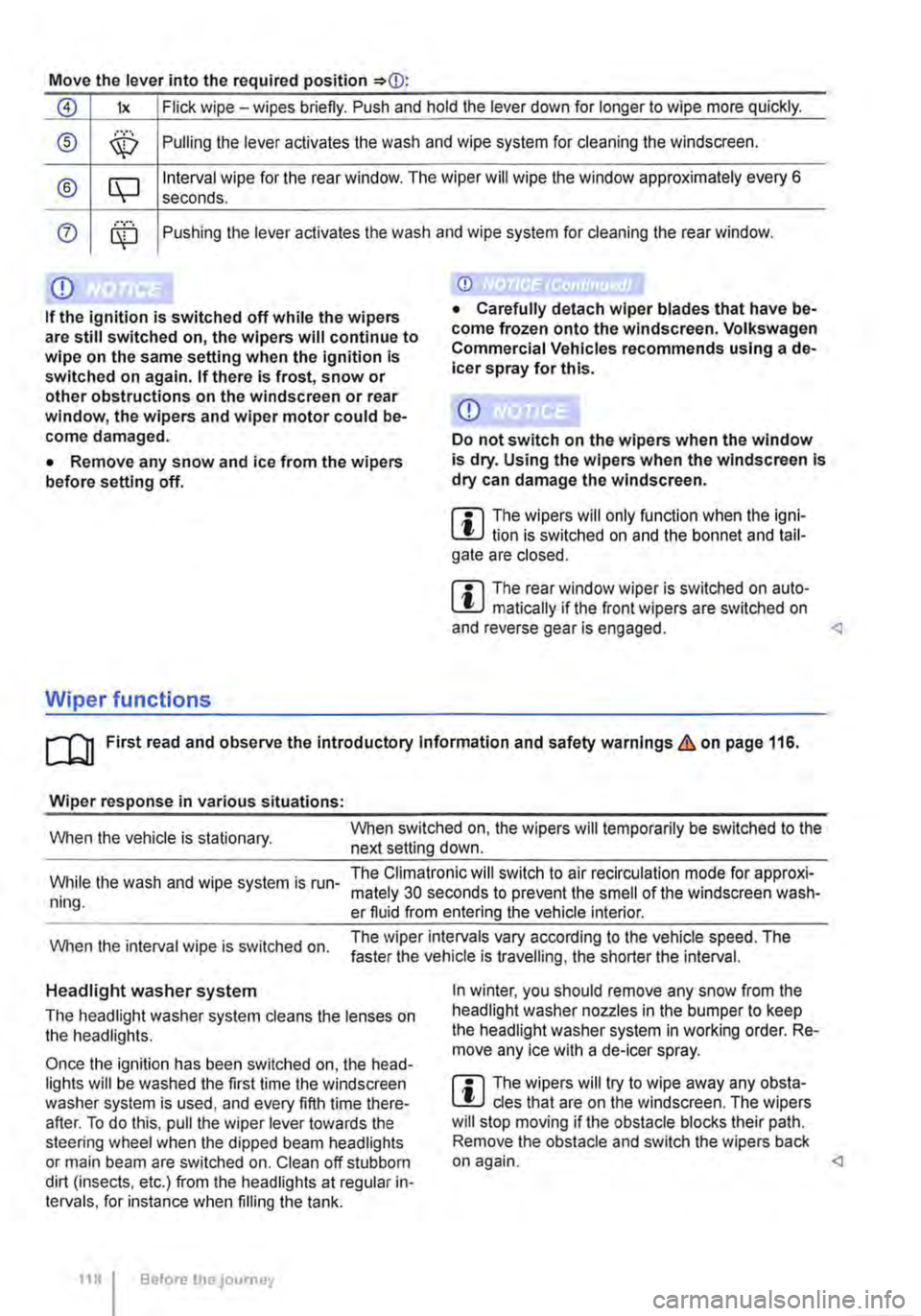
Move the lever into the required position
0 lx Flick wipe -wipes briefly. Push and hold the lever down for longer to wipe more quickly.
® ,··.··· \X:) Pulling the lever aclivates the wash and wipe system for cleaning the windscreen.
® CQ Interval wipe for the rear window. The wiper will wipe the window approximately every 6 seconds .
0 ........ Pushing the lever activates the wash and wipe system for cleaning the rear window.
Q)
If the ignition is switched off while the wipers are still switched on, the wipers will continue to wipe on the same setting when the ignition Is switched on again. If there Is frost, snow or other obstructions on the windscreen or rear window, the wipers and wiper motor could be-come damaged.
• Remove any snow and ice from the wipers before setting off.
Wiper functions
Q)
Do not switch on the wipers when the window is dry. Using the wipers when the windscreen Is dry can damage the windscreen.
m The wipers will only function when the igni-W lion is switched on and the bonnet and tail-gate are closed.
m The rear window wiper is switched on auto-W matically if the front wipers are switched on and reverse gear is engaged.
Wiper response in various situations:
When the vehicle is stationary. When switched on, the wipers will temporarily be switched to the next setting down.
While the wash and wipe system is run-ning.
The Climatronic will switch to air recirculation mode for approxi-mately 30 seconds to prevent the smell of the windscreen wash-er fluid from entering the vehicle interior.
When the interval wipe is switched on. The wiper intervals vary according to the vehicle speed. The faster the vehicle is travelling, the shorter the interval.
Headlight washer system
The headlight washer system cleans the lenses on the headlights.
Once the ignition has been switched on, the head-lights will be washed the first time the windscreen washer system is used, and every fifth time there-after. To do this, pull the wiper lever towards the steering wheel when the dipped beam headlights or main beam are switched on. Clean off stubborn dirt (insects, etc.) from the headlights at regular in-tervals, for instance when filling the tank.
118 Before the journey
In winter, you should remove any snow from the headlight washer nozzles in the bumper to keep the headlight washer system in working order. Re-move any ice with a de-icer spray.
m The wipers will try to wipe away any obsta-W cles that are on the windscreen. The wipers will stop moving if the obstacle blocks their path. Remove the obstacle and switch the wipers back on again.
Page 301 of 486
Several warning and indicator lamps will light up briefly as a functional check when the ignition is switched on. They will go out after a few seconds.
A WARNING
Failure to observe the warning lamps and text messages could lead to accidents and seri-ous Injuries.
Radar sensor
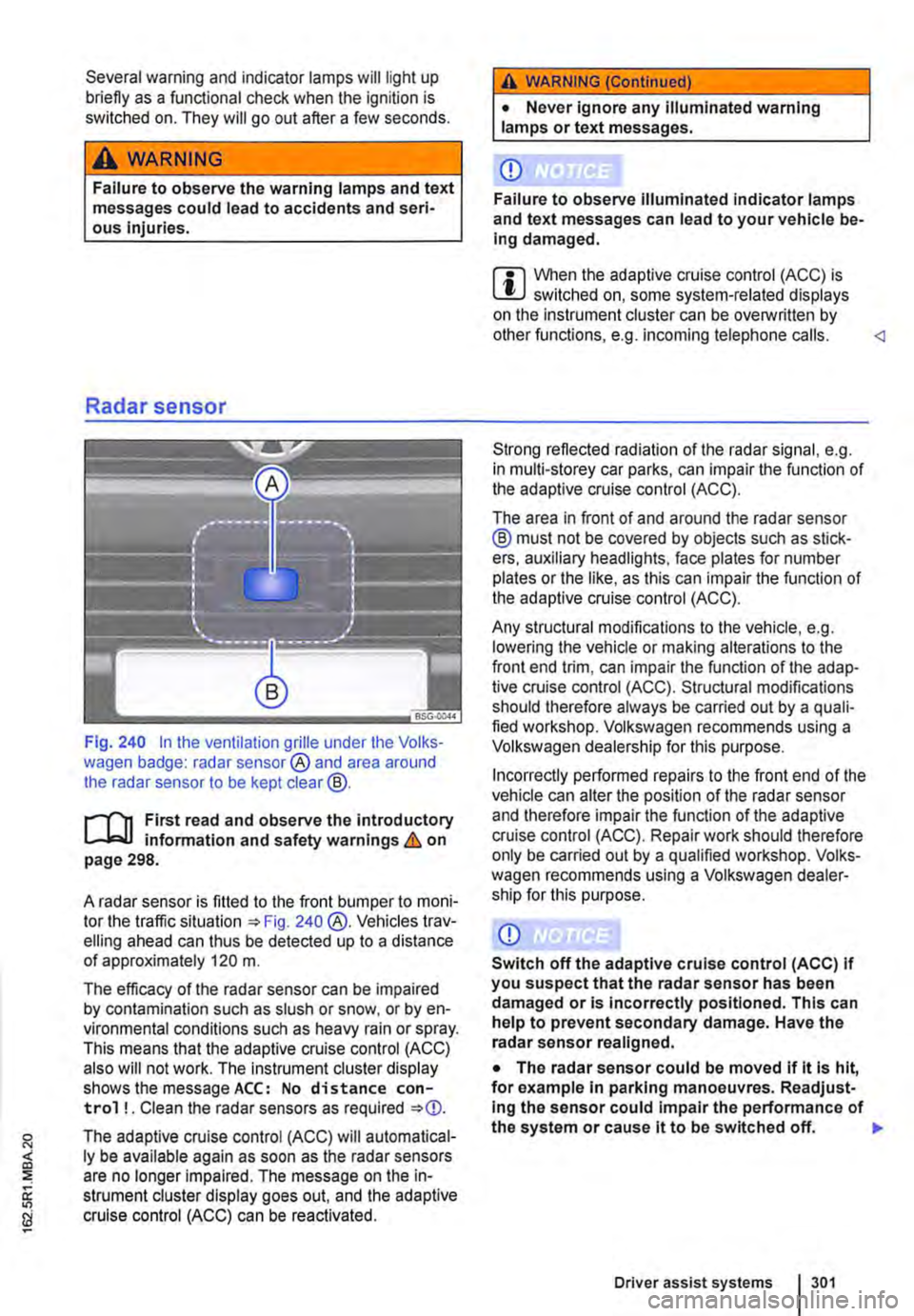
Fig. 240 In the ventilation grille under the Volks-wagen badge: radar sensor® and area around the radar sensor to be kept clear@.
r--('n First read and observe the introductory L-J,:.U information and safety warnings & on page 298.
A radar sensor is fitted to the front bumper to moni-tor the traffic situation 240 @.Vehicles trav-elling ahead can thus be detected up to a distance of approximately 120 m.
The efficacy of the radar sensor can be impaired by contamination such as slush or snow. or by en-vironmental conditions such as heavy rain or spray. This means that the adaptive cruise control (ACC) also will not work. The instrument cluster display shows the message ACC: No distance con-trol ! . Clean the radar sensors as required
The adaptive cruise control (ACC) will automatical-ly be available again as soon as the radar sensors are no longer impaired. The message on the in-strument cluster display goes out. and the adaptive cruise control (ACC) can be reactivated.
A WARNING (Continued)
• Never ignore any illuminated warning lamps or text messages.
CD
Failure to observe illuminated indicator lamps and text messages can lead to your vehicle be-Ing damaged.
m When the adaptive cruise control (ACC) is L!..J switched on, some system-related displays on the instrument cluster can be overwritlen by other functions, e.g. incoming telephone calls.
The area in front of and around the radar sensor ® must not be covered by objects such as stick-ers, auxiliary headlights, face plates for number plates or the like, as this can impair the function of the adaptive cruise control (ACC).
Any structural modifications to the vehicle, e.g. lowering the vehicle or making alterations to the front end trim, can impair the function of the adap-tive cruise control (ACC). Structural modifications should therefore always be carried out by a quali-fied workshop. Volkswagen recommends using a Volkswagen dealership for this purpose.
Incorrectly performed repairs to the front end of the vehicle can alter the position of the radar sensor and therefore impair the function of the adaptive cruise control (ACC). Repair work should therefore only be carried out by a qualified workshop. Volks-wagen recommends using a Volkswagen dealer-ship for this purpose.
CD
Switch off the adaptive cruise control (ACC) If you suspect that the radar sensor has been damaged or is incorrectly positioned. This can help to prevent secondary damage. Have the radar sensor realigned.
• The radar sensor could be moved if it is hit, for example in parking manoeuvres. Readjust-Ing the sensor could impair the performance of the system or cause it to be switched off. 11>
Driver assist systems 301
Page 309 of 486
m When Front Assist is switched on, the display L!J in the instrument cluster can be overwritten by displays related to other functions, e.g. an in-coming telephone call.
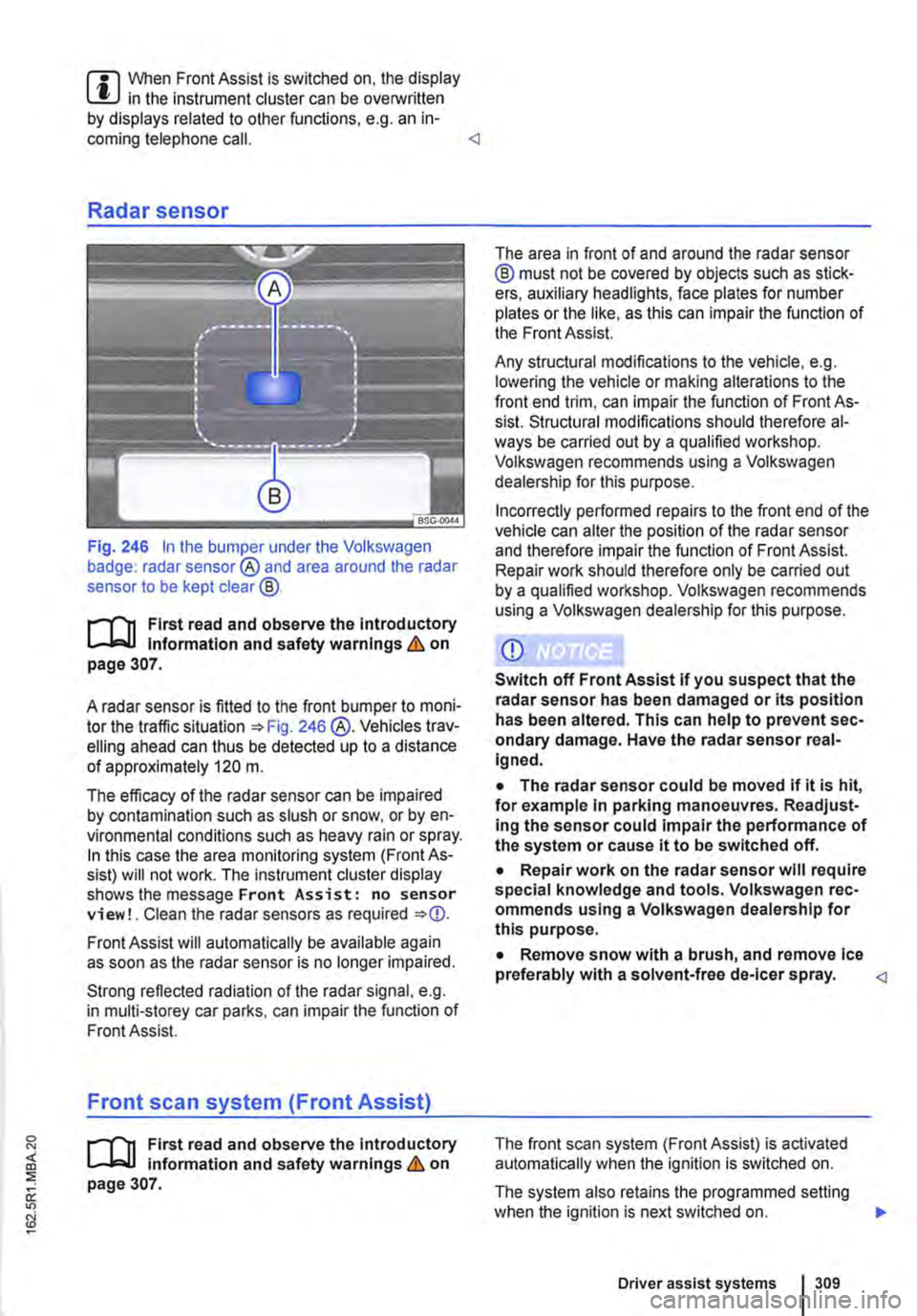
Fig. 246 In the bumper under the Volkswagen badge: radar sensor® and area around the radar sensor to be kept clear@.
r-f"'n First read and observe the Introductory l.-lo:-1.1 Information and safety warnings & on page 307.
A radar sensor is fitted to the front bumper to moni-tor the traffic situation =>Fig. 246 @.Vehicles trav-elling ahead can thus be detected up to a distance of approximately 120 m.
The efficacy of the radar sensor can be impaired by contamination such as slush or snow, or by en-vironmental conditions such as heavy rain or spray. In this case the area monitoring system (Front As-sist) will not work. The instrument cluster display shows the message Front Assist: no sensor view!. Clean the radar sensors as required =>
Strong reflected radiation of the radar signal, e.g. in multi-storey car parks, can impair the function of Front Assist.
Front scan system (Front Assist)
r-f"'n First read and observe the introductory l.-lo:-1.1 information and safety warnings & on page 307.
The area in front of and around the radar sensor @ must not be covered by objects such as stick-ers, auxiliary headlights, face plates for number plates or the like, as this can impair the function of the Front Assist.
Any structural modifications to the vehicle, e.g. lowering the vehicle or making alterations to the front end trim, can impair the function of Front As-sist. Structural modifications should therefore al-ways be carried out by a qualified workshop. Volkswagen recommends using a Volkswagen dealership for this purpose.
Incorrectly performed repairs to the front end of the vehicle can alter the position of the radar sensor and therefore impair the function of Front Assist. Repair work should therefore only be carried out by a qualified workshop. Volkswagen recommends using a Volkswagen dealership for this purpose.
• The radar sensor could be moved if it is hit, for example In parking manoeuvres. Readjust-Ing the sensor could impair the performance of the system or cause it to be switched off.
• Repair work on the radar sensor will require special knowledge and tools. Volkswagen rec-ommends using a Volkswagen dealership for this purpose.
• Remove snow with a brush, and remove Ice preferably with a solvent-free de-leer spray.
The system also retains the programmed setting when the ignition is next switched on. 1>
Driver assist systems 309
Page 310 of 486
Volkswagen recommends that Front Assist is switched on at all times. Exceptions =>page 310, Temporarily switch off the front scan system (Front Assist) in the following situations.
Activating and deactivating the front scan system
The front scan system can be activated and deacti-vated using the Front Assist option in the As-sistant submenu of the Settings menu. A tick indicates that a driver assist system is switched on.
The advance warning and distance warning are deactivated as well when the front scan system is deactivated.
If the front scan system is deactivated, a confirma-tory symbol is shown in the instrument cluster dis-play =>page 308
Activating and deactivating the advanced warning
The advance warning can be activated and deacti-vated using the Front Assist option in the As-sistant submenu of the Settings menu.
Activating or deactivating the distance warning
Depending on the vehicle equipment, the distance warning can be activated and deactivated using the Front Assist option in the Assistant sub-menu of the Settings menu.
Volkswagen recommends that the distance warn-ing is switched on at all times.
following situations
r-T'n First read and observe the introductory l-J,::JJ information and safety warnings & on page 307.
The area monitoring system (Front Assist) should be switched off in the following situations due to system limitations => &:
• If the vehicle is being towed.
• If the vehicle is on a rolling road test bed.
• If the vehide is utilised in a capacity beyond us-age on public roads, e.g. off-road or racing.
• If the radar sensor is faulty.
310 I While drivtng
• On external force on the radar sensor, e.g. after a rear-end collision.
• In the event of multiple unwanted interventions.
• If the radar sensor is covered temporarily by any auxiliary equipment, e.g. auxiliary headlights.
• If the vehicle is being loaded onto a truck, car ferry or motorail train.
A WARNING
Failure to switch off Front Assist in the situa-tions mentioned can cause accidents and se-rious Injuries.
Page 343 of 486
Capacities
r--('n First read and observe the introductory L-W.I information and safety warnings & on page 340.
Checks when filling the tank
r--r'n First read and observe the introductory L-W.I information and safety warnings & on page 340.
Checklist
Never carry out any work on the engine or in the engine compartment if you are not familiar with the necessary procedures and the general safety re-quirements or if the correct operating equipment, fluids and unsuitable tools are not available 350, Preparation for working in the engine compartment! The work should be carried out by a qualified workshop if you are uncertain. Please en-sure that the following are checked regular1y, pref-erably every time you fill the tank:
..( Windscreen washer fluid level 116
..( Engine oil level 353
Fuel
c:QJ Introduction
This chapter contains information on the following subjects:
Petrol
Diesel ...
344 345
Different engines require different fuels. The facto-ry-fitted sticker on the inside of the tank flap indi-cates the fuel type that is required for your particu-lar vehicle.
Volkswagen Commercial Vehicles recommends us-ing fuels with a low sulphur content or which are sulphur-free in order to reduce fuel consumption and prevent damage to the engine.
If the engine is not running smoothly or begins to judder, this can indicate poor or inadequate fuel quality, e.g. water in the fuel. If these symptoms appear, reduce the vehicle speed immediately and drive to the nearest qualified workshop at medium engine speeds, avoiding high engine loading. If these symptoms occur immediately after the vehi-
Fuel tank capacity
Approx. 80.0 I,
..( Engine coolant level 358
..( Brake fluid level 269
..( Tyre pressure 367
..( Vehicle lighting necessary for traffic safety:
-Turn signals
-Side lights, dipped beam headlights and main beam headlights
-Tail light cluster
-Brake lights
-Rear fog light 1 08
Information on changing bulbs 432.
cle has been refuelled, switch the engine off as soon as it is safe to do so and seek expert assis-tance. This can help to prevent further damage.
Additional information and warnings:
• Filling the tank 340
• Engine management system and exhaust puri-fication system 407
• Service schedule
A WARNING
Incorrect handling of fuel can cause explo-sions, fire, serious burns and other injuries.
• Fuel is highly explosive and inflammable.
• Never handle fuel near open flames, sparks or glowing matter (e.g. cigarettes).
• Keep naked flames, hot parts and sparks at a safe distance.
At the filling station 1343
Page 381 of 486
Washing the vehicle
r-f'n First read and observe the introductory Information and safety warnings & on page 380.
The longer substances such as insects, bird drop-pings, resinous tree sap, road dirt, industrial de-posits, tar, soot or road salt and other corrosive materials remain on the vehicle, the more damage they do to the paintwork. High temperatures (for in-stance in strong sunlight) accelerate the corrosion process. The underside of the vehicle should also be cleaned thoroughly and regularly.
Car washes
Please observe the signs on the automatic car wash. Before using an automatic car wash take the usual precautions, such as closing all windows and folding in the exterior mirrors, in order to avoid damage to the vehicle. You must consult the car wash operator if there are special parts on your ve-hicle such as spoilers, roof luggage carrier systems or radio aerials ::.CD.
The paint is so hard-wearing that the car can nor-mally be washed without problems in an automatic car wash. However, the effect on the paint de-pends to a large extent on the design of the car wash. Volkswagen Commercial Vehicles recom-mends the use of car washes without brushes.
To remove any wax residue from the windows and to stop wipers rubbing, please note the following points ::.page 382, Cleaning windows and exterior mirrors.
Washing the car by hand
When washing by hand, first soften the dirt with plenty of water and rinse off as well as possible.
Then clean the vehicle with a soft sponge, a glove or a brush using only light pressure. Start with the roof and work from the top to the bottom. Use a shampoo for very stubborn dirt only.
The sponge or glove should be wrung out thor-oughly at regular intervals.
Clean the wheels, sill panels etc. last. Use a differ-ent sponge for this purpose.
A WARNING
Parts of the vehicle with sharp edges can cause Injury.
• Protect your hands and arms from cuts on sharp parts, for example when cleaning the underbody or the inside of the wheel hous-lngs.
A WARNING
After the car has been washed, the braking effect could set in later than normal and ex-tend the braking distance as the brake discs and brake pads will be wet, or iced up In win-ter.
• You can "dry and de-ice" the brakes by performing careful braking manoeuvres. Make sure that you do not endanger any oth-er road users or violate any legal regulations when doing so.
CD
• The water should be no warmer than +so•c (+140.FJ.
• Do not wash the vehicle in direct sunlight in order to avoid damage to the vehicle palntwork.
• Never clean with insect sponges, rough kitchen sponges or similar products as these can damage the surface.
• Never clean the headlights with a dry cloth or sponge. Always use a wet cloth or sponge. lt is best to use soapy water.
• Washing the vehicle In cold weather: if the vehicle is rinsed with a hose, do not direct the water at the lock cylinders or the gaps around the doors, boot, or bonnet. The locks and seals could freeze.
CD
Observe the following guidelines before driving the vehicle into an automatic car wash in order to avoid damage to the vehicle:
• Ensure that the gap between the guide rails In the car wash is sufficient for the vehicle track. If the track is too narrow your wheels and tyres will be damaged.
• Switch off the rain sensor before driving the vehicle Into an automatic car wash.
• Check that the car wash is tall and wide enough for your vehicle.
• Fold In the exterior mirrors. Electrically fold-Ing exterior mirrors must be moved electrically. Do not fold them in and out by hand.
• In order to prevent damage to the palntwork on the bonnet, fold the wipers back onto the windscreen after drying the wiper blades. Do not drop the wipers onto the glass.
• Lock the tailgate to prevent it from opening accidentally In the car wash.
Page 411 of 486
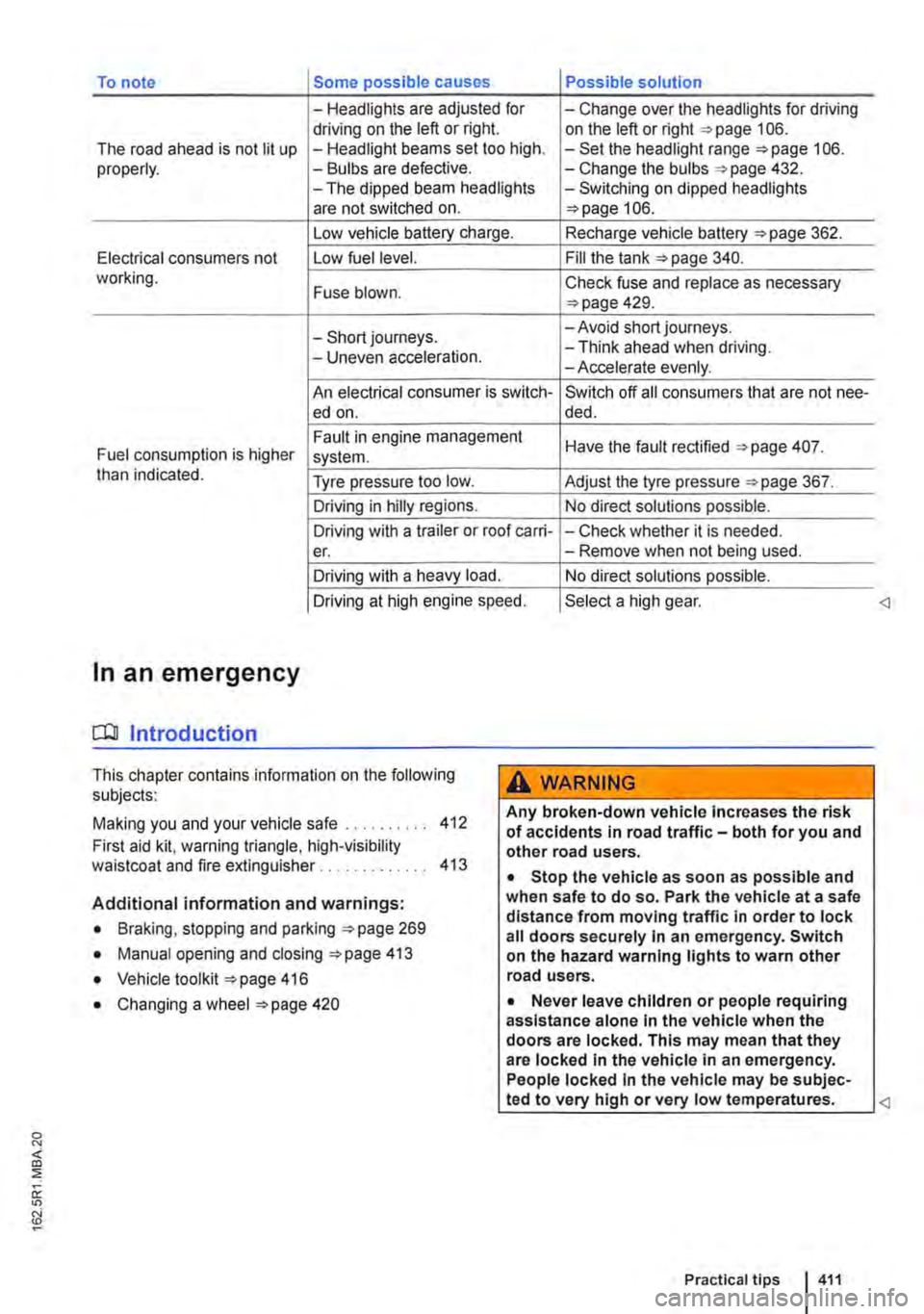
To note Some possible causes Possible solution
-Headlights are adjusted for -Change over the headlights for driving driving on the left or right. on the left or right 106. The road ahead is not lit up -Headlight beams set too high. -Set the headlight range 106. properly. -Bulbs are defective. -Change the bulbs 432. -The dipped beam headlights -Switching on dipped headlights are not switched on. 106.
Low vehicle battery charge. Recharge vehicle battery 362.
Electrical consumers not Low fuel level. Fill the tank 340. working. Fuse blown. Check fuse and replace as necessary 429.
-Short journeys. -Avoid short journeys.
-Uneven acceleration. -Think ahead when driving. -Accelerate evenly.
An electrical consumer is switch-Switch off all consumers that are not nee-ed on. de d.
Fault in engine management Have the fault rectified 407. Fuel consumption is higher system. than indicated. Tyre pressure too low. Adjust the tyre pressure 367.
Driving in hilly regions. No direct solutions possible.
Driving with a trailer or roof carri--Check whether it is needed. er. -Remove when not being used.
Driving with a heavy load. No direct solutions possible.
Driving at high engine speed. Select a high gear.
In an emergency
COl Introduction
This chapter contains information on the following subjects:
Making you and your vehicle safe . . 412
First aid kit. warning triangle, high-visibility waistcoat and fire extinguisher . . . . . . . . . . . . . 413
Additional information and warnings:
• Braking, stopping and parking 269
• Manual opening and closing 413
• Vehicle toolkit 416
• Changing a wheel 420
A WARNING
Any broken-down vehicle Increases the risk of accidents in road traffic-both for you and other road users.
• Stop the vehicle as soon as possible and when safe to do so. Park the vehicle at a safe distance from moving traffic In order to lock all doors securely In an emergency. Switch on the hazard warning lights to warn other road users.
• Never leave children or people requiring assistance alone In the vehicle when the doors are locked. This may mean that they are locked In the vehicle in an emergency. People locked In the vehicle may be subjec-
Page 432 of 486
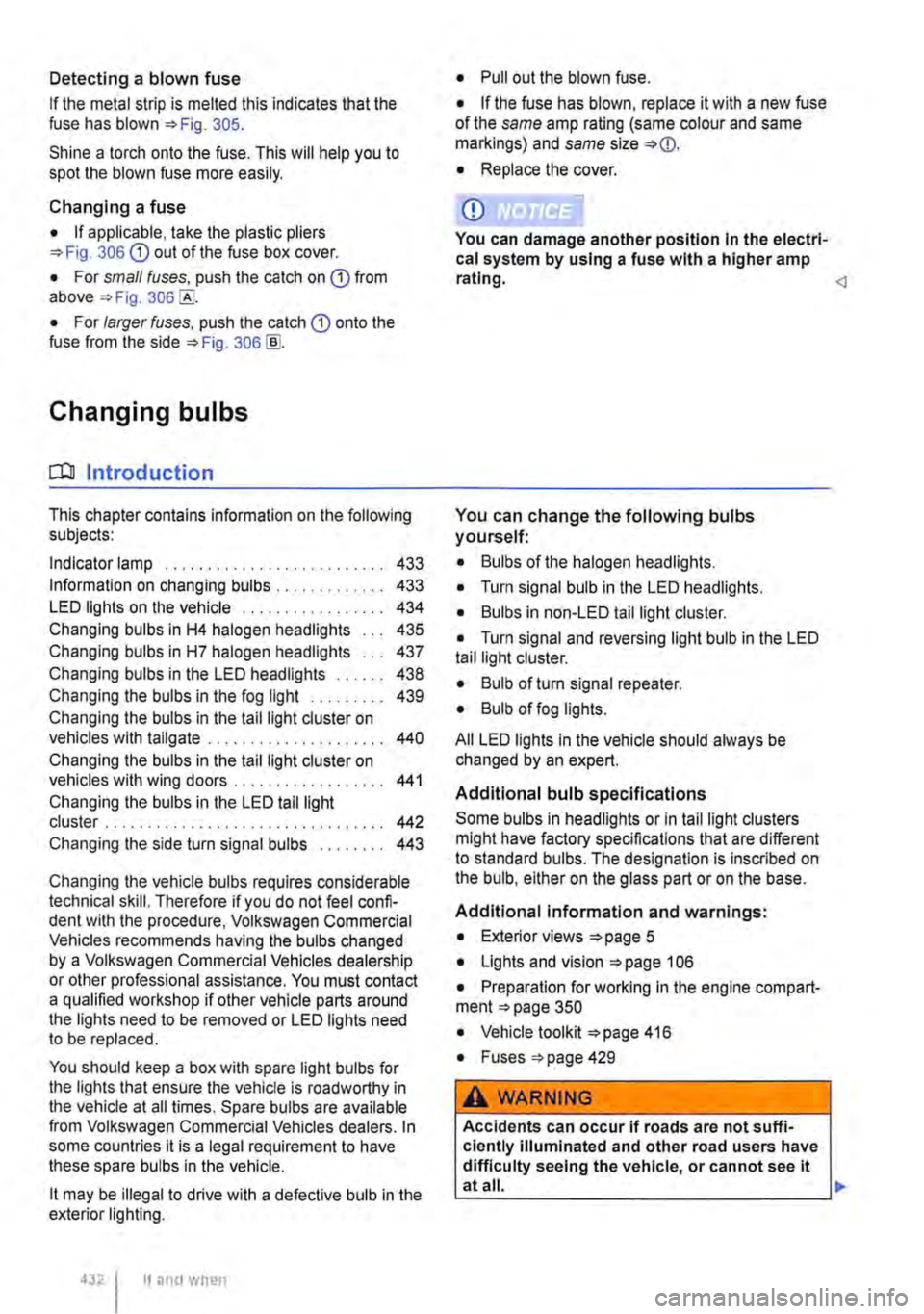
Detecting a blown fuse
If the metal strip is melted this indicates that the fuse has blown 305.
Shine a torch onto the fuse. This will help you to spot the blown fuse more easily.
Changing a fuse
• If applicable, take the plastic pliers 306 G) out of the fuse box cover.
• For small fuses. push the catch on G) from above 306
• For larger fuses, push the catch G) onto the fuse from the side 306@
Changing bulbs
o::n Introduction
This chapter contains information on the following subjects:
Indicator lamp . . . . . . . . . . . . . . . . . . . . . . . . . 433
Information on changing bulbs . 433 LED lights on the vehicle . . . . . . . . . 434
Changing bulbs in H4 halogen headlights 435
Changing bulbs in H7 halogen headlights . . . 437
Changing bulbs in the LED headlights . . . 438
Changing the bulbs in the fog light . . . . . . . . . 439 Changing the bulbs in the tail light cluster on vehicles with tailgate . . . . . . . . . . . . . . . . . . . . . 440
Changing the bulbs in the tail light cluster on vehicles with wing doors .................. 441
Changing the bulbs in the LED tail light cluster . . . . . . . . . . . . . . . . . . . . . . . . . 442 Changing the side turn signal bulbs . . . . . . . . 443
Changing the vehicle bulbs requires considerable technical skill. Therefore if you do not feel confi-dent with the procedure. Volkswagen Commercial Vehicles recommends having the bulbs changed by a Volkswagen Commercial Vehicles dealership or other professional assistance. You must contact a qualified workshop if other vehicle parts around the lights need to be removed or LED lights need to be replaced.
You should keep a box with spare light bulbs for the lights that ensure the vehicle is roadworthy in the vehicle at all times. Spare bulbs are available from Volkswagen Commercial Vehicles dealers. In some countries it is a legal requirement to have these spare bulbs in the vehicle.
lt may be illegal to drive with a defective bulb in the exterior lighting.
4321 If and when
• Pull out the blown fuse.
• If the fuse has blown, replace it with a new fuse of the same amp rating (same colour and same markings) and same size
• Replace the cover.
CD
You can damage another position In the electri-cal system by using a fuse with a higher amp rating.
You can change the following bulbs yourself:
• Bulbs of the halogen headlights.
• Turn signal bulb in the LED headlights.
• Bulbs in non-LED tail light cluster.
• Turn signal and reversing light bulb in the LED tail light cluster.
• Bulb of turn signal repeater.
• Bulb of fog lights.
All LED lights in the vehicle should always be changed by an expert.
Additional bulb specifications
Some bulbs in headlights or In tail light clusters might have factory specifications that are different to standard bulbs. The designation is inscribed on the bulb, either on the glass part or on the base.
Additional information and warnings:
• Exterior views 5
• Lights and vision 106
• Preparation for working In the engine compart-ment 350
• Vehicle toolkit 416
• Fuses 429
A WARNING
Accidents can occur If roads are not suffi-ciently Illuminated and other road users have difficulty seeing the vehicle, or cannot see it atall. 11>