wheel VOLKSWAGEN TRANSPORTER 2015 Owner´s Manual
[x] Cancel search | Manufacturer: VOLKSWAGEN, Model Year: 2015, Model line: TRANSPORTER, Model: VOLKSWAGEN TRANSPORTER 2015Pages: 486, PDF Size: 72.17 MB
Page 281 of 486
Steering
CJ:n Introduction
This chapter contains information on the following subjects:
Information on steering . . . . . . . . . . . . . . . . . . . 281
Additional information and warnings:
• Starting and stopping the engine 257
• Battery 362
• Tow-starting and towing 446
Information on steering
r--f"n First read and observe the introductory L-la.LI infonmation and safety warnings & on page 281.
Locking the steering wheel
• When the vehicle key has been removed, turn the steering wheel slightly until you hear the lock-ing pin engage.
The steering should be locked every time you leave the vehicle to make il more difficult for the vehicle to be stolen.
Unlocking the steering wheel
• Turn the steering wheel slightly to lake the load off the steering lock mechanism. Hold the steering wheel in this position and tu m the vehicle key clockwise out of position 217 @.
A WARNING
If the power steering is not working, the steering wheel is difficult to turn, which makes it difficult to steer the vehicle.
• The power steering only functions when the engine Is running.
• Never allow the vehicle to roll if the engine is switched off.
• Never remove the vehicle key from the ig-nition lock when the vehicle is in motion. The steering lock may be activated and you will no longer be able to steer the vehicle.
With power steering, the steering assistance is au-tomatically matched to vehicle speed, the steering wheel torque and the steering wheel angle. The power steering will only function when the engine is running.
You will need considerably more strength than nor-mal to steer the vehicle if lhe power steering is re-duced or has failed completely.
Page 282 of 486
Driver assist systems
Pull-away assist systems
cr:n Introduction
This chapter contains information on the following subjects:
Warning and indicator lamps . . . . . . . . . . . . . . 282
Start/stop system . . . . . . . . . . . . . . . . • . . . . . . . 283
Hill Hold Assist . . . . . . . . . . . . . . . . . . . . . . . . . . 284
Hill Descent Assist . . . . . . . . . . . . . . . . . . . . . . . 285
Rear axle differential lock . . . . . . . . . . . . . . . . . 286
Additional information and warnings:
• Volkswagen information system =>page 24
• Braking, stopping and parking =>page 269
• Battery =>page 362
• Wheels and tyres =>page 367
• Accessories, modifications, repairs and renewal of parts =>page 394
• Jump starting =>page 443
Warning and indicator lamps
A WARNING
The intelligent technology of the pull-away assist systems cannot overcome the laws of physics or system-related vehicle limitations. Never let the extra convenience afforded by pull-away assist systems tempt you into tak-ing any risks when driving-this can cause accidents.
• Unintentional vehicle movements can cause serious Injury.
• The pull-away assist systems cannot re-place the driver's full concentration.
• Always adapt your speed and driving style to suit visibility, weather, road and traffic con-ditions.
• Pull-away assist systems cannot hold the vehicle in all hill start situations or brake it sufficiently on all slopes going downhill (e.g. if the ground is slippery or icy).
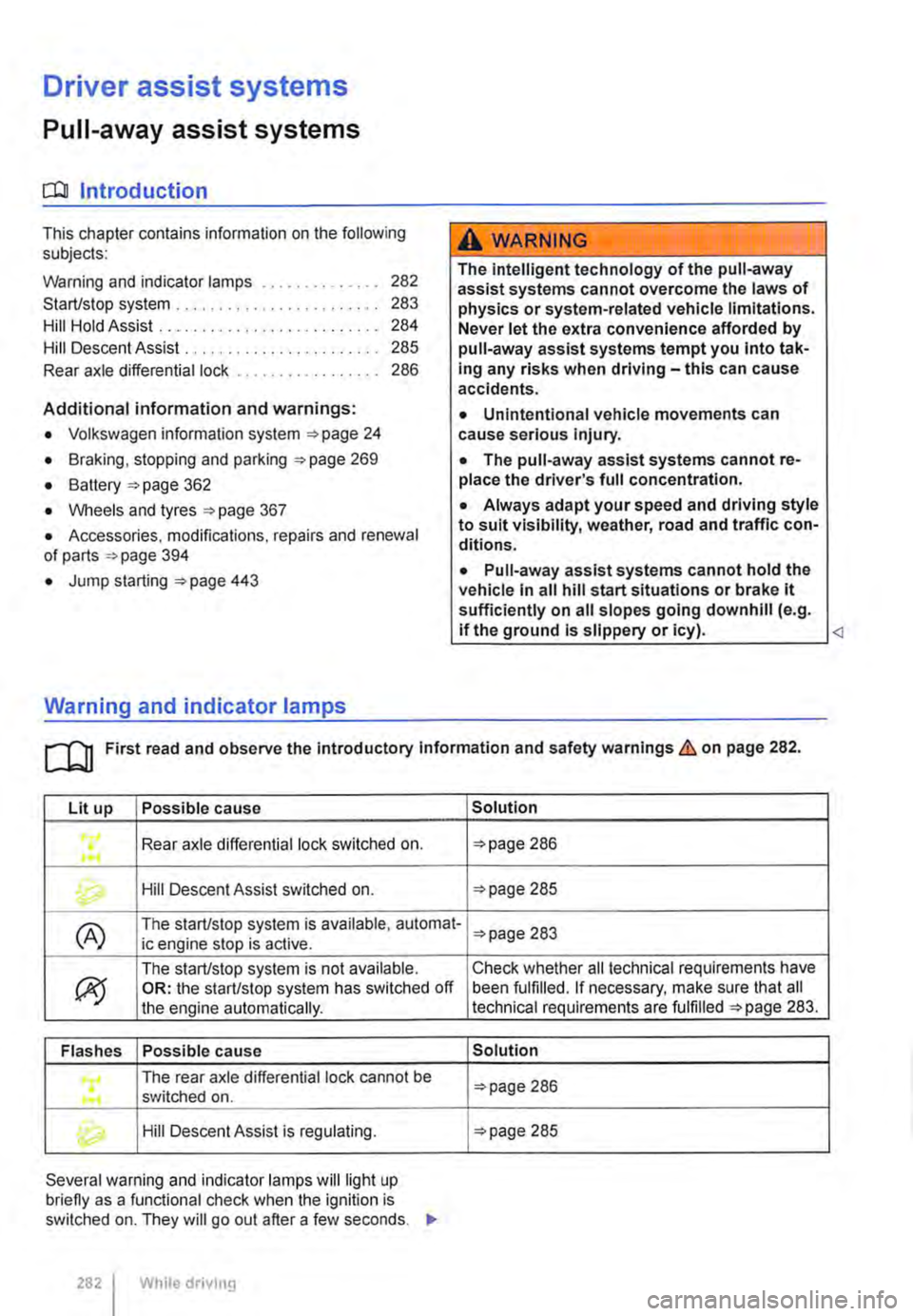
Lit up Possible cause
Rear axle differential lock switched on . ...
Hill Descent Assist switched on.
(A) The start/stop system is available, automat-ic engine stop is active.
ex;
The start/stop system is not available. OR: the start/stop system has switched off the engine automatically.
Flashes Possible cause
The rear axle differential lock cannot be .... switched on .
Hill Descent Assist is regulating.
Several warning and indicator lamps will light up briefly as a functional check when the ignition is switched on. They will go out after a few seconds. .,..
282 I While drivmg
Solution
=>page 286
=>page 285
=>page 283
Check whether all technical requirements have been fulfilled. If necessary, make sure that all technical requirements are fulfilled =>page 283.
Solution
=>page 286
=>page 285
Page 286 of 486
Rear axle differential lock
OSG-0041
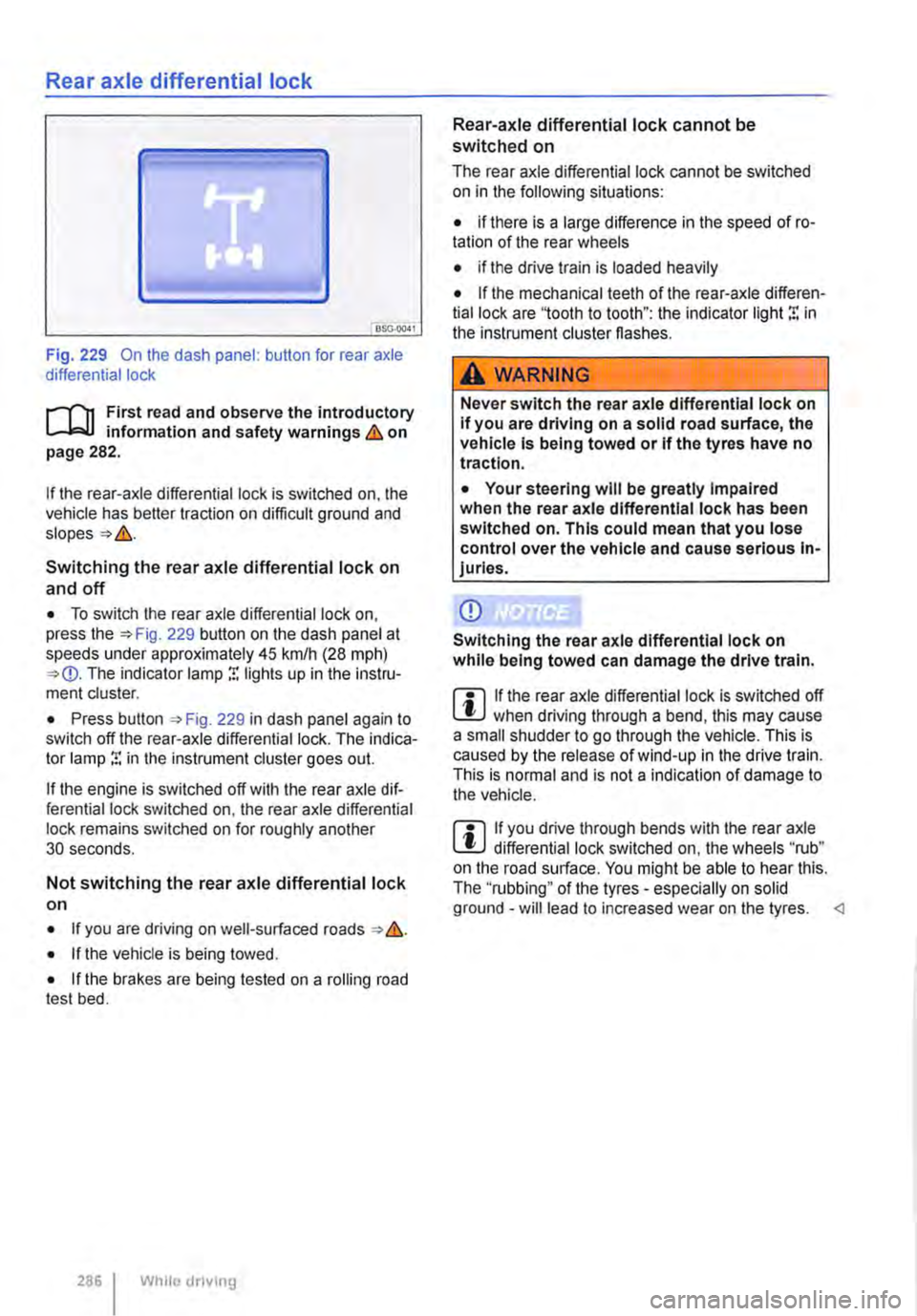
Fig. 229 On the dash panel: button for rear axle differential lock
i""('n First read and observe the introductory information and safety warnings & on page 282.
If the rear-axle differential lock is switched on, the vehicle has better traction on difficult ground and
Switching the rear axle differential lock on
and off
• To switch the rear axle differential lock on, press the 229 button on the dash panel at speeds under approximately 45 krnlh (28 mph) The indicator lamp r. lights up in the instru-ment cluster.
• Press button , Fig. 229 in dash panel again to switch off the rear-axle differential lock. The indica-tor lamp r. in the instrument cluster goes out.
If the engine is switched off with the rear axle dif-ferential lock switched on, the rear axle differential lock remains switched on for roughly another 30 seconds.
Not switching the rear axle differential lock on
• If you are driving on well-surfaced roads &.
• If the vehicle is being towed.
• If the brakes are being tested on a rolling road test bed.
286 I While dnving
Rear-axle differential lock cannot be switched on
The rear axle differential lock cannot be switched on in the following situations:
• if there is a large difference in the speed of ro-tation of the rear wheels
• if the drive train is loaded heavily
• If the mechanical teeth of the rear-axle differen-tial lock are '1ooth to tooth": the indicator light r. in the instrument cluster flashes.
A WARNING
Never switch the rear axle differential lock on If you are driving on a solid road surface, the vehicle is being towed or if the tyres have no traction.
• Your steering will be greatly Impaired when the rear axle differential lock has been switched on. This could mean that you lose control over the vehicle and cause serious In-juries.
CD
Switching the rear axle differential lock on while being towed can damage the drive train.
m If the rear axle differential lock is switched off W when driving through a bend, this may cause a small shudder to go through the vehicle. This is caused by the release of wind-up in the drive train. This is normal and is not a indication of damage to the vehicle.
m If you drive through bends with the rear axle W differential lock switched on, the wheels "rub" on the road surface. You might be able to hear this. The ''rubbing" of the tyres -especially on solid ground -will lead to increased wear on the tyres.
Page 297 of 486
Using the cruise control system (CCS)
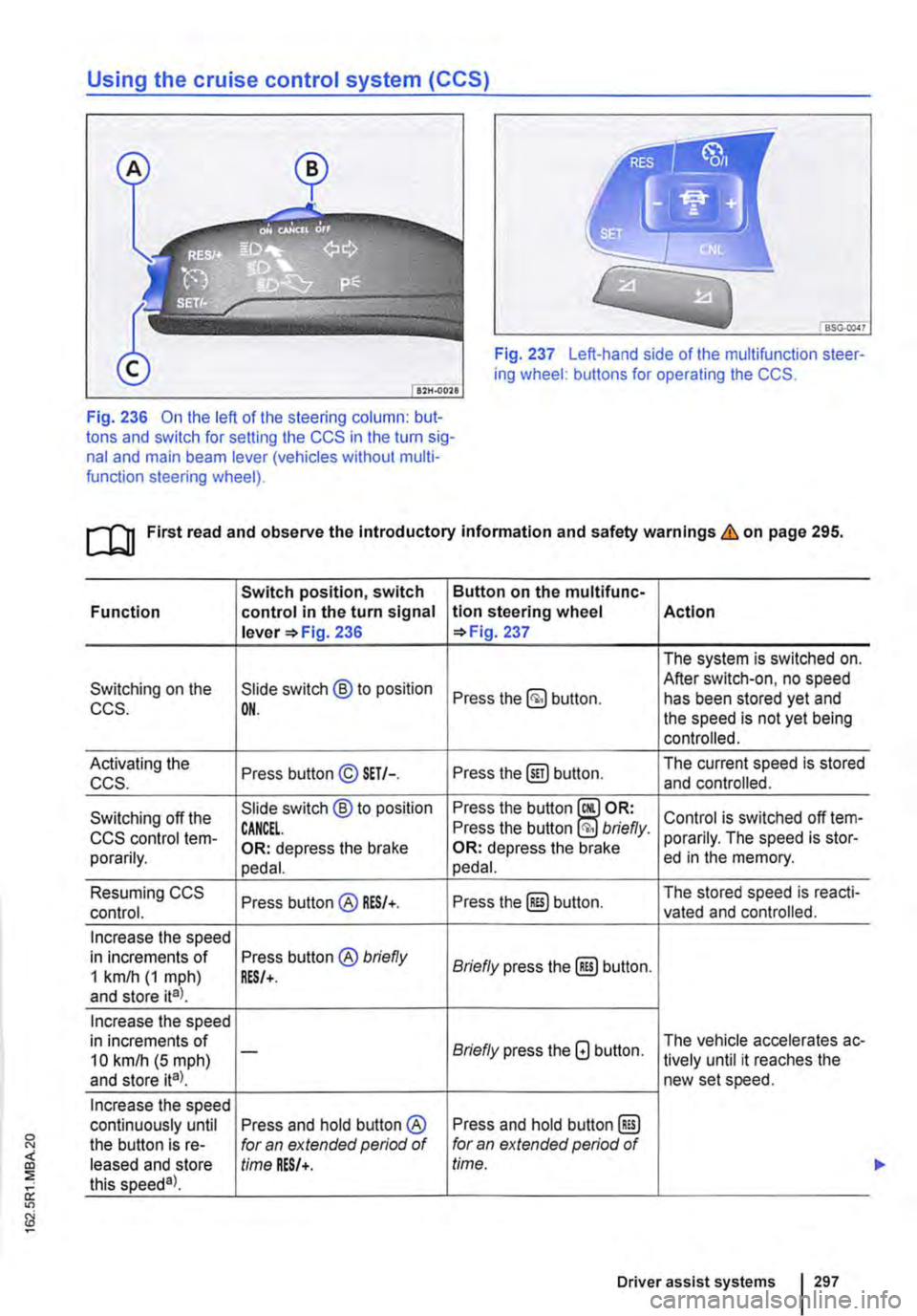
Fig. 237 Left-hand side of the multifunction steer-ing wheel: buttons for operating the CCS.
Fig. 236 On the left of the steering column: but-tons and switch for setting the CCS in the turn sig-nal and main beam lever (vehicles without multi-function steering wheel).
ro First read and observe the introductory information and safety warnings & on page 295.
Switch position, switch Button on the multifunc-Function control in the turn signal tlon steering wheel Action lever =>Fig. 236 =>Fig. 237
The system is switched on.
Switching on the Slide switch @ to position After switch-on, no speed Press the button. has been stored yet and CCS. OH. the speed is not yet being controlled.
Activating the Press button© SET/-. Press the@) button. The current speed is stored ccs. and controlled.
Switching off the Slide switch @ to position Press the button Control is switched off !em-CCS control !em-CANCEL. Press the button briefly. porarily. The speed is stor-porarily. OR: depress the brake OR: depress the brake ed in the memory. pedal. pedal.
Resuming CCS Press button@ RES/+. Press the@) button. The stored speed is reacti-control. vated and controlled.
Increase the speed in increments of Press button® briefly Briefly press the@) button. 1 km/h (1 mph) RES/+. and store ita).
Increase the speed in increments of Briefly press the G button. The vehicle accelerates ac-10 kmlh (5 mph) -lively until it reaches the and store ita). new set speed.
Increase the speed continuously until Press and hold button ® Press and hold button @) the button is re-for an extended period of for an extended period of leased and store time RES/+. time. this speeda).
Driver assist systems 297
...
Page 298 of 486
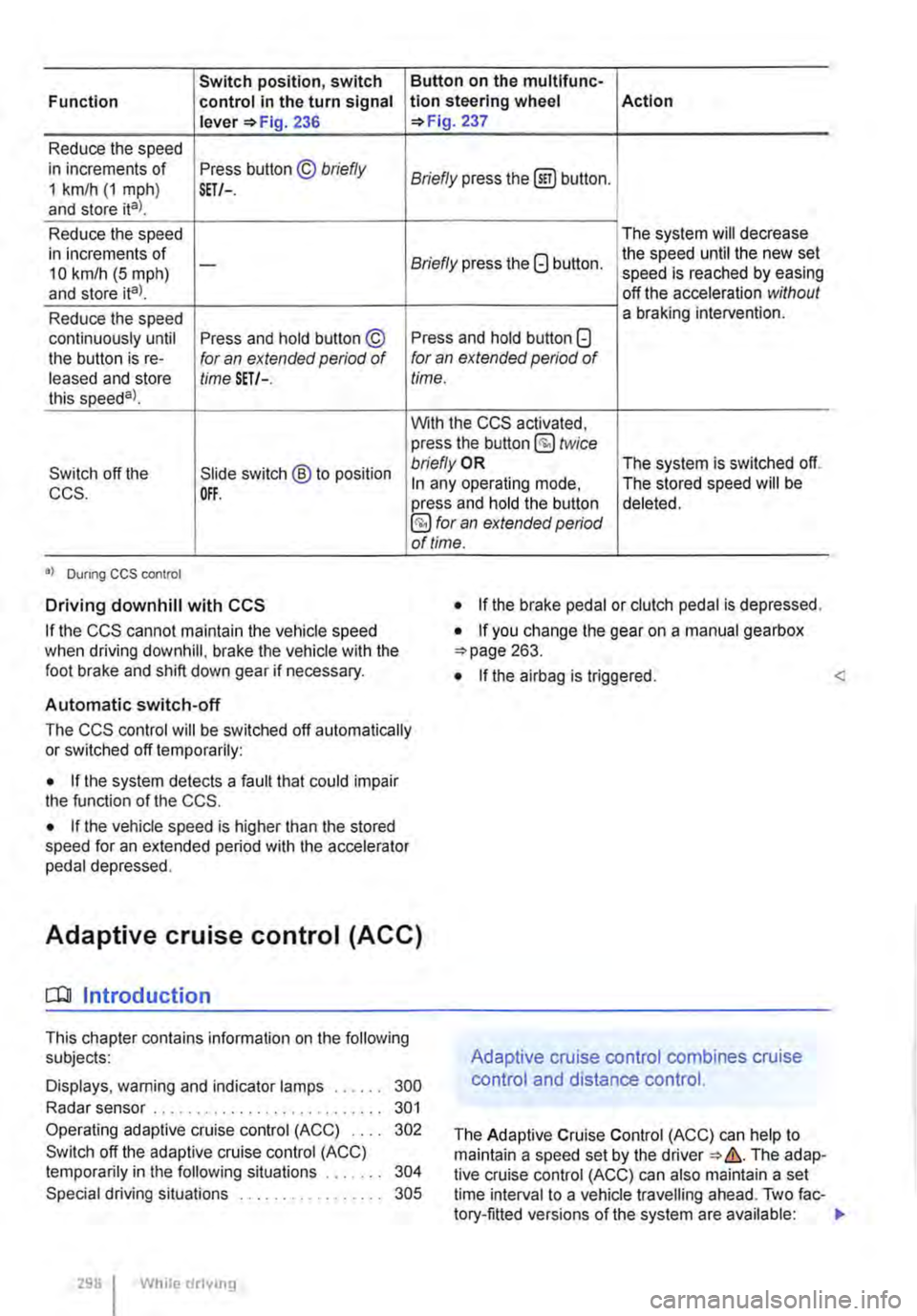
Switch position, switch Function control in the turn signal lever 236
Reduce the speed in increments of Press button © briefly 1 km/h (1 mph) and store ital. SET/-.
Reduce the speed in increments of 10 km/h (5 mph) -
and store ita).
Reduce the speed continuously until Press and hold button © the button is re-for an extended period of leased and store time SET/-. this speeda)_
Switch off the Slide switch ® to position CCS. OFF.
•I Dunng CCS control
Driving downhill with CCS
If the CCS cannot maintain the vehicle speed when driving downhill, brake the vehicle with the foot brake and shift down gear if necessary.
Automatic switch-off
Button on the multlfunc-tion steering wheel Action 237
Briefly press the (ili) button.
The system will decrease
Briefly press the G button. the speed until the new set speed is reached by easing off the acceleration without a braking intervention.
Press and hold button G for an extended period of time.
With the CCS activated, press the button @ twice bn'eflyOR The system is switched off. In any operating mode, The stored speed will be press and hold the button deleted. §) for an extended period of time.
• If the brake pedal or clutch pedal is depressed.
• If you change the gear on a manual gearbox 263.
• If the airbag is triggered. <
The CCS control will be switched off automatically or switched off temporarily:
• If the system detects a fault that could impair the function of the CCS.
• If the vehicle speed is higher than the stored speed for an extended period with the accelerator pedal depressed.
Adaptive cruise control (ACC)
dJ Introduction
This chapter contains information on the following subjects:
Displays, warning and indicator lamps . . . . . . 300
Radar sensor . . . . . . . . . . . . . . . . . . . . . . . . . . . 301
Operating adaptive cruise control (ACC) 302
Switch off the adaptive cruise control (ACC) temporarily in the following situations . . . . . 304
Special driving situations . . . . . . . . . . . . 305
298 I While drivmg
Adaptive cruise control combines cruise
control and distance control.
The Adaptive Cruise Control (ACC) can help to maintain a speed set by the The adap-tive cruise control (ACC) can also maintain a set time interval to a vehicle travelling ahead. Two fac-tory-fitted versions of the system are available: .,
Page 302 of 486
CD CD
• Remove snow with a brush, and remove Ice • Repair work on the radar sensor will require special knowledge and tools. Volkswagen rec-ommends using a Volkswagen dealership for this purpose.
preferably with a solvent-free de-leer spray.
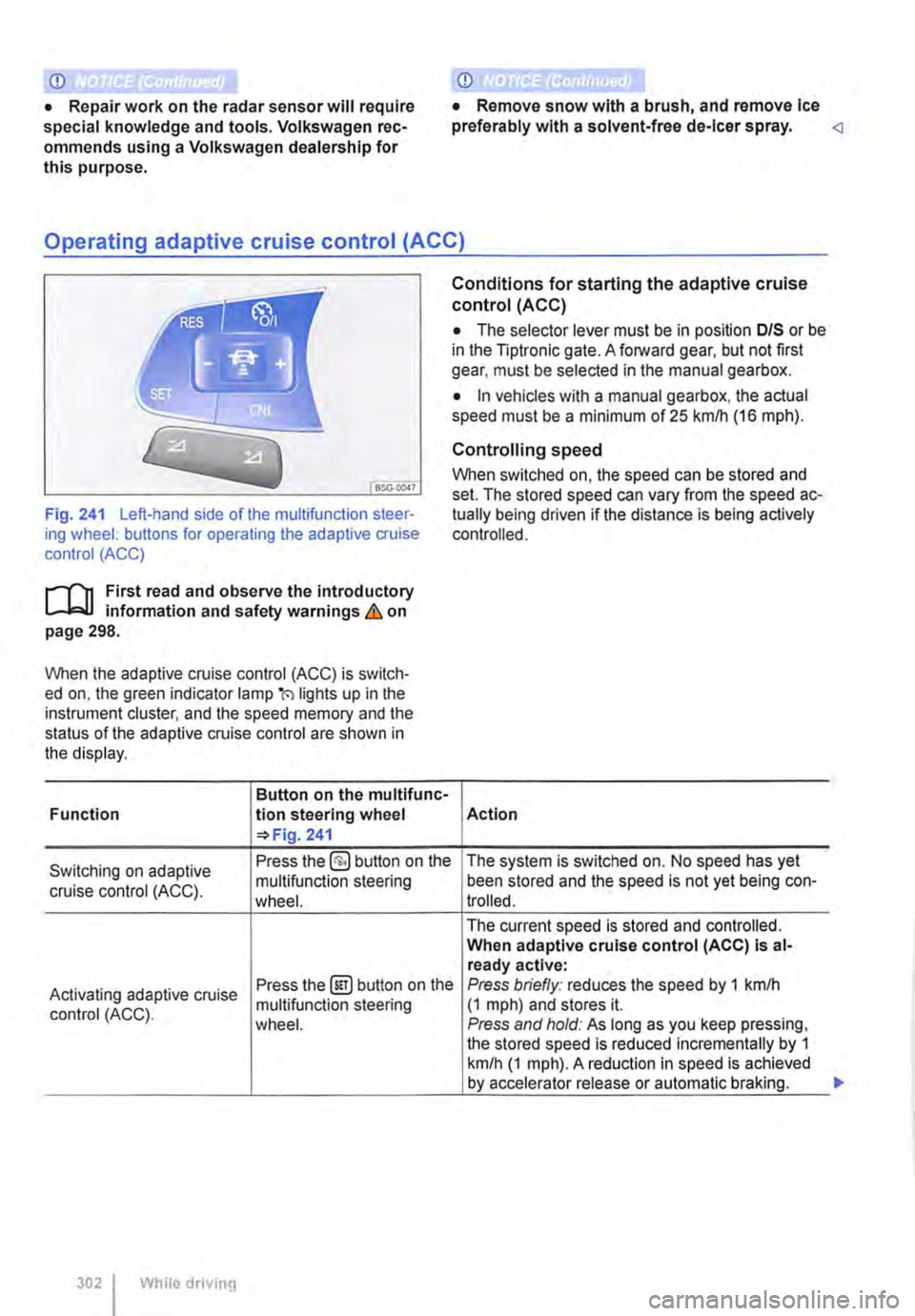
SSG-0047
Fig. 241 Left-hand side of the multifunction steer-ing wheel: buttons for operating the adaptive cruise control (ACC)
1"1'11 First read and observe the introductory L-I=J.I information and safety warnings Lb. on page 298.
When the adaptive cruise control (ACC) is switch-ed on, the green indicator lamp(') lights up in the instrument cluster, and the speed memory and the status of the adaptive cruise control are shown in the display.
Button on the multifunc-Function lion steering wheel 241
Conditions for starting the adaptive cruise control (ACC)
• The selector lever must be in position D/S or be in the Tiptronic gate. A forward gear, but not first gear, must be selected in the manual gearbox.
• In vehicles with a manual gearbox, the actual speed must be a minimum of 25 kmlh (16 m ph).
Controlling speed
When switched on, the speed can be stored and set. The stored speed can vary from the speed ac-tually being driven if the distance is being actively controlled.
Action
Switching on adaptive Press the §) button on the The system is switched on. No speed has yet
cruise control (ACC). multifunction steering been stored and the speed is not yet being con-wheel. trolled.
The current speed is stored and controlled. When adaptive cruise control (ACC) Is al-ready active:
Activating adaptive cruise Press the@!) button on the Press briefly: reduces the speed by 1 kmlh
control (ACC). multifunction steering (1 mph) and stores it. wheel. Press and hold: As long as you keep pressing, the stored speed is reduced incrementally by 1 km/h (1 mph). A reduction in speed is achieved by accelerator release or automatic braking.
302 While driving
...
Page 303 of 486
![VOLKSWAGEN TRANSPORTER 2015 Owner´s Manual Button on the multifunc-
!Action Function tlon steering wheel 241
Briefly press the §] button on the multifunction steer-ing wheel.
Switching off adaptive OR: depress the brake
cruise control (ACC](/img/18/40253/w960_40253-302.png "VOLKSWAGEN TRANSPORTER 2015 Owner´s Manual Button on the multifunc-
!Action Function tlon steering wheel 241
Briefly press the §] button on the multifunction steer-ing wheel.
Switching off adaptive OR: depress the brake
cruise control (ACC")
Button on the multifunc-
!Action Function tlon steering wheel 241
Briefly press the §] button on the multifunction steer-ing wheel.
Switching off adaptive OR: depress the brake
cruise control (ACC) tern-pedal. Control is switched off temporarily. The speed is
porarily. OR: depress the clutch for stored in the memory. longer than 30 seconds. OR: press the @Eg button on the multifunction steer-ing wheel.
The stored speed is reactivated and controlled. If no speed has yet been stored, the adaptive cruise control (ACC) adopts and regulates the current speed at which the vehicle is travelling.
Resuming adaptive cruise Press the @) button on the When adaptive cruise control (ACC) is at-multifunction steering ready active: control (ACC). wheel. Press briefly: increases the speed by 1 km/h (1 mph) and stores it. Press and hold: As long as you keep pressing, the stored speed is increased incrementally by 1 km/h (1 mph).
Accelerating (while adap-Press the 8 button on the Press briefly: increases the speed by 10 km/h (5 mph) and stores it. live cruise control (ACC) is multifunction steering Press and hold: As long as you keep pressing, active). wheel. the stored speed is increased incrementally by 10 km/h (5 mph).
Press briefly: reduces the speed by 10 kmlh
Decelerating (while adap-Press the G button on the (5 mph) and stores it.
live cruise control (ACC) is multifunction steering Press and hold: As long as you keep pressing, the stored speed is reduced incrementally by 10 active). wheel. km/h (5 mph}. A reduction in speed is achieved by accelerator release or automatic braking.
Press and hold the§] but-ton on the muMunction steering wheel. Briefly Switching off adaptive press the §] button on the The system is switched off. The stored speed cruise control (ACC). multifunction steering will be deleted. wheel if the adaptive cruise control (ACC) is temporari-ly switched off.
The mph figures given in brackets in the table re-late exclusively to instrument clusters with mile readings.
Setting the distance level
The speed-dependent distance from the vehicle travelling ahead can be set to one of 5 levels.
In wet road conditions, you should always set a larger distance than when driving in dry road con-ditions.
The following distances can be pre-setected:
• Very small
• Small
• Medium
• Large
• Very large
The distance level to the vehicle ahead is set using the(!) button on the multifunction steering wheel 241. The adaptive cruise control (ACC) dis-play appears when the button is pressed 300. To set the distance level, press the(!] button. .,..
Driver assist systems 303
Page 304 of 486
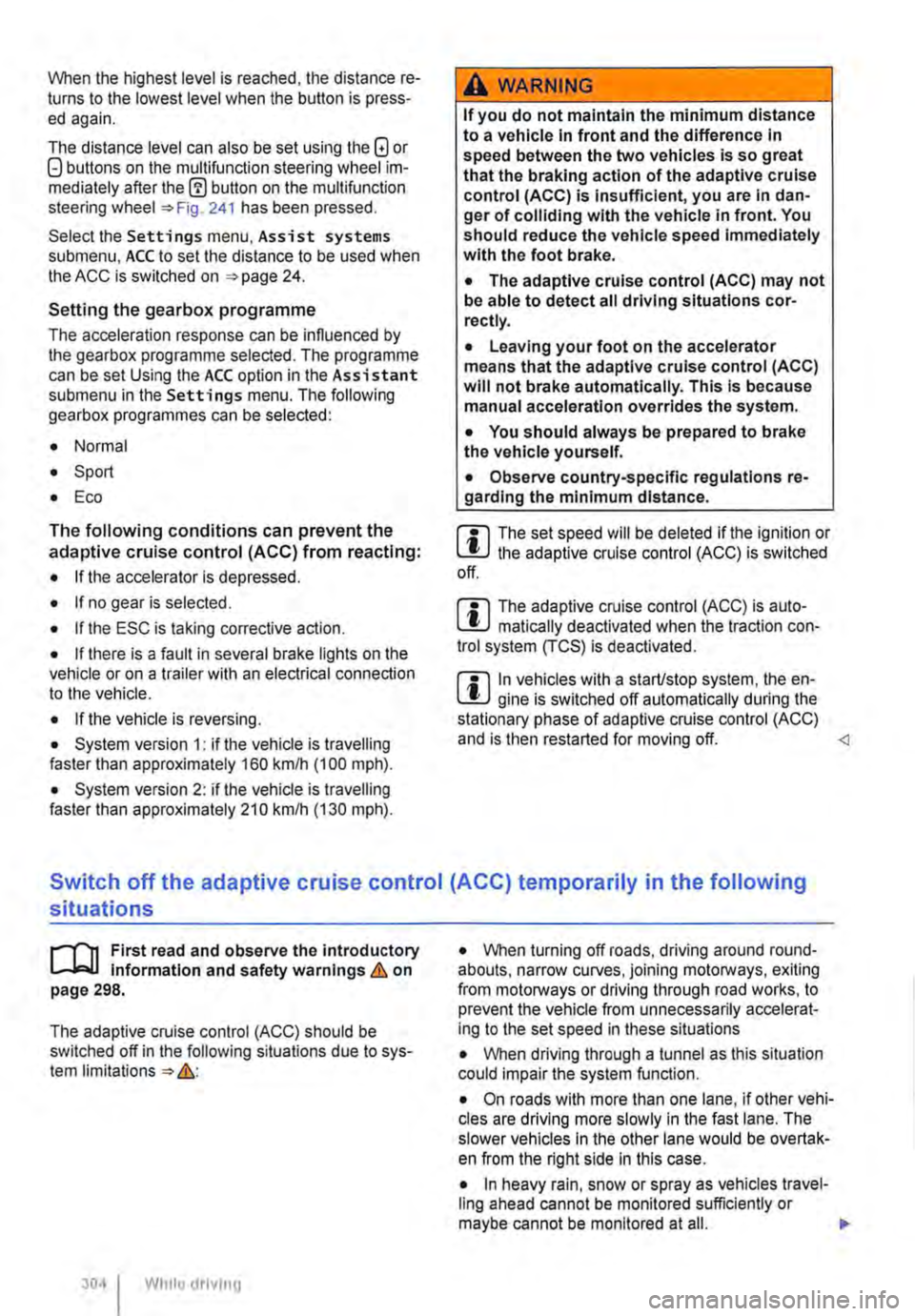
When the highest level is reached, the distance re-turns to the lowest level when the button is press-ed again.
The distance level can also be set using the Q or Q buttons on the multifunction steering wheel im-mediately after the(!) button on the multifunction steering Fig. 241 has been pressed.
Select the Settings menu, Assist systems submenu, ACC to set the distance to be used when the ACC is switched on 24.
Setting the gearbox programme
The acceleration response can be influenced by the gearbox programme selected. The programme can be set Using the ACC option in the Assistant submenu in the Settings menu. The following gearbox programmes can be selected:
• Normal
• Sport
• Eco
The following conditions can prevent the adaptive cruise control (ACC) from reacting:
• If the accelerator is depressed.
• If no gear is selected.
• If the ESC is taking corrective action.
• If there is a fault in several brake lights on the vehicle or on a trailer with an electrical connection to the vehicle.
• If the vehicle is reversing.
• System version 1: if the vehicle is travelling faster than approximately 160 km/h (1 00 m ph).
• System version 2: if the vehicle is travelling faster than approximately 210 km/h (130 mph).
A WARNING
If you do not maintain the minimum distance to a vehicle In front and the difference In speed between the two vehicles is so great that the braking action of the adaptive cruise control (ACC) is insufficient, you are In dan-ger of colliding with the vehicle in front. You should reduce the vehicle speed immediately with the foot brake.
• The adaptive cruise control (ACC) may not be able to detect all driving situations cor-rectly.
• Leaving your foot on the accelerator means that the adaptive cruise control (ACC) will not brake automatically. This is because manual acceleration overrides the system.
• You should always be prepared to brake the vehicle yourself.
• Observe country-specific regulations re-garding the minimum distance.
m The set speed will be deleted if the ignition or L!.J the adaptive cruise control (ACC) is switched off.
m The adaptive cruise control (ACC) is auto-L!.J matically deactivated when the traction con-trol system (TCS) is deactivated.
m In vehicles with a start/stop system, the en-L!.J gine is switched off automatically during the stationary phase of adaptive cruise control (ACC) and is then restarted for moving off.
situations
1""111 First read and observe the introductory L-J,:.IJ Information and safety warnings & on page 298.
The adaptive cruise control (ACC) should be switched off in the following situations due to sys-tem limitations &:
304 I While driving
• When turning off roads, driving around round-abouts, narrow curves, joining motorways, exiting from motorways or driving through road works, to prevent the vehicle from unnecessarily accelerat-ing to the set speed in these situations
• When driving through a tunnel as this situation could impair the system function.
• On roads with more than one lane, if other vehi-cles are driving more slowly in the fast lane. The slower vehicles In the other lane would be overtak-en from the right side in this case.
• In heavy rain, snow or spray as vehicles travel-ling ahead cannot be monitored sufficiently or maybe cannot be monitored at all. .,.
Page 306 of 486
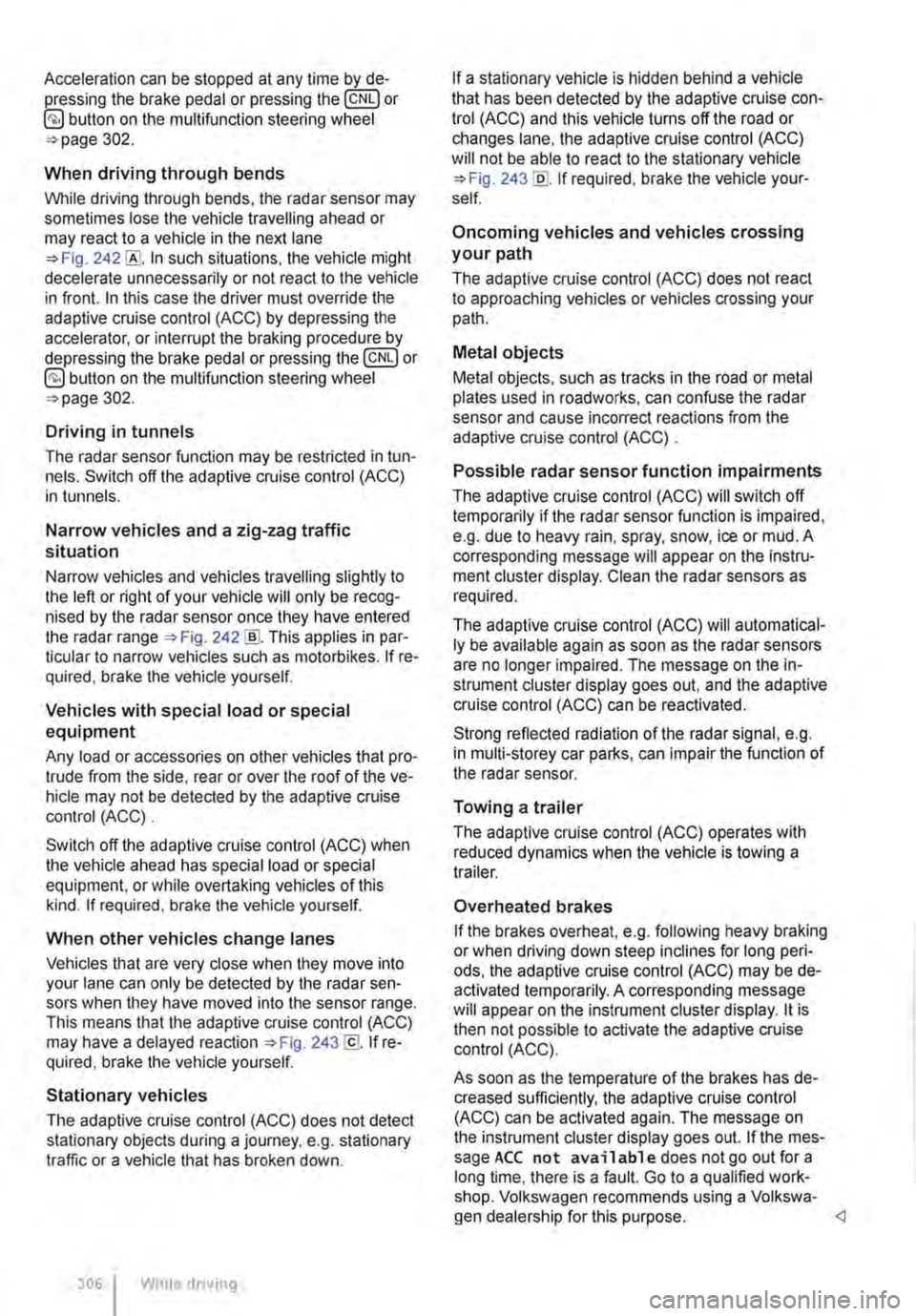
Acceleration can be stopped at any time by de-pressing the brake pedal or pressing the(@ or @ button on the multifunction steering wheel 302.
When driving through bends
While driving through bends, the radar sensor may sometimes lose the vehicle travelling ahead or may react to a vehicle in the next lane 242 !Al. In such situations, the vehicle might decelerate unnecessarily or not react to the vehicle in front. In this case the driver must override the adaptive cruise control (ACC) by depressing the accelerator, or interrupt the braking procedure by depressing the brake pedal or pressing or @ button on the multifunction steering wheel 302.
Driving in tunnels
The radar sensor function may be restricted in tun-nels. Switch off the adaptive cruise control (ACC) in tunnels.
Narrow vehicles and a zig-zag traffic situation
Narrow vehicles and vehicles travelling slightly to the left or right of your vehicle will only be recog-nised by the radar sensor once they have entered the radar range 242@ This applies in par-ticular to narrow vehicles such as motorbikes. If re-quired, brake the vehicle yourself.
Vehicles with special load or special equipment
Any load or accessories on other vehicles that pro-trude from the side, rear or over the roof of the ve-hicle may not be detected by the adaptive cruise control (ACC) .
Switch off the adaptive cruise control (ACC) when the vehicle ahead has special load or special equipment, or while overtaking vehicles of this kind. If required. brake the vehicle yourself.
When other vehicles change lanes
Vehicles that are very close when they move into your lane can only be detected by the radar sen-sors when they have moved into the sensor range. This means that the adaptive cruise control (ACC) may have a delayed reaction =>Fig. 243@]. If re-quired, brake the vehicle yourself.
Stationary vehicles
The adaptive cruise control (ACC) does not detect stationary objects during a journey, e.g. stationary traffic or a vehicle that has broken down.
306 I While driving
If a stationary vehicle is hidden behind a vehicle that has been detected by the adaptive cruise con-trol (ACC) and this vehicle turns off the road or changes lane, the adaptive cruise control (ACC) will not be able to react to the stationary vehicle 243 [Q]. If required, brake the vehicle your-self.
Oncoming vehicles and vehicles crossing your path
The adaptive cruise control (ACC) does not react to approaching vehicles or vehicles crossing your path.
Metal objects
Metal objects, such as tracks in the road or metal plates used in roadworks, can confuse the radar sensor and cause incorrect reactions from the adaptive cruise control (ACC) .
Possible radar sensor function impairments
The adaptive cruise control (ACC) will switch off temporarily if the radar sensor function is impaired, e.g. due to heavy rain, spray, snow, ice or mud. A corresponding message will appear on the instru-ment cluster display. Clean the radar sensors as required.
The adaptive cruise control (ACC) will automatical-ly be available again as soon as the radar sensors are no longer impaired. The message on the in-strument cluster display goes out, and the adaptive cruise control (ACC) can be reactivated.
Strong reflected radiation of the radar signal, e.g. in multi-storey car parks, can impair the function of the radar sensor.
Towing a trailer
The adaptive cruise control (ACC) operates with reduced dynamics when the vehicle is towing a trailer.
Overheated brakes
If the brakes overheat, e.g. following heavy braking or when driving down steep inclines for long peri-ods, the adaptive cruise control (ACC) may be de-activated temporarily. A corresponding message will appear on the instrument cluster display. lt is then not possible to activate the adaptive cruise control (ACC).
As soon as the temperature of the brakes has de-creased sufficiently, the adaptive cruise control (ACC) can be activated again. The message on the instrument cluster display goes out. If the mes-sage ACC not ava i 1 able does not go out for a long time, there is a fault. Go to a qualified work-shop. Volkswagen recommends using a Volkswa-gen dealership for this purpose.
Page 312 of 486
System limits
r-('n First read and observe the Introductory L-J,:.U Information and safety warnings & on page 307.
The area monitoring system (Front Assist) has physical and system-related limits. The driver may therefore feel that, in certain circumstances, some Front Assist reactions occur unexpectedly or with a delay. You should therefore always be prepared to take full control of the vehicle if necessary.
The following conditions can prevent Front Assist from reacting, or cause a delay in its reaction:
• In tight bends.
• If the accelerator is fully depressed.
• If Front Assist is switched off or there is a fault.
• If TCS or ESC is switched off manually.
• If the ESC is taking corrective action.
• If there is a fault in several brake lights on the vehicle or on a trailer with an electrical connection to the vehicle.
• If the radar sensor is dirty or covered.
• If the vehicle is reversing.
• Under hard acceleration.
• In snow or heavy rain.
• In case of narrow vehicles, e.g. motorbikes.
• If vehicles are travelling slightly to the left or right of your vehicle.
• If vehicles are crossing in front of your vehicle.
• If there is oncoming traffic.
• In uncertain traffic situations.
• 1/Vhen loads or attachment parts on other vehi-cles protrude to the side, rear or above the normal dimensions of the vehicle.
COJ Introduction
This chapter contains information on the following subjects:
Indicator lamp ... .
Operation ....... .
Driving situations ..........•.............
313
314
315
The lane change assist system (Side As-
sist) provides assistance when checking
for traffic behind the vehicle.
The lane change assist system cannot be switched on if the factory-fitted towing bracket is electrically connected to the trailer. The lane change assist system must be switched off manually for non-fac-tory-fitted towing brackets.
The lane change assist system has been designed for use on surfaced roads only.
Additional information and warnings:
• Exterior views =<>page 5
• Volkswagen information system =<>page 24
• Accessories, modifications, repairs and renewal of parts =<>page 394.
3121 While drivmg
A WARNING
The Intelligent technology of the lane change assist system (Side Assist) cannot change the laws of physics or the system-related ve-hicle limitations. Always take care when us-Ing the lane change assist system as you could otherwise cause accidents or Injuries. The system Is not a substitute for the full concentration of the driver.
• Adapt your speed and distance from the vehicles ahead to suit visibility, weather, road and traffic conditions.
• Your hands should always be on the steer-Ing wheel so that you can steer at any time.
• Pay attention to the visual displays in the exterior mirror housing and in the Instrument cluster display, and respond to the com-mands.
• The lane change assist system may react to special roadside structures, e.g. high or offset crash barriers. This can lead to error warnings. ,..