central locking VOLKSWAGEN TRANSPORTER 2015 Owner´s Manual
[x] Cancel search | Manufacturer: VOLKSWAGEN, Model Year: 2015, Model line: TRANSPORTER, Model: VOLKSWAGEN TRANSPORTER 2015Pages: 486, PDF Size: 72.17 MB
Page 2 of 486
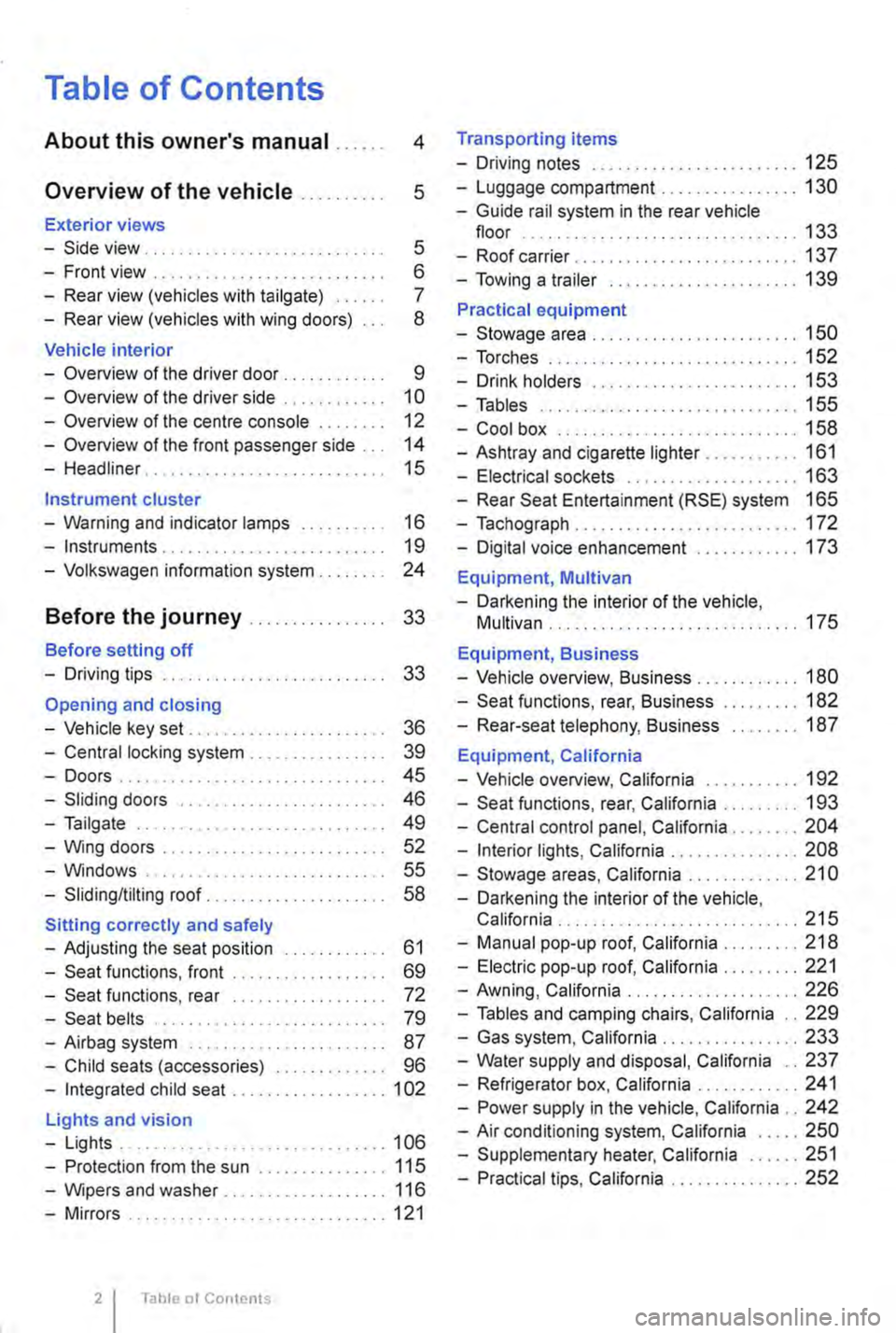
Table of Contents
About this owner's manual . . . . . . 4
Overview of the vehicle . . . . . . . . . . 5
Exterior views
-Side view . . . . . . . . . . . . . . . . . . . . . . . . . . . . 5
-Front view . . . . . . . . . . . . . . . . . . . . . . . . . . . 6
-Rear view (vehicles with tailgate) . . . . . 7
-Rear view (vehicles with wing doors) 8
Vehicle interior
-Overview of the driver door . . . . . . . . . . . 9
-Overview of the driver side . . . . . . . . . . . 10
-Overview of the centre console . . 12
-Overview of the front passenger side . . . 14
-Headliner . . . . . . . . . . . . . . . . . . . . 15
Instrument cluster
-Warning and indicator lamps . . . . . . . . . . 16
-Instruments . . . . . . . . . . . . . . . . . . . . . . . . . . 19
-Volkswagen information system . . . . . . . . 24
Before the journey . . . . . . . . . . . . . . . . 33
Before setting off
-Driving tips . . . . . . . . . . . . . . . . . . . . . . . . . . 33
Opening and closing
-Vehicle key set . . . . . . . . . . . . . . . . . . . . . . . 36
-Central locking system . . . . . . . . . . . . . . . . 39
-Doors.... . . . . . . . . . . . . . . . . . . . . . . . . . 45
-Sliding doors . . . . . . . . . . . . . . . . . . . . . . . . 46
-Tailgate . . . . . . . . . . . . . . . . . . . . . . . . . . . . 49
-Wing doors . . . . . . . . . . . . . . . . . . . . . . . . . 52
-Windows . . . . . . . . . . . . . . . . . . . . . . . . . 55
-Sliding/tilting roof. . . . . . . . . . . . . . . . 58
Sitting correctly and safely
-Adjusting the seat position . . . . . . . . . . . . 61
-Seat functions, front . . . . . . . . . . . . . . . . . . 69
-Seat functions, rear . . . . . . . . . . . . . . . . . . 72
-Seat belts . . . . . . . . . . . . . . . . . . . . . . . . . . 79
-Airbag system . . . . . . . . . . . . . . . . . . . . . . . 87
-Child seats (accessories) . . . . . . . . . . . . . 96
-Integrated child seat .................. 1 02
Lights and vision
-Lights ............................... 106
-Protection from the sun ............... 115
-Wipers and washer . . . . . . . . . . . . . 116
-Mirrors .............................. 121
Table ot Contents
Transporting items
-Driving notes ........................ 125
-Luggage compartment ................ 130
-Guide rail system in the rear vehicle floor ................................ 133
-Roof carrier ........ , ................. 137
-Towing a trailer ...................... 139
Practical equipment
-Stowage area ........................ 150
-Torches ............................. 152
-Drink holders . . . • . . . . . . . . . . . . . . . . . . 153
-Tables .............................. 155
-Cool box ............................ 158
-Ashtray and cigarette lighter ........... 161
-Electrical sockets . . . . . . . . . . . . . . . . . . . . 163
-Rear Seat Entertainment (RSE) system 165
-Tachograph . . . . . . . . . . . . . . . . . . . . . . . . . . 172
-Digital voice enhancement ............ 173
Equipment, Multivan
-Darkening the interior of the vehicle, Multivan ............................. 175
Equipment, Business
-Vehicle overview, Business . . . . . . . . . . . . 180
-Seat functions, rear, Business ......... 182
-Rear-seat telephony, Business ........ 187
Equipment, California
-Vehicle overview, California . . . . . . . . . . . 192
-Seat functions, rear, California ......... 193
-Central control panel, California ........ 204
-Interior lights, California ............... 208
-Stowage areas, California ............. 21 0
-Darkening the interior of the vehicle, California . . . . . . . . ................... 215
-Manual pop-up roof, California ......... 218
-Electric pop-up roof, California ......... 221
-Awning, California .................... 226
-Tables and camping chairs, California .. 229
-Gas system, California ................ 233
-Water supply and disposal, California .. 237
-Refrigerator box, California ............ 241
-Power supply in the vehicle, California .. 242
-Air conditioning system, California ..... 250
-Supplementary heater, California ...... 251
-Practical tips, California ............... 252
Page 9 of 486
Vehicle interior
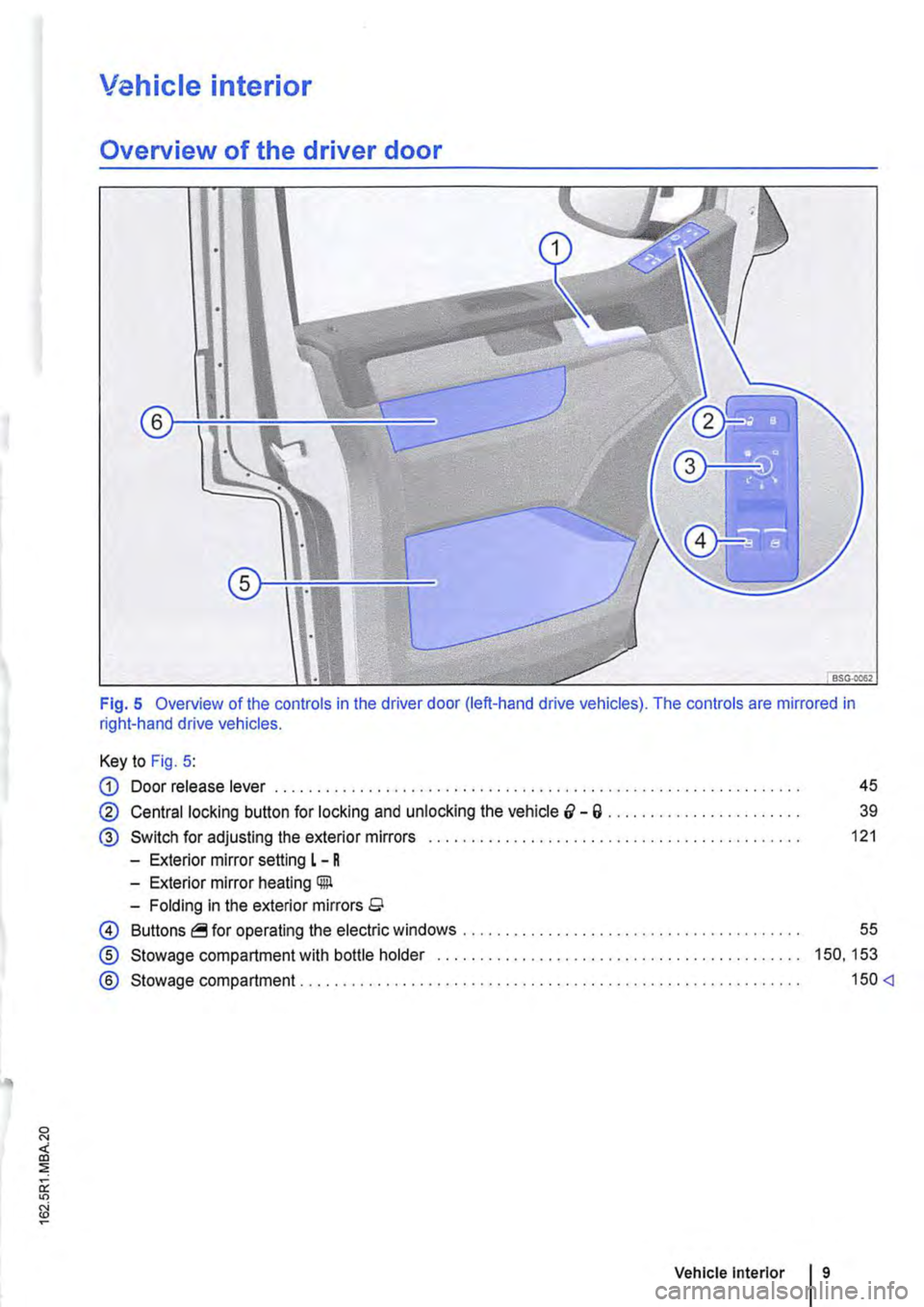
Overview of the driver door
Fig. 5 Overview of the controls in the driver door (left-hand drive vehicles). The controls are mirrored in right-hand drive vehicles.
Key to Fig. 5:
G) Door release lever . . . . . . . . . . . . . . . . . . . . . . . . . . . . . . . . . . . . . . . . . . . . . . . . . 45
@ Central locking button for locking and unlocking the vehicle &-a . . . . . . . . . . . . . . . . . . . . . 39
® Switch for adjusting the exterior mirrors . . . . . . . . . . . . . . . . . . . . . . . . . . . . . . . . . . . . . 121
-Exterior mirror setting L - R
-Exterior mirror heating Gill
-Folding in the exterior mirrors 9
0 Buttons operating the electric windows ..
® Stowage compartment with bottle holder
® Stowage compartment ..................... .
55
150, 153
150
Page 25 of 486
A WARNING
Accidents and injuries can occur if the driver is distracted.
• Never open the menus on the instrument cluster display while the vehicle is in motion.
r::l After starting the engine with a discharged l!..J vehicle battery, or after the battery has been changed, system settings (time, date, personal
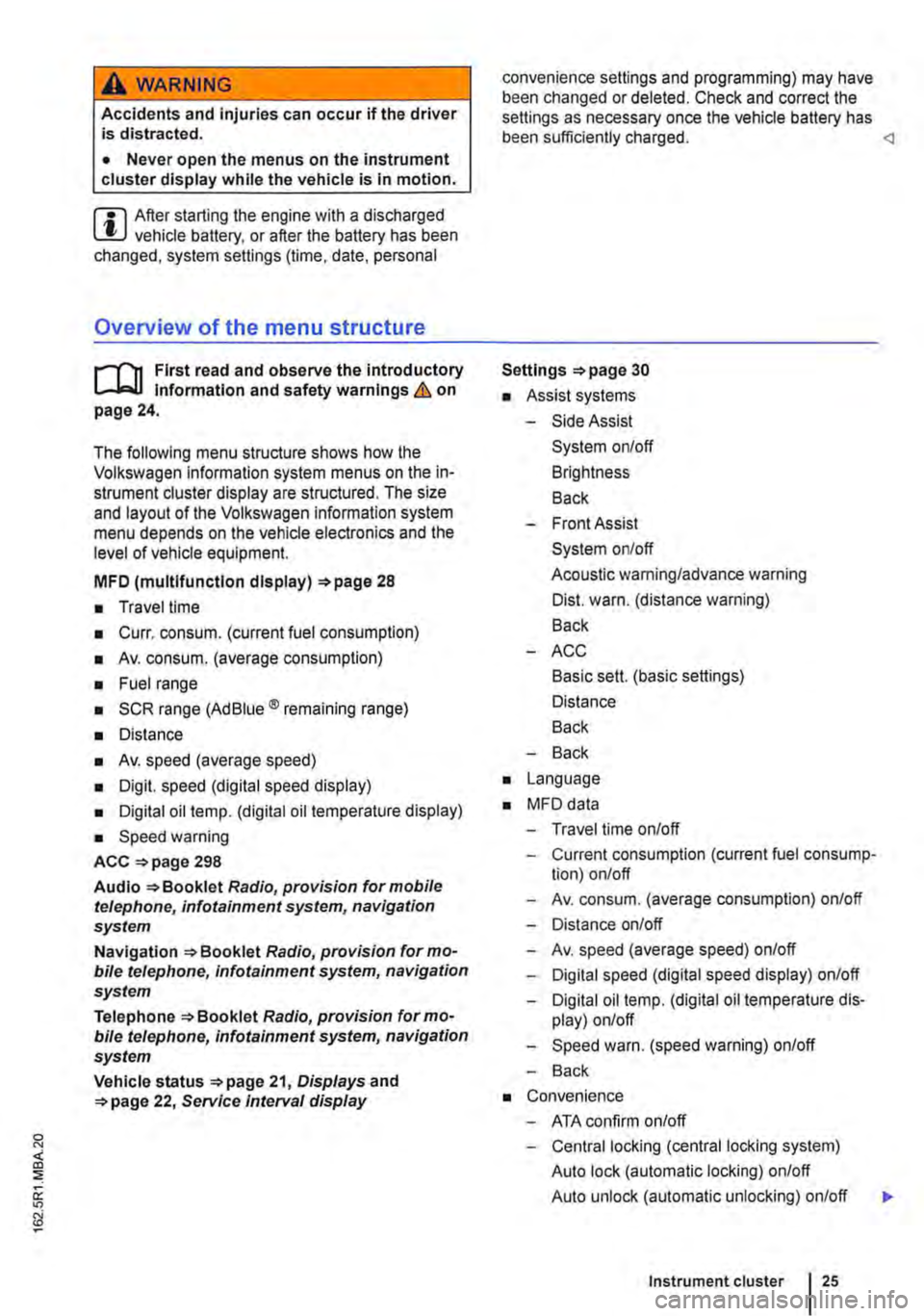
Overview of the menu structure
nl1 First read and observe the introductory 1-J,::.JJ Information and safety warnings & on page 24.
The following menu structure shows how the Volkswagen information system menus on the in-strument cluster display are structured. The size and layout of the Volkswagen information system menu depends on the vehicle electronics and the level of vehicle equipment.
MFD (multlfunctlon display) 28
• Travel time
• Curr. consum. (current fuel consumption)
• Av. consum. (average consumption)
• Fuel range
• SCR range (Ad Blue® remaining range)
• Distance
• Av. speed (average speed)
• Digit. speed (digital speed display)
• Digital oil temp. (digital oil temperature display)
• Speed warning
ACC =>page 298
Audio Radio, provision for mobile telephone, infotainment system, navigation system
Navigation Radio, provision for mo-bile telephone, infotainment system, navigation system
Telephone Radio, provision for mo-bile telephone, infotainment system, navigation system
Vehicle status 21, Displays and 22, Service Interval display
convenience settings and programming) may have been changed or deleted. Check and correct the settings as necessary once the vehicle battery has been sufficiently charged.
• Assist systems
-Side Assist
System on/off
Brightness
Back
-Front Assist
System on/off
Acoustic warning/advance warning
Dist. warn. (distance warning)
Back
-ACC
Basic sett. (basic settings)
Distance
Back
-Back
• Language
• MFD data
-Travel time on/off
-Current consumption (current fuel consump-tion) on/off
-Av. consum. (average consumption) on/off
-Distance on/off
-Av. speed (average speed) on/off
-Digital speed (digital speed display) on/off
-Digital oil temp. (digital oil temperature dis-play) on/off
-Speed warn. (speed warning) on/off
-Back
• Convenience
-ATA confirm on/off
-Central locking (central locking system)
Auto lock (automatic locking) on/off
Auto unlock (automatic unlocking) on/off
Instrument cluster 25
...
Page 31 of 486
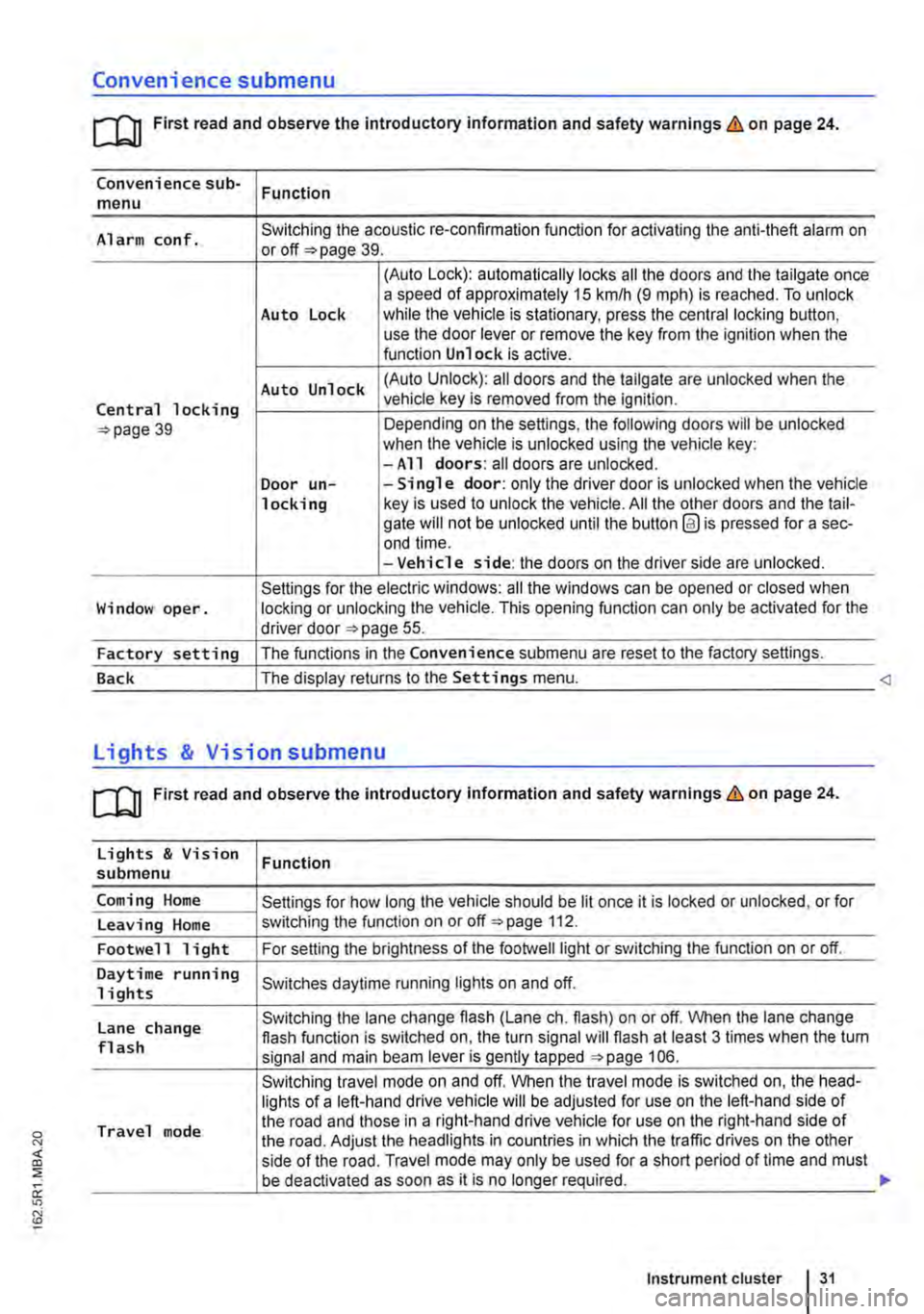
Convenience submenu
m First read and observe the introductory information and safety warnings & on page 24.
Convenience sub-menu Function
Alarm conf. Switching the acoustic re-confirmation function for activating the anti-theft alarm on or page 39.
(Auto Lock): automatically locks all the doors and the tailgate once a speed of approximately 15 km/h (9 m ph) is reached. To unlock Auto Lock while the vehicle is stationary, press the central locking button, use the door lever or remove the key from the ignition when the function Unlock is active.
Auto Unlock (Auto Unlock): all doors and the tailgate are unlocked when the
Central locking vehicle key is removed from the ignition.
39 Depending on the settings, the following doors will be unlocked when the vehicle is unlocked using the vehicle key: -All doors: all doors are unlocked. Door un--Single door: only the driver door is unlocked when the vehicle locking key is used to unlock the vehicle. All the other doors and the tail-gate will not be unlocked until the button @ is pressed for a sec-end time. -Vehicle side: the doors on the driver side are unlocked.
Settings for the electric windows: all the windows can be opened or closed when Window oper. locking or unlocking the vehicle. This opening function can only be activated for the driver door 55.
Factory setting The functions in the Convenience submenu are reset to the factory settings.
Back The display returns to the Settings menu.
[QJ First read and observe the introductory information and safety warnings & on page 24.
Lights & Vision Function submenu
Coming Home Settings for how long the vehicle should be lit once it is locked or unlocked, or for
Leaving Home switching the function on or off 112.
Footwell light For setting the brightness of the footwelllight or switching the function on or off.
Daytime running Switches daytime running lights on and off. 1 i ghts
Lane change Switching the lane change flash (Lane eh. flash) on or off. When the lane change flash function is switched on, the turn signal will flash at least 3 times when the tum flash signal and main beam lever is gently tapped 106.
Switching travel mode on and off. When the travel mode is switched on, the head-lights of a left-hand drive vehicle will be adjusted for use on the left-hand side of
Travel mode the road and those in a right-hand drive vehicle for use on the right-hand side of the road. Adjust the headlights in countries in which the traffic drives on the other side of the road. Travel mode may only be used for a short period of time and must be deactivated as soon as it is no longer required.
Instrument cluster 31
Page 36 of 486

Opening and closing
Vehicle key set
COl Introduction
This chapter contains information on the following subjects:
Vehicle key . . . . . . . . . . . . . . . . . . . . . . . . . . . . . 37 Indicator lamp in the remote control key . . . . . 38 Replacing the battery . . . . . . . . . . . . . 38 Synchronising the remote control key . . . . . . . 39
Additional Information and warnings:
• Settings in the Volkswagen information system 24
• Central locking system 39
• Starting and stopping the engine 257
• Consumer information 404
• Manual opening and closing 413
A DANGER .
Swallowing batteries with a diameter of 20 mm or other lithium batteries can result In severe or even fatal injuries within a very short period of time.
• Always keep the vehicle key, key ring with batteries, spare batteries, round cells and other batteries that are larger than 20 mm out of the reach of children.
• Call for medical help Immediately you sus-pect that someone has swallowed a battery.
36 Before tho journey
A WARNING
Careless or unsupervised use of the vehicle key can lead to accidents or injuries.
• Always take all vehicle keys with you ev-ery time you leave the vehicle. Children or third parties could lock the doors and tail-gate, start the engine or switch on the igni-tion and thus operate electrical equipment, such as the electric windows.
• Never leave children or people requiring assistance alone In the vehicle. They could become trapped In the vehicle in an emergen-cy and may not be able to get themselves to safety. For example, locked vehicles may be subjected to very high or very low tempera-tures, according to season. This can cause serious Injuries and Illness or fatalities, espe-cially for small children.
A WARNING
Improper use of the vehicle key could lead to the engine being switched off and the steer-Ing lock engaging, which would render the vehicle unsteerable.
• Never remove the vehicle key from the Ig-nition lock when the vehicle Is In motion.
• When folding out the key bit, ensure that lt Is folded out completely and engaged fully.
• Never attach heavy objects to the vehicle key. Attach only light objects, If at all, such as a key fob with up to five house keys. <
Page 37 of 486
Vehicle key
B D E
B7E:c2Ja
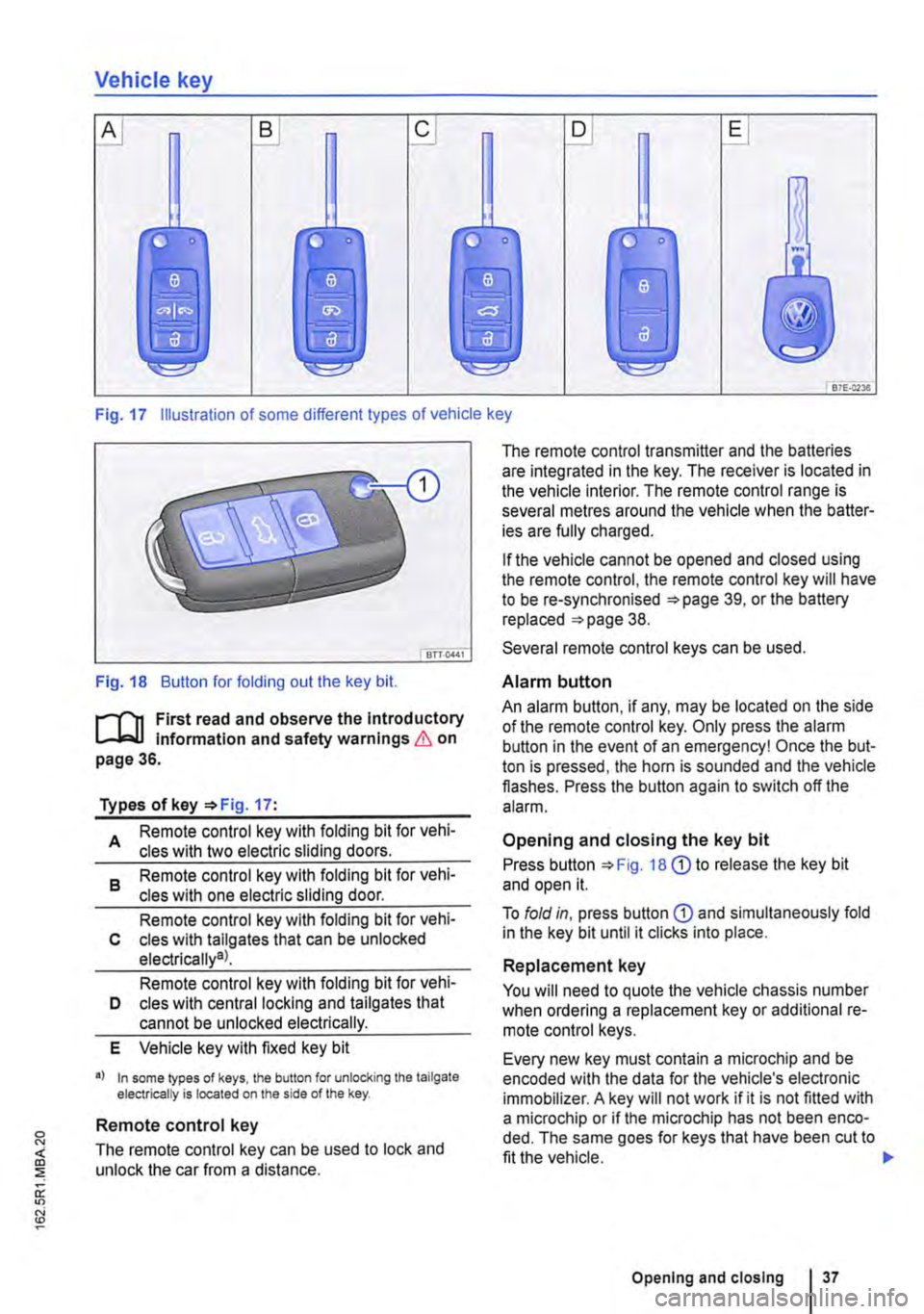
Fig. 17 Illustration of some different types of vehicle key
Fig. 18 Button for folding out the key bit.
r-('n First read and observe the Introductory L-J,..lJ Information and safety warnings & on page 36.
Types of key '*Fig. 17:
A Remote control key with folding bit for vehi-cles with two electric sliding doors.
8 Remote control key with folding bit for vehi-cles with one electric sliding door.
Remote control key with folding bit for vehi-c cles with tallgates that can be unlocked electrically9l.
Remote control key with folding bit for vehi-D cles with central locking and tailgates that cannot be unlocked electrically.
E Vehicle key with fixed key bit
•I In some lypes of keys, lhe button for unlocking the tailgate electrically is located on the side of the key.
Remote control key
The remote control key can be used to lock and unlock the car from a distance.
The remote control transmitter and the batteries are integrated in the key. The receiver is located in the vehicle interior. The remote control range is several metres around the vehicle when the batter-ies are fully charged.
If the vehicle cannot be opened and closed using the remote control, the remote control key will have to be re-synchronised '*page 39, or the battery replaced '*page 38.
Several remote control keys can be used.
Alarm button
An alarm button, if any, may be located on the side of the remote control key. Only press the alarm button in the event of an emergency! Once the but-ton is pressed, the horn is sounded and the vehicle flashes. Press the button again to switch off the alarm.
Opening and closing the key bit
Press button '*Fig. 18 G) to release the key bit and open it.
To fold in, press button G) and simultaneously fold in the key bit until it clicks into place.
Replacement key
You will need to quote the vehicle chassis number when ordering a replacement key or additional re-mote control keys.
Every new key must contain a microchip and be encoded with the data for the vehicle's electronic immobilizer. A key will not work if it is not fitted with a microchip or if the microchip has not been enco-ded. The same goes for keys that have been cut to fit the vehicle.
Opening and closing I 37
Page 39 of 486
Replacing the battery
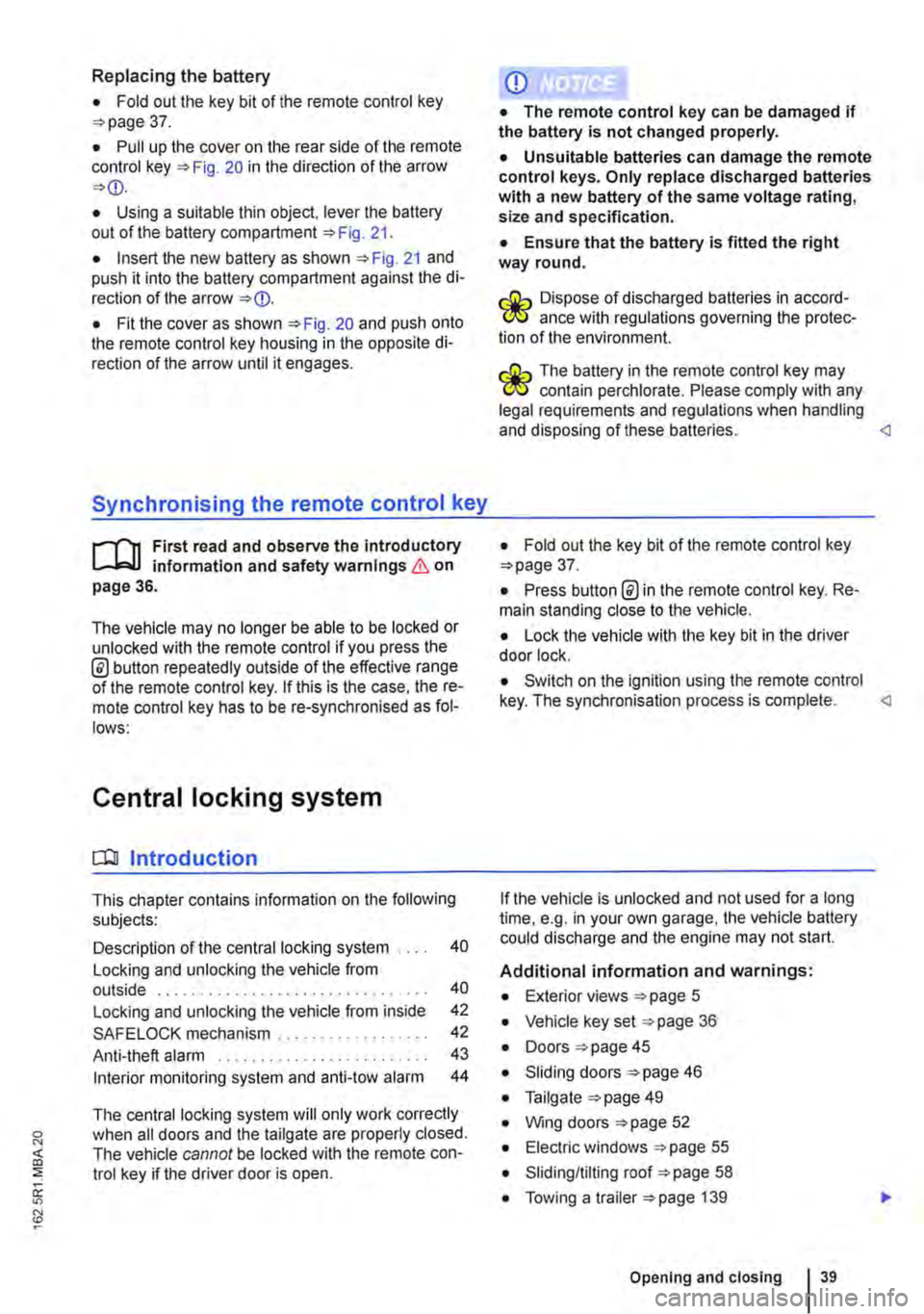
• Fold out the key bit of the remote control key =>page 37.
• Pull up the cover on the rear side of the remote control key =>Fig. 20 in the direction of the arrow =>
• Insert the new battery as shown =>Fig. 21 and push it into the battery compartment against the di-rection of the arrow =>
Synchronising the remote control key
,--m First read and observe the introductory L-.lo:.ll information and safety warnings & on page 36.
The vehicle may no longer be able to be locked or unlocked with the remote control if you press the @ button repeatedly outside of the effective range of the remote control key. If this is the case. the re-mote control key has to be re-synchronised as fol-lows:
Central locking system
CQ Introduction
This chapter contains information on the following subjects:
Description of the central locking system . . . . 40
Locking and unlocking the vehicle from outside . . . . . . . . . . . . . . . . . . . . . . . . . . . . . . . . 40
Locking and unlocking the vehicle from inside
SAFELOCK mechanism ................. .
Anti-theft alarm ........................ .
Interior monitoring system and anti-tow alarm
42
42
43
44
The central locking system will only work correctly when all doors and the tailgate are properly closed. The vehicle cannot be locked with the remote con-trol key if the driver door is open.
CD
• The remote control key can be damaged if the battery is not changed properly.
• Unsuitable batteries can damage the remote control keys. Only replace discharged batteries with a new battery of the same voltage rating, size and specification.
• Ensure that the battery Is fitted the right way round.
r:lib Dispose of discharged batteries in accord-W ance with regulations governing the protec-tion of the environment.
r:lib The battery in the remote control key may W contain perchlorate. Please comply with any legal requirements and regulations when handling and disposing of these batteries.
• Press button @in the remote control key. Re-main standing close to the vehicle.
• Lock the vehicle with the key bit in the driver door lock.
• Switch on the ignition using the remote control key. The synchronisation process is complete.
Additional information and warnings:
• Exterior views =>page 5
• Vehicle key set =>page 36
• Doors => page 45
• Sliding doors =>page 46
• Tailgate =>page 49
• Wing doors =>page 52
• Electric windows =>page 55
• Sliding/tilting roof =>page 58
• Towing a trailer =>page 139
Opening and closing 39
Page 40 of 486
• Cleaning and caring for the vehide exterior 380
• Manual opening and dosing 413
A WARNING
Improper use of the central locking system could lead to serious injury.
• The central locking system locks all doors. Locking the vehicle from the inside can prevent accidental opening of the doors and unauthorised persons from entering the vehicle. However, locked doors can delay as-sistance to passengers inside the vehicle in the event of an accident or emergency.
• Never leave children or people requiring assistance alone in the vehicle. All doors can be locked from the Inside using the central
6 WARNING (Continued)
locking button. This may mean that people lock themselves In the vehicle. People locked In the vehicle may be subjected to very high or very low temperatures.
• Temperatures Inside a locked vehicle may reach extremes of heat or cold, according to season. This can cause serious Injuries and Illness or fatalities, especially to small chil-dren.
• Never leave anyone Inside a locked vehi-cle. People In the vehicle could become trap-ped In an emergency and may not be able to get themselves to safety.
• Doors and the tailgate should therefore only be opened or closed when you are sure that nobody Is in their path.
Description of the central locking system
r"'f"n First read and observe the Introductory L-Jc.l.l Information and safety warnings & on page 39.
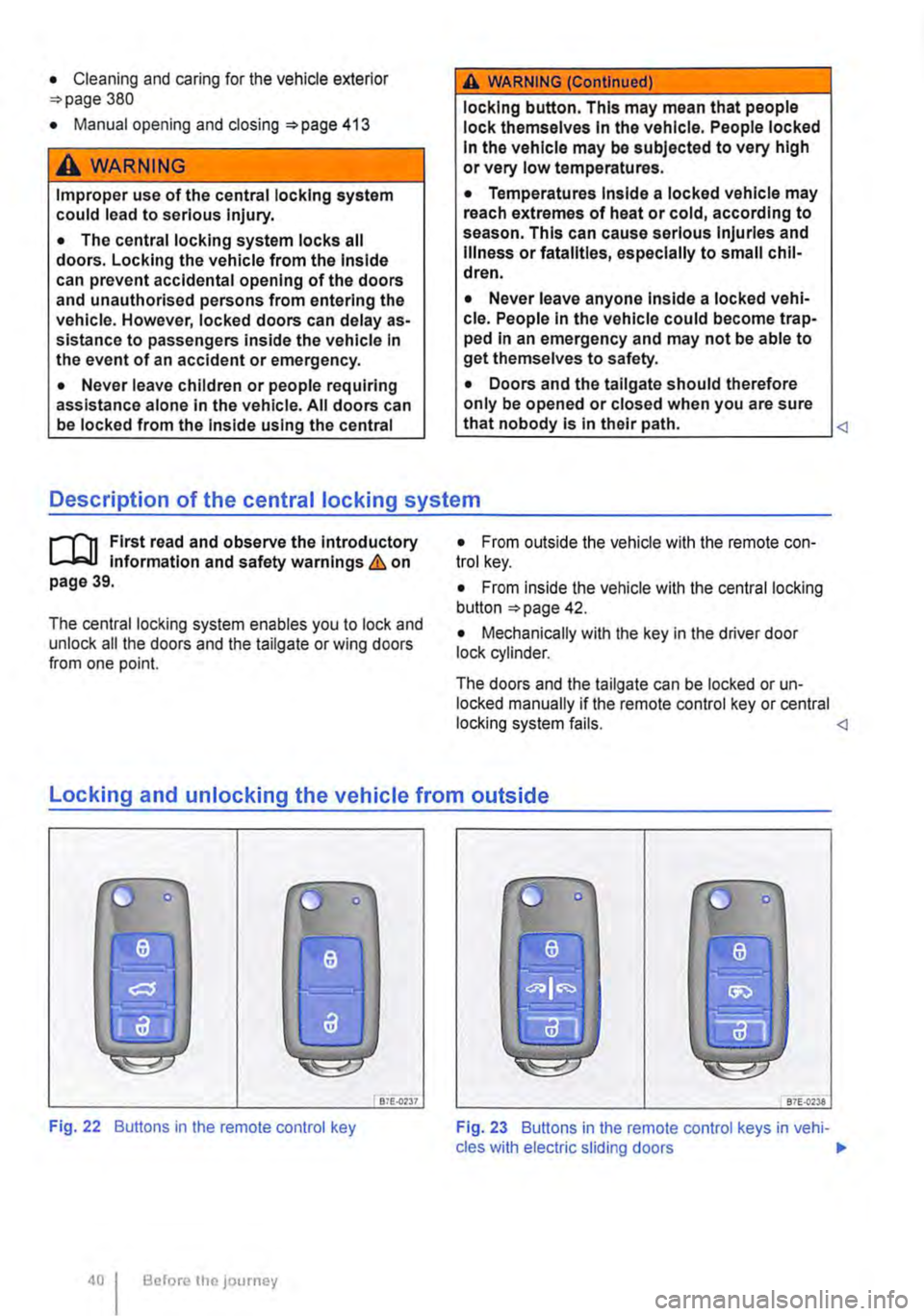
The central locking system enables you to lock and unlock all the doors and the tailgate or wing doors from one point.
• From outside the vehicle with the remote con-trol key.
• From inside the vehicle with the central locking button 42.
• Mechanically with the key in the driver door lock cylinder.
The doors and the tailgate can be locked or un-locked manually if the remote control key or central locking system fails. <1
locking and unlocking the vehicle from outside
liJ
Fig. 22 Buttons in the remote control key
Before the JOurney
Bi£..0237 87E-{)'238
Fig. 23 Buttons in the remote control keys in vehi-cles with electric sliding doors .,.
Page 42 of 486
Locking and unlocking the vehicle from inside
c
1 PSG-0030
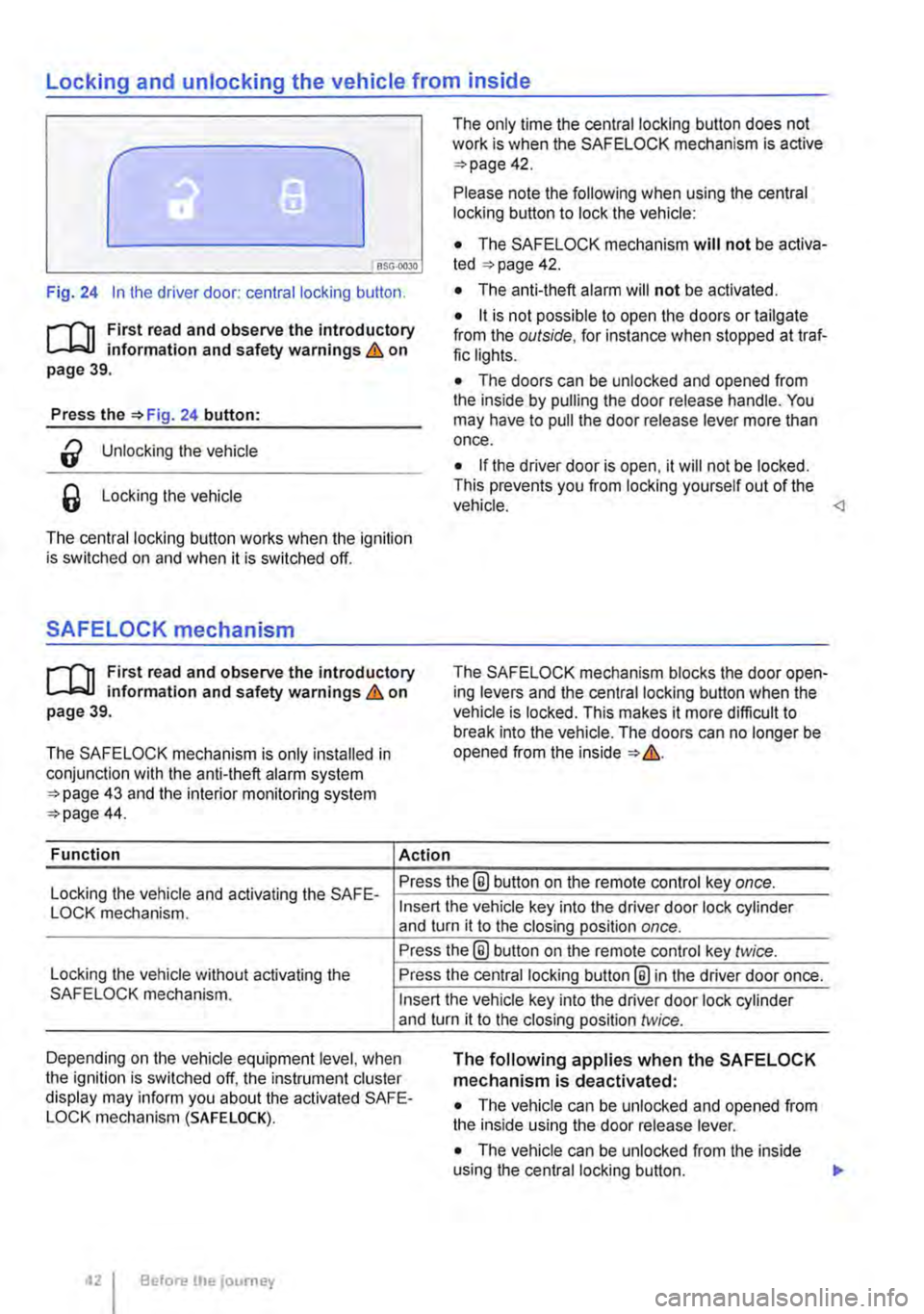
Fig. 24 In the driver door: central locking button.
rf'n First read and observe the introductory L.-J=.I.I information and safety warnings & on page 39.
Press the =>Fig. 24 button:
a Unlocking the vehicle
6 Locking the vehicle
The central locking button works when the ignition is switched on and when it is switched off.
SAFELOCK mechanism
rf'n First read and observe the introductory L.-J=.I.I information and safety warnings & on page 39.
The SAFELOCK mechanism is only installed in conjunction with the anti-theft alarm system =>page 43 and the interior monitoring system =>page 44.
Function Action
The only time the central locking button does not work is when the SAFE LOCK mechanism is active =>page 42.
Please note the following when using the central locking button to lock the vehicle:
• The SAFELOCK mechanism will not be activa-ted =:>page 42.
• The anti-theft alarm will not be activated.
• it is not possible to open the doors or tailgate from the outside, for instance when stopped at traf-fic lights.
• The doors can be unlocked and opened from the inside by pulling the door release handle. You may have to pull the door release lever more than once.
• If the driver door is open, it will not be locked. This prevents you from locking yourself out of the vehicle.
Locking the vehicle and activating the SAFE-Press the® button on the remote control key once.
LOCK mechanism.
Locking the vehicle without activating the SAFELOCK mechanism.
Insert the vehicle key into the driver door lock cylinder and turn it to the closing position once.
Press the@ button on the remote control key twice.
Press the central locking button@ in the driver door once.
Insert the vehicle key into the driver door lock cylinder and turn it to the closing position twice.
Depending on the vehicle equipment level, when the ignition is switched off, the instrument cluster display may inform you about the activated SAFE-LOCK mechanism (SAFE LOCK).
The following applies when the SAFELOCK mechanism is deactivated:
• The vehicle can be unlocked and opened from the inside using the door release lever.
• The vehicle can be unlocked from the inside using the central locking button. .,.
Before the journey
Page 44 of 486
m Due to the current legislation on the Israel W market, the acoustic warning signals are de-activated there.
m The alarm will be triggered again if a person W gains access to the same or a different se-cured zone after the alarm has been switched off. For example, if the tailgate is opened after a door had been opened.
m The anti-theft alarm will not be activated if W the vehicle is locked from the Inside using the central locking button @.
m If you unlock the driver door mechanically us-L!J ing the vehicle key, only the driver door is un-locked, and not the whole vehicle. The SAFELOCK mechanism on all doors is not deactivated and the central locking button is not activated until you switch on the ignition (however the doors will not be unlocked).
m The anti-theft alarm will not function correctly W if the vehicle battery is weak or discharged.
m lt is not possible to include the trailer in the W anti-theft alarm system.
81f·01U
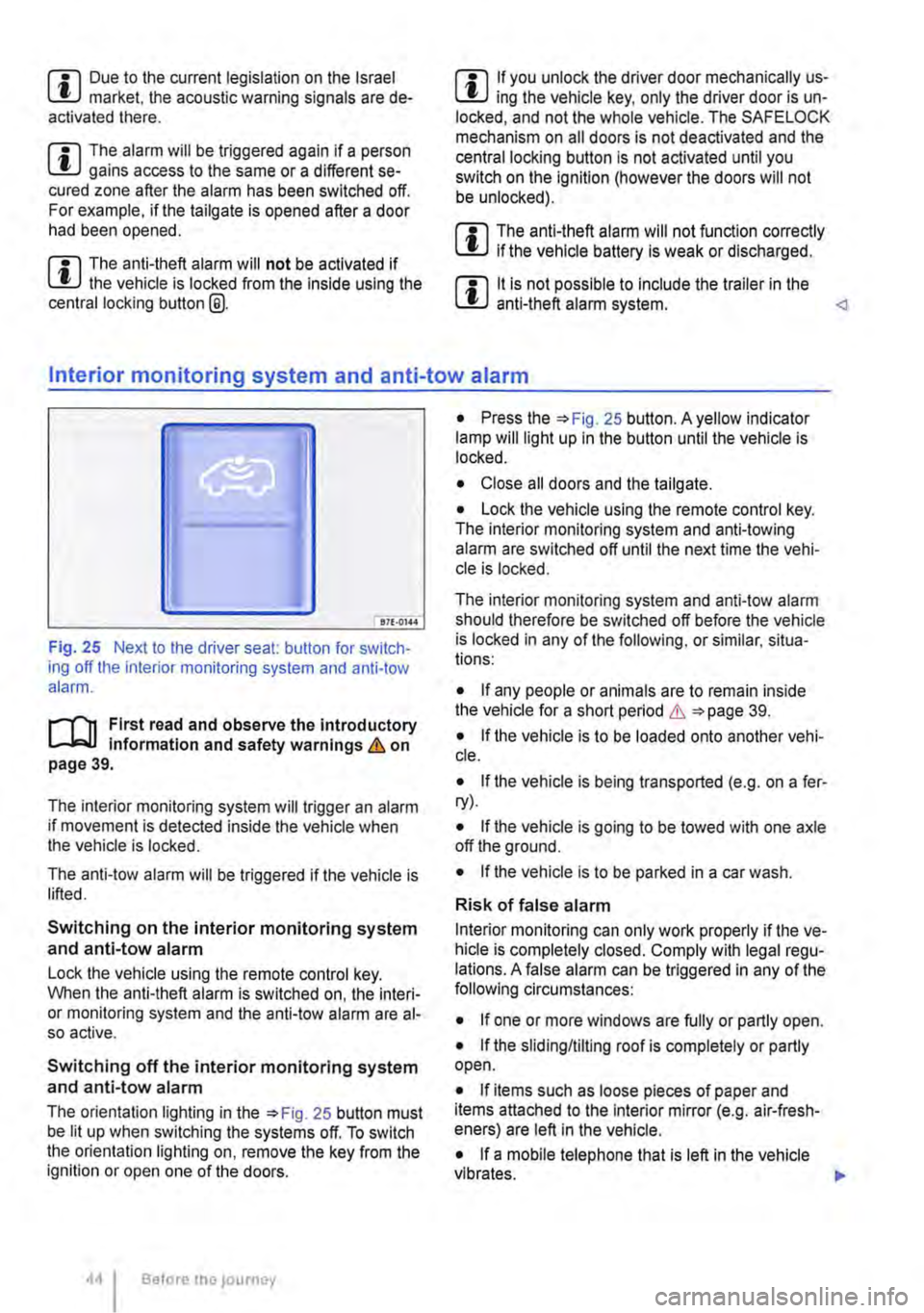
Fig. 25 Next to the driver seat: button for switch-ing off the interior monitoring system and anti-tow alarm.
r-f"n First read and observe the introductory information and safety warnings & on page 39.
The interior monitoring system will trigger an alarm if movement is detected inside the vehicle when the vehicle is locked.
The anti-tow alarm will be triggered if the vehicle is lifted.
Switching on the interior monitoring system and anti-tow alarm
Lock the vehicle using the remote control key. When the anti-theft alarm is switched on, the interi-or monitoring system and the anti-tow alarm are al-so active.
Switching off the interior monitoring system and anti-tow alarm
The orientation lighting in the =>Fig. 25 button must be lit up when switching the systems off. To switch the orientation lighting on, remove the key from the ignition or open one of the doors.
Before the journey
• Press the =>Fig. 25 button. A yellow indicator lamp will light up in the button until the vehicle is locked.
• Close all doors and the tailgate.
• Lock the vehicle using the remote control key. The interior monitoring system and anti-towing alarm are switched off until the next time the vehi-cle is locked.
The interior monitoring system and anti-tow alarm should therefore be switched off before the vehicle is locked in any of the following, or similar, situa-tions:
• If any people or animals are to remain inside the vehicle for a short period & =>page 39.
• If the vehicle is to be loaded onto another vehi-cle.
• If the vehicle is being transported (e.g. on a fer-ry).
• If the vehicle is going to be towed with one axle off the ground.
• If the vehicle is to be parked in a car wash.
Risk of false alarm
Interior monitoring can only work properly if the ve-hicle is completely closed. Comply with legal regu-lations. A false alarm can be triggered in any of the following circumstances:
• If one or more windows are fully or partly open.
• If the slidingflilting roof is completely or partly open.
• If items such as loose pieces of paper and items attached to the Interior mirror (e.g. air-fresh-eners) are left in the vehicle.
• If a mobile telephone that is left in the vehicle vibrates. 11>-