steering VOLKSWAGEN TRANSPORTER 2019 Owner's Manual
[x] Cancel search | Manufacturer: VOLKSWAGEN, Model Year: 2019, Model line: TRANSPORTER, Model: VOLKSWAGEN TRANSPORTER 2019Pages: 486, PDF Size: 69.28 MB
Page 118 of 486
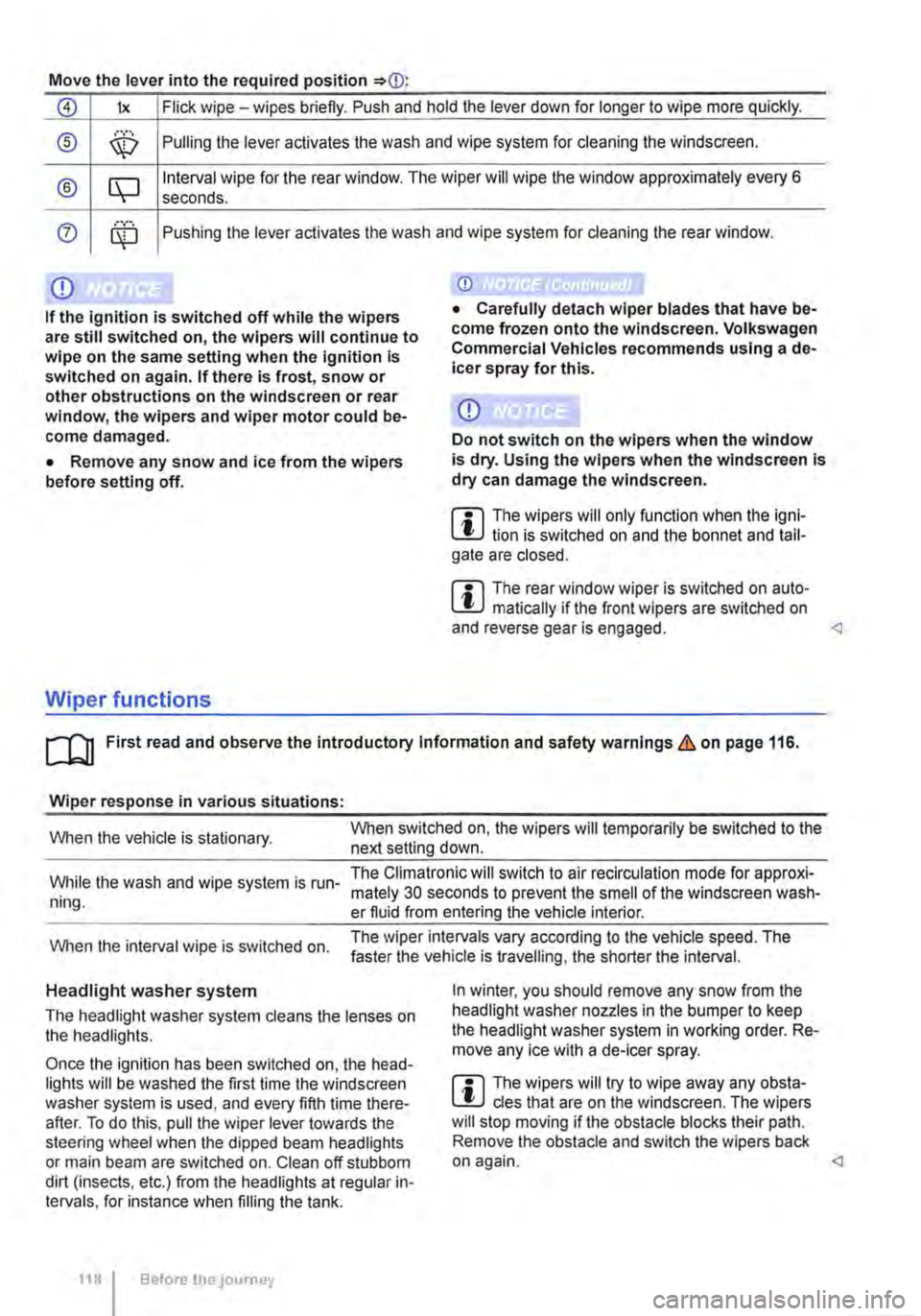
Move the lever into the required position
0 lx Flick wipe -wipes briefly. Push and hold the lever down for longer to wipe more quickly.
® ,··.··· \X:) Pulling the lever aclivates the wash and wipe system for cleaning the windscreen.
® CQ Interval wipe for the rear window. The wiper will wipe the window approximately every 6 seconds .
0 ........ Pushing the lever activates the wash and wipe system for cleaning the rear window.
Q)
If the ignition is switched off while the wipers are still switched on, the wipers will continue to wipe on the same setting when the ignition Is switched on again. If there Is frost, snow or other obstructions on the windscreen or rear window, the wipers and wiper motor could be-come damaged.
• Remove any snow and ice from the wipers before setting off.
Wiper functions
Q)
Do not switch on the wipers when the window is dry. Using the wipers when the windscreen Is dry can damage the windscreen.
m The wipers will only function when the igni-W lion is switched on and the bonnet and tail-gate are closed.
m The rear window wiper is switched on auto-W matically if the front wipers are switched on and reverse gear is engaged.
Wiper response in various situations:
When the vehicle is stationary. When switched on, the wipers will temporarily be switched to the next setting down.
While the wash and wipe system is run-ning.
The Climatronic will switch to air recirculation mode for approxi-mately 30 seconds to prevent the smell of the windscreen wash-er fluid from entering the vehicle interior.
When the interval wipe is switched on. The wiper intervals vary according to the vehicle speed. The faster the vehicle is travelling, the shorter the interval.
Headlight washer system
The headlight washer system cleans the lenses on the headlights.
Once the ignition has been switched on, the head-lights will be washed the first time the windscreen washer system is used, and every fifth time there-after. To do this, pull the wiper lever towards the steering wheel when the dipped beam headlights or main beam are switched on. Clean off stubborn dirt (insects, etc.) from the headlights at regular in-tervals, for instance when filling the tank.
118 Before the journey
In winter, you should remove any snow from the headlight washer nozzles in the bumper to keep the headlight washer system in working order. Re-move any ice with a de-icer spray.
m The wipers will try to wipe away any obsta-W cles that are on the windscreen. The wipers will stop moving if the obstacle blocks their path. Remove the obstacle and switch the wipers back on again.
Page 119 of 486
Service position for the front wipers
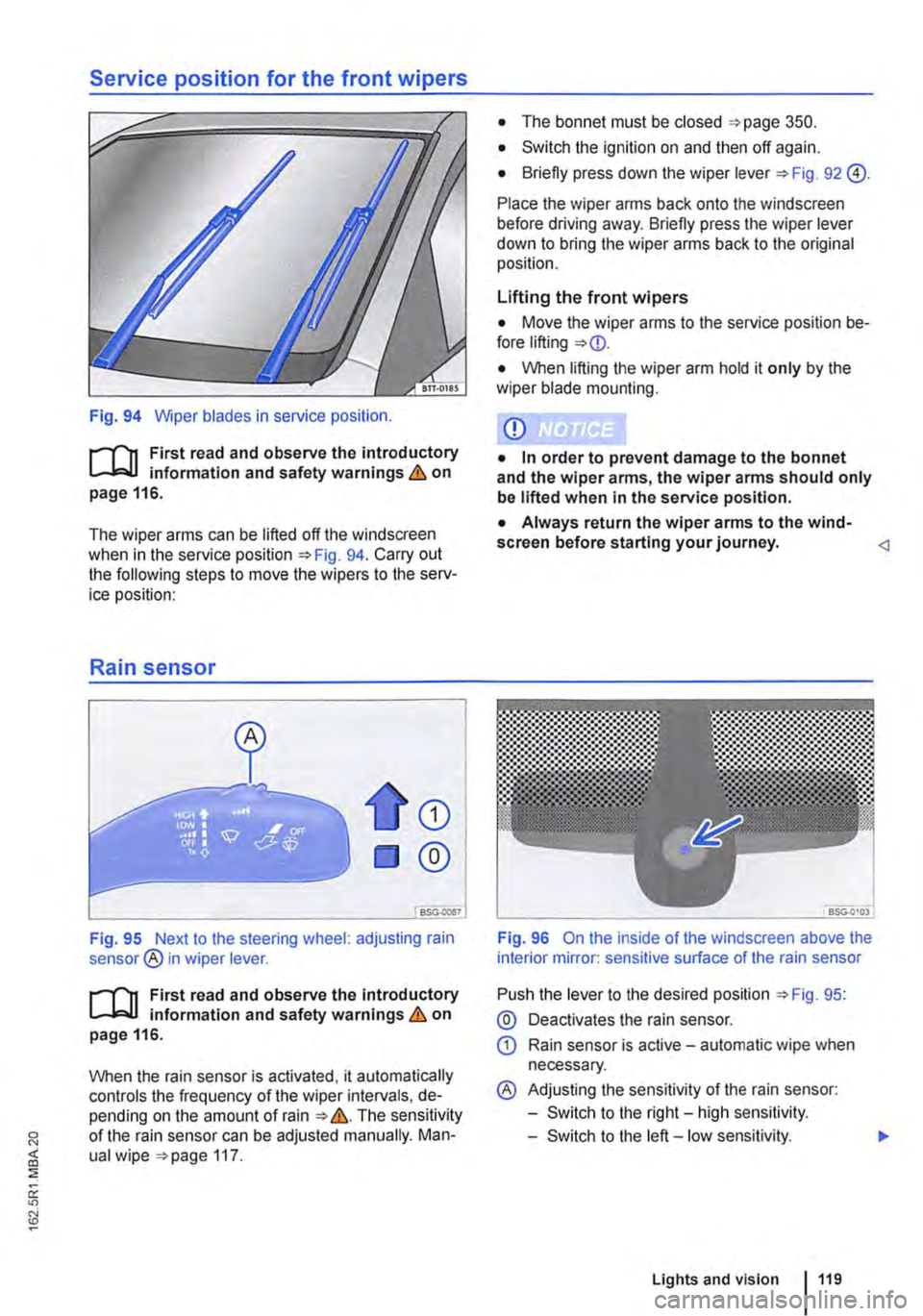
Fig. 94 Wiper blades in service position.
r--('n First read and observe the introductory L-J,::.IJ information and safety warnings & on page 116.
The wiper arms can be lifted off the windscreen when in the service position 94. Carry out the following steps to move the wipers to the serv-ice position:
Rain sensor
CD
®
Fig. 95 Next to the steering wheel: adjusting rain sensor® in wiper lever.
r--('n First read and observe the introductory L-J,::.U information and safety warnings & on page 116.
When the rain sensor is activated, it automatically controls the frequency of the wiper intervals, de-pending on the amount of rain &. The sensitivity of the rain sensor can be adjusted manually. Man-ual wipe 117.
• The bonnet must be closed 350.
• Switch the ignition on and then off again.
• Briefly press down the wiper lever 92 @).
Place the wiper arms back onto the windscreen before driving away. Briefly press the wiper lever down to bring the wiper arms back to the original position.
Lifting the front wipers
• Move the wiper arms to the service position be-fore lifting
• When lifting the wiper arm hold it only by the wiper blade mounting.
CD
• In order to prevent damage to the bonnet and the wiper arms, the wiper arms should only be lifted when in the service position.
• Always return the wiper arms to the wind-screen before starting your journey.
Push the lever to the desired position 95:
@ Deactivates the rain sensor.
CD Rain sensor is active -automatic wipe when necessary.
® Adjusting the sensitivity of the rain sensor:
-Switch to the right-high sensitivity.
-Switch to the left -low sensitivity.
Lights and vision 119
Page 150 of 486
Practical equipment
Stowage area
o::n Introduction
This chapter contains information on the following subjects:
Stowage compartments on the dash panel . . 151 Stowage compartment on the front passenger side . . . . . . . . . . . . . . . . . . . . . . . . . 151 Other stowage compartments . . . . . . . . . . . . . 152
Only use stowage compartments to stow light or smaller objects.
A factory-fitted AUX-IN socket or the USB sock-may be located in the storage compartment on the front passenger side =>Booklet Radio, provi-sion for mobile telephone, infotainment system, navigation system.
Additional information and warnings:
• Seat functions, front => page 69
• Seat functions, rear =>page 72
• Stowage =>page 150
• Drink holder => page 153
• Central table =>page 155
• Seat functions, rear. Business =>page 182
• Seat functions, rear, California =>page 193
• Cleaning and caring for the interior =>page 388
A WARNING
Loose objects may be flung through the vehi-cle Interior In the event of a sudden driving or braking manoeuvre. This can cause serious injury and can also lead to loss of control of the vehicle.
• Do not stow any pets or any hard, heavy or sharp objects In the vehicle's open stow-age areas, on the dash panel, on the shelf be-hind the rear seats, or in items of clothing and bags in the vehicle Interior.
• Store any objects in open stowage com-partments in such a way that they do not project over the edges of the stowage com-partment.
• Always keep stowage compartments with a lid closed while the vehicle is in motion.
150 I Before the journey
A WARNING
External devices in the vehicle that are not properly secured can be flung though the in-terior and cause Injuries, if there is a sudden driving or braking manoeuvre, or in the event of an accident.
• You should never position or attach an ex-ternal device on a door, on the windscreen or above or near to the areas marked "AIRBAG" on the steering wheel, the dash panel and the seat backrests, or between these areas and the vehicle occupants. External devices can cause serious Injury in an accident, especial-ly when the alrbags deploy.
A WARNING
Objects in the driver footwell can hinder ped-al operation. This can lead to loss of control of the vehicle and increase the risk of serious injury.
• Please ensure that all pedals can always be operated without any hindrance.
• The foot mats must always be properly se-cured in the footwell.
• No additional foot mats or other floor cov-erings should be placed over the fitted foot mat.
• Ensure that no objects can enter the driv-er footwell while the vehicle Is in motion.
• If there are any objects in the footwell, re-move them when the vehicle is parked.
A WARNING
Cigarette lighters in the vehicle could be damaged or accidentally lit. This could lead to serious burns and other Injuries.
• Before adjusting the seats always make sure that there Is no lighter on or near the moveable parts of the seat.
• Before closing stowage areas or compart-ments always ensure that there Is no lighter in the way. 11>
Page 188 of 486
menus provided by way of the instrument cluster nor the factory-installed radio or navigation system can be used to make rear-seat telephony settings.
lfv'hen pairing a mobile telephone with the rear-seat telephony system using the hands-free profile (HFP) and when the mobile telephone is not in the charging base, observe the information on use of a mobile telephone in the vehicle without connection to the external aerial =>page 399.
Follow the operating manual for your mobile tele· phone and the instructions provided by the acces-sory manufacturer.
You may experience poor reception or may be cut off in areas where the signal is weak.
Most electronic devices are shielded against high-frequency signals. In rare cases, however, it Is pos-sible that electronic devices will not be shielded against high-frequency signals emitted by the rear-seat telephony system. This can cause Interfer-ence.
Bluetooth
Bluetooth technology is used to connect a mobile telephone to the hands-free system fitted In a vehi· cle. Pairing needs to be carried out once only in or-der to use the rear-seat telephony system with a Bluetooth mobile telephone.
Use compatible Bluetooth devices only. Information on compatible Bluetooth products Is available from your Volkswagen Commercial Vehicles dealer or on the Internet.
Some Bluetooth mobile telephones are detected and connected automatically when the ignition is switched on. For this to happen, the mobile tele-phone and the Bluetooth function in the telephone must be switched on, and all active Bluetooth con-nections to other units must be disconnected.
The Bluetooth connection is free of charge.
Bluetooth® is a registered trademark of Blue-tooth® SIG, Inc.
Declaration of conformity
BURY Sp. z o.o. herewith declares that this system complies with the basic requirements and the rele· van! stipulations of directive 1999/5/EG. This sys-tem has been classified as belonging to Device Class 1. A manufacturer's declaration of conformity for this system can be requested from the following e-mail address: [email protected]. Please formulate all enquiries either In English or German.
((
166 I Before the journey
Additional information and warnings:
• Digital voice enhancement =>page 173
• Accessories, modifications, repairs and renewal of parts =>page 394
• Radio or navigation system =>Booklet Radio, provision for mobile telephone, infotainment sys-tem, navigation system
A wARNING
Accidents and Injuries can occur If the driver Is distracted. Using the telephone or the rear· seat telephony system can distract you from what Is happening on the road.
• Select volume settings that allow signals from outside the vehicle (such as emergency services sirens) to be easily heard at all times. Comply with legal regulations.
• Your call may be cut off or you may be un-able to make calls If you are In an area with no mobile telephone network coverage, an area where the network Is very weak or, In some cases, In a tunnel, garage or under-pass. This also means that no emergency calls can be made.
• In some countries, lt Is only possible to make an emergency call from the rear-seat telephony system if it is connected to a mo-bile telephone containing a SIM card that is "unlocked" and has sufficient credit.
A WARNING
Any mobile telephone that is not secured or Is incorrectly secured in the vehicle could be flung though the interior during a sudden driving or braking manoeuvre, or In the event of an accident. This could cause Injuries.
• You should never position or attach a mo-bile telephone on a door, on the windscreen or above or near to the areas marked "AIR-BAG" on the steering wheel, the dash panel and the seat backrests, or between these areas and the vehicle occupants. The mobile telephone could cause serious Injury In an accident, especially when the alrbags Inflate.
A WARNING
Always switch off the mobile telephone when filling the tank and in areas with a risk of ex-plosion. Electromagnetic radiation can gener-ate sparks which can In turn start a fire.
• The mobile telephone can automatically log Itself Into the mobile telephone network again If the Bluetooth connection to the rear-seat telephony system has been Interrupted. I>
Page 257 of 486
While driving
Starting the engine, changing gear and parking
Starting and stopping the engine
o::n Introduction
This chapter contains information on the following subjects:
Ignition lock . . ......•........ 258
Starting the engine . . . . . • . • . . . . . . . . 258
Stopping the engine . . . . . . . . . . . . . . . . . . . . . 259
Electronic immobilizer . . . . . . . . . • . . . . . . . . . . 260
Immobilizer display
When a vehicle key is not valid or there is a fault in the system, this will be displayed in the Instrument cluster. The engine cannot be started.
Push-starting or tow-starting
For technical reasons, your vehicle must not be push-started or tow-started. Use jump leads to start the engine instead.
Additional information and warnings:
• Vehicle key set =>page 36
• Changing gear =>page 260
• Braking, stopping and parking =>page 269
• Steering =>page 281
• Pull-away assist systems =>page 282
• Filling the tank =>page 340
• Fuel =>page 343
• Manual opening and dosing =>page 413
• Jump starting =>page 443
• Tow-starting and towing =>page 446
A WARNING
Switching the engine off while the vehicle Is moving makes it more difficult to stop the ve-hicle. This can lead to loss of control of the vehicle and to accidents and severe Injuries.
• Braking and steering support systems, the alrbag system, the belt tens loners and other items of safety equipment in the vehicle are only active when the engine is running.
A WARNING (Continued)
• The engine should only be switched off when the vehicle Is stationary.
A WARNING
The risk of serious Injury can be reduced with the engine running or when starting the en-glne.
• Never start or run the engine In unventlla-ted or closed spaces. The exhaust fumes contain carbon monoxide, an odourless and colourless toxic gas. Carbon monoxide can cause people to lose consciousness. it can also cause death.
• Never start or run the engine if oil, fuel or any other highly flammable fluids are under or near the vehicle, or are leaking out of the vehicle, e.g. as the result of damage.
• Never leave the vehicle unattended with the engine running, particularly if a gear or driving mode has been selected. The vehicle could move suddenly or something unexpec-ted may happen that may cause damage, fire and serious Injuries.
• Never use a start booster. Start boosters may explode and cause the engine to sud-denly run at high revs.
A WARNING
The components of the exhaust system be-come very hot. This can cause fires and sari-ous Injuries.
• Never park the vehicle where parts of the exhaust system can come Into contact with Inflammable material underneath the vehicle, e.g. undergrowth, leaves, dry grass, split fuel.
• Never apply additional undersea! or anti-corrosion coatings to the exhaust pipes, cat-a lytic converters or heat shields.
Starting the engine, changing gear and parking I 257
Page 258 of 486
Ignition lock
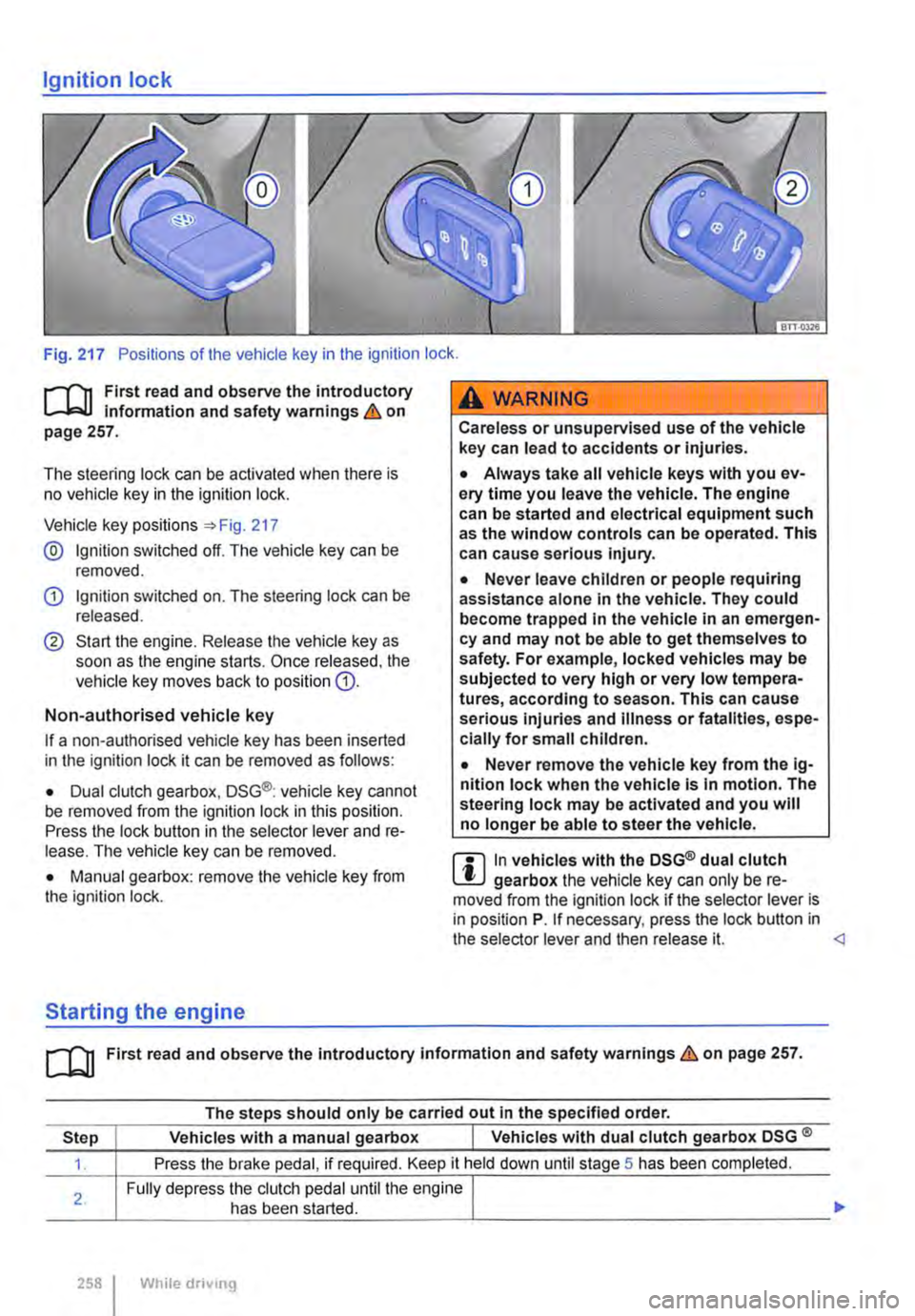
Fig. 217 Positions of the vehicle key in the ignition lock .
.--m First read and observe the introductory Information and safety warnings & on page 257.
The steering lock can be activated when there is no vehicle key in the ignition lock.
Vehicle key positions :) Fig. 217
@ Ignition switched off. The vehicle key can be removed.
G) Ignition switched on. The steering lock can be released.
® Start the engine. Release the vehicle key as soon as the engine starts. Once released. the vehicle key moves back to position G).
Non-authorised vehicle key
If a non-authorised vehicle key has been inserted in the ignition lock it can be removed as follows:
• Dual clutch gearbox, DSG®: vehicle key cannot be removed from the ignition lock in this position. Press the lock button in the selector lever and re-lease. The vehicle key can be removed.
• Manual gearbox: remove the vehicle key from the ignition lock.
Starting the engine
A WARNING
Careless or unsupervised use of the vehicle key can lead to accidents or Injuries.
• Always take all vehicle keys with you ev-ery time you leave the vehicle. The engine can be started and electrical equipment such as the window controls can be operated. This can cause serious Injury.
• Never leave children or people requiring assistance alone In the vehicle. They could become trapped In the vehicle in an emergen-cy and may not be able to get themselves to safety. For example, locked vehicles may be subjected to very high or very low tempera-tures, according to season. This can cause serious Injuries and Illness or fatalities, espe-cially for small children.
• Never remove the vehicle key from the ig-nition lock when the vehicle Is In motion. The steering lock may be activated and you will no longer be able to steer the vehicle.
m In vehicles with the DSG® dual clutch W gearbox the vehicle key can only be re-moved from the Ignition lock if the selector lever is in position P. If necessary, press the lock button in the selector lever and then release it.
The steps should only be carried out In the specified order.
Step Vehicles with a manual gearbox I Vehicles with dual clutch gearbox DSG ®
1. Press the brake pedal, if required. Keep it held down until stage 5 has been completed.
Fully depress the clutch pedal until the engine I
___
258 I While drivong
Page 260 of 486
A WARNING
Never switch off the engine while the vehicle Is In motion. This can lead to a loss of vehicle control, accidents and serious injuries.
• The alrbags and belt tensioners will not work If the Ignition Is switched off.
• The brake servo will not work when the engine Is switched off. That is why more pressure on the brake pedal is needed to stop the vehicle when the engine Is switched off.
• The power assisted steering will not work when the engine is not running. More power is needed to steer the vehicle when the en-gine Is switched off.
Electronic immobilizer
r-T'n First read and observe the Introductory L-Wl information and safety warnings & on page 257.
The immobilizer helps to prevent the engine from being started and driven with an unauthorised ve-hicle key.
There is a chip in the key. lt automatically deacti-vates the immobilizer when the vehicle key is in-serted into the ignition lock.
The electronic immobilizer is automatically activa-ted when the vehicle key is removed from the igni-tion lock.
Changing gears
CO! Introduction
This chapter contains information on the following subjects:
Warning and indicator lamps ............. . Pedals ... Manual gearbox: selecting a gear ........ .
Dual clutch gearbox DSG® ...... .
DSG® dual clutch gearbox: selecting a gear Changing gear with llptronic ............. .
260 While driving
261 262 263
264
264
266
A WARNING (Continued)
• If the vehicle key is removed from the Igni-tion, the steering lock can activate and you will no longer be able to steer the vehicle.
CD
If the vehicle has been driven at high load for a long period, the engine could overheat when it Is switched off. In order to avoid damage to the engine, allow the engine to run In neutral for approximately two minutes before switching lt off.
m In vehicles with DSG® dual clutch gearbox, W the vehicle key can only be removed from the ignition lock if the selector lever is in position P.
m After the engine is switched off, the radiator W fan in the engine compartment may run on for some minutes, even if the ignition is switched off or the vehicle key has been removed. The radi· ator fan will switch itself off automatically.
If a non-authorised vehicle key has been used, the display in the instrument cluster will show SAFE, or Immobilizer active!. The vehicle cannot be used if this occurs.
m The vehicle cannot be operated properly if W you do not have a genuine Volkswagen key.
Gear-change indicator 268
Page 269 of 486
Braking, stopping and parking
COl Introduction
This chapter contains information on the following subjects:
Warning and indicator lamps Handbrake ............................ .
Parking . . . . . . . ............. .
Information on the brakes ................ . Brake support systems .................. .
Switching the TCS on and off ............. .
Brake fluid ............................ .
270 271
272 272
274
276
277
The brake support systems are the anti-lock brake system (ASS), the Brake Assist system (SAS), the electronic differential lock (EDS), the traction control system (TCS) and the Electronic Stability Control (ESC).
Additional information and warnings:
• Towing a trailer 139
• Pull-away assist systems 282
• Wheels and tyres 367
• Accessories, modifications, repairs and renewal of parts 394
A WARNING
Driving with worn brake pads or with a faulty brake system can cause accidents and seri-ous Injuries.
• If the warning lamp 0 lights up either on its own or with a text message In the display of the Instrument cluster, go to a qualified workshop Immediately, have the brake pads checked and any worn brake pads replaced.
A WARNING
Incorrect parking can cause serious Injuries.
• Never remove the vehicle key from the lg-nltlon lock when the vehicle Is In motion. The steering lock may be activated and you will no longer be able to steer or control the vehl-cl e.
A WARNING (Continued)
• Never park the vehicle where parts of the exhaust system can come into contact with inflammable material underneath the vehicle, e.g. undergrowth, leaves, dry grass, spilt fuel.
• Always apply the handbrake when the ve-hicle Is parked.
• Never leave children or people requiring assistance alone In the vehicle. They could release the handbrake, move the selector lev-er or gearshift lever and thus set the vehicle In motion. This can lead to accidents and se-rious injuries.
• Always take all vehicle keys with you ev-ery time you leave the vehicle. The engine can be started and electrical equipment such as the window controls can be used which could cause serious injury.
• Never leave children or people requiring assistance alone in the vehicle. They could become trapped in the vehicle in an emergen-cy and may not be able to get themselves to safety. For example, locked vehicles may be subjected to very high or very low tempera-tures, according to season. This can cause serious Injuries and illness or fatalities, espe-cially for small children.
CD
• To avoid unintentional movement when parking the vehicle, first apply the handbrake and then remove your foot from the brake ped-al.
• Always take care when driving in car parks with protruding kerbstones or bollards. Objects that protrude from the ground can damage the bumper and other components when parking the vehicle. In order to avoid any damage, stop the vehicle before the wheels can touch the bollards or kerbs.
• Drive carefully through dips in the road, over driveways, ramps, kerbstones and other objects. Low-lying vehicle components such as the bumper, spoiler and parts of the running gear, engine or exhaust system could be dam-aged.
Starting the engine, changing gear and parking I 269
Page 270 of 486
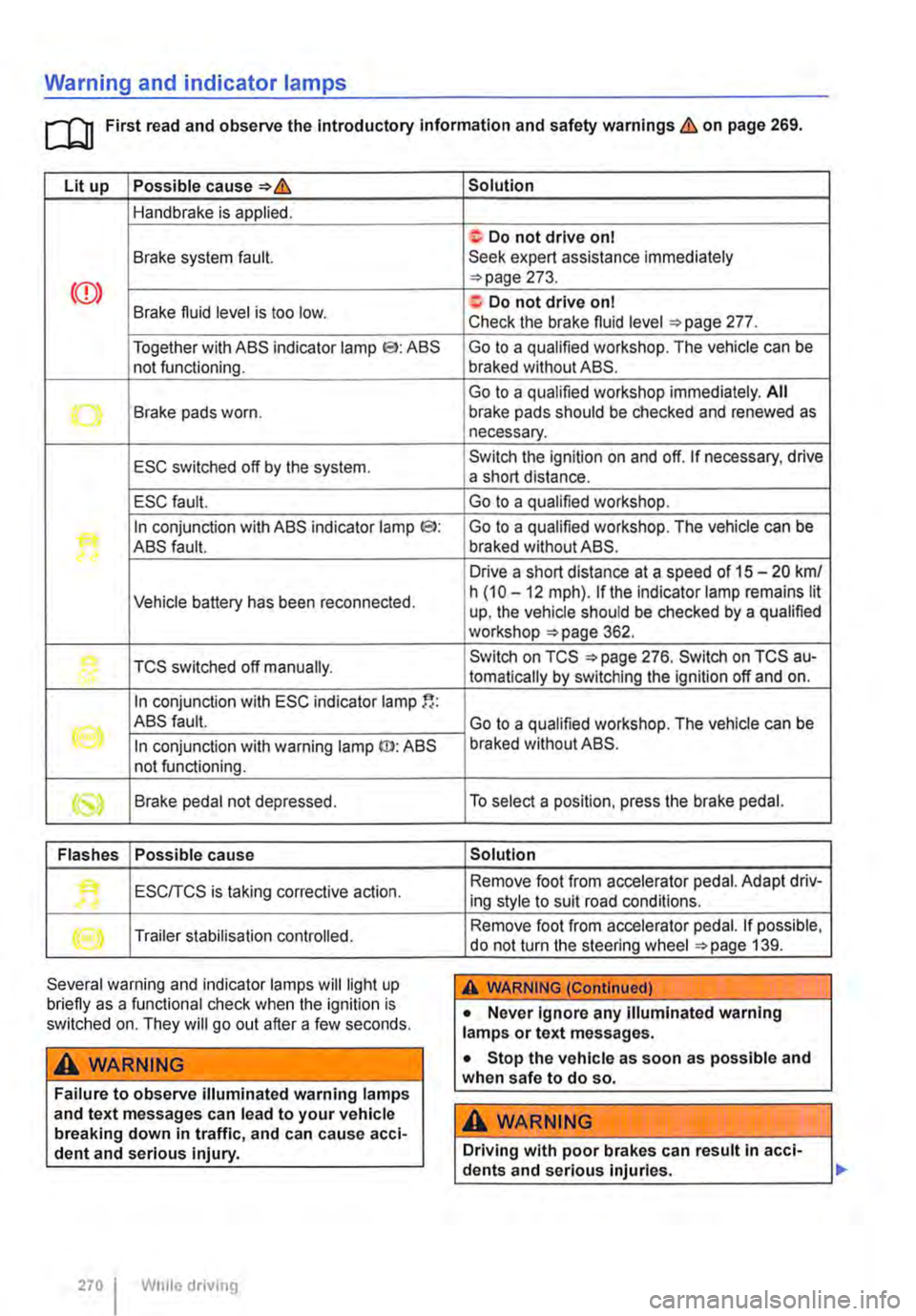
Warning and indicator lamps
[Q First read and observe the Introductory information and safety warnings & on page 269.
Lit up Possible cause=>&
Handbrake is applied.
Brake system fault.
Together with ABS indicator lamp El: ABS not functioning.
-...-Brake pads worn .
ESC switched off by the system.
ESC fault.
In conjunction with ABS indicator lamp CS>: ABS fault.
Vehicle battery has been reconnected.
TCS switched off manually.
In conjunction with ESC indicator lamp
((oil ABS fault.
In conjunction with warning lamp ID: ABS not functioning.
Brake pedal not depressed.
Flashes Possible cause
'• ESCITCS is taking corrective action.
Trailer stabilisation controlled.
Several warning and indicator lamps will light up briefly as a functional check when the ignition is switched on. They will go out after a few seconds.
A WARNING
Failure to observe illuminated warning lamps and text messages can lead to your vehicle breaking down in traffic, and can cause acci-dent and serious injury.
270 I While driving
Solution
f; Do not drive on I Seek expert assistance immediately =>page 273.
a:. Do not drive on I Check the brake fluid level =>page 277.
Go to a qualified workshop. The vehicle can be braked without ABS.
Go to a qualified workshop immediately. All brake pads should be checked and renewed as necessary.
Switch the ignition on and off. If necessary, drive a short distance.
Go to a qualified workshop.
Go to a qualified workshop. The vehicle can be braked without ABS.
Drive a short distance at a speed of 15 -20 km/ h (10 -12 mph). if the indicator lamp remains lit up, the vehicle should be checked by a qualified workshop =>page 362.
Switch on TCS =>page 276. Switch on TCS au-tomatically by switching the ignition off and on.
Go to a qualified workshop. The vehicle can be braked without ABS.
To select a position, press the brake pedal.
Solution
Remove foot from accelerator pedal. Adapt driv-ing style to suit road conditions.
Remove foot from accelerator pedal. If possible, do not turn the steering wheel =>page 139.
A WARNING (Continued)
• Never ignore any illuminated warning lamps or text messages.
• Stop the vehicle as soon as possible and when safe to do so.
A WARNING
Driving with poor brakes can result in acci-dents and serious injuries.
Page 272 of 486
Parking
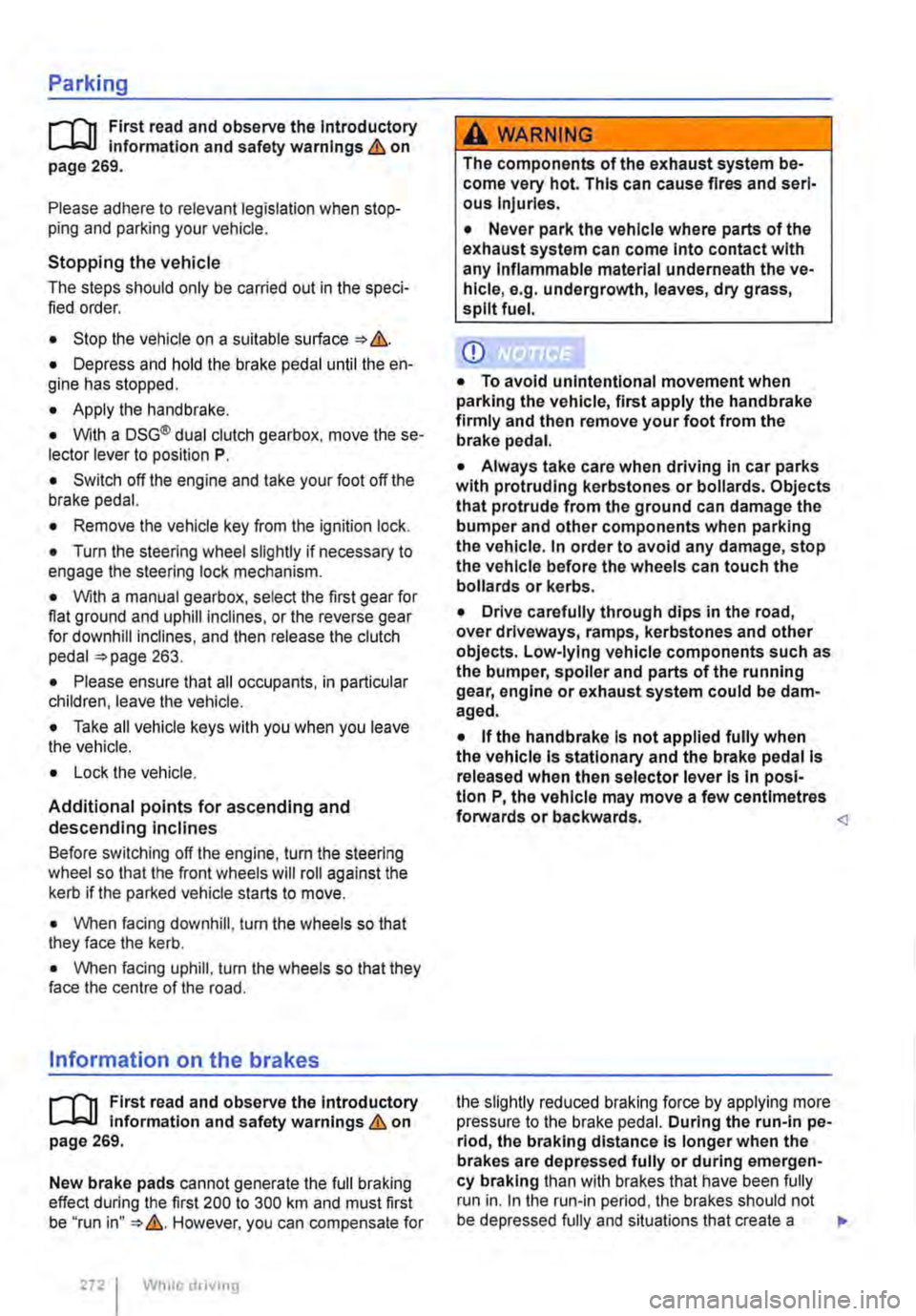
r--f"n First read and observe the Introductory L-J.:.lJ information and safety warnings & on page 269.
Please adhere to relevant legislation when stop-ping and parking your vehicle.
Stopping the vehicle
The steps should only be carried out in the speci-fied order.
• Stop the vehicle on a suitable surface &.
• Depress and hold the brake pedal until the en-gine has stopped.
• Apply the handbrake.
• With a DSG® dual clutch gearbox, move the se-lector lever to position P.
• Switch off the engine and take your foot off the brake pedal.
• Remove the vehicle key from the ignition lock.
• Turn the steering wheel slightly if necessary to engage the steering lock mechanism.
• With a manual gearbox, select the first gear for flat ground and uphill inclines, or the reverse gear for downhill inclines, and then release the clutch pedal 263.
• Please ensure that all occupants, in particular children, leave the vehicle.
• Take all vehicle keys with you when you leave the vehicle.
• Lock the vehicle.
Additional points for ascending and descending inclines
Before switching off the engine, turn the steering wheel so that the front wheels will roll against the kerb if the parked vehicle starts to move.
• When facing downhill, turn the wheels so that they face the kerb.
• When facing uphill, turn the wheels so that they face the centre of the road.
Information on the brakes
r--f"n First read and observe the Introductory L-J.:.lJ information and safety warnings & on page 269.
New brake pads cannot generate the full braking effect during the first 200 to 300 km and must first be "run in" &. However, you can compensate for
2721 While driv1ng
A WARNING
The components of the exhaust system be-come very hot. This can cause fires and seri-ous Injuries.
• Never park the vehicle where parts of the exhaust system can come Into contact with any Inflammable material underneath the ve-hicle, e.g. undergrowth, leaves, dry grass, split fuel.
CD
• To avoid unintentional movement when parking the vehicle, first apply the handbrake firmly and then remove your foot from the brake pedal.
• Always take care when driving in car parks with protruding kerbstones or bollards. Objects that protrude from the ground can damage the bumper and other components when parking the vehicle. In order to avoid any damage, stop the vehicle before the wheels can touch the bollards or kerbs.
• Drive carefully through dips in the road, over driveways, ramps, kerbstones and other objects. Low-lying vehicle components such as the bumper, spoiler and parts of the running gear, engine or exhaust system could be dam-aged.
• If the handbrake Is not applied fully when the vehicle Is stationary and the brake pedal Is released when then selector lever Is in posi-tion P, the vehicle may move a few centimetres forwards or backwards.