tire VOLKSWAGEN TRANSPORTER 2021 Owners Manual
[x] Cancel search | Manufacturer: VOLKSWAGEN, Model Year: 2021, Model line: TRANSPORTER, Model: VOLKSWAGEN TRANSPORTER 2021Pages: 486, PDF Size: 69.28 MB
Page 81 of 486
Frontal collisions and the laws of physics
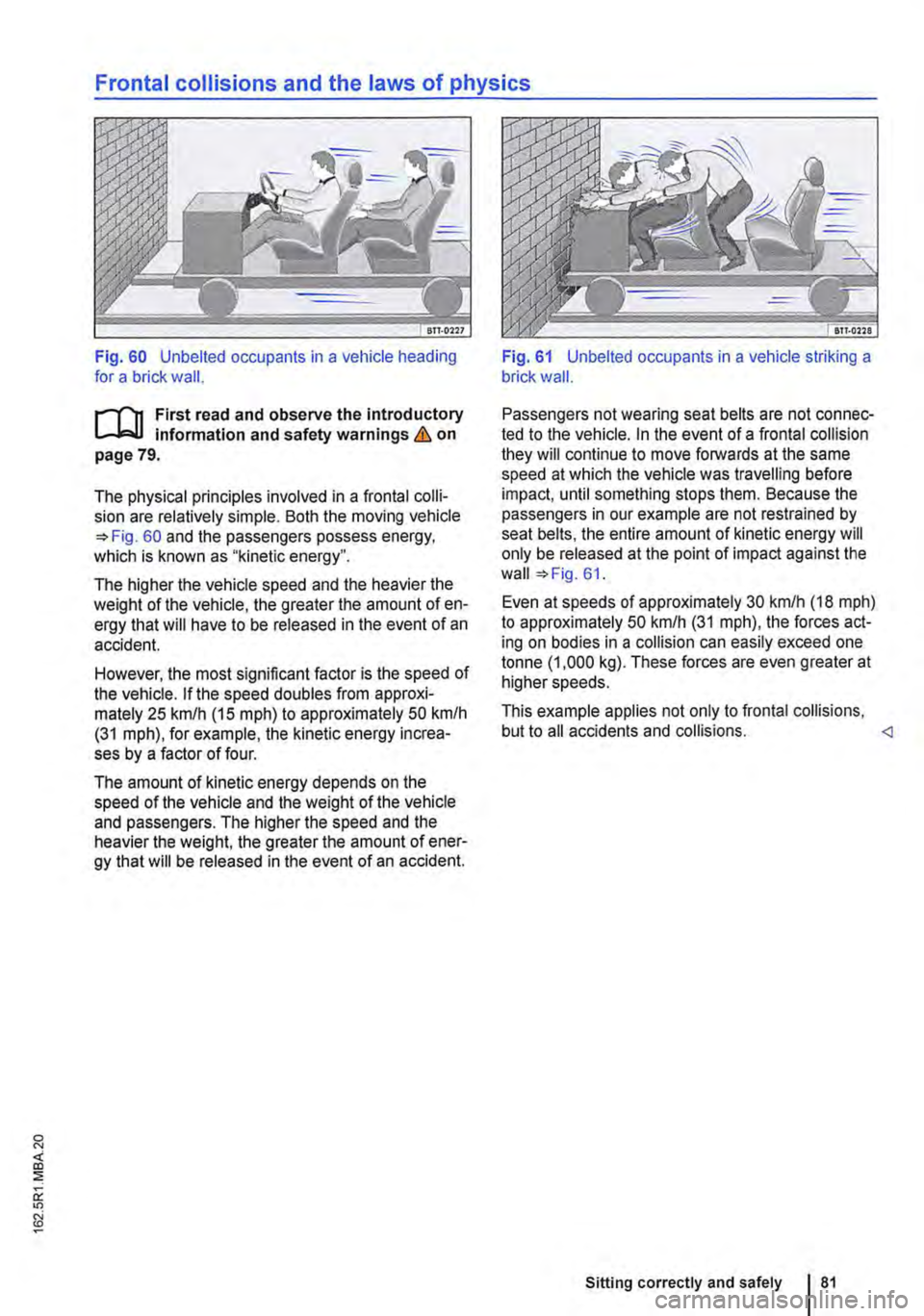
Fig. 60 Unbelted occupants in a vehicle heading for a brick wall.
r"'''"'n First read and observe the introductory information and safety warnings & on page 79.
The physical principles involved in a frontal colli-sion are relatively simple. Both the moving vehicle =>Fig. 60 and the passengers possess energy, which is known as "kinetic energy".
The higher the vehicle speed and the heavier the weight of the vehicle, the greater the amount of en-ergy that will have to be released in the event of an accident.
However, the most significant factor is the speed of the vehicle. If the speed doubles from approxi-mately 25 km/h (15 m ph) to approximately 50 km/h (31 mph), for example, the kinetic energy increa-ses by a factor of four.
The amount of kinetic energy depends on the speed of the vehicle and the weight of the vehicle and passengers. The higher the speed and the heavier the weight, the greater the amount of ener-gy that will be released in the event of an accident.
Fig. 61 Unbelted occupants in a vehicle striking a brick wall.
Passengers not wearing seat belts are not connec-ted to the vehicle. In the event of a frontal collision they will continue to move forwards at the same speed at which the vehicle was travelling before impact, until something stops them. Because the passengers in our example are not restrained by seat belts, the entire amount of kinetic energy will only be released at the point of impact against the wall =>Fig. 61.
Even at speeds of approximately 30 km/h (18 mph) to approximately 50 km/h (31 mph), the forces act-ing on bodies in a collision can easily exceed one tonne (1 ,000 kg). These forces are even greater at higher speeds.
This example applies not only to frontal collisions, but to all accidents and collisions.
Page 85 of 486
Seat belt routing
BTT.Q3l4
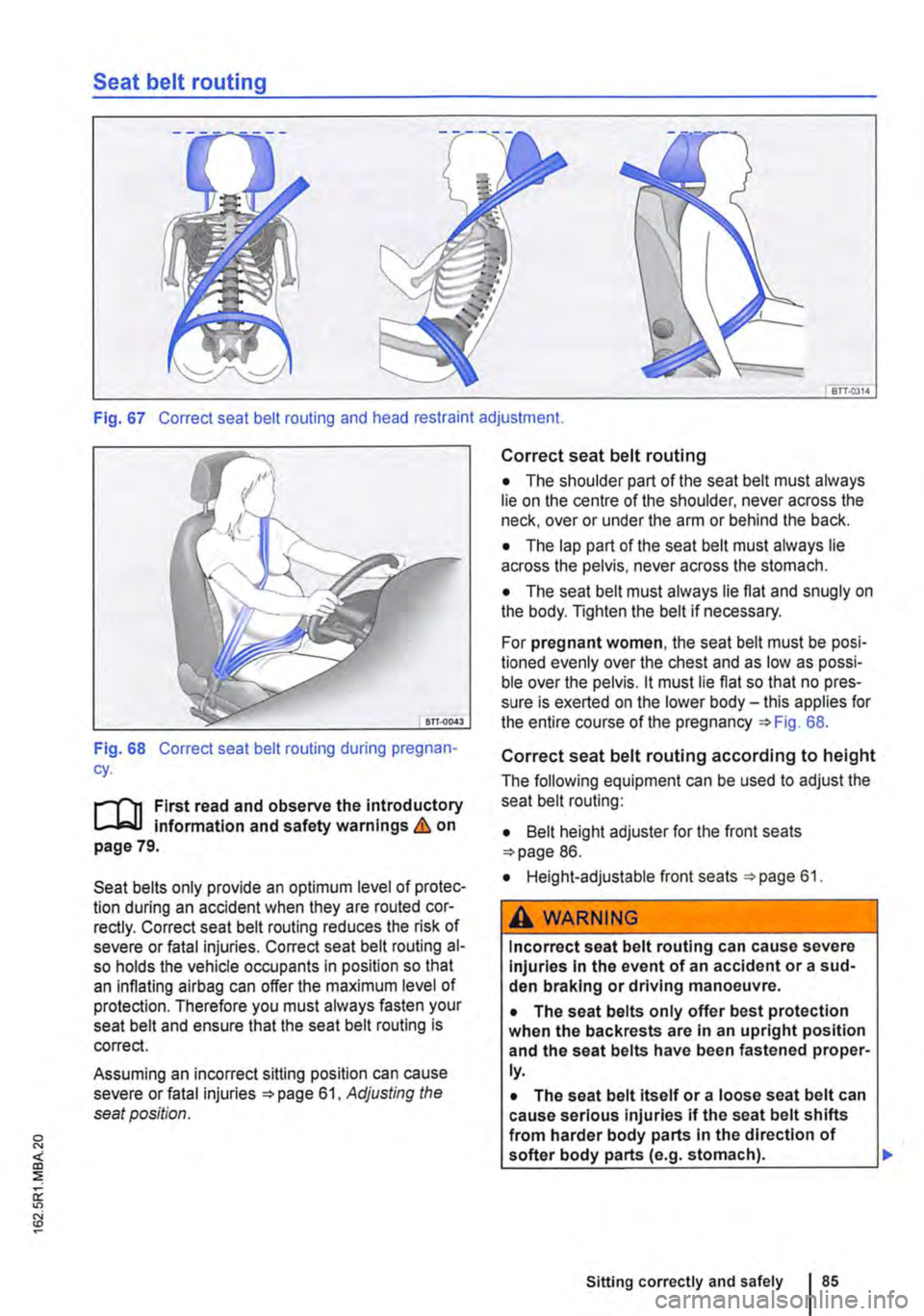
Fig. 67 Correct seat belt routing and head restraint adjustment.
Fig. 68 Correct seat belt routing during pregnan-cy.
r-T'n First read and observe the introductory L-Wl infonmation and safety warnings & on page 79.
Seat belts only provide an optimum level of protec-tion during an accident when they are routed cor-rectly. Correct seat belt routing reduces the risk of severe or fatal injuries. Correct seat belt routing al-so holds the vehicle occupants in position so that an inflating airbag can offer the maximum level of protection. Therefore you must always fasten your seat belt and ensure that the seat belt routing is correct.
Assuming an incorrect sitting position can cause severe or fatal injuries 61, Adjusting the seat position.
Correct seat belt routing
• The shoulder part of the seat belt must always lie on the centre of the shoulder, never across the neck, over or under the arm or behind the back.
• The lap part of the seat belt must always lie across the pelvis, never across the stomach.
• The seat belt must always lie flat and snugly on the body. Tighten the belt if necessary.
For pregnant women, the seat belt must be posi-tioned evenly over the chest and as low as possi-ble over the pelvis. it must lie flat so that no pres-sure is exerted on the lower body-this applies for the entire course of the pregnancy =>Fig. 68.
Correct seat belt routing according to height
The following equipment can be used to adjust the seat belt routing:
• Belt height adjuster for the front seats =>page 86.
• Height-adjustable front seats =>page 61.
A WARNING
Incorrect seat belt routing can cause severe Injuries In the event of an accident or a sud-den braking or driving manoeuvre.
• The seat belts only offer best protection when the backrests are in an upright position and the seat belts have been fastened proper-ly.
• The seat belt itself or a loose seat belt can cause serious injuries if the seat belt shifts from harder body parts In the direction of softer body parts (e.g. stomach). .,.
Sitting correctly and safely
Page 139 of 486
Loading the roof carrier
ill1 First read and observe the introductory L-l.:.l.l information and safety warnings & on page 137.
Loads can only be attached securely when the roof carrier system is fitted correctly &.
Maximum permissible roof load
The maximum permissible roof load for vehicles with a normal roof is 150 kg and for vehicles with a pop-up roof it is 50 kg. The roof load limit refers to the combined weight of the roof carrier and the load carried on the roof &.
Each mount can bear a maximum load of 50 kg if the weight of the load is evenly distributed over the entire length of the mount.
Ensure that you know the weight of the roof rack and the items to be transported on the roof, and weigh them if necessary. Never exceed the maxi-mum permissible roof load.
However, you will not be able to carry the maxi-mum roof load if you are using a roof carrier with a lower weight rating. In this instance, do not exceed the maximum weight limit for the roof carrier. This weight limit is listed in the fitting instructions.
Distributing the load
Distribute the load evenly and secure it correctly
Checking the fittings
After the mounts and roof carrier have been at-tached, check the bolted connections and fasten-ings once you have travelled a short distance and then at regular intervals.
Towing a trailer
o:n Introduction
This chapter contains information on the following subjects:
Technical requirements . . . . . . . . . . 141 Fitting the removable ball coupling 142
Removing the ball coupling . . . . . . . . . 144
Hitching and connecting the trailer . . . 144 Loading the trailer . . . . . . . . . .. . . 146 Towing a trailer . . . . . . . . . . . . . . . . . . . . . . . . 146
Trailer stabilisation . . . . . . . . . . . . . . . . . . . . . . 147
Retrofitting a towing bracket............... 149
A WARNING
Accidents and vehicle damage can occur if the maximum permitted roof load is excee-ded.
• Never exceed the quoted roof load, the maximum permissible axle loads, and the permissible gross vehicle weight for the vehi-cle.
• Do not exceed the weight rating of the roof carrier, even if the maximum roof load has not been reached.
• Secure heavy objects as far forwards as possible and distribute the load evenly.
A WARNING
Loose and Incorrectly secured loads can fall off the roof carrier and cause accidents and injuries.
• Always use suitable and undamaged se-curing straps.
• Secure loads properly.
The additional load will affect the durability, fuel consumption and performance of the vehicle and, in certain circumstances, could shorten the service intervals.
Driving with a trailer not only places an extra load on the vehicle, but also requires increased concen-tration on the part of the driver.
Transporting items 139
Page 145 of 486
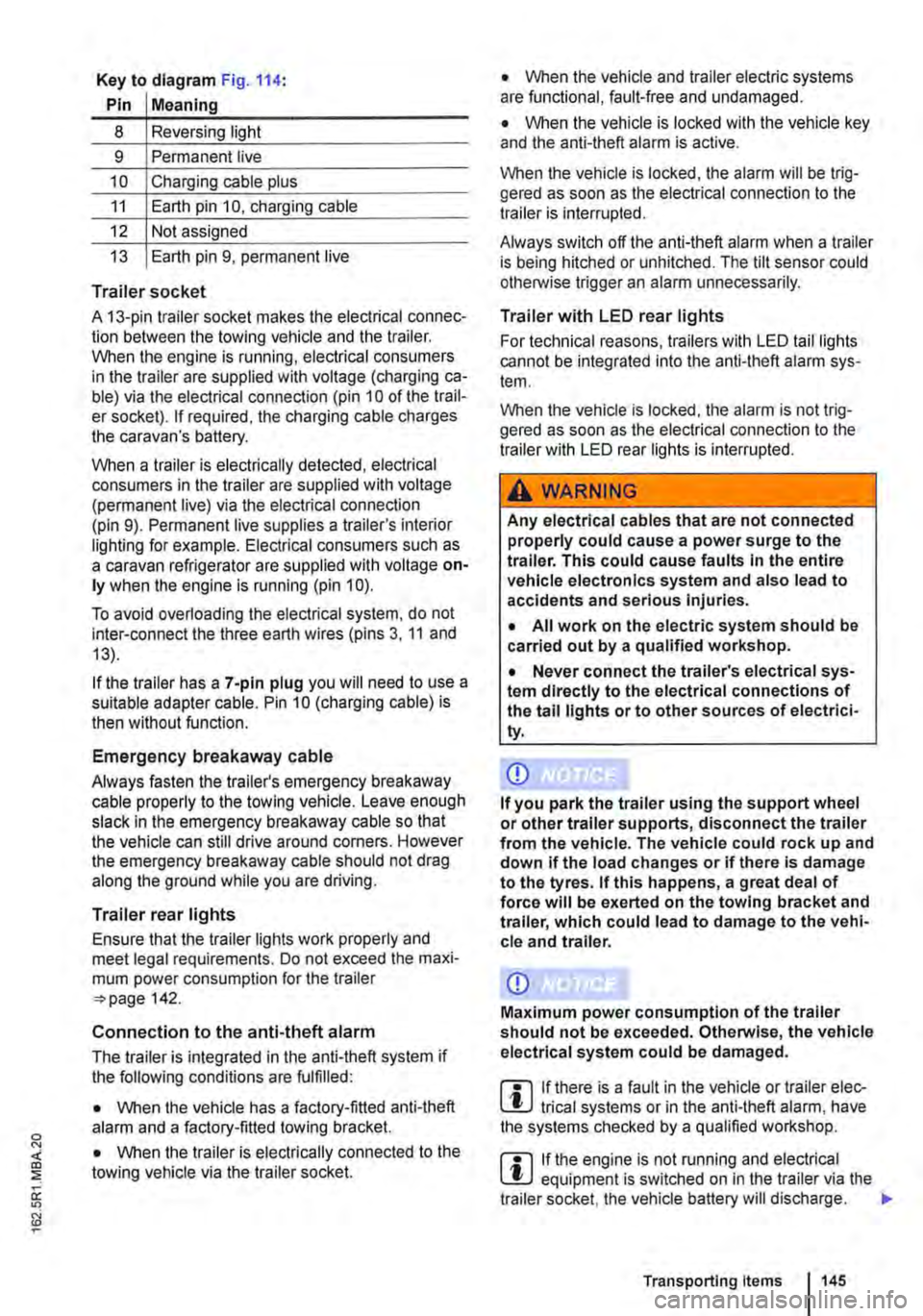
Key to diagram Fig. 114:
Pin Meaning
8 Reversing light
9 Permanent live
10 Charging cable plus
11 Earth pin 10, charging cable
12 Not assigned
13 Earth pin 9, permanent live
Trailer socket
A 13-pin trailer socket makes the electrical connec-tion between the towing vehicle and the trailer. When the engine is running, electrical consumers in the trailer are supplied with voltage (charging ca-ble) via the electrical connection (pin 10 of the trail-er socket). If required, the charging cable charges the caravan's battery.
When a trailer is electrically detected, electrical consumers in the trailer are supplied with voltage (permanent live) via the electrical connection (pin 9). Permanent live supplies a trailer's interior lighting for example. Electrical consumers such as a caravan refrigerator are supplied with voltage on-ly when the engine is running (pin 1 0).
To avoid overloading the electrical system, do not inter-connect the three earth wires (pins 3, 11 and 13).
If the trailer has a 7 -pin plug you will need to use a suitable adapter cable. Pin 10 (charging cable) is then without function.
Emergency breakaway cable
Always fasten the trailer's emergency breakaway cable properly to the towing vehicle. Leave enough slack in the emergency breakaway cable so that the vehicle can still drive around corners. However the emergency breakaway cable should not drag along the ground while you are driving.
Trailer rear lights
Ensure that the trailer lights work properly and meet legal requirements. Do not exceed the maxi-mum power consumption for the trailer 142.
Connection to the anti-theft alarm
The trailer is integrated in the anti-theft system if the following conditions are fulfilled:
• When the vehicle has a factory-fitted anti-theft alarm and a factory-fitted towing bracket.
• When the trailer is electrically connected to the towing vehicle via the trailer socket.
• When the vehicle and trailer electric systems are functional, fault-free and undamaged.
• When the vehicle is locked with the vehicle key and the anti-theft alarm is active.
When the vehicle is locked, the alarm will be trig-gered as soon as the electrical connection to the trailer is interrupted.
Always switch off the anti-theft alarm when a trailer is being hitched or unhitched. The tilt sensor could otherwise trigger an alarm unnecessarily.
Trailer with LED rear lights
For technical reasons, trailers with LED tail lights cannot be integrated into the anti-theft alarm sys-tem.
When the vehicle is locked, the alarm is not trig-gered as soon as the electrical connection to the trailer with LED rear lights is interrupted.
A WARNING
Any electrical cables that are not connected properly could cause a power surge to the trailer. This could cause faults tn the entire vehicle electronics system and also lead to accidents and serious Injuries.
• All work on the electric system should be carried out by a qualified workshop.
• Never connect the trailer's electrical sys-tem directly to the electrical connections of the tail lights or to other sources of electrici-ty.
CD
If you park the trailer using the support wheel or other trailer supports, disconnect the trailer from the vehicle. The vehicle could rock up and down if the load changes or if there is damage to the tyres. If this happens, a great deal of force will be exerted on the towing bracket and trailer, which could lead to damage to the vehi-cle and trailer.
CD
Maximum power consumption of the trailer should not be exceeded. Otherwise, the vehicle electrical system could be damaged.
m If there is a fault in the vehicle or trailer elec-L.:!.J trical systems or in the anti-theft alarm, have the systems checked by a qualified workshop.
m If the engine is not running and electrical L.:!.J equipment is switched on in the trailer via the trailer socket, the vehicle battery will discharge. .,.
Transporting Items 145
Page 149 of 486
Retrofitting a towing bracket
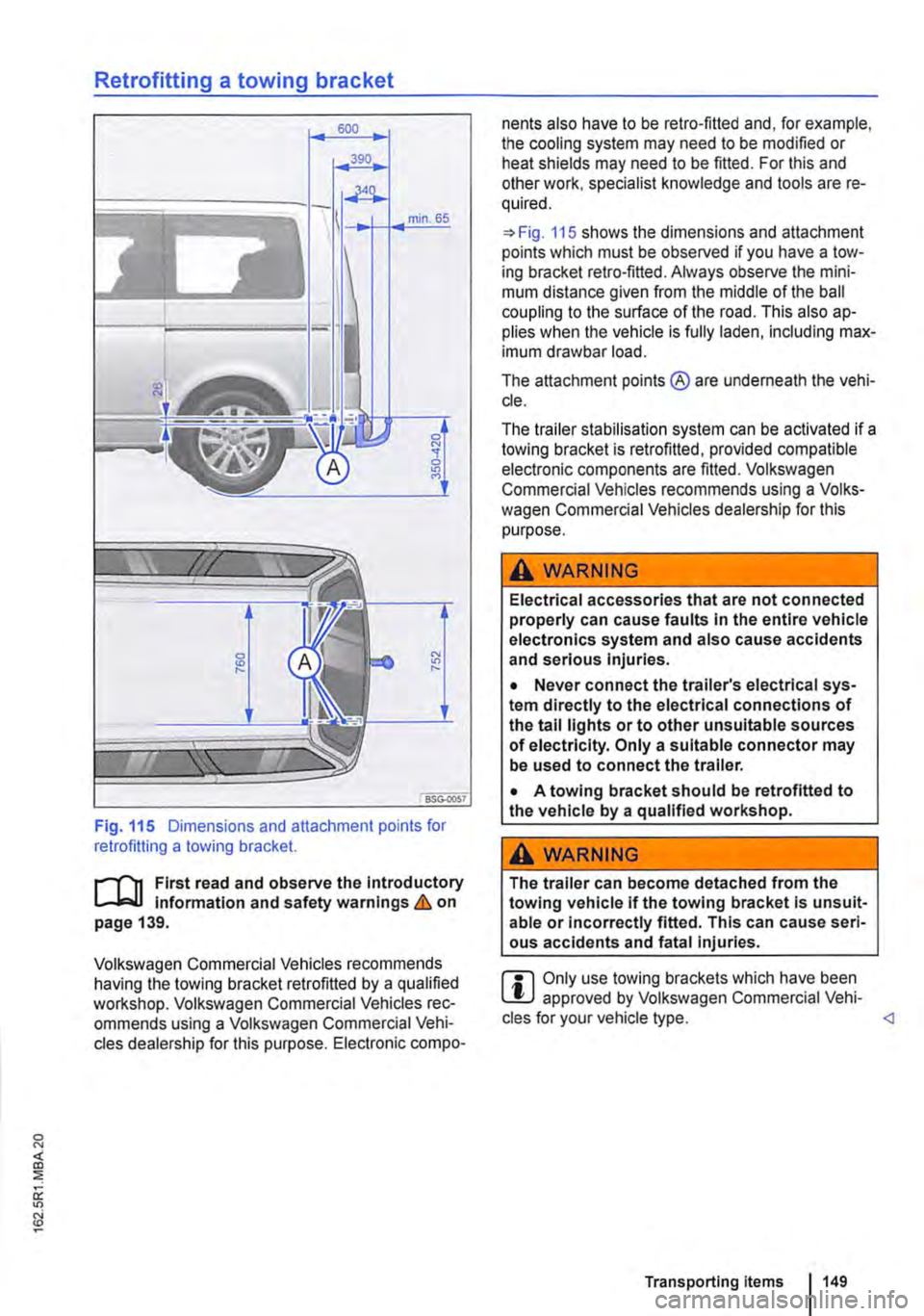
Fig. 115 Dimensions and attachment points for retrofitting a towing bracket.
r-1"'11 First read and observe the Introductory L-J,:.U Information and safety warnings & on page 139.
Volkswagen Commercial Vehicles recommends having the towing bracket retrofitted by a qualified workshop. Volkswagen Commercial Vehicles rec-ommends using a Volkswagen Commercial Vehi-cles dealership for this purpose. Electronic compo-
nents also have to be retro-fitted and, for example, the cooling system may need to be modified or heat shields may need to be fitted. For this and other work, specialist knowledge and tools are re-quired.
=>Fig. 115 shows the dimensions and attachment points which must be observed if you have a tow-ing bracket retro-fitted. Always observe the mini-mum distance given from the middle of the ball coupling to the surface of the road. This also ap-plies when the vehicle Is fully laden, including max-imum drawbar load.
The attachment points ® are underneath the vehi-cle.
The trailer stabilisation system can be activated if a towing bracket is retrofitted, provided compatible electronic components are fitted. Volkswagen Commercial Vehicles recommends using a Volks-wagen Commercial Vehicles dealership for this purpose.
A WARNING
Electrical accessories that are not connected properly can cause faults In the entire vehicle electronics system and also cause accidents and serious Injuries.
• Never connect the trailer's electrical sys-tem directly to the electrical connections of the tall lights or to other unsuitable sources of electricity. Only a suitable connector may be used to connect the trailer.
• A towing bracket should be retrofitted to the vehicle by a qualified workshop.
A WARNING
The trailer can become detached from the towing vehicle if the towing bracket Is unsuit-able or Incorrectly fitted. This can cause seri-ous accidents and fatal injuries.
r::l Only use towing brackets which have been W approved by Volkswagen Commercial Vehi-cles for your vehicle type.
Page 315 of 486
![VOLKSWAGEN TRANSPORTER 2021 Owners Manual Driving situations
A
(I
Fig. 249 [A] Driving situation when overtaking with traffic behind the vehicle [81 Visual display in the left-hand exterior mirror.
A
Fig. 250 situation when overtaking an](/img/18/55777/w960_55777-314.png "VOLKSWAGEN TRANSPORTER 2021 Owners Manual Driving situations
A
(I
Fig. 249 [A] Driving situation when overtaking with traffic behind the vehicle [81 Visual display in the left-hand exterior mirror.
A
Fig. 250 situation when overtaking an")
Driving situations
A
(I
Fig. 249 [A] Driving situation when overtaking with traffic behind the vehicle [81 Visual display in the left-hand exterior mirror.
A
Fig. 250 situation when overtaking and pulling in. [B' Visual display in the right-hand exterior mirror.
rll1 First read and observe the introductory L-W.I Information and safety warnings & on page 312.
The following driving situations trigger a light in the exterior mirror 249 [ID (arrow) or 250 [ID (arrow):
• When another vehicle is overtaking your vehi-cle 249
• When overtaking another vehicle 250 with a speed difference of up to approximately 15 km/h (9 m ph). No display will be shown if the take-over manoeuvre is much faster.
The display in the exterior mirror will be shown ear-lier the faster you are nearing another vehicle as the lane change assist system calculates the
speed difference to other vehicles. For this reason, the display could be activated at different times de-spite your vehicle being at the same distance from other vehicles.
Physical and system-specific limits
The lane change assist system might, for example, interpret the traffic situation incorrectly in certain driving situations. In the following situations, for ex-ample:
• In tight bends.
• When road lanes are of varying width.
• At the brow of a hill.
• In poor weather conditions.
• Where there are special roadside structures, e.g. high or offset crash barriers. <1
Driver Alert System (recommendation for rest breaks)
o::n Introduction
This chapter contains information on the following subjects:
Function and operation by the user.. . . . 316
The Driver Alert System informs the driv-
er if their driving shows signs of tired-
ness.
Driver assist systems 315
Page 316 of 486
Additional information and warnings:
• Volkswagen information system =>page 24
• Accessories, modifications, repairs and renewal of parts (information stored in the control units) =>page 394
A WARNING
The Intelligent technology used In the Driver Alert System cannot overcome the laws of physics, and functions only within the limits of the system. Do not let the extra conven-ience afforded by the Driver Alert System tempt you Into taking any risks when driving -this can cause accidents. During a long trip, plan regular and sufficient breaks.
• The driver Is responsible at all times for their fitness to drive.
• Never drive a vehicle when you are tired.
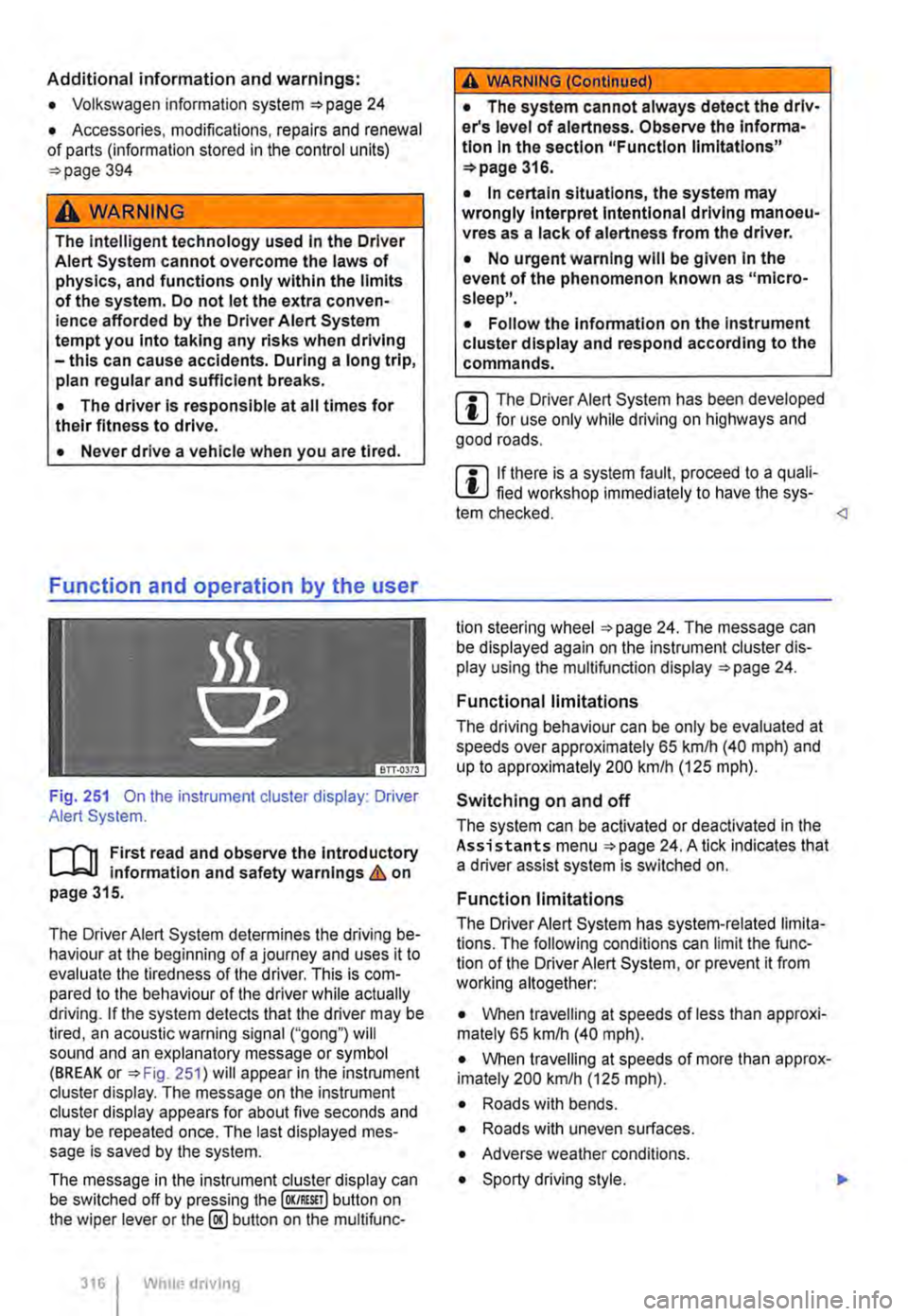
Fig. 251 On the instrument cluster display: Driver Alert System.
r--('n First read and observe the Introductory Information and safety warnings&. on page 315.
The Driver Alert System determines the driving be-haviour at the beginning of a journey and uses it to evaluate the tiredness of the driver. This is com-pared to the behaviour of the driver while actually driving. If the system detects that the driver may be tired, an acoustic warning signal ("gong") will sound and an explanatory message or symbol (BREAK or =>Fig. 251) will appear in the instrument cluster display. The message on the instrument cluster display appears for about five seconds and may be repeated once. The last displayed mes-sage is saved by the system.
The message in the instrument cluster display can be switched off by pressing the (OK/RESIT I button on the wiper lever or the@ button on the multifunc-
316 I Whole driving
A WARNING (Continued)
• The system cannot always detect the driv-er's level of alertness. Observe the Informa-tion In the section "Function limitations" =>page 316.
• In certain situations, the system may wrongly Interpret Intentional driving manoeu-vres as a lack of alertness from the driver.
• No urgent warning will be given In the event of the phenomenon known as "micro-sleep".
• Follow the Information on the Instrument cluster display and respond according to the commands.
m The Driver Alert System has been developed l!..J for use only while driving on highways and good roads.
m If there is a system fault, proceed to a quali-L!..J fied workshop immediately to have the sys-tem checked.
Functional limitations
The driving behaviour can be only be evaluated at speeds over approximately 65 kmlh (40 mph) and up to approximately 200 km/h (125 m ph).
Switching on and off
The system can be activated or deactivated in the Assistants menu =>page 24. A tick indicates that a driver assist system is switched on.
Function limitations
The Driver Alert System has system-related limita-tions. The following conditions can limit the func-tion of the Driver Alert System, or prevent it from working altogether:
• When travelling at speeds of less than approxi-mately 65 km/h (40 mph).
• When travelling at speeds of more than approx-imately 200 km/h (125 mph).
• Roads with bends.
• Roads with uneven surfaces.
• Adverse weather conditions.
• Sporty driving style. .,..
Page 322 of 486
Air conditioning system
Heating, ventilating, cooling
o:n Introduction
This chapter contains information on the following subjects:
Controls for Climatic . . . . . . . . . . . . . . . . . . . . 323
Controls for Climatronic . . . . . . . . . . . . . . . . . 325
Controls for the heating and fresh air system . 327
Information on the air conditioning system . . . 328
..................... m
Air recirculation mode . . . . . . . • . . . . . . . . . . . . 330
Windscreen heating . . . . . . . . . . . . . . . . . . . . . 331
Roof ventilator . . . . . . . . . . . . . . . . . . . . . . . . . . 331
Displays for the Climatronic information
Depending on the vehicle equipment level, infor-mation on the Climatronic is displayed briefly on the screen of the factory-fitted radio or navigation system.
The dust and pollen filter
The dust and pollen filter with activated charcoal reduces the level of impurities in the outside air en-tering the vehicle.
The dust and pollen filler must be changed regular-ly to avoid impairing the performance of the air conditioning system.
The dust and pollen filter must be changed more frequently than stated in the service schedule if the efficiency of the filter declines prematurely due to the vehicle being used in areas with high levels of air pollution.
Additional information and warnings:
• Exterior views 5
• Wipers/washer 116
• Supplementary heaters (auxiliary air heater or auxiliary coolant heater) 332
• Cleaning and caring for the vehicle exterior 380
A WARNING
Poor visibility through all windows increases the risk of collisions and accidents, which can cause serious injuries.
• Always ensure that all windows are free of ice, snow and mist to ensure good visibility.
3221 While driving
A WARNING (Continued)
• Maximum heat output, which Is needed to defrost the windows as quickly as possible, is only available when the engine has reached Its operating temperature. Do not start your journey until you have good visibil-Ity.
• Always ensure that the heating and fresh air system or the air conditioning system and the rear window heating are used correctly so that you have good visibility.
• Never use the air reclrculatlon mode for an extended period. If the cooling system Is switched off, the windows can mist up very quickly In air reclrculatlon mode and reduce visibility considerably.
• Always switch off the air reclrculatlon mode when it Is not required.
A WARNING
Stale air can quickly make the driver tired and affect their concentration, which In turn can cause collisions, accidents and serious Inju-ries.
• Never switch off the blowers or switch on the air recirculatlon mode for an extended pe· riod as this prevents fresh air from entering the vehicle interior.
• Repairs to the air conditioning system re-quire specialist knowledge and special tools. Volkswagen Commercial Vehicles recommends using a Volkswagen Commercial Vehicles deal-ership for this purpose.
Page 324 of 486
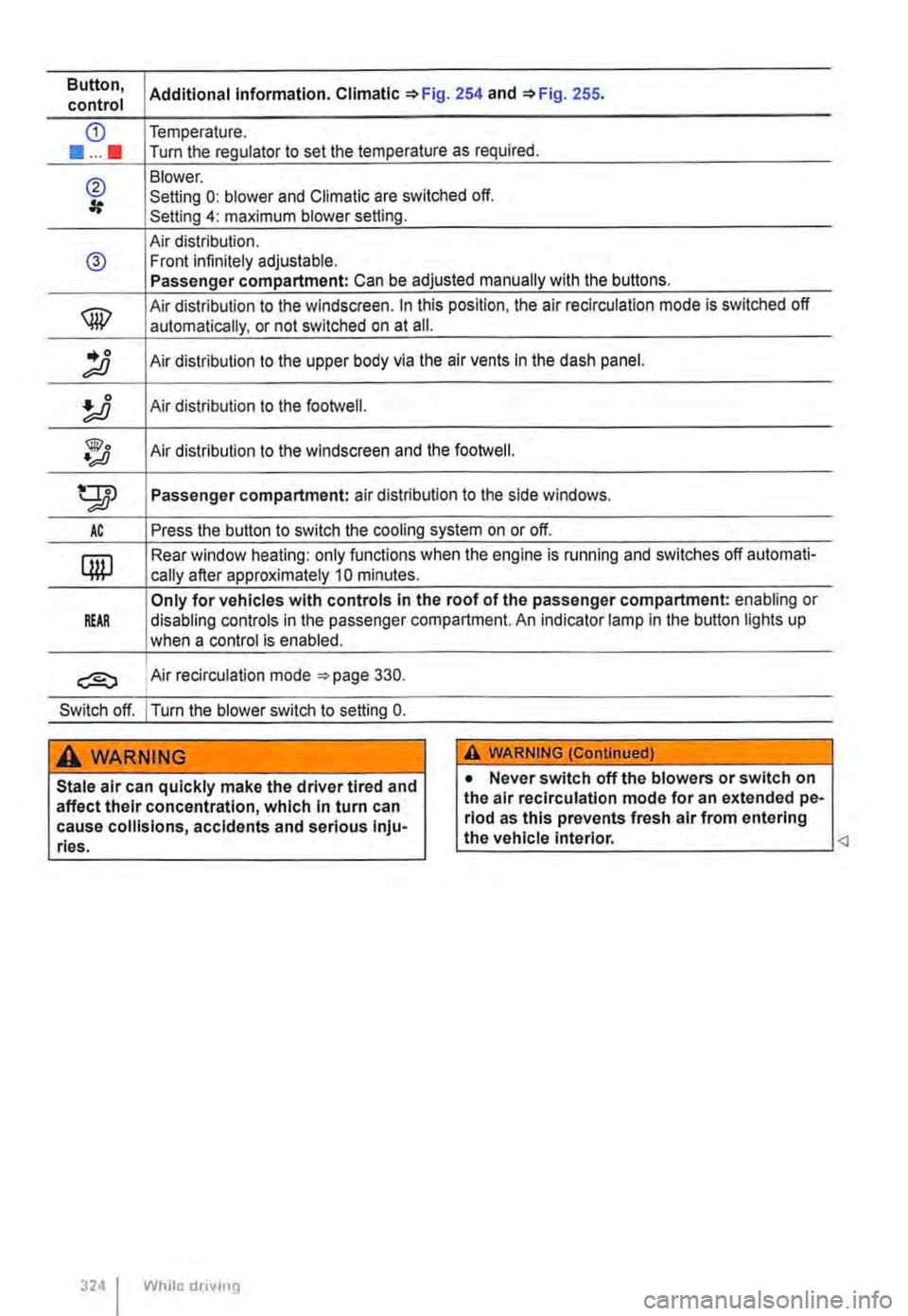
Button, Additional information. Climatic '*Fig. 254 and '*Fig. 255. control
CD Temperature .
••••• Turn the regulator to set the temperature as required.
@ Blower. Setting 0: blower and Climatic are switched off. Setting 4: maximum blower setting.
Air distribution. @ Front infinitely adjustable. Passenger compartment: Can be adjusted manually with the buttons.
® Air distribution to the windscreen. In this position, the air re circulation mode is switched off
automatically, or not switched on at ail .
.. 0 ;;;o Air distribution to the upper body via the air vents In the dash panel.
Air distribution to the footwell.
@o •;;JJ Air distribution to the windscreen and the footweii.
gp Passenger compartment: air distribution to the side windows.
AC Press the button to switch the cooling system on or off.
QW Rear window heating: only functions when the engine is running and switches off automati-
cally after approximately 10 minutes.
Only for vehicles with controls in the roof of the passenger compartment: enabling or REAR disabling controls in the passenger compartment. An indicator lamp in the button lights up
when a control is enabled.
Air recirculation mode =-page 330.
Switch off. I Turn the blower switch to setting 0.
A WARNING
Stale air can quickly make the driver tired and affect their concentration, which in turn can cause collisions, accidents and serious Inju-ries.
324 I While drivmg
A WARNING (ConUnued)
• Never switch off the blowers or switch on the air recirculation mode for an extended pe-riod as this prevents fresh air from entering the vehicle interior.
Page 326 of 486
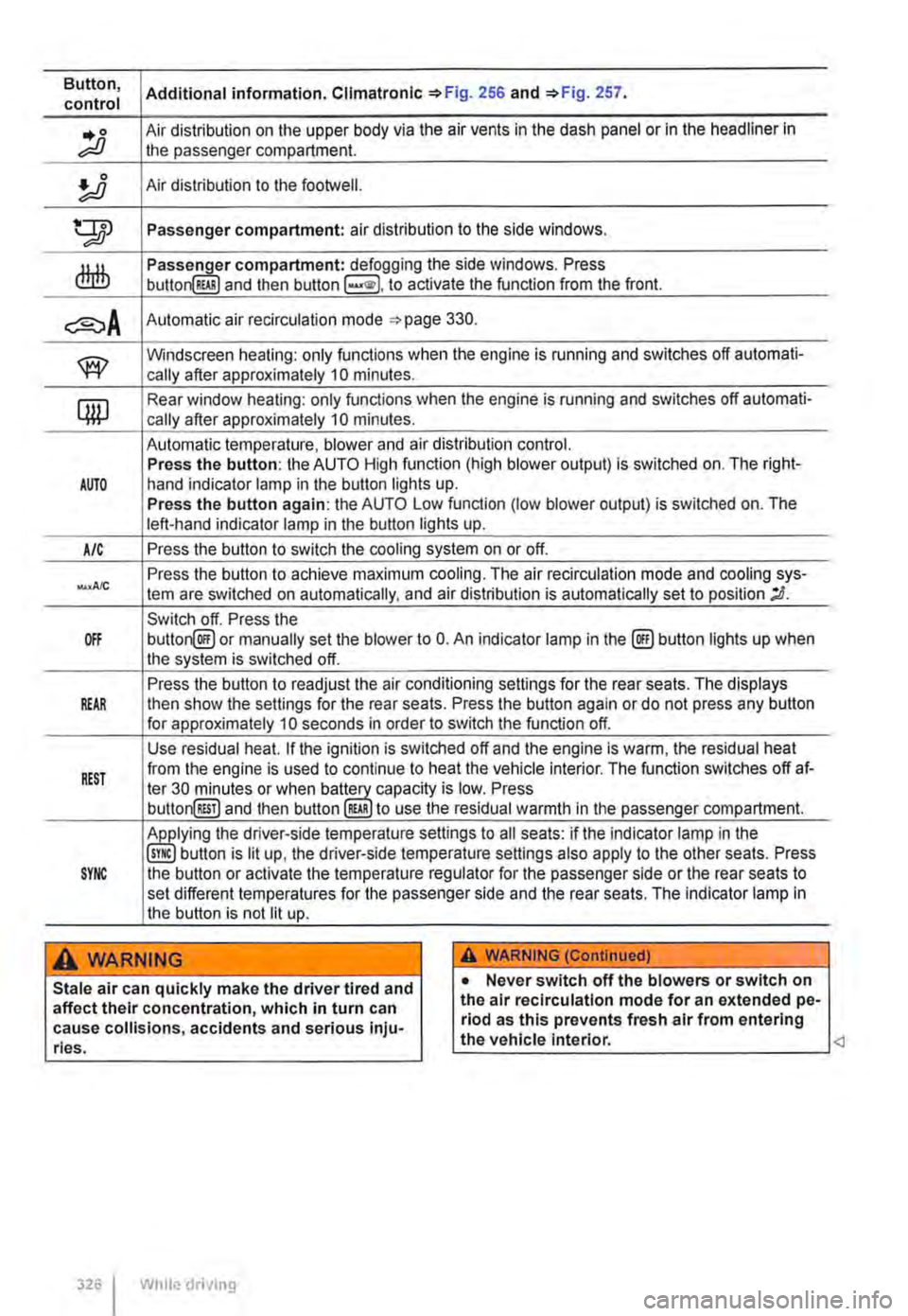
Button, Additional information. Climatronlc 256 and 257. control
.. 0 Air distribution on the upper body via the air vents in the dash panel or in the headliner in ;;;o the passenger compartment.
!J Air distribution to the footwetl.
tTIJ Passenger compartment: air distribution to the side windows.
dlrlb compartment: defogging the side windows. Press button RWI and then button to activate the function from the front.
Automatic air recirculation mode 330.
w Windscreen heating: only functions when the engine is running and switches off automati-cally after approximately 10 minutes.
qw Rear window heating: only functions when the engine is running and switches off automati-cally after approximately 10 minutes.
Automatic temperature, blower and air distribution control. Press the button: the AUTO High function (high blower output) is switched on. The right-AUTO hand indicator lamp in the button lights up. Press the button again: the AUTO Low function (low blower output) is switched on. The left-hand indicator lamp in the button lights up.
A/C Press the button to switch the cooling system on or off.
Press the button to achieve maximum cooling. The air recirculation mode and cooling sys-tern are switched on automatically, and air distribution is automatically set to position ;D.
Switch off. Press the OFF button@ or manually set the blower to 0. An indicator lamp in the@) button lights up when the system is switched off.
Press the button to readjust the air conditioning settings for the rear seats. The displays REAR then show the settings for the rear seats. Press the button again or do not press any button for approximately 10 seconds in order to switch the function off.
Use residual heat. If the ignition is switched off and the engine is warm, the residual heat
REST from the engine is used to continue to heat the vehicle interior. The function switches off at-ter 30 minutes or when capacity is low. Press button@!] and then button RWI to use the residual warmth in the passenger compartment.
the driver-side temperature settings to all seats: if the indicator lamp in the button is lit up, the driver-side temperature settings also apply to the other seats. Press SYNC the button or activate the temperature regulator for the passenger side or the rear seats to set different temperatures for the passenger side and the rear seats. The indicator lamp in the button is not lit up.
A wARNING A WARNING (Continued)
Stale air can quickly make the driver tired and affect their concentration, which in turn can cause collisions, accidents and serious inju-ries.
326 I While driving
• Never switch off the blowers or switch on the air recirculatlon mode for an extended pe-riod as this prevents fresh air from entering the vehicle interior.