tyre VOLKSWAGEN TRANSPORTER 2021 Owners Manual
[x] Cancel search | Manufacturer: VOLKSWAGEN, Model Year: 2021, Model line: TRANSPORTER, Model: VOLKSWAGEN TRANSPORTER 2021Pages: 486, PDF Size: 69.28 MB
Page 3 of 486
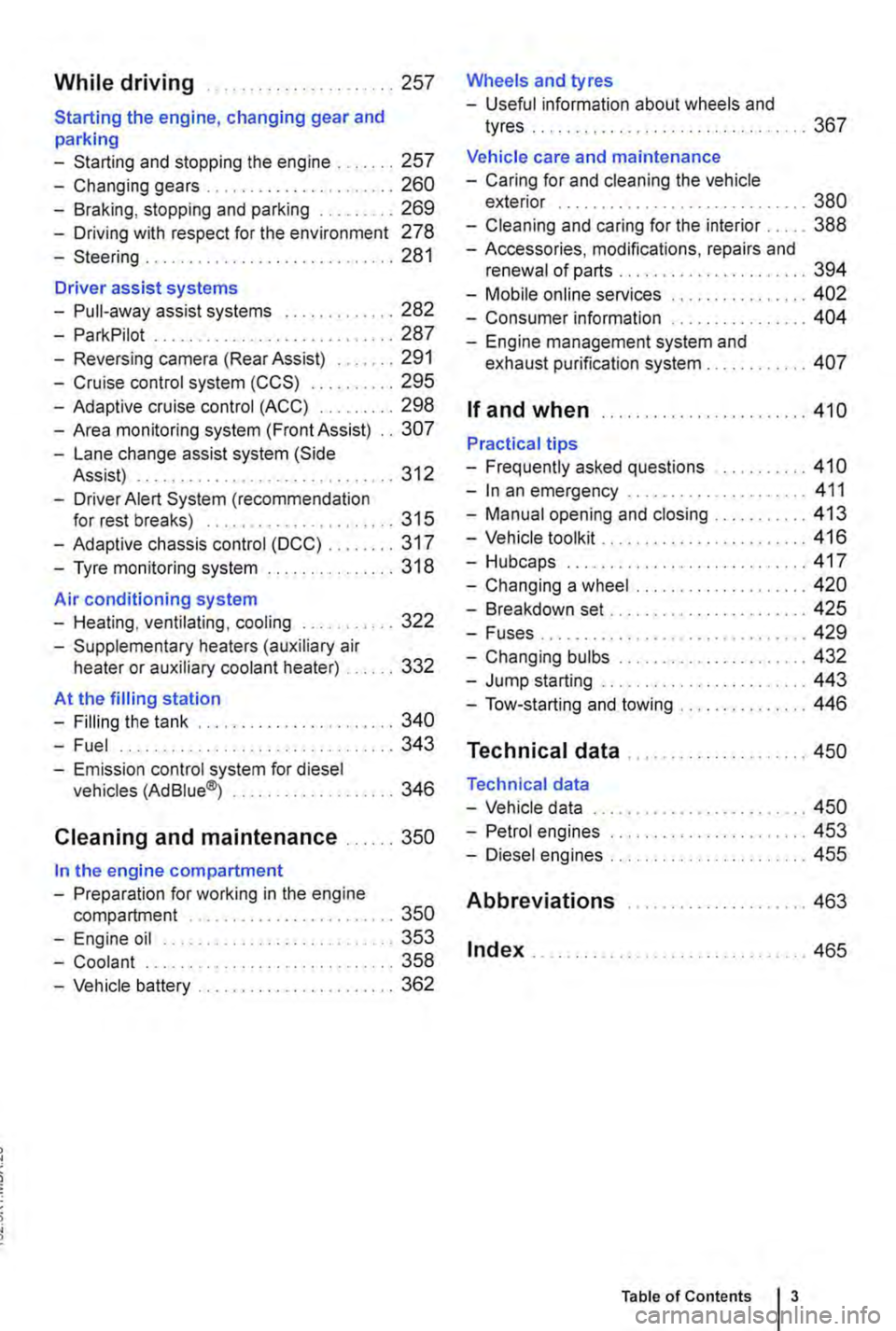
While driving .. ...... 257
Starting the engine, changing gear and parking
-Starting and stopping the engine .. 257
-Changing gears . . . . . . . . . .......... 260
-Braking, stopping and parking ......... 269
-Driving with respect for the environment 278
-Steering ........... 281
Driver assist systems
-Pull-away assist systems .... 282
-ParkPilot ............................ 287
-Reversing camera (Rear Assist) ....... 291
-Cruise control system (CCS) . . . . . ... 295
-Adaptive cruise control (ACC) ......... 298
-Area monitoring system (Front Assist) .. 307
-Lane change assist system (Side Assist) . .. . . .. .. . . . . . . . . .......... 312
-Driver Alert System (recommendation for rest breaks) . . . . . . . . . . ......... 315
-Adaptive chassis control (DCC) ........ 317
-Tyre monitoring system . . . . . . . ....... 318
Air conditioning system
-Heating, ventilating, cooling ........... 322
-Supplementary heaters (auxiliary air heater or auxiliary coolant heater) .... 332
At the filling station
-Filling the tank ....................... 340
-Fuel . . . . . . . . . . . . . . . . ........ 343
-Emission control system for diesel vehicles (AdBiue®j ................... 346
Cleaning and maintenance ...... 350
In the engine compartment
-Preparation for working in the engine compartment . . . . . . . . . . . . . . . . 350
-Engine oil ........................... 353
-Coolant ..................... 358
-Vehicle battery ....................... 362
Wheels and tyres
-Useful information about wheels and
tyres . . . . . . . . . . . . . . ..... 367
Vehicle care and maintenance
-Caring for and cleaning the vehicle exterior . . . . . . . . . . . . . . . . . . . ... 380
-Cleaning and caring for the interior ..... 388
-Accessories, modifications, repairs and renewal of parts . . . . . . . .... 394
-Mobile online services .. 402
-Consumer information 404
-Engine management system and exhaust purification system . . . .. 407
If and when ........................ 410
Practical tips
-Frequently asked questions ........... 410
-In an emergency ..................... 411
-Manual opening and closing . . . . . . . . . 413
-Vehicle toolkit . . ............... 416
-Hubcaps.. . .................... 417
-Changing a wheel .................... 420
-Breakdown set ....................... 425
-Fuses................ . . 429
-Changing bulbs . . . . . . . . .....•.... 432
-Jump starting . . . . . . .......... 443
-Tow-starting and towing . . . 446
Technical data ...
Technical data
-Vehicle data
-Petrol engines
-Diesel engines ..
Abbreviations
Index .......... .
... 450
... 450
......... 453
455
..... " ... 463
.. 465
Table of Contents 3
Page 12 of 486
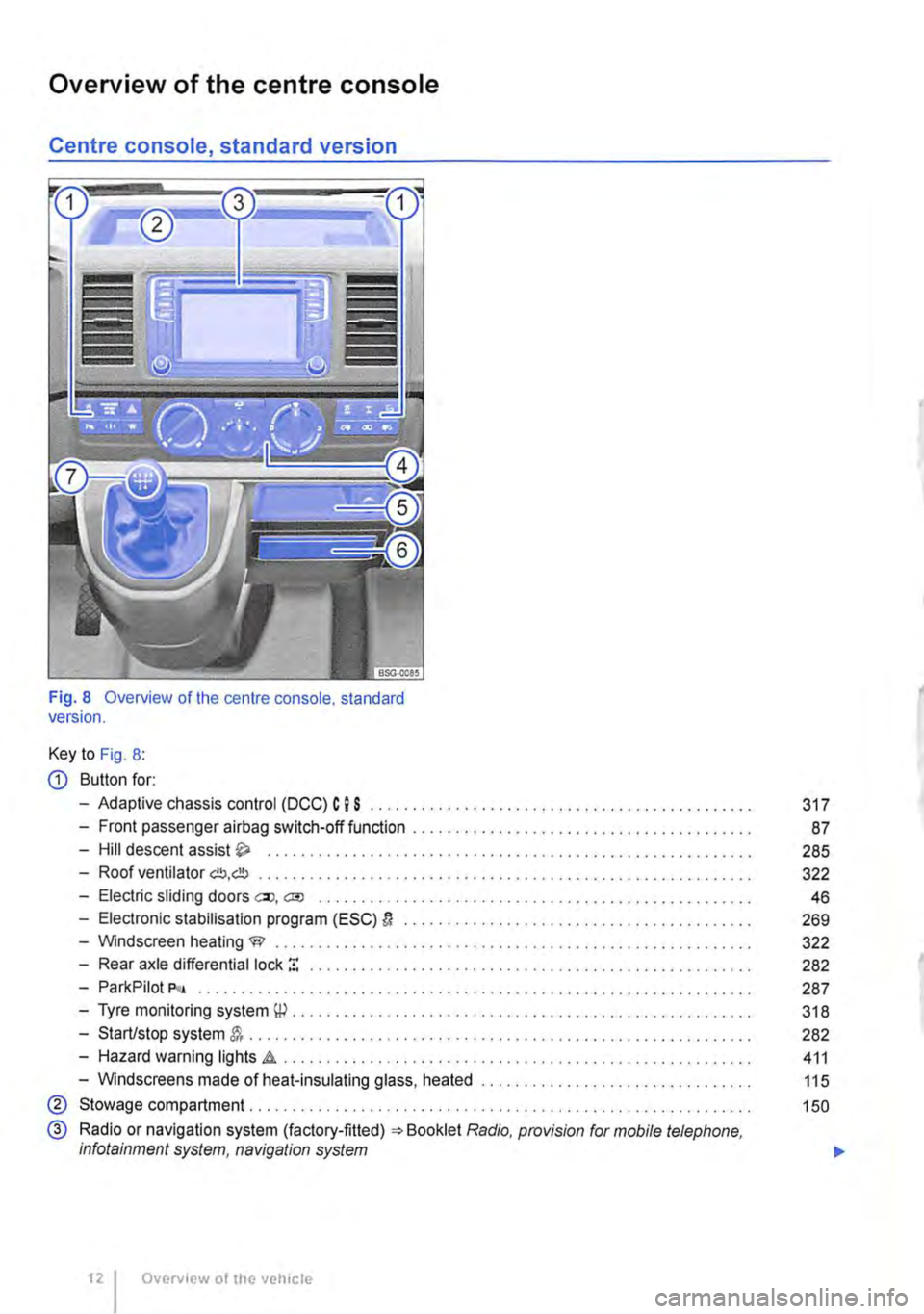
Overview of the centre console
Centre console, standard version
Fig. 8 Overview of the centre console. standard version.
Key to Fig. 8:
CD Button for:
-Adaptive chassis control (DCC) C I S .......................................... .
-Front passenger airbag switch-off function ................•.......................
-Hill descent assist .................................•.......................
-Roof ventilator G!!J,db ......................................................... .
-Electric sliding doors ell, a;o ............................................••....•
-Electronic stabilisation program (ESC) D ........................................ .
-Windscreen heating W ..................•...................................
-Rear axle differential lock ! ................................................. .
-ParkPilot P<• .....................•..••••.............••..............•••••.
-Tyre monitoring system \P . . . . . . . . . . . . . . . . . . . . . . . . ........................ .
-Start/stop system . . . . . . . . . . . . . . . . . . . . . . . . ............................... .
-Hazard warning lights .a . . . . . . . . . . . . . . . . . . . ............................ .
-Windscreens made of heat-insulating glass, heated ............................... .
® Stowage compartment. . . . . . . . . . . . . . . . ............... .
@ Radio or navigation system (factory-fitted) =:-Booklet Radio, provision for mobile telephone, infotainment system, navigation system
Overview of the vehicle
317
87
285
322
46
269
322
282
287
318
282
411
115
150
...
Page 13 of 486
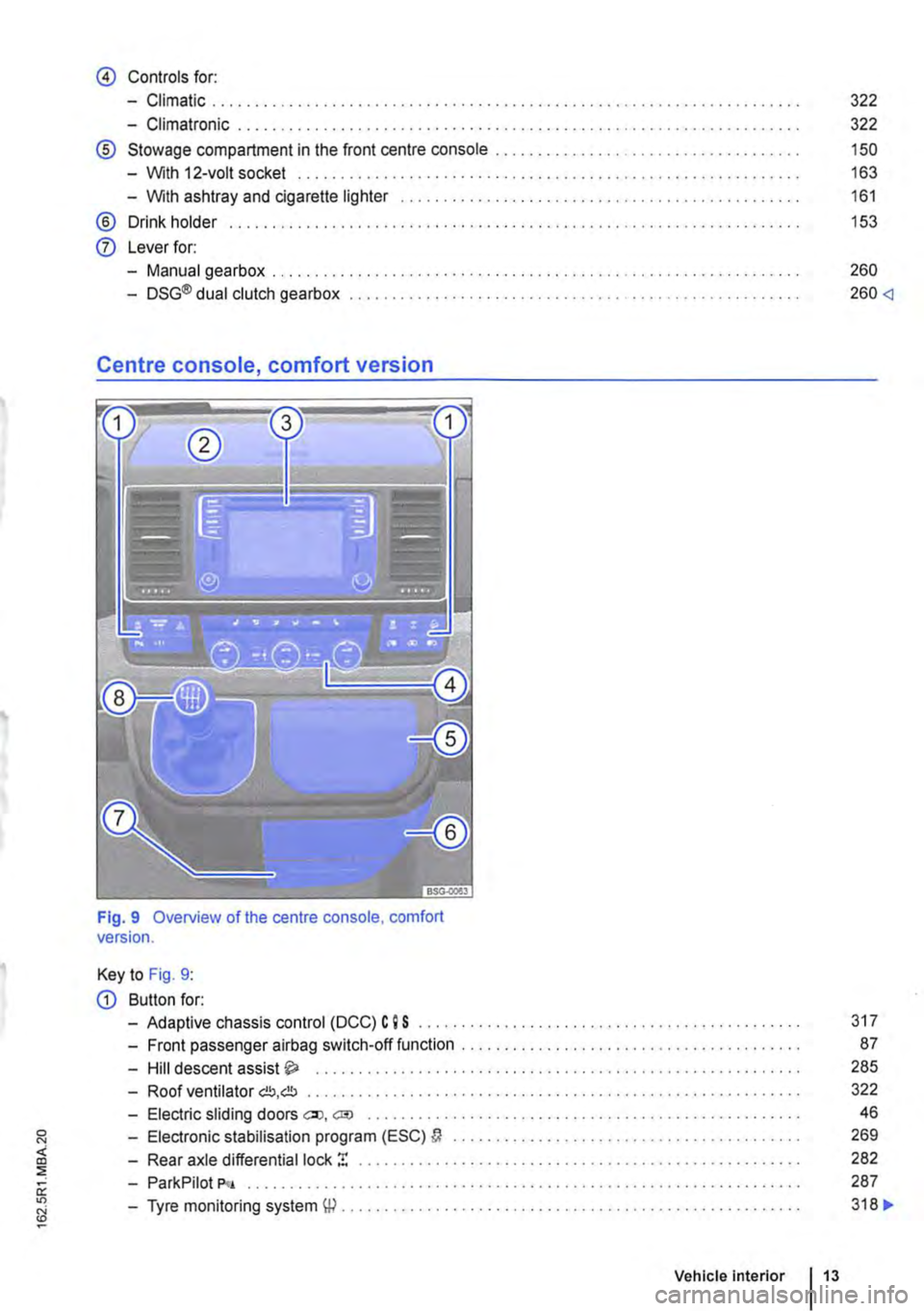
@ Controls for:
-Climatic .................................................................... .
-Climatronic ............................................•.....................
® Stowage compartment in the front centre console ...... .
-With 12-volt socket ...................... .
-With ashtray and cigarette lighter
® Drink holder ..
0 Lever for:
-Manual gearbox . . . . . . . . . . . . . . . . . . . . . . . . . . . . . . . . . . . . . . . . . . . . . ........ .
-DSG® dual clutch gearbox .................................................. .
Centre console, comfort version
Fig. 9 Overview of the centre console, comfort version.
Key to Fig. 9:
G) Button for:
-Adaptive chassis control (DCC) C 9 S
-Front passenger airbag switch-off function
-Hill descent assist ..... .
322
322
150
163
161
153
260
260
87
285
-Roof ventilator C!J,C!J . . . . . . . . . . . . . . . . . . • . . . . . . . . . . . . . • . • . . . . . . . . . . . • • . • • . • . . 322
-Electric sliding doors eo, cm . . . . . . . . . . . . . . . . . . . . . . . . . . . . . . . . . . . . . . . . . . . . . . 46
-Electronic stabilisation program (ESC) a . . . . . . . . . . . . . . . . . . . . . . 269
-Rear axle differential lock ! . . . . . . . . . . . . . . . . . . . . . . . . . . 282
-ParkPilot P<•
-Tyre monitoring system W .............. .
Vehicle Interior 13
287
318 ..
Page 17 of 486
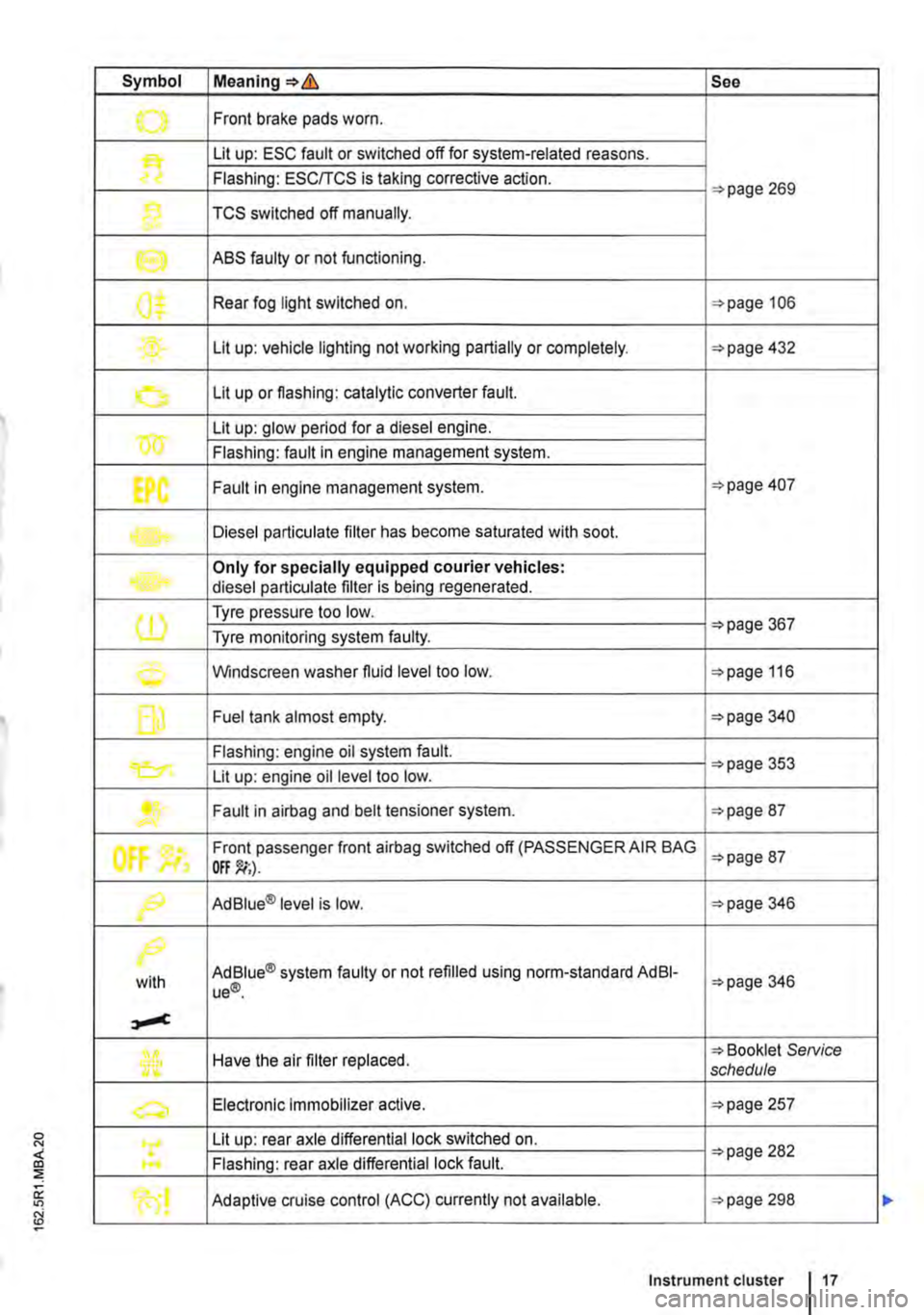
Symbol Meaning=>& See
.......,. Front brake pads worn .
Lit up: ESC fault or switched off for system-related reasons.
Flashing: ESC/TCS is taking corrective action. =>page 269
1} TCS switched off manually.
e ABS faulty or not functioning.
0$ Rear fog light switched on. =>page 106
Lit up: vehicle lighting not working partially or completely. =>page 432
0 Lit up or flashing: catalytic converter fault.
w Lit up: glow period for a diesel engine.
Flashing: fault in engine management system.
EPC Fault in engine management system. =>page 407
Diesel particulate filter has become saturated with soot.
Only for specially equipped courier vehicles: diesel particulate filter is being regenerated.
(1) Tyre pressure too low. =>page 367 Tyre monitoring system faulty.
0 Windscreen washer fluid level too low. =>page 116
f] Fuel tank almost empty. =>page 340
Flashing: engine oil system fault.
Lit up: engine oil level too low. =>page 353
....... Fault in airbag and belt tensioner system. =>page 87
tf'
Front passenger front airbag switched off (PASSENGER AIR BAG =>page 87
f9 Ad Blue® level is low. =>page 346
/>.
with Ad Blue® system faulty or not refilled using norm-standard AdBI-ue®. =>page 346
Have the air filter replaced. => Booklet SeNice schedule
a, Electronic Immobilizer active. =>page 257
Lit up: rear axle differential lock switched on. =>page 282 .... Flashing: rear axle differential lock fault.
Adaptive cruise control (ACC) currently not available. =>page 298
Instrument cluster 17
Page 26 of 486
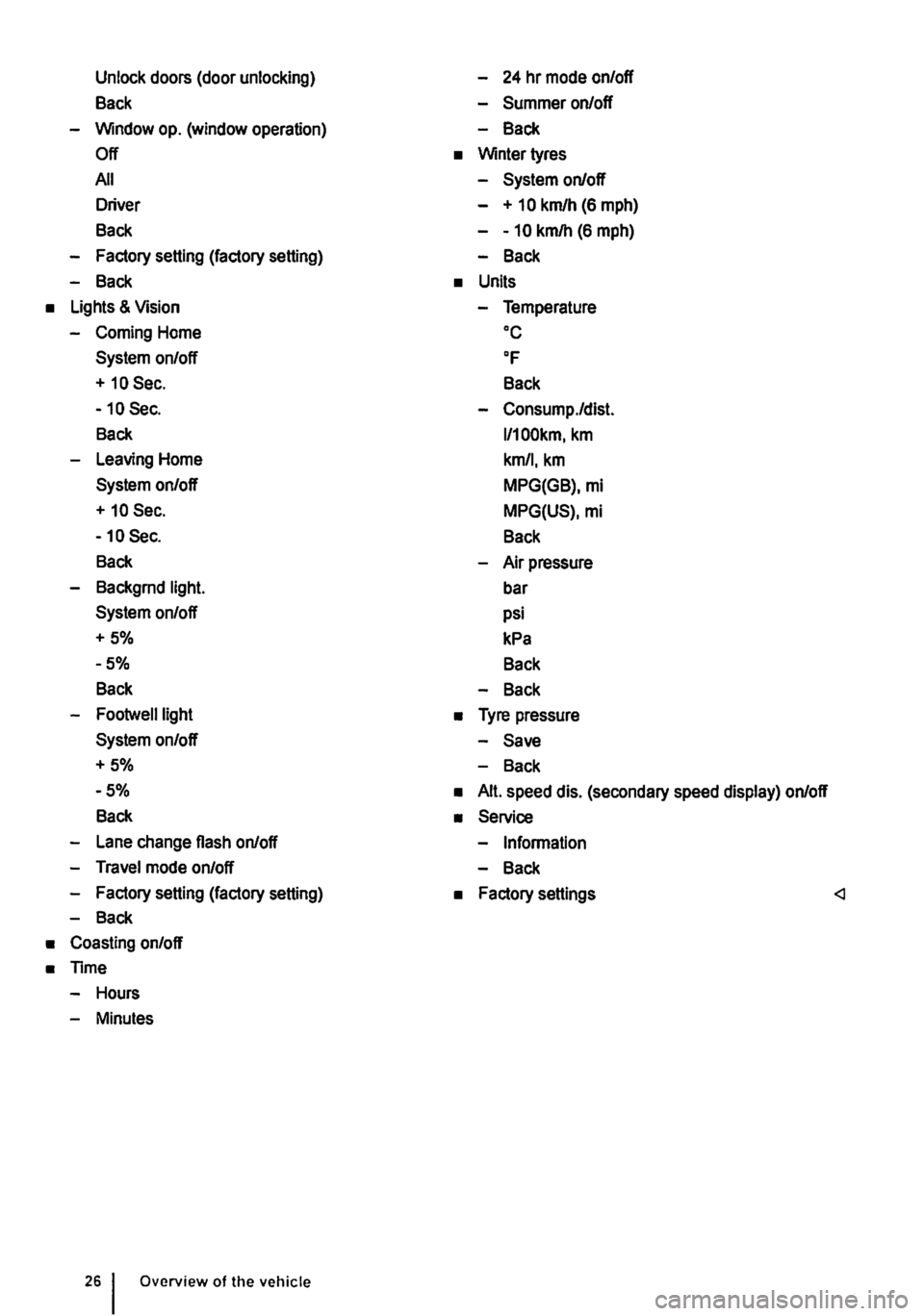
Unlock doors (door unlocking)
Back
-Window op. (window operation)
Off
All
Driver
Back
-Factory setting (factory setting)
-Back
• Lights & Vision
-Coming Home
System on/off
+ 10 Sec.
-10 Sec.
Back
-Leaving Home
System on/off
+ 10 Sec.
-10 Sec.
Back
-Backgrnd light.
System on/off
+5%
-5%
Back
-Footwelllight
System on/off
+5%
-5%
Back
-Lane change flash on/off
-Travel mode on/off
-Factory setting (factory setting)
-Back
• Coasting on/off
• Time
-Hours
-Minutes
Overview of the vehicle
-24 hr mode on/off
-Summer on/off
-Back
• Winter tyres
-System on/off
- + 10 km/h (6 mph)
--10 km/h (6 mph)
-Back
• Units
-Temperature oc
OF
Back
-Consump./dist.
l/100km, km
km/1, km
MPG(GB), mi
MPG(US), mi
Back
-Air pressure
bar
psi
kPa
Back
-Back
• Tyre pressure
-Save
-Back
• Alt. speed dis. (secondary speed display) on/off
• Service
-Information
-Back
• Factory settings
Page 28 of 486
Main menu
m First read and observe the introductory Information and safety warnings & on page 24.
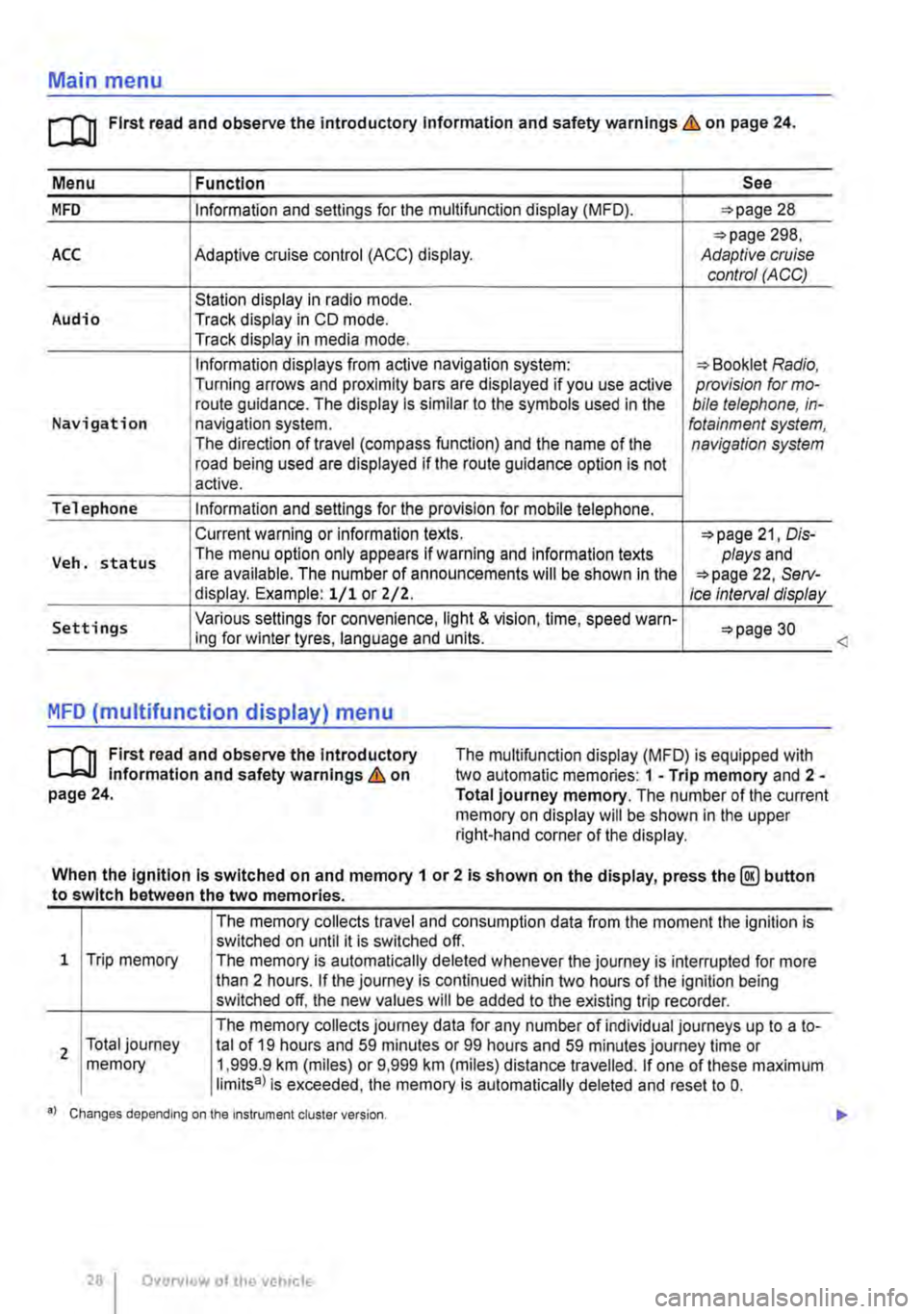
Menu I Function See
MFD Information and settings for the multifunction display (MFD). 28
298, ACC Adaptive cruise control (ACC) display. Adaptive cruise control (ACC)
Station display in radio mode. Audio Track display in CD mode. Track display in media mode.
Information displays from active navigation system: Booklet Radio, Turning arrows and proximity bars are displayed if you use active provision for mo-route guidance. The display is similar to the symbols used in the bile telephone, in-Navigation navigation system. fotainment system, The direction of travel (compass function) and the name of the navigation system road being used are displayed if the route guidance option is not active.
Telephone Information and settings for the provision for mobile telephone.
Current warning or information texts. 21, Dis-
Veh. status The menu option only appears If warning and information texts plays and are available. The number of announcements will be shown In the 22, Serv-display. Example: 1/1 or Z/2. Ice Interval display
Settings Various settings for convenience, light & vision, time, speed warn-30 ing for winter tyres, language and units.
MFD (multifunction display) menu
rl'l1 First read and observe the Introductory L-J,.:.U Information and safety warnings & on page 24.
The multifunction display (MFD) is equipped with two automatic memories: 1 -Trip memory and 2 -Total journey memory. The number of the current memory on display will be shown in the upper right-hand corner of the display.
When the Ignition Is switched on and memory 1 or 2 is shown on the display, press the@ button to switch between the two memories.
1 Trip memory
2 Total journey memory
The memory collects travel and consumption data from the moment the ignition is switched on until it is switched off. The memory is automatically deleted whenever the journey is interrupted for more than 2 hours. If the journey is continued within two hours of the ignition being switched off, the new values will be added to the existing trip recorder.
The memory collects journey data for any number of individual journeys up to a to-tal of 19 hours and 59 minutes or 99 hours and 59 minutes journey time or 1,999.9 km (miles) or 9,999 km (miles) distance travelled. If one of these maximum limits8l is exceeded, the memory is automatically deleted and reset to 0.
•l Changes depending on the Instrument cluster version.
28 I Overview of the vehicle
<
Page 30 of 486
Settings menu
rn First read and observe the introductory information and safety warnings & on page 24.
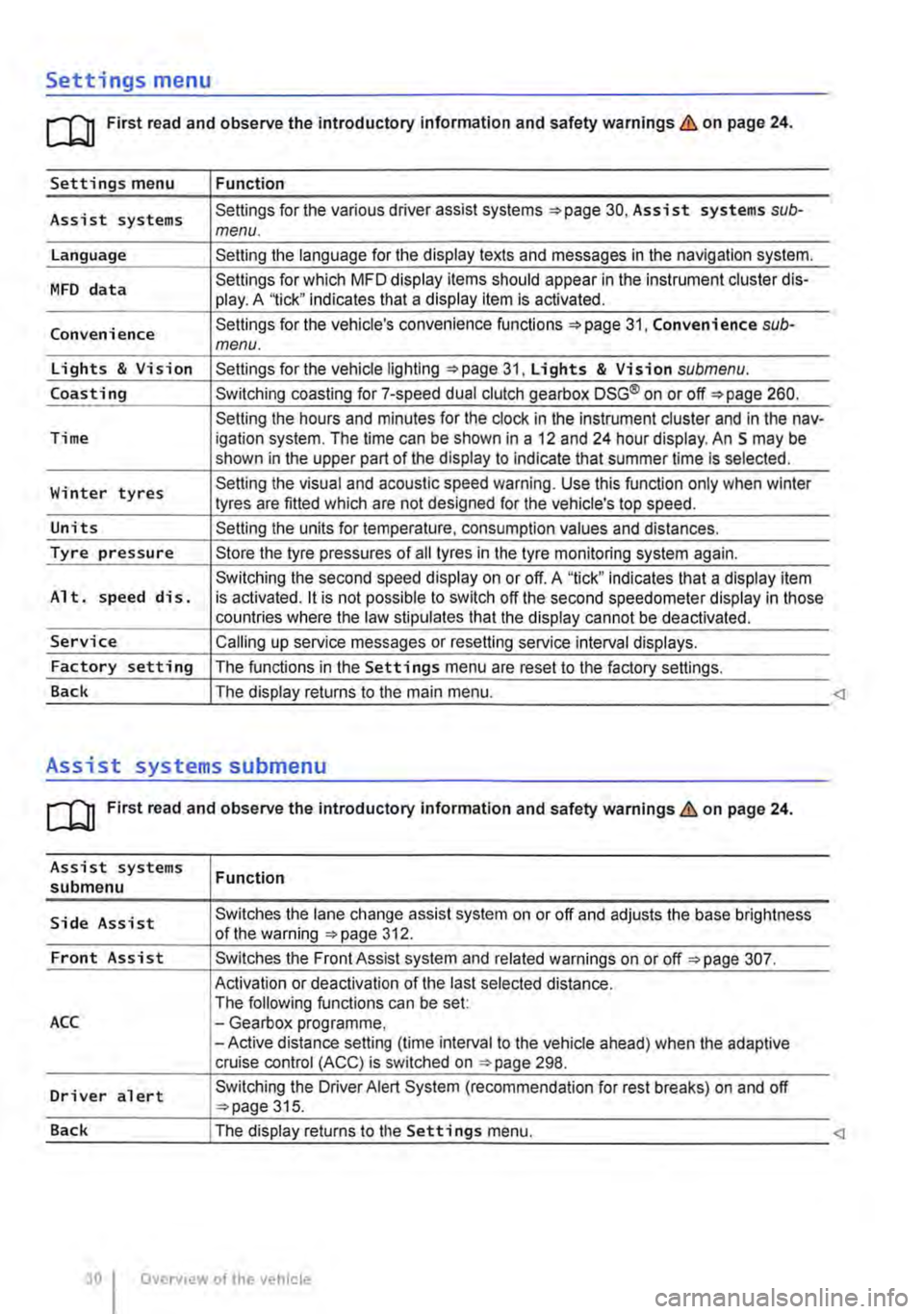
Settings menu Function
Assist systems Settings for the various driver assist systems =:.page 30, Assist systems sub-menu.
Language Setting the language for the display texts and messages in the navigation system.
MFD data Settings for which MFD display items should appear in the instrument cluster dis-play. A '1ick" indicates that a display item is activated.
Convenience Settings for the vehicle's convenience functions 31, Convenience sub-menu.
Lights & Vision Settings for the vehicle lighting =:.page 31, Lights & Vision submenu.
Coasting Switching coasting for 7-speed dual clutch gearbox DSG® on or off=:. page 260.
Setting the hours and minutes for the clock in the instrument cluster and in the nav-Time igation system. The time can be shown in a 12 and 24 hour display. An S may be shown in the upper part of the display to indicate that summer time Is selected.
Winter tyres Setting the visual and acoustic speed warning. Use this function only when winter tyres are fitted which are not designed for the vehicle's top speed.
Units Setting the units for temperature, consumption values and distances.
Tyre pressure Store the tyre pressures of all tyres in the tyre monitoring system again.
Switching the second speed display on or off. A "tick" indicates that a display item Alt. speed dis. is activated. it is not possible to switch off the second speedometer display in those countries where the law stipulates that the display cannot be deactivated.
Service Calling up service messages or resetting service interval displays.
Factory setting The functions in the Settings menu are reset to the factory settings.
Back The display returns to the main menu.
Assist systems submenu
rn First read and observe the introductory information and safety warnings & on page 24.
Assist systems submenu
Side Assist
Front Assist
ACC
Driver alert
Function
Switches the lane change assist system on or off and adjusts the base brightness of the warning =:.page 312.
Switches the Front Assist system and related warnings on or off =:.page 307.
Activation or deactivation of the last selected distance. The following functions can be set: -Gearbox programme, -Active distance setting (time interval to the vehicle ahead) when the adaptive cruise control (ACC) is switched on ::.page 298.
Switching the Driver Alert System (recommendation for rest breaks) on and off ::.page 315.
Page 33 of 486
Before the journey
Before setting off
Driving tips
CO Introduction
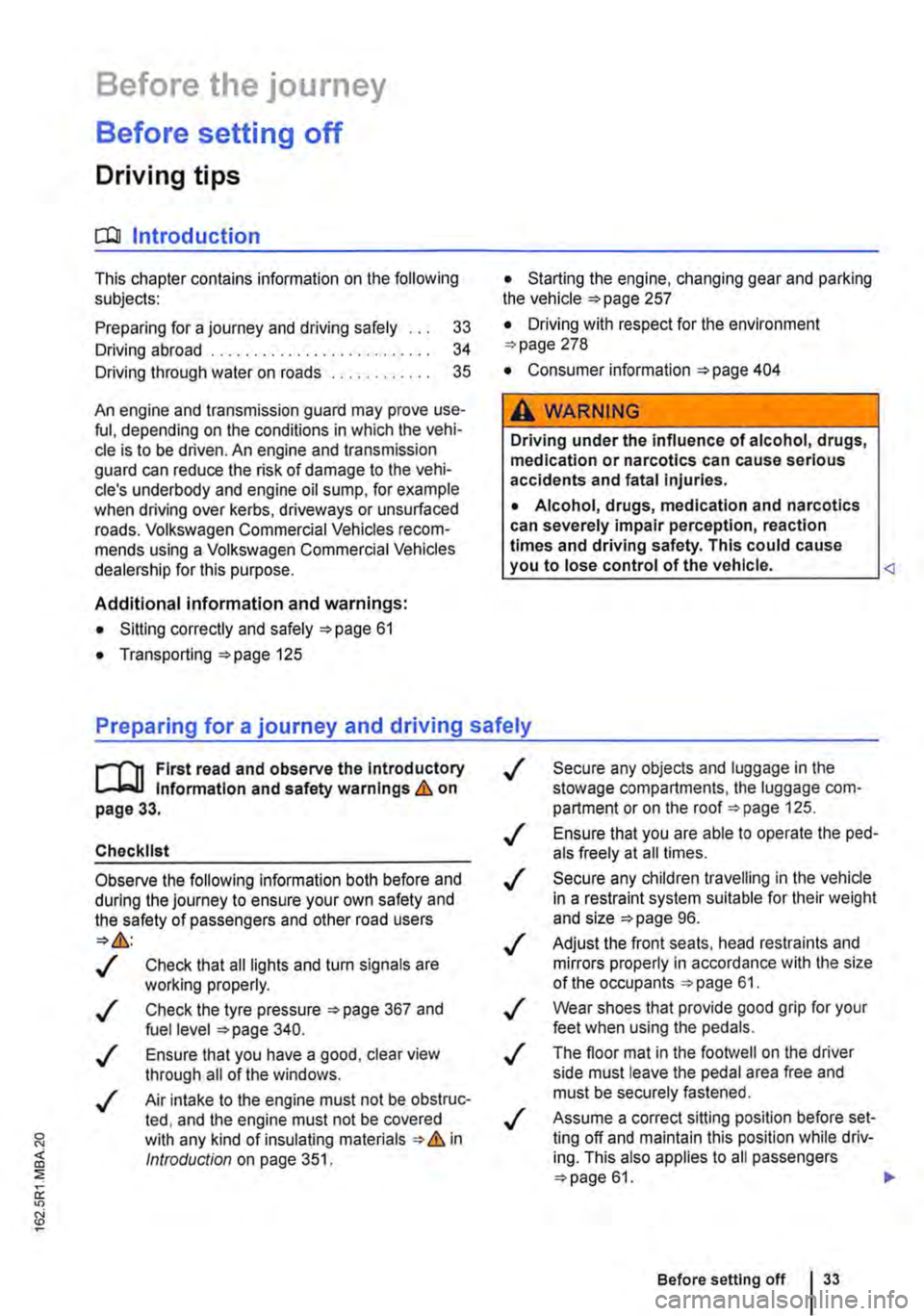
This chapter contains information on the following subjects:
Preparing for a journey and driving safely
Driving abroad ...................... .
Driving through water on roads ........ .
33 34
35
An engine and transmission guard may prove use-ful, depending on the conditions in which the vehi-cle is to be driven. An engine and transmission guard can reduce the risk of damage to the vehi-cle's underbody and engine oil sump, for example when driving over kerbs, driveways or unsurfaced roads. Volkswagen Commercial Vehicles recom-mends using a Volkswagen Commercial Vehicles dealership for this purpose.
Additional Information and warnings:
• Sitting correctly and safely 61
• Transporting 125
• Starting the engine, changing gear and parking the vehicle 257
• Driving with respect for the environment =>page 278
• Consumer information 404
A WARNING
Driving under the Influence of alcohol, drugs, medication or narcotics can cause serious accidents and fatal Injuries.
• Alcohol, drugs, medication and narcotics can severely impair perception, reaction times and driving safety. This could cause you to lose control of the vehicle.
l""""('n First read and observe the Introductory L-Wl Information and safety warnings th on page 33.
Checklist
Observe the following Information both before and during the journey to ensure your own safety and the safety of passengers and other road users
..( Check that all lights and turn signals are working properly.
Check the tyre pressure 367 and fuel level 340.
..( Ensure that you have a good, clear view through all of the windows.
..( Air intake to the engine must not be obstruc-ted, and the engine must not be covered with any kind of insulating materials th in ell Introduction on page 351.
0::
g!
..(
..(
..(
..(
..(
..(
..(
Secure any objects and luggage in the stowage compartments, the luggage corn-partment or on the roof 125 .
Ensure that you are able to operate the ped-als freely at all times .
Secure any children travelling in the vehicle in a restraint system suitable for their weight and size =>page 96.
Adjust the front seats, head restraints and mirrors properly in accordance with the size of the occupants 61.
Wear shoes that provide good grip for your feet when using the pedals.
The floor mat in the footwell on the driver side must leave the pedal area free and must be securely fastened .
Assume a correct sitting position before set-ling off and maintain this position while driv-ing. This also applies to all passengers =>page 61. ..
Before setting off 33
Page 34 of 486
Checklist (Continued)
..( Fasten your seat belt correctly before set-ting off and keep it properly fastened throughout the journey. This also applies to all passengers 79 .
..!
..!
..!
..!
..!
Each vehicle occupant must sit in a seat of their own and must have their own seat belt.
Never drive if your driving ability is impaired, e.g. by medication, alcohol or drugs.
Do not allow yourself to be distracted from the traffic, e.g. by passengers, telephone calls, opening menus and making adjust-ments to settings .
Always adapt your speed and driving style to suit visibility, weather, road and traffic conditions.
Observe traffic regulations and speed limits.
Driving abroad
r-f'n First read and observe the introductory l.-J=.U information and safety warnings.& on page 33.
Checklist
In some countries, special safety standards and emissions-related regulations apply that the vehi-cle may not comply with. Volkswagen Commercial Vehicles recommends that you visit your Volkswa-gen Commercial Vehicles dealer before travelling abroad to find out about any legal requirements and the following points concerning your destina-tion:
..( Does the vehicle need any technical modifi-cations for driving abroad, e.g. masking or switching the headlights over?
..( Are the necessary tools, diagnostic equip-ment and spare parts available for service and repair work?
..( Are there any Volkswagen Commercial Ve-hicles dealerships in the country of destina-tion?
..( For petrol engines: is unleaded petrol with the correct octane number available?
34 Before the journey
..( When travelling long distances, stop and take a break regularly-at least every 2 hours.
..( Secure animals in the vehicle using a sys-tem that is suitable for their weight and size.
A WARNING
Always observe current traffic regulations and speed limits, and think ahead when driv-Ing. Correct interpretation of a driving situa-tion can make the difference between reach-Ing your destination safely and having an ac-cident with serious Injuries.
W Regular servicing of your vehicle not only W maintains its value, it also ensures that your vehicle remains roadworthy and in perfect working order. Servicing work should therefore be carried out in accordance with the service schedule. Some work may have to be carried out before the due date of the next service if the vehicle is subjected to severe operating conditions. Severe operating conditions are, for example, regular stop and go driving, regular driving with a trailer and driving in areas with high levels of dust. Additional informa-tion is available from your Volkswagen Commercial Vehicles dealership or qualified workshop.
..( Are the correct engine oil 353 and other service fluids in accordance with the specifications of Volkswagen Commercial Vehicles available in the destination coun-try?
..( Will the factory-fitted navigation system work with the navigation data available in the destination country?
..( Are special tyres necessary for travelling in the destination country?
CD
Volkswagen Commercial Vehicles is not re-sponsible for any vehicle damage which Is caused by low-quality fuel, inadequate servic-ing work or lack of availability of Genuine Parts.
Page 125 of 486
Transporting items
Driving notes
ClJl Introduction
This chapter contains information on the following subjects:
Stowing items of luggage . . . . . . . . . . . . . . . . . 126
Stowing cargo . . . . . . . . . . . . . . . . . . 127
Buckle straps . . . . . . . . . . . . . . . . . . . . . . . . . . . 128
Ratchet straps . . . . . . . . . . . . . . . . . . . 128 Driving with an open tailgate or open wing doors . . . . . . . . . . . . . . . . . . . . . 129
Driving a loaded vehicle .... 130
Always secure the load transported in the luggage compartment or load compartment, on the roof car-rier, on the load surface or trailer. Always use suita-ble securing straps with the fastening rings to se-cure heavy items. Never exceed the vehicle's max-imum payload. Both the payload and the distribu-tion of the load in the vehicle will have an effect on the driving response and braking distance &.
Using securing straps
• Follow the instructions for the securing straps.
• Observe specifications for maximum load rat-ing.
• The securing straps must be long enough for the item you wish to secure.
Damaged securing straps
Never use the securing straps if:
• Damage to the warp and weft of the webbing (cuts or fraying) accounts for more than 10% of the webbing.
• The seams are damaged.
• The webbing is deformed by friction or heat.
• The securing straps are cracked, especially if cracked across the strap, or if the straps have notches.
• The securing straps have splits or corrosion damage.
• There is damage to the tightening device and connection elements.
Additional information and warnings:
• Tailgate 49
• Wing doors 52
• Lights 106
• Luggage compartment 130
• Roof carrier 137
• Towing a trailer 139
• Wheels and tyres 367
• Vehicle weight and axle weight rating 450
A WARNING
Objects that are not secured, or are secured incorrectly, can cause serious injuries in the event of a sudden driving or braking manoeu-vre or accident. This applies particularly if objects are struck by the airbag when activa-ted and then flung through the vehicle interi-or. To reduce the risk of accidents, please ob-serve the following guidelines:
• Always stow all objects in the vehicle se· curely.
• Always use suitable straps to prevent ob-jects entering the deployment zones of the curtain alrbag, the combined curtain and side airbag or the front airbag during a sudden driving or braking manoeuvre.
• Objects should be stowed in the vehicle interior In such a way that they can never en-ter the alrbag deployment zones while the ve-hicle is In motion.
• Always keep stowage compartments closed while the vehicle is In motion.
• The front airbag must be switched off and the indicator lamp PASSENGER AIR BAG OFF 'Ji; must light up for as long as the front passenger seat backrest is folded forwards.
• Stowed objects must never cause passen-gers to assume an incorrect sitting position.
• If an item is being stowed on a seat, this seat must not be used by any passengers.
A WARNING
Transporting heavy objects changes the vehi-cle driving characteristics and increases the braking distance. Heavy loads which are not properly stowed or secured in the vehicle can lead to a loss of vehicle control and cause se-rious injury. .,..
Transporting items 125