ECO mode VOLVO 850 1996 User Guide
[x] Cancel search | Manufacturer: VOLVO, Model Year: 1996, Model line: 850, Model: VOLVO 850 1996Pages: 265, PDF Size: 4.57 MB
Page 82 of 265

1996 Volvo 850
C - Pause
If you press the "volume" knob the tape is stopped, the unit is silent a\
nd "PAUSE" is displayed. To
restart the tape press the knob again.
D - Scan
Press this button to listen to the first five seconds of each song. Pres\
s it again to stop scanning. pg. 1:58 Cassette deck
A - Cassette eject
If the button is pressed the tape will stop and the cassette will be eje\
cted. The radio will be automatically
engaged. The radio, CD or CD changer will engage automatically (dependi\
ng on which mode was
activated before the tape was played).
B - To re-enter Radio mode
file:///K|/ownersdocs/1996/1996_850/96850_156.htm (3 of 4)12/30/2006 9\
:59:16 AMClassic Cars & Cycles www.ClassicCycles.org
Page 85 of 265
.
NOTE: If the CD eject button is pressed and the")
1996 Volvo 850
engaged. The radio, tape or CD changer will engage automatically (depen\
ding on which mode was
activated before the CD was played).
NOTE: If the CD eject button is pressed and the disc is not removed with\
in 12 seconds, the disc will not
be drawn into the CD player again. pg. 1:60 CD - Single
A - Music search
Press the "
" or " " button to search within a track. While the button is depressed the pl\
aying
time for this track will be displayed.
B - Changing the selected track number
Press "
" for forward selection or " " for backwards selection. The chosen track number will be
displayed.
C - Playing- time display
file:///K|/ownersdocs/1996/1996_850/96850_159.htm (2 of 9)12/30/2006 9\
:59:18 AMClassic Cars & Cycles www.ClassicCycles.org
Page 86 of 265

1996 Volvo 850
When the "CD" button is pressed the playing time for the current track i\
s displayed for 5 seconds.
D - Scan
Press this button to listen to the first ten seconds of each track. Pres\
s it again to stop scanning. pg. 1:61 CD - Single
A - Random choice
Press "RND" to actuate the random mode. From A disc, tracks will be play\
ed at random. "RND" will be
displayed when this function is engaged.
B - Pause
If you press the "volume" knob the disc is stopped, the unit is silent a\
nd "PAUSE" is displayed. To
restart the disc press the knob again.
C - To re-enter Radio mode
file:///K|/ownersdocs/1996/1996_850/96850_159.htm (3 of 9)12/30/2006 9\
:59:18 AMClassic Cars & Cycles www.ClassicCycles.org
Page 89 of 265

A")
1996 Volvo 850
Press the " " or " " button to search within a track. While the button is depressed the pl\
aying
time for this track will be displayed.
pg. 1:63 CD - Remote (certain models)
A - Changing the selected track number
Press "
" for forward selection or " " for backward selection. The chosen disc number and track
number will be displayed.
B - Playing-time display
When the "CHGR" button is pressed the playing time for current track is \
displayed for 5 seconds.
C - Scan
Press this button to listen to the first ten seconds of each track. Pres\
s it again to stop scanning.
pg. 1:64 CD - Remote (certain models)
file:///K|/ownersdocs/1996/1996_850/96850_159.htm (6 of 9)12/30/2006 9\
:59:18 AMClassic Cars & Cycles www.ClassicCycles.org
Page 102 of 265

1996 Volvo 850
Doors and locks
Your car is equipped with a two door operated central locking system.
The key, used on either of the front doors, will lock/unlock all doors, \
trunk/tailgate and on certain
models also the fuel tank cover.
Turn the key once to unlock the door in which the key is inserted.
Turn the key again (within 10 seconds) to unlock all doors, trunk/tail\
gate and on certain models also the
fuel tank cover.
One turn with the key towards lock in one of the front doors locks all d\
oors, trunk/tailgate and fuel tank
filler cap.
Use the switch on the instrument panel to lock/unlock the car from the i\
nside. This button will only
function when the doors are closed.
Check the action of the buttons on the other doors to verify their corre\
ct function (lock/unlock). The
driver's door can be locked only by using the key when outside the vehic\
le. On vehicles equipped with
the optional remote control locking system, refer to the following page.\
file:///K|/ownersdocs/1996/1996_850/96850_201.htm (3 of 8)12/30/2006 9\
:59:21 AMClassic Cars & Cycles www.ClassicCycles.org
Page 105 of 265

1996 Volvo 850
New transmitters
If you purchase additional transmitters, they must be programmed to func\
tion with your remote keyless
entry system. Please refer to
page 2:21 for instructions.
This device complies with the FCC rules Part 15. Operations is subject t\
o the following two
conditions: (1) This device may not cause harmful interference and (2\
) this device must accept any
interference that may be received, including interference that may cause\
undesired operation.
WARNING! Volvo does not recommend using the transmitter to lock the door\
s from inside the car.
On cars equipped with an alarm, the alarm would be activated and would s\
ound when one of the doors
is opened. The doors must not be locked using the remote transmitter whi\
le the vehicle is occupied. In
case of an accident, this may hinder rapid access to the occupants of th\
e vehicle. The alarm will also
sound on models equipped with this feature.
pg. 2:5 Alarm
Alarm (certain models)
To lock : Press the large button (number 1 in the illustration) once t\
o lock all doors and trunk/tailgate
and arm the security system. Lamps will flash to acknowledge that the ve\
hicle is locked and the security
file:///K|/ownersdocs/1996/1996_850/96850_201.htm (6 of 8)12/30/2006 9\
:59:21 AMClassic Cars & Cycles www.ClassicCycles.org
Page 117 of 265
1996 Volvo 850
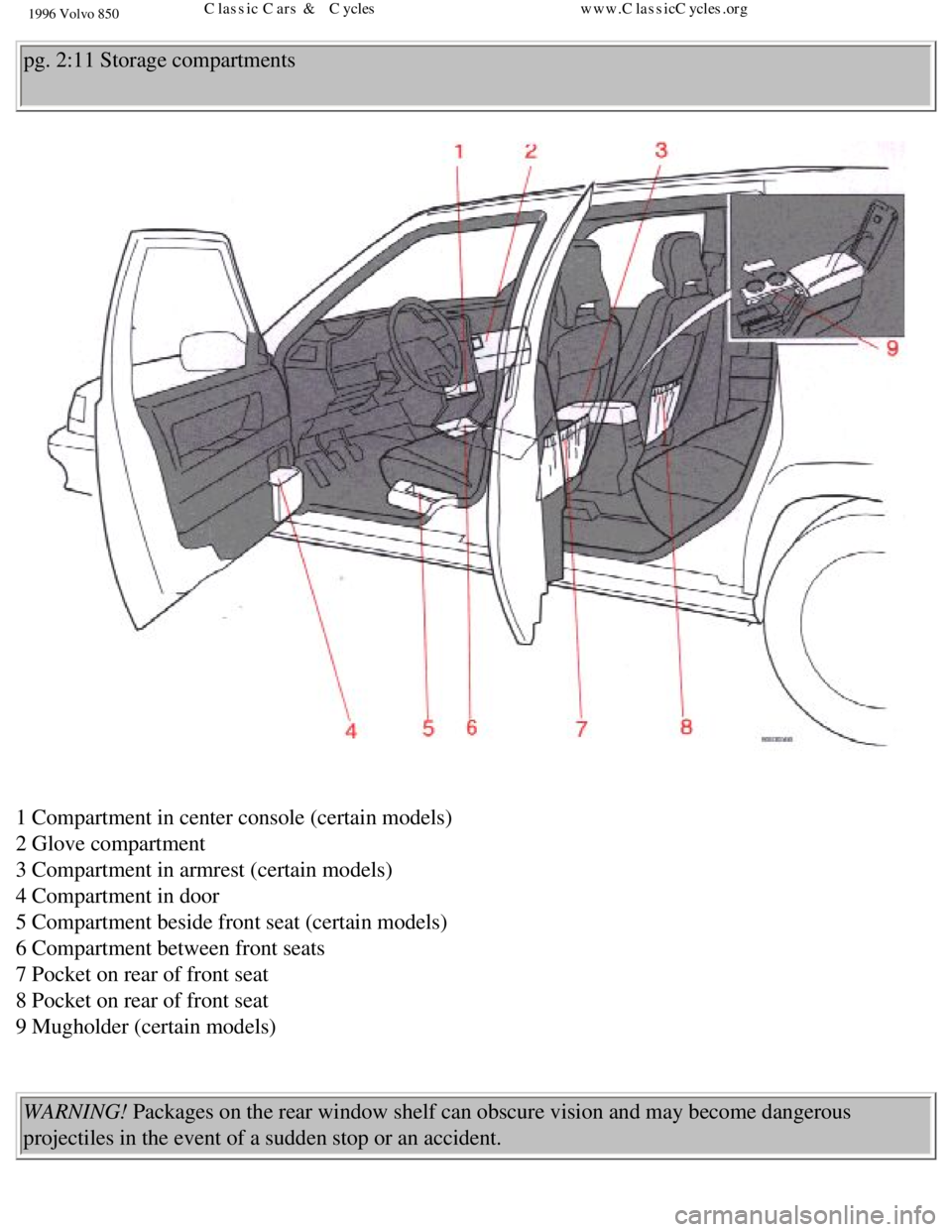
pg. 2:11 Storage compartments
1 Compartment in center console (certain models)
2 Glove compartment
3 Compartment in armrest (certain models)
4 Compartment in door
5 Compartment beside front seat (certain models)
6 Compartment between front seats
7 Pocket on rear of front seat
8 Pocket on rear of front seat
9 Mugholder (certain models)
WARNING! Packages on the rear window shelf can obscure vision and may become dang\
erous
projectiles in the event of a sudden stop or an accident.
file:///K|/ownersdocs/1996/1996_850/96850_206.htm (10 of 11)12/30/2006\
9:59:22 AMClassic Cars & Cycles www.ClassicCycles.org
Page 163 of 265

1996 Volvo 850
CAUTION: Take care not to spill gasoline during refueling. Gasolines con\
taining alcohol can cause
damage to painted surfaces, which may not be covered under the New Vehic\
le Limited Warranty.
Do not use gasoline containing methanol (methyl alcohol, wood alcohol)\
. This practice can result in
vehicle performance deterioration and can damage critical parts in the f\
uel system. Such damage may
not be covered under the New Vehicle Limited Warranty.
pg. 4:4 Driving economy
Economical driving does not necessarily mean driving slowly
Better driving economy may be obtained by thinking ahead, avoiding rapid\
starts and stops and
adjusting the speed of your vehicle to immediate traffic conditions. Obs\
erve the following rules:
l Bring the engine to normal operating temperature as soon as possible by \
driving with a light foot on
the accelerator pedal for the first minutes of operation. A cold engine \
uses more fuel and is subject to
increased wear.
l Whenever possible, avoid using the car for driving short distances. This\
does not allow the engine to
reach normal operating temperature.
l Drive carefully and avoid rapid acceleration and hard braking.
l Do not exceed speed limit.
l Avoid carrying unnecessary items (extra load) in the car.
l Check tire pressure regularly (check when tires are cold).
l Remove snow tires when threat of snow or ice has ended.
l Note that roof racks, ski racks, etc., increase air resistance and there\
by fuel consumption.
l Avoid using automatic transmission kick-down feature unless necessary.
l Avoid using the air conditioning when it is not required. When engaged, \
the air conditioner's
compressor places places an additional load on the engine.
l If your car is equipped with the optional Trip Computer, utilizing the f\
uel consumption modes can
help you "learn" how to drive more economically.
Other factors which decrease gas mileage are:
l Low tire pressure
l Worn or dirty spark plugs
l Incorrect spark plug gap
l Dirty air cleaner
l Dirty engine oil and clogged oil filter
l Dragging brakes
l Incorrect front end alignment
file:///K|/ownersdocs/1996/1996_850/96850_401.htm (5 of 8)12/30/2006 9\
:59:32 AMClassic Cars & Cycles www.ClassicCycles.org
Page 169 of 265
1996 Volvo 850
P (Park)
Use this position when starting the engine or parking the car.
Never use P while car is in motion.
The parking brake should also be used when parking on grades.
The gear selector is mechanically locked in the P position (Shift lock)\
. To release the selector, start the
engine and depress the brake pedal. If it is necessary to manually relea\
se the gear selector,
see page 6:18
for instructions.
CAUTION:
l Never select P or R while the car is in motion.
l When initially selecting positions D, 3, L or R, your right foot should \
press firmly on the brake
pedal to ensure that the car is standing still with the engine idling.
l The gear selector should not be downshifted to L at speeds above 75 mph \
(125 km/h).*
* Always observe posted speed limits.
WARNING! Never leave the car when the engine is running. If, by mistake,\
the gear selector is moved
from P the car may start moving.
R (Reverse)
Never engage R while is moving forward.
N (Neutral)
Neutral = no gear is engaged. Use the parking brake. The engine can be s\
tarted with the gear selector in
this position.
D (Drive)
D is the normal driving position and should be used as often as possible\
to help improve fuel economy.
When modes E or S are selected, upshift and downshift of the forward gea\
rs occur automatically and are
file:///K|/ownersdocs/1996/1996_850/96850_406.htm (3 of 10)12/30/2006 \
9:59:34 AMClassic Cars & Cycles www.ClassicCycles.org
Page 170 of 265

Automatically shifts up and down between 1st, 2nd, and 3rd gears when in\
driving modes E or")
1996 Volvo 850
governed by accelerator pedal position and vehicle speed.
3 (Intermediate position)
Automatically shifts up and down between 1st, 2nd, and 3rd gears when in\
driving modes E or S. There
is no upshift from 3rd gear. Position 3 can be used for driving in hilly\
terrain, for towing trailers or for
increased engine braking power.
L (low position)
No upshift can occur when L is engaged. Select position L for driving in\
first and second gears. Use this
position to select low gear with no upshift, e.g. when ascending and des\
cending steep grades. The
transmission will noticeably shift down from second to first if road spe\
ed drops to below 40 km/h (25
mph) when driving in E mode and below 10 km/h (6 mph in S mode.
Kick-down
Automatic shift to a lower gear (kick-down) is achieved by depressing \
the accelerator pedal fully and
briskly. An upshift will be achieved when approaching the top speed for \
a particular gear or by releasing
the accelerator pedal slightly. Kick-down can be used for maximum accele\
ration or when passing at
highway speeds.
"Lock-up"
The transmission has a "lock-up" function which reduces engine speed and\
saves fuel. "Lock-up" can
sometimes be felt as an additional gear change. pg. 4:8 Automatic transmission
file:///K|/ownersdocs/1996/1996_850/96850_406.htm (4 of 10)12/30/2006 \
9:59:34 AMClassic Cars & Cycles www.ClassicCycles.org