battery VOLVO C30 2008 User Guide
[x] Cancel search | Manufacturer: VOLVO, Model Year: 2008, Model line: C30, Model: VOLVO C30 2008Pages: 234, PDF Size: 4.8 MB
Page 139 of 234
If the vehicle is being towed on a flat bed truck, the towing eyelets must not be used to secure the vehicle on the flat
bed. Consult the tow truck operator.
WARNING
Remember that the power brakes and power steering will not function when engine is not running. The braking
and steering systems will function but the brake pedal pressure required is 3 - 5 times above normal and greater
steering effort must be exerted.
The towing eyelets must not be used for pulling the vehicle out of a ditch or for any similar purpose involving
severe strain. Do not use the towing eyelets to pull the vehicle up onto a flat bed tow truck.
154 06 Starting and driving
Jump starting
Follow these instructions to jump start your vehicle's dead battery or to jump start another vehicle's dead battery using
your vehicle. If the 12-volt auxiliary battery to be used is in another vehicle, check that the vehicles are not touching to
prevent premature completion of a circuit. Be sure to follow jump starting instructions provided for the other vehicle.
To jump start your vehicle:
1. Switch off the ignition.
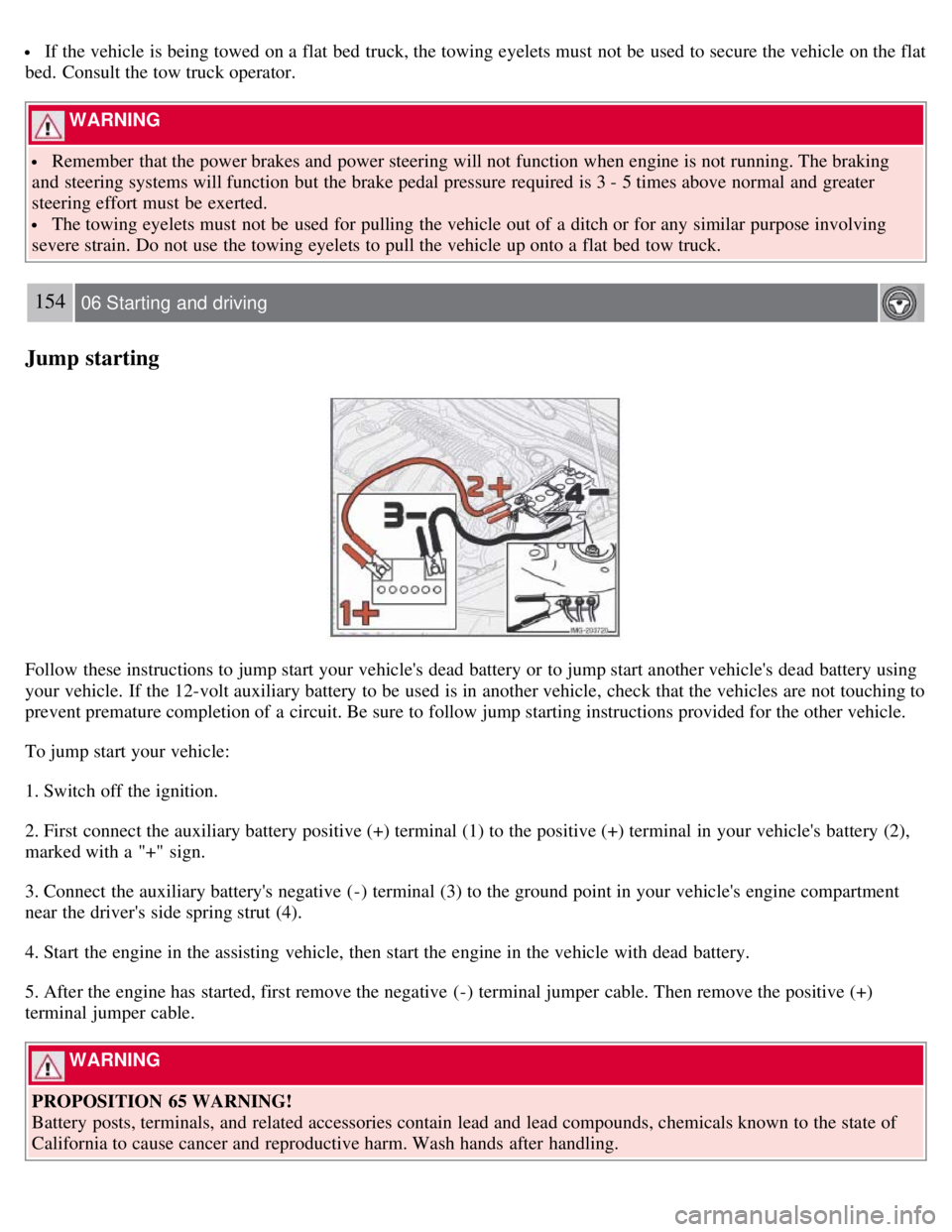
2. First connect the auxiliary battery positive (+) terminal (1) to the positive (+) terminal in your vehicle's battery (2),
marked with a "+" sign.
3. Connect the auxiliary battery's negative (-) terminal (3) to the ground point in your vehicle's engine compartment
near the driver's side spring strut (4).
4. Start the engine in the assisting vehicle, then start the engine in the vehicle with dead battery.
5. After the engine has started, first remove the negative (-) terminal jumper cable. Then remove the positive (+)
terminal jumper cable.
WARNING
PROPOSITION 65 WARNING!
Battery posts, terminals, and related accessories contain lead and lead compounds, chemicals known to the state of
California to cause cancer and reproductive harm. Wash hands after handling.
Page 140 of 234
WARNING
Do not connect the jumper cable to any part of the fuel system or to any moving parts. Avoid touching hot
manifolds.
Batteries generate hydrogen gas, which is flammable and explosive.
Battery fluid contains sulfuric acid. Do not allow battery fluid to contact eyes, skin, fabrics or painted surfaces. If
contact occurs, flush the affected area immediately with water. Obtain medical help immediately if eyes are affected.
Never expose the battery to open flame or electric spark.
Do not smoke near the battery.
Failure to follow the instructions for jump starting can lead to personal injury.
Do not touch the jumper cables during the attempt to start the vehicle. This could cause sparks.
155 06 Starting and driving
Transporting loads
Loading the vehicle
Your vehicle's load-carrying capacity is affected by factors such as:
the number of passengers
tire inflation
the amount of optional or accessory equipment installed
the amount of cargo
See the chapter "Wheels and tires" for more detailed information.
Before loading the car, turn off the engine, and apply the parking brake when loading or unloading long objects. The
gear selector can be inadvertently knocked out of position by long cargo, causing the vehicle to move.
Keep the following in mind when loading the vehicle:
Load the cargo in the cargo area against the rear seat backrest.
Load heavy cargo as low as possible.
Center wide loads.
Secure all cargo with restraining straps anchored to the load securing eyelets.
Cover sharp edges on the load.
Seats can be folded down to extend the cargo compartment. See page 108.
WARNING
Remember that an object weighing 44 lbs (20 kg) produces a force of 2,200 lbs (1,000 kg) in a head-on collision
at 30 m.p.h. (50 km/h)!
When the rear backrest(s) are folded down, the vehicle should not be loaded to a level higher than 2 in. (5 cm)
below the upper edge of the rear side windows. Objects placed higher than this level could impede the function of
the Volvo Inflatable Curtain.
Load carriers (accessory)
Load carriers are available as Volvo accessories. Follow the installation instructions supplied with the load carriers.
Observe the following points when using load carriers:
Page 174 of 234
2 0 0 8
VOLVO C30
196 09 Maintenance and servicing
Volvo maintenance 198
Maintaining your car199
Hood201
Engine compartment202
Engine oil203
Fluids205
Wiper blades207
Battery208
Bulbs210
Replacing bulbs211
Fuses219
197 09 Maintenance and servicing
198 09 Maintenance and servicing
Volvo maintenance
General
Volvo advises you to follow the maintenance program outlined in the Warranty and Service Records Information
booklet. This maintenance program contains inspections and services necessary for the proper function of your vehicle.
The maintenance services contain several checks that require special tools and training, and therefore must be
performed by a qualified technician. To keep your Volvo in top condition, specify time-tested and proven Genuine
Volvo Parts and Accessories.
The Federal Clean Air Act - U.S
The Federal Clean Air Act requires vehicle manufacturers to furnish written instructions to the ultimate purchaser to
Page 176 of 234
Each time the vehicle is refueled:
Check the engine oil level
Clean the windshield, windshield wipers, headlights, and tail lights
Monthly:
Check cold tire pressure in all tires. Inspect the tires for wear.
Check that engine coolant and other fluid levels are between the indicated "min" and "max" markings.
Clean interior glass surfaces with a glass cleaner and soft paper towels.
Wipe driver information displays with a soft cloth.
Visually inspect battery terminals for corrosion. Corrosion may indicate a loose terminal connector, or a battery near
the end of its useful service life. Consult your Volvo retailer for additional information.
As needed:
Wash the car, including the undercarriage, to reduce wear that can be caused by a buildup of dirt, and corrosion that
can be caused by salt residues.
Clean leaves and twigs from air intake vents at the base of the windshield, and from other places where they may
collect.
Complete service information for qualified technicians is available online for purchase or subscription at
www.volvotechinfo.com.
200 09 Maintenance and servicing
Maintaining your car
Emission inspection readiness
What is an Onboard Diagnostic System (OBD II)?
OBD II is part of your vehicle's computerized engine management system. It stores diagnostic information about your
vehicle's emission controls. It can light the Check Engine light (MIL) if it detects an emission control "fault." A "fault"
is a component or system that is not performing within an expected range. A fault may be permanent or temporary.
OBD II will store a message about any fault.
How Do States Use OBD II for Emission Inspections?
Many states connect a computer directly to a vehicle's OBD II system. The inspector can then read "faults." In some
states, this type of inspection has replaced the tailpipe emission test.
How Can My Vehicle Fail OBD II Emission Inspection ?
Your vehicle can fail OBD II emission inspection for any of the following reasons.
If your Check Engine (MIL) light is lit, your vehicle may fail inspection.
If your vehicle's Check Engine light was lit, but went out without any action on your part, OBD II will still have a
recorded fault. Your vehicle may pass or fail, depending on the inspection practices in your area.
If you had recent service that required disconnecting the battery, OBD II diagnostic information may be incomplete
and "not ready" for inspection. A vehicle that is not ready may fail inspection.
How Can I Prepare for My Next OBD II Emission Inspection ?
If your Check Engine (MIL) light is lit - or was lit but went out without service, have your vehicle diagnosed and, if
necessary, serviced by a qualified Volvo technician.
If you recently had service for a lit Check Engine light, or if you had service that required disconnecting the battery,
Page 178 of 234
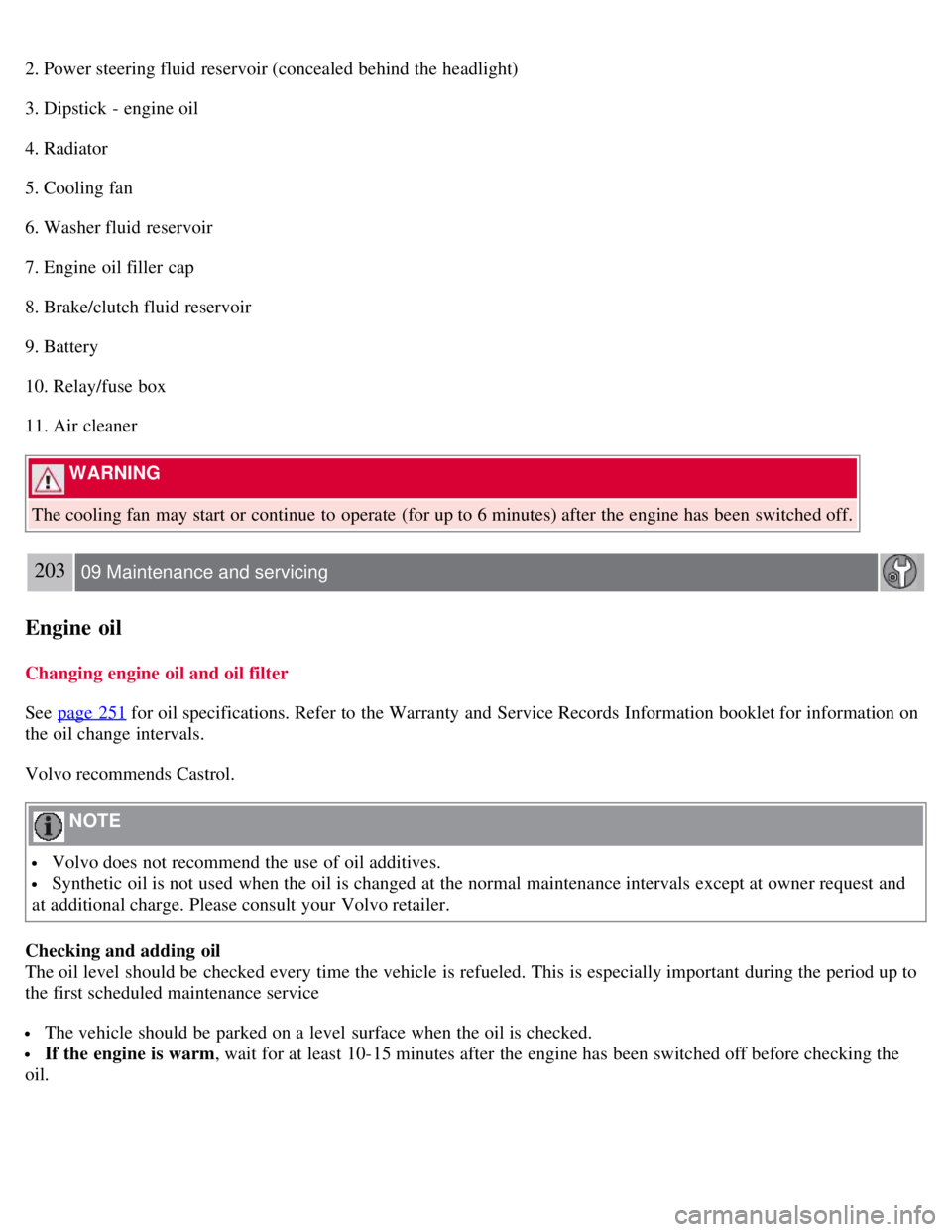
2. Power steering fluid reservoir (concealed behind the headlight)
3. Dipstick - engine oil
4. Radiator
5. Cooling fan
6. Washer fluid reservoir
7. Engine oil filler cap
8. Brake/clutch fluid reservoir
9. Battery
10. Relay/fuse box
11. Air cleaner
WARNING
The cooling fan may start or continue to operate (for up to 6 minutes) after the engine has been switched off.
203 09 Maintenance and servicing
Engine oil
Changing engine oil and oil filter
See page 251
for oil specifications. Refer to the Warranty and Service Records Information booklet for information on
the oil change intervals.
Volvo recommends Castrol.
NOTE
Volvo does not recommend the use of oil additives.
Synthetic oil is not used when the oil is changed at the normal maintenance intervals except at owner request and
at additional charge. Please consult your Volvo retailer.
Checking and adding oil
The oil level should be checked every time the vehicle is refueled. This is especially important during the period up to
the first scheduled maintenance service
The vehicle should be parked on a level surface when the oil is checked.
If the engine is warm , wait for at least 10-15 minutes after the engine has been switched off before checking the
oil.
Page 184 of 234
Battery
Battery maintenance
Driving habits and conditions, climate, the number of starts, etc., all affect the service life and function of the battery.
In order for your battery to perform satisfactorily, keep the following in mind:
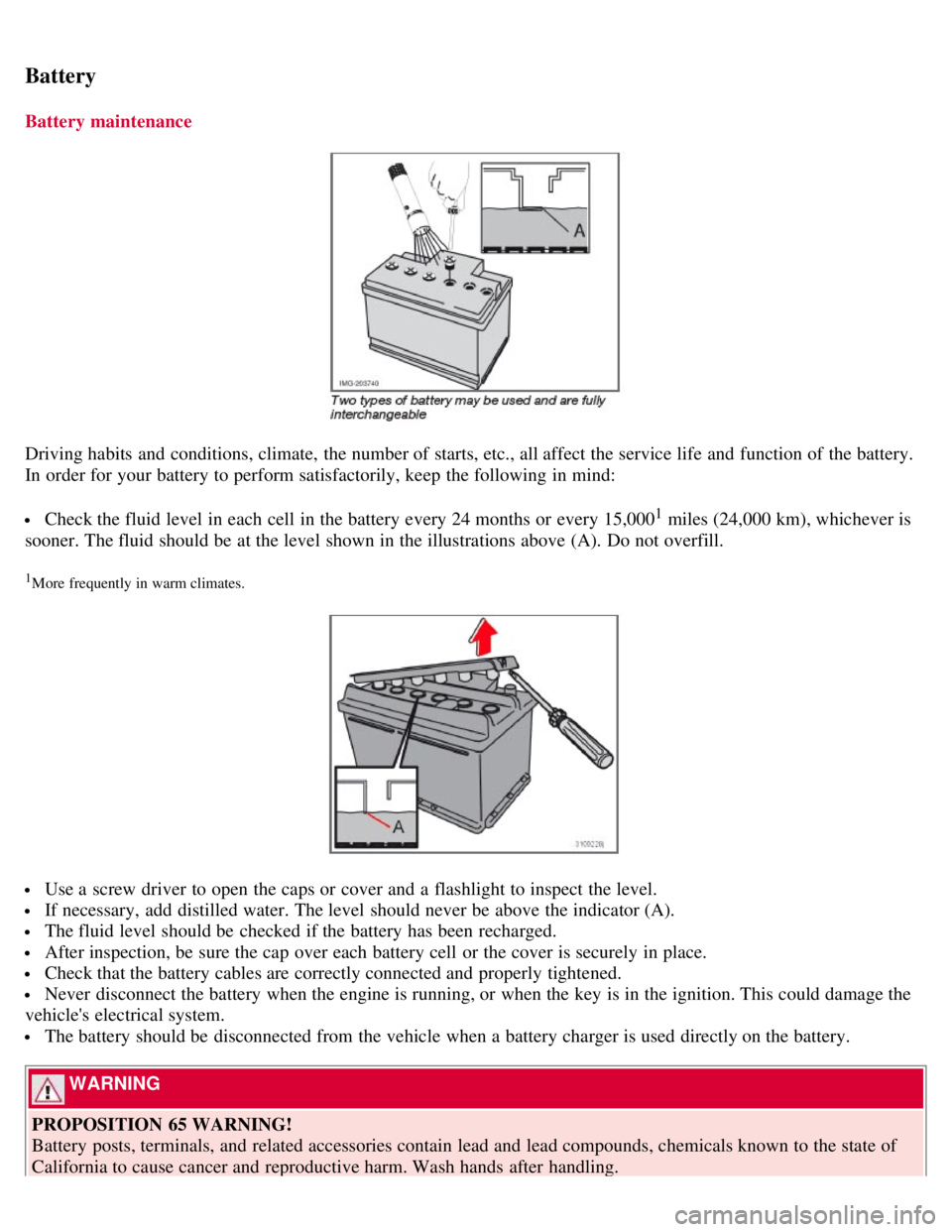
Check the fluid level in each cell in the battery every 24 months or every 15,0001 miles (24,000 km), whichever is
sooner. The fluid should be at the level shown in the illustrations above (A). Do not overfill.
1More frequently in warm climates.
Use a screw driver to open the caps or cover and a flashlight to inspect the level.
If necessary, add distilled water. The level should never be above the indicator (A).
The fluid level should be checked if the battery has been recharged.
After inspection, be sure the cap over each battery cell or the cover is securely in place.
Check that the battery cables are correctly connected and properly tightened.
Never disconnect the battery when the engine is running, or when the key is in the ignition. This could damage the
vehicle's electrical system.
The battery should be disconnected from the vehicle when a battery charger is used directly on the battery.
WARNING
PROPOSITION 65 WARNING!
Battery posts, terminals, and related accessories contain lead and lead compounds, chemicals known to the state of
California to cause cancer and reproductive harm. Wash hands after handling.
Page 185 of 234
209 09 Maintenance and servicing
Battery
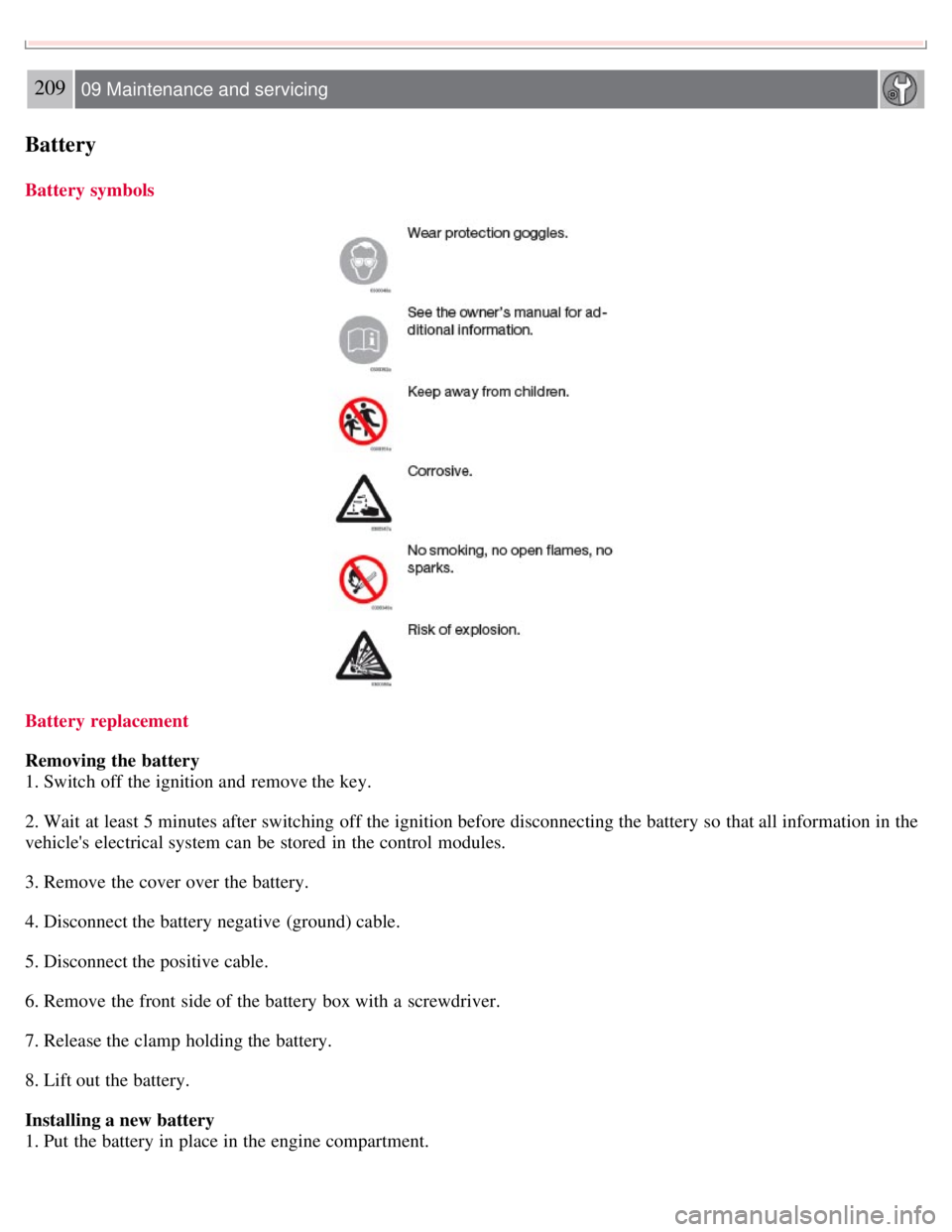
Battery symbols
Battery replacement
Removing the battery
1. Switch off the ignition and remove the key.
2. Wait at least 5 minutes after switching off the ignition before disconnecting the battery so that all information in the
vehicle's electrical system can be stored in the control modules.
3. Remove the cover over the battery.
4. Disconnect the battery negative (ground) cable.
5. Disconnect the positive cable.
6. Remove the front side of the battery box with a screwdriver.
7. Release the clamp holding the battery.
8. Lift out the battery.
Installing a new battery
1. Put the battery in place in the engine compartment.
Page 186 of 234
2. Install the battery's retaining clamp.
3. Reinstall the front side of the battery box.
4. Connect the positive cable.
5. Connect the ground cable.
6. Reinstall the cover over the battery.
NOTE
Used batteries should be properly disposed of at a recycling station or similar facility, or taken to your Volvo
retailer.
WARNING
Never expose the battery to open flame or electric spark.
Do not smoke near the battery.
Battery fluid contains sulfuric acid. Do not allow battery fluid to contact eyes, skin, fabrics or painted surfaces. If
contact occurs, flush the affected area immediately with water. Obtain medical help immediately if eyes are affected.
210 09 Maintenance and servicing
Bulbs
Introduction
Before replacing bulbs in your vehicle, please keep the following points in mind
NOTE
Never touch the glass of bulbs with your fingers. Grease and oils from your fingers vaporize in the heat and will
leave a deposit on the reflector, which will damage it.
Certain bulbs not listed here should only be replaced by an authorized Volvo service technician.
Certain bulbs should only be replaced by a trained and qualified Volvo service technician. These include:
- Courtesy (dome) lighting
- Reading lights
- Glove compartment lights
- Turn signals and courtesy lights in the side door mirrors
- High-mounted brake lights
- Brake lights
- Bi -Xenon® headlights (option)
WARNING
Bi -Xenon® headlights (option) - due to the high voltage used by these headlights, these bulbs should only be
replaced by an authorized Volvo service technician.
211 09 Maintenance and servicing
Page 203 of 234
An auxiliary device, such as an iPOD or a USB flash drive can be connected to the audio system via the connector in
the center console storage compartment.
A sound source must be chosen, depending on the device that has been connected:
1. Use MODE to select iPOD or USB. The text CONNECT DEVICE will be displayed.
2. Connect the device to the connector in the center console storage compartment (see the illustration).
The text LOADING will be displayed while the system indexes the files on the device. This may take a short time.
When indexing has been completed, track information will be displayed, and the desired track can then be selected.
Tracks can be selected in two ways:
Turn the Tuning knob (no. 4 in the illustration on page 228) clockwise or counterclockwise
Use the right or left arrow keys on the navigation control (no. 5 in the illustration on page 233) to select the desired
track. The arrow keys on the steering wheel keypad can also be used in the same way.
NOTE
The system supports playback of files in the most common versions of formats such as mp3, wma, and wav.
However, there may be versions of these formats that the system does not support.
USB flash drive
To simplify the use of a USB flash drive, it is advisable to only store music files on the drive. It will take considerably
longer for the system to index the files on the drive if it contains anything other than compatible music files.
MP3 player
Many mp3 players have a file indexing system that is not supported by the vehicle's audio system. In order to use an
mp3 player, the system must be set to USB Removable device/Mass Storage Device.
iPod
An iPod receives current and its battery is charged through the connecting cord. However, if the iPOD's battery is
completely drained, it should be recharged before the iPOD is connected to the audio system.
NOTE
When an iPOD is used as a sound source, the vehicle's audio system has a menu structure similar to the one in the
iPOD. See the iPOD's manual for detailed information.
For further information, refer to the accessory manual USB/iPOD Music Interface .
Sound settings
Optimal sound reproduction
The audio system is calibrated for optimal sound reproduction through the use of digital signal processing. This
calibration takes into account the speakers, amplifier, cabin
231 10 Audio
Audio functions
Page 223 of 234
comparison to a reference oil.
253 11 Specifications
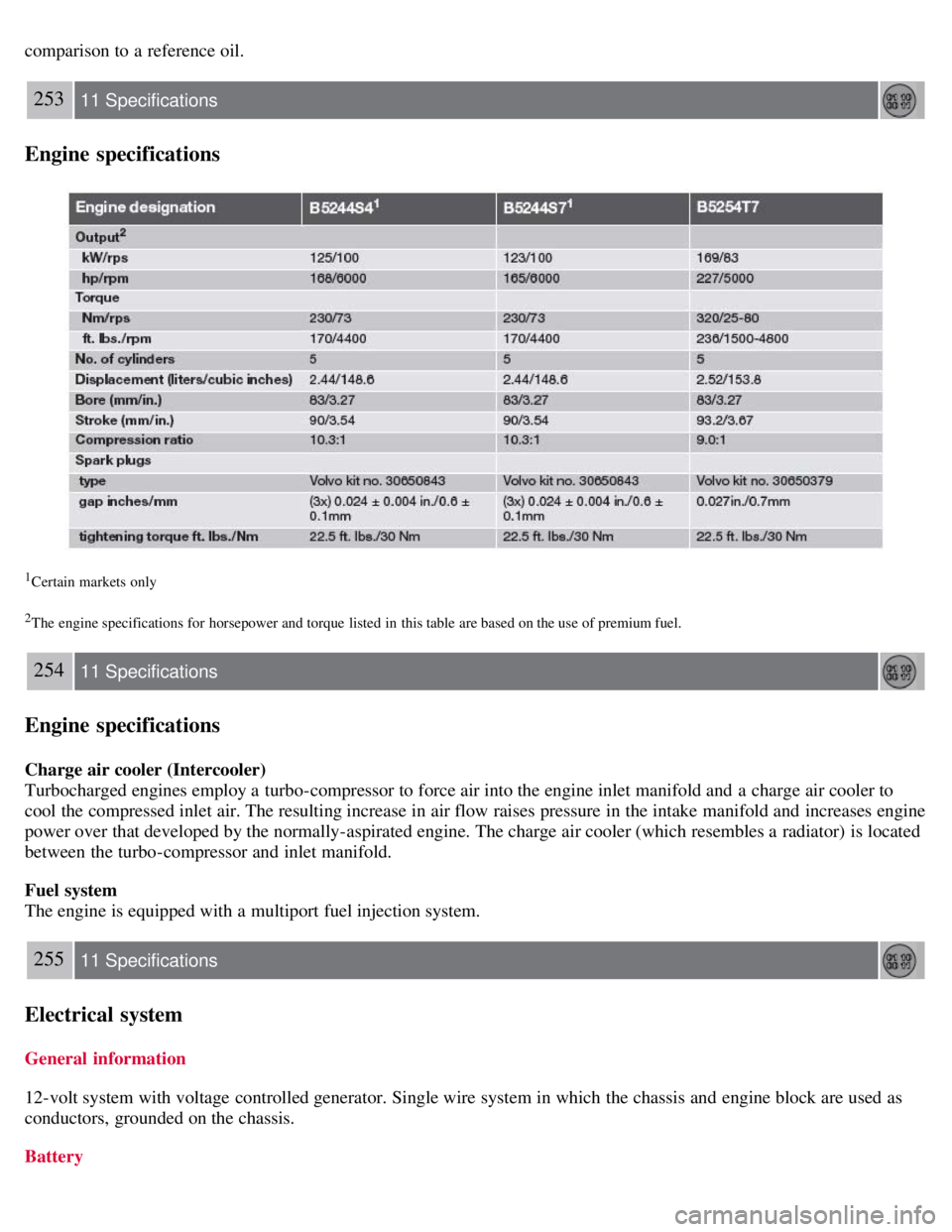
Engine specifications
1Certain markets only
2The engine specifications for horsepower and torque listed in this table are based on the use of premium fuel.
254 11 Specifications
Engine specifications
Charge air cooler (Intercooler)
Turbocharged engines employ a turbo-compressor to force air into the engine inlet manifold and a charge air cooler to
cool the compressed inlet air. The resulting increase in air flow raises pressure in the intake manifold and increases engine
power over that developed by the normally-aspirated engine. The charge air cooler (which resembles a radiator) is located
between the turbo-compressor and inlet manifold.
Fuel system
The engine is equipped with a multiport fuel injection system.
255 11 Specifications
Electrical system
General information
12-volt system with voltage controlled generator. Single wire system in which the chassis and engine block are used as
conductors, grounded on the chassis.
Battery