instrument panel VOLVO C30 2008 User Guide
[x] Cancel search | Manufacturer: VOLVO, Model Year: 2008, Model line: C30, Model: VOLVO C30 2008Pages: 234, PDF Size: 4.8 MB
Page 49 of 234
2. Restart the engine.
3. If both warning lights go off, no further action is required and the vehicle can be driven.
4. If both lights remain on after the engine has been restarted, switch off the engine again and check the brake fluid level.
See page 202
for the location of the reservoir.
Door open warning
The driver will be alerted if one of the doors, the hood, or the rear liftgate are open or ajar.
At low speeds
If the vehicle is moving at a speed of less than approximately 3 m.p.h. (5 km/h), the Information symbol in the instrument
panel will light up and a message will be shown in the information display indicating which door(s), etc is not completely
closed.
At higher speeds
If the vehicle is moving at a speed above approximately 6 m.p.h. (10 km/h), the Warning symbol in the instrument panel
will light up and a message will be shown in the information display indicating which door(s), etc is not completely
closed.
Hood and rear liftgate
If the hood and/or rear liftgate is not completely closed, the Information symbol in the instrument panel will light up and
a message will be displayed, regardless of the vehicle's speed.
56 02 Instruments and controls
Information display
Messages
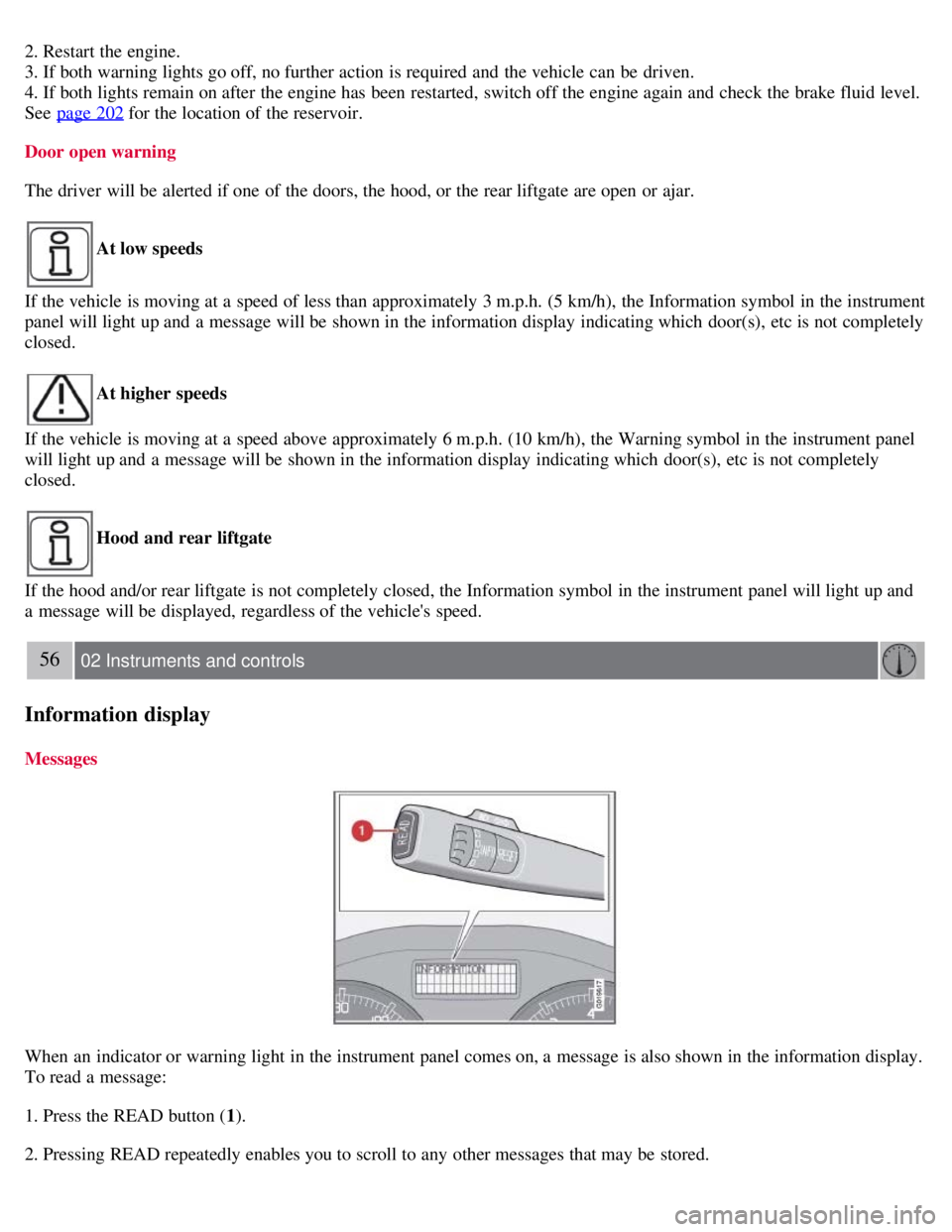
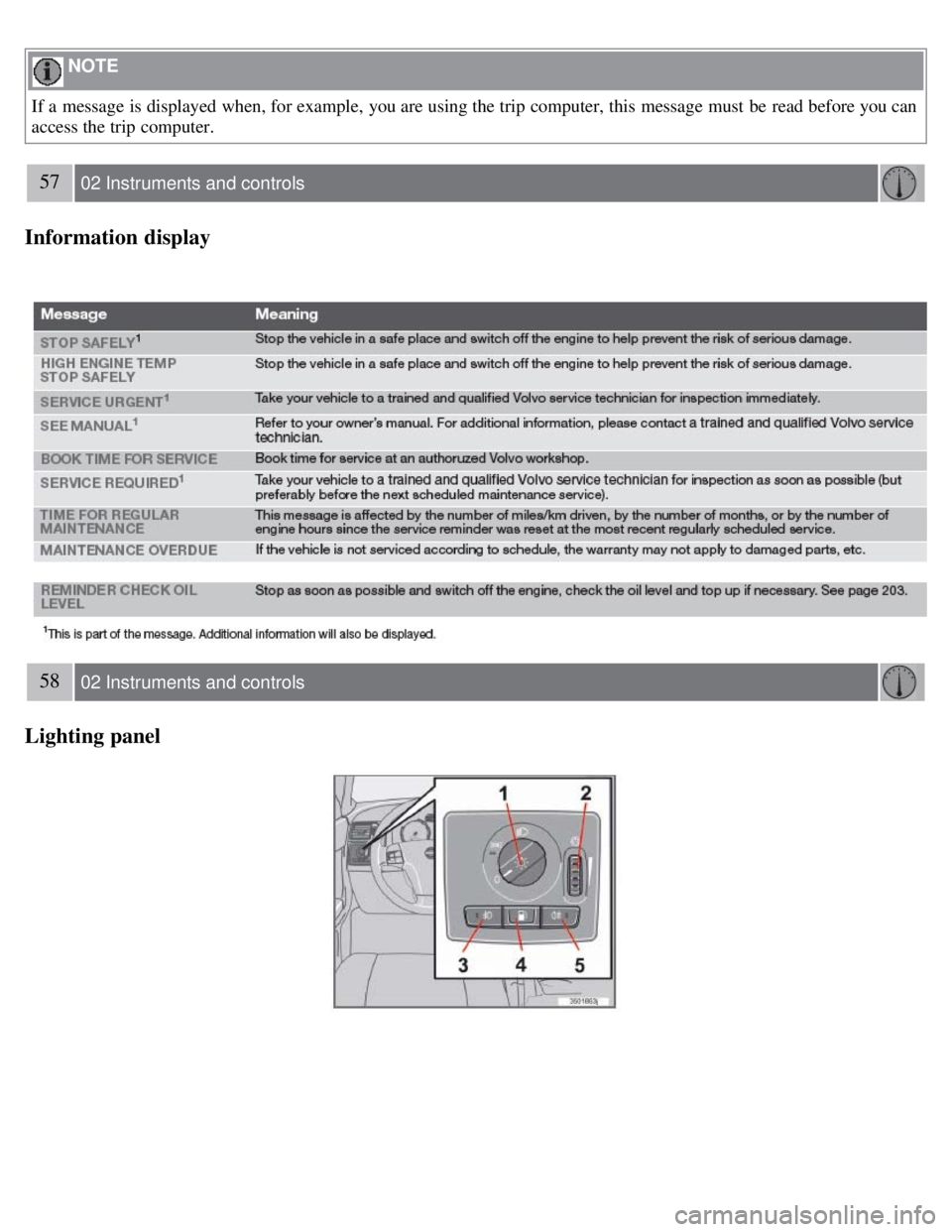
When an indicator or warning light in the instrument panel comes on, a message is also shown in the information display.
To read a message:
1. Press the READ button ( 1).
2. Pressing READ repeatedly enables you to scroll to any other messages that may be stored.
Page 50 of 234
NOTE
If a message is displayed when, for example, you are using the trip computer, this message must be read before you can
access the trip computer.
57 02 Instruments and controls
Information display
58 02 Instruments and controls
Lighting panel
Page 52 of 234
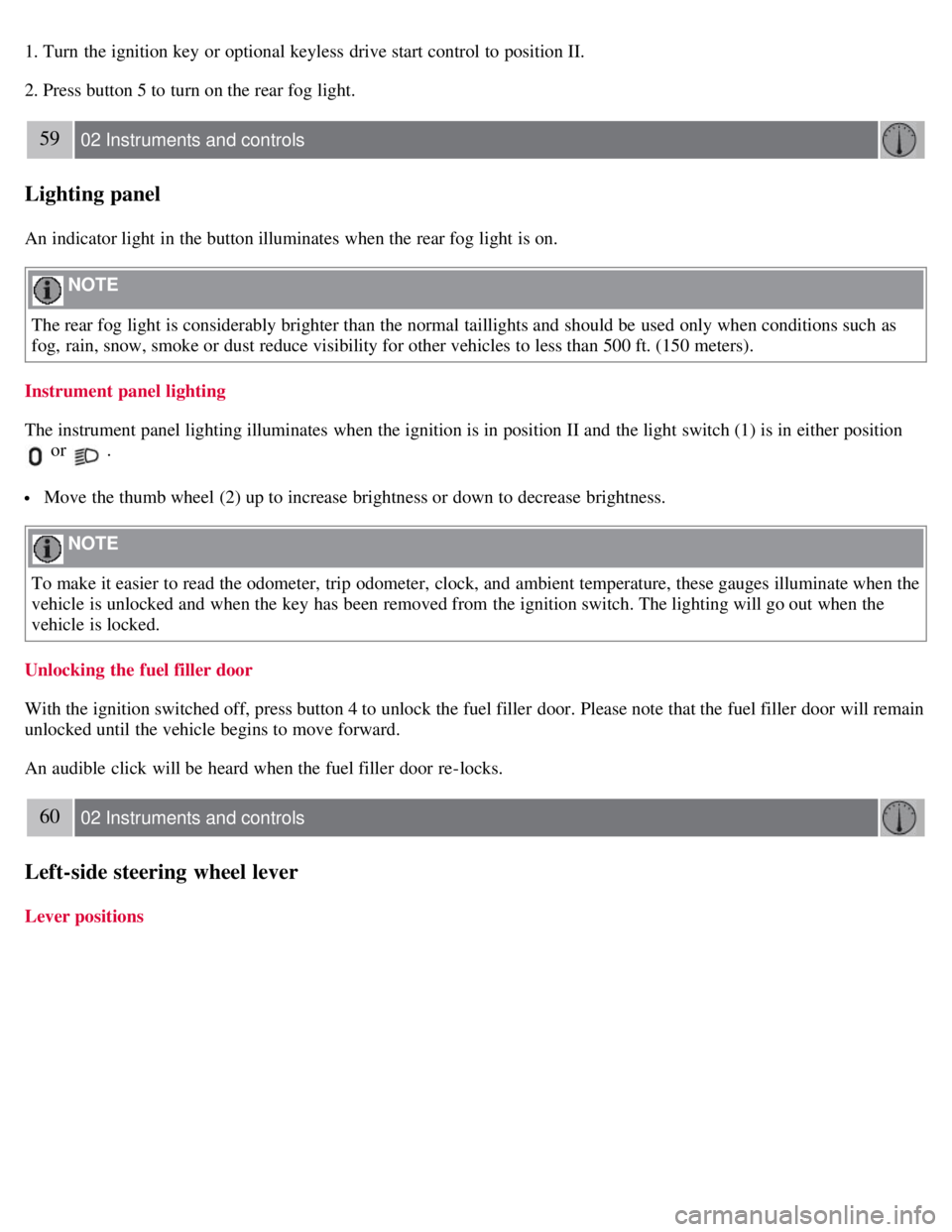
1. Turn the ignition key or optional keyless drive start control to position II.
2. Press button 5 to turn on the rear fog light.
59 02 Instruments and controls
Lighting panel
An indicator light in the button illuminates when the rear fog light is on.
NOTE
The rear fog light is considerably brighter than the normal taillights and should be used only when conditions such as
fog, rain, snow, smoke or dust reduce visibility for other vehicles to less than 500 ft. (150 meters).
Instrument panel lighting
The instrument panel lighting illuminates when the ignition is in position II and the light switch (1) is in either position
or .
Move the thumb wheel (2) up to increase brightness or down to decrease brightness.
NOTE
To make it easier to read the odometer, trip odometer, clock, and ambient temperature, these gauges illuminate when the
vehicle is unlocked and when the key has been removed from the ignition switch. The lighting will go out when the
vehicle is locked.
Unlocking the fuel filler door
With the ignition switched off, press button 4 to unlock the fuel filler door. Please note that the fuel filler door will remain
unlocked until the vehicle begins to move forward.
An audible click will be heard when the fuel filler door re-locks.
60 02 Instruments and controls
Left-side steering wheel lever
Lever positions
Page 59 of 234
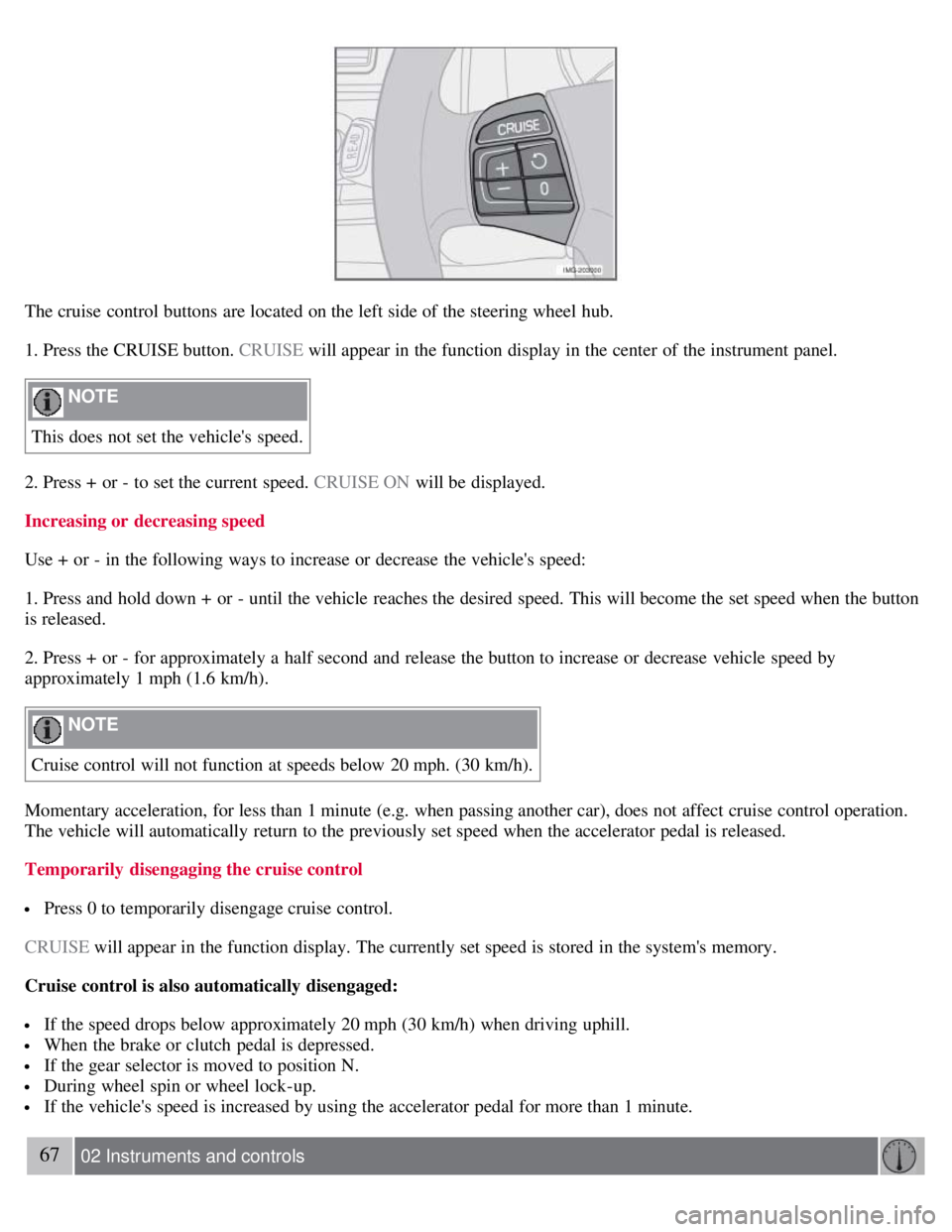
The cruise control buttons are located on the left side of the steering wheel hub.
1. Press the CRUISE button. CRUISE will appear in the function display in the center of the instrument panel.
NOTE
This does not set the vehicle's speed.
2. Press + or - to set the current speed. CRUISE ON will be displayed.
Increasing or decreasing speed
Use + or - in the following ways to increase or decrease the vehicle's speed:
1. Press and hold down + or - until the vehicle reaches the desired speed. This will become the set speed when the button
is released.
2. Press + or - for approximately a half second and release the button to increase or decrease vehicle speed by
approximately 1 mph (1.6 km/h).
NOTE
Cruise control will not function at speeds below 20 mph. (30 km/h).
Momentary acceleration, for less than 1 minute (e.g. when passing another car), does not affect cruise control operation.
The vehicle will automatically return to the previously set speed when the accelerator pedal is released.
Temporarily disengaging the cruise control
Press 0 to temporarily disengage cruise control.
CRUISE will appear in the function display. The currently set speed is stored in the system's memory.
Cruise control is also automatically disengaged:
If the speed drops below approximately 20 mph (30 km/h) when driving uphill.
When the brake or clutch pedal is depressed.
If the gear selector is moved to position N.
During wheel spin or wheel lock-up.
If the vehicle's speed is increased by using the accelerator pedal for more than 1 minute.
67 02 Instruments and controls
Page 70 of 234
must be closed manually.
77 02 Instruments and controls
Personal settings
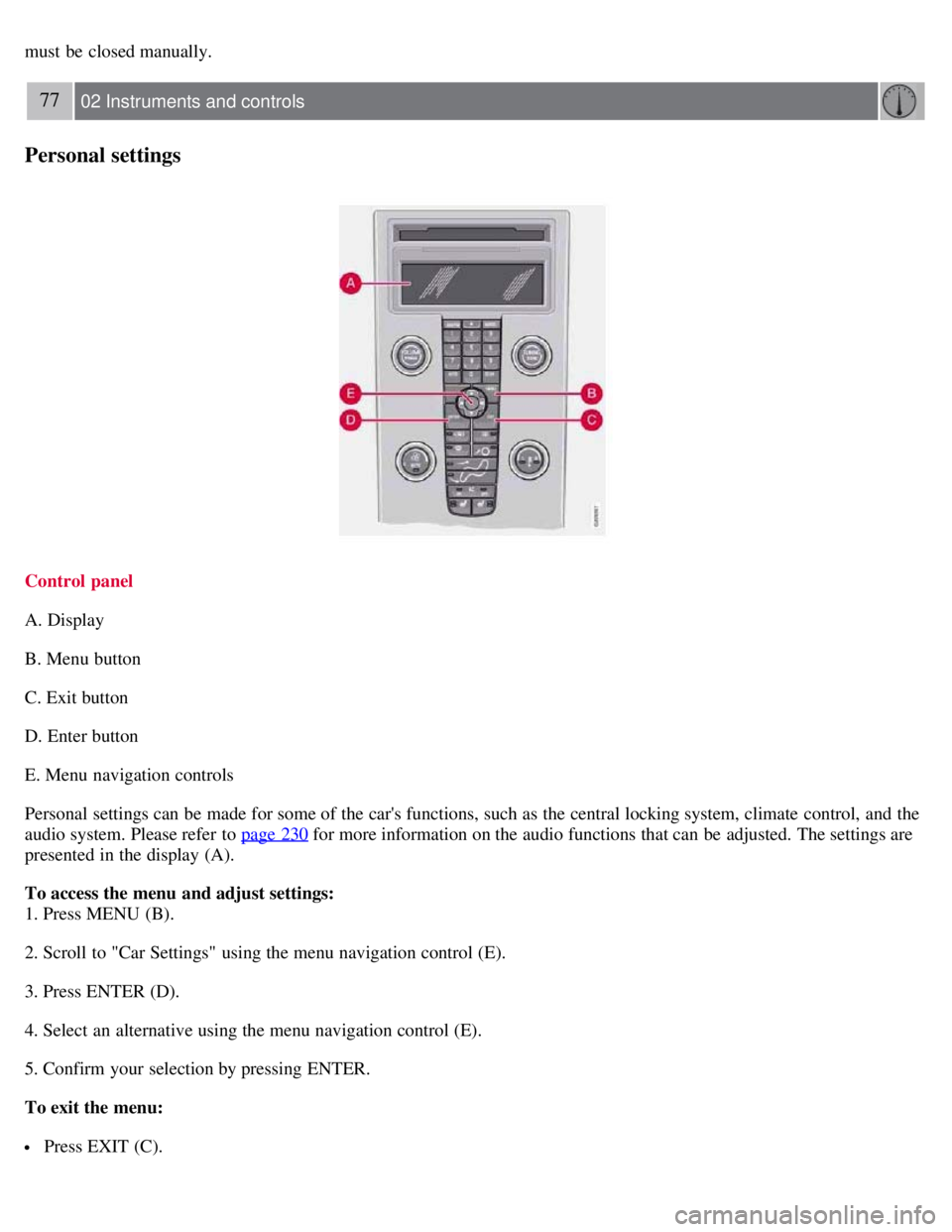
Control panel
A. Display
B. Menu button
C. Exit button
D. Enter button
E. Menu navigation controls
Personal settings can be made for some of the car's functions, such as the central locking system, climate control, and the
audio system. Please refer to page 230
for more information on the audio functions that can be adjusted. The settings are
presented in the display (A).
To access the menu and adjust settings:
1. Press MENU (B).
2. Scroll to "Car Settings" using the menu navigation control (E).
3. Press ENTER (D).
4. Select an alternative using the menu navigation control (E).
5. Confirm your selection by pressing ENTER.
To exit the menu:
Press EXIT (C).
Page 106 of 234
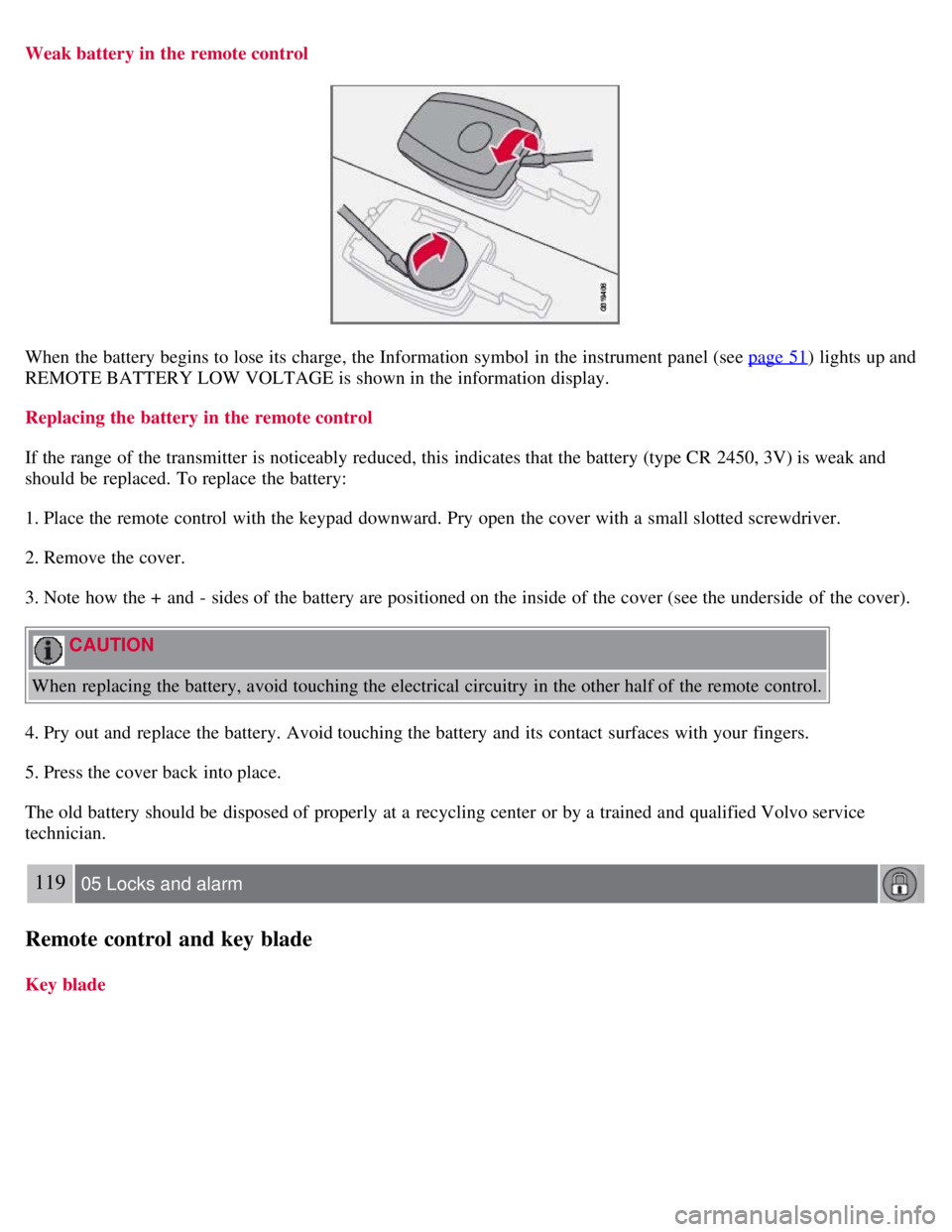
Weak battery in the remote control
When the battery begins to lose its charge, the Information symbol in the instrument panel (see page 51) lights up and
REMOTE BATTERY LOW VOLTAGE is shown in the information display.
Replacing the battery in the remote control
If the range of the transmitter is noticeably reduced, this indicates that the battery (type CR 2450, 3V) is weak and
should be replaced. To replace the battery:
1. Place the remote control with the keypad downward. Pry open the cover with a small slotted screwdriver.
2. Remove the cover.
3. Note how the + and - sides of the battery are positioned on the inside of the cover (see the underside of the cover).
CAUTION
When replacing the battery, avoid touching the electrical circuitry in the other half of the remote control.
4. Pry out and replace the battery. Avoid touching the battery and its contact surfaces with your fingers.
5. Press the cover back into place.
The old battery should be disposed of properly at a recycling center or by a trained and qualified Volvo service
technician.
119 05 Locks and alarm
Remote control and key blade
Key blade
Page 120 of 234
driving, requiring the frequent use of the washers and wipers. Volvo Washer Solvent should be diluted as follows:
Down to 14° F (-10° C): 1 part washer solvent and 4 parts water Down to 5° F (-15° C): 1 part washer solvent and 3
parts water Down to 0° F (-18° C): 1 part washer solvent and 2 parts water Down to -18° F (-28° C): 1 part washer
solvent and 1 part water.
Use Volvo Teflon Lock Spray in the locks.
NOTE
Avoid using de -icing sprays as they can cause damage to the locks.
Conserving electrical current
Keep the following in mind to help minimize battery drain:
When the engine is not running, avoid turning the ignition key to position II. Many electrical systems (the audio
system, the optional navigation system, power windows, etc) will function with the ignition key in position I. This
position reduces drain on the battery.
Please keep in mind that using systems, accessories, etc that consume a great deal of current when the engine is not
running could result in the battery being completely drained.
The optional 12 volt socket in the cargo area provides electrical current even with the ignition switched off, which
drains the battery.
NOTE
If the ignition is switched on, a warning message will be displayed in the text window in the instrument panel
when the battery charge is low.
An energy conserving function designed into the vehicle's electrical system will switch off certain functions or
reduce the load on the battery by, e.g., reducing the audio system's volume.
135 06 Starting and driving
General information
Before a long distance trip
It is always worthwhile to have your vehicle checked by a trained and qualified Volvo service technician before
driving long distances. An authorized Volvo retailer will also be able to supply you with bulbs, fuses, spark plugs and
wiper blades for your use in the event that problems occur.
As a minimum, the following items should be checked before any long trip:
Check that the engine runs smoothly and that fuel consumption is normal.
Check for fuel, oil, and fluid leakage.
Have the transmission oil level checked1.
Check condition of drive belts.
Check state of the battery's charge.
Examine tires carefully (the spare tire as well), and replace those that are worn. Check tire pressures.
The brakes, front wheel alignment, and steering gear should be checked by a trained and qualified Volvo service
technician only.
Check all lights, including high beams.
Reflective warning triangles are legally required in some states/provinces.
Have a word with a trained and qualified Volvo service technician if you intend to drive in countries where it may
Page 122 of 234
When switching to higher octane fuel or changing gasoline brands, it may be necessary to fill the tank more than
once before a difference in engine operation is noticeable.
Deposit control gasoline (detergent additives)
Volvo recommends the use of detergent gasoline to control engine deposits. Detergent gasoline is effective in keeping
injectors and intake valves clean. Consistent use of deposit control gasolines will help ensure good drivability and fuel
economy. If you are not sure whether the gasoline contains deposit control additives, check with the service station
operator.
NOTE
Volvo does not recommend the use of store -bought fuel injector cleaning additives.
Unleaded fuel
Each Volvo has a three-way catalytic converter and must use only unleaded gasoline. U.S. and Canadian regulations
require that pumps delivering unleaded gasoline be labelled "UNLEADED." Only these pumps have nozzles which fit
your vehicle's filler inlet. It is unlawful to dispense leaded fuel into a vehicle labelled "unleaded gasoline only."
Leaded gasoline damages the three-way catalytic converter and the heated oxygen sensor system. Repeated use of
leaded gasoline will lessen the effectiveness of the emission control
137 06 Starting and driving
Fuel requirements
system and could result in loss of emission warranty coverage. State and local vehicle inspection programs will make
detection of misfueling easier, possibly resulting in emission test failure for misfueled vehicles.
NOTE
Some U.S. and Canadian gasolines contain an octane enhancing additive called methyl- cyclopentadienyl manganese
tricarbonyl (MMT). If such fuels are used, your Emission Control System performance may be affected, and the
Check Engine Light (malfunction indicator lamp) located on your instrument panel may light. If this occurs, please
return your vehicle to a trained and qualified Volvo service technician for maintenance.
Gasoline containing alcohol and ethers
Some fuel suppliers sell gasoline containing "oxygenates" which are usually alcohols or ethers. In some areas, state or
local laws require that the service pump be marked indicating use of alcohols or ethers. However, there are areas in
which the pumps are unmarked. If you are not sure whether there is alcohol or ethers in the gasoline you buy, check
with the service station operator. To meet seasonal air quality standards, some areas require the use of "oxygenated"
fuel. Volvo allows the use of the following "oxygenated" fuels; however, the octane ratings listed on this page must
still be met.
Alcohol - Ethanol: Fuels containing up to 10% ethanol by volume may be used. Ethanol may also be referred to as
Ethyl alcohol, or "Gasohol". Ethers - MTBE: Fuels containing up to 15% MTBE may be used.
Fuel Formulations
Do not use gasoline that contains lead as a knock inhibitor, and do not use lead additives. Besides damaging the
exhaust emission control systems on your vehicle, lead has been strongly linked to certain forms of cancer. Many fuels
Page 133 of 234
be longer.
A warning light in the instrument panel will light up to warn the driver that a fault has occurred.
If this light comes on while driving or braking, stop immediately and check the brake fluid level in the reservoir.
NOTE
Press the brake pedal hard and maintain pressure on the pedal - do not pump the brakes.
WARNING
If the fluid level is below the MIN mark in the reservoir or if a brake system message is shown in the information
display: DO NOT DRIVE. Have the vehicle towed to a trained and qualified Volvo service technician and have the
brake system inspected.
Power brakes function only when the engine is running
The power brakes utilize vacuum pressure which is only created when the engine is running. Never let the vehicle roll
to a stop with the engine switched off.
If the power brakes are not working, the brake pedal must be pressed approximately five times harder than usual to
make up for the lack of power assistance. This can happen for example when towing your vehicle or if the engine is
switched off when the vehicle is rolling. The brake pedal feels harder than usual.
Water on brake discs and brake pads affects braking
Driving in rain and slush or passing through an automatic car wash can cause water to collect on the brake discs and
pads. This will cause a delay in braking effect when the pedal is depressed. To avoid such a delay when the brakes are
needed, depress the pedal occasionally when driving through rain, slush, etc. This will remove the water from the
brakes. Check that brake application feels normal. This should also be done after washing or starting in very damp or
cold weather.
Severe strain on the brake system
The brakes will be subject to severe strain when driving in mountains or hilly areas, or when towing a trailer. Vehicle
speed is usually slower, which means that the cooling of the brakes is less efficient than when driving on level roads.
To reduce the strain on the brakes, shift into a lower gear and let the engine help with the braking. Do not forget that if
you are towing a trailer, the brakes will be subjected to a greater than normal load.
Anti-lock brakes (ABS)
The Anti-lock Braking System (ABS) helps to improve vehicle control (stopping and steering) during severe braking
conditions by limiting brake lockup. When the system "senses" impending lockup, braking pressure is automatically
modulated in order to help prevent lockup that could lead to a skid.
The system performs a self -diagnostic test when the engine is started and when the vehicle first reaches a speed
of approximately 12 m.p.h. (20 km/h) . The brake pedal will pulsate several times and a sound may be audible from
the ABS control module. This is normal.
149 06 Starting and driving
Brake system
Page 136 of 234
151 06 Starting and driving
Dynamic Stability Traction Control
This is one of the stability system's permanent functions and cannot be switched off.
WARNING
The car's handling and stability characteristics will be altered if the DSTC system functions have been disabled.
DSTC-related messages in the text window
" TRACTION CONTROL TEMPORARILY OFF " - The system has been temporarily switched off due to high brake
temperature and will automatically switch on again when the brakes have cooled.
" ANTI SKID SERVICE REQUIRED " - the system has been automatically disengaged due to a fault. A trained and
qualified Volvo service technician should check the system.
Symbols in the instrument panel
The Stability Control indicator light
This light indicates different conditions, depending on how it illuminates.
The Stability Control indicator light illuminates for approximately 2 seconds
This indicates that the system is performing a self -diagnostic test when the ignition is switched on.
The Stability Control indicator light flashes
This indicates that the stability system is actively functioning to help counteract wheel spin and/or a skid.
The Stability Control indicator light glows steadily
"ANTI SKID SERVICE REQUIRED " will be displayed in the text window at the same time.
A fault is indicated in the stability system.
1. Stop the vehicle in a safe place and switch off the engine.
2. Restart the engine.
3. If the indicator light goes out, the fault was temporary and no further action is required.
4. If the indicator light remains on, drive to an authorized Volvo workshop as soon as possible to have the system
checked.
The Stability Control indicator light glows steadily
If " DSTC SPIN CONTROL OFF " is displayed in the text window at the same time, this is a reminder that spin control
has been disabled by the driver.
The warning symbol
The warning symbol glows steadily yellow
The system has been temporarily switched off due to high brake temperature.
" TRACTION CONTROL TEMPORARILY OFF " will be displayed. The system will automatically switch on again