lock VOLVO C30 2008 Owner's Manual
[x] Cancel search | Manufacturer: VOLVO, Model Year: 2008, Model line: C30, Model: VOLVO C30 2008Pages: 234, PDF Size: 4.8 MB
Page 70 of 234
must be closed manually.
77 02 Instruments and controls
Personal settings
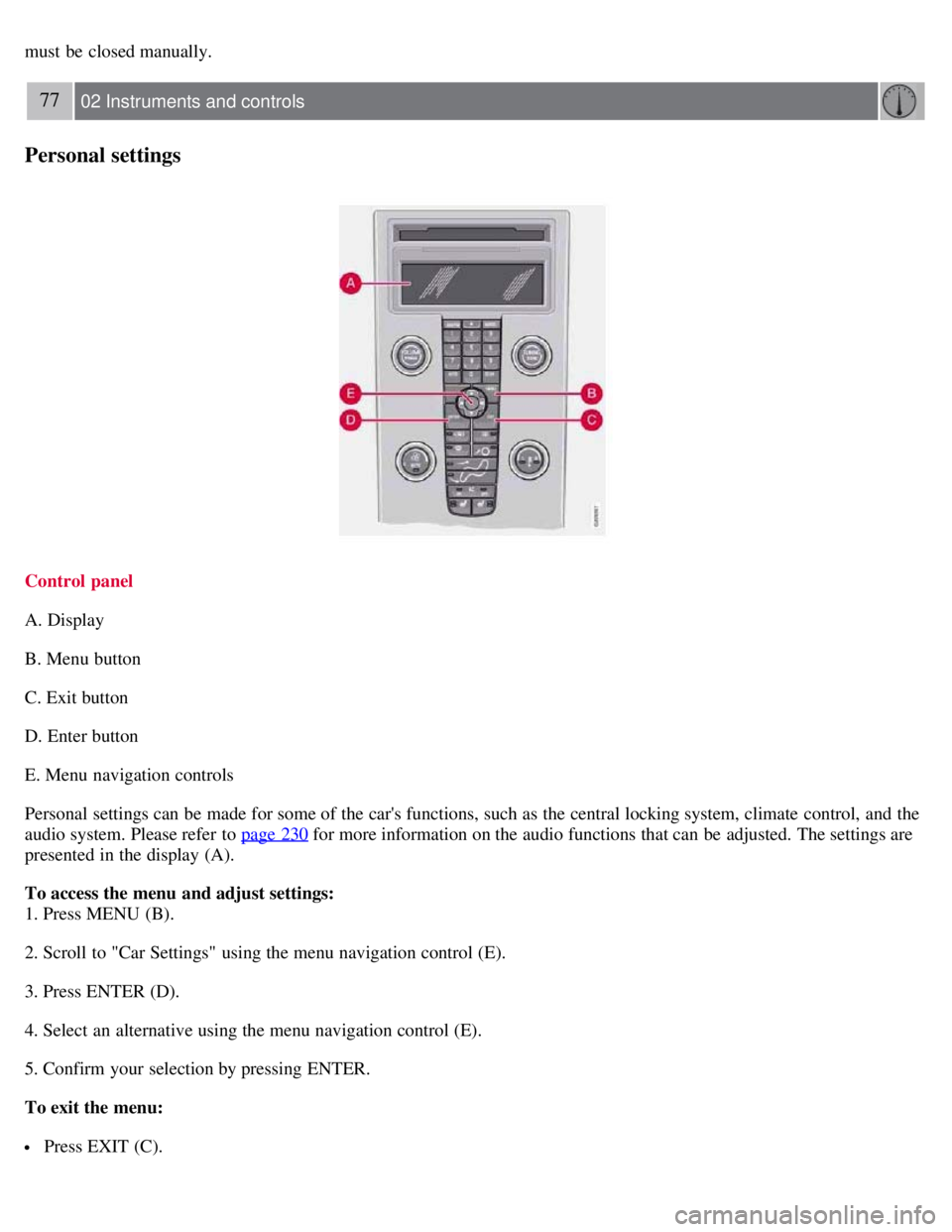
Control panel
A. Display
B. Menu button
C. Exit button
D. Enter button
E. Menu navigation controls
Personal settings can be made for some of the car's functions, such as the central locking system, climate control, and the
audio system. Please refer to page 230
for more information on the audio functions that can be adjusted. The settings are
presented in the display (A).
To access the menu and adjust settings:
1. Press MENU (B).
2. Scroll to "Car Settings" using the menu navigation control (E).
3. Press ENTER (D).
4. Select an alternative using the menu navigation control (E).
5. Confirm your selection by pressing ENTER.
To exit the menu:
Press EXIT (C).
Page 71 of 234
Available settings
Clock adjust
To set the time:
1. Use the number keys or the up/down arrow keys on the navigation control (E) to change the hour or minute.
2. Select hour(s) or minute(s) to be changed with the left/right arrow keys.
3. Press ENTER to start the clock.
NOTE
If you are currently using the 12-hour time setting, use the up/down arrow keys to select AM/PM after the minute-
setting has been adjusted.
Lock confirmation light
When the vehicle is locked/unlocked with the remote control, the direction indicators can be selected to flash to confirm
the action. The alternatives On/Off are available for both locking and unlocking.
78 02 Instruments and controls
Personal settings
Autolock
When the vehicle starts to move, the doors and rear liftgate can be locked automatically. The alternatives On/Off are
available.
NOTE
Pulling the handle twice on a door unlocks and opens that door.
Unlock
There are two alternatives for unlocking:
Global (both doors)
Unlocks both doors and the rear liftgate with one press on the remote control.
Two Step (Two-stage unlocking)
This alternative unlocks the driver's door with one press on the remote control. A second press unlocks the passenger's
door and the rear liftgate.
Operating side windows
The following alternatives can be selected for opening and/or closing both side windows at the same time by pressing and
holding the Lock/Unlock switch in either of the front doors (see also page 126
for additional information) 1.
Auto close all windows On/Off
Auto open all windows On/Off
NOTE
Page 72 of 234
The ignition key must be in position I or higher (see page 139) before all side windows can be opened/closed using the
switches in the front doors.
1 This menu alternative also makes it possible to open all side windows by pressing and holding the Unlock button on the remote control for several
seconds.
Approach lighting
This alternative determines the length of time for which the car's lights will remain on when the Approach light button on
the central locking system's remote control is pressed. Intervals of 30/60/90 seconds may be selected. See page 78
for
more information.
Home safe lighting
This alternative determines the length of time for which the car's lights will remain on when the high beam lever on the
steering column is pulled toward the wheel with the ignition switched off. Intervals of 30/60/90 seconds may be selected.
See page 78
for information on using this function.
Information
VIN number:
The VIN (Vehicle Identification Number) is the car's unique identity number.
Number of Keys:
The number of keys registered for the vehicle is displayed here.
Climate functions
Blower speed in AUTO mode:
The blower speed can be set to AUTO mode in models equipped with ECC. Choose between "Low", "Normal" and
"High".
Timer for recirculation:
When the timer is active, the air recirculates in the vehicle for 3-12 minutes depending on the ambient temperature. Select
On/Off depending on whether the recirculation timer is to be active or not.
Keyless locking and unlocking (option as available)
The following alternatives can be selected for locking and unlocking the doors and rear liftgate:
All doors
All doors are locked or unlocked at the same time.
One front door
79 02 Instruments and controls
Personal settings
Either of the front doors can be unlocked separately1.
Reset to factory settings
Use this alternative to return to the default climate system settings.
Page 73 of 234
1Factory default
80 02 Instruments and controls
Home Link® Universal Transceiver (option)
Introduction
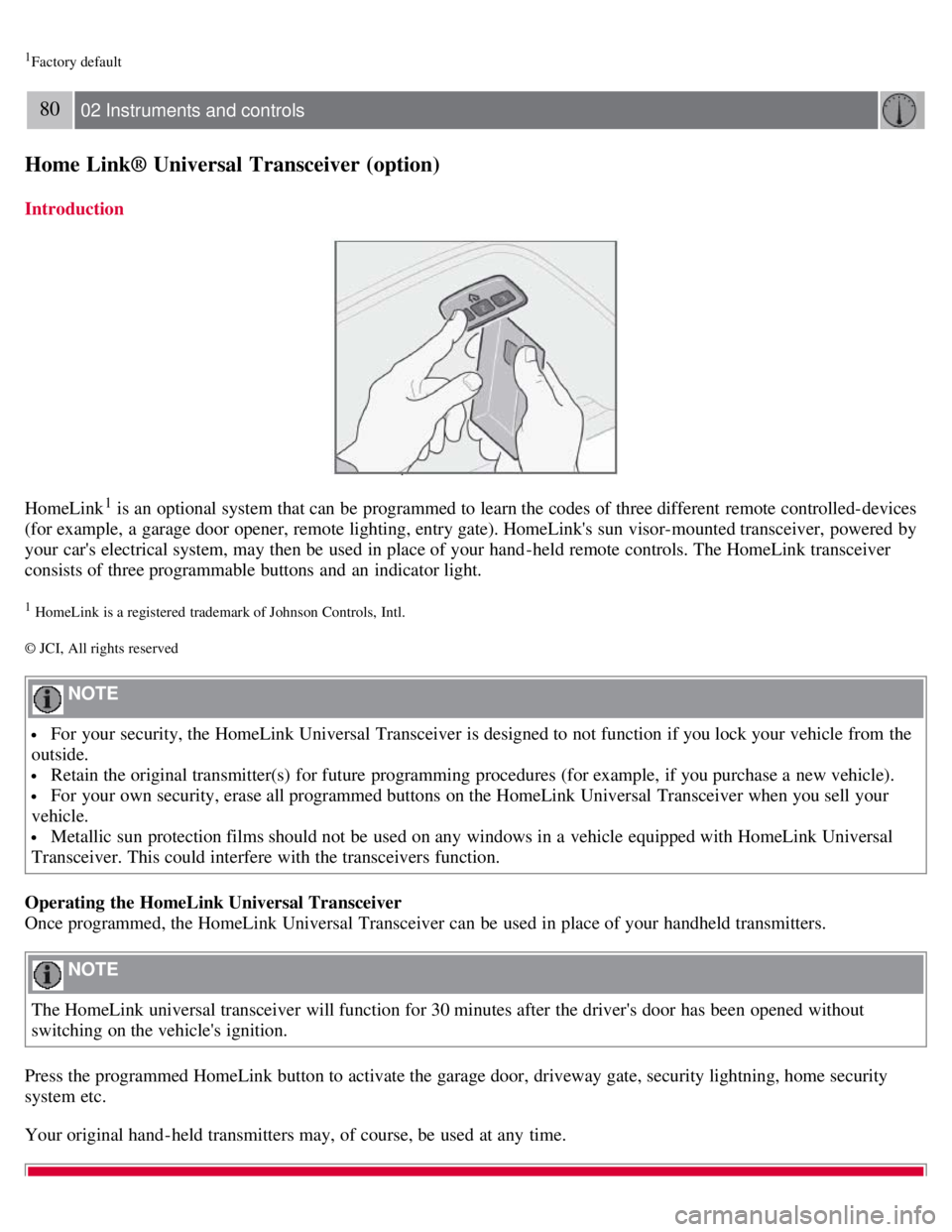
HomeLink1 is an optional system that can be programmed to learn the codes of three different remote controlled-devices
(for example, a garage door opener, remote lighting, entry gate). HomeLink's sun visor-mounted transceiver, powered by
your car's electrical system, may then be used in place of your hand -held remote controls. The HomeLink transceiver
consists of three programmable buttons and an indicator light.
1 HomeLink is a registered trademark of Johnson Controls, Intl.
© JCI, All rights reserved
NOTE
For your security, the HomeLink Universal Transceiver is designed to not function if you lock your vehicle from the
outside.
Retain the original transmitter(s) for future programming procedures (for example, if you purchase a new vehicle).
For your own security, erase all programmed buttons on the HomeLink Universal Transceiver when you sell your
vehicle.
Metallic sun protection films should not be used on any windows in a vehicle equipped with HomeLink Universal
Transceiver. This could interfere with the transceivers function.
Operating the HomeLink Universal Transceiver
Once programmed, the HomeLink Universal Transceiver can be used in place of your handheld transmitters.
NOTE
The HomeLink universal transceiver will function for 30 minutes after the driver's door has been opened without
switching on the vehicle's ignition.
Press the programmed HomeLink button to activate the garage door, driveway gate, security lightning, home security
system etc.
Your original hand -held transmitters may, of course, be used at any time.
Page 81 of 234
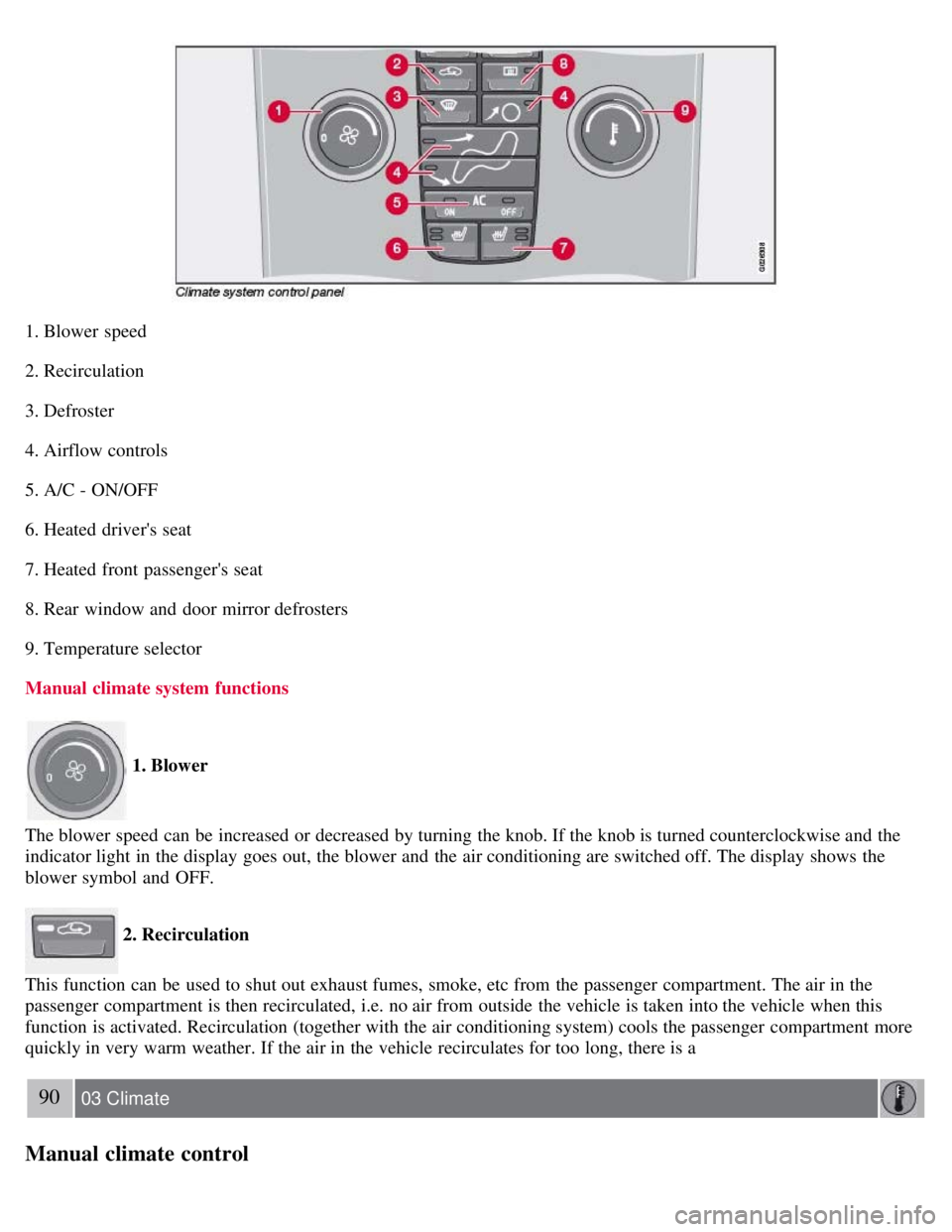
1. Blower speed
2. Recirculation
3. Defroster
4. Airflow controls
5. A/C - ON/OFF
6. Heated driver's seat
7. Heated front passenger's seat
8. Rear window and door mirror defrosters
9. Temperature selector
Manual climate system functions
1. Blower
The blower speed can be increased or decreased by turning the knob. If the knob is turned counterclockwise and the
indicator light in the display goes out, the blower and the air conditioning are switched off. The display shows the
blower symbol and OFF.
2. Recirculation
This function can be used to shut out exhaust fumes, smoke, etc from the passenger compartment. The air in the
passenger compartment is then recirculated, i.e. no air from outside the vehicle is taken into the vehicle when this
function is activated. Recirculation (together with the air conditioning system) cools the passenger compartment more
quickly in very warm weather. If the air in the vehicle recirculates for too long, there is a
90 03 Climate
Manual climate control
Page 84 of 234
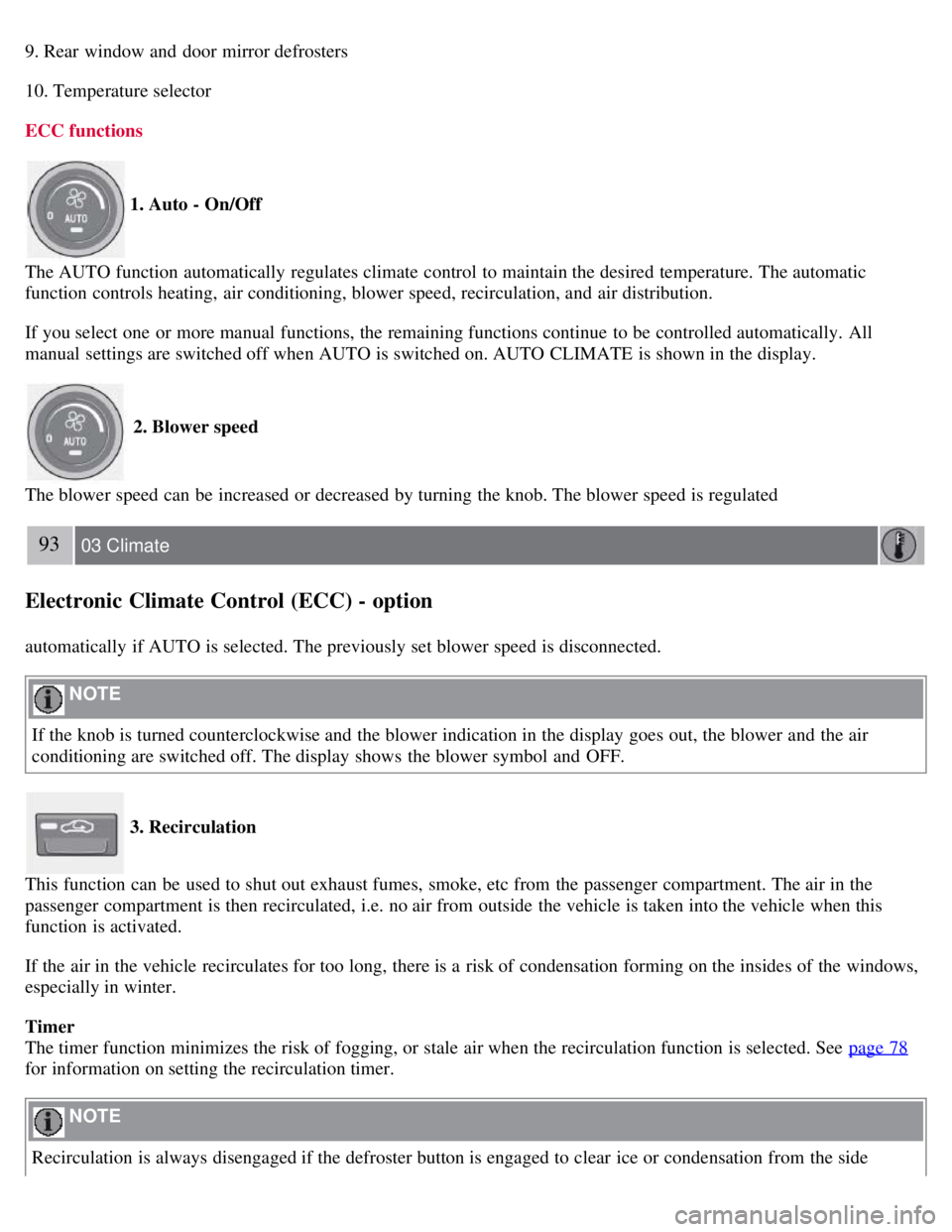
9. Rear window and door mirror defrosters
10. Temperature selector
ECC functions
1. Auto - On/Off
The AUTO function automatically regulates climate control to maintain the desired temperature. The automatic
function controls heating, air conditioning, blower speed, recirculation, and air distribution.
If you select one or more manual functions, the remaining functions continue to be controlled automatically. All
manual settings are switched off when AUTO is switched on. AUTO CLIMATE is shown in the display.
2. Blower speed
The blower speed can be increased or decreased by turning the knob. The blower speed is regulated
93 03 Climate
Electronic Climate Control (ECC) - option
automatically if AUTO is selected. The previously set blower speed is disconnected.
NOTE
If the knob is turned counterclockwise and the blower indication in the display goes out, the blower and the air
conditioning are switched off. The display shows the blower symbol and OFF.
3. Recirculation
This function can be used to shut out exhaust fumes, smoke, etc from the passenger compartment. The air in the
passenger compartment is then recirculated, i.e. no air from outside the vehicle is taken into the vehicle when this
function is activated.
If the air in the vehicle recirculates for too long, there is a risk of condensation forming on the insides of the windows,
especially in winter.
Timer
The timer function minimizes the risk of fogging, or stale air when the recirculation function is selected. See page 78
for information on setting the recirculation timer.
NOTE
Recirculation is always disengaged if the defroster button is engaged to clear ice or condensation from the side
Page 89 of 234
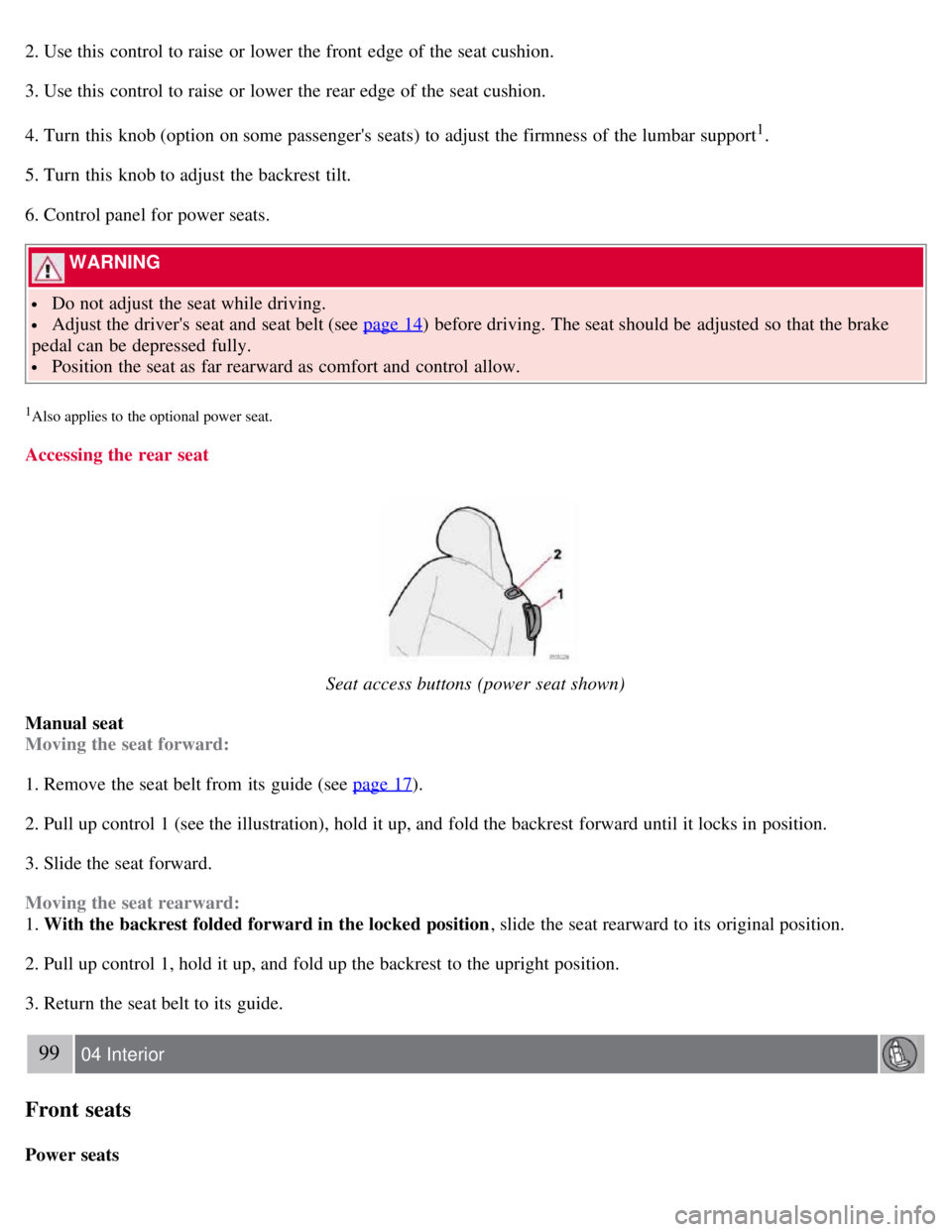
2. Use this control to raise or lower the front edge of the seat cushion.
3. Use this control to raise or lower the rear edge of the seat cushion.
4. Turn this knob (option on some passenger's seats) to adjust the firmness of the lumbar support
1.
5. Turn this knob to adjust the backrest tilt.
6. Control panel for power seats.
WARNING
Do not adjust the seat while driving.
Adjust the driver's seat and seat belt (see page 14) before driving. The seat should be adjusted so that the brake
pedal can be depressed fully.
Position the seat as far rearward as comfort and control allow.
1Also applies to the optional power seat.
Accessing the rear seat
Seat access buttons (power seat shown)
Manual seat
Moving the seat forward:
1. Remove the seat belt from its guide (see page 17
).
2. Pull up control 1 (see the illustration), hold it up, and fold the backrest forward until it locks in position.
3. Slide the seat forward.
Moving the seat rearward:
1. With the backrest folded forward in the locked position , slide the seat rearward to its original position.
2. Pull up control 1, hold it up, and fold up the backrest to the upright position.
3. Return the seat belt to its guide.
99 04 Interior
Front seats
Power seats
Page 90 of 234
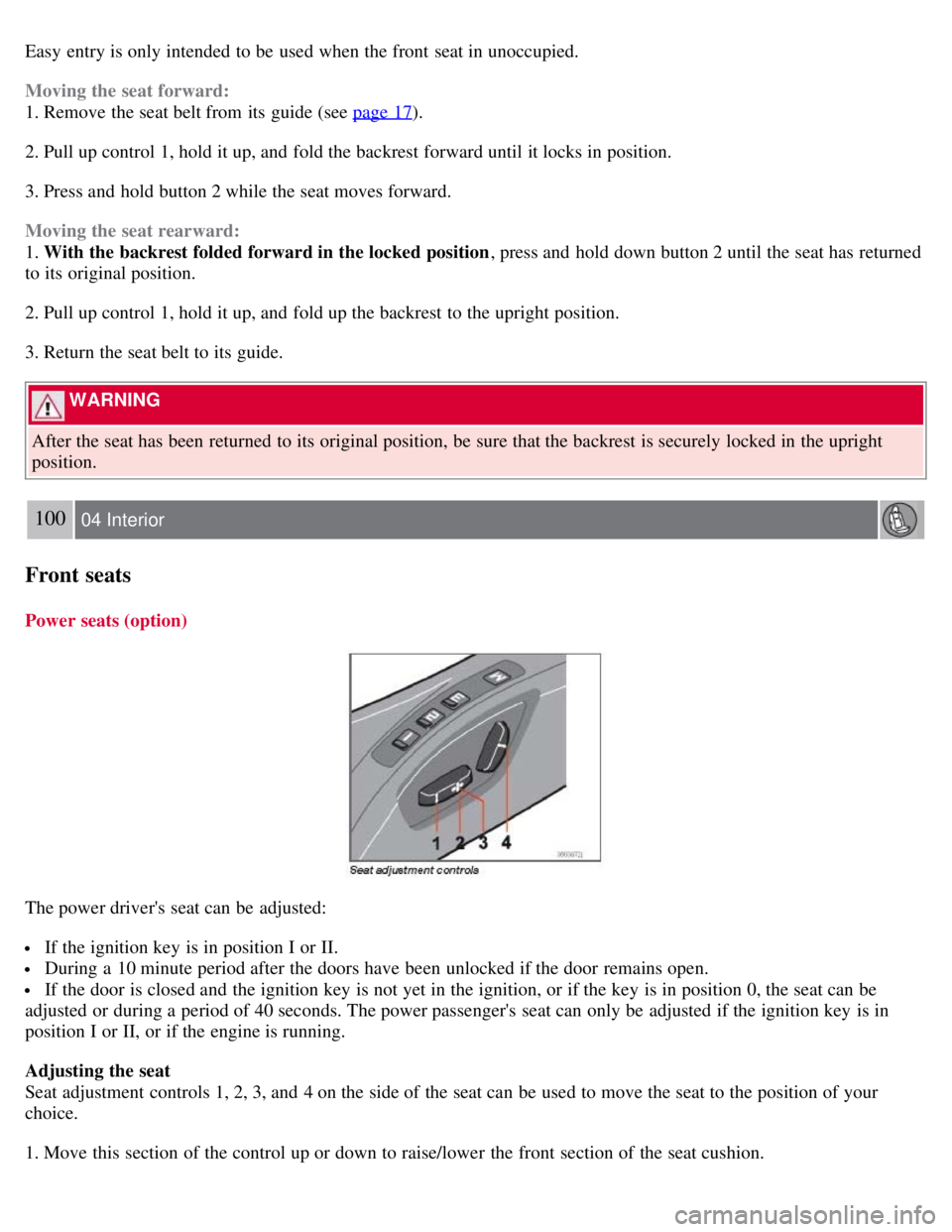
Easy entry is only intended to be used when the front seat in unoccupied.
Moving the seat forward:
1. Remove the seat belt from its guide (see page 17
).
2. Pull up control 1, hold it up, and fold the backrest forward until it locks in position.
3. Press and hold button 2 while the seat moves forward.
Moving the seat rearward:
1. With the backrest folded forward in the locked position , press and hold down button 2 until the seat has returned
to its original position.
2. Pull up control 1, hold it up, and fold up the backrest to the upright position.
3. Return the seat belt to its guide.
WARNING
After the seat has been returned to its original position, be sure that the backrest is securely locked in the upright
position.
100 04 Interior
Front seats
Power seats (option)
The power driver's seat can be adjusted:
If the ignition key is in position I or II.
During a 10 minute period after the doors have been unlocked if the door remains open.
If the door is closed and the ignition key is not yet in the ignition, or if the key is in position 0, the seat can be
adjusted or during a period of 40 seconds. The power passenger's seat can only be adjusted if the ignition key is in
position I or II, or if the engine is running.
Adjusting the seat
Seat adjustment controls 1, 2, 3, and 4 on the side of the seat can be used to move the seat to the position of your
choice.
1. Move this section of the control up or down to raise/lower the front section of the seat cushion.
Page 91 of 234
2. Move the control forward/rearward to move the seat forward or rearward.
3. Move this section of the control up or down to raise/lower the rear section of the seat cushion.
4. Backrest tilt.
NOTE
The power seats have an overload protector that activates if a seat is blocked by any object. If this occurs, switch off
the ignition (key in position 0) and wait for approximately 20 seconds before operating the seat again.
Emergency stop
If the seat inadvertently begins to move, press any of the buttons to stop the seat.
Programming the seat memory, driver's seat only (option)
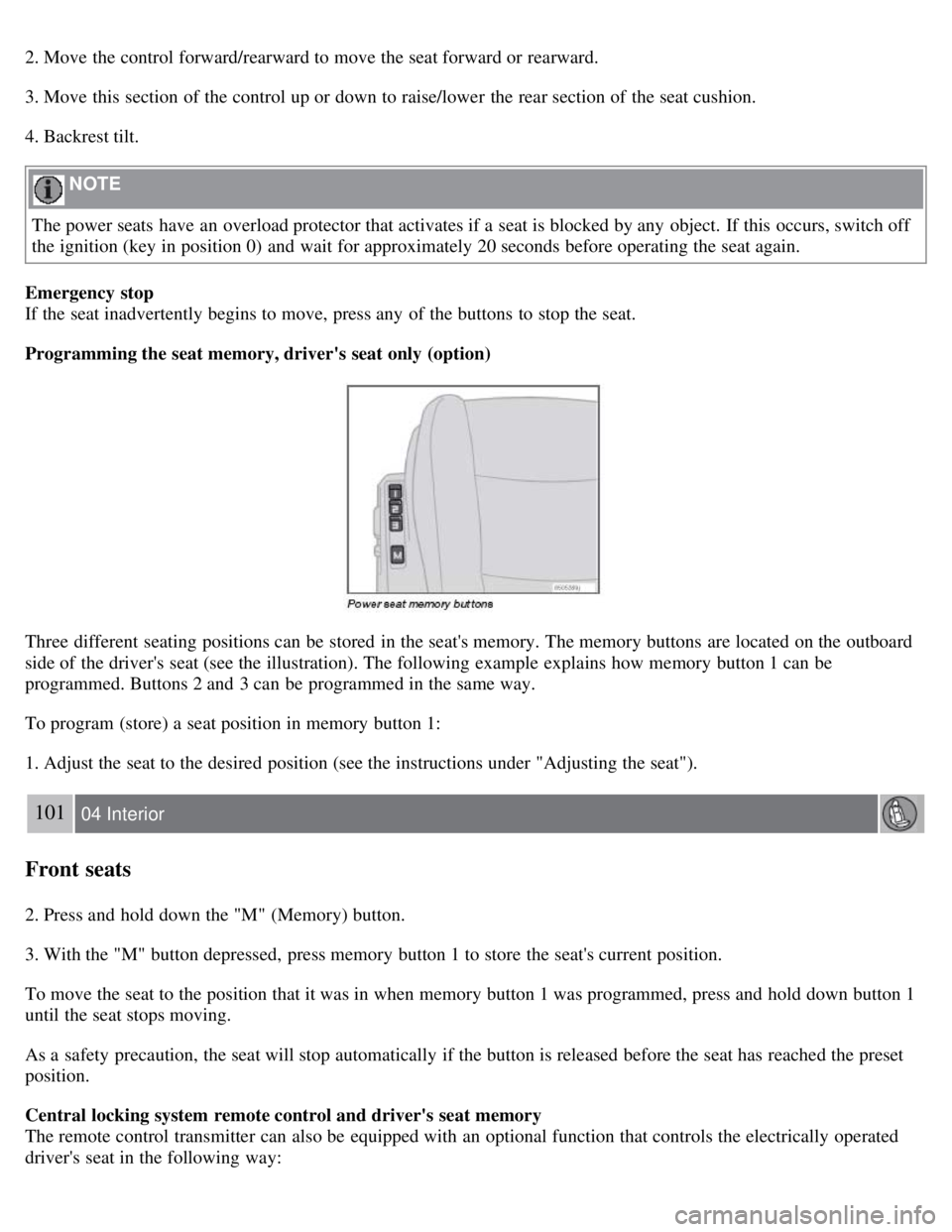
Three different seating positions can be stored in the seat's memory. The memory buttons are located on the outboard
side of the driver's seat (see the illustration). The following example explains how memory button 1 can be
programmed. Buttons 2 and 3 can be programmed in the same way.
To program (store) a seat position in memory button 1:
1. Adjust the seat to the desired position (see the instructions under "Adjusting the seat").
101 04 Interior
Front seats
2. Press and hold down the "M" (Memory) button.
3. With the "M" button depressed, press memory button 1 to store the seat's current position.
To move the seat to the position that it was in when memory button 1 was programmed, press and hold down button 1
until the seat stops moving.
As a safety precaution, the seat will stop automatically if the button is released before the seat has reached the preset
position.
Central locking system remote control and driver's seat memory
The remote control transmitter can also be equipped with an optional function that controls the electrically operated
driver's seat in the following way:
Page 92 of 234
1. Adjust the seat to the desired position.
2. When you leave the car, lock it using the remote control.
3. The next time the driver's door is unlocked with the same remote control and that door is opened within 2 minutes,
the driver's seat and side door mirrors will automatically move to the position that they were in when the doors were
most recently locked with the same remote control.
NOTE
The memory function in the remote control operates independently of the memory function in the seat.
WARNING
Because the driver's seat can be adjusted with the ignition off, children should never be left unattended in the car.
Movement of the seat can be STOPPED at any time by pressing any button on the power seat control panel.
Do not adjust the seat while driving. The seat should be adjusted so that the brake pedal can be depressed fully. In
addition, position the seat as far rearward as comfort and control allow.
The seat rails on the floor must not be obstructed in any way when the seat is in motion.
102 04 Interior
Interior lighting
Interior lighting
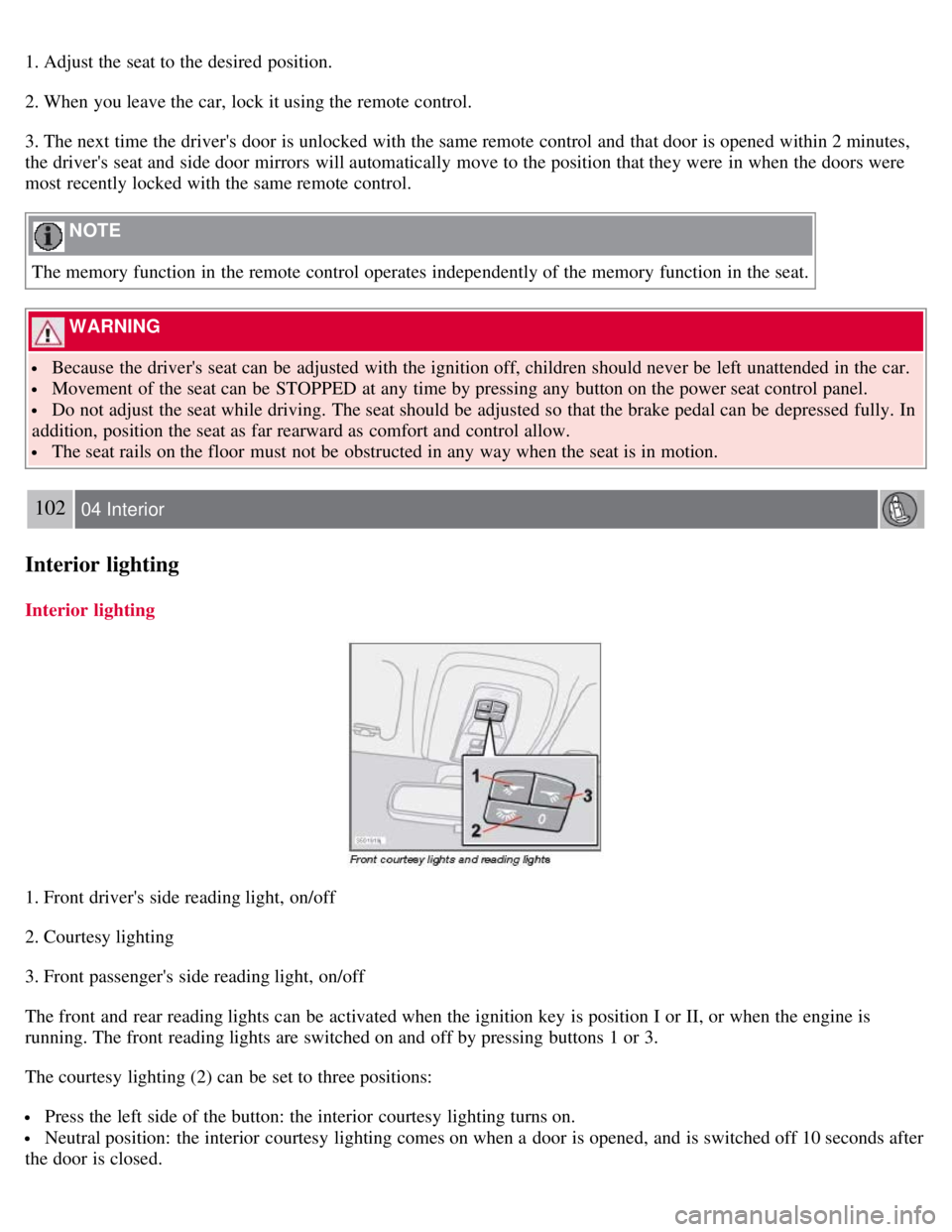
1. Front driver's side reading light, on/off
2. Courtesy lighting
3. Front passenger's side reading light, on/off
The front and rear reading lights can be activated when the ignition key is position I or II, or when the engine is
running. The front reading lights are switched on and off by pressing buttons 1 or 3.
The courtesy lighting (2) can be set to three positions:
Press the left side of the button: the interior courtesy lighting turns on.
Neutral position: the interior courtesy lighting comes on when a door is opened, and is switched off 10 seconds after
the door is closed.