ignition VOLVO C30 2008 Workshop Manual
[x] Cancel search | Manufacturer: VOLVO, Model Year: 2008, Model line: C30, Model: VOLVO C30 2008Pages: 234, PDF Size: 4.8 MB
Page 185 of 234
209 09 Maintenance and servicing
Battery
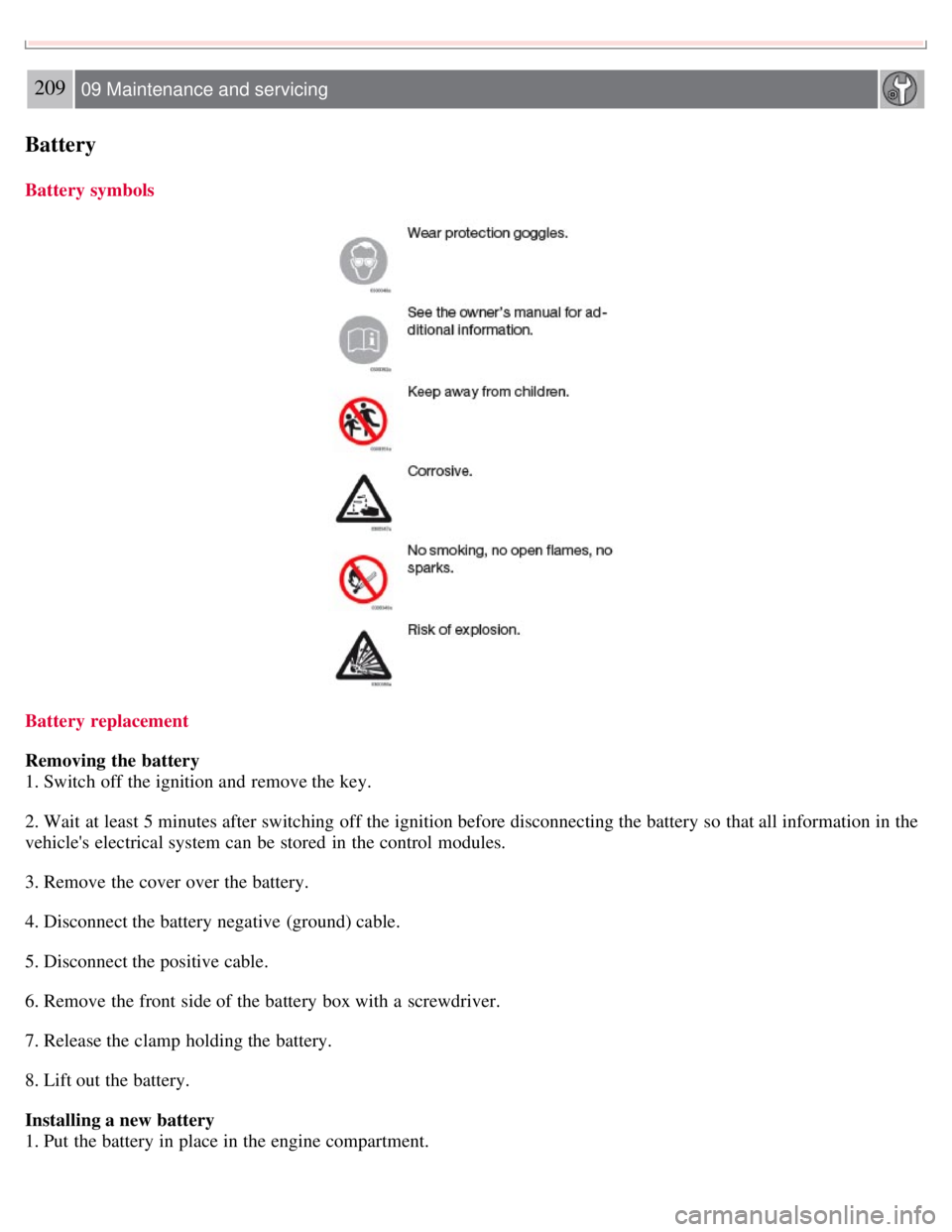
Battery symbols
Battery replacement
Removing the battery
1. Switch off the ignition and remove the key.
2. Wait at least 5 minutes after switching off the ignition before disconnecting the battery so that all information in the
vehicle's electrical system can be stored in the control modules.
3. Remove the cover over the battery.
4. Disconnect the battery negative (ground) cable.
5. Disconnect the positive cable.
6. Remove the front side of the battery box with a screwdriver.
7. Release the clamp holding the battery.
8. Lift out the battery.
Installing a new battery
1. Put the battery in place in the engine compartment.
Page 187 of 234
Replacing bulbs
Headlight housing
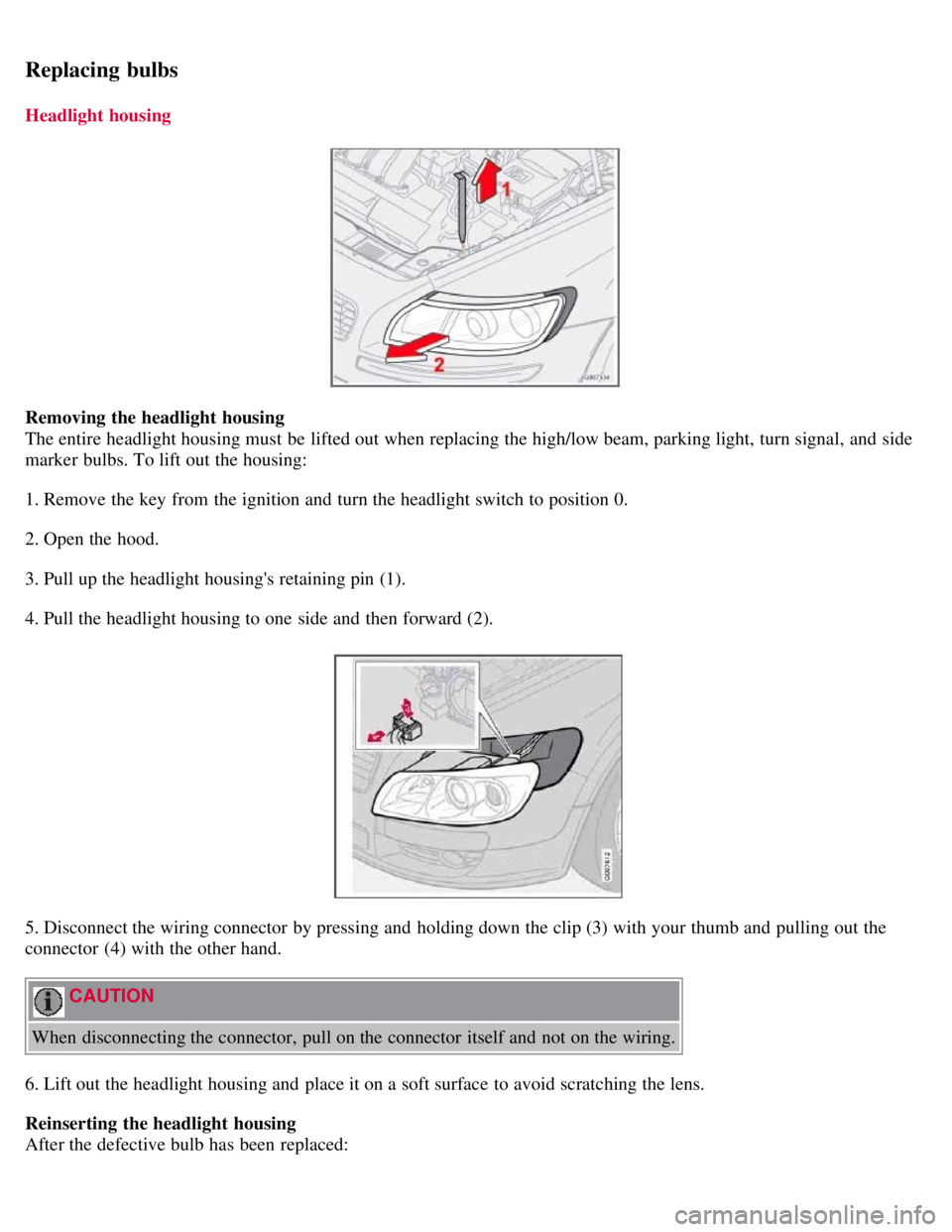
Removing the headlight housing
The entire headlight housing must be lifted out when replacing the high/low beam, parking light, turn signal, and side
marker bulbs. To lift out the housing:
1. Remove the key from the ignition and turn the headlight switch to position 0.
2. Open the hood.
3. Pull up the headlight housing's retaining pin (1).
4. Pull the headlight housing to one side and then forward (2).
5. Disconnect the wiring connector by pressing and holding down the clip (3) with your thumb and pulling out the
connector (4) with the other hand.
CAUTION
When disconnecting the connector, pull on the connector itself and not on the wiring.
6. Lift out the headlight housing and place it on a soft surface to avoid scratching the lens.
Reinserting the headlight housing
After the defective bulb has been replaced:
Page 211 of 234
This menu function enables you to make settings on certain Sirius satellite radio functions. To access this menu:
1. Press MENU.
2. Scroll to Sirius menu.
3. Select ADVANCED SIRIUS SETTINGS .
WARNING
Settings should be made when the vehicle is at a standstill.
The following settings can be made in the Sirius menu.
Songs can be added to the song list
Channel skip settings can be made
Channel lock settings can be made
The channel access code can be displayed or changed
Your Sirius ID can be displayed
Skip options
This function is used to remove a channel from the list of available channels.
Skip current
1. Select CHANNEL SKIP LIST and press ENTER.
2. Select a category in the list and press ENTER .
3. Skip channels in the list presented by pressing ENTER or right arrow key.
Unskip all channels
This permanently removes all channels from the skip list and makes them available for selection.
Temp. unskip all ch.
This function will temporarily unskip all channels and make them available for selection. The channels remain on the
skip list and will again be skipped the next time the ignition is switched on.
Channel lock
Access to specific channels can be restricted (locked). A locked channel will not provide audio, song titles, or artist
information.
NOTE
All channels are initially unlocked.
Locking a channel:
1. Select " SIRIUS ID " in the menu and select LOCK OPTIONS and press ENTER.
2. Select CHANNEL LOCK LIST and press ENTER
3. Enter the channel access code and press ENTER .
4. Select a category in the list and press ENTER .
Page 212 of 234
5. Lock channels in the list presented by pressing ENTER or right arrow.
The channel is now locked and a checked box will be displayed to indicate this. It will be necessary to enter the
channel access code1 in order to listen to a locked channel.
Unlocking a channel:
A channel's access code1 is required to unlock a channel.
Unlock all channels
This permanently removes all channels from the locked list and makes them available for selection.
Temp. unlock all ch.
This function will temporarily unlock all channels and make them available for selection. The channels remain on the
locked list and will again be locked the next time the ignition is switched on.
238 10 Audio
Sirius satellite radio (option)
CHANGE CODE
This function makes it possible to change the channel access code. The default code is 0000.
To change the code:
1. Select CHANGE CODE and press ENTER.
2. Enter the current code and press ENTER .
3. Enter the code and press ENTER .
4. Confirm the new code and press ENTER .
If an incorrect code is entered, the text WRONG CODE! is displayed.
If you have forgotten the access code:
1. Select " SIRIUS ID " in the Sirius settings menu and press ENTER .
2. Press and hold the ENTER button for 2 seconds.
3. The current code will be displayed. Your Volvo retailer can also provide you with assistance.
SIRIUS ID
This function displays the 12-digit Sirius activation ID.
239 10 Audio
CD player/CD changer (option)
CD function controls
Page 224 of 234
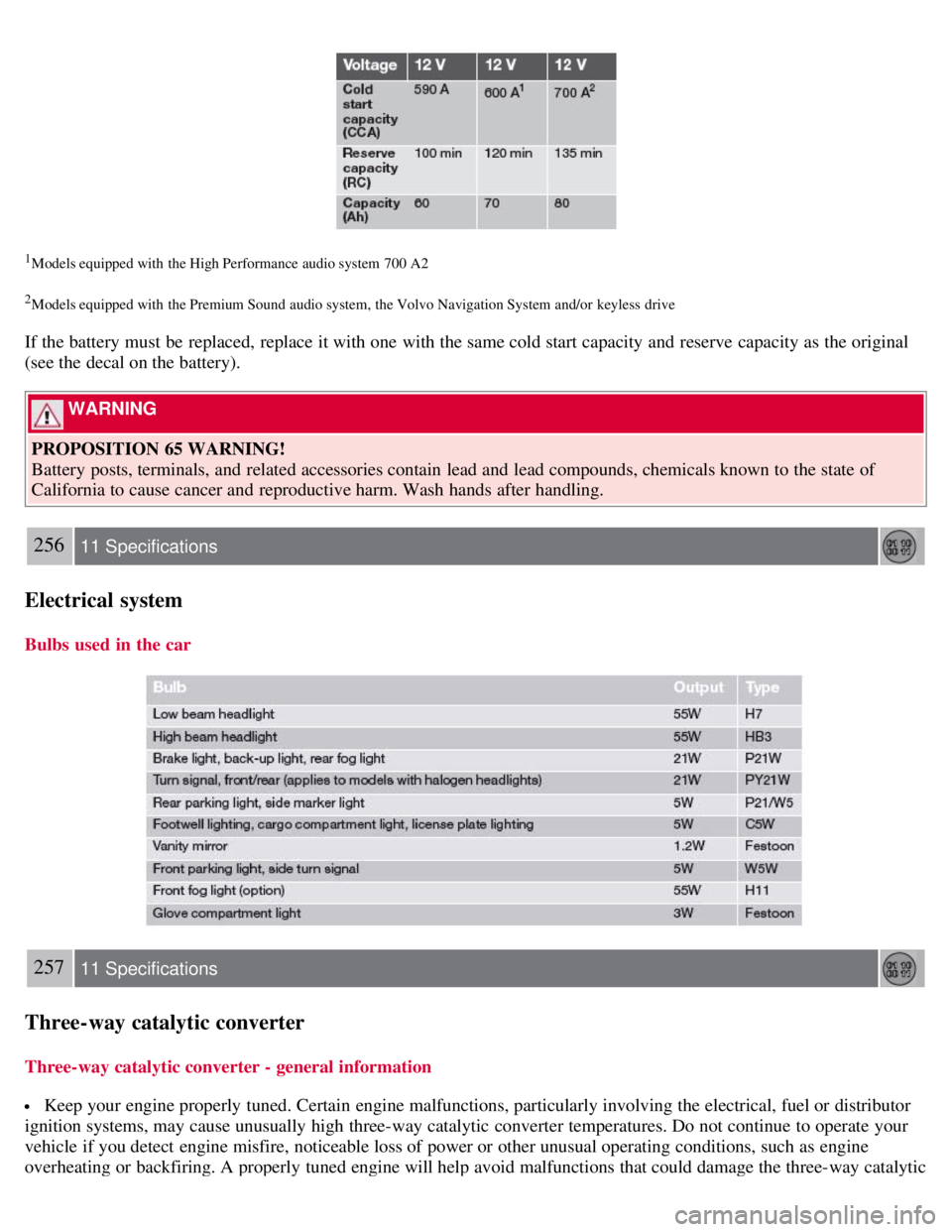
1Models equipped with the High Performance audio system 700 A2
2Models equipped with the Premium Sound audio system, the Volvo Navigation System and/or keyless drive
If the battery must be replaced, replace it with one with the same cold start capacity and reserve capacity as the original
(see the decal on the battery).
WARNING
PROPOSITION 65 WARNING!
Battery posts, terminals, and related accessories contain lead and lead compounds, chemicals known to the state of
California to cause cancer and reproductive harm. Wash hands after handling.
256 11 Specifications
Electrical system
Bulbs used in the car
257 11 Specifications
Three-way catalytic converter
Three-way catalytic converter - general information
Keep your engine properly tuned. Certain engine malfunctions, particularly involving the electrical, fuel or distributor
ignition systems, may cause unusually high three-way catalytic converter temperatures. Do not continue to operate your
vehicle if you detect engine misfire, noticeable loss of power or other unusual operating conditions, such as engine
overheating or backfiring. A properly tuned engine will help avoid malfunctions that could damage the three-way catalytic
Page 229 of 234
warning141
Fluid capacities250
Fluids206
Front airbags19, 20, 21
Front fog lights58
Front passenger's side airbag, disabling22, 23
Front seats
manual adjustment98
power99, 100, 101
Fuel filler cap6
Fuel filler door6
unlocking59
Fuel level warning light53
Fuel requirements136, 137, 138
Fuses219 - 224
G
Geartronic automatic transmission145, 146
shiftlock override147
Generator warning light54
Glove compartment105
locking/unlocking127
H
Hazard warning flashers68
Headlights
high beams60
low beam60
washers63
Home Link® Universal Transceiver80, 81, 82
Home safe lighting60
Hood opening201
I
Ignition switch139
Immobilizer116
Infant seats35, 36
Inflatable Curtain26, 27
Inflation pressure168
Inflation pressure tables, Canadian models171
Inflation pressure tables, U.S. models170
Information display messages56, 57
Inspection readiness200
Instrument and warning symbols51, 52, 53
Instrument overview47, 48
Instrument panel49, 50
lighting58