ESP VOLVO C30 2008 Owners Manual
[x] Cancel search | Manufacturer: VOLVO, Model Year: 2008, Model line: C30, Model: VOLVO C30 2008Pages: 234, PDF Size: 4.8 MB
Page 6 of 234
See a trained and qualified Volvo service technician as soon as possible for inspection if the check engine (
malfunction indicator) light illuminates, or stays on after the vehicle has started.
Properly dispose of any vehicle-related waste such as used motor oil, used batteries, brake pads, etc.
When cleaning your vehicle, please use genuine Volvo car care products. All Volvo car care products are
formulated to be environmentally friendly.
WARNING
Certain components of this vehicle such as air bag modules, seat belt pretensioners, adaptive steering columns, and
button cell batteries may contain Perchlorate material. Special handling may apply for service or vehicle end of life
disposal. See www.dtsc.ca.gov/hazardouswaste/perchlorate
.
8 Introduction
Volvo and the environment
WARNING
CALIFORNIA proposition 65
Engine exhaust, some of its constituents, and certain vehicle components contain or emit chemicals known to the
state of California to cause cancer, and birth defects or other reproductive harm. In addition, certain fluids contained
in vehicles and certain products of component wear contain or emit chemicals known to the State of California to
cause cancer, and birth defects or other reproductive harm.
9 Introduction
Important warnings
Accessory Installation
We strongly recommend that Volvo owners install only genuine, Volvo-approved accessories, and that accessory
installations be performed only by a trained and qualified Volvo service technician.
Genuine Volvo accessories are tested to ensure compatibility with the performance, safety, and emission systems in
your car. Additionally, a trained and qualified Volvo service technician knows where accessories may and may not be
safely installed in your Volvo. In all cases, please consult a trained and qualified Volvo service technician before
installing any accessory in or on your car.
Accessories that have not been approved by Volvo may or may not be specifically tested for compatibility with your
car. Additionally, an inexperienced installer may not be familiar with some of your car's systems.
Any of your car's performance and safety systems could be adversely affected if you install accessories that Volvo
has not tested, or if you allow accessories to be installed by someone unfamiliar with your car.
Damage caused by unapproved or improperly installed accessories may not be covered by your new vehicle
warranty. See your Warranty and Service Records Information booklet for more warranty information. Volvo assumes
no responsibility for death, injury, or expenses that may result from the installation of non-genuine accessories.
Driver distraction
Driver distraction results from driver activities that are not directly related to controlling the vehicle in the driving
environment. Your new Volvo is, or can be, equipped with many feature-rich entertainment and communication
systems. These include hands-free cellular telephones, navigation systems, and multipurpose audio systems. You may
also own other portable electronic devices for your own convenience. When used properly and safely, they enrich the
Page 7 of 234
driving experience. Improperly used, any of these could cause a distraction.
For all of these systems, we want to provide the following warning that reflects the strong Volvo concern for your
safety:
Never use these devices or any feature of your vehicle in a way that distracts you from the task of driving safely.
Distraction can lead to a serious accident.In addition to this general warning, we offer the following guidance
regarding specific newer features that may be found in your vehicle:
Never use a hand -held cellular telephone while driving. Some jurisdictions prohibit cellular telephone use by a
driver while the vehicle is moving.
If your vehicle is equipped with a navigation system, set and make changes to your travel itinerary only with the
vehicle parked.
Never program your audio system while the vehicle is moving. Program radio presets with the vehicle parked, and
use your programmed presets to make radio use quicker and simpler.
Never use portable computers or personal digital assistants while the vehicle is moving.
A driver has a responsibility to do everything possible to ensure his or her own safety and the safety of passengers in
the vehicle and others sharing the roadway. Avoiding distractions is part of that responsibility.
Contents | Top of Page
Page 21 of 234
National Customer Service
175 Gordon Baker Road
North York, Ontario M2H 2N7
1-800-663-8255
WARNING
No objects that add to the total weight on the seat should be placed on the front passenger's seat. If a child is
seated in the front passenger's seat with any additional weight, this extra weight could cause the OWS system to
enable the airbag, which might cause it to deploy in the event of a collision, thereby injuring the child.
The seat belt should never be wrapped around an object on the front passenger's seat. This could interfere with the
OWS system's function.
The front passenger's seat belt should never be used in a way that exerts more pressure on the passenger than
normal. This could increase the pressure exerted on the weight sensor by a child, and could result in the airbag being
enabled, which might cause it to deploy in the event of a collision, thereby injuring the child.
WARNING
Keep the following points in mind with respect to the OWS system. Failure to follow these instructions could
adversely affect the system's function and result in serious injury to the occupant of the front passenger's seat:
The full weight of the front seat passenger should always be on the seat cushion. The passenger should never lift
him/herself off the seat cushion using the armrest in the door or the center console, by pressing the feet on the floor,
by sitting on the edge of the seat cushion, or by pressing against the backrest in a way that reduces pressure on the
seat cushion. This could cause OWS to disable the passenger's side front airbag.
Do not place any type of object on the front passenger's seat in such a way that jamming, pressing, or squeezing
occurs between the object and the front seat, other than as a direct result of the correct use of the Automatic Locking
Retractor/Emergency Locking Retractor (ALR/ELR) seat belt (see page 32
).
No objects should be placed under the front passenger's seat. This could interfere with the OWS system's function.
25 01 Safety
Side impact protection airbags
Side impact airbags (SIPS) - front seats only
As an enhancement to the structural side impact protection built into your car, the vehicle is also equipped with Side
Impact Protection System (SIPS) airbags.
Page 65 of 234
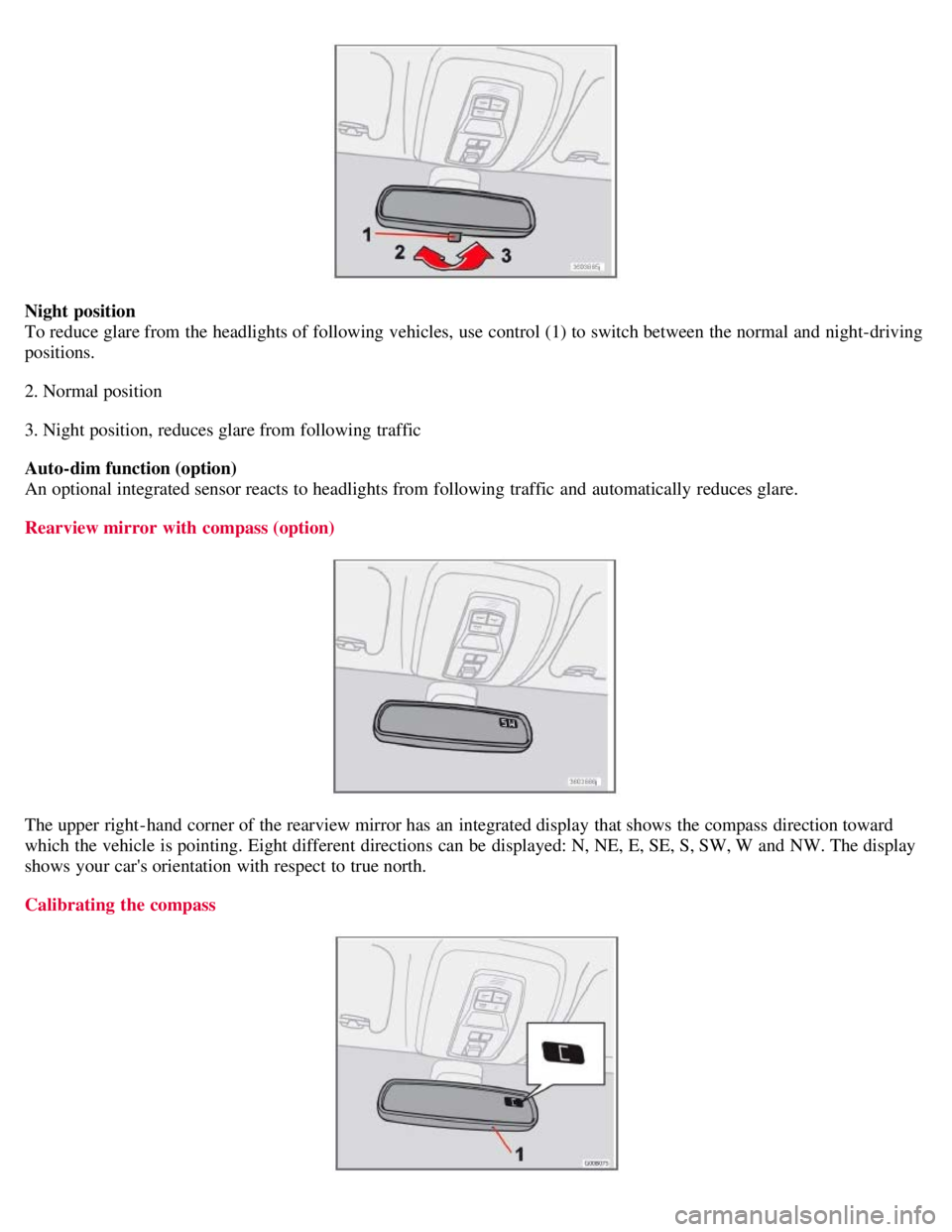
Night position
To reduce glare from the headlights of following vehicles, use control (1) to switch between the normal and night-driving
positions.
2. Normal position
3. Night position, reduces glare from following traffic
Auto-dim function (option)
An optional integrated sensor reacts to headlights from following traffic and automatically reduces glare.
Rearview mirror with compass (option)
The upper right-hand corner of the rearview mirror has an integrated display that shows the compass direction toward
which the vehicle is pointing. Eight different directions can be displayed: N, NE, E, SE, S, SW, W and NW. The display
shows your car's orientation with respect to true north.
Calibrating the compass
Page 82 of 234
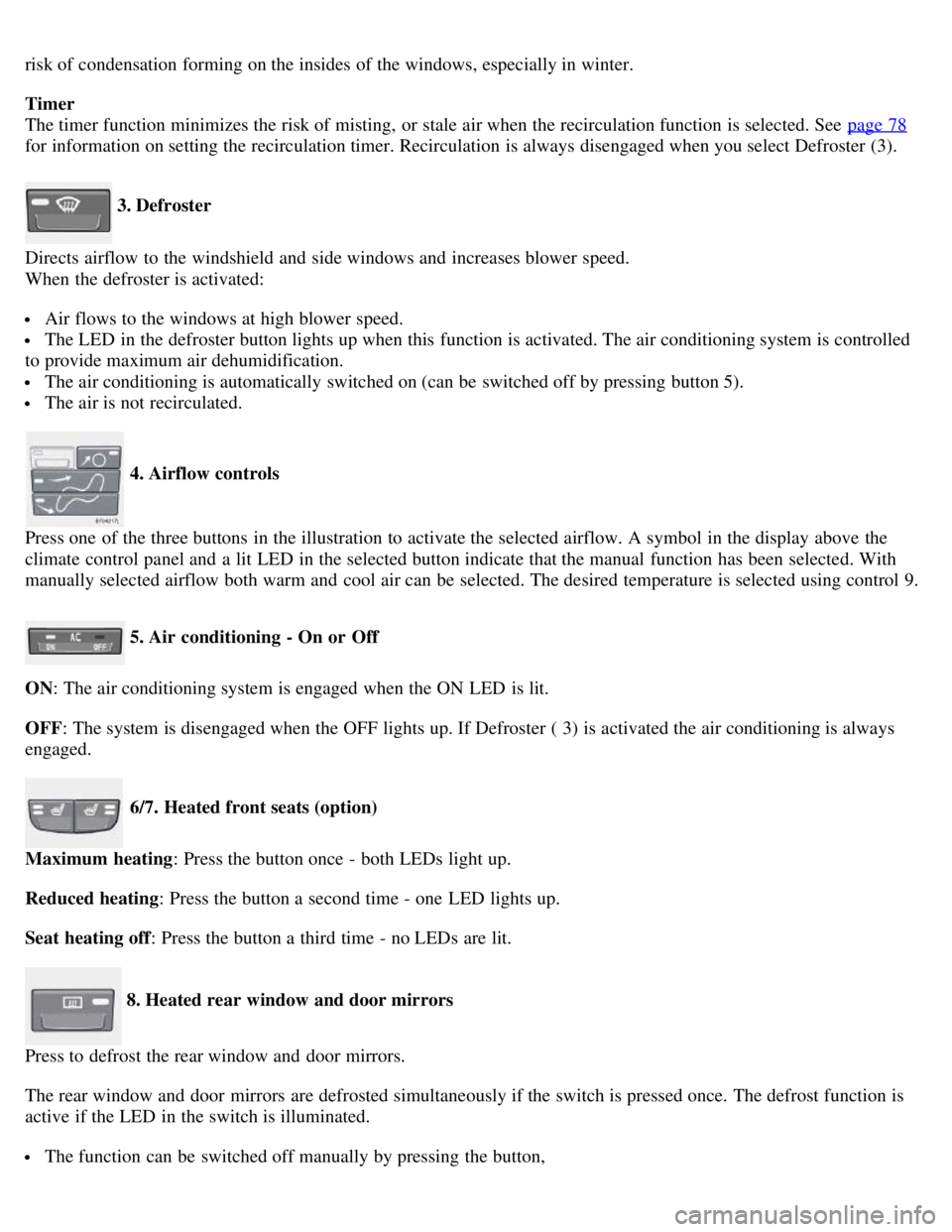
risk of condensation forming on the insides of the windows, especially in winter.
Timer
The timer function minimizes the risk of misting, or stale air when the recirculation function is selected. See page 78
for information on setting the recirculation timer. Recirculation is always disengaged when you select Defroster (3).
3. Defroster
Directs airflow to the windshield and side windows and increases blower speed.
When the defroster is activated:
Air flows to the windows at high blower speed.
The LED in the defroster button lights up when this function is activated. The air conditioning system is controlled
to provide maximum air dehumidification.
The air conditioning is automatically switched on (can be switched off by pressing button 5).
The air is not recirculated.
4. Airflow controls
Press one of the three buttons in the illustration to activate the selected airflow. A symbol in the display above the
climate control panel and a lit LED in the selected button indicate that the manual function has been selected. With
manually selected airflow both warm and cool air can be selected. The desired temperature is selected using control 9.
5. Air conditioning - On or Off
ON: The air conditioning system is engaged when the ON LED is lit.
OFF: The system is disengaged when the OFF lights up. If Defroster ( 3) is activated the air conditioning is always
engaged.
6/7. Heated front seats (option)
Maximum heating : Press the button once - both LEDs light up.
Reduced heating : Press the button a second time - one LED lights up.
Seat heating off : Press the button a third time - no LEDs are lit.
8. Heated rear window and door mirrors
Press to defrost the rear window and door mirrors.
The rear window and door mirrors are defrosted simultaneously if the switch is pressed once. The defrost function is
active if the LED in the switch is illuminated.
The function can be switched off manually by pressing the button,
Page 84 of 234
9. Rear window and door mirror defrosters
10. Temperature selector
ECC functions
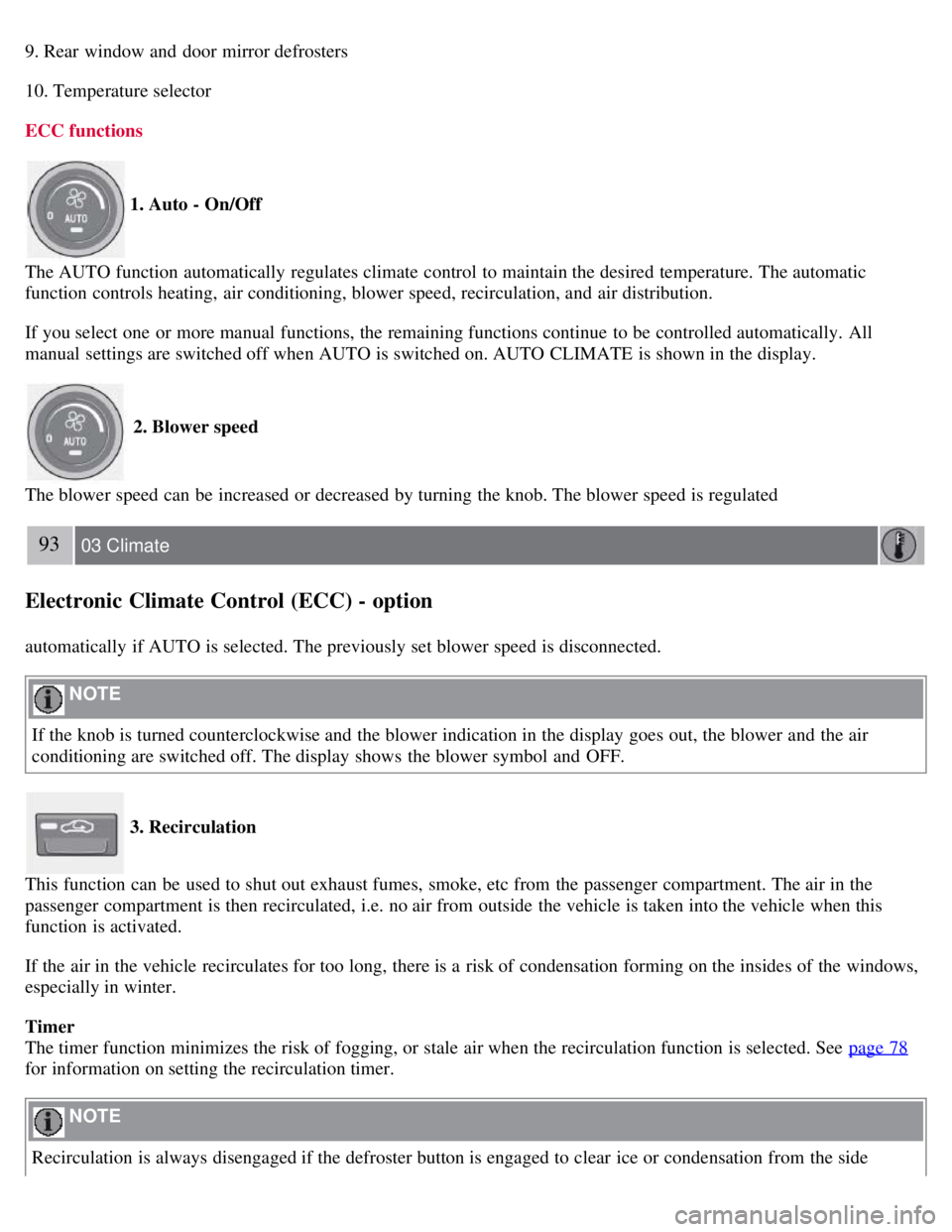
1. Auto - On/Off
The AUTO function automatically regulates climate control to maintain the desired temperature. The automatic
function controls heating, air conditioning, blower speed, recirculation, and air distribution.
If you select one or more manual functions, the remaining functions continue to be controlled automatically. All
manual settings are switched off when AUTO is switched on. AUTO CLIMATE is shown in the display.
2. Blower speed
The blower speed can be increased or decreased by turning the knob. The blower speed is regulated
93 03 Climate
Electronic Climate Control (ECC) - option
automatically if AUTO is selected. The previously set blower speed is disconnected.
NOTE
If the knob is turned counterclockwise and the blower indication in the display goes out, the blower and the air
conditioning are switched off. The display shows the blower symbol and OFF.
3. Recirculation
This function can be used to shut out exhaust fumes, smoke, etc from the passenger compartment. The air in the
passenger compartment is then recirculated, i.e. no air from outside the vehicle is taken into the vehicle when this
function is activated.
If the air in the vehicle recirculates for too long, there is a risk of condensation forming on the insides of the windows,
especially in winter.
Timer
The timer function minimizes the risk of fogging, or stale air when the recirculation function is selected. See page 78
for information on setting the recirculation timer.
NOTE
Recirculation is always disengaged if the defroster button is engaged to clear ice or condensation from the side
Page 96 of 234
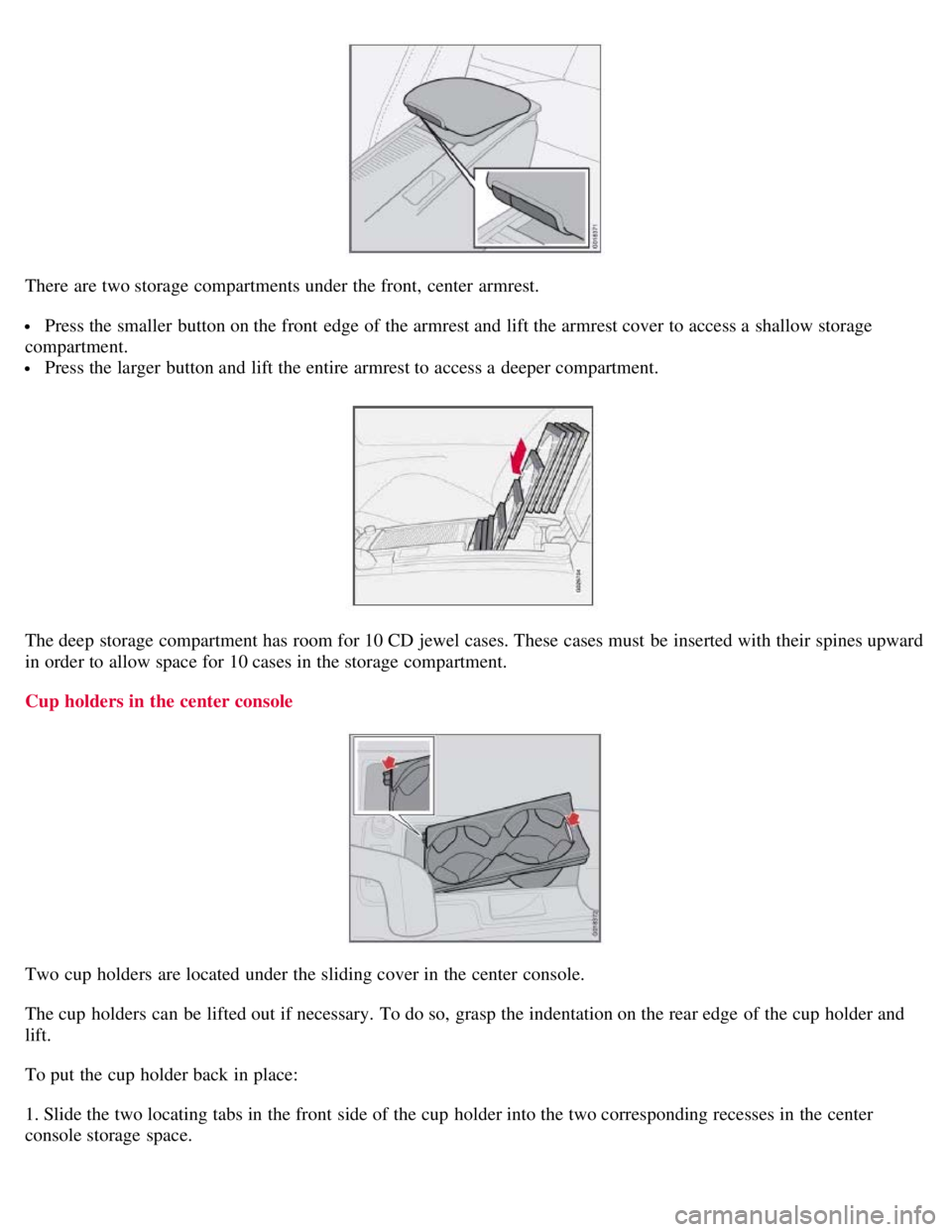
There are two storage compartments under the front, center armrest.
Press the smaller button on the front edge of the armrest and lift the armrest cover to access a shallow storage
compartment.
Press the larger button and lift the entire armrest to access a deeper compartment.
The deep storage compartment has room for 10 CD jewel cases. These cases must be inserted with their spines upward
in order to allow space for 10 cases in the storage compartment.
Cup holders in the center console
Two cup holders are located under the sliding cover in the center console.
The cup holders can be lifted out if necessary. To do so, grasp the indentation on the rear edge of the cup holder and
lift.
To put the cup holder back in place:
1. Slide the two locating tabs in the front side of the cup holder into the two corresponding recesses in the center
console storage space.
Page 126 of 234
141 06 Starting and driving
Starting the vehicle
To start the engine
1. Fasten the seat belt.
WARNING
Before starting, check that the seat, steering wheel and mirrors are adjusted properly. Make sure the brake pedal can
be depressed completely. Adjust the seat if necessary.
2. Apply the parking brake if not already set. The gear selector should be locked in the (P)ark position (Shiftlock). See
also page 147
.
Manual transmission : the clutch must be fully depressed.
3. The vehicle is equipped with an autostart feature. Without touching the throttle pedal, turn the key to position III
and release it. The starter motor will then operate automatically (for up to ten seconds) until the engine starts. If the
engine fails to start, repeat this step.
NOTE
After a cold start, idle speed may be noticeably higher than normal for a short period. This is done to help bring
components in the emission control system to their normal operating temperature as quickly as possible, which
enables them to control emissions and help reduce the vehicle's impact on the environment.
4. To release the gear selector from the (P)ark position, the engine must be running (or the ignition key must be in
position II) and the brake pedal must be depressed.
5. Select the desired gear. On models with an automatic transmission, the gear engages after a very slight delay which
is especially noticeable when selecting R.
NOTE
Immobilizer : If two of the keys to your vehicle are close together, e.g., on the same key ring when you try to start
the vehicle, this could cause interference in the immobilizer system and result in the vehicle not starting. If this
should occur, remove one of the keys from the key ring before trying to start the vehicle again.
Keylock: Models equipped an automatic transmission have a keylock system. When the engine is switched off, the
gear selector must be in the ( P)ark position before the key can be removed from the ignition switch
1.
When starting in cold weather, the transmission may shift up at slightly higher engine speeds than normal until the
automatic transmission fluid reaches normal operating temperature.
Do not race a cold engine immediately after starting. Oil flow may not reach some lubrication points fast enough
to prevent engine damage.
1The optional keyless drive start control does not need to be removed from the ignition switch.
142 06 Starting and driving
Starting the vehicle
Page 137 of 234
when the brakes have cooled.
WARNING
The stability system is intended to help improve driving safety. It supplements, but can never replace, the driver's
judgement and responsibility when operating the vehicle. Speed and driving style should always be adapted to traffic
and road conditions.
152 06 Starting and driving
Towing
Emergency towing
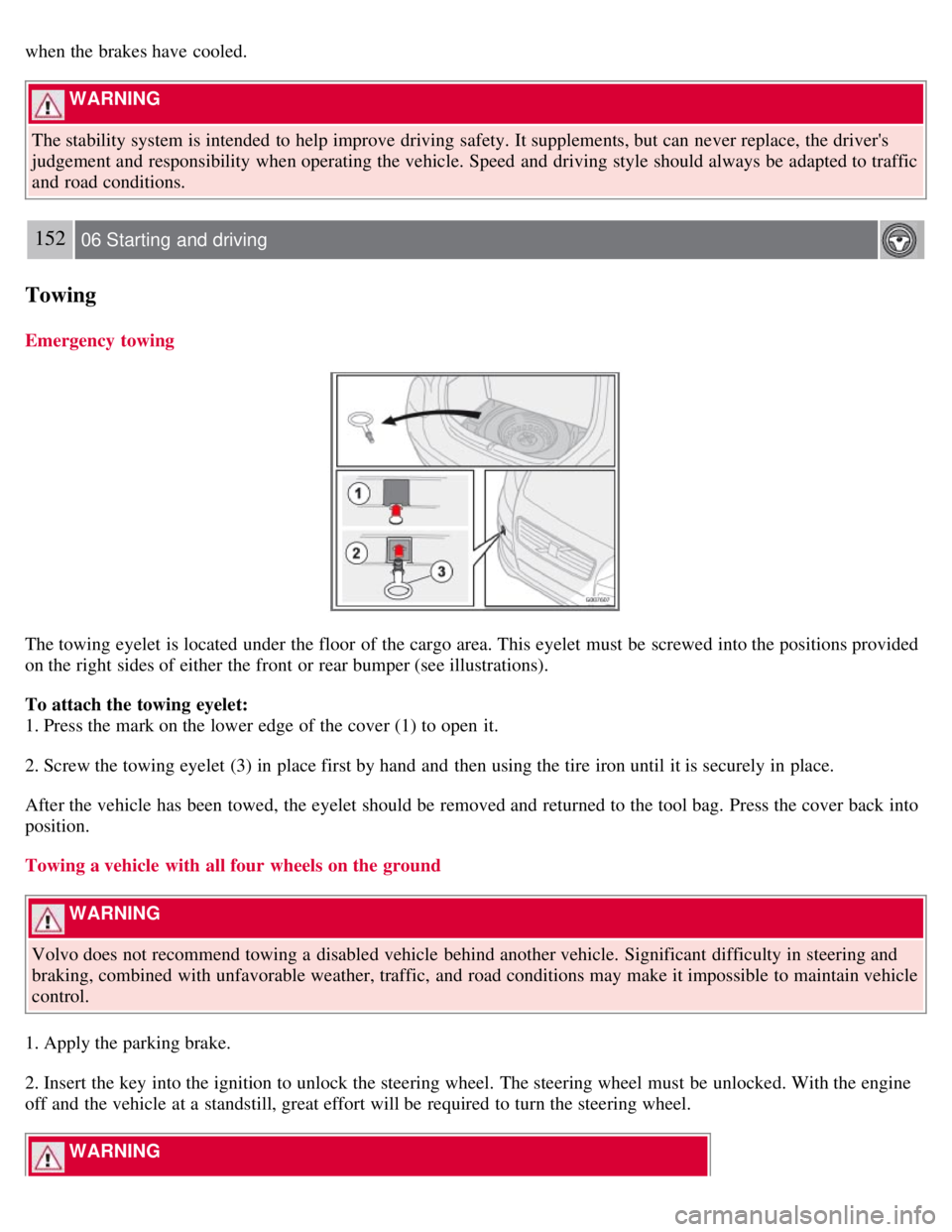
The towing eyelet is located under the floor of the cargo area. This eyelet must be screwed into the positions provided
on the right sides of either the front or rear bumper (see illustrations).
To attach the towing eyelet:
1. Press the mark on the lower edge of the cover (1) to open it.
2. Screw the towing eyelet (3) in place first by hand and then using the tire iron until it is securely in place.
After the vehicle has been towed, the eyelet should be removed and returned to the tool bag. Press the cover back into
position.
Towing a vehicle with all four wheels on the ground
WARNING
Volvo does not recommend towing a disabled vehicle behind another vehicle. Significant difficulty in steering and
braking, combined with unfavorable weather, traffic, and road conditions may make it impossible to maintain vehicle
control.
1. Apply the parking brake.
2. Insert the key into the ignition to unlock the steering wheel. The steering wheel must be unlocked. With the engine
off and the vehicle at a standstill, great effort will be required to turn the steering wheel.
WARNING
Page 141 of 234
To avoid damaging your vehicle and to achieve maximum safety when driving, we recommend using the load
carriers that Volvo has developed especially for your car.
Volvo-approved removable roof racks are designed to carry the maximum allowable roof load for this vehicle: 165
lbs (75 kg). For Non-Volvo roof racks, check the manufacturer's weight limits for the rack.
Never exceed the rack manufacturer's weigh limits and never exceed the maximum rated roof load of 165 lbs (75
kg).
Avoid single-point loads. Distribute loads evenly.
Place heavier cargo at the bottom of the load.
Secure the cargo correctly with appropriate tie-down equipment.
Check periodically that the load carriers and load are properly secured.
Remember that the car's center of gravity and handling change when you carry a load on the roof.
The car's wind resistance and fuel consumption will increase with the size of the load.
Drive smoothly. Avoid rapid starts, fast cornering and hard braking.
156 06 Starting and driving
Blind Spot Information System (BLIS)-option
Introduction
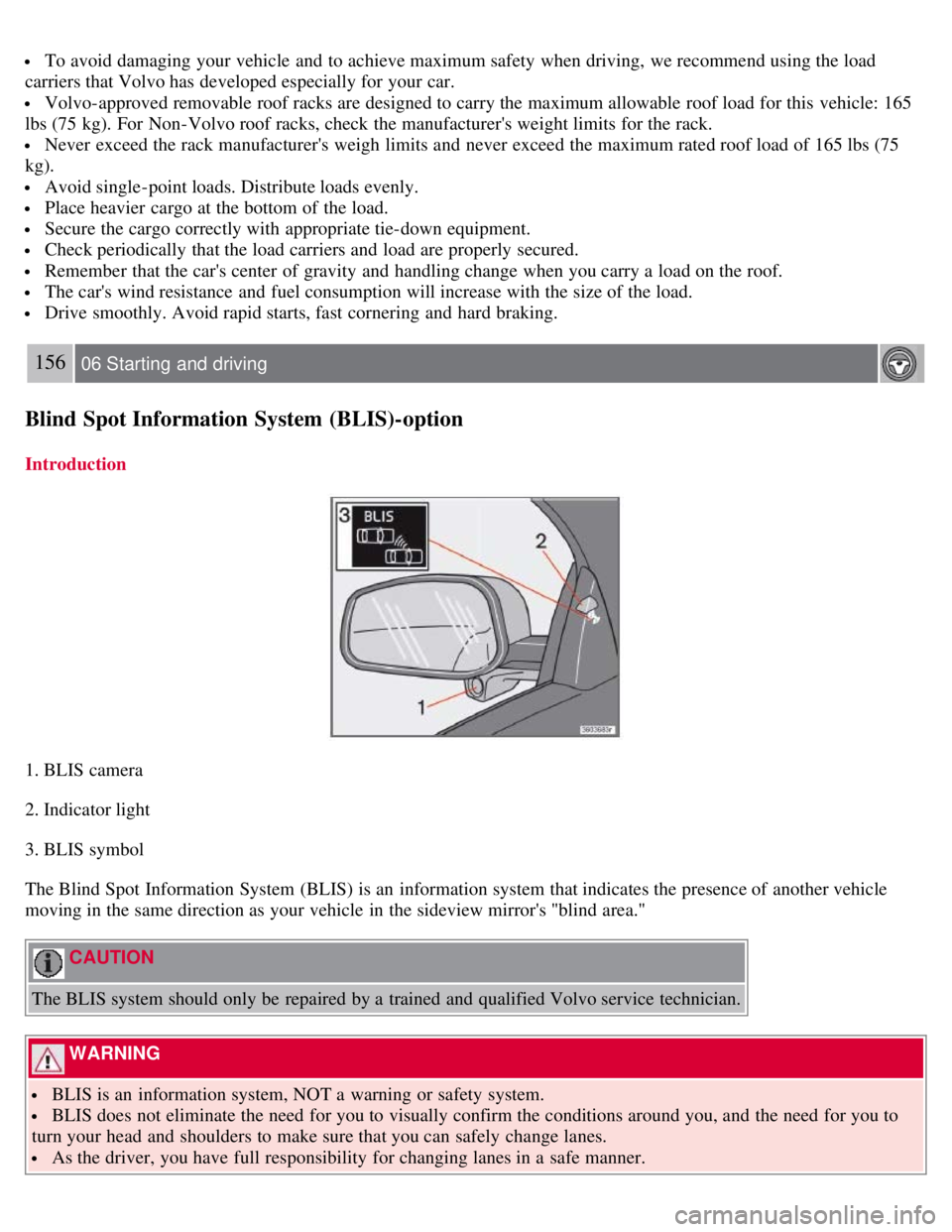
1. BLIS camera
2. Indicator light
3. BLIS symbol
The Blind Spot Information System (BLIS) is an information system that indicates the presence of another vehicle
moving in the same direction as your vehicle in the sideview mirror's "blind area."
CAUTION
The BLIS system should only be repaired by a trained and qualified Volvo service technician.
WARNING
BLIS is an information system, NOT a warning or safety system.
BLIS does not eliminate the need for you to visually confirm the conditions around you, and the need for you to
turn your head and shoulders to make sure that you can safely change lanes.
As the driver, you have full responsibility for changing lanes in a safe manner.