steering wheel adjustment VOLVO C30 2008 Owners Manual
[x] Cancel search | Manufacturer: VOLVO, Model Year: 2008, Model line: C30, Model: VOLVO C30 2008Pages: 234, PDF Size: 4.8 MB
Page 2 of 234
In Canada: Volvo Cars of Canada Corp.
National Customer Service
175 Gordon Baker Road
North York, Ontario M2H 2N7
1-800-663-8255
www.volvocanada.com
2007 © Volvo Car Corporation. All rights reserved.
2 Contents
00 Introduction
General information 6
Volvo and the environment7
Important warnings9
01 Safety
Occupant safety 12
Reporting safety defects13
Seat belts14
Supplemental Restraint System18
Front airbags19
Occupant Weight Sensor (OWS)22
Side impact protection airbags25
Volvo Inflatable Curtain (VIC)26
Whiplash Protection System28
Crash mode30
Child safety31
Child restraint systems33
Infant seats35
Convertible seats37
Booster cushions40
ISOFIX lower anchors41
Top tether anchors42
Child restraint registration and
02 Instruments and control
Instrument overview46
Instrument panel49
Instrument and warning symbols51
Information display56
Lighting panel58
Left-side steering wheel lever60
Trip computer (option)61
Right-side steering wheel lever63
Cruise control (option)66
Steering wheel adjustment, Hazard
warning flashers68
Parking brake
69
12-volt sockets70
Power windows71
Mirrors72
Power moonroof (option)75
Personal settings77
Home Link® Universal80
Page 40 of 234
2 0 0 8
VOLVO C30
44 02 Instruments and controls
Instrument overview 46
Instrument panel49
Instrument and warning symbols51
Information display56
Lighting panel58
Left-side steering wheel lever60
Trip computer (option)61
Right-side steering wheel lever63
Cruise control (option)66
Steering wheel adjustment, Hazard warning flashers68
Parking brake69
12-volt sockets70
Power windows71
Mirrors72
Power moonroof (option)75
Personal settings77
Home Link® Universal Transceiver (option)80
45 02 Instruments and controls
46 02 Instruments and controls
Instrument overview
Page 41 of 234
47 02 Instruments and controls
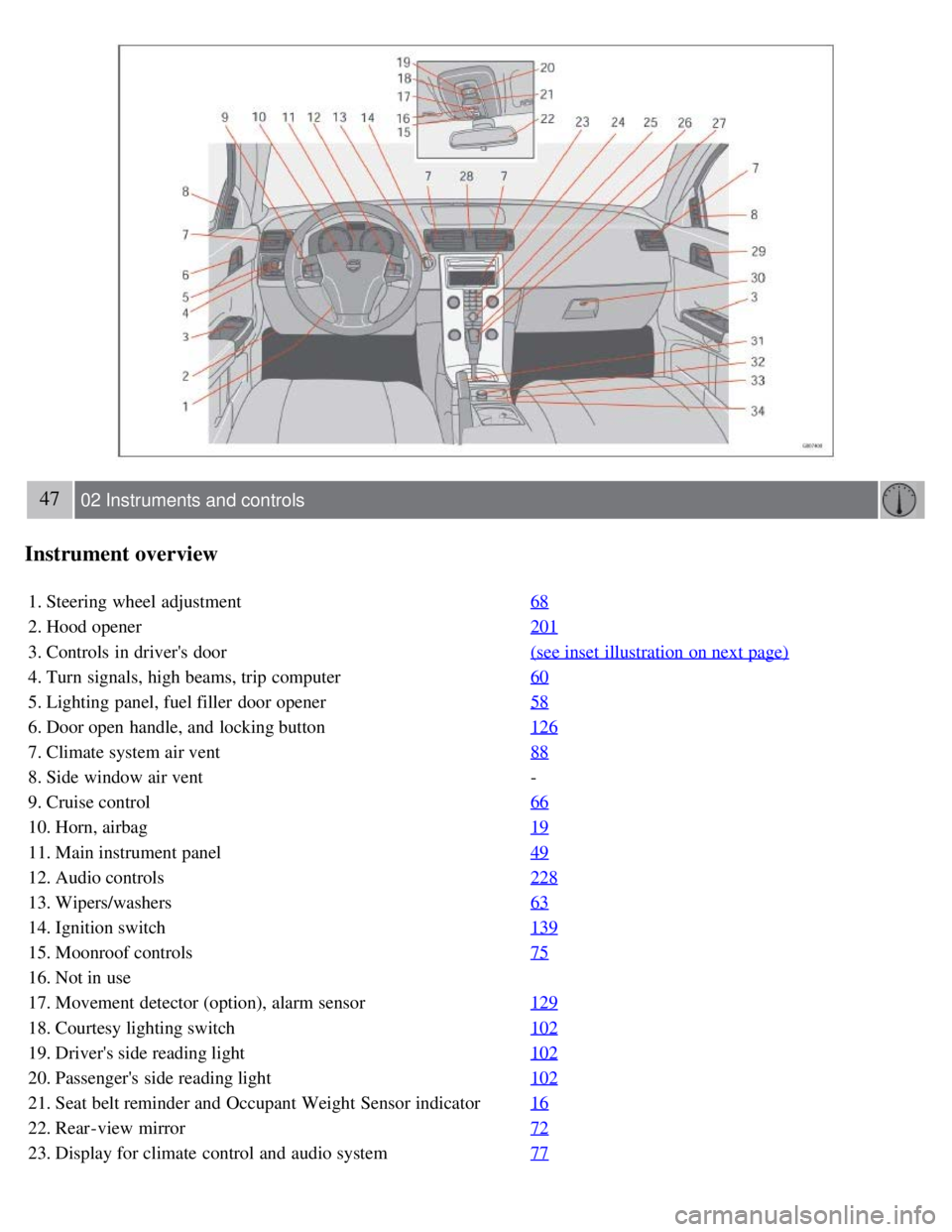
Instrument overview
1. Steering wheel adjustment68
2. Hood opener201
3. Controls in driver's door(see inset illustration on next page)
4. Turn signals, high beams, trip computer60
5. Lighting panel, fuel filler door opener58
6. Door open handle, and locking button126
7. Climate system air vent88
8. Side window air vent-
9. Cruise control 66
10. Horn, airbag19
11. Main instrument panel49
12. Audio controls228
13. Wipers/washers63
14. Ignition switch139
15. Moonroof controls75
16. Not in use
17. Movement detector (option), alarm sensor129
18. Courtesy lighting switch102
19. Driver's side reading light102
20. Passenger's side reading light102
21. Seat belt reminder and Occupant Weight Sensor indicator16
22. Rear-view mirror72
23. Display for climate control and audio system77
Page 60 of 234
Cruise control (option)
Returning to the set speed
Press the button to resume the previously set speed.
Disengaging cruise control
Cruise control can also be disengaged by:
Pressing the CRUISE button (CRUISE ON will no longer be shown in the function display).
Putting the gear selector in (N)eutral.
WARNING
Cruise control should not be used in heavy traffic or when driving on wet or slippery roads. Cruise control may not
maintain set speed on steep downgrades.
68 02 Instruments and controls
Steering wheel adjustment, Hazard warning flashers
Steering wheel adjustment
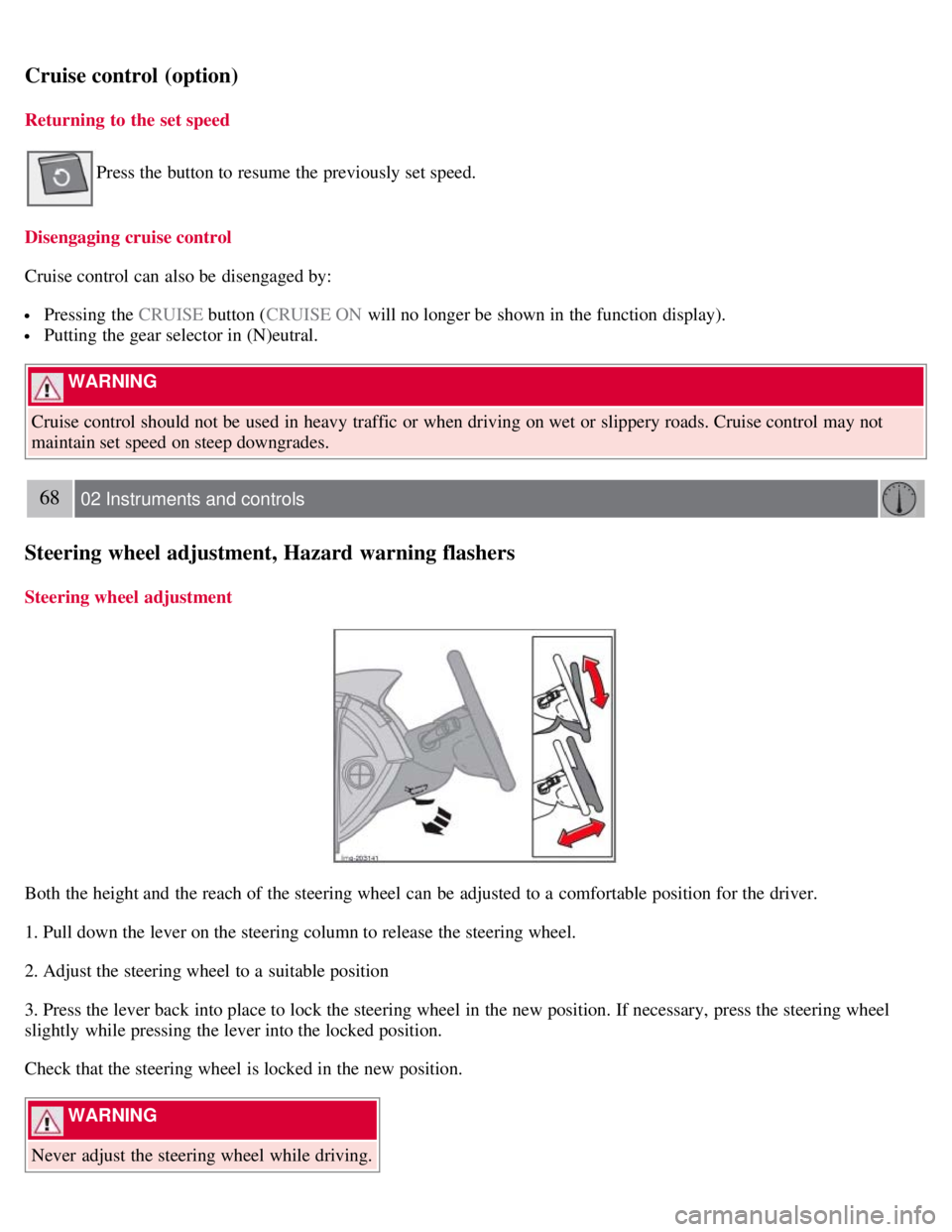
Both the height and the reach of the steering wheel can be adjusted to a comfortable position for the driver.
1. Pull down the lever on the steering column to release the steering wheel.
2. Adjust the steering wheel to a suitable position
3. Press the lever back into place to lock the steering wheel in the new position. If necessary, press the steering wheel
slightly while pressing the lever into the locked position.
Check that the steering wheel is locked in the new position.
WARNING
Never adjust the steering wheel while driving.