turn signal VOLVO C30 2008 Owners Manual
[x] Cancel search | Manufacturer: VOLVO, Model Year: 2008, Model line: C30, Model: VOLVO C30 2008Pages: 234, PDF Size: 4.8 MB
Page 41 of 234
47 02 Instruments and controls
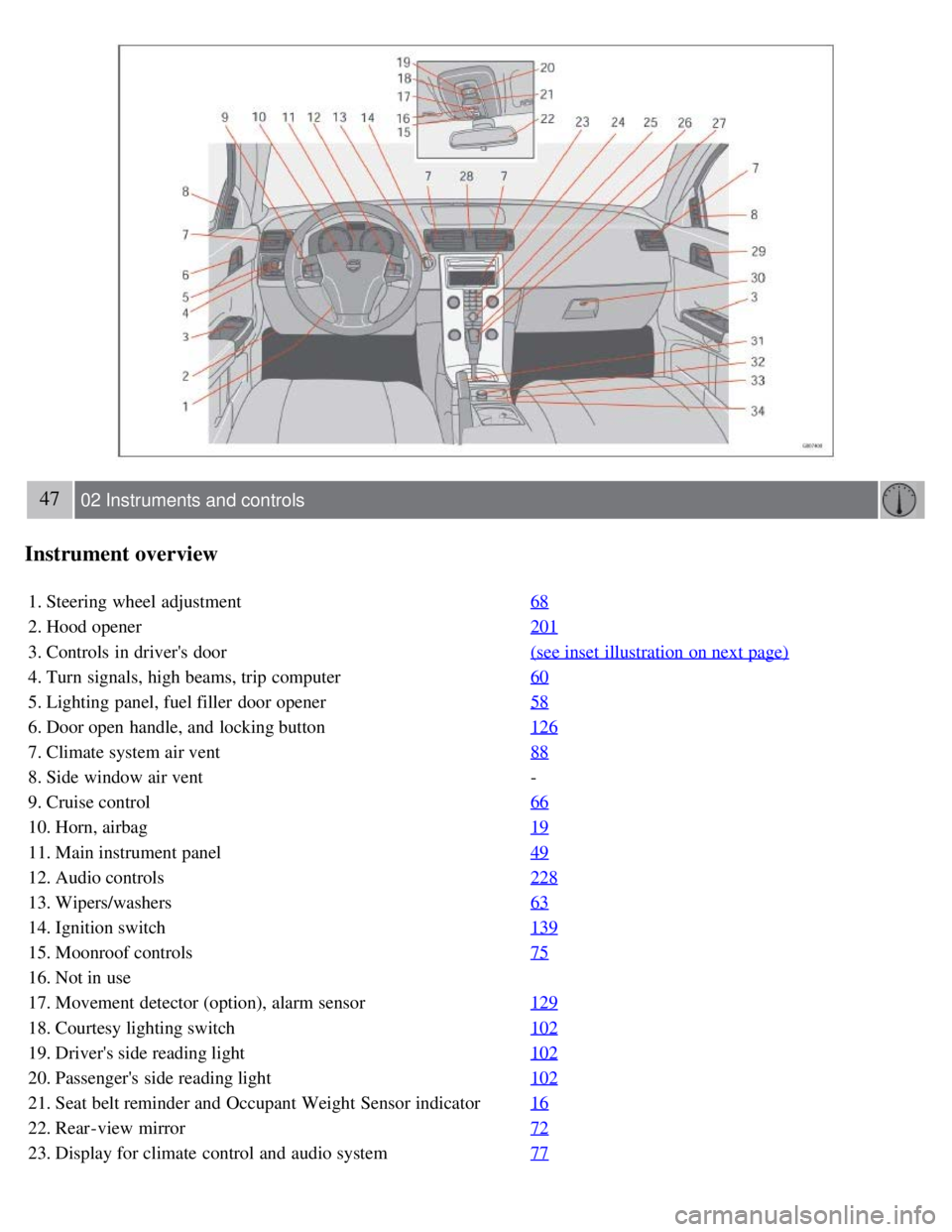
Instrument overview
1. Steering wheel adjustment68
2. Hood opener201
3. Controls in driver's door(see inset illustration on next page)
4. Turn signals, high beams, trip computer60
5. Lighting panel, fuel filler door opener58
6. Door open handle, and locking button126
7. Climate system air vent88
8. Side window air vent-
9. Cruise control 66
10. Horn, airbag19
11. Main instrument panel49
12. Audio controls228
13. Wipers/washers63
14. Ignition switch139
15. Moonroof controls75
16. Not in use
17. Movement detector (option), alarm sensor129
18. Courtesy lighting switch102
19. Driver's side reading light102
20. Passenger's side reading light102
21. Seat belt reminder and Occupant Weight Sensor indicator16
22. Rear-view mirror72
23. Display for climate control and audio system77
Page 43 of 234
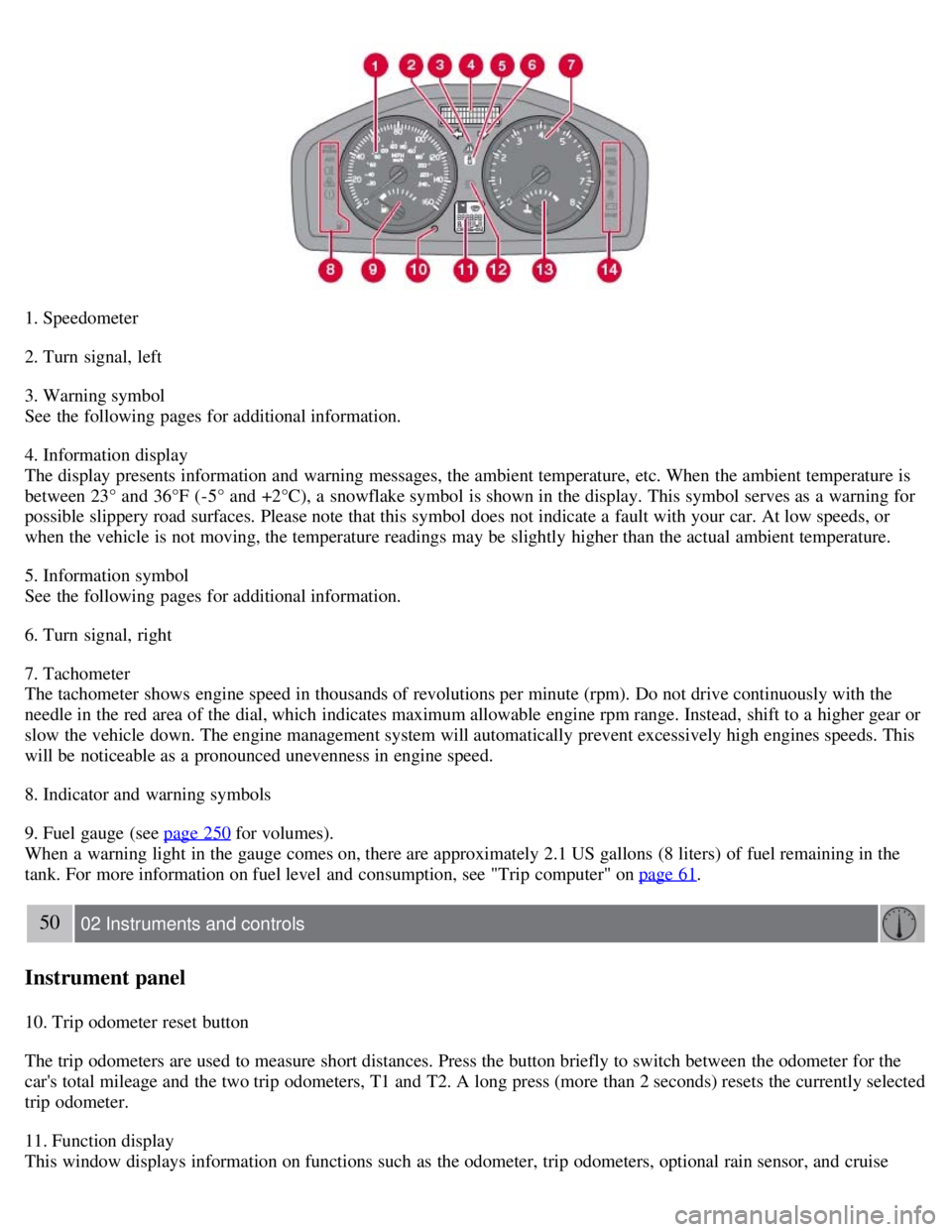
1. Speedometer
2. Turn signal, left
3. Warning symbol
See the following pages for additional information.
4. Information display
The display presents information and warning messages, the ambient temperature, etc. When the ambient temperature is
between 23° and 36°F (-5° and +2°C), a snowflake symbol is shown in the display. This symbol serves as a warning for
possible slippery road surfaces. Please note that this symbol does not indicate a fault with your car. At low speeds, or
when the vehicle is not moving, the temperature readings may be slightly higher than the actual ambient temperature.
5. Information symbol
See the following pages for additional information.
6. Turn signal, right
7. Tachometer
The tachometer shows engine speed in thousands of revolutions per minute (rpm). Do not drive continuously with the
needle in the red area of the dial, which indicates maximum allowable engine rpm range. Instead, shift to a higher gear or
slow the vehicle down. The engine management system will automatically prevent excessively high engines speeds. This
will be noticeable as a pronounced unevenness in engine speed.
8. Indicator and warning symbols
9. Fuel gauge (see page 250
for volumes).
When a warning light in the gauge comes on, there are approximately 2.1 US gallons (8 liters) of fuel remaining in the
tank. For more information on fuel level and consumption, see "Trip computer" on page 61
.
50 02 Instruments and controls
Instrument panel
10. Trip odometer reset button
The trip odometers are used to measure short distances. Press the button briefly to switch between the odometer for the
car's total mileage and the two trip odometers, T1 and T2. A long press (more than 2 seconds) resets the currently selected
trip odometer.
11. Function display
This window displays information on functions such as the odometer, trip odometers, optional rain sensor, and cruise
Page 47 of 234
stabilize the car. See page 150 for more detailed information.
5. Not in use
6. Fuel level warning light
When this light comes on, there are approximately 2.1 US gallons (8 liters) of fuel remaining in the tank.
54 02 Instruments and controls
Instrument and warning symbols
Symbols - right side
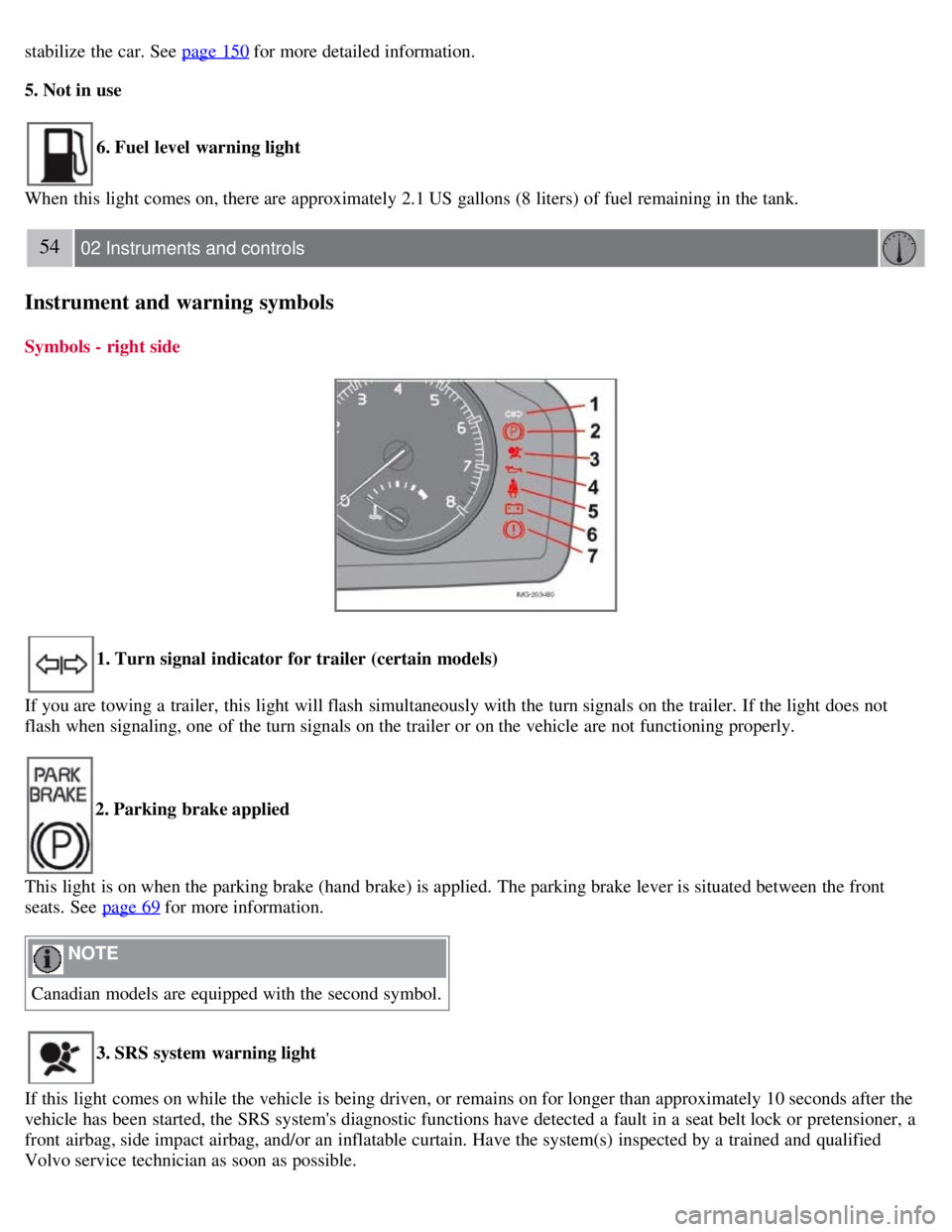
1. Turn signal indicator for trailer (certain models)
If you are towing a trailer, this light will flash simultaneously with the turn signals on the trailer. If the light does not
flash when signaling, one of the turn signals on the trailer or on the vehicle are not functioning properly.
2. Parking brake applied
This light is on when the parking brake (hand brake) is applied. The parking brake lever is situated between the front
seats. See page 69
for more information.
NOTE
Canadian models are equipped with the second symbol.
3. SRS system warning light
If this light comes on while the vehicle is being driven, or remains on for longer than approximately 10 seconds after the
vehicle has been started, the SRS system's diagnostic functions have detected a fault in a seat belt lock or pretensioner, a
front airbag, side impact airbag, and/or an inflatable curtain. Have the system(s) inspected by a trained and qualified
Volvo service technician as soon as possible.
Page 53 of 234
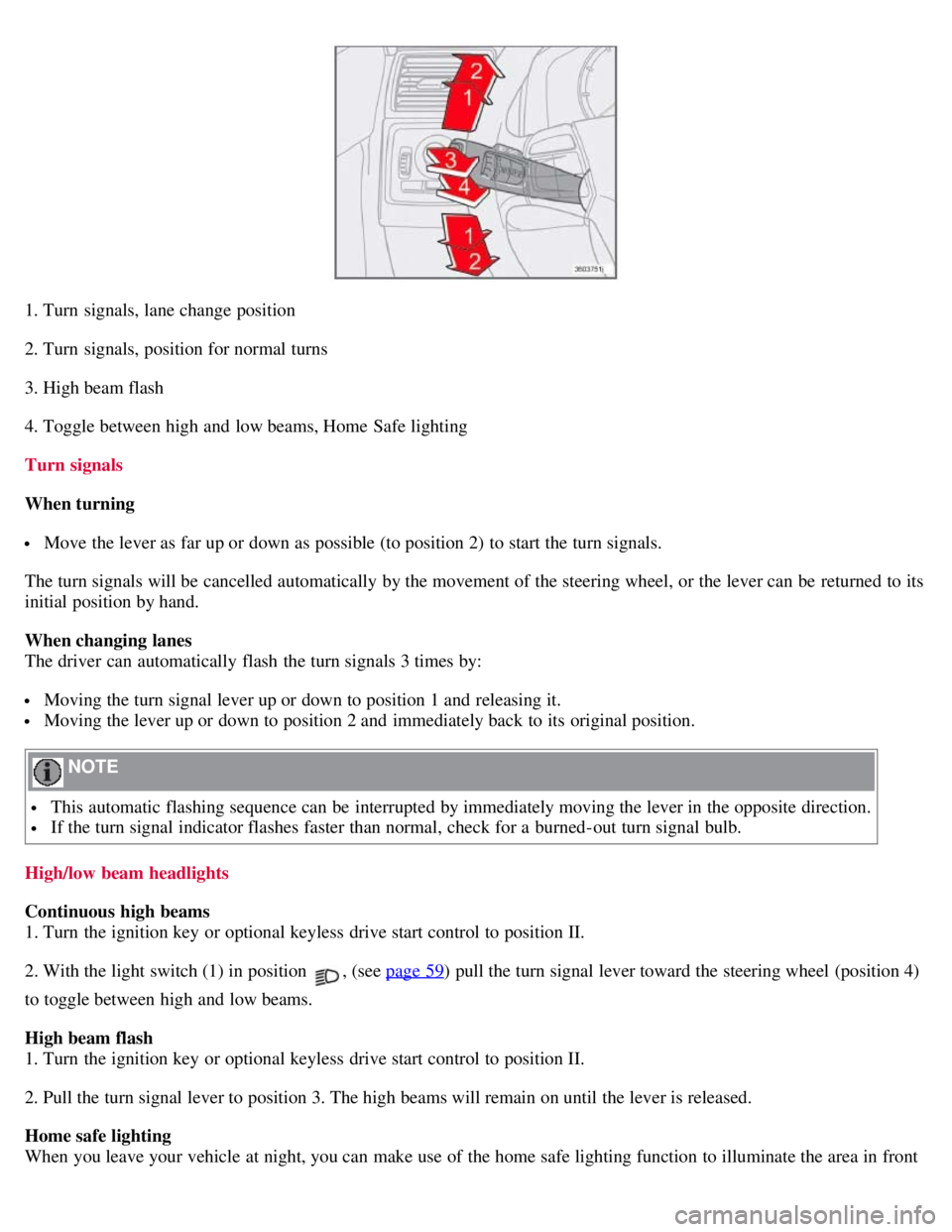
1. Turn signals, lane change position
2. Turn signals, position for normal turns
3. High beam flash
4. Toggle between high and low beams, Home Safe lighting
Turn signals
When turning
Move the lever as far up or down as possible (to position 2) to start the turn signals.
The turn signals will be cancelled automatically by the movement of the steering wheel, or the lever can be returned to its
initial position by hand.
When changing lanes
The driver can automatically flash the turn signals 3 times by:
Moving the turn signal lever up or down to position 1 and releasing it.
Moving the lever up or down to position 2 and immediately back to its original position.
NOTE
This automatic flashing sequence can be interrupted by immediately moving the lever in the opposite direction.
If the turn signal indicator flashes faster than normal, check for a burned-out turn signal bulb.
High/low beam headlights
Continuous high beams
1. Turn the ignition key or optional keyless drive start control to position II.
2. With the light switch (1) in position
, (see page 59) pull the turn signal lever toward the steering wheel (position 4)
to toggle between high and low beams.
High beam flash
1. Turn the ignition key or optional keyless drive start control to position II.
2. Pull the turn signal lever to position 3. The high beams will remain on until the lever is released.
Home safe lighting
When you leave your vehicle at night, you can make use of the home safe lighting function to illuminate the area in front
Page 74 of 234
WARNING
If you use HomeLink to open a garage door or gate, be sure no one is near the gate or door while it is in motion.
Do not use the HomeLink Universal Transceiver with any garage door opener that lacks safety "stop" and "reverse"
features as required by federal safety standards. (This includes any garage door opener model manufactured before April
1, 1982). A garage door opener that cannot "detect" an object, signalling the door to "stop" and "reverse" does not meet
current federal safety standards. Using a garage door opener without these features increases the risk of serious injury or
death. For more information on this matter, call toll-free 1-800-355-3515. (Internet: www.HomeLink.com
).
Programming the transceiver for the first time (U.S. residents)
1. For first time training, press and hold the two outer HomeLink buttons, releasing only when the HomeLink indicator
light begins to flash after 20 seconds. (Do not perform this step when training the additional HomeLink buttons.)
2. Position the hand -held transmitter 1-3 inches away from the HomeLink surface
81 02 Instruments and controls
Home Link® Universal Transceiver (option)
(located on your sun visor), keeping the HomeLink indicator light in view.
3. Using both hands, simultaneously press and hold both the desired HomeLink button and hand held transmitter button.
DO NOT release until the HomeLink indicator light flashes slowly and then rapidly. When the indicator light flashes
rapidly, both buttons may be released. (The rapid flashing indicates successful training.)
NOTE
Some garage door openers may require you to replace step 3 with the "cycling" procedure noted in the "Programming
the transceiver for the first time (Canadian residents)" section.
4. Press and hold the trained HomeLink button and observe the indicator light.
If the indicator light is solid/continuous, training is complete and your device should activate when the HomeLink
button is pressed and released.
If the indicator light blinks rapidly for 2 seconds and then turns a solid/continuous light, proceed with the following
training instructions for a rolling code device. A second person may make the following steps quicker and easier. Please
use a ladder or other device. Do not stand on your vehicle to perform the next steps.
5. At the garage door opener receiver (motorhead unit) in the garage, locate the "learn" or "smart" button (usually near
where the hanging antenna wire is attached to the unit). If there is difficulty locating the training button, reference the
garage door opener's manual or contact us toll-free 1-800-355-3515 (Internet: www.HomeLink.com
).
6. Press and release the "learn" or "smart" button (the name and color of the button may vary by manufacturer)
NOTE
Once the button is pressed, there are 30 seconds in which to initiate the next step.
7. Return to the vehicle and firmly press and hold the trained HomeLink button for two seconds and release. Repeat the
"press/hold/release" sequence up to 3 times to complete the training process.
To train additional HomeLink buttons, begin with step two.
Page 75 of 234
Programming the transceiver for the first time (Canadian residents)
1. For first time training, press and hold the two outer HomeLink buttons releasing only when the HomeLink indicator
light begins to flash after 20 seconds. (Do not perform this step when training the additional HomeLink buttons.)
2. Position the hand -held transmitter 1-3 inches (2.5-7.5 cm) away from the HomeLink surface (located on your) keeping
the HomeLink indicator light in view.
3. Using both hands, simultaneously press and hold both the desired HomeLink button and hand held transmitter button.
During programming, your handheld transmitter may automatically stop transmitting. Continue to press and hold the
desired HomeLink button while you press and re-press ("cycle") your handheld transmitter every two seconds until the
frequency signal has been learned. The indicator light will flash slowly and then rapidly after several seconds upon
successful training. DO NOT release until the HomeLink indicator light flashes slowly and then rapidly. When the
indicator light flashes rapidly, both buttons may be released. (The rapid flashing indicates successful training.)
82 02 Instruments and controls
Home Link® Universal Transceiver (option)
4. Press and hold the trained HomeLink button and observe the indicator light.
If the indicator light is solid/continuous, training is complete and your device should activate when the HomeLink
button is pressed and released.
If the indicator light blinks rapidly for 2 seconds and then turns a solid/continuous light, proceed with the following
training instructions for a rolling code device. A second person may make the following steps quicker and easier. Please
use a ladder or other device. Do not stand on your vehicle to perform the next steps.
5. At the garage door opener receiver (motorhead unit) in the garage, locate the "learn" or "smart" button (usually near
where the hanging antenna wire is attached to the unit). If there is difficulty locating the training button reference the
garage door opener's manual or contact us.
6. Press and release the "learn" or "smart" button (the name and color of the button may vary by manufacturer).
NOTE
Once the button is pressed, there are 30 seconds in which to initiate the next step.
7. Return to the vehicle and firmly press and hold the trained HomeLink button for two seconds and release. Repeat the
"press/hold/release" sequence up to 3 times to complete the training process.
NOTE
During programming, your hand -held transmitter may automatically stop transmitting. Continue to press and hold the
desired HomeLink button while you press and repress ("cycle") your hand -held transmitter every two seconds until the
frequency signal has been learned. The indicator light will flash slowly and then rapidly after several seconds upon
successful training. If necessary, follow steps 5-7 to complete the training for a rolling code device.
To train additional HomeLink buttons, begin with step two.
Rolling Code Programming
Rolling code garage door openers that are "code-protected" and manufactured after 1996 may be determined by the-
following:
Reference the garage door opener owner's manual for verification.
The handheld transmitter appears to program the HomeLink Universal Transceiver but does not activate the garage
Page 104 of 234
measure, the code of the lost remote control must be erased from the system.
Each key blade has a unique code, which is used if new key blades are required. A maximum of six remote
controls/key blades can be programmed and used for one car.
Immobilizer (start inhibitor)
Each of the keys supplied with your vehicle contains a coded transponder. The code in the key is transmitted to an
antenna in the ignition switch where it is compared to the code stored in the start inhibitor module. The vehicle will
start only with a properly coded key. If you misplace a key, take the other keys to an authorized Volvo retailer for
reprogramming as an antitheft measure.USA - FCC ID: LTQWFS 125VO
This device complies with part 15 of the FCC rules. Operation is subject to the following condition: (1) This device
may not cause harmful interference, and (2) this device must accept any interference received, including interference
that may cause undesired operation.
Canada - IC: 3659A-WFS125VO
Operation is subject to the following conditions: (1) this device may not cause interference, and (2) this device must
accept any interference, including interference that may cause undesired operation of the device.
CAUTION
Never use force on the narrow section of the remote control - this is where the transponder is located. The vehicle
cannot be started if the transponder is damaged.
117 05 Locks and alarm
Remote control and key blade
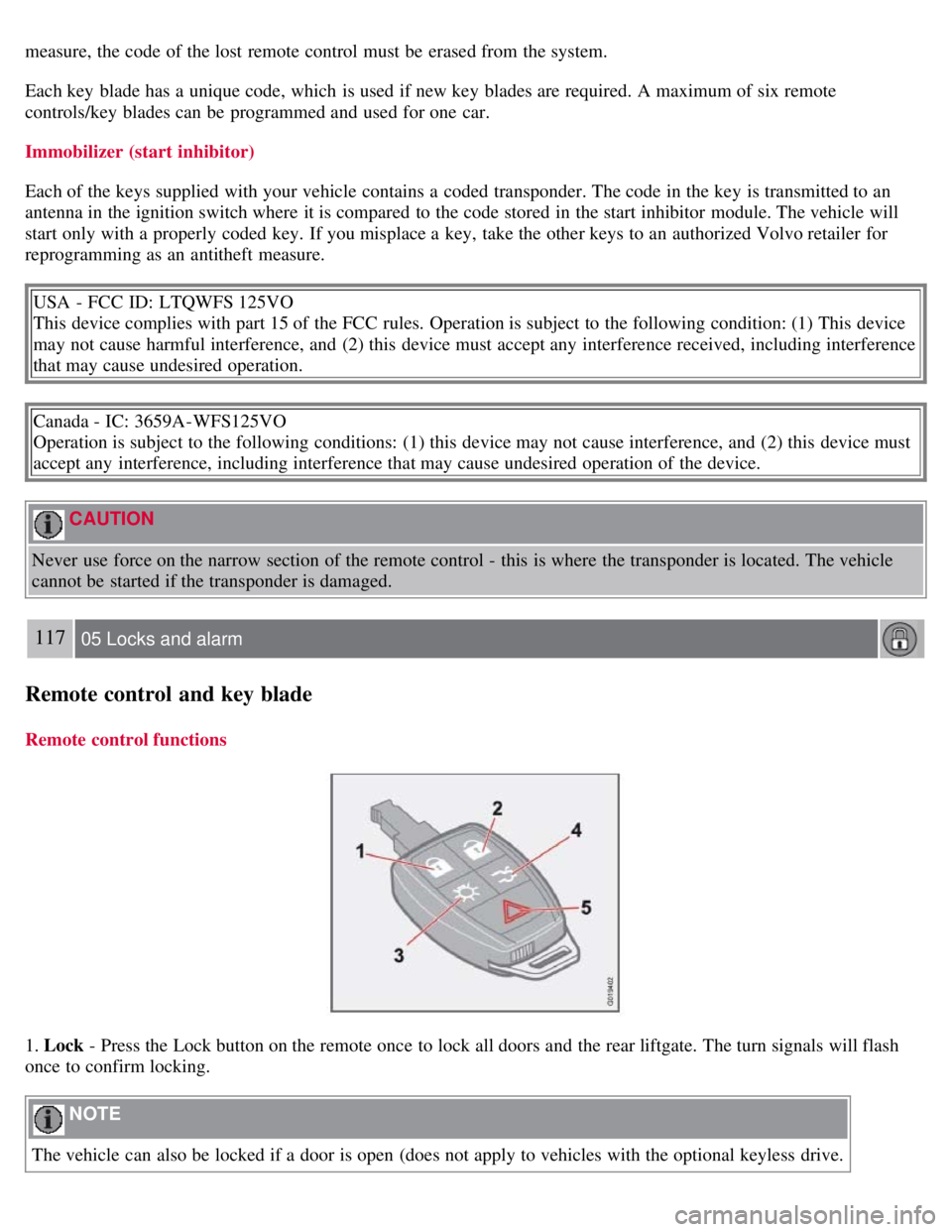
Remote control functions
1. Lock - Press the Lock button on the remote once to lock all doors and the rear liftgate. The turn signals will flash
once to confirm locking.
NOTE
The vehicle can also be locked if a door is open (does not apply to vehicles with the optional keyless drive.
Page 105 of 234
2. Unlock - Press the Unlock button on the remote once to unlock the driver's door. The turn signals will flash twice to
confirm unlocking.
After a short pause, press the Unlock button a second time within 10 seconds to unlock the other doors and the rear
liftgate.
NOTE
The turn signals flash to confirm that the vehicle has been correctly locked/unlocked with the remote control or
the optional keyless drive. When locking the vehicle, the turn signals will flash a confirmation only if all the doors
are securely closed and locked. Flashing confirmation for locking and unlocking may be customized in the vehicle's
Personal settings menu. See page 78
for more information.
The two-step unlocking function can be changed so that one press of the Unlock button unlocks all of the doors
and the rear liftgate. See Personal settings on page 78
for more information.
Automatic relocking: If the doors are unlocked, the locks will automatically reengage (re-lock) and the alarm
(option) will rearm after 2 minutes unless a door or the rear liftgate has been opened.
Automatic locking : When the vehicle starts to move, the doors and rear liftgate can be locked automatically. When
the doors have been locked in this way, they can be unlocked by: pulling twice on one of the inside door opening
handles, or by pressing an unlock button located near the door opening handle.This feature can be turned on or off, see
Personal settings on page 78
for more information.
Airbag deployment will automatically attempt to unlock the doors.
3. Approach lighting - As you approach the car:
Press the button on the remote control to illuminate the area around the car in dark conditions.
Pressing the button once lights up the interior lighting, parking lights, and license plate lighting. These lights will
switch off automatically after 30, 60 or 90 seconds. See the Personal settings on page 78
for information about
adjusting the time setting.
4. Unlock rear liftgate - Press the button once to disarm the alarm system (option) and unlock only the rear liftgate.
After closing, the rear liftgate will not automatically relock. Press Lock to relock it and rearm the alarm.
NOTE
This function will not open the rear liftgate.
If the rear liftgate is opened when the other doors are locked, it will remain unlocked after it has been closed. It
must be locked with the Lock button on the remote control.
118 05 Locks and alarm
Remote control and key blade
5. Panic alarm : - This button can be used to attract attention during emergency situations.
To activate the panic alarm, press and hold the red button for at least 3 seconds or press it twice within 3 seconds.
The turn signals and horn will be activated.
The panic alarm will stop automatically after 30 seconds.
To deactivate, wait approximately 5 seconds and press the red button again.
NOTE
This button will NOT unlock the car.
Page 110 of 234
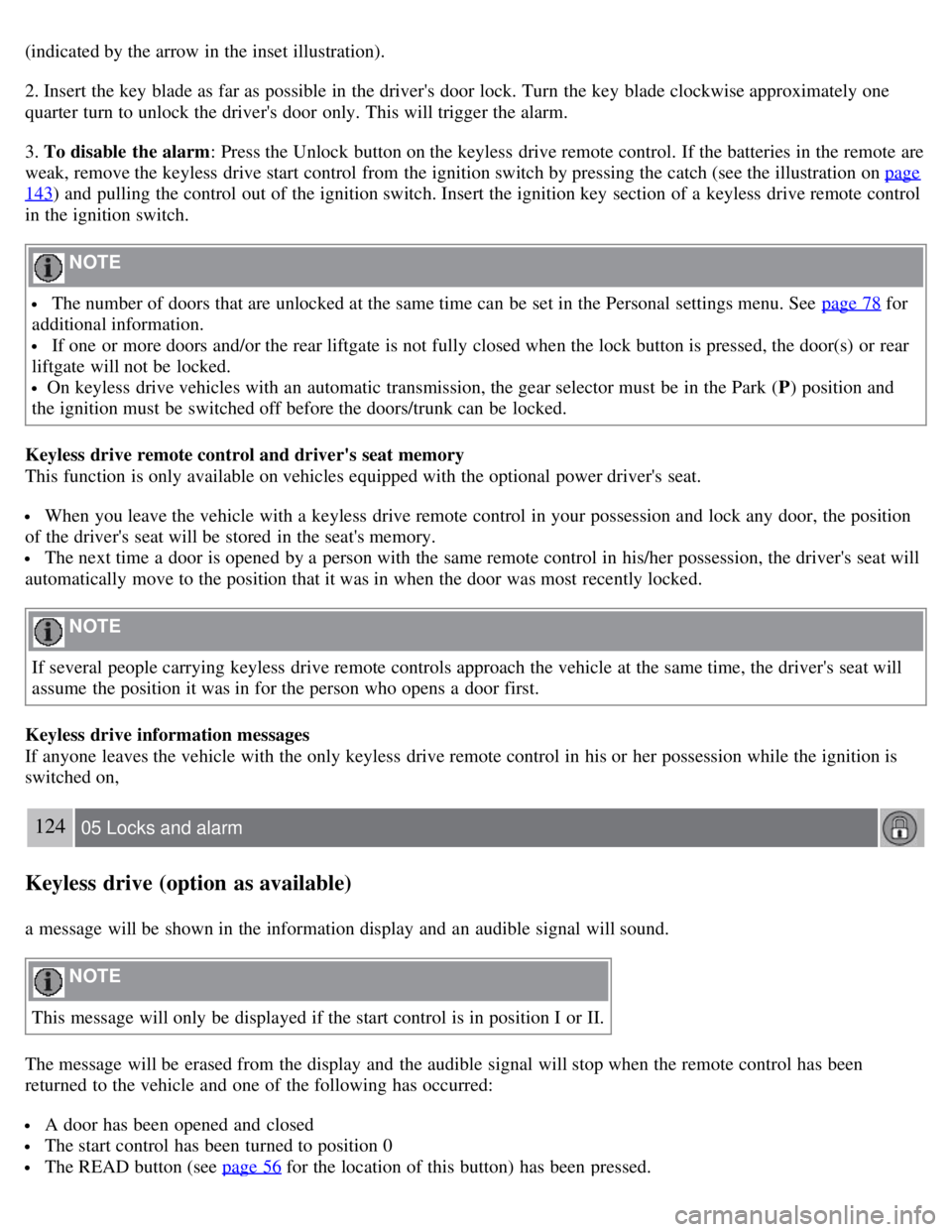
(indicated by the arrow in the inset illustration).
2. Insert the key blade as far as possible in the driver's door lock. Turn the key blade clockwise approximately one
quarter turn to unlock the driver's door only. This will trigger the alarm.
3. To disable the alarm: Press the Unlock button on the keyless drive remote control. If the batteries in the remote are
weak, remove the keyless drive start control from the ignition switch by pressing the catch (see the illustration on page
143) and pulling the control out of the ignition switch. Insert the ignition key section of a keyless drive remote control
in the ignition switch.
NOTE
The number of doors that are unlocked at the same time can be set in the Personal settings menu. See page 78 for
additional information.
If one or more doors and/or the rear liftgate is not fully closed when the lock button is pressed, the door(s) or rear
liftgate will not be locked.
On keyless drive vehicles with an automatic transmission, the gear selector must be in the Park ( P) position and
the ignition must be switched off before the doors/trunk can be locked.
Keyless drive remote control and driver's seat memory
This function is only available on vehicles equipped with the optional power driver's seat.
When you leave the vehicle with a keyless drive remote control in your possession and lock any door, the position
of the driver's seat will be stored in the seat's memory.
The next time a door is opened by a person with the same remote control in his/her possession, the driver's seat will
automatically move to the position that it was in when the door was most recently locked.
NOTE
If several people carrying keyless drive remote controls approach the vehicle at the same time, the driver's seat will
assume the position it was in for the person who opens a door first.
Keyless drive information messages
If anyone leaves the vehicle with the only keyless drive remote control in his or her possession while the ignition is
switched on,
124 05 Locks and alarm
Keyless drive (option as available)
a message will be shown in the information display and an audible signal will sound.
NOTE
This message will only be displayed if the start control is in position I or II.
The message will be erased from the display and the audible signal will stop when the remote control has been
returned to the vehicle and one of the following has occurred:
A door has been opened and closed
The start control has been turned to position 0
The READ button (see page 56 for the location of this button) has been pressed.
Page 114 of 234
The battery is disconnected (while the alarm is armed).
The siren is disconnected when the alarm is disarmed.
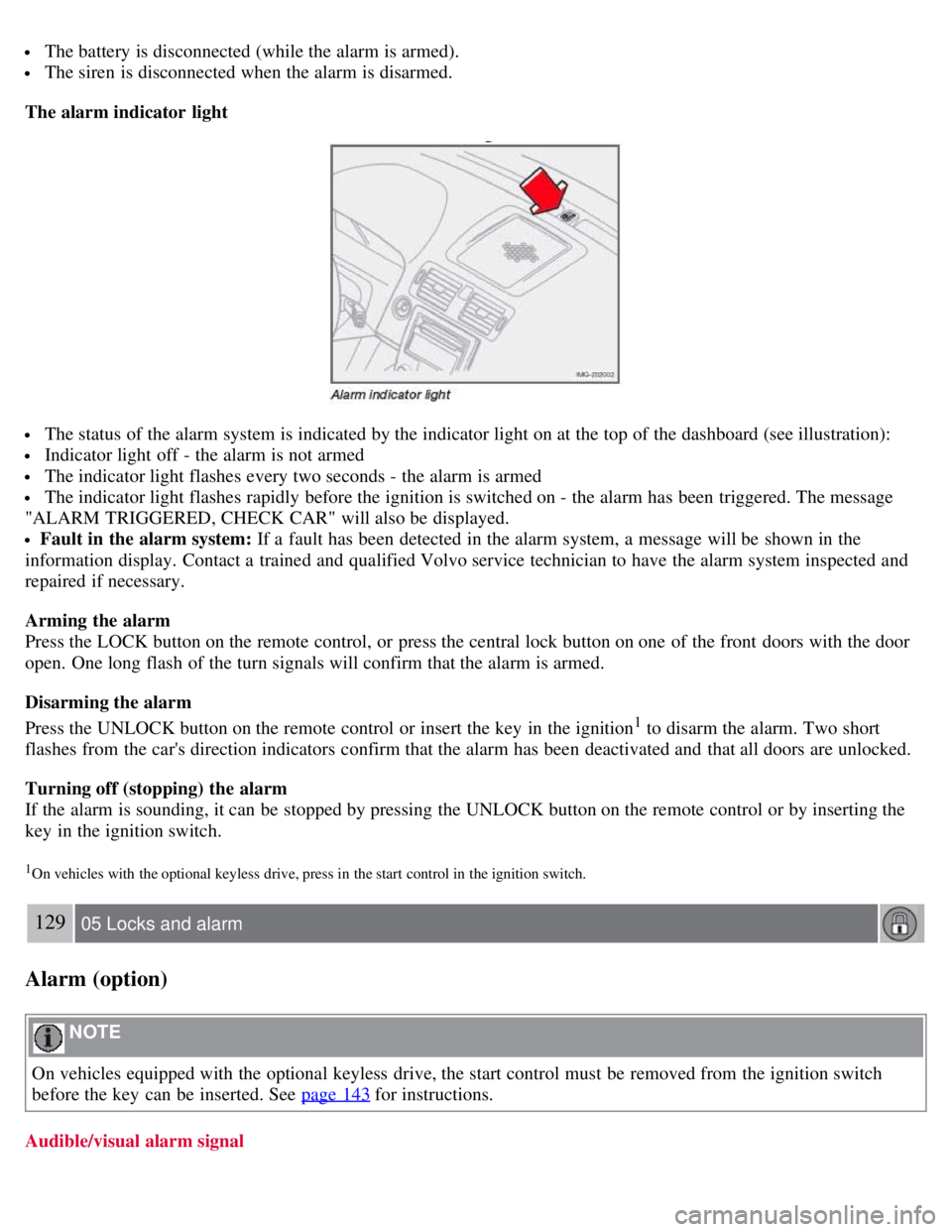
The alarm indicator light
The status of the alarm system is indicated by the indicator light on at the top of the dashboard (see illustration):
Indicator light off - the alarm is not armed
The indicator light flashes every two seconds - the alarm is armed
The indicator light flashes rapidly before the ignition is switched on - the alarm has been triggered. The message
"ALARM TRIGGERED, CHECK CAR" will also be displayed.
Fault in the alarm system: If a fault has been detected in the alarm system, a message will be shown in the
information display. Contact a trained and qualified Volvo service technician to have the alarm system inspected and
repaired if necessary.
Arming the alarm
Press the LOCK button on the remote control, or press the central lock button on one of the front doors with the door
open. One long flash of the turn signals will confirm that the alarm is armed.
Disarming the alarm
Press the UNLOCK button on the remote control or insert the key in the ignition
1 to disarm the alarm. Two short
flashes from the car's direction indicators confirm that the alarm has been deactivated and that all doors are unlocked.
Turning off (stopping) the alarm
If the alarm is sounding, it can be stopped by pressing the UNLOCK button on the remote control or by inserting the
key in the ignition switch.
1On vehicles with the optional keyless drive, press in the start control in the ignition switch.
129 05 Locks and alarm
Alarm (option)
NOTE
On vehicles equipped with the optional keyless drive, the start control must be removed from the ignition switch
before the key can be inserted. See page 143
for instructions.
Audible/visual alarm signal