ECO mode VOLVO C30 2009 Owner´s Manual
[x] Cancel search | Manufacturer: VOLVO, Model Year: 2009, Model line: C30, Model: VOLVO C30 2009Pages: 274, PDF Size: 6.82 MB
Page 142 of 274
06 Starting and drivingStarting the vehicle
06142
To start the engine
WARNING
Before starting, check that the seat, steering
wheel and mirrors are adjusted properly.
Make sure the brake pedal can be
depressed completely. Adjust the seat if
necessary.1. Fasten the seat belt.
2. Apply the parking brake if not already set.
The gear selector should be locked in the
Park (P) position (Shiftlock). See also page
148.
Manual transmission: The clutch must be
fully depressed.
NOTE
After a cold start, idle speed may be notice-
ably higher than normal for a short period.
This is done to help bring components in the
emission control system to their normal
operating temperature as quickly as possi-
ble, which enables them to control emis-
sions and help reduce the vehicle's impact
on the environment.3. The vehicle is equipped with an autostart
feature. Without touching the throttlepedal, turn the key to position III and
release it. The starter motor will then oper-
ate automatically (for up to ten seconds)
until the engine starts. If the engine fails to
start, repeat this step.
4. To release the gear selector from the Park
(P) position, the engine must be running (or
the ignition key must be in position II) and
the brake pedal must be depressed.
5. Select the desired gear. On models with an
automatic transmission, the gear engages
after a very slight delay which is especially
noticeable when selecting R.
NOTE
•
Immobilizer: If two of the keys to your
vehicle are close together, e.g., on the
same key ring when you try to start the
vehicle, this could cause interference in
the immobilizer system and result in the
vehicle not starting. If this should occur,
remove one of the keys from the key
ring before trying to start the vehicle
again.
•
Keylock: Models equipped an auto-
matic transmission have a keylock sys-
tem. When the engine is switched off,
the gear selector must be in the Park
(P) position before the key can be
removed from the ignition switch
1.
•
When starting in cold weather, the
transmission may shift up at slightly
higher engine speeds than normal until
the automatic transmission fluid rea-
ches normal operating temperature.
•
Do not race a cold engine immediately
after starting. Oil flow may not reach
some lubrication points fast enough to
prevent engine damage.
1The optional keyless drive start control does not need to be removed from the ignition switch.
Page 145 of 274
06 Starting and driving
Manual transmission, 6-speed (certain markets only)
06
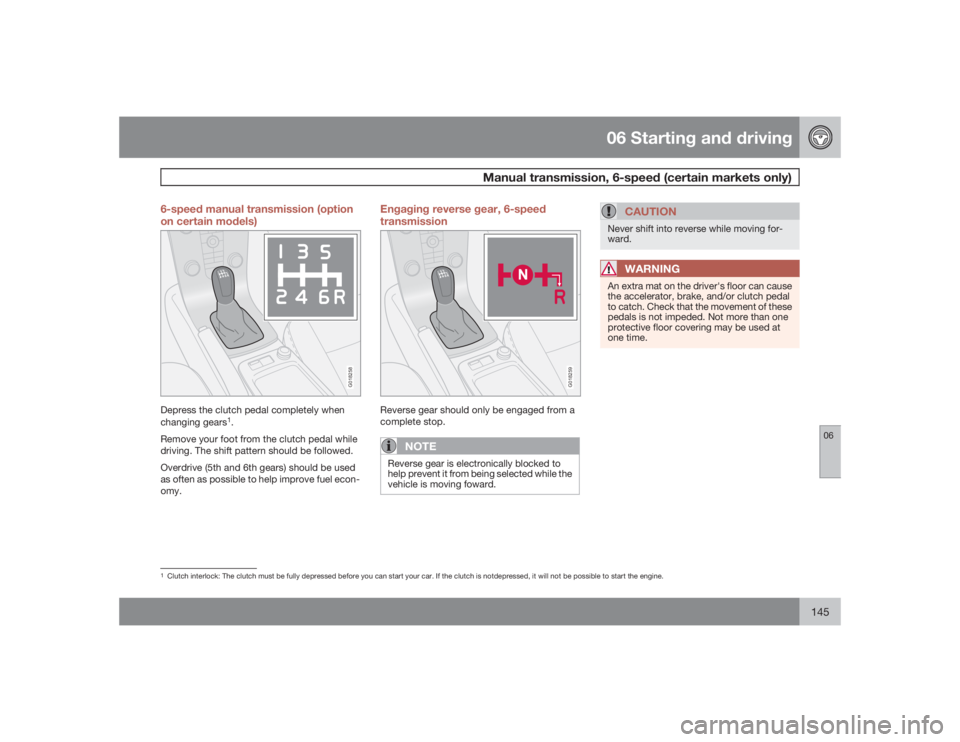
145 6-speed manual transmission (option
on certain models)
G018258
Depress the clutch pedal completely when
changing gears
1.
Remove your foot from the clutch pedal while
driving. The shift pattern should be followed.
Overdrive (5th and 6th gears) should be used
as often as possible to help improve fuel econ-
omy.
Engaging reverse gear, 6-speed
transmission
G018259
Reverse gear should only be engaged from a
complete stop.
NOTE
Reverse gear is electronically blocked to
help prevent it from being selected while the
vehicle is moving foward.
CAUTION
Never shift into reverse while moving for-
ward.
WARNING
An extra mat on the driver's floor can cause
the accelerator, brake, and/or clutch pedal
to catch. Check that the movement of these
pedals is not impeded. Not more than one
protective floor covering may be used at
one time.
1Clutch interlock: The clutch must be fully depressed before you can start your car. If the clutch is notdepressed, it will not be possible to start the engine.
Page 146 of 274
06 Starting and drivingAutomatic transmission (option)
06146
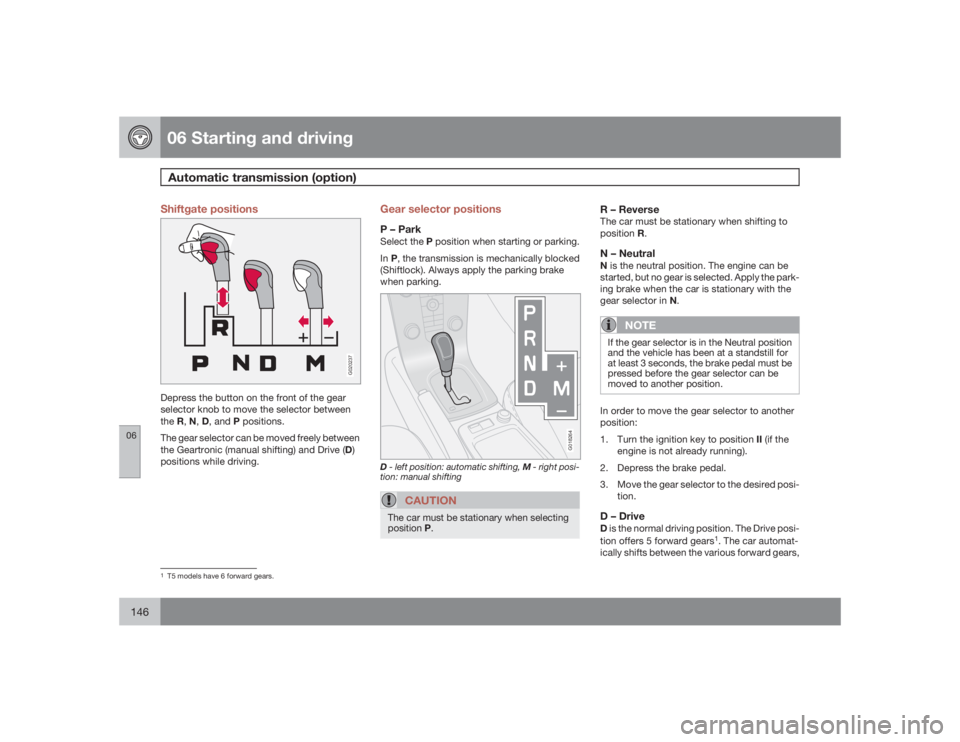
Shiftgate positions
G020237
Depress the button on the front of the gear
selector knob to move the selector between
theR,N,D, and P positions.
The gear selector can be moved freely between
the Geartronic (manual shifting) and Drive (D)
positions while driving.
Gear selector positionsP – ParkSelect the P position when starting or parking.
InP, the transmission is mechanically blocked
(Shiftlock). Always apply the parking brake
when parking.
G018264
D- left position: automatic shifting, M- right posi-
tion: manual shifting
CAUTION
The car must be stationary when selecting
positionP.
R – ReverseThe car must be stationary when shifting to
positionR.N – NeutralN is the neutral position. The engine can be
started, but no gear is selected. Apply the park-
ing brake when the car is stationary with the
gear selector in N.
NOTE
If the gear selector is in the Neutral position
and the vehicle has been at a standstill for
at least 3 seconds, the brake pedal must be
pressed before the gear selector can be
moved to another position.In order to move the gear selector to another
position:
1.
Turn the ignition key to position II (if the
engine is not already running).
2. Depress the brake pedal.
3. Move the gear selector to the desired posi-
tion.D – DriveD is the normal driving position. The Drive posi-
tion offers 5 forward gears
1. The car automat-
ically shifts between the various forward gears,
1T5 models have 6 forward gears.
Page 166 of 274
07 Wheels and tiresGeneral information
07166
Your vehicle is equipped with tires according
to the vehicle's tire information placard on the
B-pillar (the structural member at the side of
the vehicle, at the rear of the driver's door
opening), or on the inside of the fuel filler door
on Canadian models.
CAUTION
Some Volvo models are equipped with an
Ultra High Performance tire and wheel com-
bination designed to provide maximum dry
pavement performance with consideration
for hydroplaning resistance. As such, they
may be more susceptible to road hazard
damage and, depending on driving condi-
tions, may achieve a tread life of less than
20,000 miles (30,000 km). Even if this vehi-
cle is equipped with Volvo’s advanced AWD
or DSTC system, these tires are not
designed for winter driving, and should be
replaced with winter tires when weather
conditions dictate.The tires have good road holding characteris-
tics and offer good handling on dry and wet
surfaces. It should be noted however that the
tires have been developed to give these fea-
tures on snow/ice-free surfaces.
Certain models are equipped with "all-season"
tires, which provide a somewhat higher degree
of road holding on slippery surfaces than tires
without the "all-season" rating. However, foroptimum road holding on icy or snow-covered
roads, we recommend suitable winter tires on
all four wheels.
When replacing tires, be sure that the new tires
are the same size designation, type (radial) and
preferably from the same manufacturer, on all
four wheels. Otherwise there is a risk of altering
the car's roadholding and handling characte-
ristics.
Storing wheels and tiresWhen storing complete wheels (tires mounted
on rims), they should be suspended off the
floor or placed on their sides on the floor.
Tires not mounted on rims should be stored on
their sides or standing upright, but should not
be suspended.
CAUTION
Tires should preferably be stored in a cool,
dry, dark place, and should never be stored
in close proximity to solvents, gasoline, oils,
etc.
WARNING
•
The wheel and tire sizes for your Volvo
are specified to meet stringent stability
and handling requirements. Unap-
proved wheel/tire size combinations
can negatively affect your vehicle's sta-
bility and handling. Approved tire sizes
are shown in the Tire inflation pressure
tables, see page 170.
•
Any damage caused by installation of
unapproved wheel/tire size combina-
tions will not be covered by your new
vehicle warranty. Volvo assumes no
responsibility for death, injury, or
expenses that may result from such
installations.
Page 168 of 274
07 Wheels and tiresTire inflation
07168
Inflation labels
G032513
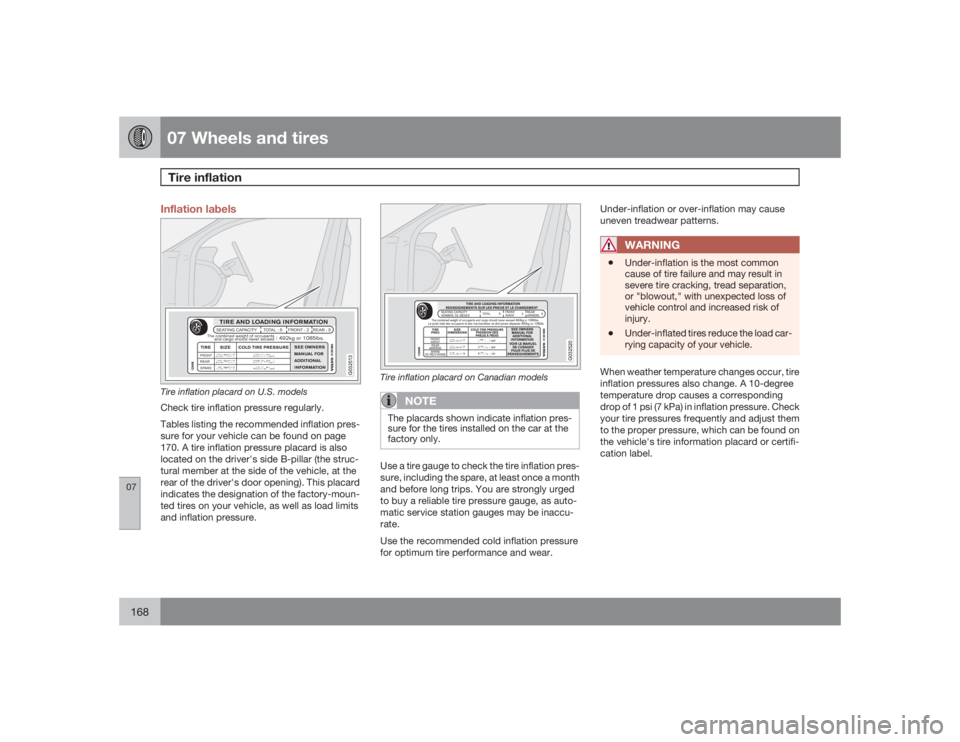
Tire inflation placard on U.S. modelsCheck tire inflation pressure regularly.
Tables listing the recommended inflation pres-
sure for your vehicle can be found on page
170. A tire inflation pressure placard is also
located on the driver's side B-pillar (the struc-
tural member at the side of the vehicle, at the
rear of the driver's door opening). This placard
indicates the designation of the factory-moun-
ted tires on your vehicle, as well as load limits
and inflation pressure.
G032520
Tire inflation placard on Canadian models
NOTE
The placards shown indicate inflation pres-
sure for the tires installed on the car at the
factory only.Use a tire gauge to check the tire inflation pres-
sure, including the spare, at least once a month
and before long trips. You are strongly urged
to buy a reliable tire pressure gauge, as auto-
matic service station gauges may be inaccu-
rate.
Use the recommended cold inflation pressure
for optimum tire performance and wear.Under-inflation or over-inflation may cause
uneven treadwear patterns.
WARNING
•
Under-inflation is the most common
cause of tire failure and may result in
severe tire cracking, tread separation,
or "blowout," with unexpected loss of
vehicle control and increased risk of
injury.
•
Under-inflated tires reduce the load car-
rying capacity of your vehicle.
When weather temperature changes occur, tire
inflation pressures also change. A 10-degree
temperature drop causes a corresponding
drop of 1 psi (7 kPa) in inflation pressure. Check
your tire pressures frequently and adjust them
to the proper pressure, which can be found on
the vehicle's tire information placard or certifi-
cation label.
Page 170 of 274
07 Wheels and tiresInflation pressure—U.S. models
07170
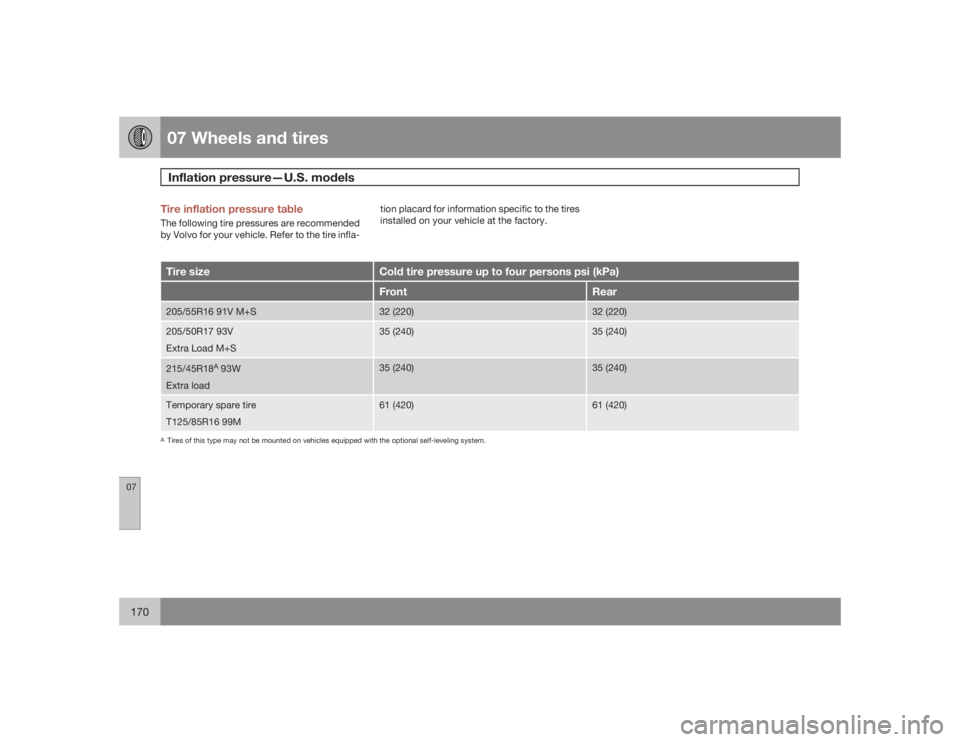
Tire inflation pressure tableThe following tire pressures are recommended
by Volvo for your vehicle. Refer to the tire infla-tion placard for information specific to the tires
installed on your vehicle at the factory.Tire size
Cold tire pressure up to four persons psi (kPa)Front
Rear
205/55R16 91V M+S
32 (220)
32 (220)
205/50R17 93V
Extra Load M+S
35 (240)
35 (240)
215/45R18
A 93W
Extra load
35 (240)
35 (240)
Temporary spare tire
T125/85R16 99M
61 (420)
61 (420)
ATires of this type may not be mounted on vehicles equipped with the optional self-leveling system.
Page 171 of 274
07 Wheels and tires
Inflation pressure—Canadian models
07
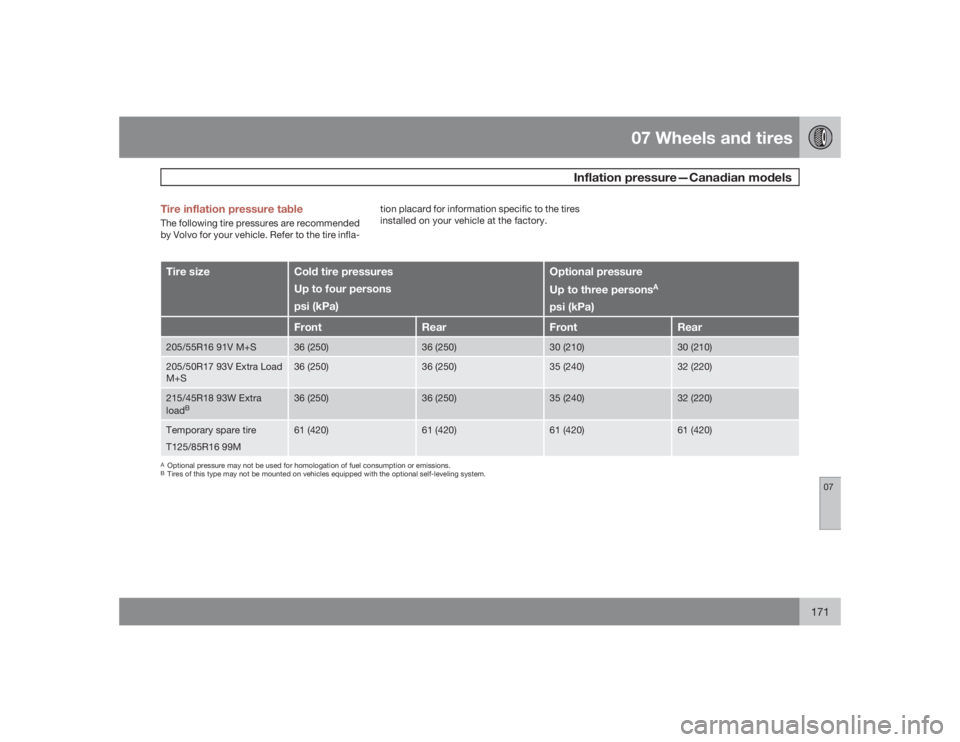
171 Tire inflation pressure table
The following tire pressures are recommended
by Volvo for your vehicle. Refer to the tire infla-tion placard for information specific to the tires
installed on your vehicle at the factory.Tire size
Cold tire pressures
Up to four persons
psi (kPa)
Optional pressure
Up to three persons
A
psi (kPa)
Front
Rear
Front
Rear
205/55R16 91V M+S
36 (250)
36 (250)
30 (210)
30 (210)
205/50R17 93V Extra Load
M+S
36 (250)
36 (250)
35 (240)
32 (220)
215/45R18 93W Extra
load
B
36 (250)
36 (250)
35 (240)
32 (220)
Temporary spare tire
T125/85R16 99M
61 (420)
61 (420)
61 (420)
61 (420)
AOptional pressure may not be used for homologation of fuel consumption or emissions.BTires of this type may not be mounted on vehicles equipped with the optional self-leveling system.
Page 174 of 274
07 Wheels and tiresGlossary of tire terminology
07174
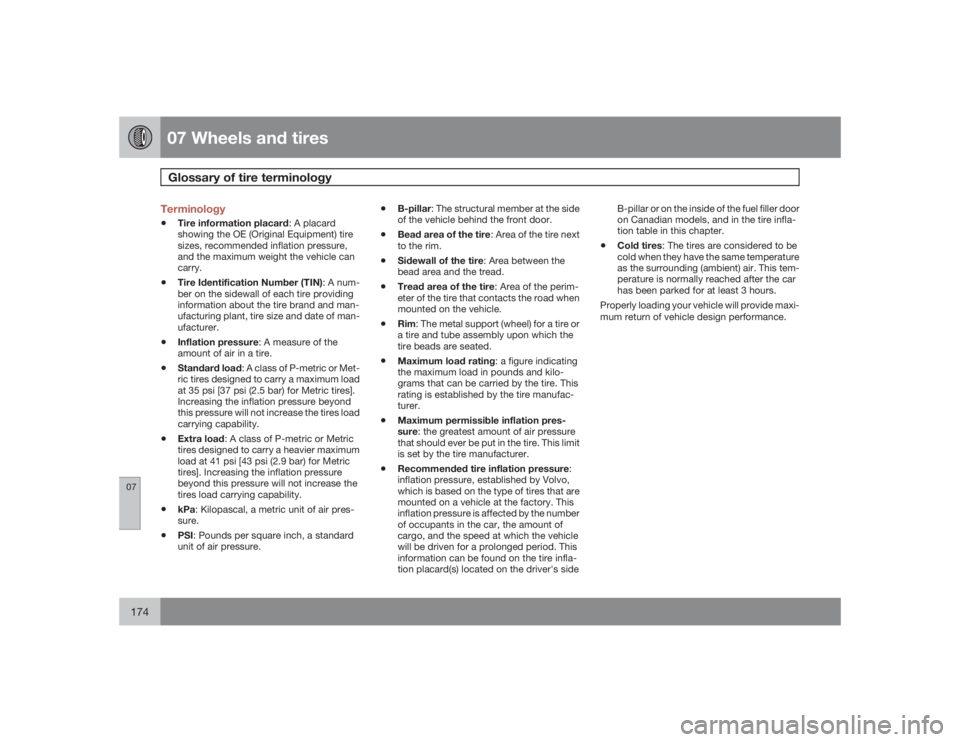
Terminology•
Tire information placard: A placard
showing the OE (Original Equipment) tire
sizes, recommended inflation pressure,
and the maximum weight the vehicle can
carry.
•
Tire Identification Number (TIN): A num-
ber on the sidewall of each tire providing
information about the tire brand and man-
ufacturing plant, tire size and date of man-
ufacturer.
•
Inflation pressure: A measure of the
amount of air in a tire.
•
Standard load: A class of P-metric or Met-
ric tires designed to carry a maximum load
at 35 psi [37 psi (2.5 bar) for Metric tires].
Increasing the inflation pressure beyond
this pressure will not increase the tires load
carrying capability.
•
Extra load: A class of P-metric or Metric
tires designed to carry a heavier maximum
load at 41 psi [43 psi (2.9 bar) for Metric
tires]. Increasing the inflation pressure
beyond this pressure will not increase the
tires load carrying capability.
•
kPa: Kilopascal, a metric unit of air pres-
sure.
•
PSI: Pounds per square inch, a standard
unit of air pressure.
•
B-pillar: The structural member at the side
of the vehicle behind the front door.
•
Bead area of the tire: Area of the tire next
to the rim.
•
Sidewall of the tire: Area between the
bead area and the tread.
•
Tread area of the tire: Area of the perim-
eter of the tire that contacts the road when
mounted on the vehicle.
•
Rim: The metal support (wheel) for a tire or
a tire and tube assembly upon which the
tire beads are seated.
•
Maximum load rating: a figure indicating
the maximum load in pounds and kilo-
grams that can be carried by the tire. This
rating is established by the tire manufac-
turer.
•
Maximum permissible inflation pres-
sure: the greatest amount of air pressure
that should ever be put in the tire. This limit
is set by the tire manufacturer.
•
Recommended tire inflation pressure:
inflation pressure, established by Volvo,
which is based on the type of tires that are
mounted on a vehicle at the factory. This
inflation pressure is affected by the number
of occupants in the car, the amount of
cargo, and the speed at which the vehicle
will be driven for a prolonged period. This
information can be found on the tire infla-
tion placard(s) located on the driver's sideB-pillar or on the inside of the fuel filler door
on Canadian models, and in the tire infla-
tion table in this chapter.
•
Cold tires: The tires are considered to be
cold when they have the same temperature
as the surrounding (ambient) air. This tem-
perature is normally reached after the car
has been parked for at least 3 hours.
Properly loading your vehicle will provide maxi-
mum return of vehicle design performance.
Page 234 of 274

10 AudioRadio functions
10234
Radio function controls
G026366
1.
AM/FM1/FM2 selection
2. Station preset buttons
3.
TUNING dial for selecting radio stations
4.
SCAN
5.
MENU NAVIGATION CONTROL–press
the up or down arrow keys to scroll in a
menu, or the keys on the left/right sides of
the control to search for or change radio
stations/CD tracks
6.
EXIT–press to cancel a menu selection or
a selected function
7.
AUTO–search for and store the strongest
radio stations in the area in which you are
driving
Searching for stationsThere are two ways to manually tune a radio
station:
1.
Turn the TUNING dial (3) to the desired fre-
quency.
2. Press the left or right arrow key on the
MENU NAVIGATION CONTROL
and
hold it down. The radio scans slowly in the
selected direction and will increase the
scanning speed after a few seconds.
Release the button when the desired fre-
quency appears in the display.
The frequency can be fine-tuned by short
presses on the left/right arrow keys.
Storing preset stationsManually storing a station1. Tune to the desired station.
2. Press and hold the preset button under
which the station is to be stored. The audio
system sound will be interrupted for a few
seconds and
STATION STORED
will
appear in the display.
NOTE
A total of 30 stations can be stored; 10 sta-
tions each in AM, FM1 and FM2.
Automatically storing a stationPressingAUTO (7) automatically searches for
and stores up to ten strong AM or FM stations
in a separate memory. If more than ten stations
are found, the ten strongest ones are stored.
This function is especially useful in areas in
which you are not familiar with radio stations or
their frequencies.
To use the AUTO function:
1.
Select a waveband using the AM/FM but-
ton (1).
2.
Start the search by pressing AUTO until
AUTO STORING
appears in the display.
When the search is completed,
AUTO
STORING
will no longer be displayed. If there
are no stations with sufficient signal strength,
NO AST FOUND
is displayed.
The auto-stored stations can be selected using
the preset buttons (2).
PressEXIT (6) to terminate the automatic stor-
ing function.
When the radio is in auto-store mode,
AUTO
is
shown in the display.
AUTO
disappears when
you return to normal radio mode, which can be
done by briefly pressing AM/FM (1), EXIT (6),
orAUTO (7).
Page 239 of 274

10 Audio
CD player/CD changer
10``239 CD function controls
G026367
MENU NAVIGATION CONTROL–press
the up or down arrow keys to scroll in a
menu, or the keys on the left/right sides of
the control to change CD tracks/fast for-
ward/backButtons for selecting a disc in the
optional CD changerCD eject buttonCD slotMODE buttonTUNING dial for selecting tracks
Playing a CDSingle CD playerStart the CD player by pressing the MODE but-
ton (5) and inserting a disc in the slot (4). If there
is already a disc inserted, it will begin to play.
NOTE
If a CD is in the slot when the audio system
is in CD mode, the CD will be played auto-
matically.CD changer (option)
The CD changer can hold up to six discs.1. Start the CD changer by pressing the
MODE button (5).
2. Select an empty position using the 1 – 6
buttons or the up/down keys on the MENU
NAVIGATION CONTROL. The display
shows which positions are empty.
3. Insert a disc into the slot (4).
NOTE
•
Ensure that
INSERT DISC
is displayed
before inserting a disc.
•
If a CD position in the changer contain-
ing a disc is selected, and the audio
system is in CD mode when it is
switched on, the CD will play automati-
cally.
CD eject
Eject from Single CD playerPress the eject button (3) to eject the disc.Eject from CD changerThis function makes it possible to eject a single
disc, or to eject all of the discs in the changer.•
Press the eject button (3) briefly to eject the
disc that is currently playing.
•
A longer press (more than two seconds)
starts the process of ejecting all of the
discs in the changer.