mirror VOLVO C30 2009 Owner´s Manual
[x] Cancel search | Manufacturer: VOLVO, Model Year: 2009, Model line: C30, Model: VOLVO C30 2009Pages: 274, PDF Size: 6.82 MB
Page 78 of 274

02 Instruments and controlsMirrors
0278
G026409
Magnetic zones3. Press button (1) for at least 3 seconds to
display the number of the current magnetic
zone.
4. Press button (1) repeatedly until the num-
ber for the required geographical area
(
1 – 15) is displayed. "
C" will be displayed
again.
5. Drive slowly in a circle at a maximum speed
of 6 mph (10 km/h) until a compass direc-
tion is displayed.
Calibration is complete.
Power door mirrors
G018250
The mirror control switches are located on the
driver's door armrest.Adjusting the mirrors
WARNING
•
The mirrors should always be adjusted
prior to driving.
•
Objects seen in the passenger's side
wide-angle door mirror are closer than
they appear to be.
Driver's door mirror:±
Press the L button (a light in the switch will
go on) to activate the adjustment control.
Use this control to adjust the driver's door
mirror.Passenger's door mirror:1.
Press the R switch (a light in the switch will
go on) to activate the adjustment control.
Use this control to adjust the passenger's
door mirror.
2. After you have adjusted the mirror(s), press
theL or R switch again (the LED will go out)
to deactivate the adjustment control.Storing the mirrors' positionThe position of the door mirrors is stored when
the vehicle is locked. The next time the driver's
door is unlocked with the same remote control
and that door is opened within 2 minutes, the
optional power driver's seat and side door mir-
rors will automatically move to the position that
they were in when the doors were most
recently locked with the same remote control.Folding power door mirrors (option on
certain markets only)The mirrors can be folded in for parking/driving
in narrow spaces.
Page 79 of 274

02 Instruments and controls
Mirrors
0279
Folding the mirrors in1.
Press down the L and R mirror control but-
tons on the driver's door at the same time.
2. Release them after approximately one sec-
ond. The mirrors automatically fold in to the
fully retracted position.Folding the mirrors outFold out the mirrors by pressing down the L
andR buttons at the same time. The mirrors
automatically fold out to the fully extended
position.Automatic foldingWhen the vehicle is locked/unlocked with the
remote control or with the optional keyless
drive system (see page 123), the power door
mirrors with automatically fold in or out.
NOTE
The door mirrors will not fold out automati-
cally when the vehicle is unlocked if they
were folded in using the buttons on the driv-
er's door control panel.This function can be activated/deactivated in
Personal settings (see page 82). In the menu
system, go to Car settings
Fold mirr. when
locking.
Return to "neutral" positionIf a mirror has been inadvertently moved (bum-
ped in a parking lot, etc.) from its original (neu-
tral) position, it must be moved back to this
position before automatic folding will function
again.
To so so:
1.
Fold in the mirrors by pressing the L and
R mirror control buttons on the driver's
door at the same time.
2.
Fold them out again by pressing the L and
R mirror control buttons.
This returns the mirrors to their original (neutral)
positions.Blind Spot Information System (BLIS) -
optionThe Blind Spot Information System (BLIS) is an
information system that indicates the presence
of another vehicle in the side-view mirror's
"blind area." See page 157 for detailed infor-
mation.
Page 83 of 274
02 Instruments and controls
Personal settings
02``83
•
Global (All doors) – unlocks all doors and
the liftgate with one press on the remote
control.
•
Two Step (Two-stage unlocking) – This
alternative unlocks the driver's door with
one press on the remote control. A second
press unlocks the passenger's door and
the liftgate.
Automatically folding the door mirrorsThe setting makes it possible to automatically
fold the door mirrors in or out when the vehicle
is locked or unlocked. See page 78.Operating side windowsThe following alternative can be selected for
opening the door windows at the same time by
pressing and holding the Unlock switch in
either of the front doors (see page 127 for
additional information)
1
NOTE
The ignition key must be in position I or
higher (see page 141) before the door win-
dows can be opened using the switches in
the doors.•
Auto open all windows On/Off
Temporarily turning off the alarm
sensor(s)The alarm sensors can be temporarily turned
off (if, for example, a person or a pet remains
in the vehicle when the doors are locked from
outside with the remote control). There are two
alternatives:
Activate once
and
Ask on exit
,
see page 118 and 129 .
Approach lightingThis alternative determines the length of time
for which the car's lights will remain on when
the Approach light button on the central lock-
ing system's remote control is pressed. Inter-
vals of 30/60/90 seconds may be selected, see
teh section "Remote control functions" for
more information.Home safe lightingThis alternative determines the length of time
for which the car's lights will remain on when
the high beam lever on the steering column is
pulled toward the wheel with the ignition
switched off. Intervals of 30/60/90 seconds
may be selected, see page 65 for information
on using this function.
Information•
VIN number – The VIN (Vehicle Identifica-
tion Number) is the car's unique identity
number.
•
Number of Keys – the number of keys reg-
istered for the car is displayed here.
Climate functions•
Blower speed in AUTO mode – the blower
speed can be set to AUTO mode in models
equipped with ECC. Choose between
"Low", "Normal" and "High".
•
Timer for recirculation – when the timer is
active, the air recirculates in the car for 3–
12 minutes depending on the ambient tem-
perature. Select On/Off depending on
whether the recirculation timer is to be
active or not.
Keyless locking and unlocking (option as
available)The following alternatives can be selected for
locking and unlocking the doors and liftgate:•
All doors – all doors are locked or unlocked
at the same time.
•
Doors on the same side – front and rear
doors on the same side are unlocked
together.
1This menu alternative also makes it possible to open both door windows by pressing and holding the Unlock button on the remote control for several seconds.
Page 91 of 274
03 Climate
General information
0391
For information about how to make these set-
tings, see the Personal settings section on
page 82.Models equipped with ECC (option)Sensors•
The sunlight sensor is on the upper side of
the dashboard
•
The passenger compartment temperature
sensor is located behind the climate sys-
tem control panel.
•
The ambient temperature sensor is in the
driver's side door mirror.
•
The humidity sensor is in the rearview mir-
ror.
These sensors should never be obstructed.NOTE
The sunlight sensor monitors the side of the
vehicle from which the sun shines into the
passenger compartment. This means that
the temperature may differ slightly between
the left and right air vents, even if the climate
system temperature is set to be the same
for both sides of the passenger compart-
ment.Side windows and optional moonroofThe electronic climate control system will func-
tion best if the windows and moonroof areclosed. If you drive with the windows or moon-
roof open, it may be preferable to manually
adjust the temperature and blower control (the
LED in the AUTO switch should be off).
AccelerationThe air conditioning system is temporarily
switched off during full throttle acceleration.
Page 93 of 274
03 Climate
Manual climate control
03``93
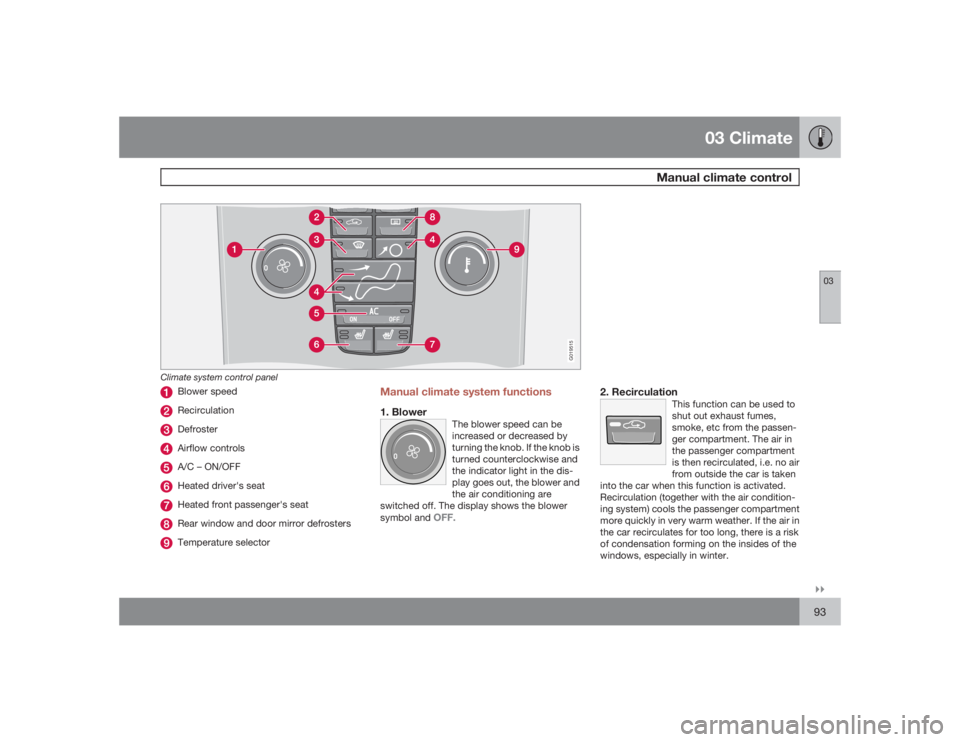
G019515
Climate system control panel
Blower speedRecirculationDefrosterAirflow controlsA/C – ON/OFFHeated driver's seatHeated front passenger's seatRear window and door mirror defrostersTemperature selector
Manual climate system functions1. Blower
The blower speed can be
increased or decreased by
turning the knob. If the knob is
turned counterclockwise and
the indicator light in the dis-
play goes out, the blower and
the air conditioning are
switched off. The display shows the blower
symbol and
OFF.
2. Recirculation
This function can be used to
shut out exhaust fumes,
smoke, etc from the passen-
ger compartment. The air in
the passenger compartment
is then recirculated, i.e. no air
from outside the car is taken
into the car when this function is activated.
Recirculation (together with the air condition-
ing system) cools the passenger compartment
more quickly in very warm weather. If the air in
the car recirculates for too long, there is a risk
of condensation forming on the insides of the
windows, especially in winter.
Page 94 of 274

03 ClimateManual climate control
0394
TimerThe timer function minimizes the risk of mist-
ing, or stale air when the recirculation function
is selected, see page 82 for information on set-
ting the recirculation timer. Recirculation is
always disengaged when you select Defroster
(3).3. Defroster
Directs airflow to the wind-
shield and side windows and
increases blower speed.
When the defroster is activated:•
Air flows to the windows at high blower
speed.
•
The LED in the defroster button lights up
when this function is activated. The air con-
ditioning system is controlled to provide
maximum air dehumidification.
•
The air conditioning is automatically
switched on (can be switched off by press-
ing button 5).
4. Airflow controls
Press one of the three buttons
in the illustration to activate
the selected airflow. A symbol
in the display above the cli-
mate control panel and a lit
LED in the selected button
indicate that the manual func-
tion has been selected. With manually selected
airflow both warm and cool air can be selected.
The desired temperature is selected using con-
trol 9.
5. A/C – On or Off
ON: The air conditioning sys-
tem is engaged when the ON
light is lit.
OFF: The system is disen-
gaged when the OFF lights
up.
If Defroster (3) is activated the air conditioning
is always engaged.6/7. Heated front seats (option)
Maximum heating: Press the
button once – both LEDs light
up.
Reduced heating: Press the button a second
time – one LED lights up.
Seat heating off: Press the button a third time
– no LEDs are lit.8. Heated rear window and door mirrors
Press to defrost the rear win-
dow and door mirrors.
The rear window and door
mirrors are defrosted simulta-
neously if the switch is
pressed once. The defrost
function is active if the LED in the switch is illu-
minated.
•
The function can be switched off manually
by pressing the button,
•
The defrost function switches off automat-
ically after 12–20 minutes, depending on
the outside temperature.NOTE
On certain markets, the defrost function
may remain on longer than 20 minutes in
cold weather to help keep the rear window
free from ice or condensation.
Page 96 of 274
03 ClimateElectronic Climate Control (ECC) – option
0396
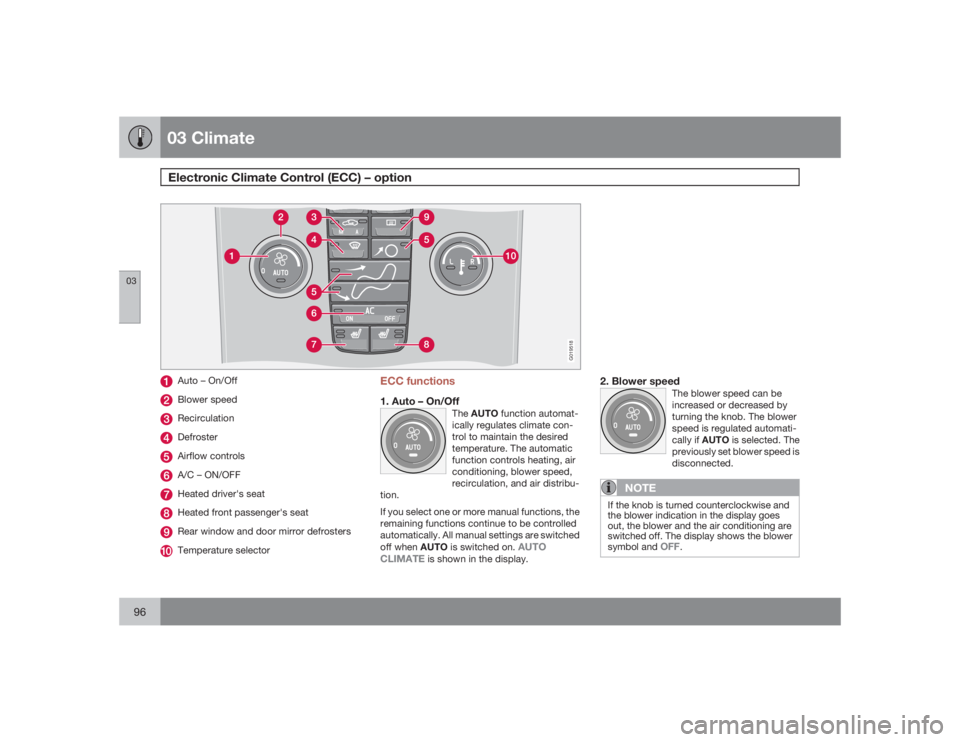
G019518
Auto – On/OffBlower speedRecirculationDefrosterAirflow controlsA/C – ON/OFFHeated driver's seatHeated front passenger's seatRear window and door mirror defrostersTemperature selector
ECC functions1. Auto – On/Off
TheAUTO function automat-
ically regulates climate con-
trol to maintain the desired
temperature. The automatic
function controls heating, air
conditioning, blower speed,
recirculation, and air distribu-
tion.
If you select one or more manual functions, the
remaining functions continue to be controlled
automatically. All manual settings are switched
off when AUTO is switched on.
AUTO
CLIMATE
is shown in the display.
2. Blower speed
The blower speed can be
increased or decreased by
turning the knob. The blower
speed is regulated automati-
cally if AUTO is selected. The
previously set blower speed is
disconnected.
NOTE
If the knob is turned counterclockwise and
the blower indication in the display goes
out, the blower and the air conditioning are
switched off. The display shows the blower
symbol and
OFF
.
Page 98 of 274
03 ClimateElectronic Climate Control (ECC) – option
0398
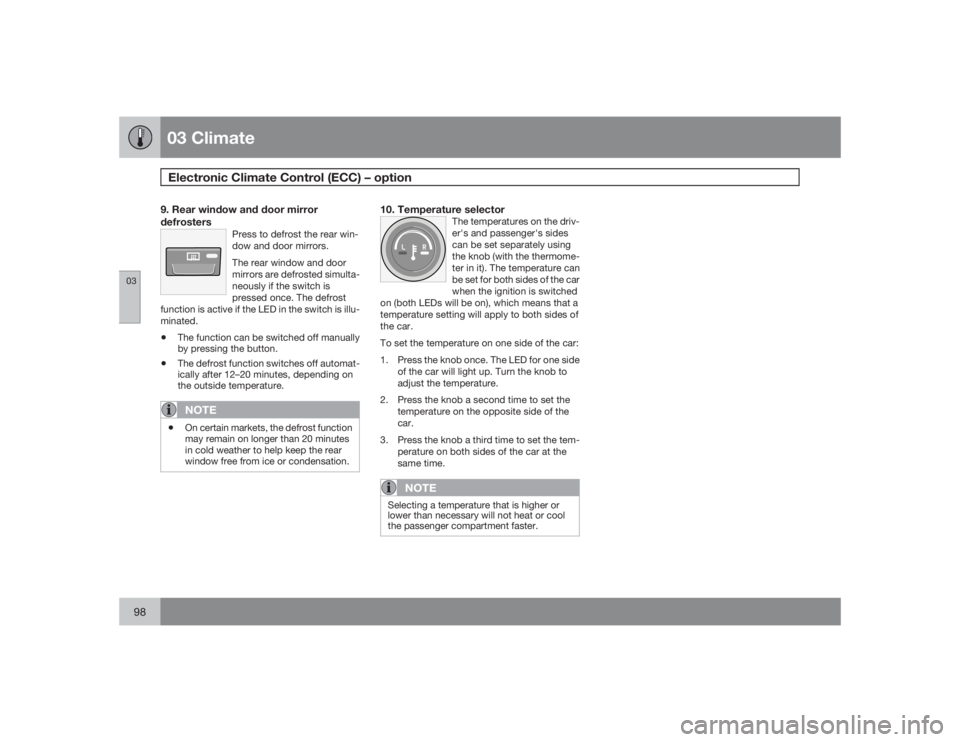
9. Rear window and door mirror
defrosters
Press to defrost the rear win-
dow and door mirrors.
The rear window and door
mirrors are defrosted simulta-
neously if the switch is
pressed once. The defrost
function is active if the LED in the switch is illu-
minated.
•
The function can be switched off manually
by pressing the button.
•
The defrost function switches off automat-
ically after 12–20 minutes, depending on
the outside temperature.NOTE
•
On certain markets, the defrost function
may remain on longer than 20 minutes
in cold weather to help keep the rear
window free from ice or condensation.
10. Temperature selector
The temperatures on the driv-
er's and passenger's sides
can be set separately using
the knob (with the thermome-
ter in it). The temperature can
be set for both sides of the car
when the ignition is switched
on (both LEDs will be on), which means that a
temperature setting will apply to both sides of
the car.
To set the temperature on one side of the car:
1. Press the knob once. The LED for one side
of the car will light up. Turn the knob to
adjust the temperature.
2. Press the knob a second time to set the
temperature on the opposite side of the
car.
3. Press the knob a third time to set the tem-
perature on both sides of the car at the
same time.
NOTE
Selecting a temperature that is higher or
lower than necessary will not heat or cool
the passenger compartment faster.
Page 104 of 274
04 InteriorFront seats
04104
NOTE
The power seats have an overload protector
that activates if a seat is blocked by any
object. If this occurs, switch off the ignition
(key in position 0) and wait for approxi-
mately 20 seconds before operating the
seat again.Emergency stopIf the seat inadvertently begins to move, press
any of the buttons to stop the seat.Programming the seat memory, driver's
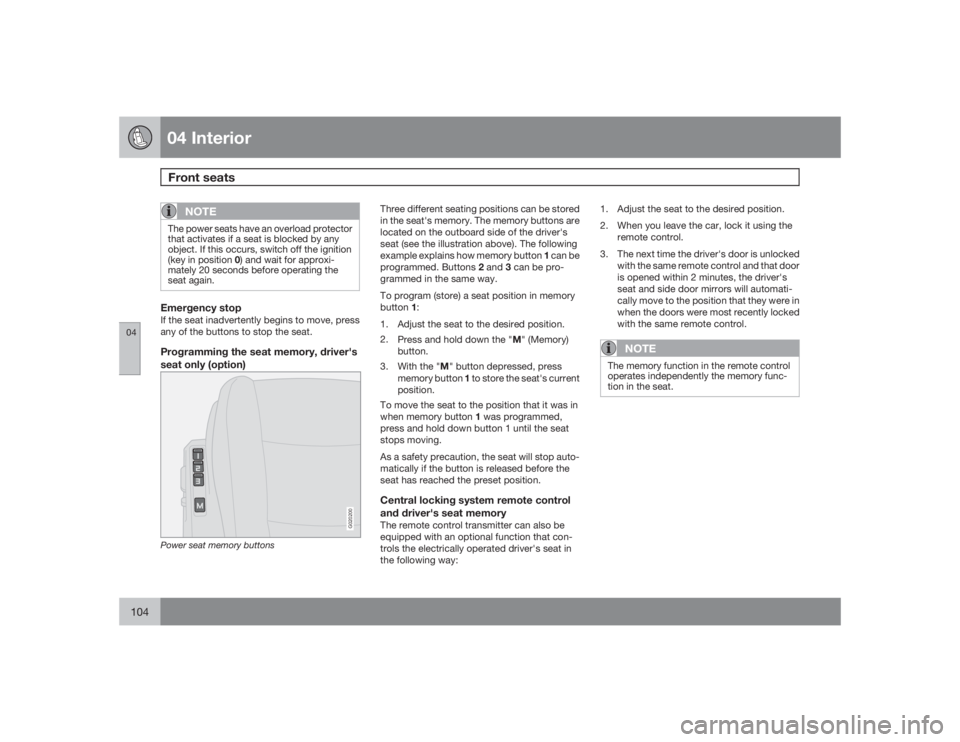
seat only (option)
G020200
Power seat memory buttons
Three different seating positions can be stored
in the seat's memory. The memory buttons are
located on the outboard side of the driver's
seat (see the illustration above). The following
example explains how memory button 1 can be
programmed. Buttons 2 and 3 can be pro-
grammed in the same way.
To program (store) a seat position in memory
button1:
1. Adjust the seat to the desired position.
2.
Press and hold down the "M" (Memory)
button.
3.
With the "M" button depressed, press
memory button 1 to store the seat's current
position.
To move the seat to the position that it was in
when memory button 1 was programmed,
press and hold down button 1 until the seat
stops moving.
As a safety precaution, the seat will stop auto-
matically if the button is released before the
seat has reached the preset position.Central locking system remote control
and driver's seat memoryThe remote control transmitter can also be
equipped with an optional function that con-
trols the electrically operated driver's seat in
the following way:1. Adjust the seat to the desired position.
2. When you leave the car, lock it using the
remote control.
3. The next time the driver's door is unlocked
with the same remote control and that door
is opened within 2 minutes, the driver's
seat and side door mirrors will automati-
cally move to the position that they were in
when the doors were most recently locked
with the same remote control.
NOTE
The memory function in the remote control
operates independently the memory func-
tion in the seat.
Page 106 of 274
04 InteriorInterior lighting
04106
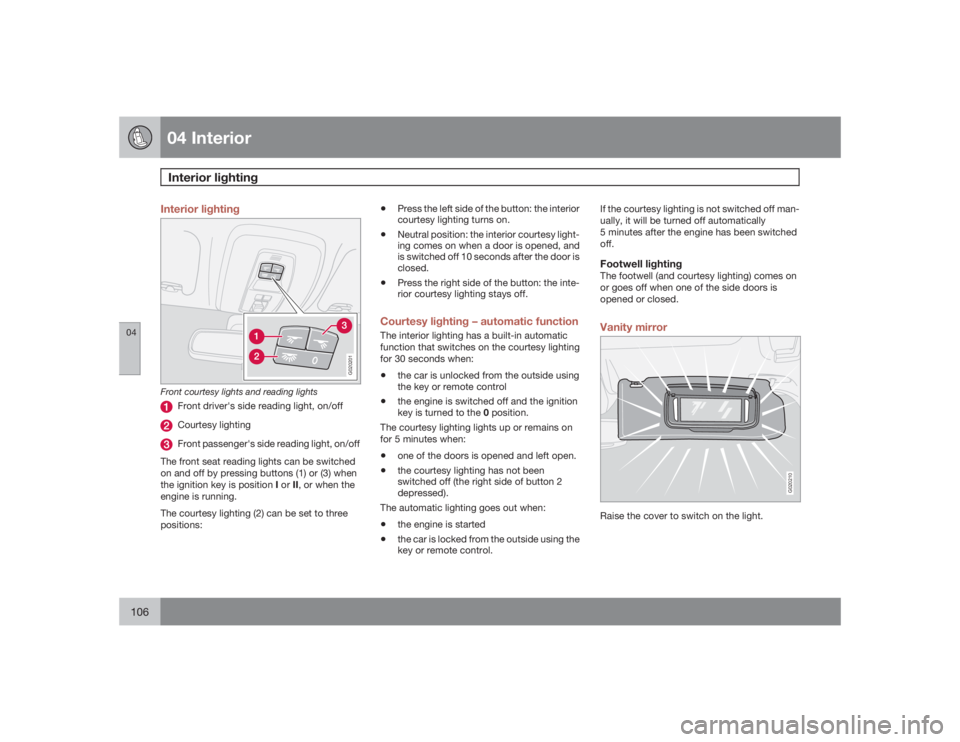
Interior lighting
G020201
Front courtesy lights and reading lights
Front driver's side reading light, on/offCourtesy lightingFront passenger's side reading light, on/off
The front seat reading lights can be switched
on and off by pressing buttons (1) or (3) when
the ignition key is position I or II, or when the
engine is running.
The courtesy lighting (2) can be set to three
positions:
•
Press the left side of the button: the interior
courtesy lighting turns on.
•
Neutral position: the interior courtesy light-
ing comes on when a door is opened, and
is switched off 10 seconds after the door is
closed.
•
Press the right side of the button: the inte-
rior courtesy lighting stays off.
Courtesy lighting – automatic functionThe interior lighting has a built-in automatic
function that switches on the courtesy lighting
for 30 seconds when:•
the car is unlocked from the outside using
the key or remote control
•
the engine is switched off and the ignition
key is turned to the 0 position.
The courtesy lighting lights up or remains on
for 5 minutes when:
•
one of the doors is opened and left open.
•
the courtesy lighting has not been
switched off (the right side of button 2
depressed).
The automatic lighting goes out when:
•
the engine is started
•
the car is locked from the outside using the
key or remote control.If the courtesy lighting is not switched off man-
ually, it will be turned off automatically
5 minutes after the engine has been switched
off.
Footwell lightingThe footwell (and courtesy lighting) comes on
or goes off when one of the side doors is
opened or closed.Vanity mirror
G020210
Raise the cover to switch on the light.