wheel VOLVO C30 2012 Owner´s Manual
[x] Cancel search | Manufacturer: VOLVO, Model Year: 2012, Model line: C30, Model: VOLVO C30 2012Pages: 298, PDF Size: 6.73 MB
Page 142 of 298
06 Starting and driving
General information
06
142
Economical driving conserves natural
resources
Better driving economy may be obtained by
thinking ahead, avoiding rapid starts and stops
and adjusting the speed of your vehicle to
immediate traffic conditions.
Observe the following rules:
•Bring the engine to normal operating tem-
perature as soon as possible by driving
with a light foot on the accelerator pedal for
the first few minutes of operation. A cold
engine uses more fuel and is subject to
increased wear.
•Whenever possible, avoid using the vehicle
for driving short distances. This does not
allow the engine to reach normal operating
temperature.
•Drive carefully and avoid rapid acceleration
and hard braking.
•Use the transmission's Drive (D) position
as often as possible and avoid using kick-
down.
•On models with a manual transmission,
use the highest gear possible, depending
on the vehicle's speed.
•Do not exceed posted speed limits.
•Avoid carrying unnecessary items (extra
load) in the vehicle.
•Maintain correct tire pressure. Check tire
pressure regularly (when tires are cold).
•Remove snow tires when threat of snow or
ice has ended.
•Note that roof racks, ski racks, etc,
increase air resistance and also fuel con-
sumption.
•At highway driving speeds, fuel consump-
tion will be lower with the air conditioning
on and the windows closed than with the
air conditioning off and the windows open.
•Using the onboard trip computer's fuel
consumption modes can help you learn
how to drive more economically.
Other factors that decrease gas mileage
are:
•Dirty air cleaner
•Dirty engine oil and clogged oil filter
•Dragging brakes
•Incorrect front end alignment
Some of the above mentioned items and others
are checked at the standard maintenance
intervals.
WARNING
Driving with the liftgate open: Driving with
the liftgate open could lead to poisonous
exhaust gases entering the passenger com-
partment. If the liftgate must be kept open
for any reason, proceed as follows:
1. Close the windows.
2. Set the ventilation system control to air
flow to floor, windshield and side win-
dows and the blower control to its high-
est setting.
Weight distribution affects handling
At the specified curb weight your vehicle has a
tendency to understeer, which means that the
steering wheel has to be turned more than
might seem appropriate for the curvature of a
bend. This ensures good stability and reduces
the risk of rear wheel skid. Remember that
these properties can alter with the vehicle load.
The heavier the load in the cargo area, the less
the tendency to understeer.
Page 144 of 298
06 Starting and driving
General information
06
144
more frequently and spray an anti-rust oil
on the battery posts.
•Volvo recommends the use of snow tires
on all four wheels for winter driving – see
the chapter "Wheels and tires."
•To prevent the washer fluid reservoir from
freezing, add washer solvents containing
antifreeze (see page 220 for the location of
the washer fluid reservoir). This is impor-
tant since dirt is often splashed on the
windshield during winter driving, requiring
the frequent use of the washers and wip-
ers. Volvo Washer Solvent should be dilu-
ted as follows: Down to 14 °F (–10 °C):
1 part washer solvent and 4 parts water
Down to 5 °F (–15 °C): 1 part washer sol-
vent and 3 parts water Down to 0 °F
(–18 °C): 1 part washer solvent and 2 parts
water Down to –18 °F (–28 °C): 1 part
washer solvent and 1 part water.
•Use Volvo Teflon Lock Spray in the locks.
NOTE
Avoid using de-icing sprays as they can
cause damage to the locks.
Conserving electrical current
Keep the following in mind to help minimize
battery drain:
•When the engine is not running, avoid turn-
ing the ignition key to position II. Many
electrical systems (the audio system, the
optional navigation system, power win-
dows, etc) will function with the ignition key
in position I. This position reduces drain on
the battery.
•Please keep in mind that using systems,
accessories, etc that consume a great deal
of current when the engine is not running
could result in the battery being completely
drained. Driving or having the engine run-
ning for approximately 15 minutes will help
keep the battery charged.
•The optional 12 volt socket in the cargo
area (certain models only) provides electri-
cal current even with the ignition switched
off, which drains the battery.
NOTE
•If the ignition is switched on, a warning
message will be displayed in the text
window in the instrument panel when
the battery charge is low.
•An energy conserving function
designed into the vehicle's electrical
system will switch off certain functions
or reduce the load on the battery by,
e.g., reducing the audio system's vol-
ume.
Before a long distance trip
It is always worthwhile to have your vehicle
checked at a trained and qualified Volvo serv-
ice technician before driving long distances.
Your trained and qualified Volvo service tech-
nician will also be able to supply you with
bulbs, fuses, spark plugs and wiper blades for
your use in the event that problems occur.
As a minimum, the following items should be
checked before any long trip:
•Check that engine runs smoothly and that
fuel consumption is normal.
•Check for fuel, oil, and fluid leakage
•Have the transmission oil level checked2.
•Check condition of drive belts.
2To prevent injury from contact with hot surfaces, do not inspect your vehicle's transmission fluid yourself. Have your vehicle's transmission fluid level inspected by a qualified Volvo service technician.
Page 145 of 298
06 Starting and driving
General information
06
145
•Check state of the battery's charge.
•Examine tires carefully (the spare tire as
well), and replace those that are worn.
Check tire pressures.
•The brakes, front wheel alignment, and
steering gear should be checked by your
Volvo retailer only.
•Check all lights, including high beams.
•Reflective warning triangles are legally
required in some states/provinces.
•Have a word with your Volvo retailer if you
intend to drive in countries where it may be
difficult to obtain the correct fuel.
•Consider your destination. If you will be
driving through an area where snow or ice
are likely to occur, consider snow tires.
Page 149 of 298
06 Starting and driving
Ignition switch
06
149 Ignition switch positions
0 – Locked positionRemove the key to lock the
steering wheel1. Never turn
the key to position 0 while
driving or when the vehicle is
being towed.
NOTE
A ticking sound may be audible if the key is
turned to a position between 0 and I. To
stop this sound, turn the key to position II
and back to position 0.
I – Intermediate position2
Certain accessories, radio,
etc. on, daytime running lights
off.
II – Drive positionThe key's position when driv-
ing. The vehicle's entire elec-
trical system is activated.
III – Start positionTurn the key to this position
and release it immediately.
The key returns automatically
to the Drive position.
A chime will sound if the key
is left in the ignition and the
driver's door is opened (does not apply to vehi-
cles with the optional keyless drive).
1Automatic transmission: the gear selector must be in the Park position. The optional keyless drive start control does not need to be removed.2Please be aware that leaving the key in positions I or II will increase battery drain.
Page 150 of 298
06 Starting and driving
Starting the vehicle
06
150
To start the engine
WARNING
Before starting, check that the seat, steering
wheel and mirrors are adjusted properly.
Make sure the brake pedal can be
depressed completely. Adjust the seat if
necessary.
1. Fasten the seat belt.
2. Apply the parking brake if not already set.
The gear selector should be locked in the
Park (P) position (Shiftlock). See also page
157.
Manual transmission: The clutch must be
fully depressed.
NOTE
After a cold start, idle speed may be notice-
ably higher than normal for a short period.
This is done to help bring components in the
emission control system to their normal
operating temperature as quickly as possi-
ble, which enables them to control emis-
sions and help reduce the vehicle's impact
on the environment.
3. The vehicle is equipped with an autostart
feature. Without touching the throttle
pedal, turn the key to position III and
release it. The starter motor will then oper-
ate automatically (for up to ten seconds)
until the engine starts. If the engine fails to
start, repeat this step.
4. To release the gear selector from the Park
(P) position, the engine must be running (or
the ignition key must be in position II) and
the brake pedal must be depressed.
5. Select the desired gear. On models with an
automatic transmission, the gear engages
after a very slight delay, which is especially
noticeable when selecting R.WARNING
•Never use more the one floor mat at one
time on the driver's floor. An extra mat
on the driver's floor can cause the
accelerator and/or brake pedal to
catch. Check that the movement of
these pedals is not impeded.
•Volvo's floor mats are specially manu-
factured for your car. They must be
firmly secured in the clips on the floor so
that they cannot slide and become trap-
ped under the pedals on the driver's
side.
Page 158 of 298
06 Starting and driving
Brake system
06
158* Option/accessory, for more information, see Introduction.
Brake lights
The brake lights come on automatically when
the brakes are applied.
Adaptive brake lightsThe adaptive brake lights activate in the event
of sudden braking or if the ABS system is acti-
vated. This function causes an additional tail-
light on each side of the vehicle to illuminate to
help alert vehicles traveling behind.
The adaptive brake lights activate if:
•The ABS system activates for more than
approximately a half second
•In the event of sudden braking while the
vehicle is moving at speeds above approx-
imately 6 mph (10 km/h)
When the vehicle has come to a stop, the brake
lights and additional taillights remain on for as
long as the brake pedal is depressed or until
braking force on the vehicle is reduced.
Brake pad inspection
On vehicles equipped with a jack*, the condi-
tion of the brake pads can be checked by rais-
ing the vehicle (see page 200 for information
about using the jack and removing a wheel)
and performing a visual inspection of the brake
pads.
WARNING
•If the vehicle has been driven immedi-
ately prior to a brake pad inspection, the
wheel hub, brake components, etc., will
be very hot. Allow time for these com-
ponents to cool before carrying out the
inspection.
•Apply the parking brake and put the
gear selector in the Park (P) position.
•Block the wheels standing on the
ground, use rigid wooden blocks or
large stones.
WARNING
•Use the jack intended for the vehicle
when changing a tire. For any other job,
use stands to support the vehicle.
•The jack should be kept well-greased
and clean, and should not be damaged.
•Be sure the jack is on a firm, level, non-
slippery surface.
•No objects should be placed between
the base of jack and the ground, or
between the jack and the attachment
bar on the vehicle.
•The jack must correctly engage the jack
attachment.
•Never allow any part of your body to be
extended under a vehicle supported by
a jack.
Brake circuit malfunction
The brake system is a hydraulic system con-
sisting of two separate brake circuits. If a prob-
lem should occur in one of these circuits, it is
still possible to stop the vehicle with the other
brake circuit.
If the brake pedal must be depressed farther
than normal and requires greater foot pressure,
the stopping distance will be longer.
Page 161 of 298
06 Starting and driving
Parking brake
06
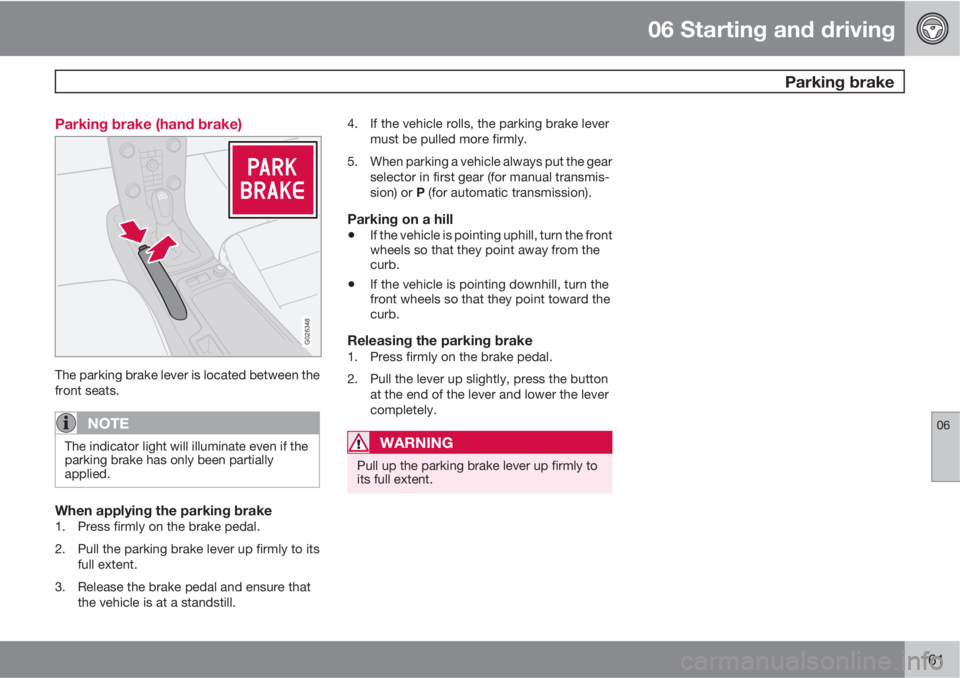
161 Parking brake (hand brake)
G026348
The parking brake lever is located between the
front seats.
NOTE
The indicator light will illuminate even if the
parking brake has only been partially
applied.
When applying the parking brake1. Press firmly on the brake pedal.
2. Pull the parking brake lever up firmly to its
full extent.
3. Release the brake pedal and ensure that
the vehicle is at a standstill.4. If the vehicle rolls, the parking brake lever
must be pulled more firmly.
5. When parking a vehicle always put the gear
selector in first gear (for manual transmis-
sion) or P (for automatic transmission).
Parking on a hill
•If the vehicle is pointing uphill, turn the front
wheels so that they point away from the
curb.
•If the vehicle is pointing downhill, turn the
front wheels so that they point toward the
curb.
Releasing the parking brake1. Press firmly on the brake pedal.
2. Pull the lever up slightly, press the button
at the end of the lever and lower the lever
completely.
WARNING
Pull up the parking brake lever up firmly to
its full extent.
Page 162 of 298
06 Starting and driving
Stability system
06
162
Dynamic Stability Traction Control
(DSTC)
The stability system consists of a number of
functions designed help reduce wheel spin,
counteract skidding, and to generally help
improve directional stability.
A pulsating sound will be audible when the
system is actively operating and is normal.
Traction control (TC)This function is designed to help reduce wheel
spin by transferring power from a drive wheel
that begins to lose traction to the wheel on the
opposite side of the vehicle (on the same axle).
TC is most active at low speeds.
This is one of the stability system's permanent
functions and cannot be switched off.
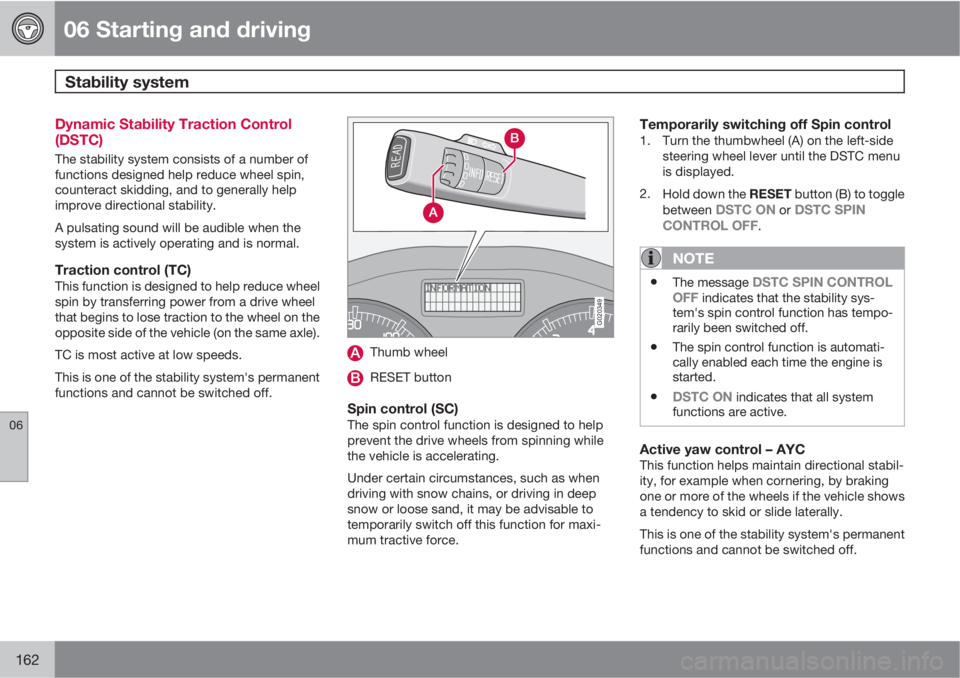
G020349
Thumb wheel
RESET button
Spin control (SC)The spin control function is designed to help
prevent the drive wheels from spinning while
the vehicle is accelerating.
Under certain circumstances, such as when
driving with snow chains, or driving in deep
snow or loose sand, it may be advisable to
temporarily switch off this function for maxi-
mum tractive force.
Temporarily switching off Spin control1. Turn the thumbwheel (A) on the left-side
steering wheel lever until the DSTC menu
is displayed.
2.
Hold down the RESET button (B) to toggle
between
DSTC ON or DSTC SPIN
CONTROL OFF.
NOTE
•The message DSTC SPIN CONTROL
OFF indicates that the stability sys-
tem's spin control function has tempo-
rarily been switched off.
•The spin control function is automati-
cally enabled each time the engine is
started.
•DSTC ON indicates that all system
functions are active.
Active yaw control – AYCThis function helps maintain directional stabil-
ity, for example when cornering, by braking
one or more of the wheels if the vehicle shows
a tendency to skid or slide laterally.
This is one of the stability system's permanent
functions and cannot be switched off.
Page 163 of 298
06 Starting and driving
Stability system
06
163
WARNING
The car's handling and stability characteris-
tics will be altered if the DSTC system func-
tions have been disabled.
DSTC-related messages in the text
window
•"TRACTION CONTROL TEMPORARILY
OFF" – The system has been temporarily
switched off due to high brake temperature
and will automatically switch on again
when the brakes have cooled.
•"ANTI-SKID SERVICE REQUIRED" – the
system has been automatically disen-
gaged due to a fault. A trained and qualified
Volvo service technician retailer should
check the system.
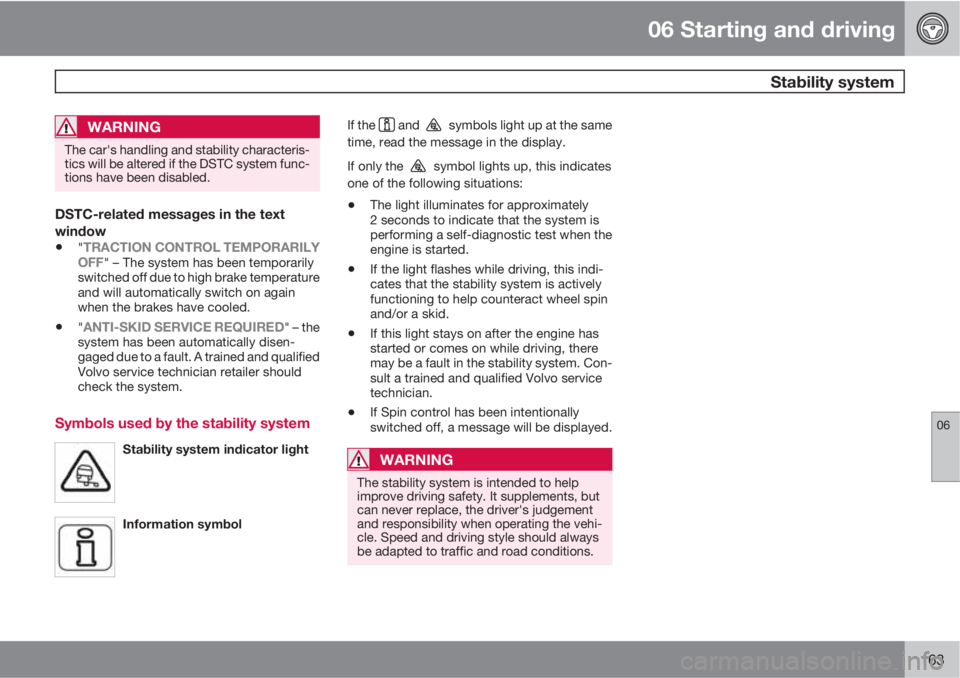
Symbols used by the stability system
Stability system indicator light
Information symbol
If the and symbols light up at the same
time, read the message in the display.
If only the
symbol lights up, this indicates
one of the following situations:
•The light illuminates for approximately
2 seconds to indicate that the system is
performing a self-diagnostic test when the
engine is started.
•If the light flashes while driving, this indi-
cates that the stability system is actively
functioning to help counteract wheel spin
and/or a skid.
•If this light stays on after the engine has
started or comes on while driving, there
may be a fault in the stability system. Con-
sult a trained and qualified Volvo service
technician.
•If Spin control has been intentionally
switched off, a message will be displayed.
WARNING
The stability system is intended to help
improve driving safety. It supplements, but
can never replace, the driver's judgement
and responsibility when operating the vehi-
cle. Speed and driving style should always
be adapted to traffic and road conditions.
Page 164 of 298
06 Starting and driving
Towing
06
164
Towing the vehicle
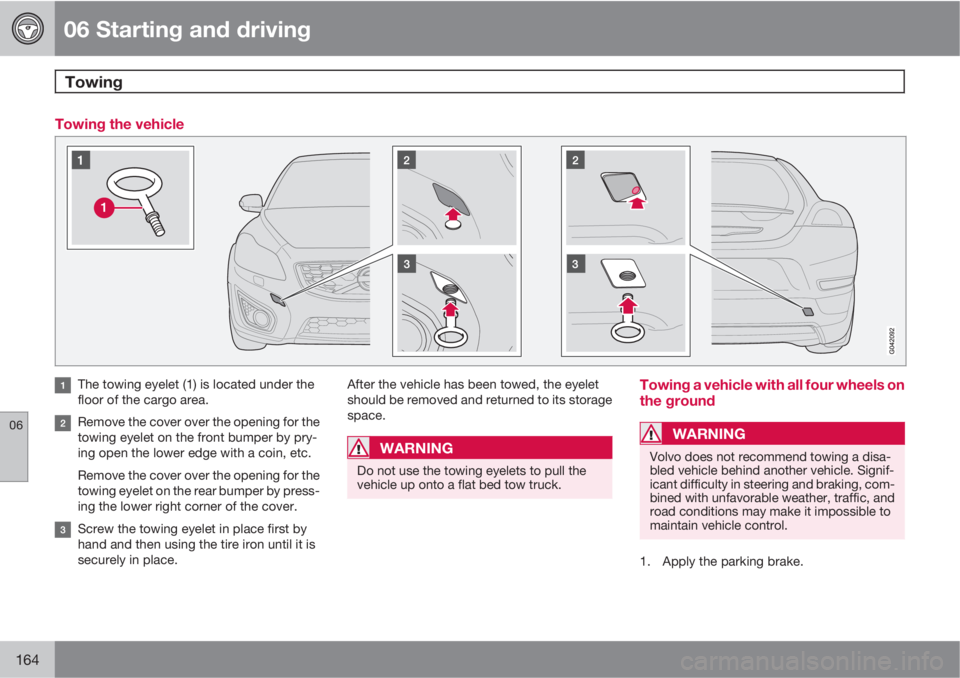
The towing eyelet (1) is located under the
floor of the cargo area.
Remove the cover over the opening for the
towing eyelet on the front bumper by pry-
ing open the lower edge with a coin, etc.
Remove the cover over the opening for the
towing eyelet on the rear bumper by press-
ing the lower right corner of the cover.
Screw the towing eyelet in place first by
hand and then using the tire iron until it is
securely in place.After the vehicle has been towed, the eyelet
should be removed and returned to its storage
space.
WARNING
Do not use the towing eyelets to pull the
vehicle up onto a flat bed tow truck.
Towing a vehicle with all four wheels on
the ground
WARNING
Volvo does not recommend towing a disa-
bled vehicle behind another vehicle. Signif-
icant difficulty in steering and braking, com-
bined with unfavorable weather, traffic, and
road conditions may make it impossible to
maintain vehicle control.
1. Apply the parking brake.