instrument panel VOLVO C30 2013 Owner´s Manual
[x] Cancel search | Manufacturer: VOLVO, Model Year: 2013, Model line: C30, Model: VOLVO C30 2013Pages: 300, PDF Size: 6.58 MB
Page 86 of 300

02 Instruments and controls
Personal settings
02
84
Control panel
Display
Menu button
Exit button
Enter button
Menu navigation controlsPersonal settings can be made for some of the
car's functions, such as the central locking
system, climate control, and the audio system.
Please refer to page 248 for more information
on the audio functions that can be adjusted.
The settings are presented in the display (A).
To access the menu and adjust settings1.
Press MENU (B).
2.
Scroll to
Car settings… using the menu
navigation control (E).
3.
Press ENTER (D).
4. Select an alternative using the menu navi-
gation control (E).
5. Confirm your selection by pressing
ENTER.
To exit the menu–
Press EXIT (C).
Available settings
Clock adjustTo set the time:
1. Use the number keys or the up/down arrow
keys on the navigation control (E) to
change the hour or minute.2. Select hour(s) or minute(s) to be changed
with the left/right arrow keys.
3.
Press ENTER to start the clock.
NOTE
If you are currently using the 12-hour time
setting, use the up/down arrow keys to
select AM/PM after the minute-setting has
been adjusted.
Lock confirmation lightWhen the car is locked/unlocked with the
remote key, the direction indicators can be
selected to flash to confirm the action. The
alternatives On/Off are available for both lock-
ing and unlocking.
AutolockWhen the car starts to move, the doors and
liftgate can be locked automatically. The alter-
natives On/Off are available.
NOTE
Pulling the handle twice on a door unlocks
and opens that door.
UnlockThere are two alternatives for unlocking:
Page 130 of 300
05 Locks and alarm
Remote key and key blade
05
128
Panic alarm – This button can be used to
attract attention during emergency situa-
tions. To activate the panic alarm, press
and hold the red button for at least 3 sec-
onds or press it twice within 3 seconds.
The turn signals and horn will be activated.
The panic alarm will stop automatically
after 30 seconds. To deactivate, wait
approximately 5 seconds and press the red
button again.
NOTE
This button will NOT unlock the car.
Weak battery in the remote key
G019406
When the battery begins to lose its charge, the
Information symbol in the instrument panel
(see page 56) lights up and
KEY BATTERY
LOW VOLTAGE is shown in the information
display.
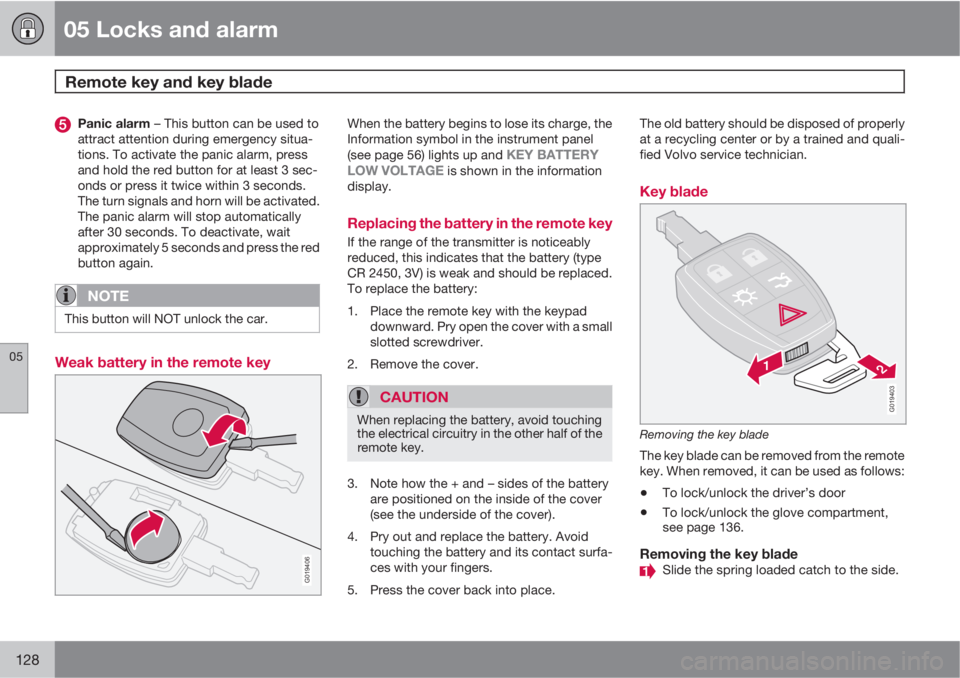
Replacing the battery in the remote key
If the range of the transmitter is noticeably
reduced, this indicates that the battery (type
CR 2450, 3V) is weak and should be replaced.
To replace the battery:
1. Place the remote key with the keypad
downward. Pry open the cover with a small
slotted screwdriver.
2. Remove the cover.
CAUTION
When replacing the battery, avoid touching
the electrical circuitry in the other half of the
remote key.
3. Note how the + and – sides of the battery
are positioned on the inside of the cover
(see the underside of the cover).
4. Pry out and replace the battery. Avoid
touching the battery and its contact surfa-
ces with your fingers.
5. Press the cover back into place.The old battery should be disposed of properly
at a recycling center or by a trained and quali-
fied Volvo service technician.
Key blade
G019403
Removing the key blade
The key blade can be removed from the remote
key. When removed, it can be used as follows:
•To lock/unlock the driver’s door
•To lock/unlock the glove compartment,
see page 136.
Removing the key bladeSlide the spring loaded catch to the side.
Page 146 of 300
06 Starting and driving
General information
06
144
•Volvo recommends the use of snow tires
on all four wheels for winter driving – see
the chapter "Wheels and tires."
•To prevent the washer fluid reservoir from
freezing, add washer solvents containing
antifreeze (see page 220 for the location of
the washer fluid reservoir). This is impor-
tant since dirt is often splashed on the
windshield during winter driving, requiring
the frequent use of the washers and wip-
ers. Volvo Washer Solvent should be dilu-
ted as follows: Down to 14 °F (–10 °C):
1 part washer solvent and 4 parts water
Down to 5 °F (–15 °C): 1 part washer sol-
vent and 3 parts water Down to 0 °F
(–18 °C): 1 part washer solvent and 2 parts
water Down to –18 °F (–28 °C): 1 part
washer solvent and 1 part water.
•Use Volvo Teflon Lock Spray in the locks.
NOTE
Avoid using de-icing sprays as they can
cause damage to the locks.
Conserving electrical current
Keep the following in mind to help minimize
battery drain:
•When the engine is not running, avoid turn-
ing the ignition key to position II. Many
electrical systems (the audio system, the
optional navigation system, power win-
dows, etc) will function with the ignition key
in position I. This position reduces drain on
the battery.
•Please keep in mind that using systems,
accessories, etc that consume a great deal
of current when the engine is not running
could result in the battery being completely
drained. Driving or having the engine run-
ning for approximately 15 minutes will help
keep the battery charged.
•The optional 12 volt socket in the cargo
area (certain models only) provides electri-
cal current even with the ignition switched
off, which drains the battery.
NOTE
•If the ignition is switched on, a warning
message will be displayed in the text
window in the instrument panel when
the battery charge is low.
•An energy conserving function
designed into the vehicle's electrical
system will switch off certain functions
or reduce the load on the battery by,
e.g., reducing the audio system's vol-
ume.
Before a long distance trip
It is always worthwhile to have your vehicle
checked at a trained and qualified Volvo serv-
ice technician before driving long distances.
Your trained and qualified Volvo service tech-
nician will also be able to supply you with
bulbs, fuses, spark plugs and wiper blades for
your use in the event that problems occur.
As a minimum, the following items should be
checked before any long trip:
•Check that engine runs smoothly and that
fuel consumption is normal.
•Check for fuel, oil, and fluid leakage.
•Have the transmission oil level checked1.
•Check condition of drive belts.
1To prevent injury from contact with hot surfaces, do not inspect your vehicle's transmission fluid yourself. Have your vehicle's transmission fluid level inspected by a qualified Volvo service technician.
Page 156 of 300
06 Starting and driving
Manual transmission, 6-speed*
06
154* Option/accessory, for more information, see Introduction.
6-speed manual transmission
G018258
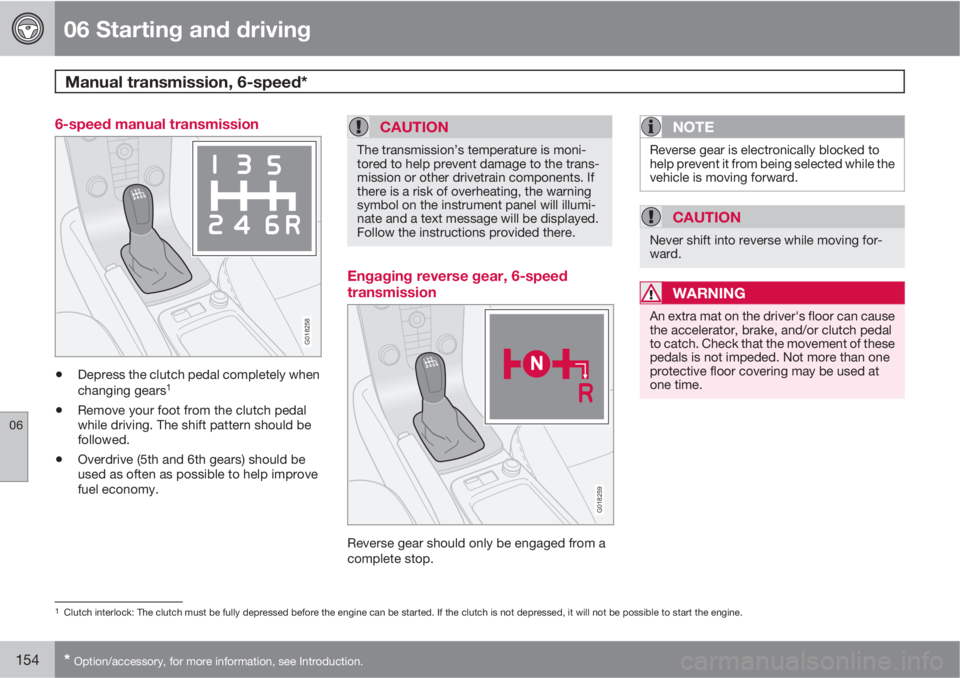
•Depress the clutch pedal completely when
changing gears1
•Remove your foot from the clutch pedal
while driving. The shift pattern should be
followed.
•Overdrive (5th and 6th gears) should be
used as often as possible to help improve
fuel economy.
CAUTION
The transmission’s temperature is moni-
tored to help prevent damage to the trans-
mission or other drivetrain components. If
there is a risk of overheating, the warning
symbol on the instrument panel will illumi-
nate and a text message will be displayed.
Follow the instructions provided there.
Engaging reverse gear, 6-speed
transmission
G018259
Reverse gear should only be engaged from a
complete stop.
NOTE
Reverse gear is electronically blocked to
help prevent it from being selected while the
vehicle is moving forward.
CAUTION
Never shift into reverse while moving for-
ward.
WARNING
An extra mat on the driver's floor can cause
the accelerator, brake, and/or clutch pedal
to catch. Check that the movement of these
pedals is not impeded. Not more than one
protective floor covering may be used at
one time.
1Clutch interlock: The clutch must be fully depressed before the engine can be started. If the clutch is not depressed, it will not be possible to start the engine.
Page 157 of 300
06 Starting and driving
Automatic transmission
06
155 Shiftgate positions
G020237
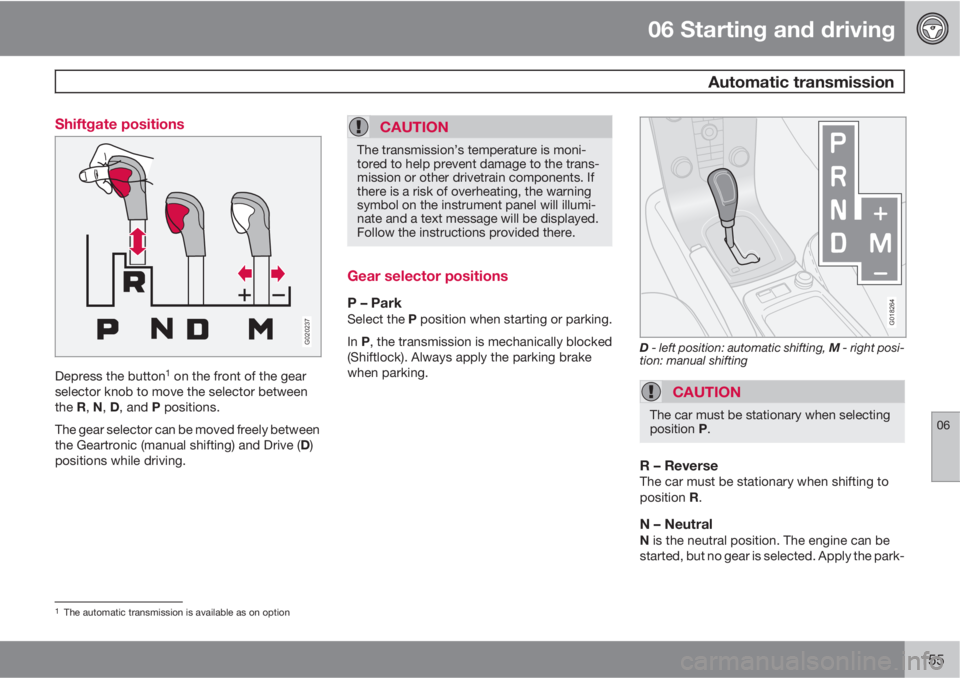
Depress the button1 on the front of the gear
selector knob to move the selector between
the R, N, D, and P positions.
The gear selector can be moved freely between
the Geartronic (manual shifting) and Drive (D)
positions while driving.
CAUTION
The transmission’s temperature is moni-
tored to help prevent damage to the trans-
mission or other drivetrain components. If
there is a risk of overheating, the warning
symbol on the instrument panel will illumi-
nate and a text message will be displayed.
Follow the instructions provided there.
Gear selector positions
P – ParkSelect the P position when starting or parking.
In P, the transmission is mechanically blocked
(Shiftlock). Always apply the parking brake
when parking.G018264
D - left position: automatic shifting, M - right posi-
tion: manual shifting
CAUTION
The car must be stationary when selecting
position P.
R – ReverseThe car must be stationary when shifting to
position R.
N – NeutralN is the neutral position. The engine can be
started, but no gear is selected. Apply the park-
1The automatic transmission is available as on option
Page 162 of 300
06 Starting and driving
Brake system
06
160
A warning light in the instrument panel will light
up to warn the driver that a fault has occurred.
If this light comes on while driving or braking,
stop immediately and check the brake fluid
level in the reservoir.
NOTE
Press the brake pedal hard and maintain
pressure on the pedal – do not pump the
brakes.
WARNING
If the fluid level is below the MIN mark in the
reservoir or if a brake system message is
shown in the information display, DO NOT
DRIVE. Have the vehicle towed to a Volvo
retailer and have the brake system inspec-
ted.
Power brakes function only when the
engine is running
The power brakes utilize vacuum pressure
which is only created when the engine is run-
ning. Never let the vehicle roll to a stop with the
engine switched off.
If the power brakes are not working, consider-
ably higher pressure will be required on the
brake pedal to compensate for the lack of
power assistance. This can happen for exam-ple when towing your vehicle or if the engine is
switched off when the vehicle is rolling. The
brake pedal feels harder than usual.
Water on brake discs and brake pads
affects braking
Driving in rain and slush or passing through an
automatic car wash can cause water to collect
on the brake discs and pads. This will cause a
delay in braking effect when the pedal is
depressed. To avoid such a delay when the
brakes are needed, depress the pedal occa-
sionally when driving through rain, slush, etc.
This will remove the water from the brakes.
Check that brake application feels normal. This
should also be done after washing or starting
in very damp or cold weather.
Severe strain on the brake system
The brakes will be subject to severe strain
when driving in mountains or hilly areas, or
when towing a trailer. Vehicle speed is usually
slower, which means that the cooling of the
brakes is less efficient than when driving on
level roads. To reduce the strain on the brakes,
shift into a lower gear and let the engine help
with the braking. Do not forget that if you are
towing a trailer, the brakes will be subjected to
a greater than normal load.
Anti-lock brakes (ABS)
The Anti-lock Braking System (ABS) helps to
improve vehicle control (stopping and steering)
during severe braking conditions by limiting
brake lockup. When the system "senses"
impending lockup, braking pressure is auto-
matically modulated in order to help prevent
lockup that could lead to a skid.
The system performs a self-diagnostic test
when the engine is started and when the
vehicle first reaches a speed of approxi-
mately 12 mph (20 km/h). The brake pedal will
pulsate several times and a sound may be
audible from the ABS control module. This is
normal.
For optimal ABS braking effect:1. Press down on the brake pedal with full
force. The pedal will pulsate.
2. Steer the vehicle in the direction of travel
and keep the brake pedal depressed.
Electronic Brake Force Distribution
(EBD)
EBD is an integrated part of the ABS system.
EBD regulates the hydraulic pressure to the
rear brakes to help provide optimal braking
capacity.
The switching of the ABS modulator will be
audible and the brake pedal will pulsate during
Page 172 of 300
06 Starting and driving
Blind Spot Information System (BLIS)*
06
170* Option/accessory, for more information, see Introduction.
Introduction
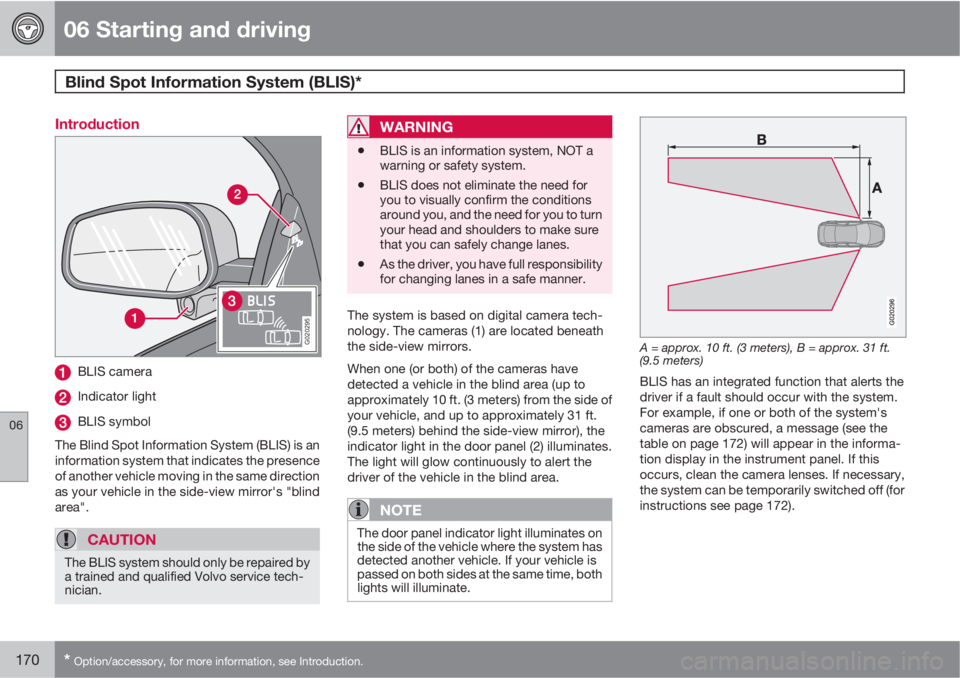
G020295
BLIS camera
Indicator light
BLIS symbol
The Blind Spot Information System (BLIS) is an
information system that indicates the presence
of another vehicle moving in the same direction
as your vehicle in the side-view mirror's "blind
area".
CAUTION
The BLIS system should only be repaired by
a trained and qualified Volvo service tech-
nician.
WARNING
•BLIS is an information system, NOT a
warning or safety system.
•BLIS does not eliminate the need for
you to visually confirm the conditions
around you, and the need for you to turn
your head and shoulders to make sure
that you can safely change lanes.
•As the driver, you have full responsibility
for changing lanes in a safe manner.
The system is based on digital camera tech-
nology. The cameras (1) are located beneath
the side-view mirrors.
When one (or both) of the cameras have
detected a vehicle in the blind area (up to
approximately 10 ft. (3 meters) from the side of
your vehicle, and up to approximately 31 ft.
(9.5 meters) behind the side-view mirror), the
indicator light in the door panel (2) illuminates.
The light will glow continuously to alert the
driver of the vehicle in the blind area.
NOTE
The door panel indicator light illuminates on
the side of the vehicle where the system has
detected another vehicle. If your vehicle is
passed on both sides at the same time, both
lights will illuminate.
A = approx. 10 ft. (3 meters), B = approx. 31 ft.
(9.5 meters)
BLIS has an integrated function that alerts the
driver if a fault should occur with the system.
For example, if one or both of the system's
cameras are obscured, a message (see the
table on page 172) will appear in the informa-
tion display in the instrument panel. If this
occurs, clean the camera lenses. If necessary,
the system can be temporarily switched off (for
instructions see page 172).
Page 204 of 300

07 Wheels and tires
Tire Pressure Monitoring System (TPMS)
07
202
Introduction
The tire pressure monitoring system1 uses sen-
sors mounted in the tire valves to check infla-
tion pressure levels. When the vehicle is mov-
ing at a speed of approximately 20 mph
(30 km/h) or faster, these sensors transmit
inflation pressure data to a receiver located in
the vehicle.
NOTE
USA – FCC ID: KR5S122780002
This device complies with part 15 of the
FCC rules. Operation is subject to the fol-
lowing conditions: (1) This device may not
cause harmful interference, and (2) this
device must accept any interference
received, including interference that may
cause undesired operation.
When low inflation pressure is detected, TPMS
will light up the tire pressure warning light
(also referred to as a telltale) in the instrument
panel and will display one of the following mes-
sages in the text window:
LOW TIRE PRESS.
CHECK TIRES or TIRE PRESSURE LOW.
NOTE
If a fault occurs in TPMS, the tire pressure
warning light will flash for approximately
1 minute and
TIRE PRESS SYST
SERVICE REQUIRED will be displayed.
Each tire, including the spare (if provided),
should be checked monthly when cold and
inflated to the inflation pressure recommended
by the vehicle manufacturer on the vehicle
placard or tire inflation pressure label. (If your
vehicle has tires of a different size than the size
indicated on the vehicle placard or tire inflation
pressure label, you should determine the
proper tire inflation pressure for those tires.)
As an added safety feature, your vehicle has
been equipped with a tire pressure monitoring
system (TPMS) that illuminates a low tire pres-
sure telltale when one or more of your tires is
significantly under-inflated. Accordingly, when
the low tire pressure telltale illuminates, you
should stop and check your tires as soon as
possible, and inflate them to the proper pres-
sure. Driving on a significantly under-inflated
tire causes the tire to overheat and can lead to
tire failure. Under-inflation also reduces fuel
efficiency and tire tread life, and may affect the
vehicle's handling and stopping ability.Please note that the TPMS is not a substitute
for proper tire maintenance, and it is the driv-
er's responsibility to maintain correct tire pres-
sure, even if under-inflation has not reached
the level to trigger illumination of the TPMS low
tire pressure telltale.
Your vehicle has also been equipped with a
TPMS malfunction indicator to indicate when
the system is not operating properly. The
TPMS malfunction indicator is combined with
the low tire pressure telltale . When the system
detects a malfunction, the telltale will flash for
approximately one minute and then remain
continuously illuminated. This sequence will
continue upon subsequent vehicle start-ups as
long as the malfunction exists. When the mal-
function indicator is illuminated, the system
may not be able to detect or signal low tire
pressure as intended. TPMS malfunctions may
occur for a variety of reasons, including the
installation of replacement or alternate tires or
wheels on the vehicle that prevent the TPMS
from functioning properly. Always check the
TPMS malfunction telltale after replacing one
or more tires or wheels on your vehicle to
ensure that the replacement or alternate tires
and wheels allow the TPMS to continue to
function properly.
1U.S. models only
Page 206 of 300
07 Wheels and tires
Tire Pressure Monitoring System (TPMS)
07
204* Option/accessory, for more information, see Introduction.
Self-supporting run flat tires (SST)*
Self-supporting run flat tires are available as
optional equipment. The vehicle must be
equipped with the Tire Pressure Monitoring
System (TPMS) if tires of this type are installed.
Tires of this type have specially reinforced
sidewalls that make it possible to continue
driving to a limited extent even though the tire
has lost some or all of its inflation pressure.
These tires are mounted on special rims (nor-
mal tires can also be mounted on these rims).
If an SST tire loses inflation pressure, the yel-
low TPMS symbol illuminates in the instrument
panel and a text message is also displayed. If
this happens, reduce speed to not more than
50 mph (80 km/h). The tire should be replaced
as soon as possible.
Drive carefully; it may be difficult to determine
which tire is damaged. To find the damaged
tire, check the inflation pressure in all four tires.WARNING
•SST tires should only be mounted by
service technicians who are familiar
with tires of this type.
•SST tires may only be mounted on vehi-
cles equipped with TPMS.
•Do not drive faster than 50 mph
(80 km/h) if TPMS indicates that a tire
has lost inflation pressure.
•Do not drive farther than 50 miles
(80 km) before replacing a damaged
SST tire.
•Drive carefully and avoid e.g., hard
braking or fast turns.
•SST tires must be replaced if they are
damaged. A tire of this type cannot be
repaired.
Page 224 of 300

09 Maintenance and servicing
Engine oil 09
222
CAUTION
•Not checking the oil level regularly can
result in serious engine damage if the oil
level becomes too low.
•Oil that is lower than the specified qual-
ity can damage the engine.
•Always add oil of the same type and
viscosity as already used.
•Never fill oil above the MAX mark. This
could cause an increase in oil consump-
tion.
•Oil changes should be carried out by a
trained and qualified Volvo service tech-
nician.
WARNING
Do not allow oil to spill onto or come into
contact with hot exhaust pipe surfaces
NOTE
Volvo uses different systems to indicate a
low oil level or pressure. Some models have
an oil pressure sensor, in which case a
warning symbol (see page 58) is used to
indicate low oil pressure. Other models have
an oil level sensor, in which case the driver
is alerted by the warning symbol in the cen-
ter of the instrument panel and a text in the
information display. Some models use both
systems. Contact an authorized Volvo
retailer for more information.