key VOLVO C30 2013 Owner´s Manual
[x] Cancel search | Manufacturer: VOLVO, Model Year: 2013, Model line: C30, Model: VOLVO C30 2013Pages: 300, PDF Size: 6.58 MB
Page 252 of 300
10 Audio
Audio functions
10
250
NOTE
Any Bluetooth cell phones used must sup-
port Audio/Video Remote Control Profile
(AVRCP) and Advanced Audio Distribution
Profile (A2DP). The phone must use AVRCP
version 1.3 and A2DP 1.2. If older versions
of these standards are used, certain fea-
tures (e.g., scan or random) may not func-
tion.
Not all cell phones are fully compatible with
the vehicle's Bluetooth system. A list of
compatible phones is available at you Volvo
retailer or at www.volvocars.us.
Listening to streaming audioPress MODE several times to select BT as a
sound source.
Audio files on the connected device can be
selected in three ways:
•Turn the TUNING dial (4) in either direction.
•Use the navigation buttons / (6) to
select an audio file.
•Use the / buttons on the steering
wheel keypads.
Sound settings
Optimal sound reproductionThe audio system is calibrated for optimal
sound reproduction through the use of digital
signal processing. This calibration takes into
account the speakers, amplifier, cabin acous-
tics, the seating position of the listener, etc., for
each combination of vehicle and audio system.
There is also dynamic calibration that takes
into account the setting of the volume control,
radio reception, and the vehicle's speed. The
sound settings described in this manual, such
as
BASS, TREBLE, and Equalizer front…/Equalizer rear… are only intended to enable
the user to adapt sound reproduction to his/her
personal preferences.
1.
Press SOUND (5). Press this button
repeatedly until you come to the setting
that you wish to change.
2.
Turn the TUNING dial (4) to make the
desired setting.
The following settings can be made:
BASS–set the bass level
TREBLE–set the treble level
BALANCE–set the left/right sound balance
FADER–set the front/rear sound balance
CENTER–make settings for the center speaker
SURROUND–make settings for surround
sound
Surround soundSurround sound settings are used to
balance sound levels throughout the
vehicle. Surround settings for the var-
ious sound sources are made sepa-
rately.
G021216
NOTE
•Dolby Surround Pro Logic II is only
available on the Premium Sound sys-
tem.
•When listening to FM radio stations,
Dolby Surround Pro Logic II functions
best in areas with strong reception. If
reception is weak, selecting 2 or 3-
channel stereo may provide better
sound quality.
The Dolby symbol will appear in the display
when Dolby Pro Logic II is activated.
There are three alternative settings:
•Pro Logic II
•3-channel
•Off (normal 2-channel stereo)
Dolby Surround Pro Logic II
Ÿ distributes the
stereo sound's two channels to the left, center,
Page 254 of 300
10 Audio
Radio functions
10
252
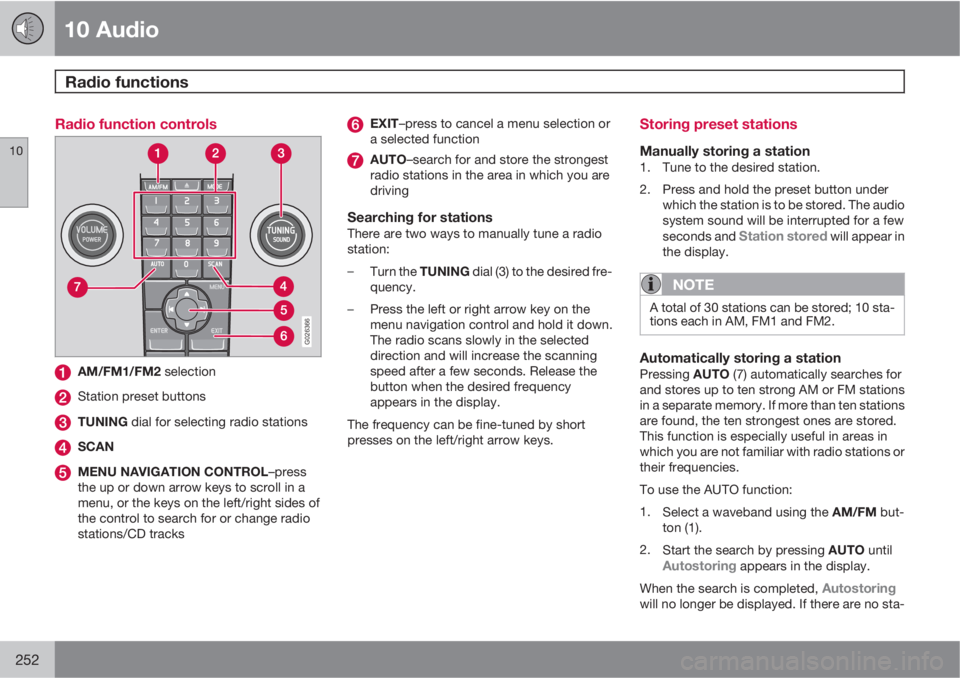
Radio function controls
G026366
AM/FM1/FM2 selection
Station preset buttons
TUNING dial for selecting radio stations
SCAN
MENU NAVIGATION CONTROL–press
the up or down arrow keys to scroll in a
menu, or the keys on the left/right sides of
the control to search for or change radio
stations/CD tracks
EXIT–press to cancel a menu selection or
a selected function
AUTO–search for and store the strongest
radio stations in the area in which you are
driving
Searching for stationsThere are two ways to manually tune a radio
station:
–
Turn the TUNING dial (3) to the desired fre-
quency.
–Press the left or right arrow key on the
menu navigation control and hold it down.
The radio scans slowly in the selected
direction and will increase the scanning
speed after a few seconds. Release the
button when the desired frequency
appears in the display.
The frequency can be fine-tuned by short
presses on the left/right arrow keys.
Storing preset stations
Manually storing a station1. Tune to the desired station.
2. Press and hold the preset button under
which the station is to be stored. The audio
system sound will be interrupted for a few
seconds and
Station stored will appear in
the display.
NOTE
A total of 30 stations can be stored; 10 sta-
tions each in AM, FM1 and FM2.
Automatically storing a stationPressing AUTO (7) automatically searches for
and stores up to ten strong AM or FM stations
in a separate memory. If more than ten stations
are found, the ten strongest ones are stored.
This function is especially useful in areas in
which you are not familiar with radio stations or
their frequencies.
To use the AUTO function:
1.
Select a waveband using the AM/FM but-
ton (1).
2.
Start the search by pressing AUTO until
Autostoring appears in the display.
When the search is completed,
Autostoringwill no longer be displayed. If there are no sta-
Page 256 of 300
10 Audio
Radio functions
10
254
HD Radio
E
Ereception (U.S.
models only)1
Introduction
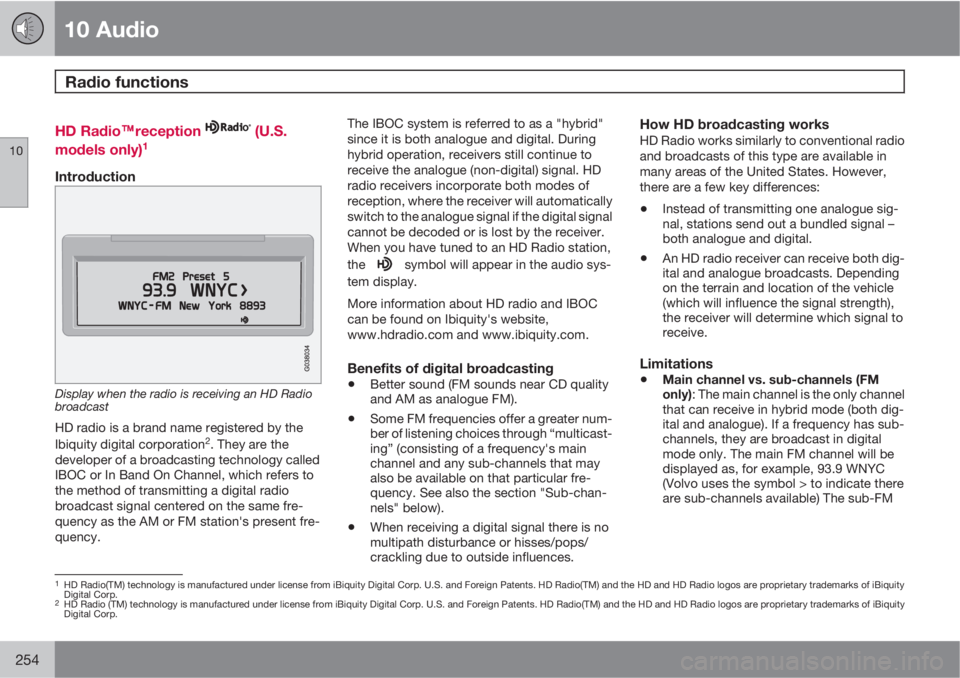
Display when the radio is receiving an HD Radio
broadcast
HD radio is a brand name registered by the
Ibiquity digital corporation2. They are the
developer of a broadcasting technology called
IBOC or In Band On Channel, which refers to
the method of transmitting a digital radio
broadcast signal centered on the same fre-
quency as the AM or FM station's present fre-
quency.The IBOC system is referred to as a "hybrid"
since it is both analogue and digital. During
hybrid operation, receivers still continue to
receive the analogue (non-digital) signal. HD
radio receivers incorporate both modes of
reception, where the receiver will automatically
switch to the analogue signal if the digital signal
cannot be decoded or is lost by the receiver.
When you have tuned to an HD Radio station,
the
symbol will appear in the audio sys-
tem display.
More information about HD radio and IBOC
can be found on Ibiquity's website,
www.hdradio.com and www.ibiquity.com.
Benefits of digital broadcasting
•Better sound (FM sounds near CD quality
and AM as analogue FM).
•Some FM frequencies offer a greater num-
ber of listening choices through “multicast-
ing” (consisting of a frequency's main
channel and any sub-channels that may
also be available on that particular fre-
quency. See also the section "Sub-chan-
nels" below).
•When receiving a digital signal there is no
multipath disturbance or hisses/pops/
crackling due to outside influences.
How HD broadcasting worksHD Radio works similarly to conventional radio
and broadcasts of this type are available in
many areas of the United States. However,
there are a few key differences:
•Instead of transmitting one analogue sig-
nal, stations send out a bundled signal –
both analogue and digital.
•An HD radio receiver can receive both dig-
ital and analogue broadcasts. Depending
on the terrain and location of the vehicle
(which will influence the signal strength),
the receiver will determine which signal to
receive.
Limitations
•Main channel vs. sub-channels (FM
only): The main channel is the only channel
that can receive in hybrid mode (both dig-
ital and analogue). If a frequency has sub-
channels, they are broadcast in digital
mode only. The main FM channel will be
displayed as, for example, 93.9 WNYC
(Volvo uses the symbol > to indicate there
are sub-channels available) The sub-FM
1HD Radio(TM) technology is manufactured under license from iBiquity Digital Corp. U.S. and Foreign Patents. HD Radio(TM) and the HD and HD Radio logos are proprietary trademarks of iBiquity
Digital Corp.
2HD Radio (TM) technology is manufactured under license from iBiquity Digital Corp. U.S. and Foreign Patents. HD Radio(TM) and the HD and HD Radio logos are proprietary trademarks of iBiquity
Digital Corp.
Page 258 of 300
10 Audio
Radio functions
10
256
In many cases, a main HD Radio station (FM
wavebands only) will also have sub-channels
offering additional types of programming or
music.
In such cases, a number will be displayed to
the right of the frequency number indicating
that the currently tuned frequency has at least
one sub-channel. The "2" in the illustration indi-
cates that you are currently listening to the first
sub-channel on frequency 93.9.
Selecting sub-channelsTo listen to a station's sub-channel(s), press
the right arrow key on the center console or on
the steering wheel keypad. To go back to the
main channel, press the left arrow key. To go
to subchannel 2 (if available), press the right
arrow key.
If you are currently tuned to a frequency's main
channel, pressing the left arrow key will tune to
the next lower radio frequency.
NOTE
•When the radio has gone into HD mode,
it may take several seconds before the
">" symbol (if the current frequency has
any sub-channels) is displayed to the
right of the frequency. Pressing the
arrow keys before the number is dis-
played will cause the radio to tune to the
next available radio station, not to the
current station's sub-channels.
•When you are no longer in broadcasting
range of the currently tuned sub-chan-
nel,
No HD reception will be dis-
played. The radio will then be muted
and it will be necessary to tune to or
search for a new radio station.
Sub-channels can also be stored as presets,
see page 252 for information on storing sta-
tions.
If you press a sub-channel's preset button, it
may take up to 6 seconds before the channel
becomes audible. If you press this button while
you are out of digital range of the transmitter,
No HD reception will be displayed.
Listening to satellite radio
The SiriusXM
E satellite system consists of a
number of high elevation satellites in geosyn-
chronous orbit.
NOTE
•The digital signals from the SiriusXM
E
satellites are line-of-sight, which means
that physical obstructions such as
bridges, tunnels, etc, may temporarily
interfere with signal reception.
•Avoid any obstructions, such as metal-
lic objects transported on roof racks or
in a ski box, or other antennas that may
impede signals from the SiriusXM
E
satellites.
Selecting SiriusXM
E radio mode1. Press Power to switch on the audio system
(see page 252 for information on the stand-
ard radio functions).
2.
Press the MODE button repeatedly until
SiriusXM
E 1 or 2 is displayed.
Activating SiriusXM
E radio1. Tune to a satellite channel that has no
audio, which means that the channel is
unsubscribed and the text "
CALL
888-539-SIRIUS TO SUBSCRIBE" is dis-
Page 259 of 300
10 Audio
Radio functions
10
257
played (see also "Selecting a channel" in
the right column).
2.
Call SiriusXM
E at 1-888-539-SIRIUS
(7474).
3.
When asked for the SiriusXM
E ID number
press AUTO to display this number. It is
also possible to retrieve the SiriusXM
E ID
from the MENU.
4.
"
Updating subscription" will be dis-
played while the subscription is being
updated, after which the display will return
to the normal view.
SIRIUS ID
The SiriusXM
E ID is required when contacting
the Sirius Call Center. It is used to activate your
account and when making any account trans-
actions. The SiriusXM
E ID is sometimes refer-
red to as the Electronic Serial Number (ESN).
Selecting a channel category1.
Select SiriusXM
E radio mode as descri-
bed above.
2.
Press ENTER.
3. Use the up/down arrow keys to scroll
through the list of categories.
4.
Press ENTER or the right arrow key to
select a category.5. Use the left or right arrow keys to select a
channel in the currently chosen category.
6.
Press ENTER to listen to a channel.
NOTE
•The category "All" is default, which ena-
bles you to scroll through the entire list
of available satellite channels.
•The channel categories are automati-
cally updated several times a year. This
takes approximately two minutes and
will interrupt normal broadcasting. A
message will be displayed while updat-
ing is in progress. Information on chan-
nel or feature updates is available at
www.sirius.com.
Selecting a channelThere are three ways of tuning in a channel:
•Using the left and right arrow keys
•By turning the tuning control
•Through direct channel entry
Direct channel entry
The SiriusXM
E satellite channels are num-
bered consecutively throughout all of the cat-
egories. To access a channel directly:1.
Press MENU and scroll to "Direct channel
entry."
2. Use the numerical keypad to enter the
channel's number.
3.
Press ENTER. The radio will tune to this
channel, even if it belongs to a category
other than the currently selected one.
NOTE
•The numbers of skipped or locked
channels will not be displayed.
•If a channel is locked, the access code
must be entered before the channel can
be selected. See "Unlocking a channel"
on page 258.
Scanning
NOTE
SCAN automatically searches through the
list of satellite channels, see page 253 for
more detailed information.
Storing a channel
•A long press on one of the number keys
stores the currently tuned channel on that
key.
•A short press on a number key while the
radio is in SiriusXM
E 1 or 2 mode will tune
Page 261 of 300
10 Audio
Radio functions
10
259
2. Select a category in the list and press
ENTER.
3. Skip channels in the list presented by
pressing ENTER or right arrow key.
Unskip all channelsThis permanently removes all channels from
the skip list and makes them available for
selection.
Temp. unskip all ch.This function will temporarily unskip all chan-
nels and make them available for selection. The
channels remain on the skip list and will again
be skipped the next time the ignition is
switched on.
Channel lockAccess to specific channels can be restricted
(locked). A locked channel will not provide
audio, song titles, or artist information.
NOTE
All channels are initially unlocked.
Locking a channel1.
Select "Sirius ID:" in the menu and selectLOCK OPTIONS and press ENTER.
2.
Select
Channel lock list and press
ENTER3. Enter the channel access code and press
ENTER.
4. Select a category in the list and press
ENTER.
5. Lock channels in the list presented by
pressing ENTER or right arrow.
The channel is now locked and a checked box
will be displayed to indicate this. It will be nec-
essary to enter the channel access code1 in
order to listen to a locked channel.
Unlocking a channel:A channel's access code1 is required to unlock
a channel.
Unlock all channelsThis permanently removes all channels from
the locked list and makes them available for
selection.
Temp. unlock all ch.This function will temporarily unlock all chan-
nels and make them available for selection. The
channels remain on the locked list and will
again be locked the next time the ignition is
switched on.
CHANGE CODEThis function makes it possible to change the
channel access code. The default code
is 0000.
To change the code:1.
Select
Change code and press ENTER.
2.
Enter the current code and press ENTER.
3.
Enter the code and press ENTER.
4.
Confirm the new code and press ENTER.
If an incorrect code is entered, the text
Incorrect code is displayed.
If you have forgotten the access code:
1.
Select "
Sirius ID:" in the SiriusXM
E set-
tings menu and press ENTER.
2.
Press and hold the ENTER button for
2 seconds.
3. The current code will be displayed.
Your Volvo retailer can also provide you with
assistance.
SiriusXM
E ID
This function displays the 12-digit SiriusXM
E
activation ID.
Page 262 of 300
10 Audio
CD player
10
260
CD function controls
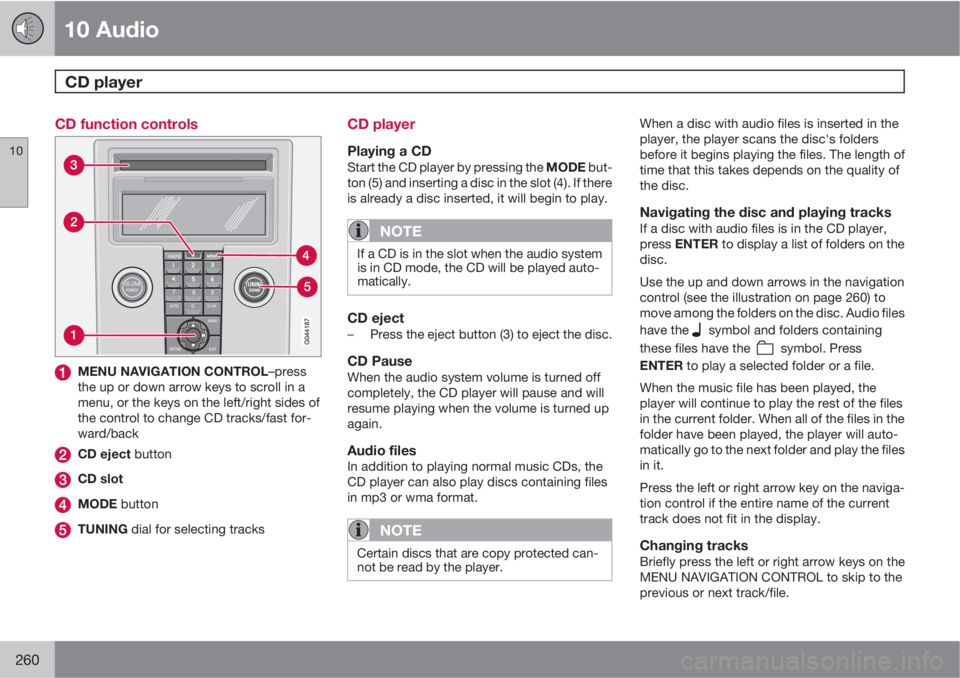
MENU NAVIGATION CONTROL–press
the up or down arrow keys to scroll in a
menu, or the keys on the left/right sides of
the control to change CD tracks/fast for-
ward/back
CD eject button
CD slot
MODE button
TUNING dial for selecting tracks
CD player
Playing a CDStart the CD player by pressing the MODE but-
ton (5) and inserting a disc in the slot (4). If there
is already a disc inserted, it will begin to play.
NOTE
If a CD is in the slot when the audio system
is in CD mode, the CD will be played auto-
matically.
CD eject–Press the eject button (3) to eject the disc.
CD PauseWhen the audio system volume is turned off
completely, the CD player will pause and will
resume playing when the volume is turned up
again.
Audio filesIn addition to playing normal music CDs, the
CD player can also play discs containing files
in mp3 or wma format.
NOTE
Certain discs that are copy protected can-
not be read by the player.
When a disc with audio files is inserted in the
player, the player scans the disc's folders
before it begins playing the files. The length of
time that this takes depends on the quality of
the disc.
Navigating the disc and playing tracksIf a disc with audio files is in the CD player,
press ENTER to display a list of folders on the
disc.
Use the up and down arrows in the navigation
control (see the illustration on page 260) to
move among the folders on the disc. Audio files
have the
symbol and folders containing
these files have the
symbol. Press
ENTER to play a selected folder or a file.
When the music file has been played, the
player will continue to play the rest of the files
in the current folder. When all of the files in the
folder have been played, the player will auto-
matically go to the next folder and play the files
in it.
Press the left or right arrow key on the naviga-
tion control if the entire name of the current
track does not fit in the display.
Changing tracksBriefly press the left or right arrow keys on the
MENU NAVIGATION CONTROL to skip to the
previous or next track/file.
Page 263 of 300
10 Audio
CD player
10
261
NOTE
The TUNING dial (6) (turn clockwise to go to
the next track/file, or counterclockwise to
go to the previous track/file) or the steering
wheel keypad can also be used for this pur-
pose.
Fast forward/back–Press and hold down the left or right arrows
keys in the menu navigation control (or the
corresponding keys on the steering wheel
keypad) to search within a track/file or the
whole disc. The search continues for as
long as the buttons are held down.
Random playThis function plays the tracks/files on a CD in
random order (shuffle).
Activating/deactivating the random
function
If a normal CD is being played:
1.
Press MENU followed by ENTER.
2.
Select Random and press ENTER.
If a CD with audio files is being played:1.
Press MENU followed by ENTER.
2.
Select
Random and press ENTER.
3.
Select
Disc or Folder and press ENTER.
ScanThis function plays the first 10 seconds of each
track/file on the CD.
–
Press SCAN.
–
Press EXIT or SCAN to stop the scan func-
tion and listen to an entire track/file.
CD ejectPress the eject button (3) to eject the disc.
NOTE
•The Eject all function can only be used
while the vehicle is at a standstill and will
be cancelled if the vehicle begins to
move.
•For reasons of traffic safety, the ejected
CD must be removed within 12 seconds
or it will be automatically drawn back
into the slot and the CD player will enter
pause mode. Press the CD button to
restart the disc.
Compact disc care
Keep the following in mind when playing/han-
dling compact discs
•Do not put tape or labels on the disc itself.
They could become stuck in the player.
•CDR discs can cause listening problems
due to the quality of the disc or recording
equipment used.
•DualDisc: The audio side of a DualDisc
(combined CD/DVD) does not meet CD
specifications and may not play in your
audio system.
•Keep the discs clean. Wipe them with a
soft, clean, lint-free cloth, working from the
center outward. If necessary, dampen the
cloth with a neutral soap solution. Dry thor-
oughly before using.
•Never use cleaning spray or antistatic liq-
uid. Use only cleaners specifically made for
CDs.
•Use discs of the correct size only
(3.5" discs should never be used).
•Volvo does not recommend the use of
plastic outer rings on the disc.
•Condensation may occur on discs/optical
components of the CD player in cold winter
weather. The disc can be dried with a
clean, lint-free cloth. Optical components
in the CD player may, however, take up to
one hour to dry off.
Page 267 of 300
10 Audio
Bluetooth® hands-free connection
10
265
> The audio system will search for cell
phones that are in range. This search
takes approximately 30 seconds. Any
phones detected will be displayed with
their Bluetooth
® names. The hands-free
system’s Bluetooth® name will appear
in the cell phone’s display as My Volvo
Car.
4. Select one of the cell phones shown in the
audio system’s (center console) display.
5. Using the cell phone’s keypad, enter the
digits shown in the audio system’s display.
Alternative 2–using the cell phone’s menus
1. Activate the hands-free system by briefly
pressing the PHONE button in the center
console. If there is a cell phone connected,
disconnect it from the hands-free system.
2. Perform a search using the cell phone’s
Bluetooth
® function (consult the cell
phone’s owner’s manual if necessary).
3.
Select
My Volvo Car in the list of devices
shown in the cell phone’s display.
4. When prompted, enter the PIN code 1234
in the cell phone.
5.
Connect to
My Volvo Car from the cell
phone.The cell phone will be registered and will be
connected automatically to the audio system
while the text
Synchronizing is displayed. For
more information on synchronizing a cell
phone, see page 267.
When a connection has been established, the
symbol and the cell phone’s Bluetooth®
name will be displayed. The cell phone can
now be controlled from the audio system.
Making a call1.
Ensure that PHONE is shown at the top of
the center console display and that the
symbol is visible (by pressing briefly on
PHONE on the center console).
2. Dial the desired phone number or use the
phone book (see page 267).
3.
Press ENTER.
End the call by pressing EXIT.
Disconnecting the cell phoneThe cell phone is automatically disconnected
from the audio system if it is moved out of
range. For more information about connec-
tions, see page 264.
The cell phone can be manually disconnected
from the hands-free system by pressing
PHONE. The hands-free system is also deac-
tivated when the ignition is switched off (or ifthe driver’s door is opened on vehicles equip-
ped with the optional keyless drive).
When the cell phone is disconnected from the
hands-free system, a call in progress can be
continued using the cell phone’s own speaker
and microphone.
NOTE
Certain cell phones may require confirma-
tion from the phone’s keypad when a call is
transferred from hands-free to the cell
phone.
Handling calls
Incoming calls–
Press ENTER to answer a call, even if the
audio system is currently in e.g., CD or FM
mode.
–
Press EXIT to defer a call.
Automatic answerThis function means that incoming calls will be
answered automatically. Activate or deactivate
the function in the menu system under Phone
Menu…
Call options…Automatic
answer.
Page 268 of 300
10 Audio
Bluetooth® hands-free connection
10
266
Call settingsWhile a call is in progress, press MENU or
ENTER on the center console to access the
following functions:
•Mute microphone: mute the audio sys-
tem’s microphone.
•Transfer call to cell: transfer the call from
hands-free to the cell phone.
•Phone book: this feature enables you to
search for a stored telephone number.
NOTE
•On certain cell phones, the connection
is broken when the mute function is
used, which is normal. If this happens,
the hands-free system will prompt you
to reconnect.
•A new call cannot be initiated while
another call is in progress.
Sound settings
Call volumeCall volume can be adjusted while a call is in
progress using the buttons in the steering
wheel keypad.
Audio system volumeWhen PHONE is displayed, volume for the
audio system can be adjusted in the normal
way with the audio system's volume control. In
order to adjust volume during a phone call, the
audio system must be switched to one of the
other modes (FM, CD, etc).
Audio system sound can be automatically
muted when a phone call is received in
Phone Menu…
Phone settings…
Sounds and volume…Mute radio and
adjust the volume with the
/ keys on the
center console.
Ringing volume
Go to Phone Menu…Phone settings…
Sounds and volume…Ring volume and
adjust the volume with the
/ keys on the
center console.
Ringing tonesThe hands-free system’s integrated ringing
tones can be selected in Phone Menu…
Phone settings…Sounds and volume…
Ring signals…Ring signal 1, etc.
NOTE
The connected cell phone’s ring tone may
not be switched off when one of the hands-
free system's ringing tones is used.
If you prefer to use the connected cell phone’s
ring tone1, go to Phone Menu…Phone
settings…
Sounds and volume…Ring
signals…
Use cell phone signal
More information about registering
and connecting cell phones
A maximum of 5 cell phones can be registered
in the hands-free system. Registration only
needs to be done once for each phone. After
registration, the cell phones can then be found
in the list of registered phones. Only one cell
phone can be connected to hands-free at a
time. Phones can be unregistered in Phone
Menu…
Bluetooth…Remove phone
1Not supported by all cell phones.