reset VOLVO C70 2001 Owners Manual
[x] Cancel search | Manufacturer: VOLVO, Model Year: 2001, Model line: C70, Model: VOLVO C70 2001Pages: 88, PDF Size: 2.07 MB
Page 16 of 88
Some of the items above are available on certain models only.
pg. 16 Instruments
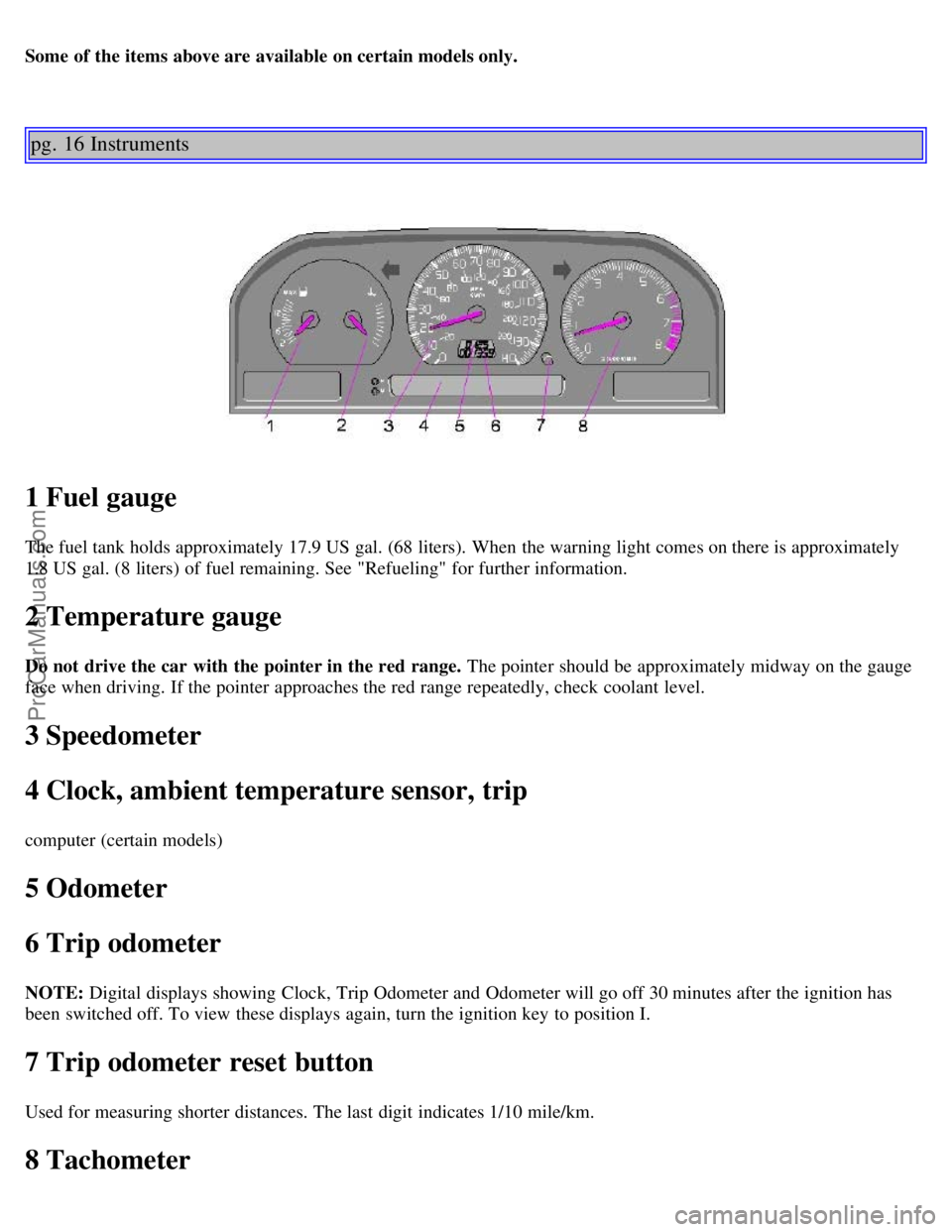
1 Fuel gauge
The fuel tank holds approximately 17.9 US gal. (68 liters). When the warning light comes on there is approximately
1.8 US gal. (8 liters) of fuel remaining. See "Refueling" for further information.
2 Temperature gauge
Do not drive the car with the pointer in the red range. The pointer should be approximately midway on the gauge
face when driving. If the pointer approaches the red range repeatedly, check coolant level.
3 Speedometer
4 Clock, ambient temperature sensor, trip
computer (certain models)
5 Odometer
6 Trip odometer
NOTE: Digital displays showing Clock, Trip Odometer and Odometer will go off 30 minutes after the ignition has
been switched off. To view these displays again, turn the ignition key to position I.
7 Trip odometer reset button
Used for measuring shorter distances. The last digit indicates 1/10 mile/km.
8 Tachometer
ProCarManuals.com
Page 20 of 88
The lamp will light up when the Winter/Wet starting mode is engaged or if gears "4,3" or "L" are selected.
If the warning lamp begins to flash, this means that there is a fault in the automatic gearbox. Contact Your Volvo
retailer.
Supplemental Restraint System (SRS)
If the light comes on (or stays on after the
vehicle has started), the SRS diagnostic system has detected a fault. Drive to an authorized Volvo retailer for an
inspection of the system. See the SRS section for more information.
Service reminder indicator
This light will come on at 7,500 mile (12,000 km) intervals, after 750 hours of driving or after 12 months, whichever
occurs first. It is a reminder to the driver that the service interval has been exceeded. The light will stay on for 2
minutes after start until reset by the servicing retailer.
Bulb failure warning light
The light will come on if any of the following bulbs are defective:
· one of the low beam headlights
· one of the tail lights
· one of the brake lights when the brake pedal is depressed.
Check the fuse and bulb. See sections "Replacing bulbs" and "fuses.
Should the warning light come on after a defective outside bulb has been replaced, the corresponding bulb on the other
side of the car should also be replaced.
Contents | Top of Page
ProCarManuals.com
Page 23 of 88

AUTO-open function.
· AUTO-open: Press the lower section of the switch once to automatically open the sun roof.
The AUTO-open function can be stopped at any time by pressing the switch.
· To close the sun roof : Depress the upper section of the switch until the sun roof has closed completely.
· To open the rear edge of the sun roof (ventilation position): With the sun roof closed, depress the upper section of
the switch. To close, depress the lower section of the switch until the sun roof has closed completely.
· To slide open the sun roof : Depress the lower section of the switch until the sun roof has opened to the position
you prefer or until it reaches its final position and stops automatically.
Sun visor : The sun roof also features a sliding sun visor. The visor slides back automatically when the sun roof is
opened and also slides back slightly when the sun roof is opened to the ventilation position. The visor must be closed
manually.
CAUTION : Do not close the sun visor when the sun roof is in the ventilation position as this could damage the
mechanism.
NOTE :
The electrically operated sun roof has an overload protecting circuit breaker (fuse no. 37) which is activated when an
object blocks the sun roof. Should this occur, remove the object and wait 20 seconds for the circuit breaker to reset.
The sun roof should then function normally. Also check fuse no. 35. WARNING!
The sun roof must never be obstructed in any way when in operation.
pg. 42 Keys, doors and locks
ProCarManuals.com
Page 69 of 88

· Balance (pull)
3. Active Sound Control
4. CD changer selector
5. · Tape mode selector
· Tape direction selector PROG
6. Bass control
7. Treble control
8. Fader control
9. · Preset buttons
· CD-Disc No. selector
10. PROG - Reversing the tape
11. Dolby B NR button
12. Cassette eject
13. Not in use
14. Scan
15. Auto seek memory
16. · Seek tuning up/down
· TP-Next/Previous song
· CD -Next UP/Previous DOWN track
17. · Manual tuning
· TP -fast forward/Rewind
· CD -Music searchUP/DOWN
18. RND button
19. Cassette slot
20. Display
21. Waveband selector (AM)
22. Waveband selectors (FM)
23. Anti-theft LED
TP = Applicable only in Tape Mode
ProCarManuals.com
Page 70 of 88

CD = Applicable only when in CD mode and connected to a CD changer.
pg. 129 Anti -theft code
Anti-theft code
The radio features anti-theft circuitry. If the set is removed from the vehicle or if the battery power is disconnected, a
special code must be entered to enable operation of the set.
Refer to the radio code card supplied with your vehicle or ask your retailer for the correct code.
When the car is parked with the ignition key removed, the anti-theft LED will flash.
To enter the code
After installation or when the set has been disconnected from power, the set displays "COdE" when it is switched on.
Enter the 4-digit code using the preset buttons.
If the correct code is entered, "on" is displayed and the set is ready to use.
If you enter an incorrect code you must enter the correct code again from the beginning.
ProCarManuals.com
Page 72 of 88

D - Setting frequency selection
The radio can be used in most parts of the world by changing the frequency selection intervals as follows:
Depress and hold preset button 5 and turn the radio ON. "USA" will flash on the display.
Each time button 5 is pressed, the frequency selection will change from "USA" to "AUS", etc. When the correct
country name is displayed, wait 5 seconds and the radio will be ready for use.
E - Manual tuning
Press the left side tune button to tune to lower frequencies and the right side to tune to higher frequencies. The tuned
frequency is displayed.
ST will be displayed to indicate stereo FM reception.
pg. 131 Radio SC -813
A - Seek tuning up/down
Press the left side tune button to tune to lower frequencies and the right side to tune to higher frequencies. The radio
seeks the next audible station and stops there. If you wish to continue the seek tuning, press the tune button again.
B - Preset programming
1. Tune to the desired frequency.
2. Depress and hold a preset button. The audio will cut out. Keep the button depressed until the audio comes on again
(approx. 2 seconds).
3. The frequency is now stored on this preset button.
C - Preset buttons
To select a pre-programed radio frequency, depress the preset button. The set frequency will be displayed.
ProCarManuals.com
Page 80 of 88
Bulb failure warning17,19
Bulbs124
C
Capacities123
Central locking button36
Chains (snow)75
Changing a wheel80
Child booster cushion12
Child Restraint Anchorages10
Child safety12
Clock16
Clock - resetting25
Clutch fluid114
Clutch interlock60
Coolant - checking/changing116
Coolant level sensor19
Coolant level warning light17
Cooling system64,122
Courtesy lights - exterior20
Courtesy lights - front49
Cruise control29
D
Daytime running lights24
Demister - rear window23
Dimensions125
Distributor ignition system122
Diversity antenna183
Doors and locks42
Driving economy58
Driving mode W62
E
EBD (Electronic Brake-force Distribution)72
ECC - Electronic Climate Control34,35
Electrical system64,124
Electrically heated front seats30
Electrically operated front seats46,47
Electrically operated sun roof41
Electrically-operated windows36
Electronic Brake Distribution (EBD)70
Electronic Brake-force Distribution (EBD)70
Emergency towing66
Emergency warning flashers23
Engine121
Engine compartment117
ProCarManuals.com