warning light VOLVO C70 2006 User Guide
[x] Cancel search | Manufacturer: VOLVO, Model Year: 2006, Model line: C70, Model: VOLVO C70 2006Pages: 182, PDF Size: 3.35 MB
Page 35 of 182

In this case:
1. Stop the car in a suitable place and switch off the engine.
2. Restart the engine.
3. If both warning lights go off, no further action is required and the car can be driven.
4. If both lights remain on after the engine has been restarted, switch off the engine again and check the brake fluid
level. See page 157
for the location of the reservoir.
Door open warning
The driver will be alerted if one of the doors, the hood, or the trunk lid are open or ajar.
At low speeds
If the car is moving at a speed of less than approximately 4 m.p.h. (7 km/h), the Information symbol in the
instrument panel will light up and a message will be shown in the information display indicating which door(s), etc is
not completely closed.
At higher speeds
If the car is moving at a speed above approximately 4 m.p.h. (7 km/h), the Warning symbol in the instrument
panel will light up and a message will be shown in the information display indicating which door(s), etc is not
completely closed.
Hood and trunk
If the hood and/or trunk lid is not completely closed, the Information symbol in the instrument panel will light
up and a message will be displayed, regardless of the vehicle's speed.
pg. 37 Instruments and controls
Information display
Messages
When an indicator or warning light in the instrument panel comes on, a message is also shown in the information
display. To read a message:
Press the READ button (A).
ProCarManuals.com
Page 40 of 182

Current fuel consumption
Average speed
NOTE: Current speed in m.p.h. (Canadian models only)
NOTE: Warning messages from the car's monitoring systems will override the trip computer function. If a warning
message is shown in the information display while you are using the trip computer, you must acknowledge the
message by pressing the READ button (A). Press button A again to return to the trip computer function.
Controls
The four trip computer functions (five on Canadian models) can be accessed by twisting INFO (B) one step at a time
in either direction. Twisting a fifth time (sixth time on Canadian models) returns you to the original function.
The trip computer can be reset (average fuel consumption and average speed will be erased from system memory) by
pressing RESET (C) for at least five seconds.
Driving distance on current fuel reserve
This function shows the approximate distance that can be driven on the fuel remaining in the tank. This calculation is
based on average fuel consumption during the last 20 miles (30 km) of driving and the amount of fuel remaining in the
tank when the reading was taken. When the driving distance on current fuel reserve is less than 12 miles (20 km), "----
" will be displayed in the information display.
Average fuel consumption
This value indicates fuel consumption since the last time the trip computer was reset (by pressing RESET, button C).
When the engine is switched off, information on fuel consumption is stored and remains in system memory until the
RESET (button C) is pressed again.
Current fuel consumption
This value indicates the current fuel consumption, based on readings taken once per second. When the car is not
moving, "----" will be displayed.
Average speed
This value indicates average speed since the last time the trip computer was reset (by pressing RESET, button C).
When the engine is switched off, information on average speed is stored and remains in system memory until the
RESET (button C) is pressed again.
Current speed in m.p.h. (Canadian models only)
This function provides the driver with an instantaneous conversion of the car's current speed from km/h to m.p.h.
NOTE: Trip computer readings may vary slightly depending on the circumference of the tires on the car, tire inflation,
or driving style.
pg. 42 Instruments and controls
Cruise control
ProCarManuals.com
Page 42 of 182

Cruise control is also automatically disengaged:
If the speed drops below approximately 20 mph (30 km/h) when driving uphill.
When the brake or clutch pedal is depressed.
If the gear selector is moved to position N.
During wheel spin or wheel lock-up.
If the vehicle's speed is increased by using the accelerator pedal for more than 1 minute.
Returning to the set speed
Press the button to resume the previously set speed.
pg. 43 Instruments and controls
Cruise control
Disengaging cruise control
Cruise control can also be disengaged by:
Pressing the CRUISE button (CRUISE ON will no longer be shown in the function display.
Putting the gear selector in (N)eutral.
WARNING!
Cruise control should not be used in heavy traffic or when driving on wet or slippery roads. Cruise control may not
maintain set speed on steep downgrades.
pg. 44 Instruments and controls
Right-side steering wheel lever
Windshield wipers
A. Windshield/headlight washers
B. Rain sensor (option) - on/off
C. Thumb wheel
D. Not in use
ProCarManuals.com
Page 45 of 182
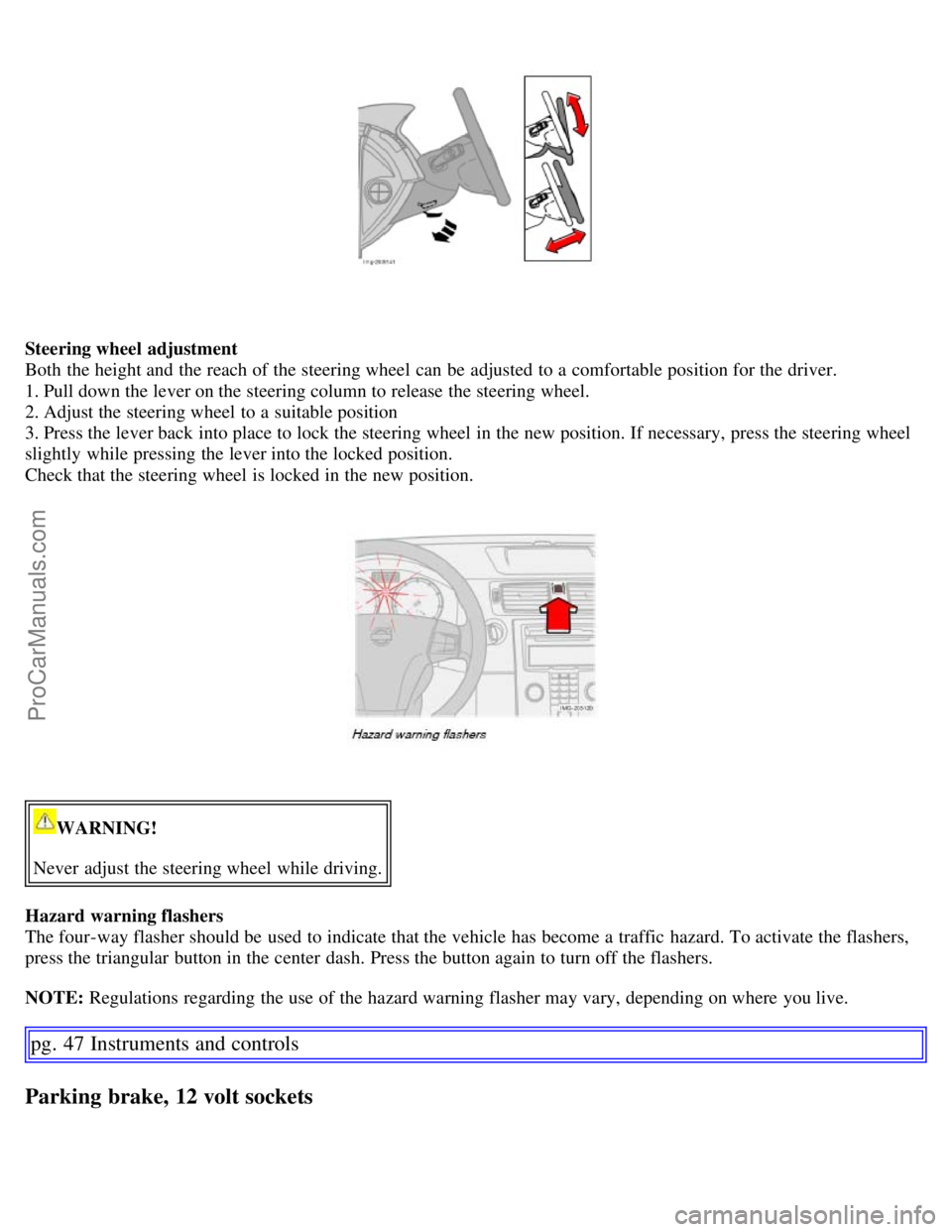
Steering wheel adjustment
Both the height and the reach of the steering wheel can be adjusted to a comfortable position for the driver.
1. Pull down the lever on the steering column to release the steering wheel.
2. Adjust the steering wheel to a suitable position
3. Press the lever back into place to lock the steering wheel in the new position. If necessary, press the steering wheel
slightly while pressing the lever into the locked position.
Check that the steering wheel is locked in the new position.
WARNING!
Never adjust the steering wheel while driving.
Hazard warning flashers
The four-way flasher should be used to indicate that the vehicle has become a traffic hazard. To activate the flashers,
press the triangular button in the center dash. Press the button again to turn off the flashers.
NOTE: Regulations regarding the use of the hazard warning flasher may vary, depending on where you live.
pg. 47 Instruments and controls
Parking brake, 12 volt sockets
ProCarManuals.com
Page 47 of 182

Ashtrays/cigarette lighter
The auxiliary sockets can also be used for cigarette lighters. Ashtrays and lighters are available as accessories. Please
contact your Volvo retailer.
pg. 48 Instruments and controls
Power windows
Operation
The power windows are opened and closed using the buttons in the armrests, or can be opened by pressing the unlock
button on the central locking system's remote control (see page 87
).
Opening/closing the windows from inside the car
NOTE:
The ignition must be ON (ignition key in position I, II or the engine running) for the power windows to function.
The power windows will also function after the ignition has been switched off as long neither of the doors has been
opened.
Opening a window
Lightly press down the front edge of any of the buttons (A or B) to the first detent ("stop") to open a window to the
position of your choice.
WARNING!
Always remove the ignition key when the vehicle is unattended.
Never leave children unattended in the vehicle.
Make sure that the windows are completely unobstructed before raising or lowering them.
Press down the front part of one or both buttons A as far as possible and release to automatically open the front
window(s) completely.
To stop the window at any time, pull the button up.
Closing a window
ProCarManuals.com
Page 50 of 182

A few seconds after browsing is complete, the display reverts to the compass direction.
Power door mirrors
The mirror control switches are located on the driver's door armrest.
To adjust the mirrors:
Driver's door mirror: Press the L button (a light in the switch will go on) to activate the adjustment control. Use this
control to adjust the driver's door mirror.
Passenger's door mirror: Press the R switch (a light in the switch will go on) to activate the adjustment control. Use
this control to adjust the passenger's door mirror.
After you have adjusted the mirror(s), press the L or R switch again (the LED will go out) to deactivate the adjustment
control.
WARNING!
The mirrors should always be adjusted prior to driving. Objects seen in the passenger's side wide -angle door mirror
are closer than they appear to be.
Storing the mirrors' position
The position of the power door mirrors is stored when the car is locked with the remote control. When the car is
unlocked with the same remote control, the mirrors will move to the stored position.
pg. 51 Instruments and controls
Personal settings
ProCarManuals.com
Page 53 of 182

Programming the transceiver
1. The ignition switch must be turned to the "accessory" position (II) before programming the HomeLink Universal
Transceiver.
2. Begin by erasing all 3 factory default channels. Hold down the two outside buttons (the left and right buttons in the
illustration) on the HomeLink Universal Transceiver for about 20 seconds, until HomeLink's indicator light begins to
flash. Then release the buttons.
3. Hold your hand -held transmitter (garage door opener, for example) 2 to 5 in. (5 to 12 cm) away from the HomeLink
surface, keeping the indicator light in view. For placement questions, contact HomeLink toll-free 1-800-355-3515
(Internet: http://www.HomeLink.com
).
4. Using two hands, push and hold both your hand -held transmitter's button and the transceiver button you wish to
program. The indicator light will flash first slowly, then rapidly. Rapid flashing indicates that the HomeLink button has
been successfully programmed. Release both buttons.
5. If you are programming a rolling code-equipped device (e.g., garage door opener or entry door lock), refer to
"Programming rolling codes" on the next page to complete the programming process.
6. Repeat steps 3 and 4 to program the other two transceiver buttons. If, after several attempts, you are unable to
successfully train the HomeLink Universal Transceiver to learn your hand -held transmitter's signal, contact HomeLink
toll-free 1-800-355-3515 (Internet: http://www.HomeLink.com
).
* HomeLink is a registered trademark of Johnson Controls, Intl.
©JCI, All rights reserved
WARNING!
If you use HomeLink to open a garage door or gate, be sure no one is near the gate or door while it is in motion. Do
not use the HomeLink Universal Transceiver with any garage door opener that lacks safety "stop" and "reverse"
features as required by federal safety standards. (This includes any garage door opener model manufactured before
April 1, 1982) A garage door opener that cannot "detect" an object, signalling the door to "stop" and "reverse" does
not meet current federal safety standards. Using a garage door opener without these features increases the risk of
serious injury or death. For more information on this matter, call toll-free 1-800-355-3515.
(Internet: http://www.HomeLink.com
)
pg. 54 Instruments and controls
Home Link® Universal Transceiver (option)
Canadian residents:
During programming, your hand -held transmitter may automatically stop transmitting. To successfully train
HomeLink, continue to hold the HomeLink button. At the same time, repeatedly press and hold your hand -held
transmitter's button at two-second intervals until HomeLink has learned your transmitter's code. The HomeLink
indicator light will flash first slowly, and then rapidly to indicate that the button has been successfully programmed.
Determining if your garage door uses a rolling code
Determine, in one of the following ways, if your garage door uses a rolling code system and is manufactured after
1996:
Refer to the garage door opener owner's manual for verification.
ProCarManuals.com
Page 71 of 182

Wind blocker
Wind blocker (retailer installed accessory)
The wind blocker is intended for use while driving with the power retractable hard top down to help reduce swirling
breezes in the passenger compartment.
Installing the wind blocker
Unfold the wind blocker to its full width.
Unfold the supports on both rear sides.
Slide the winder blocker's rear supports under the rear head restraints so that they rest on the upper edge of the
backrest.
CAUTION!
Slide in the supports carefully to avoid damaging the upholstery.
Press the side lock tabs into the holes in the side panels until they click into place.
Raise the wind blocker.
WARNING!
Make sure the wind blocker is securely attached. An improperly secured wind blocker may cause injury to occupants
of the vehicle or to other motorists.
When not in use, the wind blocker should be stored in its bag, in the trunk, against the rear seat backrest.
pg. 77 Interior
Interior lighting
ProCarManuals.com
Page 76 of 182
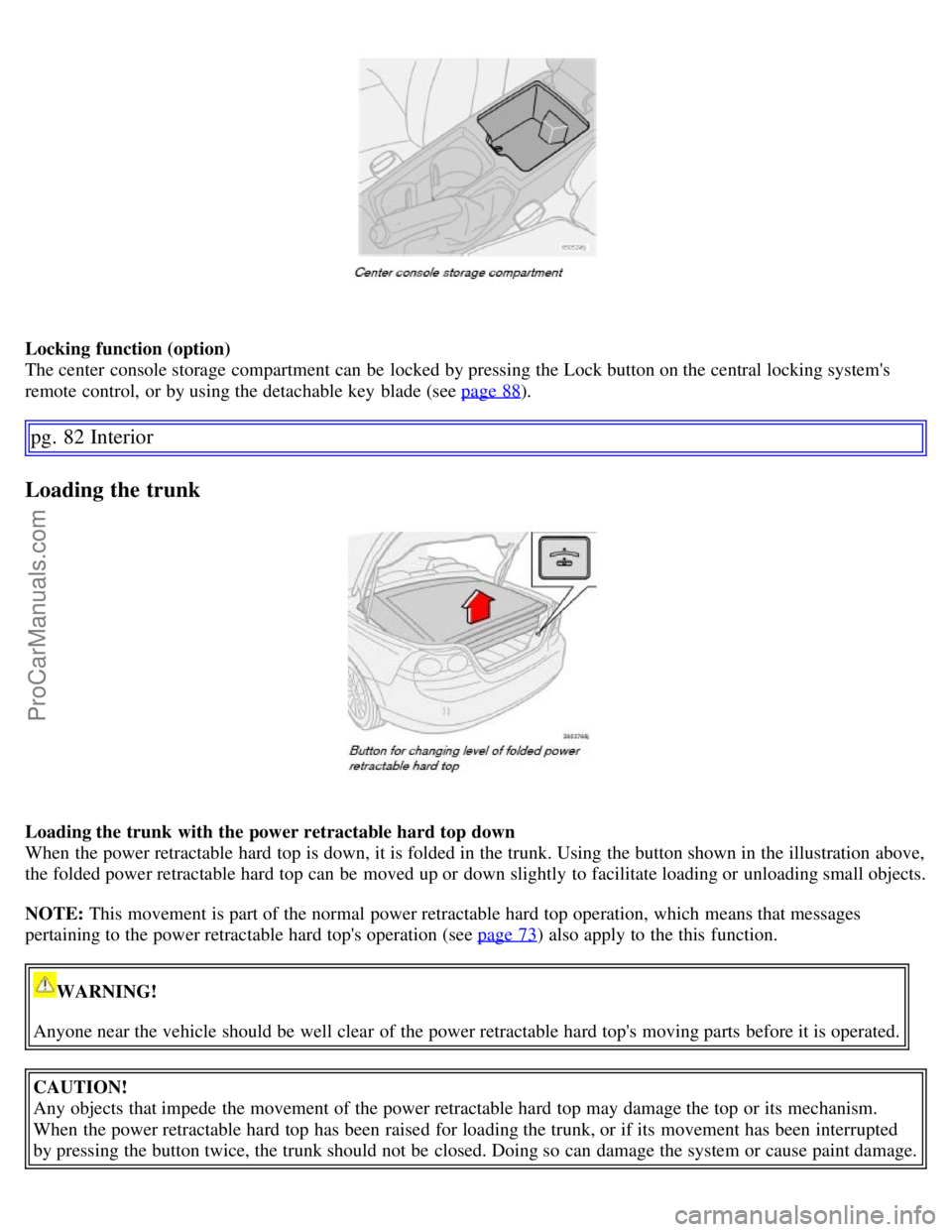
Locking function (option)
The center console storage compartment can be locked by pressing the Lock button on the central locking system's
remote control, or by using the detachable key blade (see page 88
).
pg. 82 Interior
Loading the trunk
Loading the trunk with the power retractable hard top down
When the power retractable hard top is down, it is folded in the trunk. Using the button shown in the illustration above,
the folded power retractable hard top can be moved up or down slightly to facilitate loading or unloading small objects.
NOTE: This movement is part of the normal power retractable hard top operation, which means that messages
pertaining to the power retractable hard top's operation (see page 73
) also apply to the this function.
WARNING!
Anyone near the vehicle should be well clear of the power retractable hard top's moving parts before it is operated.
CAUTION!
Any objects that impede the movement of the power retractable hard top may damage the top or its mechanism.
When the power retractable hard top has been raised for loading the trunk, or if its movement has been interrupted
by pressing the button twice, the trunk should not be closed. Doing so can damage the system or cause paint damage.
ProCarManuals.com
Page 93 of 182
well as decreasing fuel consumption while the engine is warming up. For winter use, 5W -30 oil, particularly the
synthetic type1, is recommended. Be sure to use good quality oil but do not use cold-weather oil for hard driving or in
warm weather. See page 191
for more information.
The load placed on the battery is greater during the winter since the windshield wipers, lighting, etc. are used more
often. Moreover, the capacity of the battery decreases as the temperature drops. In very cold weather, a poorly charged
battery can freeze and be damaged. It is therefore advisable to check the state of charge more frequently and spray an
anti-rust oil on the battery posts.
Volvo recommends the use of snow tires on all four wheels for winter driving - see the chapter "Wheels and tires."
To prevent the washer fluid reservoir from freezing, add washer solvents containing antifreeze (see page 157 for the
location of the washer fluid reservoir). This is important since dirt is often splashed on the windshield during winter
driving, requiring the frequent use of the washers and wipers. Volvo Washer Solvent should be diluted as follows:
Down to 14° F (-10° C): 1 part washer solvent and 4 parts water Down to 5° F (-15° C): 1 part washer solvent and 3
parts water Down to 0° F (-18° C): 1 part washer solvent and 2 parts water Down to -18° F (-28° C): 1 part washer
solvent and 1 part water.
Use Volvo Teflon Lock Spray in the locks.
NOTE: Avoid using de -icing sprays as they can cause damage to the locks.
Conserving electrical current
Keep the following in mind to help minimize battery drain:
When the engine is not running, avoid turning the ignition key to position II. Many electrical systems (the audio
system, the optional navigation system, power windows, etc) will function with the ignition key in position I. This
position reduces drain on the battery.
Please keep in mind that using systems, accessories, etc that consume a great deal of current when the engine is not
1. Synthetic oil is not used when the oil is changed at the normal maintenance intervals except at owner request and at additional charge.
pg. 100 Starting and driving
General information
running could result in the battery being completely drained.
The optional 12 volt socket in the trunk provides electrical current even with the ignition switched off, which drains
the battery.
NOTE: If the ignition is switched on, a warning message will be displayed in the text window in the instrument panel
when the battery charge is low.
An energy conserving function designed into the vehicle's electrical system will switch off certain functions or reduce
the load on the battery by, e.g., reducing the audio system's volume.
Before a long distance trip
It is always worthwhile to have your vehicle checked by a trained and qualified Volvo service technician before
driving long distances. Your retailer will also be able to supply you with bulbs, fuses, spark plugs and wiper blades for
your use in the event that problems occur.
As a minimum, the following items should be checked before any long trip:
Check that engine runs smoothly and that fuel consumption is normal.
Check for fuel, oil, and fluid leakage
Have the transmission oil level checked2.
Check condition of drive belts.
ProCarManuals.com