steering wheel VOLVO C70 2006 Owner's Manual
[x] Cancel search | Manufacturer: VOLVO, Model Year: 2006, Model line: C70, Model: VOLVO C70 2006Pages: 182, PDF Size: 3.35 MB
Page 108 of 182
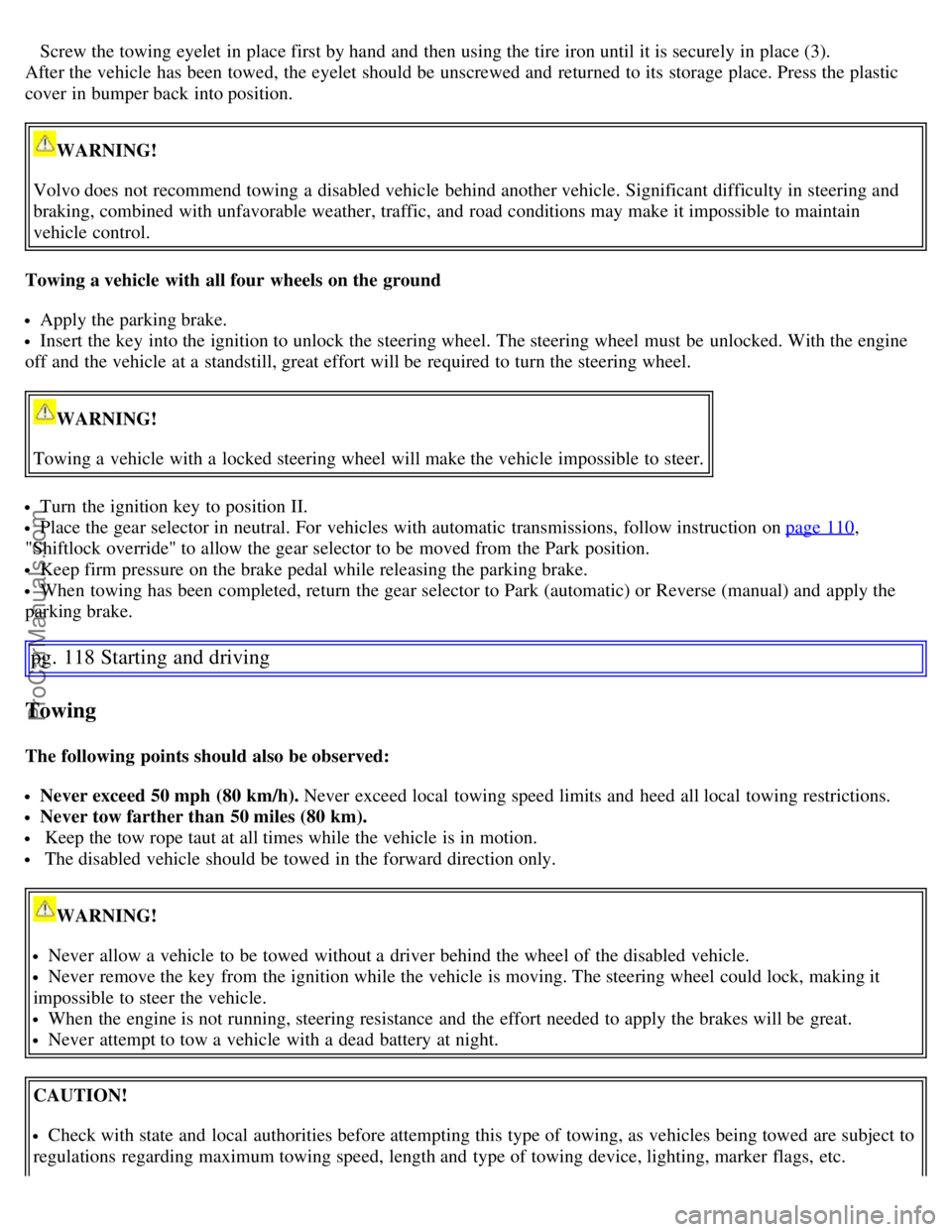
Screw the towing eyelet in place first by hand and then using the tire iron until it is securely in place (3).
After the vehicle has been towed, the eyelet should be unscrewed and returned to its storage place. Press the plastic
cover in bumper back into position.
WARNING!
Volvo does not recommend towing a disabled vehicle behind another vehicle. Significant difficulty in steering and
braking, combined with unfavorable weather, traffic, and road conditions may make it impossible to maintain
vehicle control.
Towing a vehicle with all four wheels on the ground
Apply the parking brake.
Insert the key into the ignition to unlock the steering wheel. The steering wheel must be unlocked. With the engine
off and the vehicle at a standstill, great effort will be required to turn the steering wheel.
WARNING!
Towing a vehicle with a locked steering wheel will make the vehicle impossible to steer.
Turn the ignition key to position II.
Place the gear selector in neutral. For vehicles with automatic transmissions, follow instruction on page 110,
"Shiftlock override" to allow the gear selector to be moved from the Park position.
Keep firm pressure on the brake pedal while releasing the parking brake.
When towing has been completed, return the gear selector to Park (automatic) or Reverse (manual) and apply the
parking brake.
pg. 118 Starting and driving
Towing
The following points should also be observed:
Never exceed 50 mph (80 km/h). Never exceed local towing speed limits and heed all local towing restrictions.
Never tow farther than 50 miles (80 km).
Keep the tow rope taut at all times while the vehicle is in motion.
The disabled vehicle should be towed in the forward direction only.
WARNING!
Never allow a vehicle to be towed without a driver behind the wheel of the disabled vehicle.
Never remove the key from the ignition while the vehicle is moving. The steering wheel could lock, making it
impossible to steer the vehicle.
When the engine is not running, steering resistance and the effort needed to apply the brakes will be great.
Never attempt to tow a vehicle with a dead battery at night.
CAUTION!
Check with state and local authorities before attempting this type of towing, as vehicles being towed are subject to
regulations regarding maximum towing speed, length and type of towing device, lighting, marker flags, etc.
ProCarManuals.com
Page 126 of 182

Your vehicle is equipped with a tire sealing system that enables you to temporarily seal a hole in the tread surface and
re-inflate a flat tire, or to adjust a tire's inflation pressure.
The tire sealing kit is stowed behind the ski hatch in the center of the rear seat backrest.
The jack, and lug wrench are secured in a foam plastic block located under the floor panel in the trunk.
The system consists of an air compressor, an integrated container for the sealing compound, wiring to connect the
system to the vehicle's electrical system via one of the 12-volt sockets, and a hose used to connect the system to the
tire's inflation valve.
NOTE:
The tire sealing system is only intended to seal holes on the tire's tread area, not the sidewall.
Tires with large holes or tears cannot be repaired with the tire sealing system.
WARNING!
After using the tire sealing system, the vehicle should not be driven farther than approximately 120 miles (200
km). Have the tire replaced as soon as possible.
The vehicle should not be driven faster than 50 mph (80 km/h) while using a tire that has been temporarily
repaired with the tire sealing system.
After using the tire sealing system, drive carefully and avoid abrupt steering maneuvers and sudden stops.
pg. 142 Wheels and tires
Tire sealing system
ProCarManuals.com
Page 127 of 182

Temporarily repairing a flat tire
Before using the tire sealing system, observe the following:
WARNING!
Never leave the tire sealing system unattended when it is operating.
Keep the tire sealing system kit away from children.
The vehicle's engine should be running when the tire sealing system is used to avoid battery drain. Therefore, be
sure the vehicle is parked in a well ventilated place before using the system.
Be sure the vehicle is parked safely off the road and away from moving traffic.
Apply the parking brake.
Do not remove any foreign objects (nails, etc.) from the tire.
Temporarily repairing a flat tire is done in two stages.
In the first stage, the hole is sealed by pumping sealing compound into the tire. The car is then driven a short
distance to distribute the sealing compound in the tire.
In the second stage, the tire's inflation pressure is checked and adjusted if necessary.
Stage 1: Sealing the hole
Peel off the speed limit sticker (1) and affix it to the steering wheel hub where it will be clearly visible to the driver.
Ensure that the orange switch (2) is in position 0 (the 0 side of the switch should be pressed down).
Pull out the electrical wire (5) and hose (4) from the side compartment (3).
Remove the valve cap from the tire's inflation valve and screw the hose connector onto the valve as tightly as
possible by hand.
Connect the electrical wire to the nearest 12-volt socket in the vehicle.
Release the safety catch (6) and turn the orange colored section of the sealing kit (7), which holds the sealing
compound container, 90 degrees until it clicks into the vertical position.
Start the vehicle's engine.
Start the tire sealing system's compressor by pressing the switch (2) to position I.
NOTE: The air pressure gauge (9) will temporarily show an increase in pressure to approximately 88 psi (6 bar) while
the sealing compound is being pumped into the tire. The pressure should return to a normal level after approximately
one minute.
pg. 143 Wheels and tires
Tire sealing system
WARNING!
ProCarManuals.com
Page 128 of 182

Contact with the sealing compound may cause skin irritation. If contact occurs, wash the affected area immediately
with soap and water.
Never stand next to the tire being inflated when the compressor is in operation. If cracks, bubbles, etc. form on the
tire, switch off the compressor immediately. If there is visible damage to the sidewall or the rim, the tire cannot be
repaired. The vehicle should not be driven if this occurs. Contact a towing service or Volvo On Call Roadside
Assistance if applicable.
Within seven minutes, inflate the tire to between 22 - 50 psi (1.8 - 3.5 bar). Switch off the compressor briefly to get a
clear reading from the pressure gauge (9).
CAUTION!
If the pressure remains below 22 psi (1.8 bar) after approximately seven minutes, turn off the compressor. In this
case, the hole is too large to be sealed and the vehicle should not be driven.
Disconnect the electrical wire from the 12-volt socket.
Unscrew the hose from the tire's inflation valve and reinstall the valve cap.
Fold down the orange section of the tire sealing system to its original (horizontal) position and press the safety catch
into place.
Safely stow the tire sealing system kit in a convenient place as it will soon be used again to check the tire's inflation
pressure.
Immediately drive the vehicle for approximately 2 miles (3 km) to distribute the sealing compound in the tire.
WARNING!
If heavy vibrations, unsteady steering behavior, or noises should occur while driving, reduce speed and park the car
in a safe place. Recheck the tire for bumps, cracks, or other visible damage, and recheck its inflation pressure. If the
pressure is below 16 psi (1.3 bar), do not continue driving. Have the vehicle towed to a workshop or Volvo retailer.
Stage 2: Checking inflation pressure
Park the car in a safe place.
Ensure that the orange switch (2) is in position 0 (the 0 side of the switch should be pressed down).
Remove the valve cap from the tire's inflation valve and screw the hose connector onto the valve as tightly as
possible by hand.
Connect the electrical wire to the nearest 12-volt socket in the vehicle.
Start the vehicle's engine.
Check the tire's inflation pressure on the gauge (9).
NOTE: In dark conditions, switching on the tire sealing system's compressor will illuminate the pressure gauge.
Inflate the tire to the correct pressure as indicated in the tire inflation tables on page 116. If the tire needs to be
inflated, start the tire sealing system's compressor. If necessary, release air from the tire by pressing the vent button (8).
Turn off the compressor (press switch 2 to the 0 position) when the correct inflation pressure has been reached.
pg. 144 Wheels and tires
Tire sealing system
CAUTION!
The compressor should not be used for more than ten minutes at a time to avoid overheating.
ProCarManuals.com
Page 143 of 182

Fluid type: Volvo power steering fluid or equivalent.
Replace: No fluid change required
WARNING!
If a problem should occur in the power steering system or if the vehicle has no electrical current and must be towed,
it is still possible to steer the vehicle. However, keep in mind that greater effort will be required to turn the steering
wheel.
pg. 161 Maintenance and servicing
Wiper blades
Replacing windshield wiper blades
Fold out the wiper arm and fold out the wiper blade at a 90° angle to the wiper arm.
Pull off the wiper blade from the attachment, straight to the side.
Slide in a new wiper blade at a 90° angle to the wiper arm.
Fold in the wiper blade under the metal plate and fold the wiper arm down.
NOTE: The wiper blades are different lengths. The blade on the driver's side is longer than the one on the passenger's
side.
ProCarManuals.com
Page 159 of 182

The system will automatically start the next time the key is turned to position I.
Turn the volume dial or use the buttons in the optional steering wheel keypad to adjust the volume level. The volume
level is also adjusted automatically according to the vehicle's speed, see page 177
for more information on this
function.
Steering wheel keypad
The four buttons on the steering wheel keypad can be used to control the audio system. The steering wheel keypad can
be used to adjust volume, shift between preset stations and change CD tracks. Press one of the two left-hand buttons
briefly to change to the next/previous preset radio station, or to go to the next/previous track on a CD. Press and hold
down these buttons to search within a track on a CD.
Daytime/twilight display
In daylight the information is displayed against a light background. In darkness it is displayed against a dark
background.
Sound source
A sound source can be selected by pressing AM/FM (2) or CD (3). Press AM/FM repeatedly to toggle between FM1,
FM2, and AM. The currently selected sound source will be shown in the display.
Sound settings
Press SOUND (5). Press this button repeatedly until you come to the setting that you wish to change.
Turn the TUNING dial (4) to make the desired setting.
The following settings can be made:
BASS -set the bass level
TREBLE-set the treble level
BALANCE-set the left/right sound balance
FADER-set the front/rear sound balance
SUBWOOFER (option)-set the level for the subwoofer (bass speaker)
pg. 177 Audio
Audio functions
CENTER1-make settings for the center speaker
SURROUND
1-make settings for surround sound
Subwoofer (option)
To switch the subwoofer on or off:
Press MENU followed by ENTER.
ProCarManuals.com
Page 165 of 182
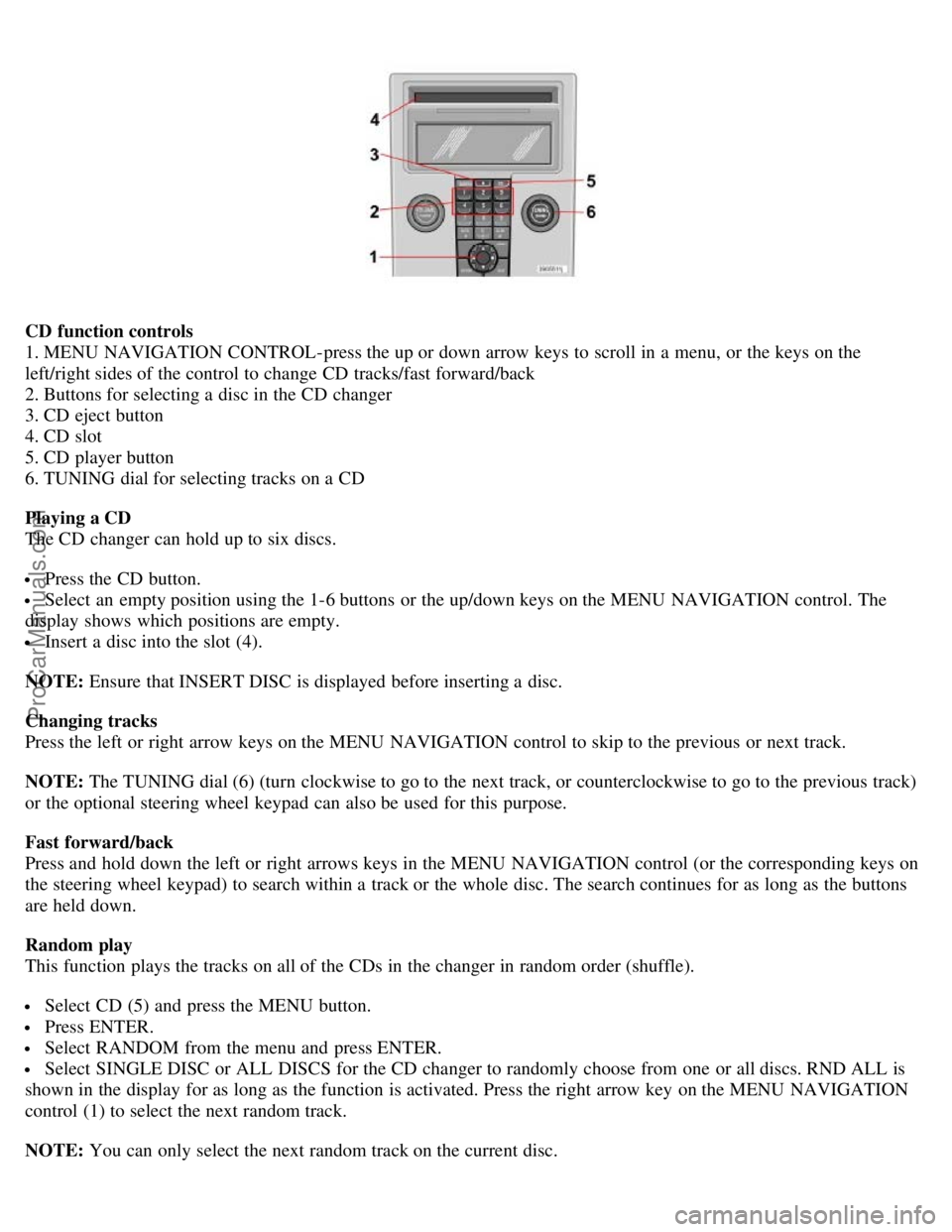
CD function controls
1. MENU NAVIGATION CONTROL-press the up or down arrow keys to scroll in a menu, or the keys on the
left/right sides of the control to change CD tracks/fast forward/back
2. Buttons for selecting a disc in the CD changer
3. CD eject button
4. CD slot
5. CD player button
6. TUNING dial for selecting tracks on a CD
Playing a CD
The CD changer can hold up to six discs.
Press the CD button.
Select an empty position using the 1-6 buttons or the up/down keys on the MENU NAVIGATION control. The
display shows which positions are empty.
Insert a disc into the slot (4).
NOTE: Ensure that INSERT DISC is displayed before inserting a disc.
Changing tracks
Press the left or right arrow keys on the MENU NAVIGATION control to skip to the previous or next track.
NOTE: The TUNING dial (6) (turn clockwise to go to the next track, or counterclockwise to go to the previous track)
or the optional steering wheel keypad can also be used for this purpose.
Fast forward/back
Press and hold down the left or right arrows keys in the MENU NAVIGATION control (or the corresponding keys on
the steering wheel keypad) to search within a track or the whole disc. The search continues for as long as the buttons
are held down.
Random play
This function plays the tracks on all of the CDs in the changer in random order (shuffle).
Select CD (5) and press the MENU button.
Press ENTER.
Select RANDOM from the menu and press ENTER.
Select SINGLE DISC or ALL DISCS for the CD changer to randomly choose from one or all discs. RND ALL is
shown in the display for as long as the function is activated. Press the right arrow key on the MENU NAVIGATION
control (1) to select the next random track.
NOTE: You can only select the next random track on the current disc.
ProCarManuals.com
Page 181 of 182

SEE MANUAL37
SERVICE REQUIRED37
Shiftlock2
Shiftlock override110
Side impact protection (SIPS) airbags21
Side marker light, replacing167
Sockets, 12 volt47
Spare tire138
Speedometer32
Spin control - SC113
SRS warning light35
Stability system113, 114
Start inhibitor (immobilizer)86
Starting the car105
Station formats180
Steering wheel adjustment46
Steering wheel lock104
Stone chips, paint touch-up151
STOP ENGINE37
STOP SAFELY37
Storage compartments79
Storing wheels and tires126
T
Tachometer32
Tail light bulb holder, removing168
Technician certification195
Temperature gauge32
Temporary cover75
Temporary spare tire138
Three-way catalytic converter194
TIME FOR REGULAR SERVICE37
Tire inflation pressure tables130
Tire rotation137
Tires, changing138
Tires, general information126
Tires, storing126
Traction control - TC113
Transmission, automatic108
Tread wear indicator127
Trip computer41
Trip odometer32
Trunk, loading82
Trunk divider71
Trunk lighting, replacing169
ProCarManuals.com