light VOLVO C70 2006 Owner's Guide
[x] Cancel search | Manufacturer: VOLVO, Model Year: 2006, Model line: C70, Model: VOLVO C70 2006Pages: 182, PDF Size: 3.35 MB
Page 54 of 182

If your hand -held transmitter appears to program the HomeLink Universal Transceiver but the programmed button
does not activate the garage door, your garage door opener may have a rolling code.
Press the programmed HomeLink button. If the garage door opener has the rolling code feature, the HomeLink
indicator light flashes rapidly and then glows steadily after approximately 2 seconds.
To train a rolling code garage door opener, follow these instructions after programming the desired transceiver
button according to "Programming the transceiver." The help of a second person may make training easier.
1. Locate the training button on the garage door opener motor head unit. The location and color of the training button
may vary. If you encounter difficulty, refer to the garage door opener owner's manual or call toll-free 1-800-355-3515
(Internet: http://www.HomeLink.com
).
2. Press the "training" button on the garage door opener motor head unit until the "training" light comes on.
3. Press and release the programmed HomeLink button. Press and release the programmed HomeLink button a second
time to complete the training process.
4. Some garage door openers may require you to do this procedure a third time to complete the training.
5. The programmed button on your HomeLink Universal Transceiver should now operate your garage door opener.
The original handheld transmitter can also be used, as desired, to operate the garage door.
The remaining two HomeLink buttons can be programmed in the same way. In the event of any problems in
programming the HomeLink Universal Transceiver, call toll-free 1-800- 355-3515 (Internet:
http://www.HomeLink.com
).
Operating the HomeLink Universal Transceiver
Once programmed, the HomeLink Universal Transceiver can be used in place of your handheld transmitters.
To operate, the key must be turned to the "accessory" position (II) or the engine must be running. Press the
programmed HomeLink button to activate the garage door, driveway gate, security lightning, home security system etc.
Your original hand -held transmitters may, of course, be used at any time.
Erasing programmed buttons
Individual buttons cannot be erased, To erase all three programmed buttons:
1. Turn the ignition key to the "accessory" position (II).
2. Hold down the two outside buttons on the HomeLink Universal Transceiver for about 20 seconds, until HomeLink's
indicator light begins to flash.
3. Release both buttons.
pg. 55 Instruments and controls
Home Link® Universal Transceiver (option)
The HomeLink buttons can be reprogrammed using the procedures described on the previous page.
Reprogramming a single HomeLink button
1. Press and hold the desired HomeLink button. Do not release the button until step 3 has been completed.
2. When the indicator light begins to flash slowly (after approximately 20 seconds), position your hand -held
transmitter 2 to 5 in. (5 to 12 cm) away from the HomeLink surface.
3. Press and hold the hand -held transmitter button. The HomeLink indicator light will flash first slowly, then rapidly.
When the indicator light flashes rapidly, release both buttons.
ProCarManuals.com
Page 57 of 182

Display
The display above the climate control panel shows the climate settings that have been made.
Personal settings
There are two functions in the climate system that can be set to your preferences:
Blower speed in Auto mode.
Timer controlled recirculation of the air in the passenger compartment. For information about how to make these
settings, see the Personal settings section on page 52
.
Climate system sensors
The sunlight sensor on the upper side of the dashboard and the passenger compartment temperature sensor, located
behind the climate system control panel, should not be obstructed.
Acceleration
The air conditioning system is temporarily switched off during full throttle acceleration.
pg. 59 Climate
Air vents
Air vents in the dashboard
A. Open
B. Closed
C. Horizontal air flow
D. Vertical air flow
Direct the outer air vents toward the side windows to defrost.
pg. 60 Climate
Electronic climate control (ECC)
ProCarManuals.com
Page 59 of 182

pg. 61 Climate
Electronic climate control (ECC)
If the air in the car recirculates for too long, there is a risk of condensation forming on the insides of the windows,
especially in winter.
Timer
The timer function minimizes the risk of fogging, or stale air when the recirculation function is selected. See page 52
for information on setting the recirculation timer.
NOTE: Recirculation is always disengaged if the defroster button is engaged to clear ice or condensation from the side
windows.
4. Defroster
Directs airflow to the windshield and side windows and increases blower speed. The LED in the defroster
button lights up when this function is activated. The air conditioning system is controlled to provide maximum air
dehumidification. The air is not recirculated.
5. Airflow controls
Press one of the three buttons in the illustration to activate the selected airflow. A symbol in the display
above the climate control panel and a lit LED in the selected button indicate that the manual function has been
selected. With manually selected airflow both warm and cool air can be selected. See also the table on page 63
.
6. Air conditioning On/Off
The air conditioning system is controlled automatically by the system when the ON LED is lit to maintain
the selected temperature.
When OFF is selected and the OFF LED is lit, the air conditioning system is deactivated. Other functions are still
controlled automatically.
When Defroster (4) is selected, the air conditioning system is activated for maximum dehumidifying.
7 and 8. Heated front seats (option)
Maximum heating: Press the button once - both LEDs light up.
Reduced heating: Press the button a second time - one LED lights up.
Seat heating off: Press the button a third time - no LEDs are lit.
9. Rear window and door mirror defrosters
Press to defrost the rear window and door mirrors.
ProCarManuals.com
Page 60 of 182

The rear window and door mirrors are defrosted simultaneously if the switch is pressed once. The function is active if
one LED is lit in the switch. The door mirrors are deactivated automatically after approximately 6 minutes. The rear
window is deactivated after approximately 12 minutes.
NOTE: This function is automatically switched off when the power retractable hard top is down.
10. Temperature selector
The temperatures on the driver's and passenger's sides can be set separately using the knob (with the
thermometer in it). The temperature can be set for both sides of the car when the ignition is switched on (both LEDs
will be on), which means that a temperature setting will apply to both sides of the car.
To set the temperature on one side of the car:
pg. 62 Climate
Electronic climate control (ECC)
Press the knob once. The LED for one side of the car will light up. Turn the knob to adjust the temperature.
Press the knob a second time to set the temperature on the opposite side of the car.
Press the knob a third time to set the temperature on both sides of the car the same time.
NOTE: Selecting a temperature that is higher or lower than necessary will not heat or cool the passenger compartment
faster.
pg. 63 Climate
Electronic climate control (ECC)
pg. 64 Climate
ProCarManuals.com
Page 62 of 182

2 0 0 6
VOLVO C70
Chapter 5 - Interior
pg. 65 Interior
Front seats 66
Power seats68
Power retractable hard top70
Temporary cover75
Wind blocker76
Interior lighting77
Storage compartments79
Loading the trunk82
Carrying long loads84
pg. 66 Interior
Front seats
Manual passenger's seat adjustment
The passenger's seat can be manually adjusted in a number of ways to provide a comfortable driving and sitting
position.
1. Forward-rearward: Pull the lever up and slide the seat to the position of your choice.
2. Use this control to raise or lower the front edge of the seat cushion.
3. Use this control to raise or lower the rear edge of the seat cushion.
4. Turn this knob (option on some passenger's seats) to adjust the firmness of the lumbar support.
5. Turn this knob to adjust the backrest tilt.
6. Control panel for power seats.
ProCarManuals.com
Page 71 of 182

Wind blocker
Wind blocker (retailer installed accessory)
The wind blocker is intended for use while driving with the power retractable hard top down to help reduce swirling
breezes in the passenger compartment.
Installing the wind blocker
Unfold the wind blocker to its full width.
Unfold the supports on both rear sides.
Slide the winder blocker's rear supports under the rear head restraints so that they rest on the upper edge of the
backrest.
CAUTION!
Slide in the supports carefully to avoid damaging the upholstery.
Press the side lock tabs into the holes in the side panels until they click into place.
Raise the wind blocker.
WARNING!
Make sure the wind blocker is securely attached. An improperly secured wind blocker may cause injury to occupants
of the vehicle or to other motorists.
When not in use, the wind blocker should be stored in its bag, in the trunk, against the rear seat backrest.
pg. 77 Interior
Interior lighting
ProCarManuals.com
Page 72 of 182

Interior lighting
1. Driver's side reading light
2. Courtesy lighting
3. Passenger's side reading light
The front seat reading lights can be switched on and off by pressing buttons 1 or 3.
The courtesy lighting (2) can be set to three positions:
Off - Press the right side of the button.
Neutral position - the interior courtesy lighting comes on when a door is opened, and is switched off when the door
is closed.
ON - Press the left side of the button.
Rear seat reading lights
The rear reading lights can be switched on or off by pressing the respective buttons.
Courtesy lighting - automatic function
The interior lighting has a built-in automatic function that switches on the courtesy lighting for 30 seconds when:
the car is unlocked from the outside using the key or remote control
the engine is switched off and the ignition key is turned to the 0 position.
The courtesy lighting lights up or remains on for 5 minutes when:
one of the doors is open
the courtesy lighting has not been switched off (the right side of button 2 depressed).
The automatic lighting goes out when:
the engine is started
ProCarManuals.com
Page 73 of 182
the car is locked from the outside using the key or remote control.
If the courtesy lighting is not switched off manually, it will be turned off automatically 5 minutes after the engine has
been switched off.
pg. 78 Interior
Interior lighting
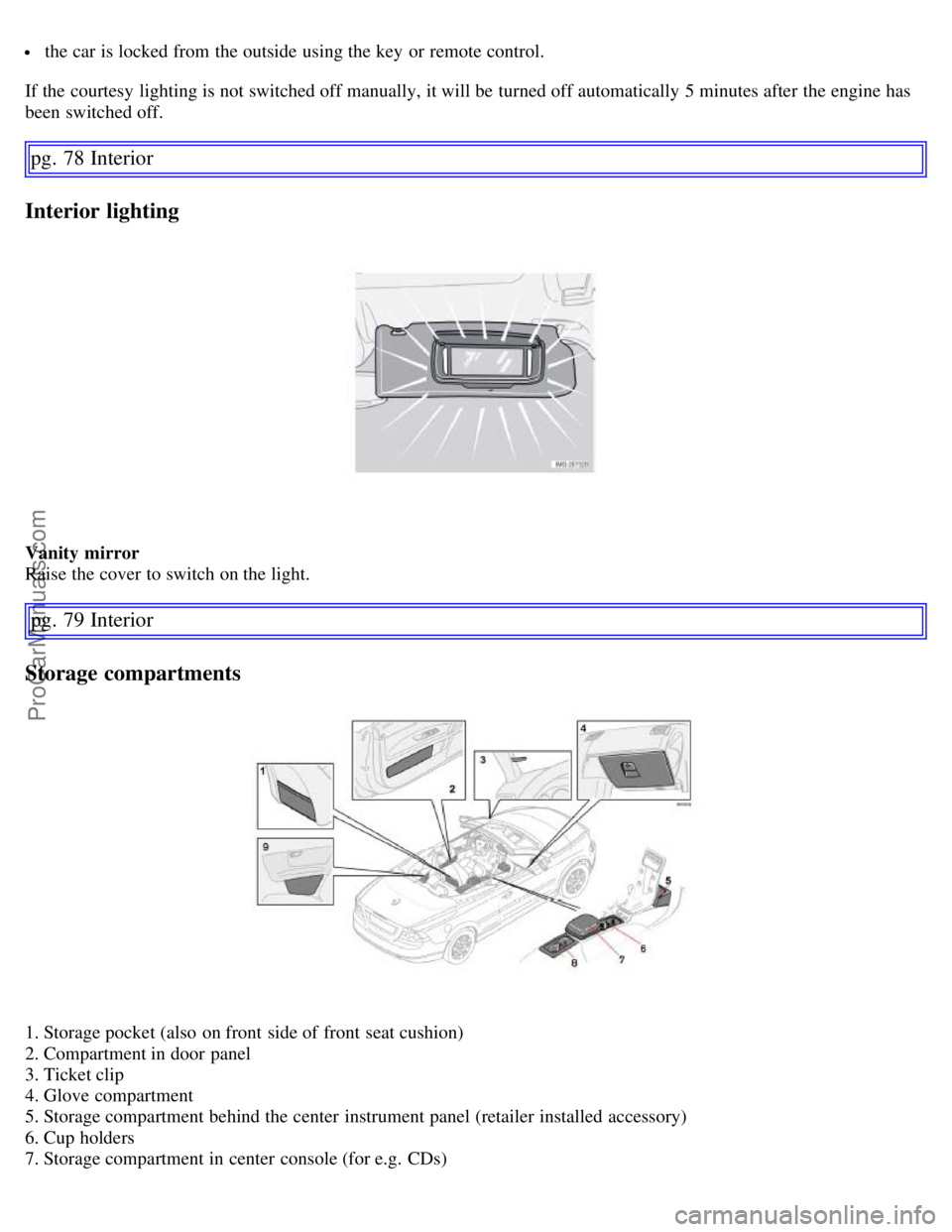
Vanity mirror
Raise the cover to switch on the light.
pg. 79 Interior
Storage compartments
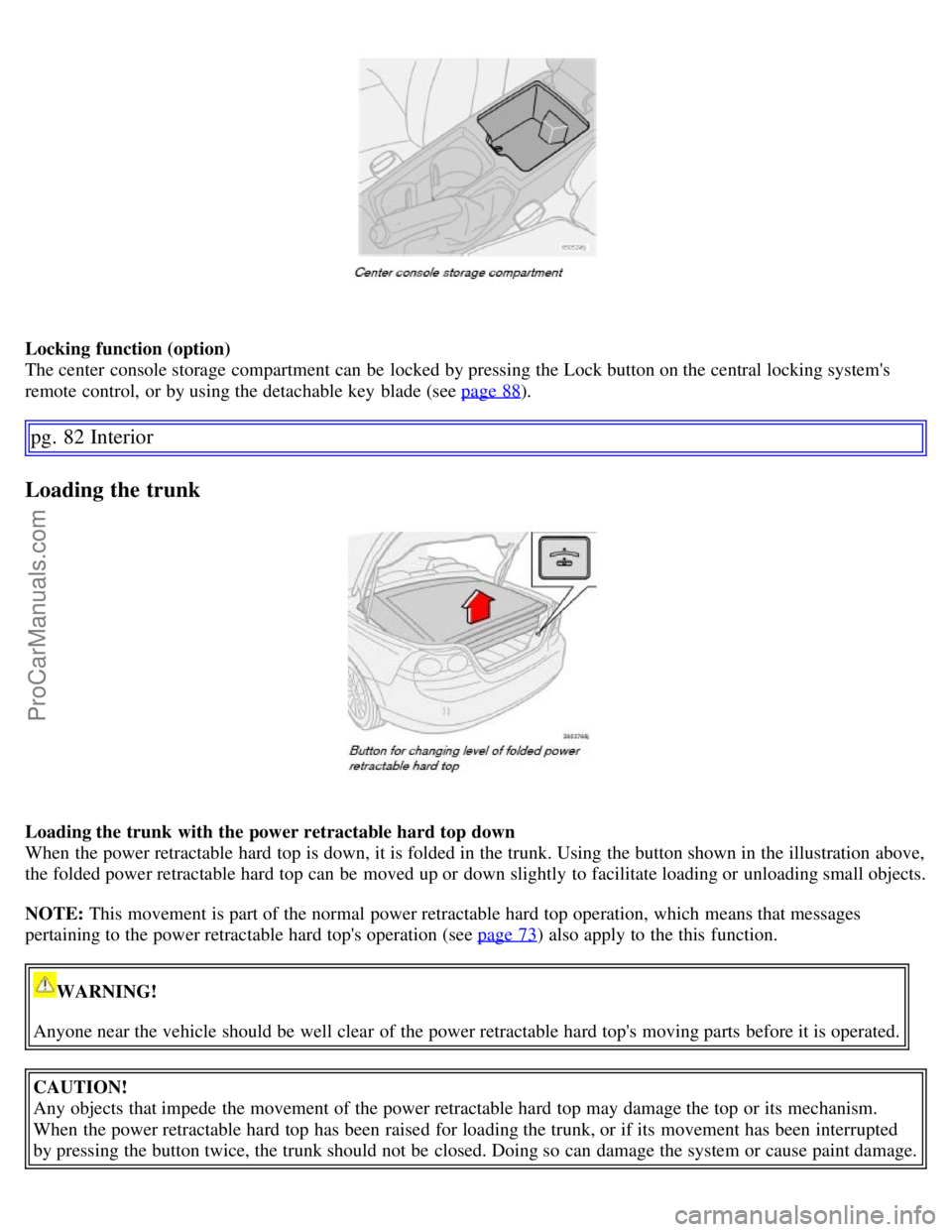
1. Storage pocket (also on front side of front seat cushion)
2. Compartment in door panel
3. Ticket clip
4. Glove compartment
5. Storage compartment behind the center instrument panel (retailer installed accessory)
6. Cup holders
7. Storage compartment in center console (for e.g. CDs)
ProCarManuals.com
Page 76 of 182
Locking function (option)
The center console storage compartment can be locked by pressing the Lock button on the central locking system's
remote control, or by using the detachable key blade (see page 88
).
pg. 82 Interior
Loading the trunk
Loading the trunk with the power retractable hard top down
When the power retractable hard top is down, it is folded in the trunk. Using the button shown in the illustration above,
the folded power retractable hard top can be moved up or down slightly to facilitate loading or unloading small objects.
NOTE: This movement is part of the normal power retractable hard top operation, which means that messages
pertaining to the power retractable hard top's operation (see page 73
) also apply to the this function.
WARNING!
Anyone near the vehicle should be well clear of the power retractable hard top's moving parts before it is operated.
CAUTION!
Any objects that impede the movement of the power retractable hard top may damage the top or its mechanism.
When the power retractable hard top has been raised for loading the trunk, or if its movement has been interrupted
by pressing the button twice, the trunk should not be closed. Doing so can damage the system or cause paint damage.
ProCarManuals.com
Page 77 of 182

To raise the level of the folded power retractable hard top:
Open the trunk.
Press the button on the right side of the trunk opening.
NOTE:
There may be a delay of several seconds before the folded power retractable hard top begins to move.
Movement of the top can be stopped by pressing the button again.
The folded power retractable hard top will raise slightly. If an audible signal sounds during this operation, check the
information display in the center instrument panel for messages.
Lift the trunk divider (see page 71) to provide an opening into the trunk.
When the objects to be loaded have been placed in the trunk, press down the trunk divider.
Press the button to move the power retractable hard top downward. Movement of the top can be stopped by pressing
the button again.
Close the trunk.
NOTE: The trunk cannot be closed while the folded power retractable hard top is in the upper position.
Raising and lowering the folded top in the event of a fault
If the message ROOF FAILURE SEE MANUAL is displayed, the folded power
pg. 83 Interior
retractable hard top can only be lowered in the trunk.
Loading the trunk
CAUTION!
Damage may be unavoidable if the power retractable hard top must be operated when this message is displayed.
Press the button again and hold it down. After approximately 2 seconds, the power retractable hard top will begin to
move. Keep the button depressed until the folded top is lowered.
NOTE: An audible signal will sound during this entire operation.
Load anchoring eyelets
The eyelets in the trunk can be used to fasten accessory load and lashing straps, load nets, and other load anchors.
ProCarManuals.com