steering VOLVO C70 2006 Owner's Guide
[x] Cancel search | Manufacturer: VOLVO, Model Year: 2006, Model line: C70, Model: VOLVO C70 2006Pages: 182, PDF Size: 3.35 MB
Page 156 of 182

into the mounting clips again. The mounting clips then expand, holding the upholstery in position.
pg. 173 Maintenance and servicing
Fuses
Fuses in the passenger compartment
37. Not in use
38. Not in use
39. Not in use
40. Not in use
41. Not in use
42. Not in use
43. Audio system, Volvo Navigation system (option),15A
44. Supplemental Restrain System (SRS), 10A
45. 12-volt socket in passenger compartment, 15A
46. Lighting - glove compartment, instrument panel, and footwells, 5A
47. Interior lighting, 5A
48. Windshield washers, 15A
49. Supplemental Restrain System (SRS), Occupant Weight Sensor (OWS), 10A
50. Not in use
51. Park assist (option), 10A
52. Transmission control module (TCM), 5A
53. ABS, power steering, Bi -Xenon headlights (option), 10A
54. Engine control module, turbo (ECM), 10A
55. Not in use
56. Alarm siren control module, 10A
57. On-board diagnostic socket, brake light switch,15A
58. Right high beam, auxiliary lights relay, 7.5A
59. Left high beam, 7.5A
60. Heated driver's seat (option), 15A
61. Heated passenger's seat (option), 15A
62. Not in use
63. Power window - rear passenger's side, 20A
64. Lock indicator lights i door panels, Volvo Navigation system (option), 5A
65. Audio system, 5A
66. Audio system control module (ICM), climate system, 10A
67. Not in use
68. Cruise control, 5A
69. Climate system, rain sensor (option), 5A
70. Not in use
71. Not in use
ProCarManuals.com
Page 159 of 182

The system will automatically start the next time the key is turned to position I.
Turn the volume dial or use the buttons in the optional steering wheel keypad to adjust the volume level. The volume
level is also adjusted automatically according to the vehicle's speed, see page 177
for more information on this
function.
Steering wheel keypad
The four buttons on the steering wheel keypad can be used to control the audio system. The steering wheel keypad can
be used to adjust volume, shift between preset stations and change CD tracks. Press one of the two left-hand buttons
briefly to change to the next/previous preset radio station, or to go to the next/previous track on a CD. Press and hold
down these buttons to search within a track on a CD.
Daytime/twilight display
In daylight the information is displayed against a light background. In darkness it is displayed against a dark
background.
Sound source
A sound source can be selected by pressing AM/FM (2) or CD (3). Press AM/FM repeatedly to toggle between FM1,
FM2, and AM. The currently selected sound source will be shown in the display.
Sound settings
Press SOUND (5). Press this button repeatedly until you come to the setting that you wish to change.
Turn the TUNING dial (4) to make the desired setting.
The following settings can be made:
BASS -set the bass level
TREBLE-set the treble level
BALANCE-set the left/right sound balance
FADER-set the front/rear sound balance
SUBWOOFER (option)-set the level for the subwoofer (bass speaker)
pg. 177 Audio
Audio functions
CENTER1-make settings for the center speaker
SURROUND
1-make settings for surround sound
Subwoofer (option)
To switch the subwoofer on or off:
Press MENU followed by ENTER.
ProCarManuals.com
Page 165 of 182
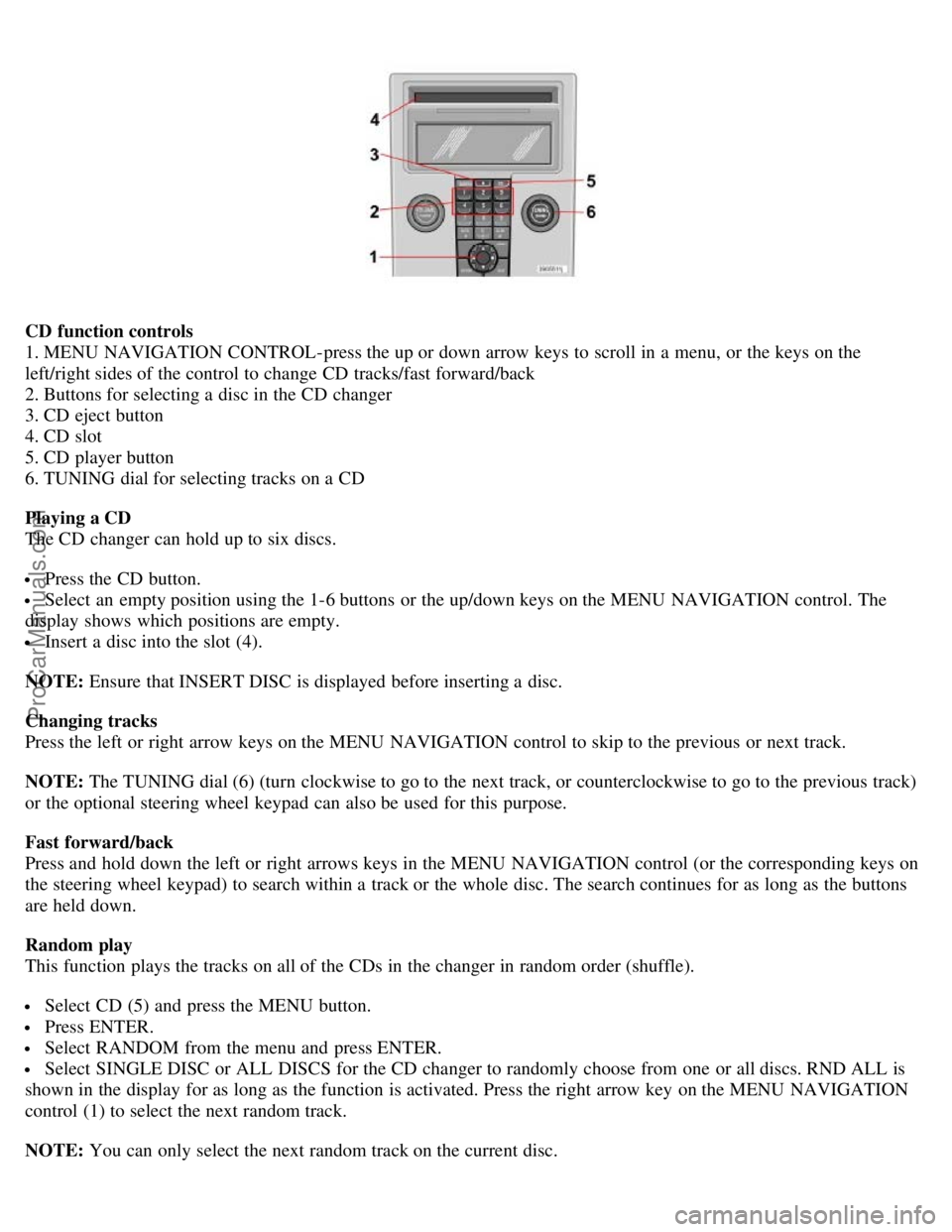
CD function controls
1. MENU NAVIGATION CONTROL-press the up or down arrow keys to scroll in a menu, or the keys on the
left/right sides of the control to change CD tracks/fast forward/back
2. Buttons for selecting a disc in the CD changer
3. CD eject button
4. CD slot
5. CD player button
6. TUNING dial for selecting tracks on a CD
Playing a CD
The CD changer can hold up to six discs.
Press the CD button.
Select an empty position using the 1-6 buttons or the up/down keys on the MENU NAVIGATION control. The
display shows which positions are empty.
Insert a disc into the slot (4).
NOTE: Ensure that INSERT DISC is displayed before inserting a disc.
Changing tracks
Press the left or right arrow keys on the MENU NAVIGATION control to skip to the previous or next track.
NOTE: The TUNING dial (6) (turn clockwise to go to the next track, or counterclockwise to go to the previous track)
or the optional steering wheel keypad can also be used for this purpose.
Fast forward/back
Press and hold down the left or right arrows keys in the MENU NAVIGATION control (or the corresponding keys on
the steering wheel keypad) to search within a track or the whole disc. The search continues for as long as the buttons
are held down.
Random play
This function plays the tracks on all of the CDs in the changer in random order (shuffle).
Select CD (5) and press the MENU button.
Press ENTER.
Select RANDOM from the menu and press ENTER.
Select SINGLE DISC or ALL DISCS for the CD changer to randomly choose from one or all discs. RND ALL is
shown in the display for as long as the function is activated. Press the right arrow key on the MENU NAVIGATION
control (1) to select the next random track.
NOTE: You can only select the next random track on the current disc.
ProCarManuals.com
Page 180 of 182

Opening the hood157
P
Paint touch up151
Panel lighting, instrument38
Panic alarm, central locking system remote control87
Park assist115
Parking brake47
Parking light bulb, replacing166
Parking lights38
Passenger's side front airbag, disabling18
Personal settings51
PI (Program Information) seek179
Polishing149
Power door mirrors50
Power retractable hard top70
Power steering fluid160
Power windows48
Program Information seek179
Program type, audio system180
PROPOSITION 65 WARNING162
R
Radio Broadcast Data System - RBDS179
Radio station formats180
Radio text179
Rain sensor45
Reading lights77
Rear fog light38
Rear seat, accessing67
Rearview mirror49
Rearview mirror with compass (option)49
Refueling102
Remote control functions87
Remote control, battery replacement92
Remote controls, central locking system86
Replacing fuses170
Reporting safety defects10
Retractable hard top70
Roll-over Protection system (ROPS)25
S
Safety defects, reporting10
Seat belt maintenance13
Seat belt reminder13, 35
Seat belts11
Seats, front66
ProCarManuals.com
Page 181 of 182

SEE MANUAL37
SERVICE REQUIRED37
Shiftlock2
Shiftlock override110
Side impact protection (SIPS) airbags21
Side marker light, replacing167
Sockets, 12 volt47
Spare tire138
Speedometer32
Spin control - SC113
SRS warning light35
Stability system113, 114
Start inhibitor (immobilizer)86
Starting the car105
Station formats180
Steering wheel adjustment46
Steering wheel lock104
Stone chips, paint touch-up151
STOP ENGINE37
STOP SAFELY37
Storage compartments79
Storing wheels and tires126
T
Tachometer32
Tail light bulb holder, removing168
Technician certification195
Temperature gauge32
Temporary cover75
Temporary spare tire138
Three-way catalytic converter194
TIME FOR REGULAR SERVICE37
Tire inflation pressure tables130
Tire rotation137
Tires, changing138
Tires, general information126
Tires, storing126
Traction control - TC113
Transmission, automatic108
Tread wear indicator127
Trip computer41
Trip odometer32
Trunk, loading82
Trunk divider71
Trunk lighting, replacing169
ProCarManuals.com