brake VOLVO C70 2008 User Guide
[x] Cancel search | Manufacturer: VOLVO, Model Year: 2008, Model line: C70, Model: VOLVO C70 2008Pages: 246, PDF Size: 5.14 MB
Page 45 of 246

51 02 Instruments and controls
Symbols - instrument panel
Symbols - right side
1. Turn signal indicator for trailer (certain models)
If you are towing a trailer, this light will flash simultaneously with the turn signals on the trailer. If the light does not
flash when signaling, one of the turn signals on the trailer or on the car are not functioning properly.
2. Parking brake applied
This light is on when the parking brake (hand brake) is applied. The parking brake lever is situated between the front
seats. Always pull up this lever as far as possible when applying the parking brake.
NOTE
Canadian models are equipped with the second symbol.
3. SRS warning light
If this light comes on while the car is being driven, or remains on for longer than approximately 10 seconds after the
car has been started, the SRS system's diagnostic functions have detected a fault in a seat belt lock or pretensioner, a
front airbag, side impact airbag, and/or an inflatable curtain. Have the system(s) inspected by a trained and qualified
Volvo service technician as soon as possible.
4. Oil pressure warning light1
If the light comes on while driving, stop the car, stop the engine immediately, and check the engine oil level. If the oil
level is normal and the light stays on after restart, have the car towed to the nearest trained and qualified Volvo service
technician. After hard driving, the light may come on occasionally when the engine is idling. This is normal, provided
it goes off when the engine speed is increased.
ProCarManuals.com
Page 46 of 246

5. Seat belt reminder
See page 16
for detailed information.
6. Generator warning light
If the light comes on while the engine is running, have the charging system checked by a trained and qualified Volvo
service technician.
7. Brake failure warning light
If this light comes on while driving or braking, stop the car as quickly as possible in a safe place, open the hood, and
check
1On certain engines, this symbol is not used to indicate low oil pressure. Instead, a text warning is provided in the information display, see also
page 210
.
52 02 Instruments and controls
Symbols - instrument panel
the brake fluid level in the reservoir. See page 208 for the location of the reservoir.
NOTE
Canadian models are equipped with the second symbol.
WARNING
If the fluid level is below the MIN mark in the reservoir or if a "Brake failure - Service urgent" message is displayed
in the information display: DO NOT DRIVE . Have the car towed to a trained and qualified Volvo service technician
and have the brake system inspected.
If the fluid level is below the MIN mark in the reservoir or if a " BRAKE FAILURE - SERVICE URGENT" message
is displayed in the information display: DO NOT DRIVE. Have the car towed to a trained and qualified Volvo service
technician and have the brake system inspected.
If the BRAKE and ABS warning lights come on at the same time, this could indicate a fault in the brake system.
In this case:
1. Stop the car in a suitable place and switch off the engine.
ProCarManuals.com
Page 47 of 246

2. Restart the engine.
3. If both warning lights go off, no further action is required and the car can be driven.
4. If both lights remain on after the engine has been restarted, switch off the engine again and check the brake fluid
level. See page 208
for the location of the reservoir.
Door open warning
The driver will be alerted if either door, the hood, or the trunk lid are open or ajar.
At low speeds
If the car is moving at a speed of less than approximately 3 m.p.h. (5 km/h), the Information symbol in the instrument
panel will light up and a message will be shown in the information display indicating which door(s), etc is not
completely closed.
At higher speeds
If the car is moving at a speed above approximately 6 m.p.h. (10 km/h), the Warning symbol in the instrument panel
will light up and a message will be shown in the information display indicating which door(s), etc is not completely
closed.
Hood and trunk
If the hood and/or trunk lid is not completely closed, the Information symbol in the instrument panel will light up and a
message will be displayed, regardless of the vehicle's speed.
53 02 Instruments and controls
Information display
Messages
When an indicator or warning light in the instrument panel comes on, a message is also shown in the information
display. To read a message:
ProCarManuals.com
Page 49 of 246

Parking lights
The front and rear parking lights can be turned on even when the ignition is switched off.
Turn switch (1) to position .
The license plate lights also illuminate when the parking lights are switched on.
Headlights
1. Turn the ignition key to position II.
2. The low beam headlights (daytime running lights) illuminate automatically, except when the light switch (1) is in
position
1.
NOTE
See page 57
for information on switching between high and low beams.
1On Canadian models, the daytime running lights will remain on with the light switch in this position.
Brake lights
The brake lights come on automatically when the brakes are applied.
Fog lights
Front fog lights
The front fog lights can be used in combination with either the headlights or the parking lights.
1. Turn the ignition to position II.
2. Press button (3) to turn on the front fog lights.
An indicator light in the button illuminates when the front fog lights are on.
Rear fog light
The single rear fog light is located in the driver's side taillight cluster.
ProCarManuals.com
Page 58 of 246

If the speed drops below approximately 20 mph (30 km/h) when driving uphill.
When the brake or clutch pedal is depressed.
If the gear selector is moved to position N.
During wheel spin or wheel lock-up.
If the vehicle's speed is increased by using the accelerator pedal for more than 1 minute.
63 02 Instruments and controls
Cruise control
Returning to the set speed
Press the button to resume the previously set speed.
Disengaging cruise control
Cruise control can also be disengaged by:
Pressing the CRUISE button (CRUISE ON will no longer be shown in the function display).
Putting the gear selector in Neutral ( N).
WARNING
Cruise control should not be used in heavy traffic or when driving on wet or slippery roads. Cruise control may not
maintain set speed on steep downgrades.
64 02 Instruments and controls
Steering wheel adjustment, Hazard warning flashers
Steering wheel adjustment
Both the height and the reach of the steering wheel can be adjusted to a comfortable position for the driver.
1. Pull down the lever on the steering column to release the steering wheel.
ProCarManuals.com
Page 59 of 246
2. Adjust the steering wheel to a suitable position
3. Press the lever back into place to lock the steering wheel in the new position. If necessary, press the steering wheel
slightly while pressing the lever into the locked position.
Check that the steering wheel is locked in the new position.
WARNING
Never adjust the steering wheel while driving.
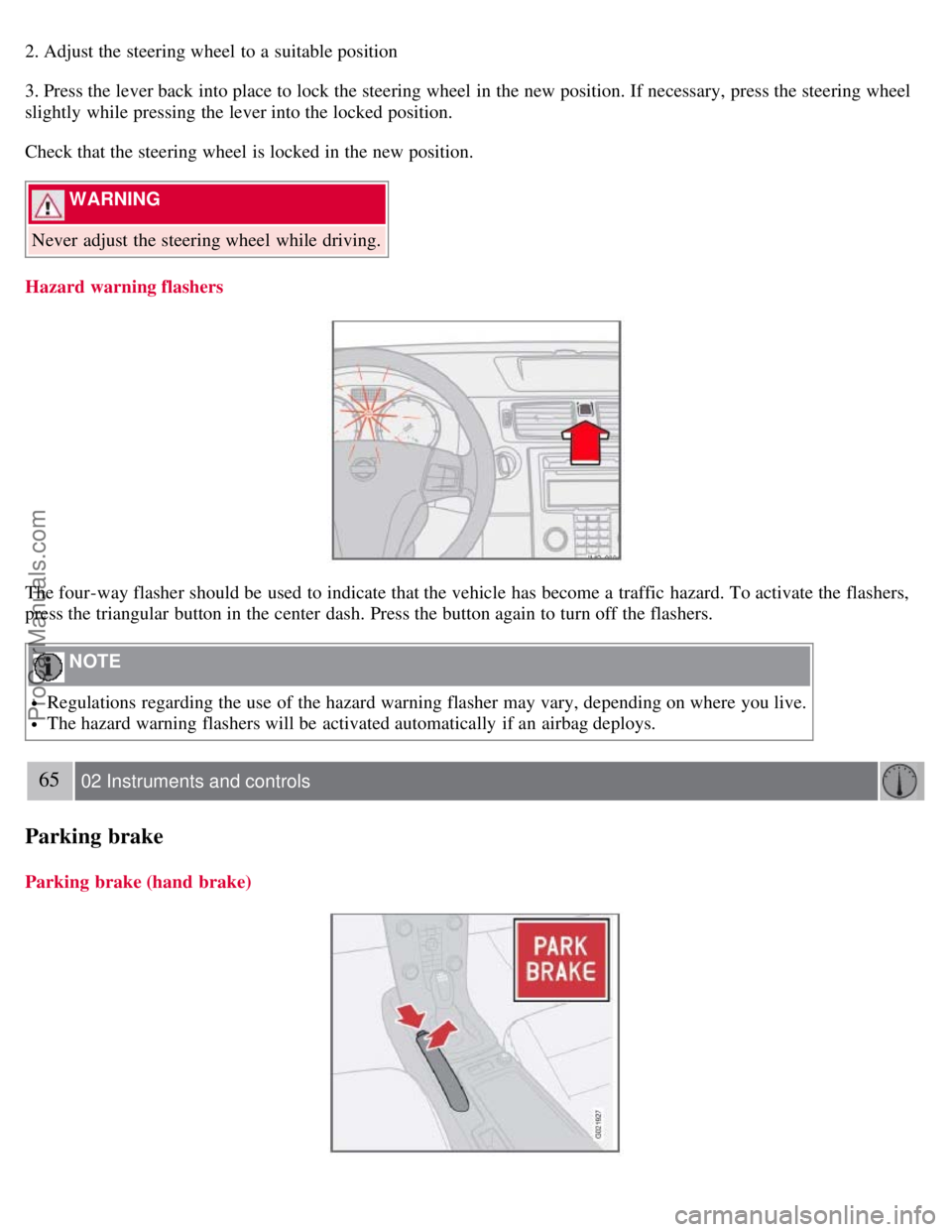
Hazard warning flashers
The four-way flasher should be used to indicate that the vehicle has become a traffic hazard. To activate the flashers,
press the triangular button in the center dash. Press the button again to turn off the flashers.
NOTE
Regulations regarding the use of the hazard warning flasher may vary, depending on where you live.
The hazard warning flashers will be activated automatically if an airbag deploys.
65 02 Instruments and controls
Parking brake
Parking brake (hand brake)
ProCarManuals.com
Page 60 of 246
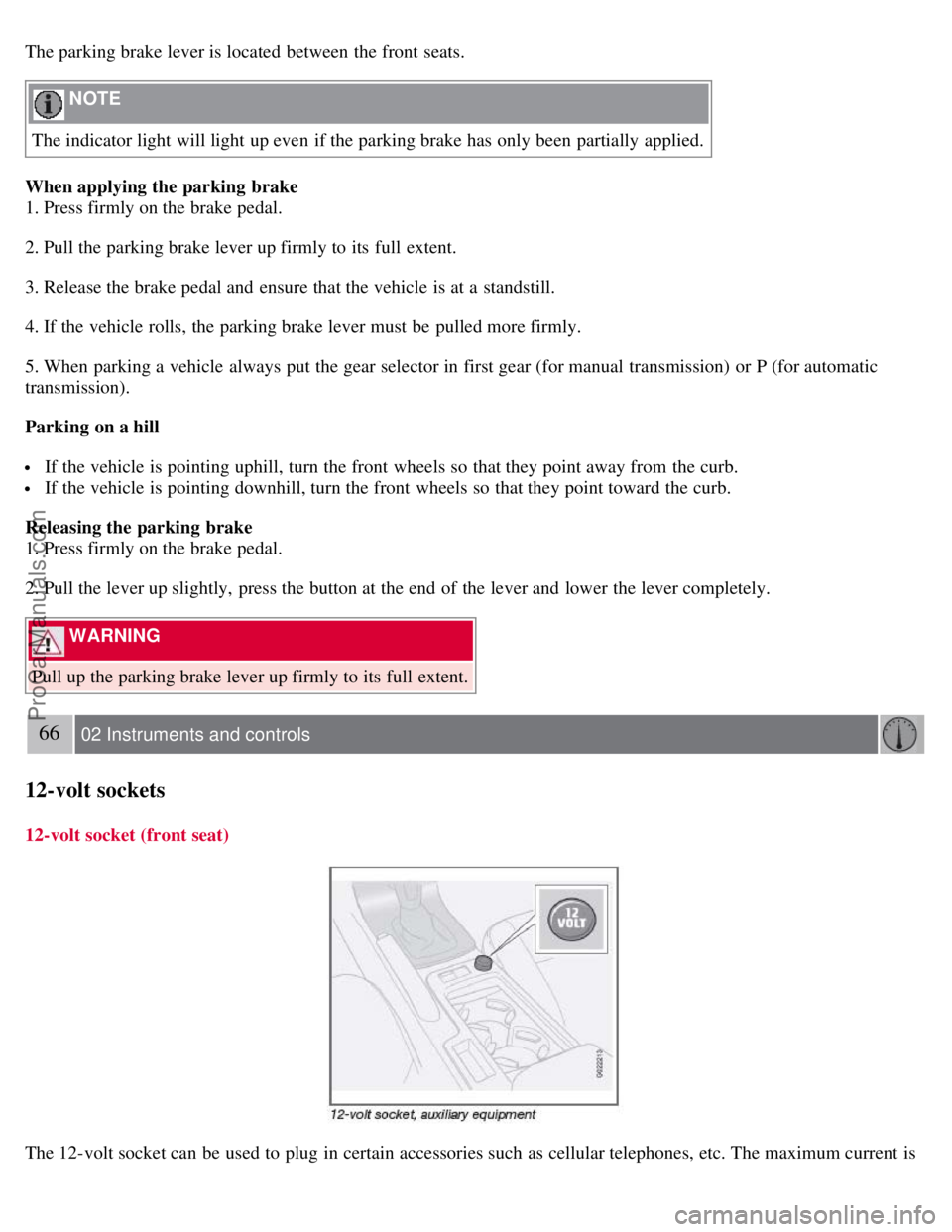
The parking brake lever is located between the front seats.
NOTE
The indicator light will light up even if the parking brake has only been partially applied.
When applying the parking brake
1. Press firmly on the brake pedal.
2. Pull the parking brake lever up firmly to its full extent.
3. Release the brake pedal and ensure that the vehicle is at a standstill.
4. If the vehicle rolls, the parking brake lever must be pulled more firmly.
5. When parking a vehicle always put the gear selector in first gear (for manual transmission) or P (for automatic
transmission).
Parking on a hill
If the vehicle is pointing uphill, turn the front wheels so that they point away from the curb.
If the vehicle is pointing downhill, turn the front wheels so that they point toward the curb.
Releasing the parking brake
1. Press firmly on the brake pedal.
2. Pull the lever up slightly, press the button at the end of the lever and lower the lever completely.
WARNING
Pull up the parking brake lever up firmly to its full extent.
66 02 Instruments and controls
12-volt sockets
12-volt socket (front seat)
The 12-volt socket can be used to plug in certain accessories such as cellular telephones, etc. The maximum current is
ProCarManuals.com
Page 81 of 246

2. Use this control to raise or lower the front edge of the seat cushion.
3. Use this control to raise or lower the rear edge of the seat cushion.
4. Turn this knob (option on some passenger's seats) to adjust the firmness of the lumbar support
1.
5. Turn this knob to adjust the backrest tilt.
6. Control panel for power seats.
WARNING
Do not adjust the seat while driving.
Adjust the driver's seat and seat belt (see page 14) before driving. The seat should be adjusted so that the brake
pedal can be depressed fully.
Position the seat as far rearward as comfort and control allow.
1Also applies to the optional power seat.
91 04 Interior
Front seats
Accessing the rear seat
Seat access buttons (power seat shown)
Manual seat
Moving the seat forward:
1. Remove the seat belt from its guide (see page 15
).
2. Pull up control 1 (see the illustration), hold it up, and fold the backrest forward until it locks in position.
3. Slide the seat forward.
Moving the seat rearward:
1. With the backrest folded forward in the locked position , slide the seat rearward to its original position.
ProCarManuals.com
Page 84 of 246
3. With the "M" button depressed, press memory button 1 to store the seat's current position.
To move the seat to the position that it was in when memory button 1 was programmed, press and hold down button 1
until the seat stops moving.
As a safety precaution, the seat will stop automatically if the button is released before the seat has reached the preset
position.
Central locking system remote control and driver's seat memory
The remote control transmitter can also be equipped with an optional function that controls the electrically operated
driver's seat and door mirrors in the following way:
1. Adjust the seat and door mirrors to the desired position.
2. When you leave the car, lock it using the remote control.
3. The next time the driver's door is unlocked with the same remote control and that door is opened within 2 minutes,
the driver's seat and door mirrors will automatically move to the position that they were in when the doors were most
recently locked with the same remote control.
NOTE
The memory function in the remote control operates independently of the memory function in the seat.
WARNING
Because the driver's seat can be adjusted with the ignition off, children should never be left unattended in the car.
Movement of the seat can be STOPPED at any time by pressing any button on the power seat control panel.
Do not adjust the seat while driving. The seat should be adjusted so that the brake pedal can be depressed fully. In
addition, position the seat as far rearward as comfort and control allow.
The seat rails on the floor must not be obstructed in any way when the seat is in motion.
94 04 Interior
Power retractable hard top
Before raising and lowering the power retractable hard top
Please observe the following information before operating the power retractable hard top:
ProCarManuals.com
Page 85 of 246

There should be no objects on the power retractable hard top's cover.
Remove all snow, ice or loose objects from the power retractable hard top and trunk lid.
The top should be dry before it is lowered.
CAUTION
If the power retractable hard top is lowered while it is wet, water may drip into the passenger compartment or trunk
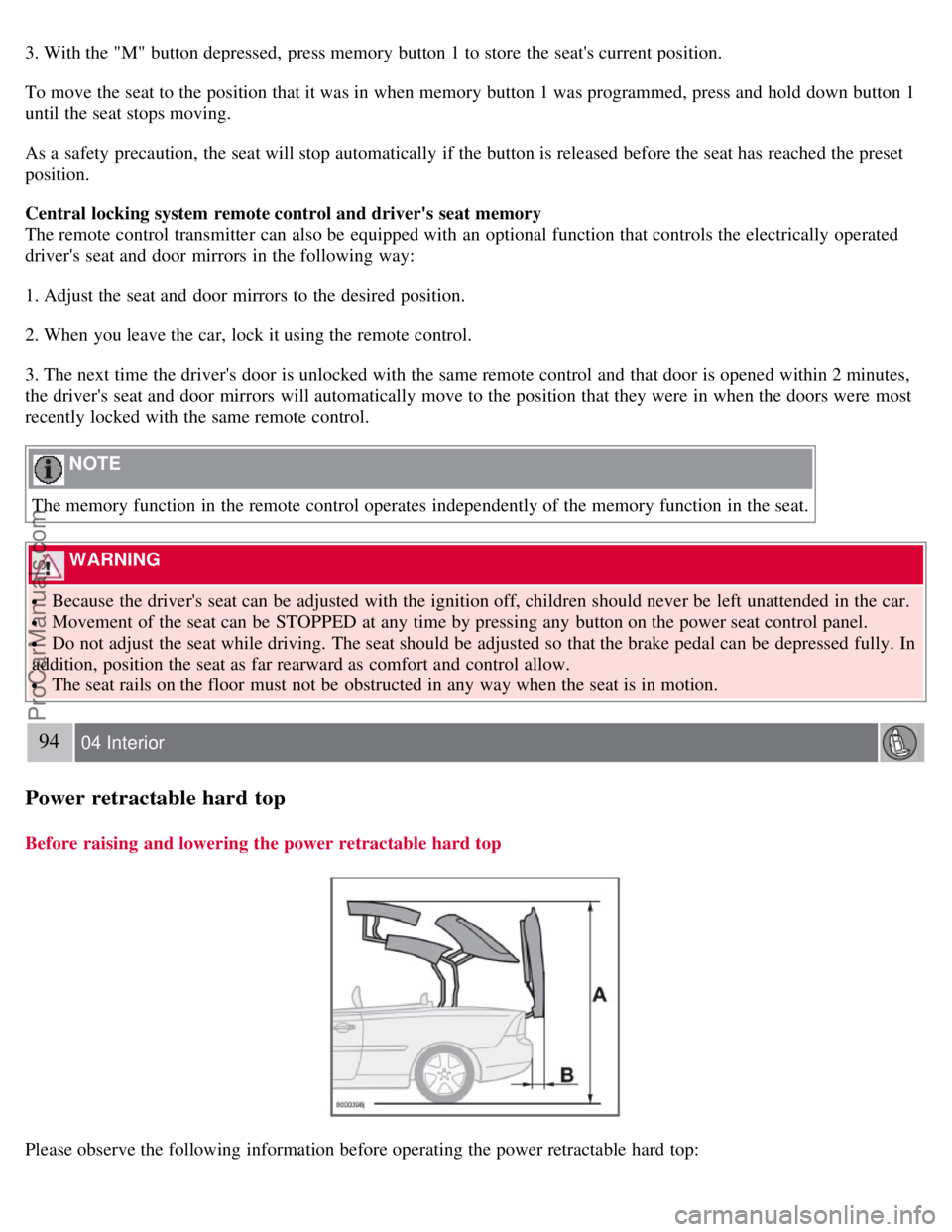
There should be at least 6.5 feet (2 meters) of free space from the ground (distance A in the illustration).
There should be at least 8 inches (20 cm) of free space behind the vehicle (distance B in the illustration in the center
column).
The ambient temperature should be above 14°F (-10°C).
The trunk divider (see page 95) must be closed.
The trunk must be closed.
The vehicle must be at a standstill and the brake pedal must be pressed.
Volvo also recommends the following:
The vehicle should be parked outdoors, on level ground.
Raising or lowering the power retractable hard top should preferably be done in one, continuous operation.
If the vehicle is parked outdoors, the engine should be idling to help avoid battery drain.
CAUTION
If the instructions on these pages are not followed, damage to the power retractable hard top's mechanism may occur.
WARNING
The power retractable hard top must not be obstructed in any way when it is being operated. Always have an
unobstructed view of the power retractable hard top when it is in motion. See also the decal on the trunk divider.
Anyone near the vehicle should be well clear of the power retractable hard top's moving parts before it is operated.
Children must never be allowed to play with the power retractable hard top control buttons.
Do not leave the power retractable hard top motionless longer than necessary while it is being operated
Do not leave the key in the ignition if there are children in the vehicle.
95 04 Interior
Power retractable hard top
Trunk divider
ProCarManuals.com