buttons VOLVO C70 2008 User Guide
[x] Cancel search | Manufacturer: VOLVO, Model Year: 2008, Model line: C70, Model: VOLVO C70 2008Pages: 246, PDF Size: 5.14 MB
Page 85 of 246

There should be no objects on the power retractable hard top's cover.
Remove all snow, ice or loose objects from the power retractable hard top and trunk lid.
The top should be dry before it is lowered.
CAUTION
If the power retractable hard top is lowered while it is wet, water may drip into the passenger compartment or trunk
There should be at least 6.5 feet (2 meters) of free space from the ground (distance A in the illustration).
There should be at least 8 inches (20 cm) of free space behind the vehicle (distance B in the illustration in the center
column).
The ambient temperature should be above 14°F (-10°C).
The trunk divider (see page 95) must be closed.
The trunk must be closed.
The vehicle must be at a standstill and the brake pedal must be pressed.
Volvo also recommends the following:
The vehicle should be parked outdoors, on level ground.
Raising or lowering the power retractable hard top should preferably be done in one, continuous operation.
If the vehicle is parked outdoors, the engine should be idling to help avoid battery drain.
CAUTION
If the instructions on these pages are not followed, damage to the power retractable hard top's mechanism may occur.
WARNING
The power retractable hard top must not be obstructed in any way when it is being operated. Always have an
unobstructed view of the power retractable hard top when it is in motion. See also the decal on the trunk divider.
Anyone near the vehicle should be well clear of the power retractable hard top's moving parts before it is operated.
Children must never be allowed to play with the power retractable hard top control buttons.
Do not leave the power retractable hard top motionless longer than necessary while it is being operated
Do not leave the key in the ignition if there are children in the vehicle.
95 04 Interior
Power retractable hard top
Trunk divider
ProCarManuals.com
Page 91 of 246

backrest.
4. Press the side lock tabs into the holes in the side panels until they click into place.
5. Raise the wind blocker.
The zipper in the wind blocker can be opened to place or access objects in the rear seat.
CAUTION
Slide in the supports carefully to avoid damaging the upholstery.
WARNING
Make sure the wind blocker is securely attached. An improperly secured wind blocker may cause injury to
occupants of the vehicle or to other motorists.
No one should be allowed to sit in the rear seat when the wind blocker is in place.
When not in use, the wind blocker should be stored in its bag, in the trunk, against the rear seat backrest.
100 04 Interior
Interior lighting
Interior lighting
1. Driver's side reading light
2. Courtesy lighting
3. Passenger's side reading light
The front seat reading lights can be switched on and off by pressing buttons 1 or 3.
The courtesy lighting (2) can be set to three positions:
Off - Press the right side of the button.
Neutral position - the interior courtesy lighting comes on when a door is opened, and is switched off when the door
is closed.
ON - Press the left side of the button.
ProCarManuals.com
Page 92 of 246
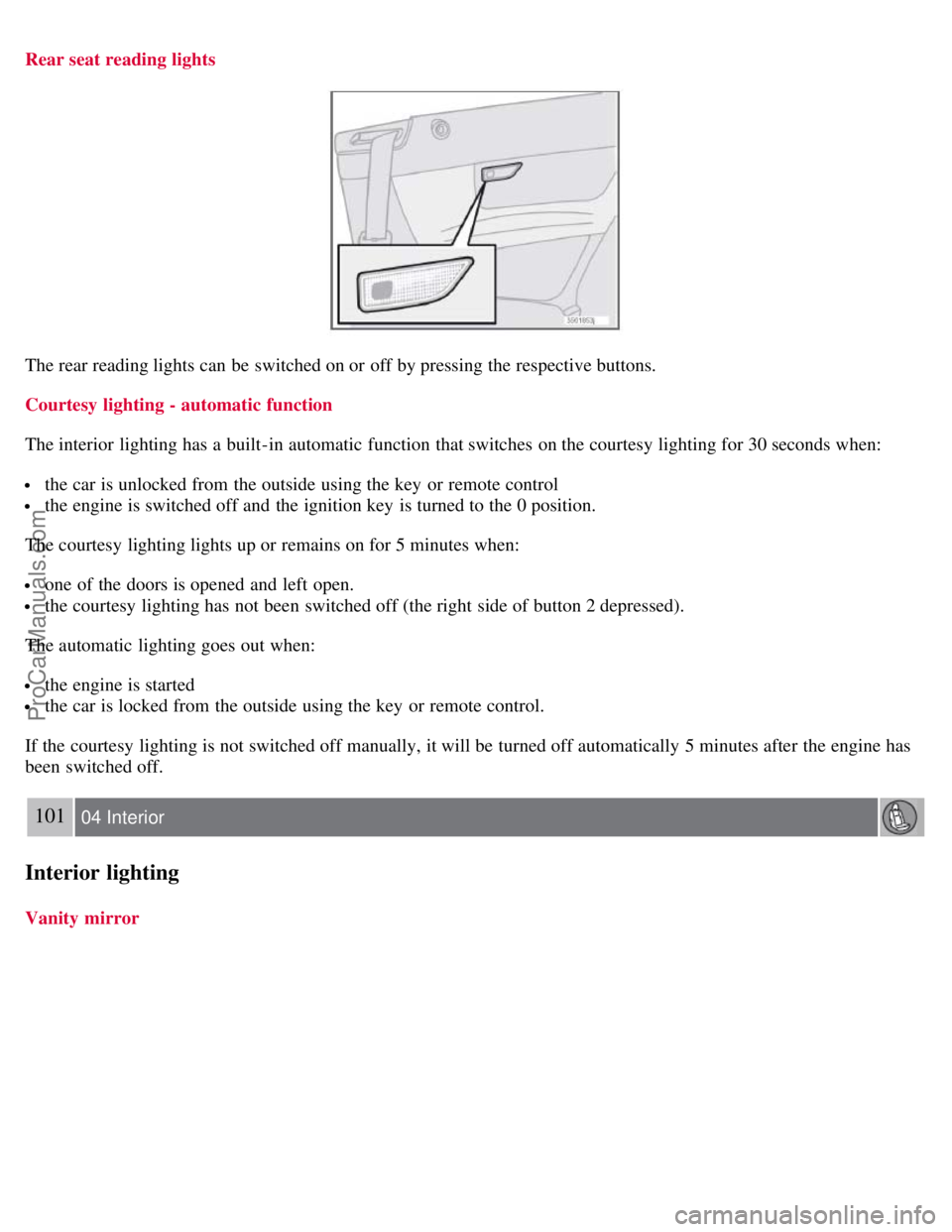
Rear seat reading lights
The rear reading lights can be switched on or off by pressing the respective buttons.
Courtesy lighting - automatic function
The interior lighting has a built-in automatic function that switches on the courtesy lighting for 30 seconds when:
the car is unlocked from the outside using the key or remote control
the engine is switched off and the ignition key is turned to the 0 position.
The courtesy lighting lights up or remains on for 5 minutes when:
one of the doors is opened and left open.
the courtesy lighting has not been switched off (the right side of button 2 depressed).
The automatic lighting goes out when:
the engine is started
the car is locked from the outside using the key or remote control.
If the courtesy lighting is not switched off manually, it will be turned off automatically 5 minutes after the engine has
been switched off.
101 04 Interior
Interior lighting
Vanity mirror
ProCarManuals.com
Page 97 of 246

The deep storage compartment has room for 10 CD jewel cases. These cases must be inserted with their spines upward
in order to allow space for 10 cases in the storage compartment.
Cup holders in the center console
Two cup holders are located under the sliding cover in the center console.
The cup holders can be lifted out if necessary. To do so, grasp the indentation on the rear edge of the cup holder and
lift.
To put the cup holder back in place:
1. Slide the two locating tabs in the front side of the cup holder into the two corresponding recesses in the center
console storage space.
2. Press down the rear edge of the cup holder.
To close the sliding cover, grasp the underside of the front edge and pull.
106 04 Interior
Storage compartments
Storage compartment behind the parking brake
If the buttons for optional equipment are not installed, the recess behind the parking brake can be used as a storage
compartment.
ProCarManuals.com
Page 109 of 246

This system makes it possible to unlock and lock the vehicle without having to use the remote control. It is only
necessary to have a keyless drive remote control in your possession to operate the central locking system.
NOTE
The buttons on the keyless drive remote control can also be used to lock and unlock the vehicle. See page 113
for
more information.
Both of the remote controls provided with the vehicle have the keyless function, and additional remotes can be
ordered. The system can accommodate up to six keyless drive remote controls.
NOTE
The number of doors that are unlocked at the same time can be set in the Personal settings menu. See page 71
for
additional information.
1. A keyless drive remote control must be on the same side of the vehicle as the door to be opened, and be within 5
feet (1.5 meters) of the lock or the trunk opening control (see the shaded areas in the illustration).
2. Pull a door handle to unlock and open the door or press the trunk opening control on the trunk lid.
Locking the vehicle
The doors and the trunk can be locked by pressing the lock button in any of the outside door handles.
NOTE
ProCarManuals.com
Page 211 of 246
6. Turn the volume knob to raise or lower the AUX Input Volume until you hear music at a comfortable level.
235 10 Audio
Audio functions
7. If there is distortion, lower your music player's headphone volume until the distortion goes away.
8. Finally, exit the menu and adjust the audio volume to a comfortable level.
Volume
Use the volume dial (1) or the buttons in the optional steering wheel keypad to adjust the volume level. The volume
level is also adjusted automatically according to the vehicle's speed, see page 239
for more information on this
function.
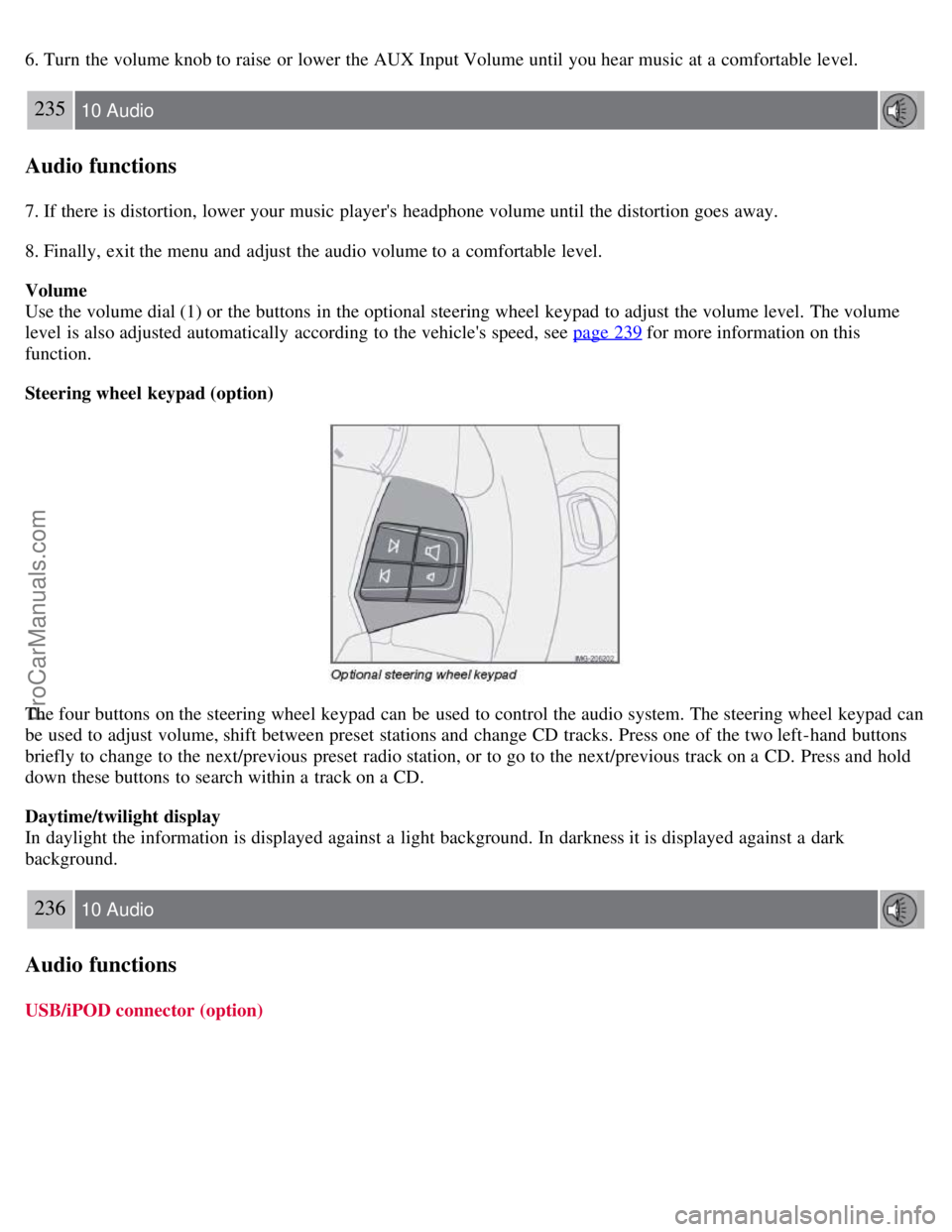
Steering wheel keypad (option)
The four buttons on the steering wheel keypad can be used to control the audio system. The steering wheel keypad can
be used to adjust volume, shift between preset stations and change CD tracks. Press one of the two left-hand buttons
briefly to change to the next/previous preset radio station, or to go to the next/previous track on a CD. Press and hold
down these buttons to search within a track on a CD.
Daytime/twilight display
In daylight the information is displayed against a light background. In darkness it is displayed against a dark
background.
236 10 Audio
Audio functions
USB/iPOD connector (option)
ProCarManuals.com
Page 215 of 246

To set the automatic sound level:
1. Press MENU followed by ENTER .
2. Select AUDIO SETTINGS in the menu and press ENTER .
3. Select AUTO. VOLUME CONTROL in the menu and press ENTER.
4. Select LOW , MEDIUM, or HIGH and press ENTER .
1Default setting
239 10 Audio
Radio functions
Radio function controls
1. AM/FM1/FM2 selection
2. Station preset buttons
3. TUNING dial for selecting radio stations
4. SCAN
5. MENU NAVIGATION CONTROL -press the up or down arrow keys to scroll in a menu, or the keys on the
left/right sides of the control to search for or change radio stations/CD tracks
6. EXIT -press to cancel a menu selection or a selected function
7. AUTO -search for and store the strongest radio stations in the area in which you are driving
Searching for stations
There are two ways to manually tune a radio station:
1. Turn the TUNING dial (3) to the desired frequency.
2. Press the left or right arrow key on the MENU NAVIGATION CONTROL and hold it down. The radio scans
slowly in the selected direction and will increase the scanning speed after a few seconds. Release the button when the
ProCarManuals.com
Page 216 of 246

desired frequency appears in the display.
The frequency can be fine-tuned by short presses on the left/right arrow keys.
Storing preset stations
Manually storing a station
1. Tune to the desired station.
2. Press and hold the preset button under which the station is to be stored. The audio system sound will be interrupted
for a few seconds and STATION STORED will appear in the display.
NOTE
A total of 30 stations can be stored; 10 stations each in AM, FM1 and FM2.
Automatically storing a station
Pressing AUTO (7) automatically searches for and stores up to ten strong AM or FM stations in a separate memory. If
more than ten stations are found, the ten strongest ones are stored. This function is especially useful in areas in which
you are not familiar with radio stations or their frequencies.
To use the AUTO function:
1. Select a waveband using the AM/FM button (1).
2. Start the search by pressing AUTO until AUTO STORING appears in the display.
When the search is completed, AUTO STORING will no longer be displayed. If there are no stations with sufficient
signal strength, NO AST FOUND is displayed.
The auto-stored stations can be selected using the preset buttons (2).
Press EXIT (6) to terminate the automatic storing function.
When the radio is in auto-store mode, AUTO is shown in the display. AUTO disappears when you return to normal
radio mode, which can be done by briefly pressing AM/FM (1), EXIT (6), or AUTO (7).
240 10 Audio
Radio functions
To return to the Auto-store mode, press the AUTO button briefly and select a stored station by pressing one of the
preset buttons (2).
Saving auto-stored stations in the preset memory
An auto-stored station can be saved in the memory for manually preset stations.
1. Press AUTO (7) briefly.
2. Auto is displayed.
3. Press one of the preset buttons (2) under which the station is to be stored. Hold down the button until STATION
STORED is displayed.
ProCarManuals.com
Page 217 of 246

The radio will then exit auto-store mode and the stored station can be selected by pressing the preset button.
Scanning
SCAN (4) automatically searches through the selected waveband for strong AM or FM stations. When the radio finds a
station, that station will be played for approximately 8 seconds, after which scanning resumes.
Activating/deactivating SCAN
1. Select radio mode using the AM/FM button (2).
2. Press SCAN to activate the function. SCAN is shown in the display.
3. Press the SCAN or EXIT button to deactivate the scan function and listen to the selected station.
Storing a station found with SCAN
A station can be stored as a preset while the SCAN function is activated.
Press one of the preset buttons (2) under which the station is to be stored. Hold down the button until STATION
STORED is displayed.
The SCAN function will be deactivated and the station can be selected by pressing the preset button.
Radio text
Certain stations broadcast program information, which can be shown in the display.
To start this function:
1. Select FM1 or FM2 and press the MENU button.
2. Press ENTER .
3. Select RADIOTEXT in the menu and press ENTER .
To deactivate this function, select RADIOTEXT again and press ENTER.
241 10 Audio
Radio functions
Listening to satellite radio
The Sirius satellite system consists of a number of high elevation satellites in geosynchronous orbit.
NOTE
The digital signals from the Sirius satellites are line-of-sight, which means that physical obstructions such as
bridges, tunnels, etc, may temporarily interfere with signal reception.
Avoid any obstructions, such as metallic objects transported on roof racks or in a ski box, or other antennas that
may impede signals from the SIRIUS satellites.
Selecting Sirius radio mode
1. Press Power to switch on the audio system (see page 239
for information on the standard radio functions).
ProCarManuals.com
Page 222 of 246
If you have forgotten the access code:
1. Select "SIRIUS ID" in the Sirius settings menu and press ENTER.
2. Press and hold the ENTER button for 2 seconds.
3. The current code will be displayed.
Your Volvo retailer can also provide you with assistance.
SIRIUS ID
This function displays the 12-digit Sirius activation ID.
245 10 Audio
CD player/CD changer (option)
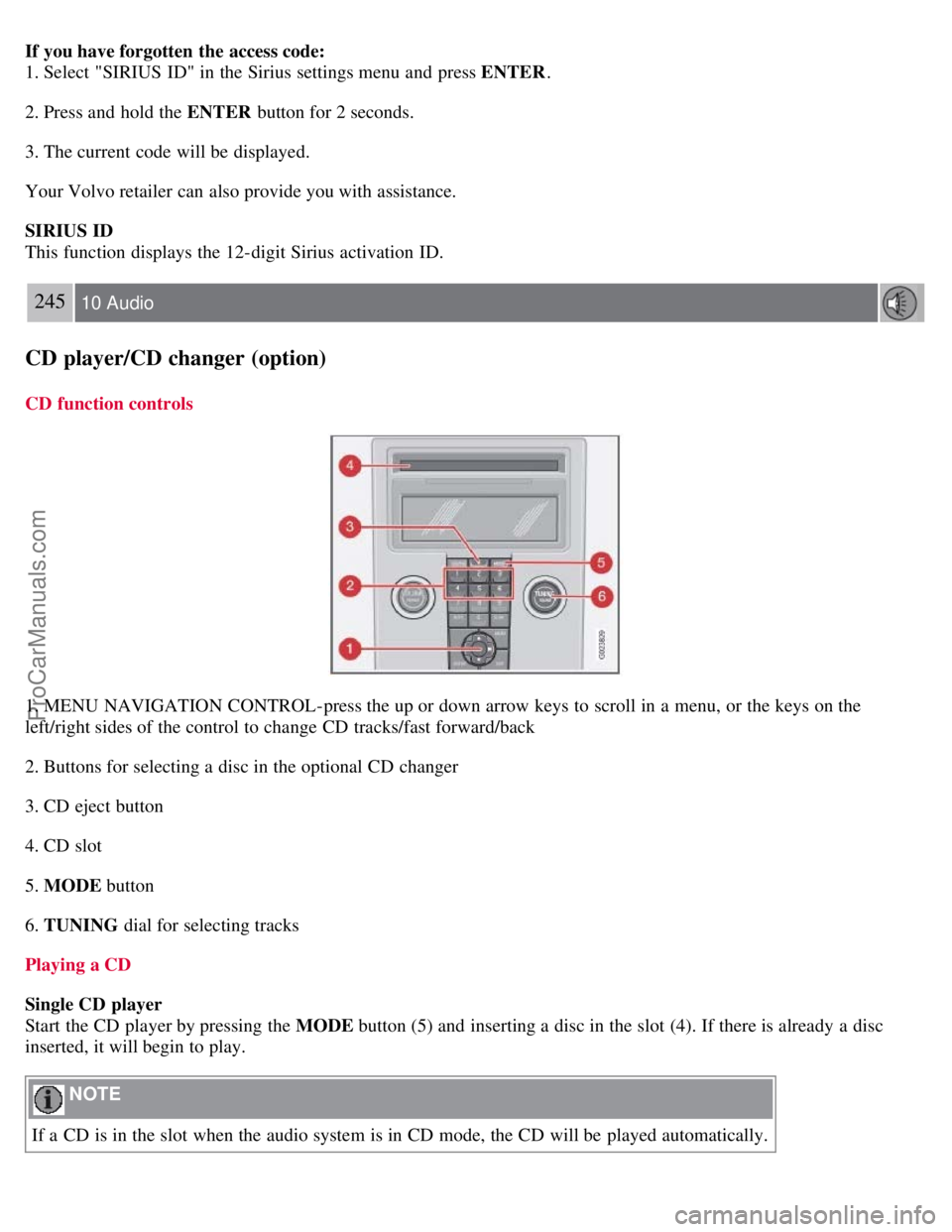
CD function controls
1. MENU NAVIGATION CONTROL-press the up or down arrow keys to scroll in a menu, or the keys on the
left/right sides of the control to change CD tracks/fast forward/back
2. Buttons for selecting a disc in the optional CD changer
3. CD eject button
4. CD slot
5. MODE button
6. TUNING dial for selecting tracks
Playing a CD
Single CD player
Start the CD player by pressing the MODE button (5) and inserting a disc in the slot (4). If there is already a disc
inserted, it will begin to play.
NOTE
If a CD is in the slot when the audio system is in CD mode, the CD will be played automatically.
ProCarManuals.com