instrument panel VOLVO C70 2008 User Guide
[x] Cancel search | Manufacturer: VOLVO, Model Year: 2008, Model line: C70, Model: VOLVO C70 2008Pages: 246, PDF Size: 5.14 MB
Page 45 of 246

51 02 Instruments and controls
Symbols - instrument panel
Symbols - right side
1. Turn signal indicator for trailer (certain models)
If you are towing a trailer, this light will flash simultaneously with the turn signals on the trailer. If the light does not
flash when signaling, one of the turn signals on the trailer or on the car are not functioning properly.
2. Parking brake applied
This light is on when the parking brake (hand brake) is applied. The parking brake lever is situated between the front
seats. Always pull up this lever as far as possible when applying the parking brake.
NOTE
Canadian models are equipped with the second symbol.
3. SRS warning light
If this light comes on while the car is being driven, or remains on for longer than approximately 10 seconds after the
car has been started, the SRS system's diagnostic functions have detected a fault in a seat belt lock or pretensioner, a
front airbag, side impact airbag, and/or an inflatable curtain. Have the system(s) inspected by a trained and qualified
Volvo service technician as soon as possible.
4. Oil pressure warning light1
If the light comes on while driving, stop the car, stop the engine immediately, and check the engine oil level. If the oil
level is normal and the light stays on after restart, have the car towed to the nearest trained and qualified Volvo service
technician. After hard driving, the light may come on occasionally when the engine is idling. This is normal, provided
it goes off when the engine speed is increased.
ProCarManuals.com
Page 46 of 246

5. Seat belt reminder
See page 16
for detailed information.
6. Generator warning light
If the light comes on while the engine is running, have the charging system checked by a trained and qualified Volvo
service technician.
7. Brake failure warning light
If this light comes on while driving or braking, stop the car as quickly as possible in a safe place, open the hood, and
check
1On certain engines, this symbol is not used to indicate low oil pressure. Instead, a text warning is provided in the information display, see also
page 210
.
52 02 Instruments and controls
Symbols - instrument panel
the brake fluid level in the reservoir. See page 208 for the location of the reservoir.
NOTE
Canadian models are equipped with the second symbol.
WARNING
If the fluid level is below the MIN mark in the reservoir or if a "Brake failure - Service urgent" message is displayed
in the information display: DO NOT DRIVE . Have the car towed to a trained and qualified Volvo service technician
and have the brake system inspected.
If the fluid level is below the MIN mark in the reservoir or if a " BRAKE FAILURE - SERVICE URGENT" message
is displayed in the information display: DO NOT DRIVE. Have the car towed to a trained and qualified Volvo service
technician and have the brake system inspected.
If the BRAKE and ABS warning lights come on at the same time, this could indicate a fault in the brake system.
In this case:
1. Stop the car in a suitable place and switch off the engine.
ProCarManuals.com
Page 47 of 246

2. Restart the engine.
3. If both warning lights go off, no further action is required and the car can be driven.
4. If both lights remain on after the engine has been restarted, switch off the engine again and check the brake fluid
level. See page 208
for the location of the reservoir.
Door open warning
The driver will be alerted if either door, the hood, or the trunk lid are open or ajar.
At low speeds
If the car is moving at a speed of less than approximately 3 m.p.h. (5 km/h), the Information symbol in the instrument
panel will light up and a message will be shown in the information display indicating which door(s), etc is not
completely closed.
At higher speeds
If the car is moving at a speed above approximately 6 m.p.h. (10 km/h), the Warning symbol in the instrument panel
will light up and a message will be shown in the information display indicating which door(s), etc is not completely
closed.
Hood and trunk
If the hood and/or trunk lid is not completely closed, the Information symbol in the instrument panel will light up and a
message will be displayed, regardless of the vehicle's speed.
53 02 Instruments and controls
Information display
Messages
When an indicator or warning light in the instrument panel comes on, a message is also shown in the information
display. To read a message:
ProCarManuals.com
Page 48 of 246

1. Press the READ button (1).
2. Pressing READ repeatedly enables you to scroll to any other messages that may be stored.
NOTE
If a message is displayed when e.g. you are using the trip computer, this message must be read before you can access
the trip computer
54 02 Instruments and controls
Information display
55 02 Instruments and controls
Lighting panel
ProCarManuals.com
Page 50 of 246

The rear fog light will only function in combination with the high/low beam headlights or the optional front fog lights.
1. Turn the ignition key to position II.
2. Press button (5) to turn on the rear fog light.
56 02 Instruments and controls
Lighting panel
An indicator light in the button illuminates when the rear fog light is on.
NOTE
The rear fog light is considerably brighter than the normal taillights and should be used only when conditions such as
fog, rain, snow, smoke or dust reduce visibility for other vehicles to less than 500 ft. (150 meters).
Instrument panel lighting
The instrument panel lighting illuminates when the ignition is in position II and the light switch (1) is in either position
or .
NOTE
To make it easier to read the odometer, trip odometer, clock, and ambient temperature, these gauges illuminate when
the vehicle is unlocked and when the key has been removed from the ignition switch. The lighting will go out when
the vehicle is locked.
Move the thumb wheel (2) up to increase brightness or down to decrease brightness.
Unlocking the fuel filler door
With the ignition switched off, press button (4) to unlock the fuel filler door. Please note that the fuel filler door will
remain unlocked until the car begins to move forward.
An audible click will be heard when the fuel filler door re-locks.
Please refer to the following information for instructions on manually opening the fuel filler door.
Manually unlocking the fuel filler door
ProCarManuals.com
Page 51 of 246
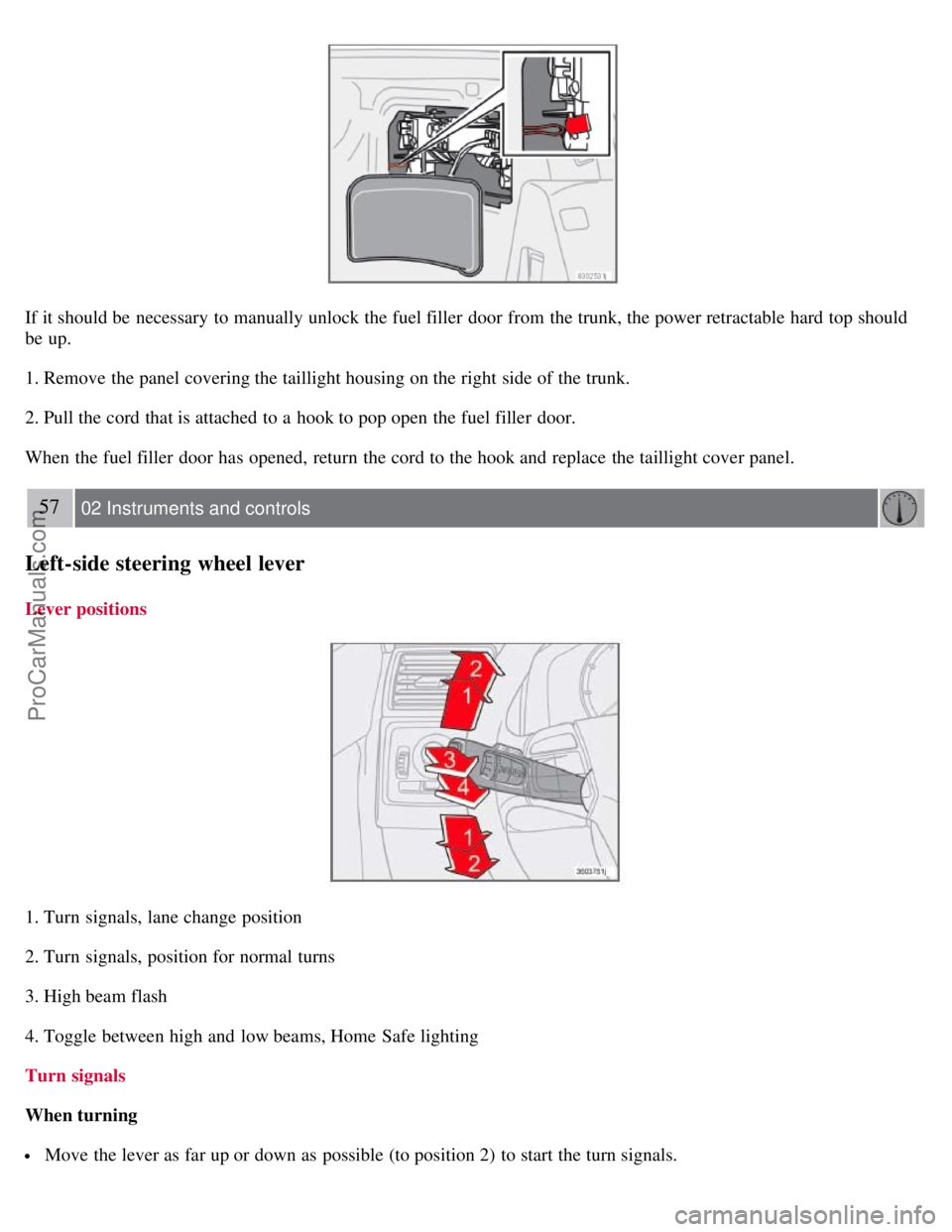
If it should be necessary to manually unlock the fuel filler door from the trunk, the power retractable hard top should
be up.
1. Remove the panel covering the taillight housing on the right side of the trunk.
2. Pull the cord that is attached to a hook to pop open the fuel filler door.
When the fuel filler door has opened, return the cord to the hook and replace the taillight cover panel.
57 02 Instruments and controls
Left-side steering wheel lever
Lever positions
1. Turn signals, lane change position
2. Turn signals, position for normal turns
3. High beam flash
4. Toggle between high and low beams, Home Safe lighting
Turn signals
When turning
Move the lever as far up or down as possible (to position 2) to start the turn signals.
ProCarManuals.com
Page 57 of 246

Cruise control
Engaging the cruise control function
The cruise control buttons are located on the left side of the steering wheel hub.
1. Press the CRUISE button. CRUISE will appear in the function display in the center of the instrument panel.
NOTE
This does not set the vehicle's speed.
2. Press + or - to set the current speed. CRUISE ON will be displayed.
Increasing or decreasing speed
Use + or - in the following ways to increase or decrease the vehicle's speed:
1. Press and hold down + or - until the vehicle reaches the desired speed. This will become the set speed when the
button is released.
2. Press + or - for approximately a half second and release the button to increase or decrease vehicle speed by
approximately 1 mph (1.6 km/h).
NOTE
Cruise control will not function at speeds below 20 mph. (30 km/h).
Momentary acceleration, for less than 1 minute (e.g. when passing another car), does not affect cruise control
operation. The car will automatically return to the previously set speed when the accelerator pedal is released.
Temporarily disengaging the cruise control
Press 0 to temporarily disengage cruise control.
CRUISE will appear in the function display. The currently set speed is stored in the system's memory.
Cruise control is also automatically disengaged:
ProCarManuals.com
Page 65 of 246
The mirrors should always be adjusted prior to driving.
Objects seen in the passenger's side wide -angle door mirror are closer than they appear to be.
Storing the mirrors' position
The position of the power door mirrors is stored when the car is locked with the remote control. When the car is
unlocked with the same remote control, the mirrors will move to the stored position.
Blind Spot Information System (BLIS) -option
The Blind Spot Information System (BLIS) is an information system that indicates the presence of another vehicle in
the side-view mirror's "blind area." See page 159
for detailed information.
71 02 Instruments and controls
Personal settings
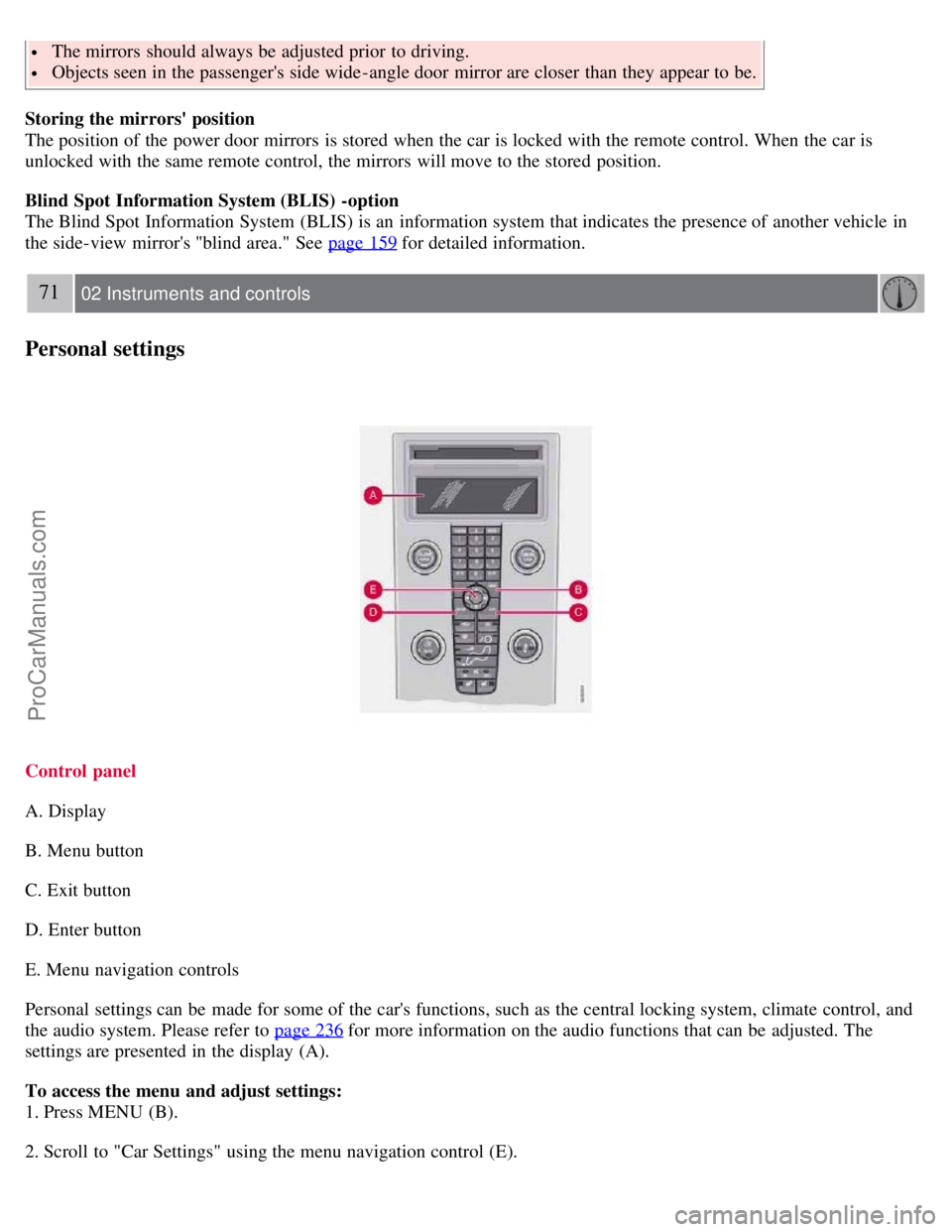
Control panel
A. Display
B. Menu button
C. Exit button
D. Enter button
E. Menu navigation controls
Personal settings can be made for some of the car's functions, such as the central locking system, climate control, and
the audio system. Please refer to page 236
for more information on the audio functions that can be adjusted. The
settings are presented in the display (A).
To access the menu and adjust settings:
1. Press MENU (B).
2. Scroll to "Car Settings" using the menu navigation control (E).
ProCarManuals.com
Page 99 of 246

information display in the center instrument panel for messages.
4. Lift the trunk divider (see page 95) to provide an opening into the trunk.
5. When the objects to be loaded have been placed in the trunk, press down the trunk divider.
6. Press the button to move the power retractable hard top downward. Movement of the top can be stopped by pressing
the button again.
7. Close the trunk.
NOTE
The trunk cannot be closed while the folded power retractable hard top is in the upper position.
108 04 Interior
Storage compartments
Raising and lowering the folded top in the event of a fault
If the message ROOF FAILURE SEE MANUAL is displayed, the folded power retractable hard top can only be
lowered in the trunk.
CAUTION
Damage may be unavoidable if the power retractable hard top must be operated when this message is displayed.
Press the button again and hold it down. After approximately 2 seconds, the power retractable hard top will begin to
move. Keep the button depressed until the folded top is lowered.
NOTE
An audible signal will sound during this entire operation.
Load anchoring eyelets
The eyelets in the trunk can be used to fasten accessory load and lashing straps, load nets, and other load anchors.
ProCarManuals.com
Page 105 of 246

turn signals and horn will be activated.
The panic alarm will stop automatically after 30 seconds.
To deactivate, wait approximately 5 seconds and press the red button again.
NOTE
This button will NOT unlock the car.
Weak battery in the remote control
When the battery begins to lose its charge, the Information symbol in the instrument panel (see page 49) lights up and
REMOTE BATTERY LOW VOLTAGE is shown in the information display.
Replacing the battery in the remote control
If the range of the transmitter is noticeably reduced, this indicates that the battery (type CR 2450, 3V) is weak and
should be replaced. To replace the battery:
115 05 Locks and alarm
Remote control and key blade
1. Place the remote control with the keypad downward. Pry open the cover with a small slotted screwdriver.
2. Remove the cover.
3. Note how the + and - sides of the battery are positioned on the inside of the cover (see the underside of the cover).
CAUTION
When replacing the battery, avoid touching the electrical circuitry in the other half of the remote control.
4. Pry out (2) and replace the battery. Avoid touching the battery and its contact surfaces with your fingers.
5. Press the cover back into place and tighten the screw.
6. Reinsert the key blade in the remote control.
The old battery should be disposed of properly at a recycling center or at your Volvo retailer.
ProCarManuals.com