trunk VOLVO C70 2008 User Guide
[x] Cancel search | Manufacturer: VOLVO, Model Year: 2008, Model line: C70, Model: VOLVO C70 2008Pages: 246, PDF Size: 5.14 MB
Page 89 of 246
NOTE
Movement of the top may stop briefly. However, the button should be held down throughout the entire operation. An
audible signal will sound during the entire operation.
WARNING
Never pull the release wire for the power retractable hard top's hydraulic system that is located under the rear seat
cushion. This wire is only intended for use by qualified service personnel. Pulling this wire could lead to:
High risk of being injured by the power retractable hard top's opening/closing mechanism.
Unexpected movement of the hard top/the hard top or the trunk could inadvertently open.
The retractable hard top can be damaged.
98 04 Interior
Power retractable hard top
Temporary cover
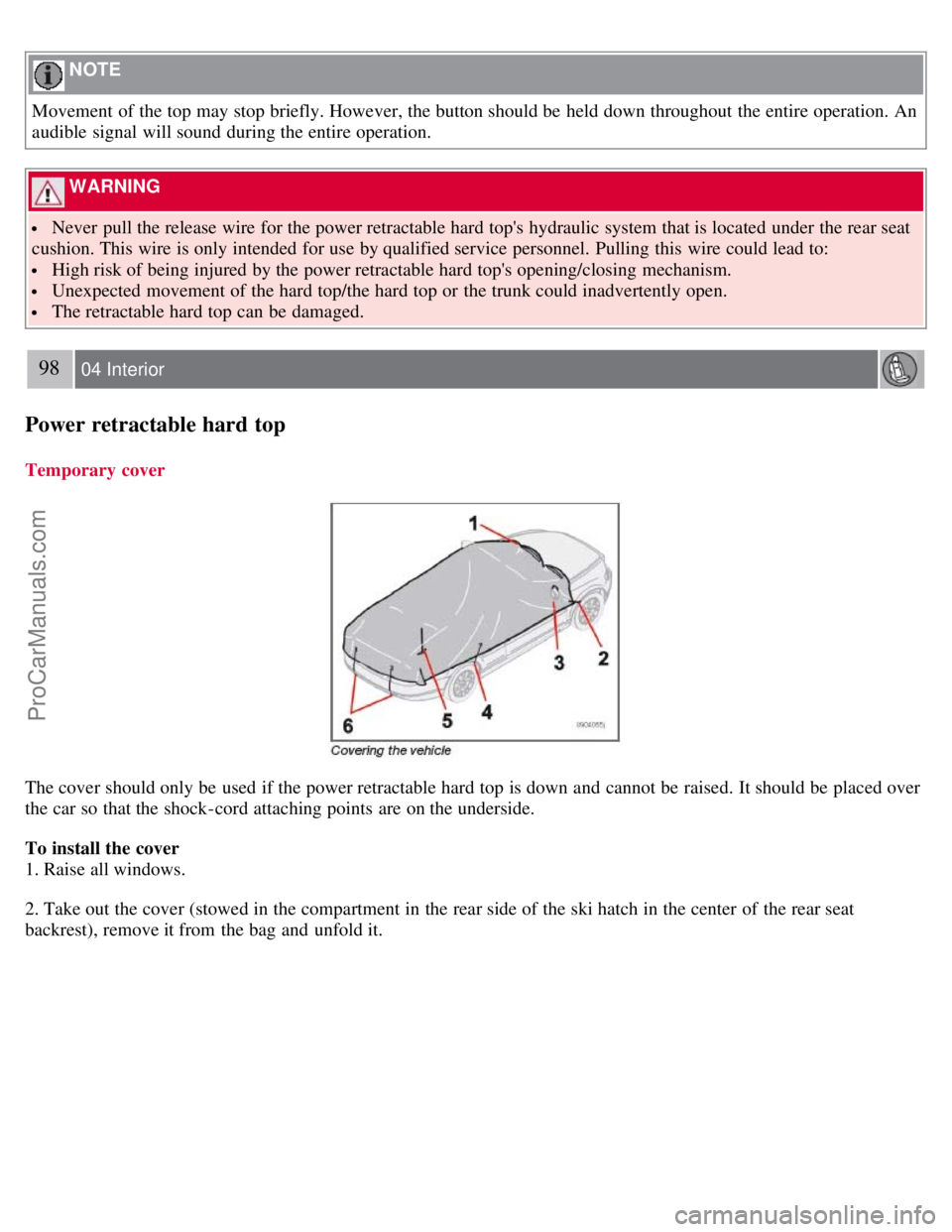
The cover should only be used if the power retractable hard top is down and cannot be raised. It should be placed over
the car so that the shock-cord attaching points are on the underside.
To install the cover
1. Raise all windows.
2. Take out the cover (stowed in the compartment in the rear side of the ski hatch in the center of the rear seat
backrest), remove it from the bag and unfold it.
ProCarManuals.com
Page 91 of 246

backrest.
4. Press the side lock tabs into the holes in the side panels until they click into place.
5. Raise the wind blocker.
The zipper in the wind blocker can be opened to place or access objects in the rear seat.
CAUTION
Slide in the supports carefully to avoid damaging the upholstery.
WARNING
Make sure the wind blocker is securely attached. An improperly secured wind blocker may cause injury to
occupants of the vehicle or to other motorists.
No one should be allowed to sit in the rear seat when the wind blocker is in place.
When not in use, the wind blocker should be stored in its bag, in the trunk, against the rear seat backrest.
100 04 Interior
Interior lighting
Interior lighting
1. Driver's side reading light
2. Courtesy lighting
3. Passenger's side reading light
The front seat reading lights can be switched on and off by pressing buttons 1 or 3.
The courtesy lighting (2) can be set to three positions:
Off - Press the right side of the button.
Neutral position - the interior courtesy lighting comes on when a door is opened, and is switched off when the door
is closed.
ON - Press the left side of the button.
ProCarManuals.com
Page 98 of 246
107 04 Interior
Storage compartments
Loading the trunk
Loading the trunk with the power retractable hard top down
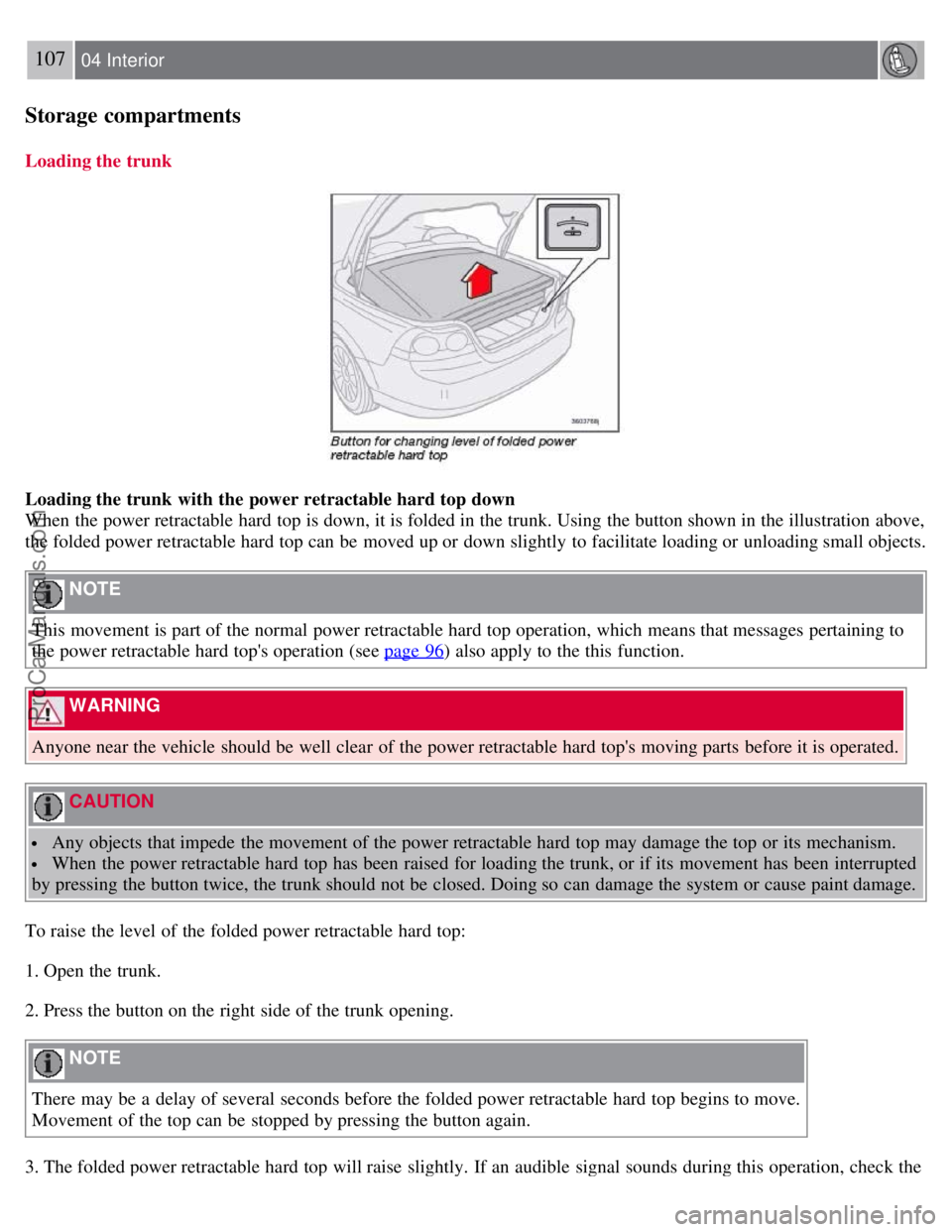
When the power retractable hard top is down, it is folded in the trunk. Using the button shown in the illustration above,
the folded power retractable hard top can be moved up or down slightly to facilitate loading or unloading small objects.
NOTE
This movement is part of the normal power retractable hard top operation, which means that messages pertaining to
the power retractable hard top's operation (see page 96
) also apply to the this function.
WARNING
Anyone near the vehicle should be well clear of the power retractable hard top's moving parts before it is operated.
CAUTION
Any objects that impede the movement of the power retractable hard top may damage the top or its mechanism.
When the power retractable hard top has been raised for loading the trunk, or if its movement has been interrupted
by pressing the button twice, the trunk should not be closed. Doing so can damage the system or cause paint damage.
To raise the level of the folded power retractable hard top:
1. Open the trunk.
2. Press the button on the right side of the trunk opening.
NOTE
There may be a delay of several seconds before the folded power retractable hard top begins to move.
Movement of the top can be stopped by pressing the button again.
3. The folded power retractable hard top will raise slightly. If an audible signal sounds during this operation, check the
ProCarManuals.com
Page 99 of 246

information display in the center instrument panel for messages.
4. Lift the trunk divider (see page 95) to provide an opening into the trunk.
5. When the objects to be loaded have been placed in the trunk, press down the trunk divider.
6. Press the button to move the power retractable hard top downward. Movement of the top can be stopped by pressing
the button again.
7. Close the trunk.
NOTE
The trunk cannot be closed while the folded power retractable hard top is in the upper position.
108 04 Interior
Storage compartments
Raising and lowering the folded top in the event of a fault
If the message ROOF FAILURE SEE MANUAL is displayed, the folded power retractable hard top can only be
lowered in the trunk.
CAUTION
Damage may be unavoidable if the power retractable hard top must be operated when this message is displayed.
Press the button again and hold it down. After approximately 2 seconds, the power retractable hard top will begin to
move. Keep the button depressed until the folded top is lowered.
NOTE
An audible signal will sound during this entire operation.
Load anchoring eyelets
The eyelets in the trunk can be used to fasten accessory load and lashing straps, load nets, and other load anchors.
ProCarManuals.com
Page 100 of 246
12-volt socket (option)
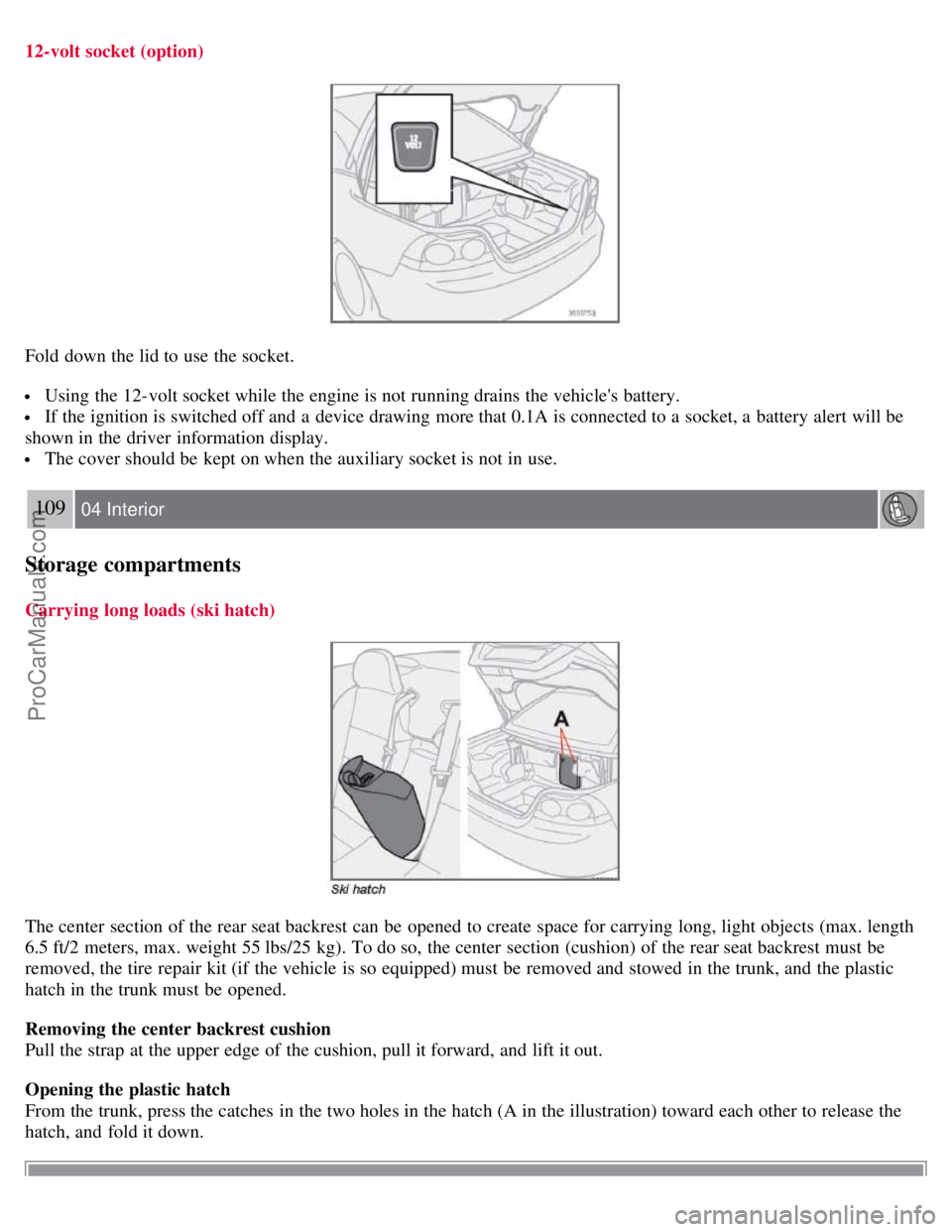
Fold down the lid to use the socket.
Using the 12-volt socket while the engine is not running drains the vehicle's battery.
If the ignition is switched off and a device drawing more that 0.1A is connected to a socket, a battery alert will be
shown in the driver information display.
The cover should be kept on when the auxiliary socket is not in use.
109 04 Interior
Storage compartments
Carrying long loads (ski hatch)
The center section of the rear seat backrest can be opened to create space for carrying long, light objects (max. length
6.5 ft/2 meters, max. weight 55 lbs/25 kg). To do so, the center section (cushion) of the rear seat backrest must be
removed, the tire repair kit (if the vehicle is so equipped) must be removed and stowed in the trunk, and the plastic
hatch in the trunk must be opened.
Removing the center backrest cushion
Pull the strap at the upper edge of the cushion, pull it forward, and lift it out.
Opening the plastic hatch
From the trunk, press the catches in the two holes in the hatch (A in the illustration) toward each other to release the
hatch, and fold it down.
ProCarManuals.com
Page 102 of 246

2 0 0 8
VOLVO C70
110 05 Locks and alarm
Remote control and key blade 112
Valet locking117
Keyless drive (option as available)119
Locking and unlocking123
Glove compartment and trunk124
Opening the trunk from the inside125
Alarm126
111 05 Locks and alarm
112 05 Locks and alarm
Remote control and key blade
Remote controls
Two remote controls that also function as ignition keys are provided with your car. The remote controls contain
detachable metal key blades for manually locking or unlocking the driver's door and the glove compartment.
USA - FCC ID: LTQVO315TX
This device complies with part 15 of the FCC rules. Operation is subject to the following conditions: (1) This device
may not cause harmful interference, and (2) this device must accept any interference received, including interference
that may cause undesired operation.
Canada - IC: 3659AVO315TX
Operation is subject to the following conditions: (1) this device may not cause interference, and (2) this device must
accept any interference, including interference that may cause undesired operation of the device.
Loss of a remote control
ProCarManuals.com
Page 103 of 246
If either of the remote controls is lost, the other must be taken with the car to a Volvo retailer. As an anti-theft
measure, the code of the lost remote control must be erased from the system.
Each key blade has a unique code, which is used if new key blades are required. A maximum of six remote
controls/key blades can be programmed and used for one car.
Immobilizer (start inhibitor)
Each of the keys supplied with your car contains a coded transponder. The code in the key is transmitted to an antenna
in the ignition switch where it is compared to the code stored in the start inhibitor module. The car will start only with
a properly coded key. If you misplace a key, take the other keys to an authorized Volvo retailer for reprogramming as
an antitheft measure.USA - FCC ID: LTQWFS 125VO
This device complies with part 15 of the FCC rules. Operation is subject to the following condition: (1) This device
may not cause harmful interference, and (2) this device must accept any interference received, including interference
that may cause undesired operation.
Canada - IC: 3659A-WFS125VO
Operation is subject to the following conditions: (1) this device may not cause interference, and (2) this device must
accept any interference, including interference that may cause undesired operation of the device.
CAUTION
Never use force on the narrow section of the remote control - this is where the transponder is located. The car cannot
be started if the transponder is damaged.
113 05 Locks and alarm
Remote control and key blade
Remote control functions
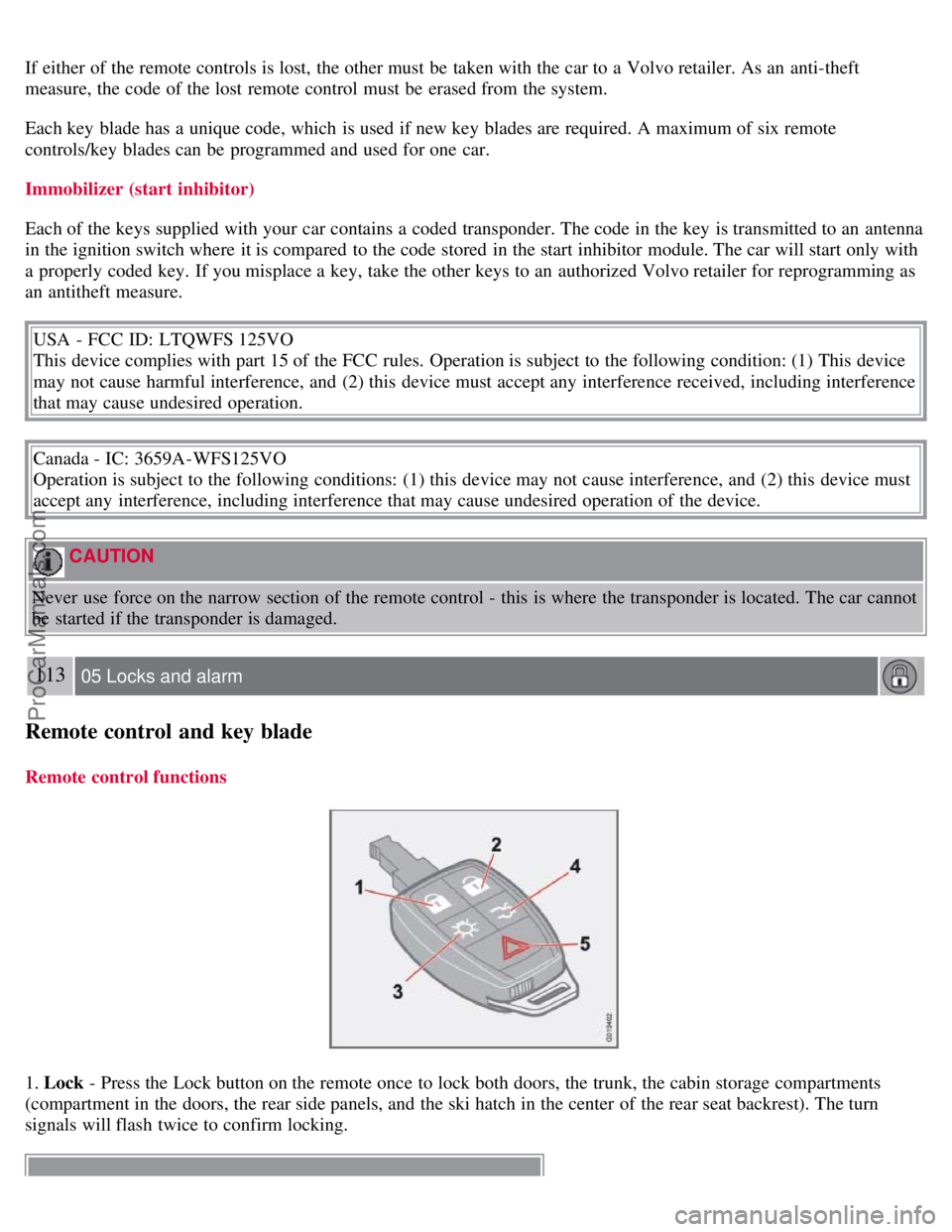
1. Lock - Press the Lock button on the remote once to lock both doors, the trunk, the cabin storage compartments
(compartment in the doors, the rear side panels, and the ski hatch in the center of the rear seat backrest). The turn
signals will flash twice to confirm locking.
ProCarManuals.com
Page 104 of 246

NOTE
The remote control will not lock or unlock the glove compartment.
Double locking
If the car is locked with the remote control while the power retractable hard top is down , the double locking feature
activates after approximately 30 seconds. This means that the doors cannot be unlocked or opened from inside the car.
NOTE
The double locking function can be temporarily disabled. See page 127
for instructions.
2. Unlock - Press the Unlock button on the remote once to unlock the driver's door. The turn signals will flash twice to
confirm unlocking. After a short pause, press the Unlock button a second time within 10 seconds to unlock the other
doors and the trunk.
A long press (for several seconds) opens the side windows.
NOTE
The turn signals flash to confirm that the vehicle has been correctly locked/unlocked with the remote control.
When locking the vehicle, the turn signals will flash a confirmation only if all the doors are securely closed and
locked. Flashing confirmation for locking and unlocking may be customized in the vehicle's Personal settings menu.
See page 71
for more information.
The two-step unlocking function can be changed so that one press of the Unlock button unlocks all of the doors
and the trunk. See Personal settings on page 71
for more information.
Automatic relocking: If the doors are unlocked, the locks will automatically reengage (re-lock) and the alarm will
rearm after 2 minutes unless a door or the trunk has been opened.
Automatic locking: When the car starts to move, the doors and trunk can be locked automatically. This feature
can be turned on or off, see Personal settings on page 72
for more information.
Airbag deployment will automatically attempt to unlock the doors.
3. Approach lighting - As you approach the car:
Press the button on the remote control to illuminate the area around the car in dark conditions.
114 05 Locks and alarm
Remote control and key blade
Pressing the button once lights up the interior lighting, parking lights, and license plate lighting. These lights will
switch off automatically after 30, 60 or 90 seconds. See the Personal settings on page 71
for information about
adjusting the time setting.
4. Unlock trunk - Press the button once to disarm the alarm system and unlock only the trunk. After closing, the trunk
will not automatically relock. Press Lock to relock it and rearm the alarm.
NOTE
This function will unlock, but not pop open, the trunk.
5. Panic alarm : - This button can be used to attract attention during emergency situations.
To activate the panic alarm, press and hold the red button for at least 3 seconds or press it twice within 3 seconds. The
ProCarManuals.com
Page 106 of 246
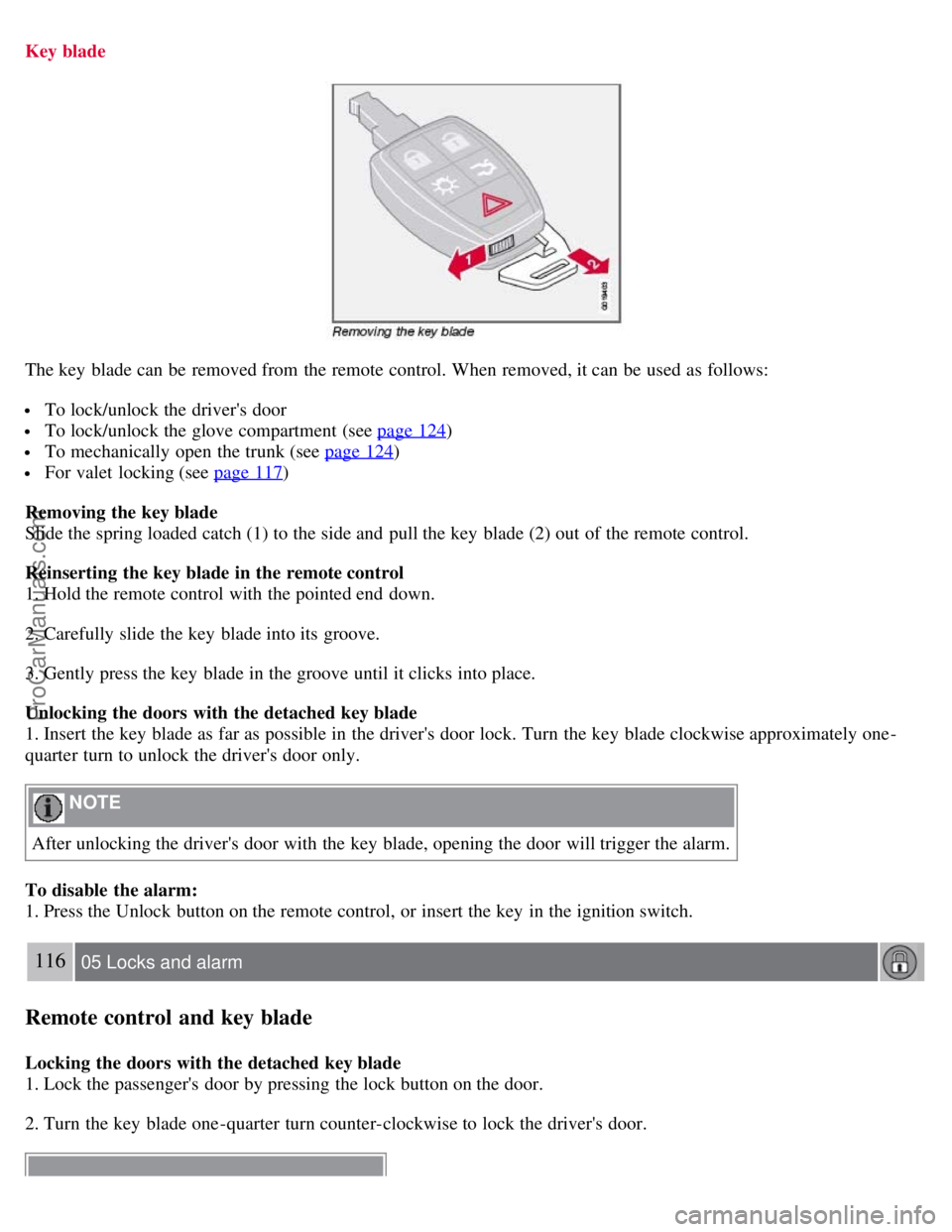
Key blade
The key blade can be removed from the remote control. When removed, it can be used as follows:
To lock/unlock the driver's door
To lock/unlock the glove compartment (see page 124)
To mechanically open the trunk (see page 124)
For valet locking (see page 117)
Removing the key blade
Slide the spring loaded catch (1) to the side and pull the key blade (2) out of the remote control.
Reinserting the key blade in the remote control
1. Hold the remote control with the pointed end down.
2. Carefully slide the key blade into its groove.
3. Gently press the key blade in the groove until it clicks into place.
Unlocking the doors with the detached key blade
1. Insert the key blade as far as possible in the driver's door lock. Turn the key blade clockwise approximately one -
quarter turn to unlock the driver's door only.
NOTE
After unlocking the driver's door with the key blade, opening the door will trigger the alarm.
To disable the alarm:
1. Press the Unlock button on the remote control, or insert the key in the ignition switch.
116 05 Locks and alarm
Remote control and key blade
Locking the doors with the detached key blade
1. Lock the passenger's door by pressing the lock button on the door.
2. Turn the key blade one -quarter turn counter-clockwise to lock the driver's door.
ProCarManuals.com
Page 107 of 246

NOTE
This does not arm the alarm or lock the trunk.
117 05 Locks and alarm
Valet locking
Introduction
By utilizing the remote control with the key blade removed, the valet locking feature enables you to block access to the
trunk and glove compartment for e.g., valet parking or when the car is brought to the retailer for service.
Locking points
A. Doors
B. Steering wheel lock
C. Glove compartment
D. Compartments in door panels
E. Ski hatch
F. Trunk
With the valet locking function activated:
The vehicle's doors can be locked or unlocked
The engine can be started
Locking points C, D, E, and F cannot be unlocked with the remote control.
118 05 Locks and alarm
Valet locking
ProCarManuals.com