warning lights VOLVO C70 2008 User Guide
[x] Cancel search | Manufacturer: VOLVO, Model Year: 2008, Model line: C70, Model: VOLVO C70 2008Pages: 246, PDF Size: 5.14 MB
Page 146 of 246

BLIS has an integrated function that alerts the driver if a fault should occur with the system. For example, if one or
both of the system's cameras are obscured, a message (see the table on page 162
) will appear in the information
display in the instrument panel. If this occurs, clean the camera lenses. If necessary, the system can be temporarily
switched off (for instructions, see page 162
).
160 06 Starting and driving
Blind Spot Information System (BLIS)-option
When does BLIS function
The system functions when your vehicle is moving at speeds above 6 mph (10 km/h).
When you pass another vehicle:
The system reacts when you pass another vehicle at a speed of up to 6 mph (10 km/h) faster than that vehicle.
When you are passed by another vehicle:
The system reacts if your vehicle is passed by another vehicle at a speed of up to 43 mph (70 km/h) faster than your
vehicle.
WARNING
BLIS does not function in sharp curves.
BLIS does not function when your vehicle is backing up.
If you are towing a wide trailer, this may prevent the BLIS cameras from detecting other vehicles in adjacent
lanes.
How BLIS functions in daylight and darkness
Daylight
BLIS reacts to the shape of surrounding vehicles. The system is designed to help detect motor vehicles such as cars,
trucks, buses, motorcycles, etc.
Darkness
BLIS reacts to the headlights of surrounding vehicles. In order to be detected by BLIS, a vehicle in the blind area
must have its headlights on. This means, for example, that the system will not detect a trailer without headlights that is
being towed behind a car or truck.
ProCarManuals.com
Page 147 of 246

WARNING
BLIS does not react to cyclists or mopeds.
BLIS does not react to vehicles that are standing still.
The function of the BLIS cameras may be affected by intense light, or when driving at night in areas where there
are no external sources of light (e.g., street lights, other vehicles, etc.). In such cases, the system may react as if the
cameras were obscured.
In both of the above mentioned conditions, a message will appear in the information display.
When driving in such conditions, the system's function will be limited or it may be temporarily switched off. See
page 162
for instructions.
When the message is no longer displayed, BLIS will return to normal function.
The BLIS cameras have the same limitation as the human eye. In other words, their "vision is impaired" by
adverse weather conditions such as heavy snowfall, dense fog, etc.
161 06 Starting and driving
Blind Spot Information System (BLIS)-option
Limitations
In certain situations, the BLIS indicator light(s) may illuminate even when there are no other vehicles in the area
monitored by the system.
NOTE
If the BLIS indicator lights illuminate occasionally even when there are no other vehicles in the blind area, this does
not indicate a fault in the system. In the event of a fault, Blind spot syst. service required will be displayed.
The following are several examples of situations in which the BLIS indicator light(s) may illuminate even when there
are no other vehicles in the area monitored by the system.
Cleaning the BLIS camera lenses
In order to function optimally, the BLIS camera lenses must be kept clean. They can be wiped clean with a soft cloth
or wet sponge.
CAUTION
Clean the lenses carefully to avoid scratching.
The lenses are electrically heated to help melt ice or snow. If necessary, gently brush away snow from the lenses.
162 06 Starting and driving
ProCarManuals.com
Page 149 of 246
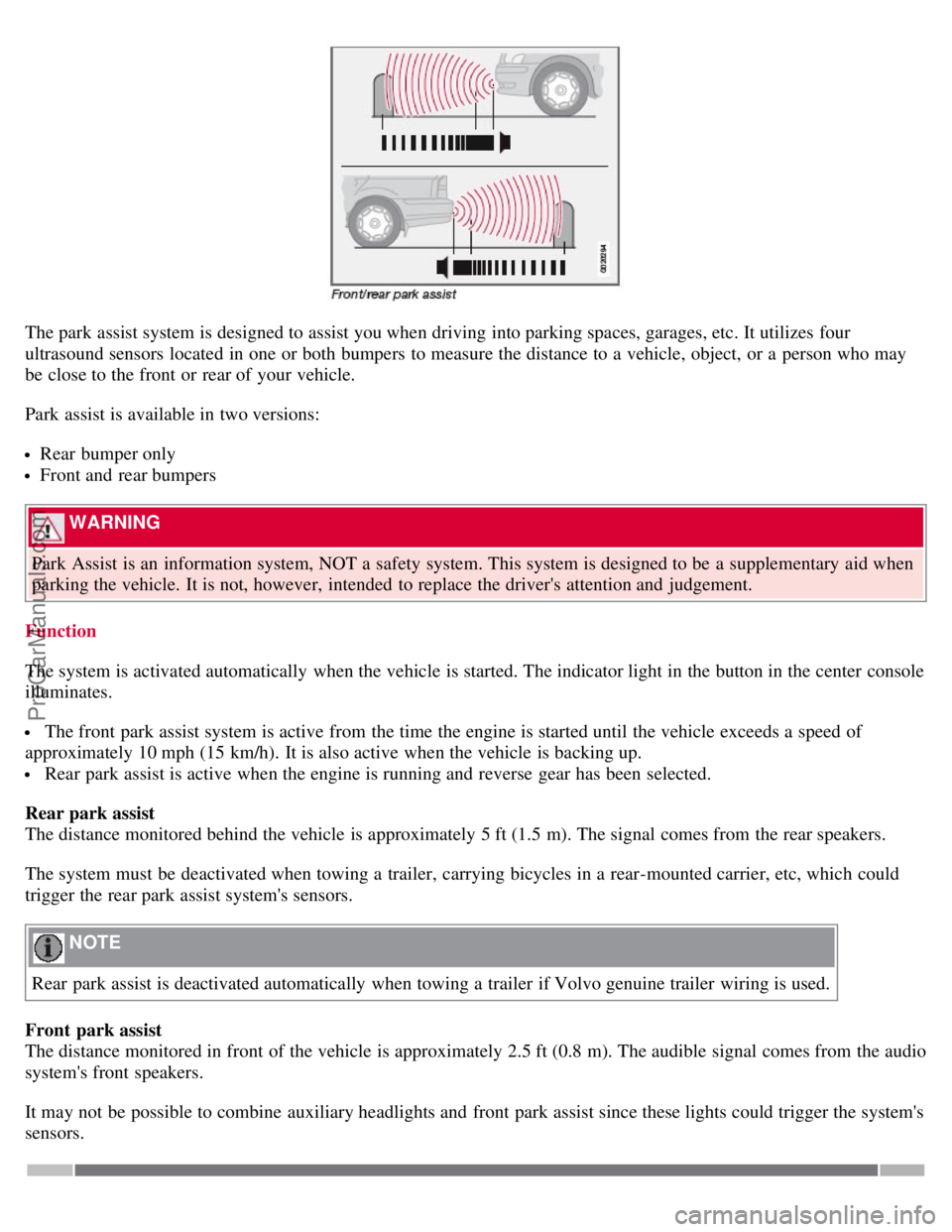
The park assist system is designed to assist you when driving into parking spaces, garages, etc. It utilizes four
ultrasound sensors located in one or both bumpers to measure the distance to a vehicle, object, or a person who may
be close to the front or rear of your vehicle.
Park assist is available in two versions:
Rear bumper only
Front and rear bumpers
WARNING
Park Assist is an information system, NOT a safety system. This system is designed to be a supplementary aid when
parking the vehicle. It is not, however, intended to replace the driver's attention and judgement.
Function
The system is activated automatically when the vehicle is started. The indicator light in the button in the center console
illuminates.
The front park assist system is active from the time the engine is started until the vehicle exceeds a speed of
approximately 10 mph (15 km/h). It is also active when the vehicle is backing up.
Rear park assist is active when the engine is running and reverse gear has been selected.
Rear park assist
The distance monitored behind the vehicle is approximately 5 ft (1.5 m). The signal comes from the rear speakers.
The system must be deactivated when towing a trailer, carrying bicycles in a rear-mounted carrier, etc, which could
trigger the rear park assist system's sensors.
NOTE
Rear park assist is deactivated automatically when towing a trailer if Volvo genuine trailer wiring is used.
Front park assist
The distance monitored in front of the vehicle is approximately 2.5 ft (0.8 m). The audible signal comes from the audio
system's front speakers.
It may not be possible to combine auxiliary headlights and front park assist since these lights could trigger the system's
sensors.
ProCarManuals.com
Page 177 of 246

NOTE
When washing the car, remember to remove dirt from the drain holes in the doors and sills.
Exterior components
Volvo recommends the use of special cleaning products, available at your Volvo retailer, for cleaning colored plastic,
rubber, or ornamental components such as chromed strips on the exterior of your vehicle. The instructions for using
these products should be followed carefully. Solvents or stain removers should not be used.
CAUTION
Avoid waxing or polishing plastic or rubber components
Polishing chromed strips can wear away or damage the surface
Polishes containing abrasive substances should not be used
CAUTION
During high pressure washing, the spray mouthpiece must never be closer to the vehicle than 13" (30 cm). Do not
spray into the locks.
Dirt, snow, etc., on the headlights can reduce lighting capacity considerably. Clean the headlights regularly, for
example when refueling.
When washing or steam cleaning the engine, avoid spraying water or steam directly on the electrical components
or toward the rear side of the engine.
Chromed wheels : Clean chrome-plated wheels using the same detergents used for the body of the vehicle.
Aggressive wheel-cleaning agents can permanently stain chrome-plated wheels.
197 08 Car care
Washing and cleaning the vehicle
Automatic washing - simple and quick
We do NOT recommend washing your car in an automatic wash during the first six months (because the paint will not
have hardened sufficiently).
An automatic wash is a simple and quick way to clean your car, but it is worth remembering that it may not be as
thorough as when you yourself go over the car with sponge and water.
Keeping the underbody clean is most important, especially in the winter. Some automatic washers do not have
facilities for washing the underbody.
CAUTION
Before driving into an automatic car wash, turn off the optional rain sensor to avoid damaging the windshield
wipers.
Make sure that side view mirrors, auxiliary lamps, etc, are secure, and that any antenna(s) are retracted or removed.
Otherwise there is risk of the machine dislodging them.
WARNING
When the car is driven immediately after being washed, apply the brakes several times in order to remove any
ProCarManuals.com
Page 194 of 246

Installing a new battery
1. Put the battery in place in the engine compartment.
2. Install the battery's retaining clamp.
3. Reinstall the front side of the battery box.
4. Connect the positive cable.
5. Connect the ground cable.
6. Reinstall the cover over the battery.
NOTE
Used batteries should be properly disposed of at a recycling station or similar facility, or taken to your Volvo
retailer.
WARNING
Never expose the battery to open flame or electric spark.
Do not smoke near the battery.
Battery fluid contains sulfuric acid. Do not allow battery fluid to contact eyes, skin, fabrics or painted surfaces. If
contact occurs, flush the affected area immediately with water. Obtain medical help immediately if eyes are affected.
216 09 Maintenance and servicing
Replacing bulbs
Introduction
Before replacing bulbs in your vehicle, please keep the following points in mind:
NOTE
Never touch the glass of bulbs with your fingers. Grease and oils from your fingers vaporize in the heat and will
leave a deposit on the reflector, which will damage it.
The optional Bi -Xenon® headlight bulbs contain trace amounts of mercury. These bulbs should always be
disposed of by an authorized Volvo retailer.
Certain bulbs not listed here should only be replaced by an authorized Volvo service technician.
Certain bulbs should only be replaced by a trained and qualified Volvo service technician:
- Courtesy (dome) lighting
- Reading lights
- Glove compartment lights
- Turn signals and courtesy lights in the side door mirrors
- High-mounted brake lights
- Bi -Xenon® headlights
217 09 Maintenance and servicing
ProCarManuals.com
Page 195 of 246

Replacing bulbs
Removing the headlight housing
The entire headlight housing must be lifted out when replacing the high/low beam, parking light, turn signal, and side
marker bulbs.
To lift out the housing:
1. Remove the key from the ignition and turn the headlight switch to position 0.
2. Open the hood.
3. Pull up the headlight housing's retaining pin (1)
4. Pull the headlight housing to one side and then forward (2)
5. Disconnect the wiring connector by pressing down the clip with your thumb
6. (3) and pulling out the connector (4) with your other hand.
7. Lift out the headlight housing and place it on a soft surface to avoid scratching the lens.
After the defective bulb has been replaced, reinsert the housing in the reverse order. Check that the retaining pin is
correctly inserted.
WARNING
Bi -Xenon® headlights (option) - due to the high voltage used by these headlights, these bulbs should only be
replaced by a trained and qualified Volvo service technician.
ProCarManuals.com
Page 238 of 246
Auxiliary equipment68
B
Battery
maintenance214
replacing215
specifications260
warning symbols215
Black box (vehicle event data)204
Blind Spot Information System (BLIS)159, 160, 161
Booster cushions39
Brake fluid212
Brake lights55
Brake system
general information147, 148
warning light51
Bulbs
list of261
replacing216-223
C
Capacity weight177
, 255
Catalytic converter262
CD care248
CD changer/player245, 246, 247
Central locking system112
Chains180
Changing tires184, 185
Child restraints33, 34
booster cushions39
convertible seats37, 38
infant seats35
ISOFIX lower anchors40
recalls and registration41
Child safety30, 31, 32
Climate system
air distribution86
air vents81
defroster83
Electronic Climate Control82, 83, 84
general information80
recirculation83
Clock setting71
Cold weather driving133
Collision mode (crash mode)29
Color code, paint200
ProCarManuals.com
Page 239 of 246
Compass68, 69
Convertible seats37, 38
Convertible top94, 95, 96, 97, 98, 99
Coolant211
Courtesy lighting100
Crash mode29
Cruise control62
Cup holders105
Curb weight177, 255
D
Defroster83
Dimensions254
Disabling the passenger's side front airbag21, 22, 23
Door mounted inflatable curtain25
Door open warning52
Driver distraction8
Driving economically132
Driving in cold weather133
Driving through water133
Dynamic Stability and Traction Control149, 150
indicator light50
E
Easy entry front seat function91
Economical driving132
Electrical current, conserving134
Electrically operated windows67
Electronic Climate Control82, 83, 84
Emergency flashers64
Emergency Locking Retractor32
Emergency towing151, 152, 153
Emission inspection readiness206
Engine
specifications259
starting140
Engine compartment overview208
Engine oil
changing209
specifications257, 258
warning lights51
Environment7
F
Federal Clean Air Act204
Fluid specifications256
Fog lights front/rear55
ProCarManuals.com
Page 240 of 246
Front airbag system18, 19, 20
Front passenger's side airbag, disabling21, 22, 23
Front seats
easy entry function91
electrically operated92, 93
heated84
manual adjustment90
power91
whiplash protection system26, 27
Fuel filler cap6
Fuel filler door6, 56, 137
unlocking manually56
Fuel gauge47
fuel level warning light50
Fuel requirements136, 137
Fuses224 - 230
G
Gasoline requirements137
Generator warning light51
Glove compartment103
locking124
Gross vehicle weight177, 255
H
Hand brake (parking brake)65
Hard top94 - 99
Hazard warning flashers64
Headlights55
high beam flash57
switching between high/low beam57
washers60
Heated front seats84
Home safe lighting57, 72
Home Link Universal Transceiver73 - 76
Hood opening207
I
Ignition switch139
Immobilizer112, 140
Infant seats35
Inflatable curtain25
Inflation pressure checking170, 171
Inflation pressure tables
Canadian models173
US models172
Information symbol54
ProCarManuals.com
Page 241 of 246

Information display message49
Inspection readiness206
Instrument overview44, 45, 46
Instrument panel47
indicator and warning lights50, 51
information symbol49
lighting56
messages53
warning symbol48
Interior lighting100
reading lights100
Introduction1
iPOD connector (audio system)236
ISOFIX lower anchors40
J
Jack
location of183
positioning185
Jacket hanger104
Jump starting154
K
Key blade115
Keyless drive
location of antennas (pacemaker warning)122
Keylock6, 140
L
Label information252, 253
Leather care196
Lighting panel55
Loading the vehicle158
Locking functions113
locking the vehicle from the inside123
valet locking117
Long distance trips134
Long loads109
Lug nuts181
M
Maintenance204
performed by owner205
Malfunction indicator light50
Manual transmission143
Memory function (power seats)92, 93
Mirrors
defroster84
ProCarManuals.com