battery VOLVO C70 2008 Owner's Manual
[x] Cancel search | Manufacturer: VOLVO, Model Year: 2008, Model line: C70, Model: VOLVO C70 2008Pages: 246, PDF Size: 5.14 MB
Page 186 of 246

1. Cooling system expansion tank
2. Power steering fluid reservoir (concealed behind the headlight)
3. Dipstick - engine oil
4. Radiator
5. Cooling fan
6. Washer fluid reservoir
7. Engine oil filler cap
8. Brake/clutch fluid reservoir
9. Battery
10. Relay/fuse box
11. Air cleaner
WARNING
The cooling fan may start or continue to operate (for up to 6 minutes) after the engine has been switched off.
209 09 Maintenance and servicing
Engine oil
Changing engine oil and oil filter
See page 257
for oil specifications. Refer to the Warranty and Service Records Information booklet for information on
the oil change intervals.
Volvo recommends Castrol.
NOTE
Volvo does not recommend the use of oil additives.
ProCarManuals.com
Page 192 of 246

214 09 Maintenance and servicing
Battery
Battery maintenance
Driving habits and conditions, climate, the number of starts, etc., all affect the service life and function of the battery.
In order for your battery to perform satisfactorily, keep the following in mind:
Check the fluid level in each cell in the battery every 24 months or every 15,0001 miles (24,000 km), whichever is
sooner. The fluid should be at the level shown in the illustrations above (A). Do not overfill.
1More frequently in warm climates.
Use a screw driver to open the caps or cover and a flashlight to inspect the level.
If necessary, add distilled water. The level should never be above the indicator (A).
The fluid level should be checked if the battery has been recharged.
After inspection, be sure the cap over each battery cell or the cover is securely in place.
Check that the battery cables are correctly connected and properly tightened.
Never disconnect the battery when the engine is running, or when the key is in the ignition. This could damage the
vehicle's electrical system.
The battery should be disconnected from the vehicle when a battery charger is used directly on the battery.
WARNING
ProCarManuals.com
Page 193 of 246

PROPOSITION 65 WARNING!
Battery posts, terminals, and related accessories contain lead and lead compounds, chemicals known to the state of
California to cause cancer and reproductive harm. Wash hands after handling.
215 09 Maintenance and servicing
Battery
Battery symbols
Battery replacement
Removing the battery
1. Switch off the ignition and remove the key.
2. Wait at least 5 minutes after switching off the ignition before disconnecting the battery so that all information in the
vehicle's electrical system can be stored in the control modules.
3. Remove the cover over the battery.
4. Disconnect the battery negative (ground) cable.
5. Disconnect the positive cable.
6. Remove the front side of the battery box with a screwdriver.
7. Release the clamp holding the battery.
8. Lift out the battery.
ProCarManuals.com
Page 194 of 246

Installing a new battery
1. Put the battery in place in the engine compartment.
2. Install the battery's retaining clamp.
3. Reinstall the front side of the battery box.
4. Connect the positive cable.
5. Connect the ground cable.
6. Reinstall the cover over the battery.
NOTE
Used batteries should be properly disposed of at a recycling station or similar facility, or taken to your Volvo
retailer.
WARNING
Never expose the battery to open flame or electric spark.
Do not smoke near the battery.
Battery fluid contains sulfuric acid. Do not allow battery fluid to contact eyes, skin, fabrics or painted surfaces. If
contact occurs, flush the affected area immediately with water. Obtain medical help immediately if eyes are affected.
216 09 Maintenance and servicing
Replacing bulbs
Introduction
Before replacing bulbs in your vehicle, please keep the following points in mind:
NOTE
Never touch the glass of bulbs with your fingers. Grease and oils from your fingers vaporize in the heat and will
leave a deposit on the reflector, which will damage it.
The optional Bi -Xenon® headlight bulbs contain trace amounts of mercury. These bulbs should always be
disposed of by an authorized Volvo retailer.
Certain bulbs not listed here should only be replaced by an authorized Volvo service technician.
Certain bulbs should only be replaced by a trained and qualified Volvo service technician:
- Courtesy (dome) lighting
- Reading lights
- Glove compartment lights
- Turn signals and courtesy lights in the side door mirrors
- High-mounted brake lights
- Bi -Xenon® headlights
217 09 Maintenance and servicing
ProCarManuals.com
Page 212 of 246
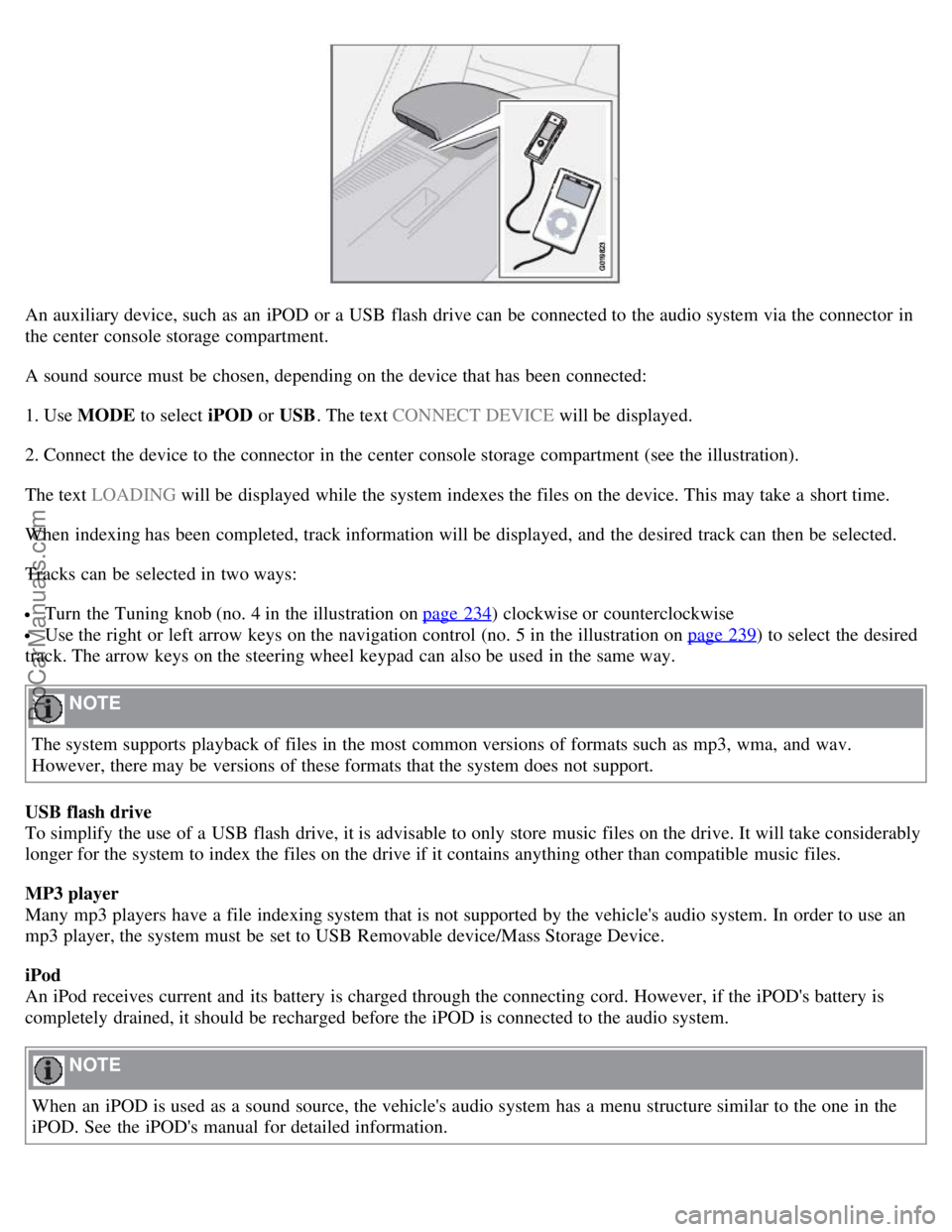
An auxiliary device, such as an iPOD or a USB flash drive can be connected to the audio system via the connector in
the center console storage compartment.
A sound source must be chosen, depending on the device that has been connected:
1. Use MODE to select iPOD or USB. The text CONNECT DEVICE will be displayed.
2. Connect the device to the connector in the center console storage compartment (see the illustration).
The text LOADING will be displayed while the system indexes the files on the device. This may take a short time.
When indexing has been completed, track information will be displayed, and the desired track can then be selected.
Tracks can be selected in two ways:
Turn the Tuning knob (no. 4 in the illustration on page 234) clockwise or counterclockwise
Use the right or left arrow keys on the navigation control (no. 5 in the illustration on page 239) to select the desired
track. The arrow keys on the steering wheel keypad can also be used in the same way.
NOTE
The system supports playback of files in the most common versions of formats such as mp3, wma, and wav.
However, there may be versions of these formats that the system does not support.
USB flash drive
To simplify the use of a USB flash drive, it is advisable to only store music files on the drive. It will take considerably
longer for the system to index the files on the drive if it contains anything other than compatible music files.
MP3 player
Many mp3 players have a file indexing system that is not supported by the vehicle's audio system. In order to use an
mp3 player, the system must be set to USB Removable device/Mass Storage Device.
iPod
An iPod receives current and its battery is charged through the connecting cord. However, if the iPOD's battery is
completely drained, it should be recharged before the iPOD is connected to the audio system.
NOTE
When an iPOD is used as a sound source, the vehicle's audio system has a menu structure similar to the one in the
iPOD. See the iPOD's manual for detailed information.
ProCarManuals.com
Page 234 of 246

260 11 Specifications
Electrical system
General information
12-volt system with voltage controlled generator. Single wire system in which the chassis and engine block are used as
conductors, grounded on the chassis.
Battery
1Models equipped with the High Performance audio system
2Models equipped with the Premium Sound audio system and/or the Volvo Navigation System
If the battery must be replaced, replace it with one with the same cold start capacity and reserve capacity as the original
(see the decal on the battery).
WARNING
PROPOSITION 65 WARNING!
Battery posts, terminals, and related accessories contain lead and lead compounds, chemicals known to the state of
California to cause cancer and reproductive harm. Wash hands after handling.
261 11 Specifications
Electrical system
Bulbs used in the car
ProCarManuals.com
Page 238 of 246
Auxiliary equipment68
B
Battery
maintenance214
replacing215
specifications260
warning symbols215
Black box (vehicle event data)204
Blind Spot Information System (BLIS)159, 160, 161
Booster cushions39
Brake fluid212
Brake lights55
Brake system
general information147, 148
warning light51
Bulbs
list of261
replacing216-223
C
Capacity weight177
, 255
Catalytic converter262
CD care248
CD changer/player245, 246, 247
Central locking system112
Chains180
Changing tires184, 185
Child restraints33, 34
booster cushions39
convertible seats37, 38
infant seats35
ISOFIX lower anchors40
recalls and registration41
Child safety30, 31, 32
Climate system
air distribution86
air vents81
defroster83
Electronic Climate Control82, 83, 84
general information80
recirculation83
Clock setting71
Cold weather driving133
Collision mode (crash mode)29
Color code, paint200
ProCarManuals.com
Page 243 of 246

Rear window defroster84
Rearview mirror68, 69
Recalls, child restraints41
Recirculation (climate system)83
Refueling136, 137, 138
Registering child restraints41
Remote control112
approach lighting113
functions113
key blade115
replacing the battery113
Reporting safety defects
Canada13
USA12
Retractable hard top94 - 99
Roadside assistance263
Roll-over protection system28
S
Safety defects, reporting
Canada13
USA12
Seat belts14
Automatic Locking Retractor/Emergency Locking Retractor32
reminder16
reminder light51
use during pregnancy15
Seats90 - 93
front91
Service locking117
Shiftlock6, 140
override146
Side impact protection airbags24
Sirius satellite radio241, 242, 243
Ski hatch109
Snow chains180
Snow tires180
Sound settings235
Spare tire183
Stability system149, 150
Start inhibitor112, 140
Starting the engine140
Steering wheel
adjustment64
keypad235
ProCarManuals.com