belt VOLVO C70 2008 Owner's Guide
[x] Cancel search | Manufacturer: VOLVO, Model Year: 2008, Model line: C70, Model: VOLVO C70 2008Pages: 246, PDF Size: 5.14 MB
Page 39 of 246

45 02 Instruments and controls
Instrument overview
1. Steering wheel adjustment64
2. Hood opener207
3. Controls in driver's door(see inset illustration on the next page)
4. Left steering wheel lever57
5. Lighting panel, fuel filler door opener55
6. Door open handle, and locking button123
7. Lock indicator light123
8. Climate system air vent81
9. Side window air vent
10. Cruise control62
11. Horn, airbag18
12. Main instrument panel47
13. Audio controls234
14. Right steering wheel lever60
15. Ignition switch139
16. Rear-view mirror68
17. Seat belt reminder and Occupant Weight Sensor indicator16
18. Driver's side reading light100
19. Movement detector (option), alarm sensor127
20. Courtesy lighting switch100
21. Position for accessory switch
22. Passenger's side reading light100
23. Display for climate control, personal settings, and audio system
24. Controls for personal settings and audio system71
/234
ProCarManuals.com
Page 45 of 246

51 02 Instruments and controls
Symbols - instrument panel
Symbols - right side
1. Turn signal indicator for trailer (certain models)
If you are towing a trailer, this light will flash simultaneously with the turn signals on the trailer. If the light does not
flash when signaling, one of the turn signals on the trailer or on the car are not functioning properly.
2. Parking brake applied
This light is on when the parking brake (hand brake) is applied. The parking brake lever is situated between the front
seats. Always pull up this lever as far as possible when applying the parking brake.
NOTE
Canadian models are equipped with the second symbol.
3. SRS warning light
If this light comes on while the car is being driven, or remains on for longer than approximately 10 seconds after the
car has been started, the SRS system's diagnostic functions have detected a fault in a seat belt lock or pretensioner, a
front airbag, side impact airbag, and/or an inflatable curtain. Have the system(s) inspected by a trained and qualified
Volvo service technician as soon as possible.
4. Oil pressure warning light1
If the light comes on while driving, stop the car, stop the engine immediately, and check the engine oil level. If the oil
level is normal and the light stays on after restart, have the car towed to the nearest trained and qualified Volvo service
technician. After hard driving, the light may come on occasionally when the engine is idling. This is normal, provided
it goes off when the engine speed is increased.
ProCarManuals.com
Page 46 of 246

5. Seat belt reminder
See page 16
for detailed information.
6. Generator warning light
If the light comes on while the engine is running, have the charging system checked by a trained and qualified Volvo
service technician.
7. Brake failure warning light
If this light comes on while driving or braking, stop the car as quickly as possible in a safe place, open the hood, and
check
1On certain engines, this symbol is not used to indicate low oil pressure. Instead, a text warning is provided in the information display, see also
page 210
.
52 02 Instruments and controls
Symbols - instrument panel
the brake fluid level in the reservoir. See page 208 for the location of the reservoir.
NOTE
Canadian models are equipped with the second symbol.
WARNING
If the fluid level is below the MIN mark in the reservoir or if a "Brake failure - Service urgent" message is displayed
in the information display: DO NOT DRIVE . Have the car towed to a trained and qualified Volvo service technician
and have the brake system inspected.
If the fluid level is below the MIN mark in the reservoir or if a " BRAKE FAILURE - SERVICE URGENT" message
is displayed in the information display: DO NOT DRIVE. Have the car towed to a trained and qualified Volvo service
technician and have the brake system inspected.
If the BRAKE and ABS warning lights come on at the same time, this could indicate a fault in the brake system.
In this case:
1. Stop the car in a suitable place and switch off the engine.
ProCarManuals.com
Page 81 of 246

2. Use this control to raise or lower the front edge of the seat cushion.
3. Use this control to raise or lower the rear edge of the seat cushion.
4. Turn this knob (option on some passenger's seats) to adjust the firmness of the lumbar support
1.
5. Turn this knob to adjust the backrest tilt.
6. Control panel for power seats.
WARNING
Do not adjust the seat while driving.
Adjust the driver's seat and seat belt (see page 14) before driving. The seat should be adjusted so that the brake
pedal can be depressed fully.
Position the seat as far rearward as comfort and control allow.
1Also applies to the optional power seat.
91 04 Interior
Front seats
Accessing the rear seat
Seat access buttons (power seat shown)
Manual seat
Moving the seat forward:
1. Remove the seat belt from its guide (see page 15
).
2. Pull up control 1 (see the illustration), hold it up, and fold the backrest forward until it locks in position.
3. Slide the seat forward.
Moving the seat rearward:
1. With the backrest folded forward in the locked position , slide the seat rearward to its original position.
ProCarManuals.com
Page 82 of 246
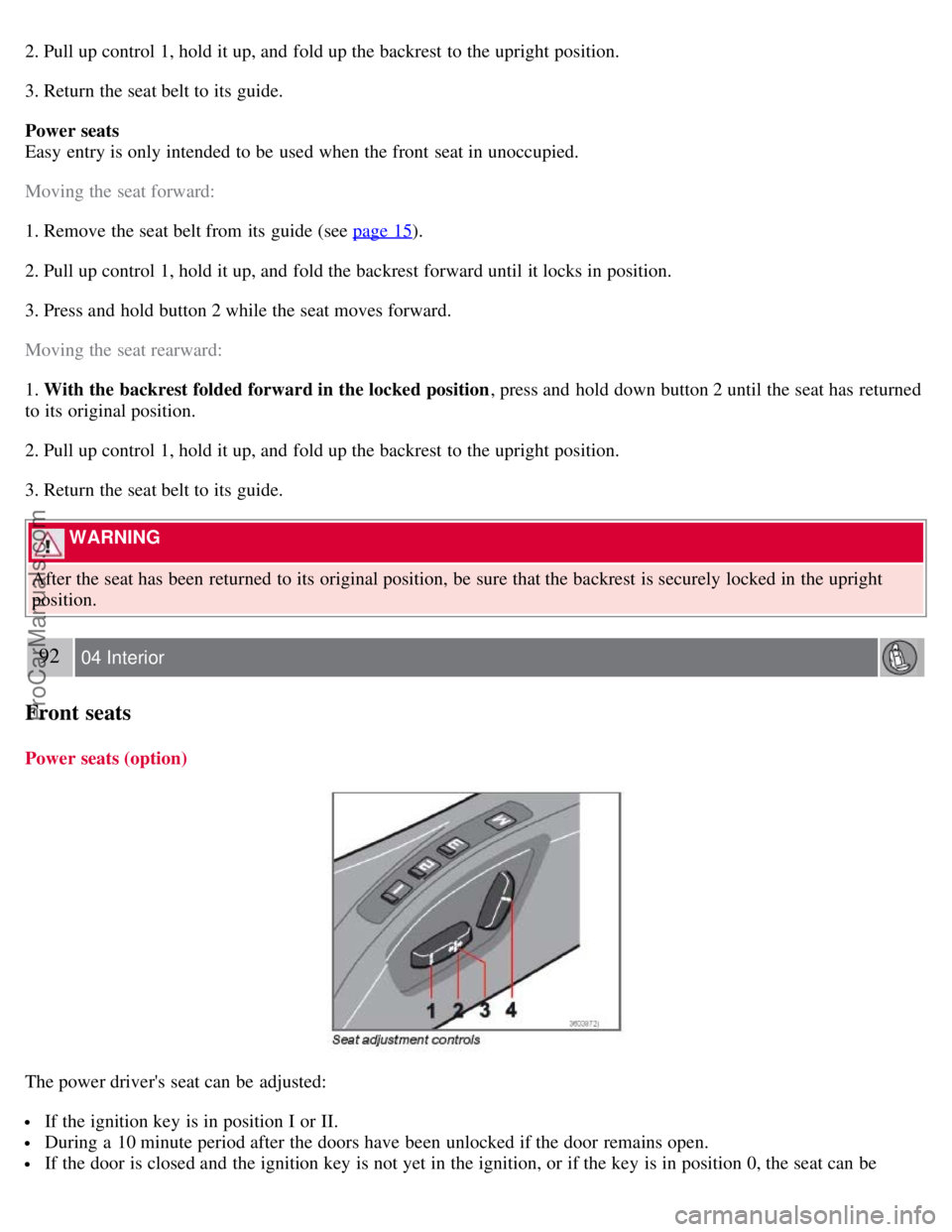
2. Pull up control 1, hold it up, and fold up the backrest to the upright position.
3. Return the seat belt to its guide.
Power seats
Easy entry is only intended to be used when the front seat in unoccupied.
Moving the seat forward:
1. Remove the seat belt from its guide (see page 15
).
2. Pull up control 1, hold it up, and fold the backrest forward until it locks in position.
3. Press and hold button 2 while the seat moves forward.
Moving the seat rearward:
1. With the backrest folded forward in the locked position , press and hold down button 2 until the seat has returned
to its original position.
2. Pull up control 1, hold it up, and fold up the backrest to the upright position.
3. Return the seat belt to its guide.
WARNING
After the seat has been returned to its original position, be sure that the backrest is securely locked in the upright
position.
92 04 Interior
Front seats
Power seats (option)
The power driver's seat can be adjusted:
If the ignition key is in position I or II.
During a 10 minute period after the doors have been unlocked if the door remains open.
If the door is closed and the ignition key is not yet in the ignition, or if the key is in position 0, the seat can be
ProCarManuals.com
Page 101 of 246
NOTE
If the vehicle is equipped with the optional ski bag, the bag's zipper must be opened from the passenger's
compartment in order to insert objects through the ski hatch.
Replacing the backrest cushion
Begin by guiding the lower section of the cushion into place. Then press the upper section of the cushion into place.
NOTE
This cushion is locked in place when the vehicle is locked with the remote control. See page 117
.
Securing long objects
Long objects should be secured with one of the rear seat belts.
Wrap the belt once around the object and lock the belt in the retractor as usual.
If the vehicle is equipped with the optional ski bag, pass the seat belt through the bag's handle before fastening the seat
belt.
Contents | Top of Page
ProCarManuals.com
Page 122 of 246

charge more frequently and spray an antirust oil on the battery posts.
Volvo recommends the use of snow tires on all four wheels for winter driving - see the chapter "Wheels and tires."
To prevent the washer fluid reservoir from freezing, add washer solvents containing antifreeze (see page 211 for the
location of the washer fluid reservoir). This is important since dirt is often splashed on the windshield during winter
driving, requiring the frequent use of the washers and wipers. Volvo Washer Solvent should be diluted as follows:
Down to 14° F (-10° C): 1 part washer solvent and 4 parts water Down to 5° F (-15° C): 1 part washer solvent and 3
parts water Down to 0° F (-18° C): 1 part washer solvent and 2 parts water Down to -18° F (-28° C): 1 part washer
solvent and 1 part water.
Use Volvo Teflon Lock Spray in the locks.
NOTE
Avoid using de -icing sprays as they can cause damage to the locks.
Conserving electrical current
Keep the following in mind to help minimize battery drain:
When the engine is not running, avoid turning the ignition key to position II. Many electrical systems (the audio
system, the optional navigation system, power windows, etc) will function with the ignition key in position I. This
position reduces drain on the battery.
Please keep in mind that using systems, accessories, etc that consume a great deal of current when the engine is not
running could result in the battery being completely drained.
The optional 12 volt socket in the cargo area provides electrical current even with the ignition switched off, which
drains the battery.
NOTE
If the ignition is switched on, a warning message will be displayed in the text window in the instrument panel
when the battery charge is low.
An energy conserving function designed into the vehicle's electrical system will switch off certain functions or
reduce the load on the battery by, e.g., reducing the audio system's volume.
135 06 Starting and driving
General information
Before a long distance trip
It is always worthwhile to have your vehicle checked by a trained and qualified Volvo service technician before
driving long distances. Your retailer or service technician will also be able to supply you with bulbs, fuses, spark plugs
and wiper blades for your use in the event that problems occur.
As a minimum, the following items should be checked before any long trip:
Check that engine runs smoothly and that fuel consumption is normal.
Check for fuel, oil, and fluid leakage
Have the transmission oil level checked1.
Check condition of drive belts.
Check state of the battery's charge.
Examine tires carefully (the spare tire as well), and replace those that are worn. Check tire pressures.
The brakes, front wheel alignment, and steering gear should be checked by a trained and qualified Volvo service
ProCarManuals.com
Page 127 of 246

III - Start position
Turn the key to this position and release it immediately. The key returns automatically to the Drive position.
A chime will sound if the key is left in the ignition and the driver's door is opened.
Steering wheel lock
When the key is removed from the ignition, the steering wheel locks so that it cannot be turned.
Releasing the steering wheel lock
If the front wheels are hard up against a curb, the steering wheel lock may be under too much tension to unlock.
If so, the key will turn in the ignition switch but the car will not start.
At the same time, a message "Steering locked turn wheel" will appear in the information display.
If this happens:
1. Remove the key from the ignition.
2. Turn the steering wheel slightly and hold it to release pressure on the lock mechanism.
3. Reinsert the key and start the vehicle.
The steering should immediately unlock. If not, try again.
NOTE
In order to help reduce vehicle theft, make sure the steering wheel lock is engaged before leaving the vehicle.
WARNING
Never switch off the ignition (turn the ignition key to position 0) or remove the key from the ignition switch while
the vehicle is in motion. This could cause the steering wheel to lock, which would make the vehicle impossible to
steer.
140 06 Starting and driving
Starting the vehicle
To start the engine
1. Fasten the seat belt.
WARNING
Before starting, check that the seat, steering wheel and mirrors are adjusted properly. Make sure the brake pedal can
be depressed completely. Adjust the seat if necessary.
ProCarManuals.com
Page 179 of 246

Volvo also offers a special leather softener that should be applied after the cleaner and protectant. It leaves leather soft
and smooth, and reduces friction between leather and other finishes in the vehicle.
Volvo recommends cleaning, protecting and conditioning your vehicle's leather two to four times a year. Ask your
Volvo retailer about Leather Care Kit 951 0251 and Leather Softener 943 7429.
Cleaning leather upholstery
1. Pour leather cleaner on a damp sponge and squeeze it until the cleaner foams.
2. Apply the foam to the stain by moving the sponge with circular movements.
3. Dampen the stain thoroughly with the sponge. Let the sponge absorb the stain, do not rub.
4. Dry the stain with soft paper towels or a towel, and allow the leather to dry completely.
Protecting leather upholstery
1. Put a small amount of protectant cream on a cloth and apply a thin coating of cream to the upholstery with light
circular movements.
2. Allow the leather to dry for 20 minutes.
This will help the leather resist staining and protect against sunlight's harmful UV rays.
CAUTION
Under no circumstances should gasoline, naphtha or similar cleaning agents be used on the plastic or the leather
since these can cause damage.
Take extra care when removing stains such as ink or lipstick since the coloring can spread.
Use solvents sparingly. Too much solvent can damage the seat padding.
Start from the outside of the stain and work toward the center.
Sharp objects (e.g. pencils or pens in a pocket) or Velcro fasteners on clothing may damage the textile upholstery.
Clothing that is not colorfast, such as new jeans or suede garments, may stain the upholstery.
199 08 Car care
Washing and cleaning the vehicle
Cleaning the seat belts
Clean only with lukewarm water and a mild soap solution.
Cleaning floor mats
The floor mats should be vacuumed or brushed clean regularly, especially during winter when they should be taken out
for drying. Spots on textile mats can be removed with a mild detergent. For best protection in winter, Volvo
recommends the use of Volvo rubber floor mats. Consult your Volvo retailer.
200 08 Car care
Paint touch up
Touching up minor paint damage
ProCarManuals.com
Page 183 of 246
assure the proper servicing and function of the components that control emissions. These services, which are listed in
the "Warranty and Service Records Information" booklet, are not covered by the warranty. You will be required to pay
for labor and material used.
Maintenance
Your Volvo passed several major inspections before it was delivered to you, in accordance with Volvo specifications.
The maintenance procedures outlined in the Warranty and Service Records Information booklet, many of which will
positively affect your vehicle's emissions, should be performed as indicated. It is recommended that receipts for
vehicle emission maintenance be retained in case questions arise concerning maintenance. Inspection and maintenance
should also be performed anytime a malfunction is observed or suspected.
Applicable warranties - U.S/Canada
In accordance with applicable U.S. and Canadian regulations, the following list of warranties is provided.
New Vehicle Limited Warranty
Parts and Accessories Limited Warranty
Corrosion Protection Limited Warranty
Seat Belt and Supplemental Restraint Systems Limited Warranty
Emission Design and Defect Warranty
Emission Performance Warranty
These are the federal warranties; other warranties are provided as required by state/provincial law. Refer to your
separate Warranty and Service Records Information booklet for detailed information concerning each of the warranties.
Periodic maintenance helps minimize emissions
Periodic maintenance will help keep your vehicle running well. Your Warranty and Service Records Information
booklet provides a comprehensive periodic maintenance schedule up to 150,000 miles (240,000 km) of vehicle
maintenance. The schedule includes components that affect vehicle emissions. This page describes some of the
emission-related components.
Vehicle Event Data (Black Box)
Your vehicle's driving and safety systems employ computers that monitor, and share with each other, information
about your vehicle's operation. One or more of these computers may store what they monitor, either during normal
vehicle operation or in a crash or near-crash event. Stored information may be read and used by:
Volvo Car Corporation
service and repair facilities
law enforcement or government agencies
others who may assert a legal right to know, or who obtain your consent to know such information.
205 09 Maintenance and servicing
Maintaining your vehicle
Owner maintenance
Periodic maintenance requirements and intervals are described in your vehicle's Warranty and Service Records
Information booklet.
The following points can be carried out between the normally scheduled maintenance services.
ProCarManuals.com