climate control VOLVO C70 2008 Owners Manual
[x] Cancel search | Manufacturer: VOLVO, Model Year: 2008, Model line: C70, Model: VOLVO C70 2008Pages: 246, PDF Size: 5.14 MB
Page 3 of 246
3 Contents
03 Climate
General information80
Air vents81
Electronic Climate Control (ECC)82
Air distribution86
04 Interior
Front seats90
Power retractable hard top94
Interior lighting100
Storage compartments102
Trunk107
05 Locks and alarm
Remote control and key blade 112
Valet locking117
Keyless drive (option as
available)119
Locking and unlocking
123
Glove compartment and trunk124
Opening the trunk from the inside125
Alarm126
4 Contents
06 Starting and driving
General information132
Fuel requirements136
Ignition switch/Steering wheel
lock139
Starting the vehicle
140
Starting the car with keyless drive
(option)142
Manual transmission
143
Automatic transmission144
Shiftlock override146
Brake system147
Stability system149
Towing151
Jump starting154
Towing a trailer155
Detachable trailer hitch157
Transporting loads158
Blind Spot Information System
(BLIS)-option159
Park assist (Option/accessory)
163
07 Wheels and tires
General information168
Tire inflation170
Tire designations174
Glossary of tire terminology176
Vehicle loading177
Uniform tire quality gradings179
Snow chains, snow tires, studded
tires180
Wheel nuts
181
Tire rotation182
Temporary spare183
Changing a wheel184
Tire sealing system185
Tire Pressure Monitoring System
(TPMS)192
08 Car care
Washing and cleaning the vehicle
196
Paint touch up200
5 Contents
ProCarManuals.com
Page 39 of 246

45 02 Instruments and controls
Instrument overview
1. Steering wheel adjustment64
2. Hood opener207
3. Controls in driver's door(see inset illustration on the next page)
4. Left steering wheel lever57
5. Lighting panel, fuel filler door opener55
6. Door open handle, and locking button123
7. Lock indicator light123
8. Climate system air vent81
9. Side window air vent
10. Cruise control62
11. Horn, airbag18
12. Main instrument panel47
13. Audio controls234
14. Right steering wheel lever60
15. Ignition switch139
16. Rear-view mirror68
17. Seat belt reminder and Occupant Weight Sensor indicator16
18. Driver's side reading light100
19. Movement detector (option), alarm sensor127
20. Courtesy lighting switch100
21. Position for accessory switch
22. Passenger's side reading light100
23. Display for climate control, personal settings, and audio system
24. Controls for personal settings and audio system71
/234
ProCarManuals.com
Page 40 of 246
25. Controls for climate system82
26. Hazard warning flashers.64
27. Door open handle, and locking button123
28. Glove compartment103
29. Gear selector, manual143
Gear selector, automatic144
30. Parking brake65
31. 12-volt socket66
32. Switches for raising/lowering the power retractable hard top96
46 02 Instruments and controls
Instrument overview
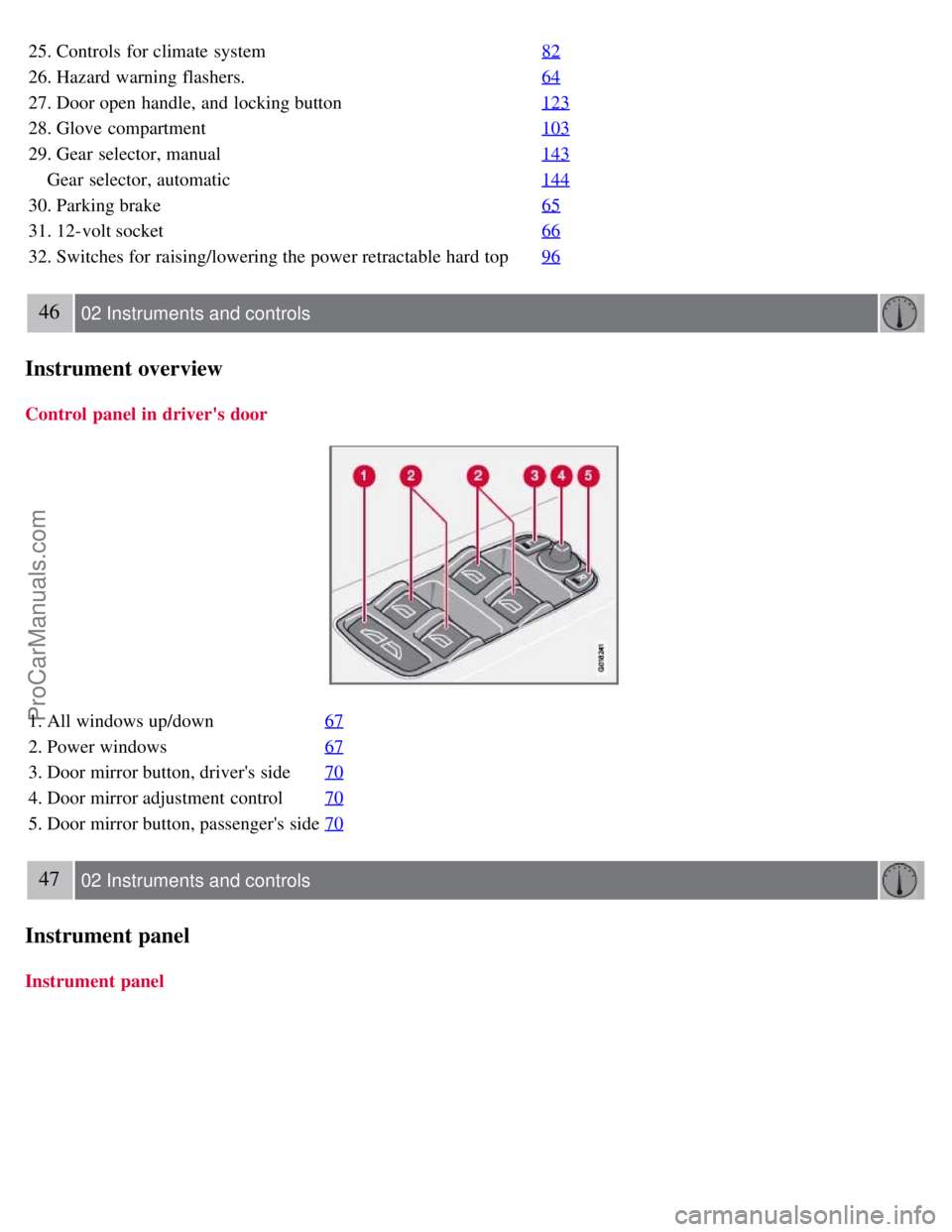
Control panel in driver's door
1. All windows up/down67
2. Power windows67
3. Door mirror button, driver's side70
4. Door mirror adjustment control70
5. Door mirror button, passenger's side70
47 02 Instruments and controls
Instrument panel
Instrument panel
ProCarManuals.com
Page 65 of 246
The mirrors should always be adjusted prior to driving.
Objects seen in the passenger's side wide -angle door mirror are closer than they appear to be.
Storing the mirrors' position
The position of the power door mirrors is stored when the car is locked with the remote control. When the car is
unlocked with the same remote control, the mirrors will move to the stored position.
Blind Spot Information System (BLIS) -option
The Blind Spot Information System (BLIS) is an information system that indicates the presence of another vehicle in
the side-view mirror's "blind area." See page 159
for detailed information.
71 02 Instruments and controls
Personal settings
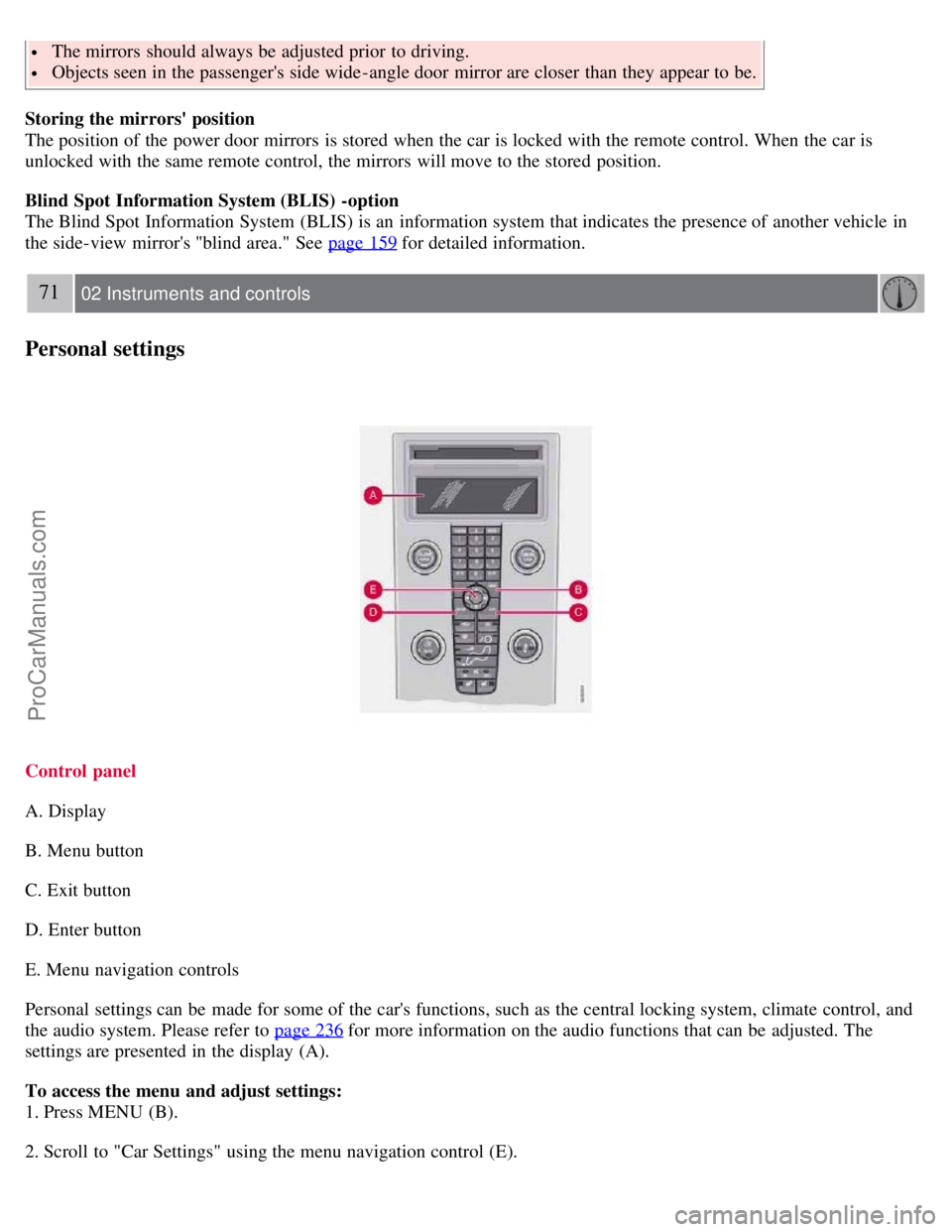
Control panel
A. Display
B. Menu button
C. Exit button
D. Enter button
E. Menu navigation controls
Personal settings can be made for some of the car's functions, such as the central locking system, climate control, and
the audio system. Please refer to page 236
for more information on the audio functions that can be adjusted. The
settings are presented in the display (A).
To access the menu and adjust settings:
1. Press MENU (B).
2. Scroll to "Car Settings" using the menu navigation control (E).
ProCarManuals.com
Page 67 of 246
Operating side windows
The following alternative can be selected for opening all windows at the same time by pressing and holding the Unlock
button on the central locking system's remote control. See page 113
for more information.
Auto open all windows On/Off
Approach lighting
This alternative determines the length of time for which the car's lights will remain on when the Approach light button
on the central locking system's remote control is pressed. Intervals of 30/60/90 seconds may be selected. See page 113
for more information.
Home safe lighting
This alternative determines the length of time for which the car's lights will remain on when the high beam lever on the
steering column is pulled toward the wheel with the ignition switched off. Intervals of 30/60/90 seconds may be
selected. See page 57
for information on using this function.
Information
VIN number:
The VIN (Vehicle Identification Number) is the car's unique identity number.
Number of Keys:
The number of keys registered for the car is displayed here.
Climate functions
Blower speed in AUTO mode:
The blower speed can be set to AUTO mode in models equipped with ECC. Choose between "Low", "Normal" and
"High".
Timer for recirculation:
When the timer is active, the air recirculates in the car for 3-12 minutes depending on the ambient temperature. Select
On/Off depending on whether the recirculation timer is to be active or not.
Reset to factory settings
Use this alternative to return to the default climate system settings.
73 02 Instruments and controls
HomeLink® Universal Transceiver (option)
Introduction
ProCarManuals.com
Page 73 of 246
2 0 0 8
VOLVO C70
78 03 Climate
General information 80
Air vents81
Electronic Climate Control (ECC)82
Air distribution86
79 03 Climate
80 03 Climate
General information
Air conditioning - A/C
Your car is equipped with an Electronic Climate Control (ECC).
The air conditioning system can be switched off, but for optimal air quality in the passenger compartment and to
prevent the windows from fogging, the air conditioning should be left on - even in cool weather.
NOTE
In warm weather, a small amount of water may accumulate under the car when it has been parked. This water is
condensation from the A/C system and is normal.
Ice and snow
Always keep the air intake grille at the base of the windshield free of snow.
Fog on the inside of the windows
The defroster function should be used to remove fog or mist from the inside of the windows. Keeping the windows
clean with a commercially available window washing spray will also help prevent fogging or misting.
ProCarManuals.com
Page 74 of 246

Climate control maintenance
Special tools and equipment are required to maintain and carry out repairs on the climate system. Work of this type
should only be done by a trained and qualified Volvo service technician.
Refrigerant
Volvo cares about the environment. The air conditioning system in your car contains a CFC-free refrigerant - R134a.
This substance will not deplete the ozone layer. The system contains 1.2 lbs (530 g) R134a (HFC 134a), and uses PAG
oil.
Passenger compartment filter
Replace the cabin air filter with a new one at the recommended intervals. Please refer to your Warranty and Service
Records Information booklet, or consult a trained and qualified Volvo service technician for these intervals. The filter
should be replaced more often when driving under dirty and dusty conditions. The filter cannot be cleaned and
therefore should always be replaced with a new one.
NOTE
There are different types of cabin air filters. Ensure that the correct type is installed.
Display
The display above the climate control panel shows the climate settings that have been made.
Personal settings
There are two functions in the climate system that can be set to your preferences:
Blower speed to Auto mode (models with ECC only).
Timer controlled recirculation of the air in the passenger compartment.
For information about how to make these settings, see the Personal settings section on page 71
.
81 03 Climate
Air vents
Air vents in the dashboard
ProCarManuals.com
Page 75 of 246
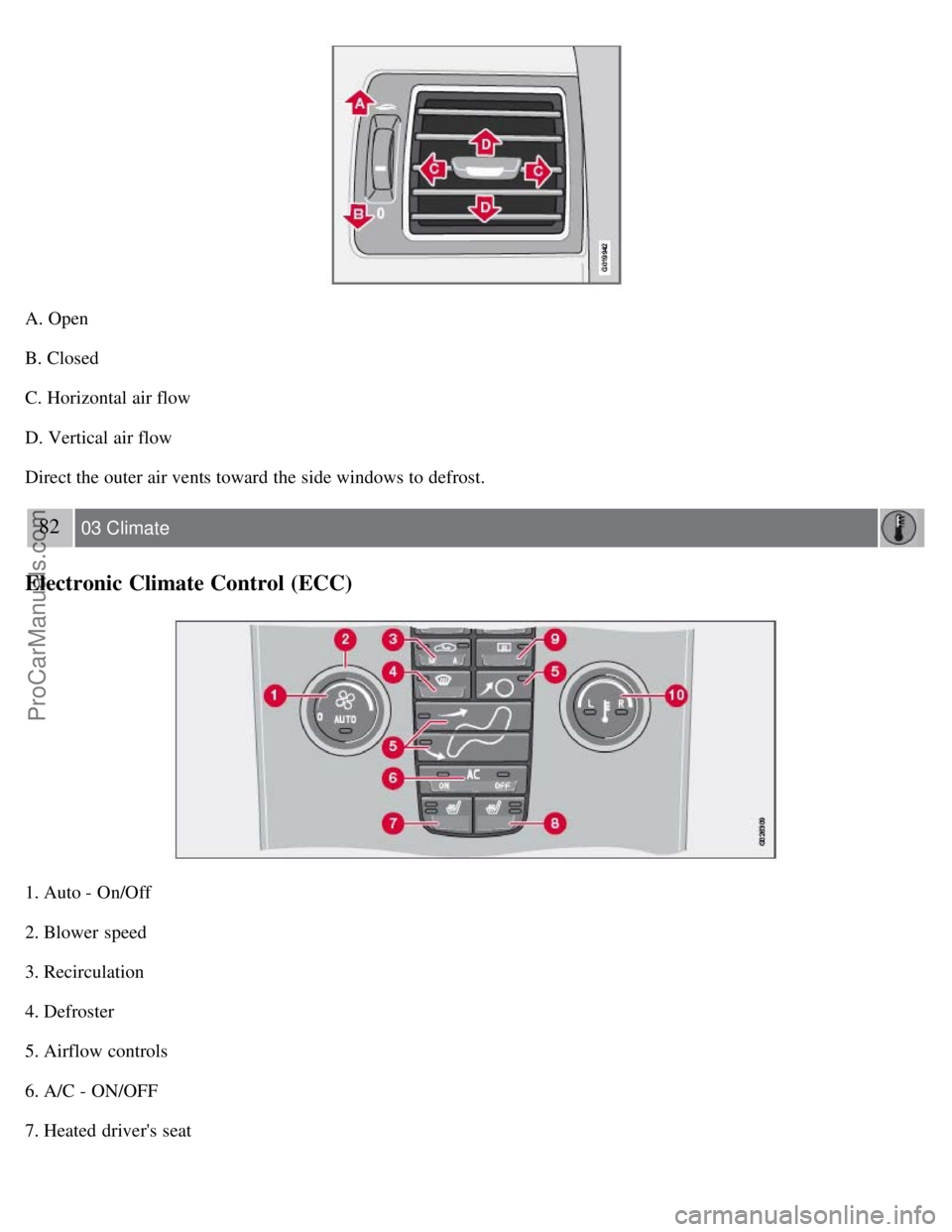
A. Open
B. Closed
C. Horizontal air flow
D. Vertical air flow
Direct the outer air vents toward the side windows to defrost.
82 03 Climate
Electronic Climate Control (ECC)
1. Auto - On/Off
2. Blower speed
3. Recirculation
4. Defroster
5. Airflow controls
6. A/C - ON/OFF
7. Heated driver's seat
ProCarManuals.com
Page 76 of 246

8. Heated front passenger's seat
9. Rear window and door mirror defrosters
10. Temperature selector
NOTE
The sunlight sensor on the upper side of the dashboard and the passenger compartment temperature sensor, located
behind the climate system control panel, should not be obstructed.
The air conditioning system is temporarily switched off during full throttle acceleration.
ECC functions
1. Auto - On/Off
The AUTO function automatically regulates climate control to maintain the desired temperature. The automatic
function controls heating, air conditioning, blower speed, recirculation, and air distribution.
If you select one or more manual functions, the remaining functions continue to be controlled automatically. All
manual settings are
83 03 Climate
Electronic Climate Control (ECC)
switched off when AUTO is switched on. AUTO CLIMATE is shown in the display.
2. Blower speed
The blower speed can be increased or decreased by turning the knob. The blower speed is regulated automatically if
AUTO is selected. The previously set blower speed is disconnected.
NOTE
If the knob is turned counterclockwise and the blower indication in the display goes out, the blower and the air
conditioning are switched off. The display shows the blower symbol and OFF.
3. Recirculation
This function can be used to shut out exhaust fumes, smoke, etc from the passenger compartment. The air in the
passenger compartment is then recirculated, i.e. no air from outside the car is taken into the car when this function is
activated.
If the air in the car recirculates for too long, there is a risk of condensation forming on the insides of the windows,
ProCarManuals.com
Page 77 of 246

especially in winter.
Timer
The timer function minimizes the risk of fogging, or stale air when the recirculation function is selected. See page 72
for information on setting the recirculation timer.
NOTE
Recirculation is always disengaged if the defroster button is engaged to clear ice or condensation from the side
windows.
4. Defroster
Directs airflow to the windshield and side windows and increases blower speed.
When the defroster is activated:
Air flows to the windows at high blower speed.
The LED in the defroster button lights up when this function is activated. The air conditioning system is controlled
to provide maximum air dehumidification.
The air conditioning is automatically switched on (can be switched off by pressing button 5).
The air is not recirculated.
5. Airflow controls
Press one of the three buttons in the illustration to activate the selected airflow. A symbol in the display above the
climate control panel and a lit LED in the selected button indicate that the manual function has been selected. With
manually selected airflow both warm and cool air can be selected. See also the table on page 86
.
6. Air conditioning On/Off
ON: The air conditioning system is engaged when the ON light is lit and is controlled automatically by the system to
maintain the selected temperature.
OFF: The system is disengaged when the OFF lights up
When OFF is selected and the OFF LED is lit, the air conditioning system is deactivated.
84 03 Climate
Electronic Climate Control (ECC)
Other functions are still controlled automatically.
When Defroster (4) is selected, the air conditioning system is activated for maximum dehumidifying.
ProCarManuals.com